
Vue global / non-global loading transitions (supporting concurrent requests)
What this solves
On the frontend, Ajax is constantly being used to exchange data asynchronously with the backend, and APIs may take varying amounts of time to respond. To make the experience feel better, we usually show a loading transition so users know data is being fetched.
Most libraries do this very simply — often just a boolean toggle. With multiple concurrent async requests, whichever one returns first turns off the loading transition for everyone.
Design idea
Build a counter in Vuex. When an Ajax request fires, call the store's increment so count goes up by 1; when it completes or fails, decrement by 1. Expose an isLoading getter for the UI to read. Wrap axios so the caller can pass a parameter that decides whether the transition should show or not.
- Request goes out →
count + 1 - Request fails →
count - 1(parameter validation errors stop here and never reach the response) - Response succeeds →
count - 1 - Response fails →
count - 1(timeout, server error, cancel)
Vuex code
import { generatorUUID } from '@/utils'
var _ = require('lodash')

const state = {

  count: []
}
// getters
const getters = {
  isLoading: (state) => {
    return state.count.length > 0
  },
  removeByItems: (state) => {
    return state.count.filter(x => x.isRemoveByRequestId === true)
  }
}
// mutations
const mutations = {
  increment(state, requestId) {
    const isRemoveByRequestId = requestId ! '' && requestId ! undefined

    requestId = requestId || generatorUUID()

    var newLoading = { requestId: requestId, isRemoveByRequestId: isRemoveByRequestId }

    state.count.push(newLoading)
  },
  decrement(state, requestId) {
    if (requestId) {
      var index = state.count.findIndex(item => item.requestId === requestId)
      state.cart.splice(index, 1)
    } else {
      const newCount = _.cloneDeep(state.count).filter(x => x.isRemoveByRequestId === false)
      if (newCount.length > 0) {
        newCount.shift()
        state.count = newCount
      }
    }
  }
}
// actions
const actions = {

}
export default {
  namespaced: true,
  state,
  getters,
  actions,
  mutations
}
Wrapping axios
function apiAxios(method, url, params, hideLoading, requestId) {
  // 顯示loading
  const appParams = {}
  params = { ...appParams, ...params }
  const httpDefault = {
    method: method,
    baseURL: baseURL,
    url: url,
    hideLoading: hideLoading,
    requestId: requestId,
    // `params` 是即將與請求一起發送的 URL 參數
    // `data` 是作為請求主體被發送的數據
    params: method = 'GET' || method = 'DELETE' ? params : null,
    data: method = 'POST' || method = 'PUT' ? params : null,
    timeout: 100000
  }

  if (httpDefault['hideLoading'] === false) {
    store.commit('loading/increment', httpDefault['requestId'])
  }

  return new Promise((resolve, reject) => {
    axios(httpDefault)
      .then((res) => {
        if (httpDefault['hideLoading'] === false) {
          store.commit('loading/decrement', requestId)
        }
        resolve(successState(res))
      })
      .catch((response) => {
        if (httpDefault['hideLoading'] === false) {
          store.commit('loading/decrement', requestId)
        }

        errorState(response)
      })
  })
}
Add a loading-box component to the layout, watching the isLoading getter to decide when to display it.
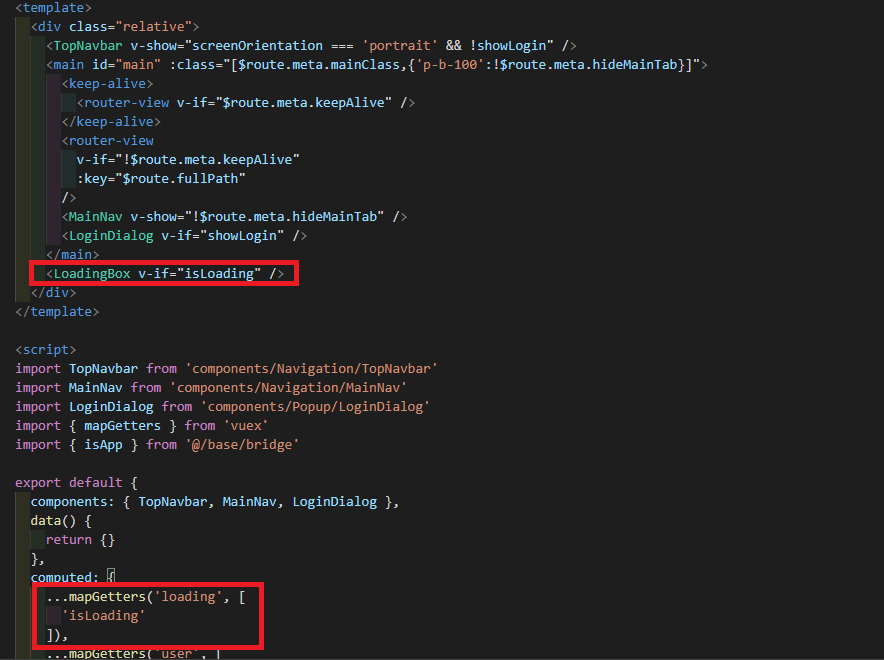
To skip the loading transition for a particular API call, pass true as an extra argument
Vue.prototype.{process.env.VUE_APP_BASE_API}/api/v1/home/query`, null, true)
To leave room for future flexibility — if a specific component needs to control loading, the caller can pass a request id, and the component can watch the isRemoveByRequestId property within the loading-count object
export function getHomeQuery(requestId = '') { return Vue.prototype.{process.env.VUE_APP_BASE_API}/api/v1/home/query`, null, true, requestId) }
Related topic — Skeletons
More and more sites adopt skeleton screens to improve the user experience; a good follow-up optimization to consider.


Comments