
Introduction
Oracle Cloud offers an "Always Free Tier" that is rare in the industry. It not only allows you to provision cloud servers but also supports various application scenarios, making it the most cost-effective choice for developers, students, SOHO professionals, and small businesses to get started with the cloud.
Free Resource Highlights
- 2 VM.Standard.E2.1.Micro instances (1 OCPU / 1GB RAM, x86 architecture)
- 4 OCPU / 24GB RAM Arm VM (A1.Flex, flexibly allocatable)
- 100GB of block storage, 10GB of object storage
- 10TB of outbound data transfer per month
- Free services like databases, load balancers, monitoring, and more
These resources are "always free"—as long as your account doesn't violate any terms, you can use them indefinitely!
How to Sign Up for a Free Oracle Cloud Account?
- Go to the Oracle Cloud official website and click "Start for free".
- Fill in your basic information, verify your email, and set a password.
- Enter your credit card details (for verification only, you won't be charged; using a physical card is recommended).
- Complete the phone verification and wait for approval (usually 5-30 minutes).
If your credit card verification fails, try a different card or ensure it supports international transactions.
How to Create a Free Oracle Cloud VM Instance?
- Log in to the Oracle Cloud Console.
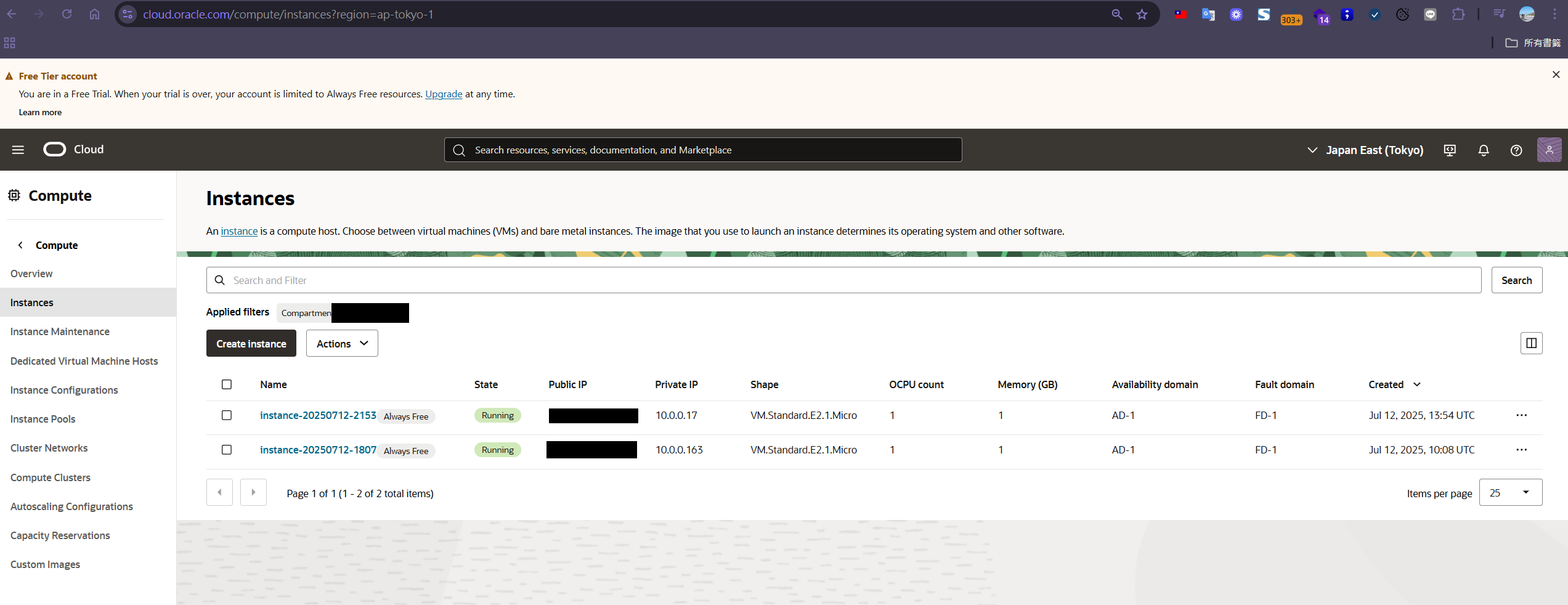
- In the top-left menu, select "Compute" → "Instances".
- Click "Create Instance" to create a new instance.
- Enter a name for the instance and choose the "Image and shape":
- Image: "Oracle Linux" or "Ubuntu" are recommended.
- Shape: Choose a free tier option like "VM.Standard.E2.1.Micro" or "Arm Ampere A1".
- Set up your SSH public key (you can use an existing key or generate a new one).
- You can leave the other settings as default and click "Create" to start.
- After a few minutes, the VM will be created, and you can find its public IP under "Public IP".
- Connect to the instance using Xshell:
- Open Xshell and create a new session.
- Host: Enter your Public IP.
- User Name: Use
opcfor Oracle Linux orubuntufor Ubuntu. - Authentication method: Select "Public Key" and load your private key, or use the "Password" method.
- Click "Connect" to log in to the instance.
Quick Tip:
By default, Oracle Cloud assigns an "Ephemeral" Public IP, which may change if you restart the VM. It's recommended that after creating the instance, you go to "Resources" → "Attached VNICs" → click the VNIC → "IPv4 Addresses" → and change the Public IP type to "Reserved". This ensures the IP address remains static, making future connections and service deployments easier.
What Can You Do with a Free Linux Instance?
1. Set Up an frps Server for NAT Traversal
- A free VM is perfect for setting up an frps server, allowing you to securely access services on your home or office network from the outside.
- Steps:
- Install frps on the VM.
- Configure the firewall to open the necessary ports.
- Connect the client (frpc) back to the Oracle VM.
- Ideal for tunneling needs like remote desktop, NAS, IoT, web services, etc.
2. Set Up a Remote Desktop Service (RestDesktop)
- Use the free VM to host a remote desktop service (like RestDesktop, Windows RDP, VNC, etc.).
- RestDesktop is a remote connection software suitable for remote operations, collaboration, technical support, and other scenarios.
- Steps:
- Install RestDesktop or another remote desktop server (e.g., xrdp, VNC, NoMachine) on the VM.
- Configure the firewall to open the corresponding ports (e.g., 3389, 5900).
- Connect to the Oracle VM from your local machine using the RestDesktop client or corresponding software.
- Suitable for remote work, teaching, cross-regional collaboration, and more.
3. Host a Personal Website / Blog
- Install Nginx/Apache + WordPress, Hugo, Gatsby, etc.
- Free SSL certificates (Let's Encrypt).
- Great for personal portfolios, blogs, and landing pages.
4. Other Applications
- VPN / Proxy server (for personal use to bypass geo-restrictions)
- Nextcloud private cloud
- Small-scale web scrapers, bots, and scheduled tasks (cron jobs)
- Learning Linux, practicing automated deployment / CI/CD
Conclusion: Endless Possibilities with the Oracle Cloud Free Tier
The Oracle Cloud Always Free Tier not only saves you server costs but also meets a wide range of needs for development, testing, learning, website hosting, and NAT traversal. By making smart use of these resources, you can build professional-grade cloud solutions for $0!
If you have any questions or ideas, feel free to leave a comment below to discuss and share more practical experiences


Comments