
Open Token Monitor
Your whole team's AI coding usage, on your own server. Tokens and equivalent cost from Claude Code, Codex, Cursor and Copilot on every employee's machine report to a hub you host every 30 minutes, compared by company, department and person.
Customized from Javis's open-source Token Monitor · Where the original code comes from

A travel eSIM covering 190+ destinations worldwide
Use TRAVEL30 for 30% off sitewide. Cannot be combined with other promo codes.
Affiliate link. Buying through it may earn this site a small commission, at no extra cost to you.
What it solves
The questions managers actually ask once a team starts coding with AI.
Where is the money going
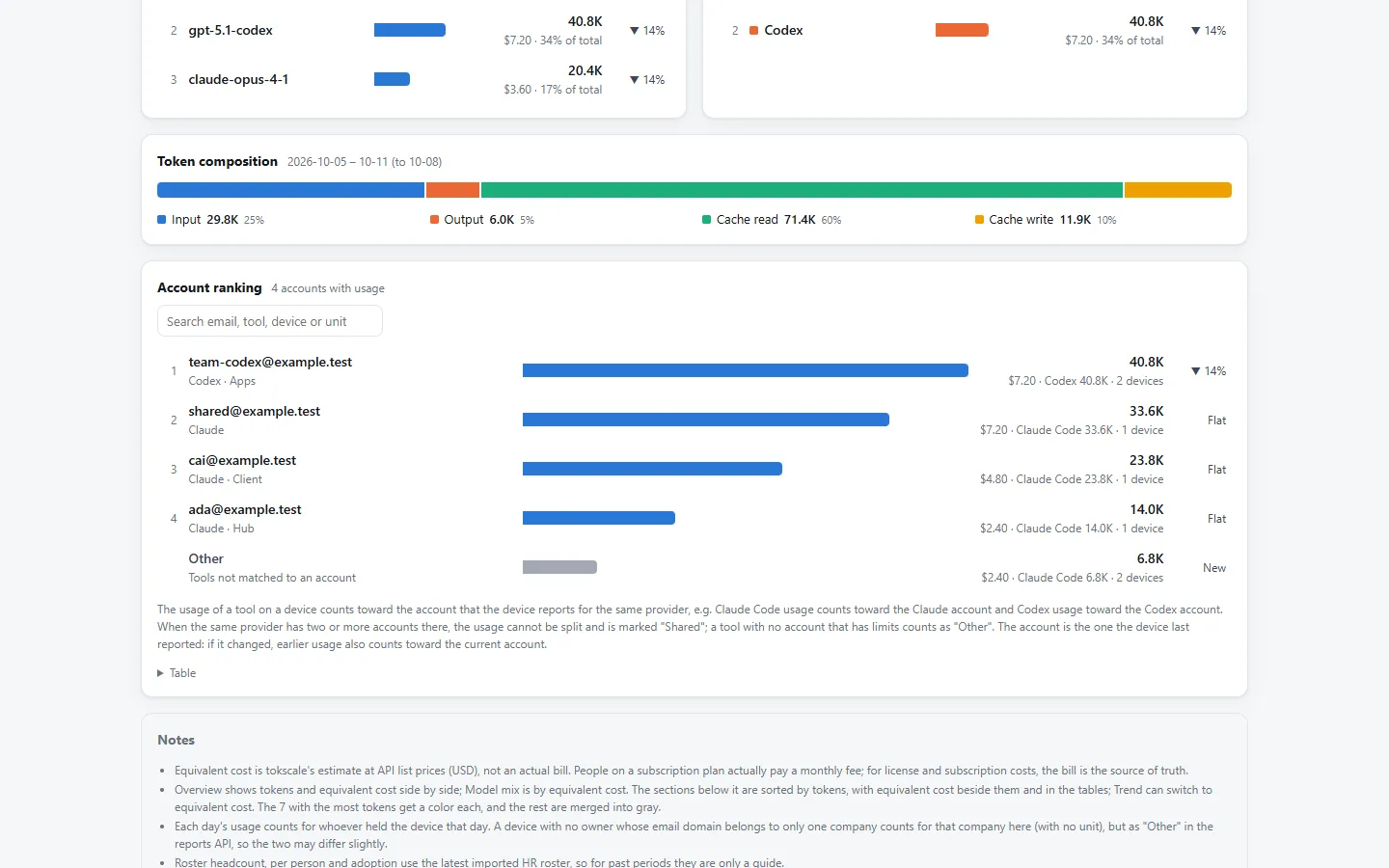
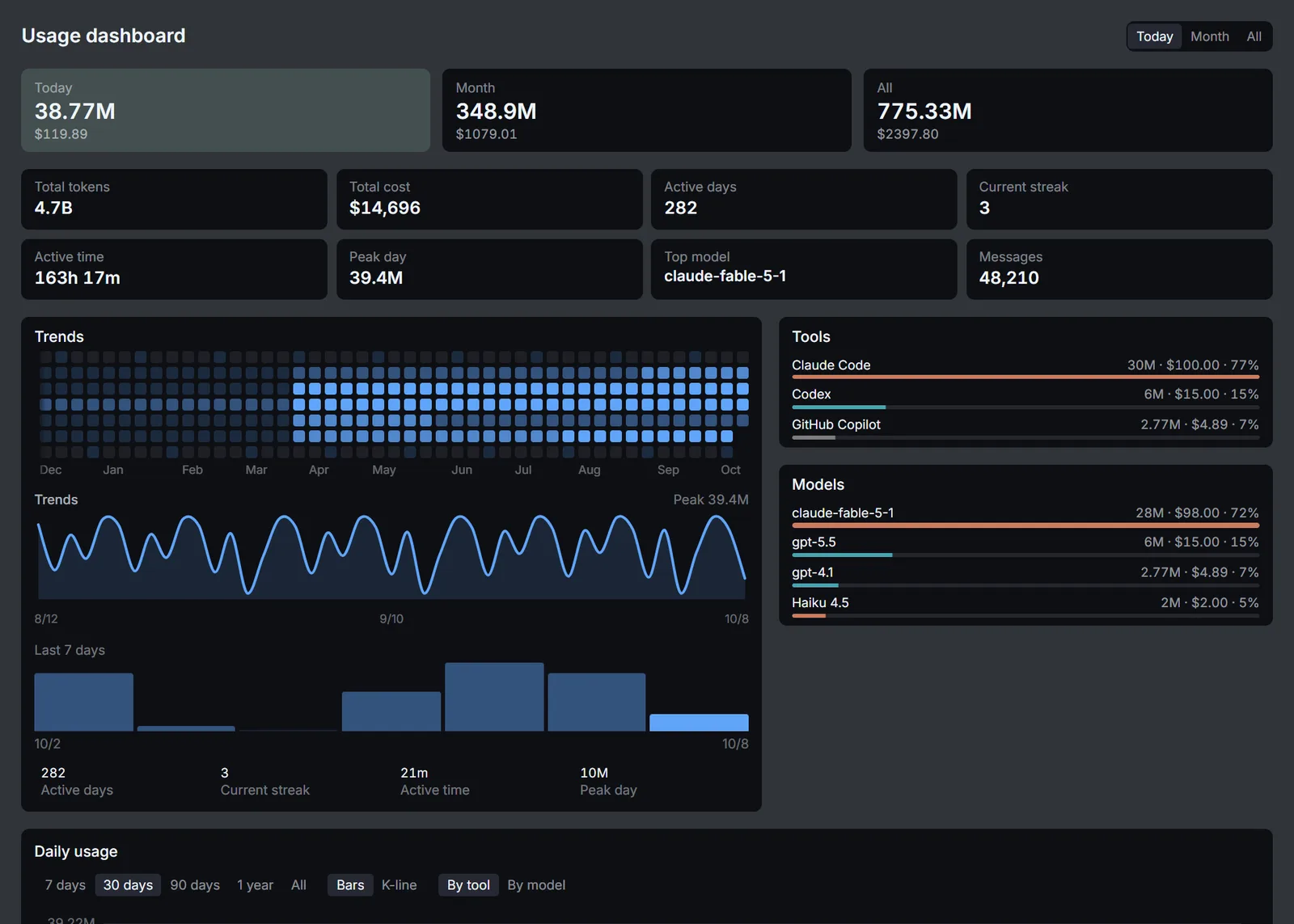
Everyone's Claude Code, Codex and Cursor usage lives on their own machine. The hub turns it into one set of tokens and equivalent cost, sliceable by company, department, person, model and tool.
Keep the data in-house
Usage logs reveal projects, accounts and working hours. The hub runs on your intranet and stores everything in your own PostgreSQL, with no third-party service in between.
Match devices to people
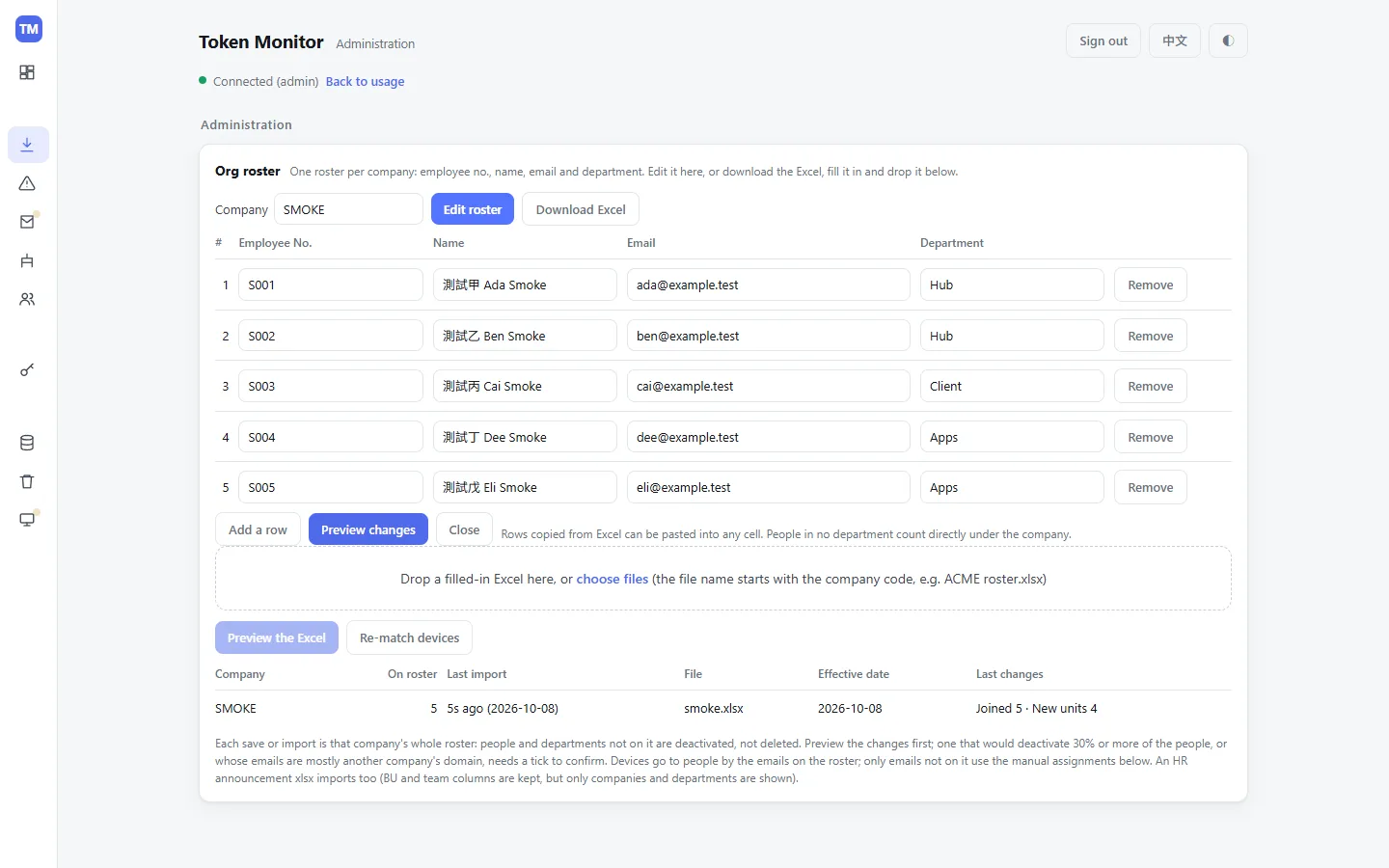
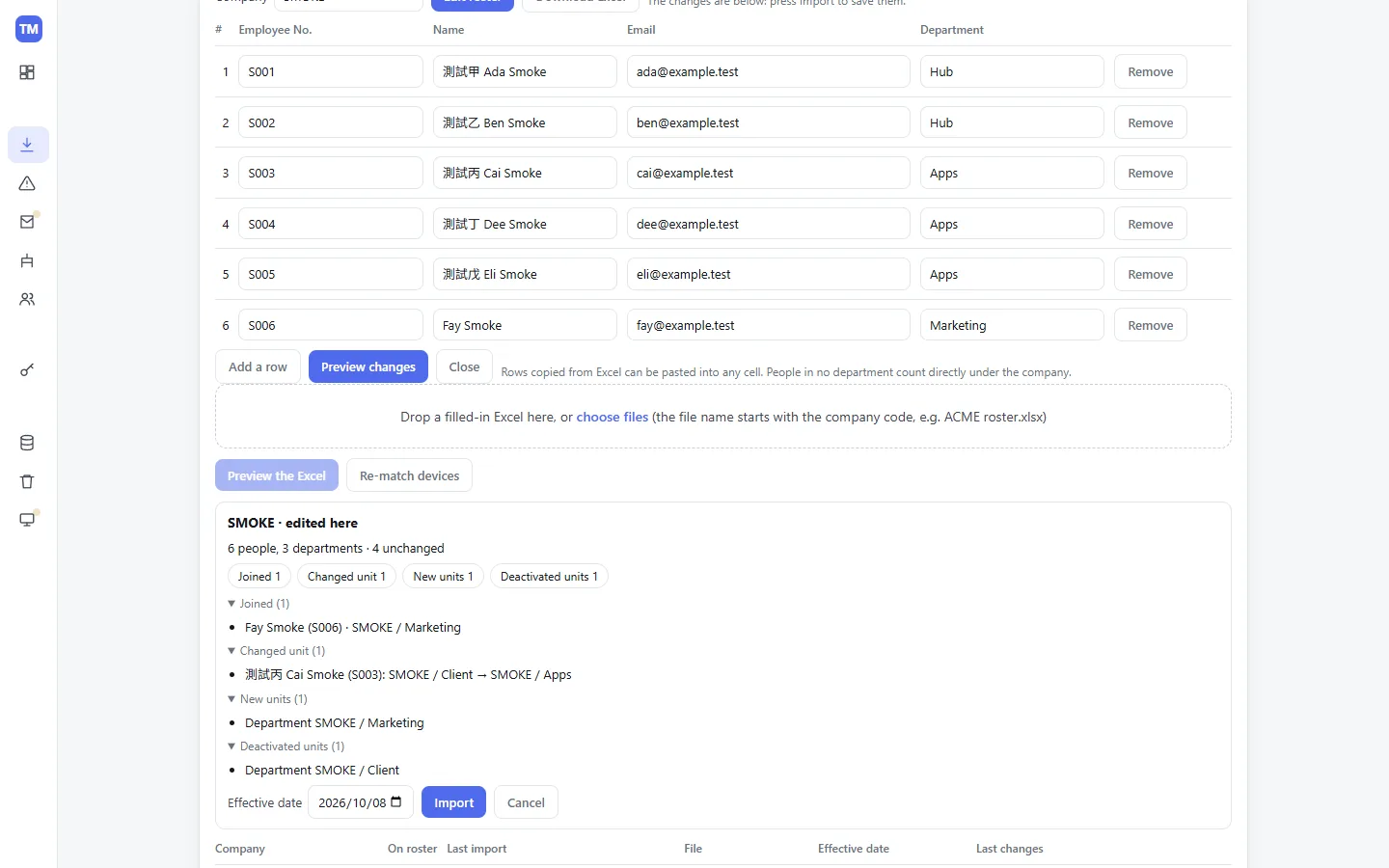
Import a roster (employee ID, name, email, department) and devices whose reported email matches are assigned automatically. Moves between people or departments keep history; monthly reports apply each day's assignment.
When will the quota run out
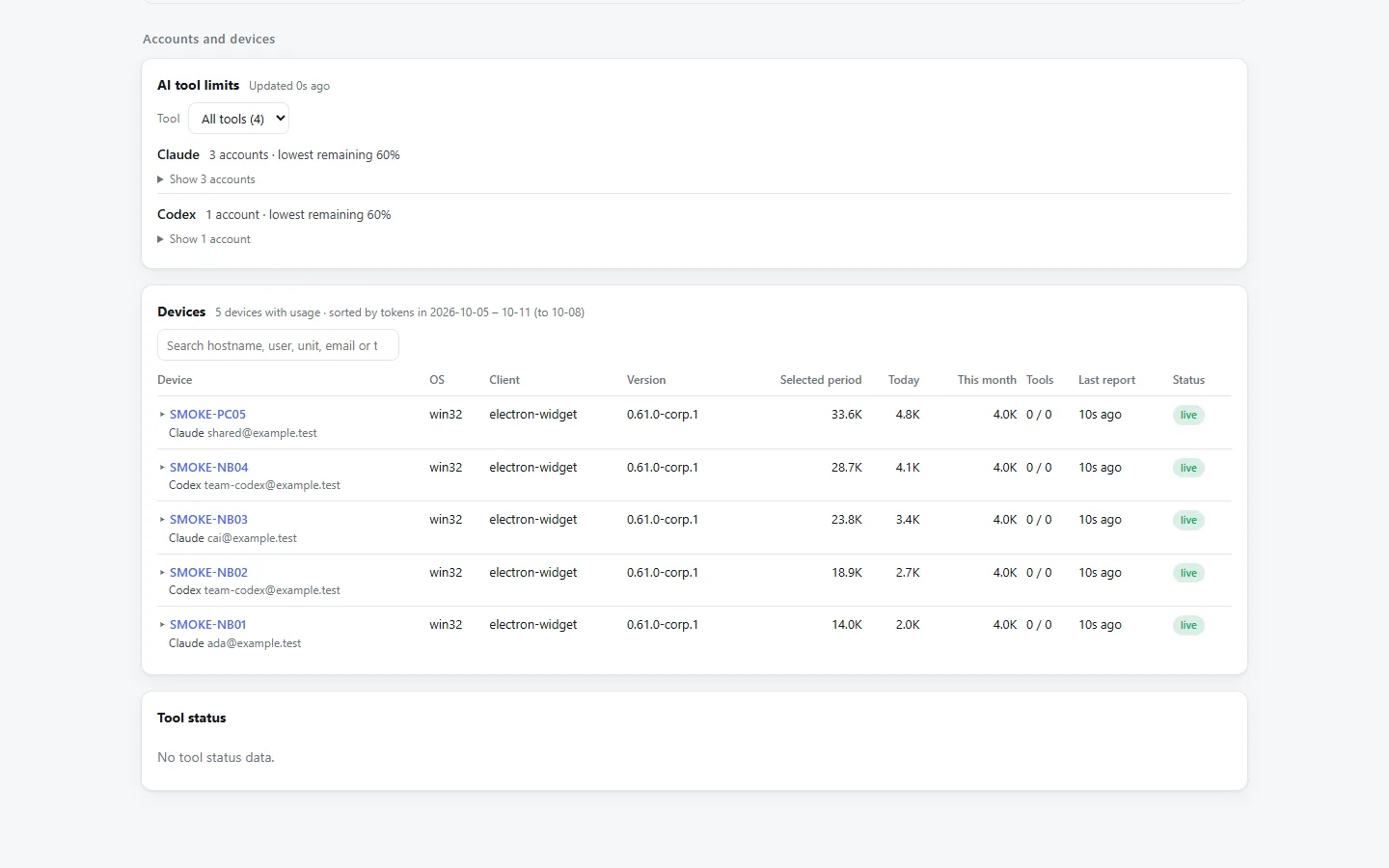
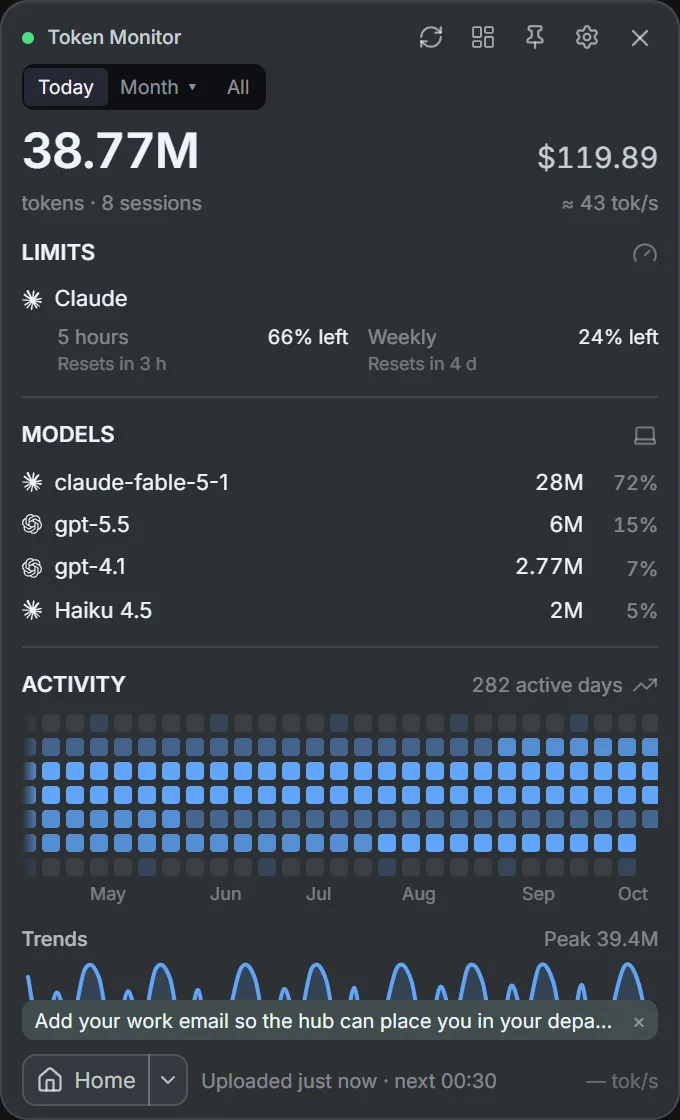
Claude 5-hour and weekly quotas and Codex quotas are on the dashboard, including accounts shared across several machines.
Feed company reporting
Reports API v1 lets cost systems or BI pull monthly, weekly and daily usage as JSON or Excel-ready CSV. It ships with OpenAPI 3.1 and llms.txt, so an AI agent can wire it up too.
Zero effort for employees
The company installer comes with the hub URL and key baked in: it connects on first launch, starts at login and uploads every 30 minutes. Nothing to configure.
Where the original code comes from
This project wasn't written from scratch. The desktop widget on each employee's machine, the usage scanning, the multi-device sync hub and the upload format all come from Token Monitor, open-sourced by Javis (GitHub @Javis603) under the MIT license. I took it and customized it into a team edition for companies.
What the original Token Monitor provides
- A local-first desktop widget (Electron) showing tokens, cost, limits and sessions for 40-plus AI coding tools, including Claude Code, Codex and Cursor
- Scans the usage logs on this computer with tokscale
- An optional multi-device sync hub: data in a JSON file, one shared key, an API and no web pages
What I added on top
- A hub backed by PostgreSQL, with admin, client and API-token keys, a usage dashboard and a reports API
- An org roster and company → department comparisons, with devices assigned to employees by email
- Electron company builds: hub and key preset, uploads every 30 minutes, launch at login
- A lightweight Rust/Tauri client and the headless tm-agent
The original code sits unchanged in the repo's upstream/ folder and everything customized lives outside it, so new upstream releases can be pulled straight in. This project is not affiliated with or endorsed by the original author.
Three parts
Built on the open-source Token Monitor without changing a line of upstream code; everything a company needs sits on top.
Hub
hub/ · docker/
- PostgreSQL storage with admin, client and API token permission tiers
- Roster editing in the browser or Excel import, automatic device ownership by email
- Usage dashboard, reports API, daily backups and history purge
- Runs in front of the upstream hub; one Docker Compose command
Electron client
client/ · packaging/
- The upstream desktop widget, packaged with your hub URL and client key
- Connects on first launch and starts at login
- Uploads every 30 minutes and shows only this machine's usage
- Swap the icon and window logo for your company's
Rust/Tauri client
tauri/
- A lightweight Rust rewrite that installs without admin rights
- Uploads field-for-field the same records as the upstream client, so the hub is unchanged
- Includes the headless tm-agent for schedulers and servers
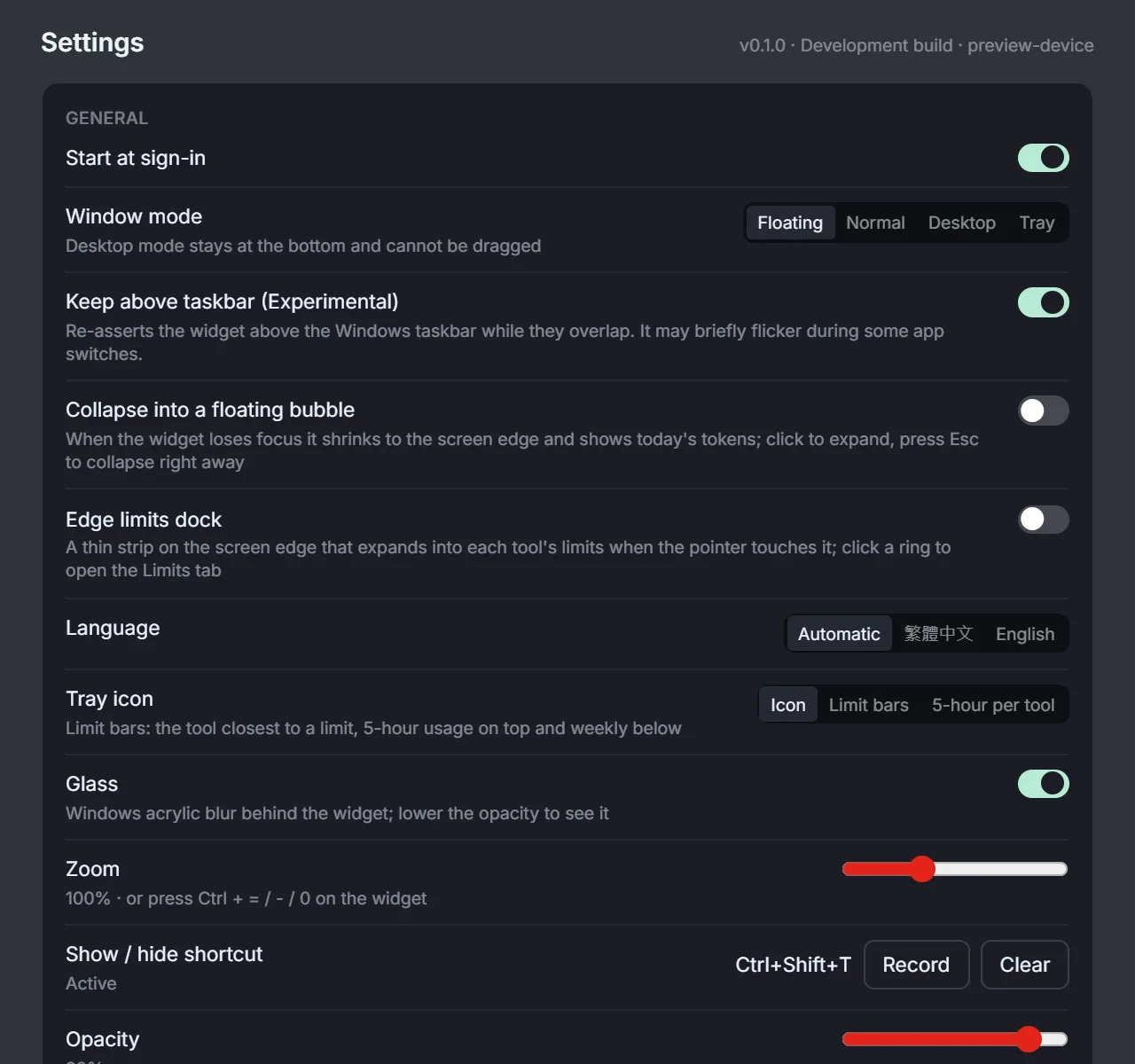
- Floating, desktop and tray window modes
Design details worth knowing
Turning usage into company data needs more care than a personal widget.
Cost is labeled "equivalent"
Amounts are converted at each provider's API list price, not real bills; subscription users actually pay a flat monthly fee. That caveat is on the dashboard and in every report response.
Three key tiers
Admin, client and API tokens each get only what they need. Admins trade the key once for an HttpOnly cookie, so the browser never stores it; API tokens are read-only, scoped and revocable.
The org is a tree
Company → BU → department → team. Each day's usage goes to that day's unit and rolls up; unassigned usage becomes an "Other" row instead of quietly disappearing.
Upstream stays untouched
upstream/ is a pristine copy of one upstream release, and npm run verify fails if anyone edits it. Every seam is covered by tests or listed, so pulling a new upstream version tells you exactly what to update.
Upgrades can be handed to AI
A weekly job checks upstream and opens a PR with a checklist. Comment @claude on the PR to finish the upgrade, or run /upstream-update in Claude Code locally.
Chinese and English
The dashboard, admin page, install guide and clients all ship in Traditional Chinese and English, picked from the browser language and switchable by hand.
Backups built in
The hub runs a rotating daily pg_dump, and admins can back up, download or delete on demand. Purging history always takes a backup first.
Try it without Docker
npm run smoke:hub starts a throwaway hub with sample data, so you can click around the dashboard before setting up a database.
AI coding tools it reads
This is the Rust client's list; the Electron client inherits upstream Token Monitor and supports even more tools.
What it looks like
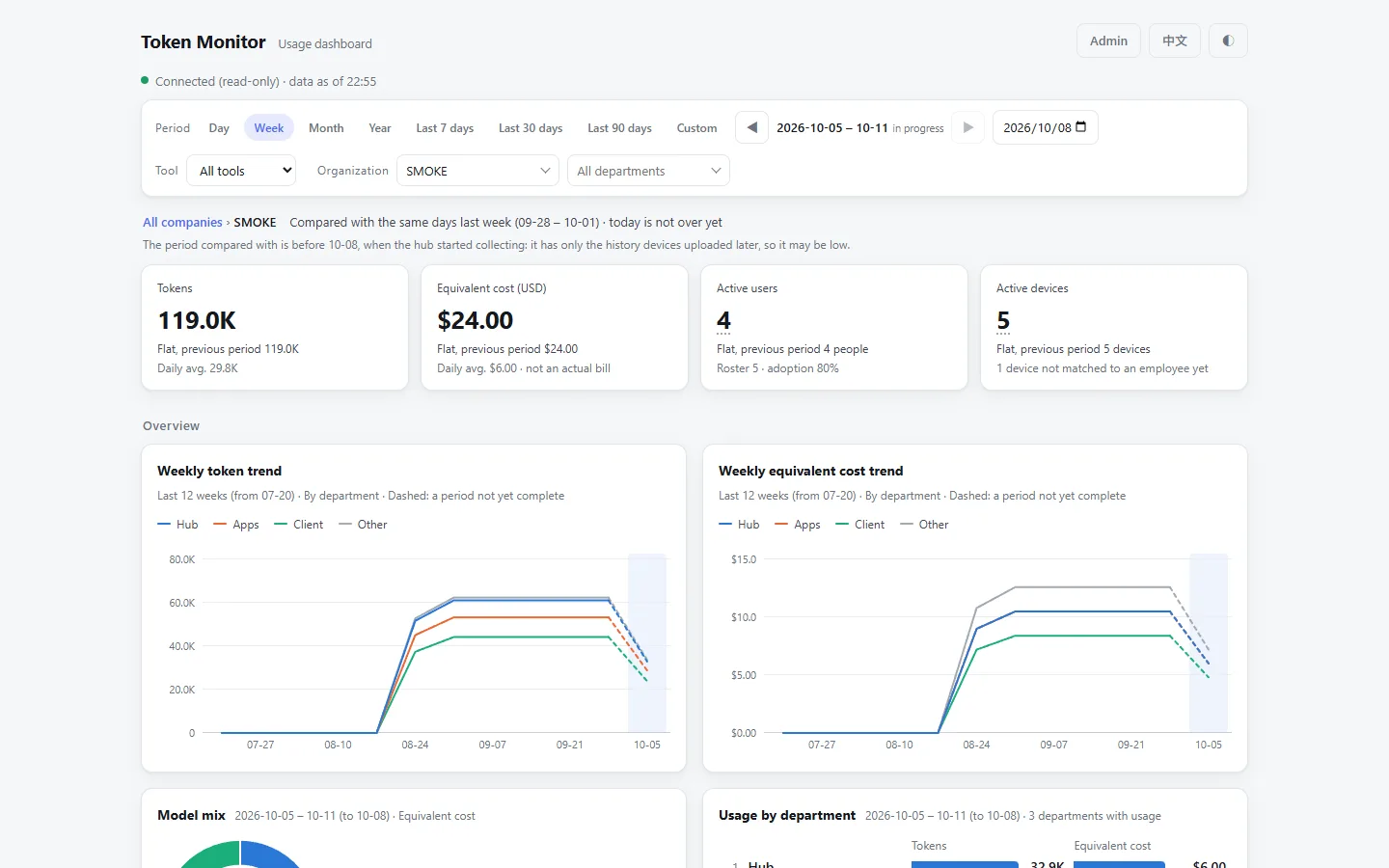
Screenshots use the repo's built-in sample data; reproduce them with npm run smoke:hub.
Five things to know first
Better to state the limits up front than explain them later.
- 1
It is for organizations, not individuals
If you only want to see your own machine, install upstream Token Monitor directly. This repo adds the hub, database, org structure and reports for people who need to roll up a whole team.
- 2
Amounts are not real bills
costUsd is an equivalent cost at API list prices (USD). People on subscriptions such as Claude Max or ChatGPT Plus actually pay a monthly fee; use your own cost data for licenses and subscriptions.
- 3
The public installer has no hub settings
Installers on GitHub Releases contain no hub URL or key; you enter them once in settings. For installers that connect automatically, package your own with npm run build:client.
- 4
Installers are not code-signed
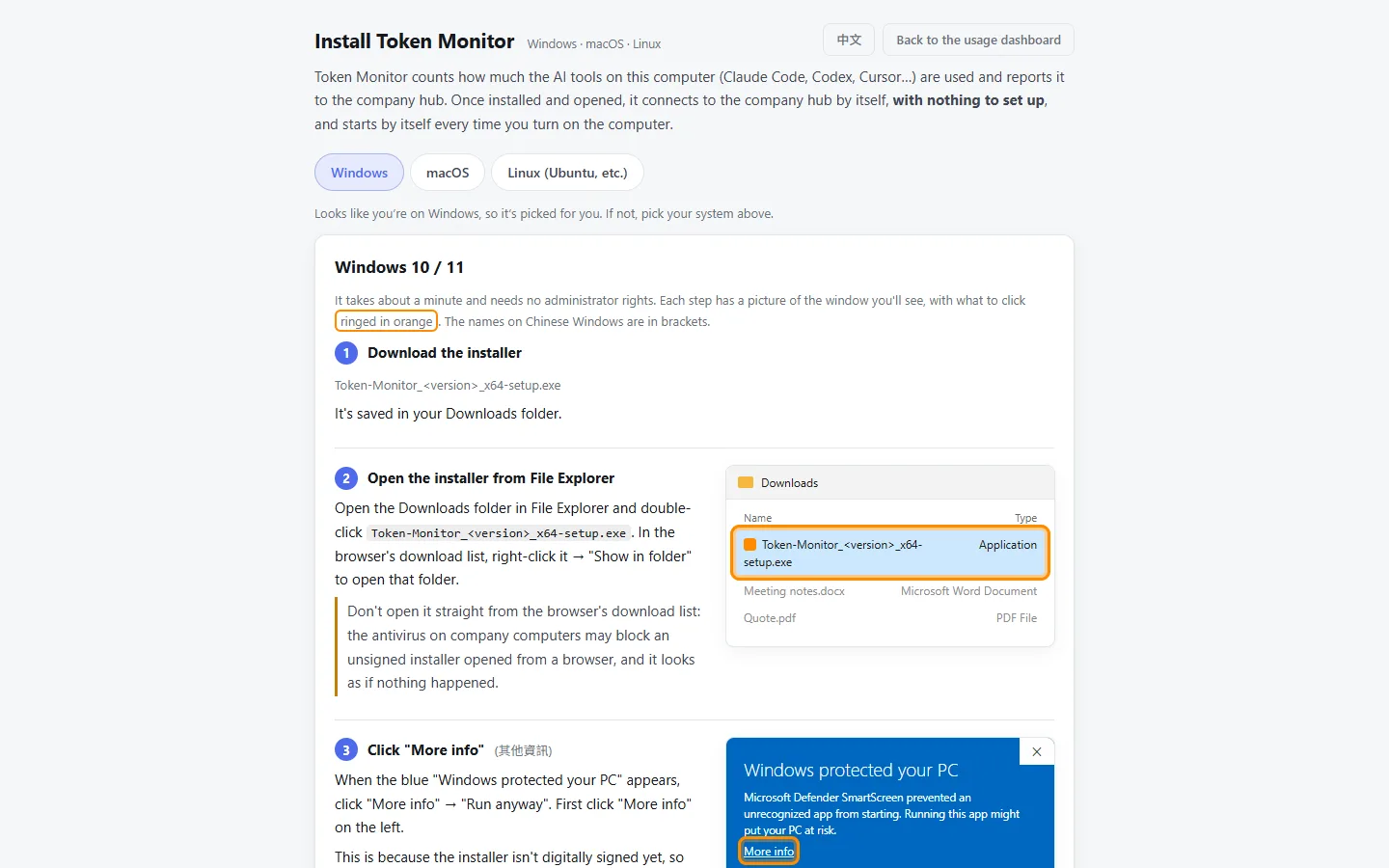
Windows shows "Windows protected your PC": click More info → Run anyway. On macOS, go to Privacy & Security and click Open Anyway. Intel Macs are not supported yet.
- 5
Not affiliated with upstream
This project builds on Javis603/token-monitor but is not an official team edition and is not endorsed by the upstream author. Please file issues in this repo.
Tech stack
The hub adds just two runtime dependencies: dotenv (same version as upstream) and the database driver.
Install the client
GitHub Releases has installers for three platforms. After installing, get the hub URL and client key from your admin and enter them in settings; it then uploads every 30 minutes and starts at login.
Windows 10 / 11
x64-setup.exe
When "Windows protected your PC" appears, click More info → Run anyway.
macOS (Apple silicon)
aarch64.dmg
Drag the app into Applications. If it is blocked on first launch, go to System Settings → Privacy & Security and click Open Anyway.
Linux (x64)
amd64.AppImage
chmod +x it and run; no install needed.
To connect to a hub: open Token Monitor, click ⚙ at the bottom right, turn on multi-device sync, choose Connect to Hub, and enter the Hub URL and secret. Upgrading from an older version keeps your settings and data.
Run the hub
- 1
You need Node.js 22.15+, plus Docker to run the hub in containers.
- 2
Clone, run npm ci, copy .env.example to .env and fill in TOKEN_MONITOR_SECRET, TOKEN_MONITOR_CLIENT_SECRETS, POSTGRES_PASSWORD and TOKEN_MONITOR_DB_PASSWORD (long random hex).
- 3
Build the image with docker build -f docker/Dockerfile -t token-monitor-hub . and start the hub plus PostgreSQL with docker compose -f docker/compose.yml --env-file .env up -d (port 80 by default).
- 4
Open http://localhost/, click Admin and paste TOKEN_MONITOR_SECRET. Under Org roster, enter a company code, edit the roster or drop in the Excel file, preview the diff and import.
- 5
Send colleagues the install guide at http://<hub>/install and they are done.
Just want a look, without Docker or a database? This line starts a hub with sample data.
When upstream ships a new version
Upgrade one version at a time. Merge when all tests pass; otherwise work through the impact list.
npm run upstream:statusSee which upstream version you are on and which is latest.
npm run upstream:update -- nextPull in the next version and run the tests.
npm run upstream:impactList the seams to check and update this time.
License and credits
Released under the MIT license: use it commercially, modify it and redistribute it. Upstream Token Monitor is © Javis, also MIT; see THIRD_PARTY_NOTICES.md in the repo for full notices.
Give your team's AI usage its own ledger
Self-hosted, free and MIT licensed. If it helps, star the repo or open an issue on GitHub to tell me what is missing.
Every tool here is free and open source
No paywall, no sign-up, and the source is public on GitHub. If one of them saved you time, buy me a coffee so the updates and the next tool keep coming.
Deal
Stay online when you work abroad
eSIM 226 is a travel eSIM covering 190+ destinations worldwide: buy the plan before you fly, scan the QR code on landing and you are online. No SIM swap, no roaming bill, and your own number stays in the phone to keep receiving bank SMS. Japan 3GB / 15 days starts around US$3.4, so a short trip never costs a full month. Use TRAVEL30 for 30% off sitewide. Cannot be combined with other promo codes.
- 190+ destinations across Asia, Europe and the Americas
- Instant QR activation, nothing to ship or queue for
- Local rates instead of roaming, no bill shock at home
Affiliate link. Buying through it may earn this site a small commission, at no extra cost to you.