
AI Podcast Cut
A desktop editor for podcasts and audio. Drop in a recording and it strips fillers and stutters, levels the loudness, keeps the breath at the end of sentences, and lets you audition every splice before export. Transcription and vocal separation run on your own machine: nothing uploaded, no key. There is an AI-friendly CLI and a built-in MCP server too, so an agent can drive the edit for you.
See it work in 90 seconds
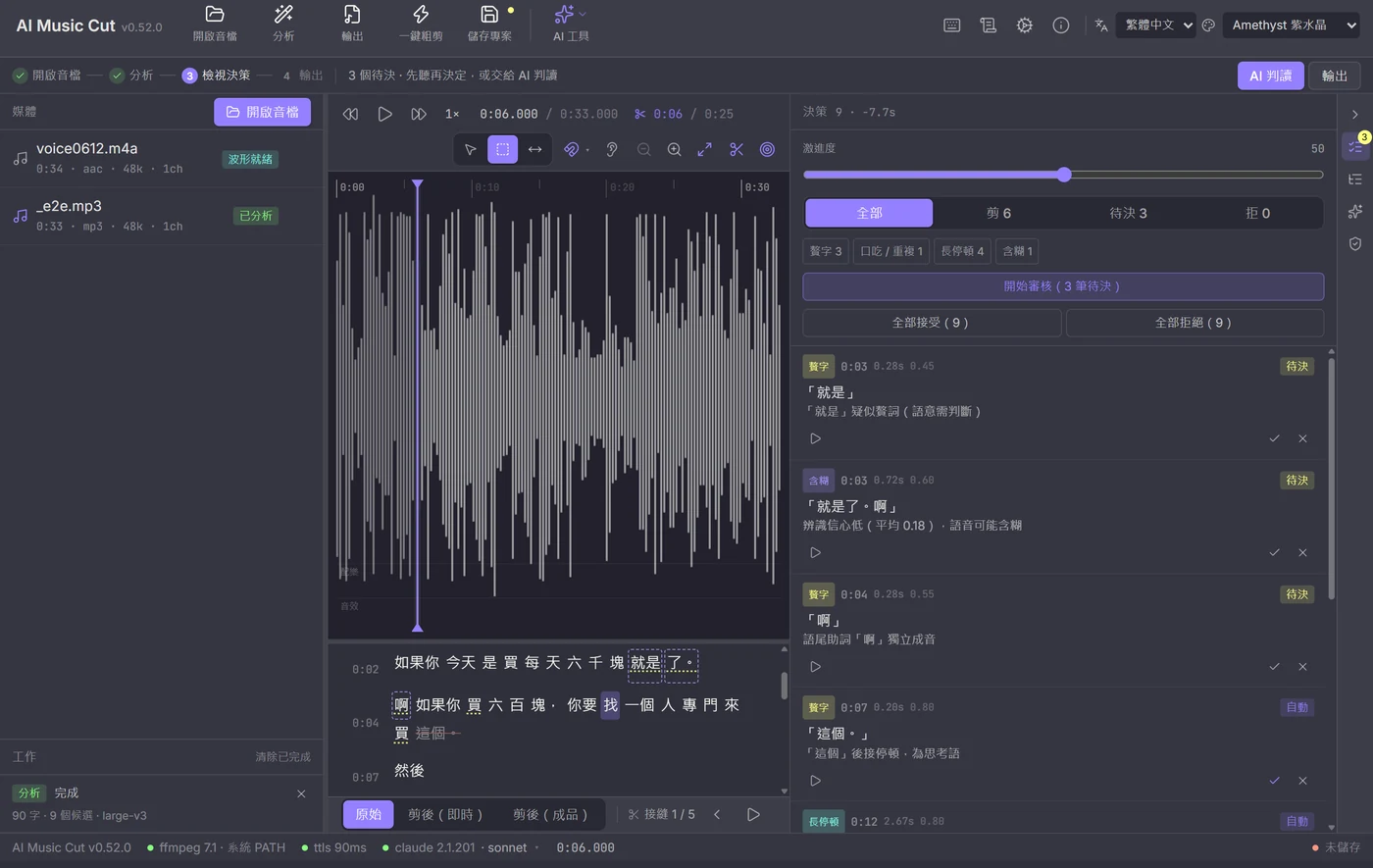
Open a file, analyse, review, export, verify: the whole flow in one pass.
What it takes off your hands
Not a one-click black box. For every change you can see what moved and why.
Fillers and stutters
Um, uh, you know, like, plus the parts where you restarted mid-sentence. Naturalness comes first: sentence-opening connectives and fillers that carry rhythm are kept, not scrubbed.
Loudness levelling
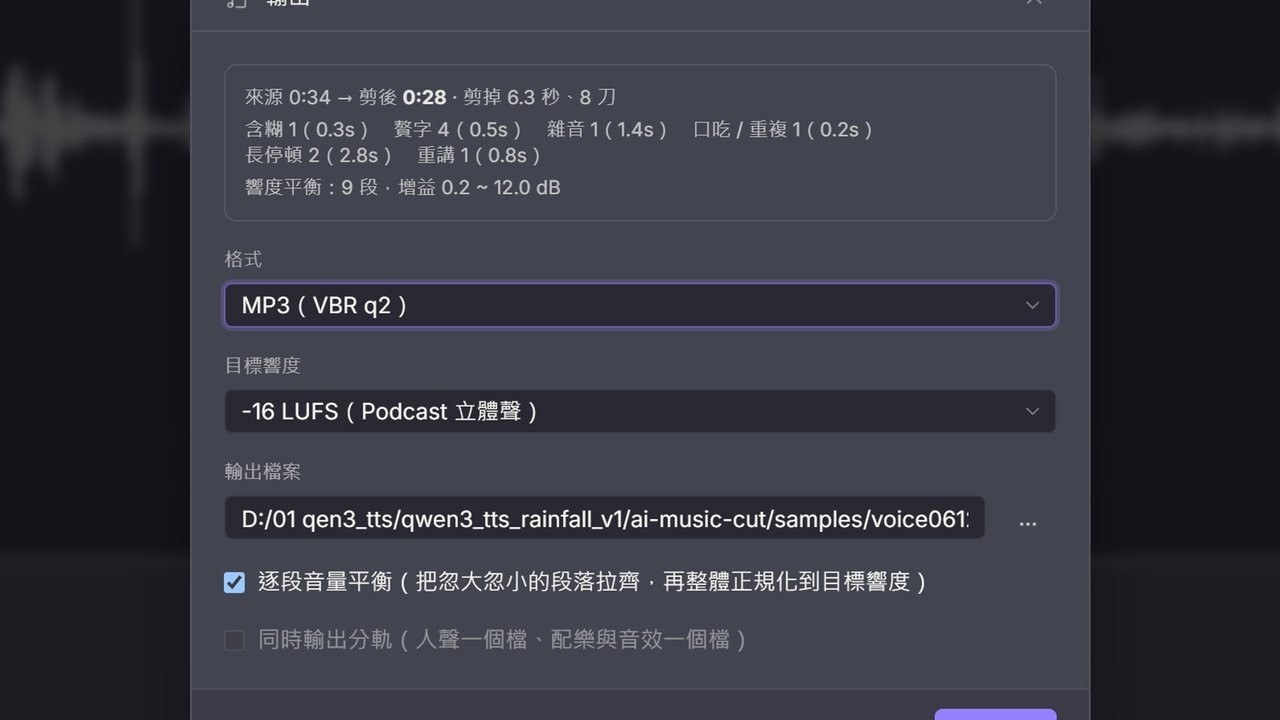
Per-segment BS.1770 measurement, then gain planning (±12 dB, peak guard, 3-tap smoothing, ≤3 dB step limit), then two loudnorm passes plus a limiter. The result lands on the target you chose.
Breathing room, preserved
Cutting does not mean gluing sentences together. 170 ms mid-sentence, 340 ms at sentence end, 575 ms between paragraphs, and room tone filled in when the silence is too short.
Cuts on whole waveforms
A cut snaps to the word boundary, then to the lowest-energy point within ±30 ms, then to the nearest rising zero crossing within ±3 ms. Every splice gets a fade: 4 ms in quiet, 24 ms speech-to-speech.
Two agents checking each other
An editor agent proposes; a reviewer agent flags only the cuts that would actually break something. When they disagree it does not decide for you; it marks the cut as contested and hands it over.
Fillers handled a word at a time
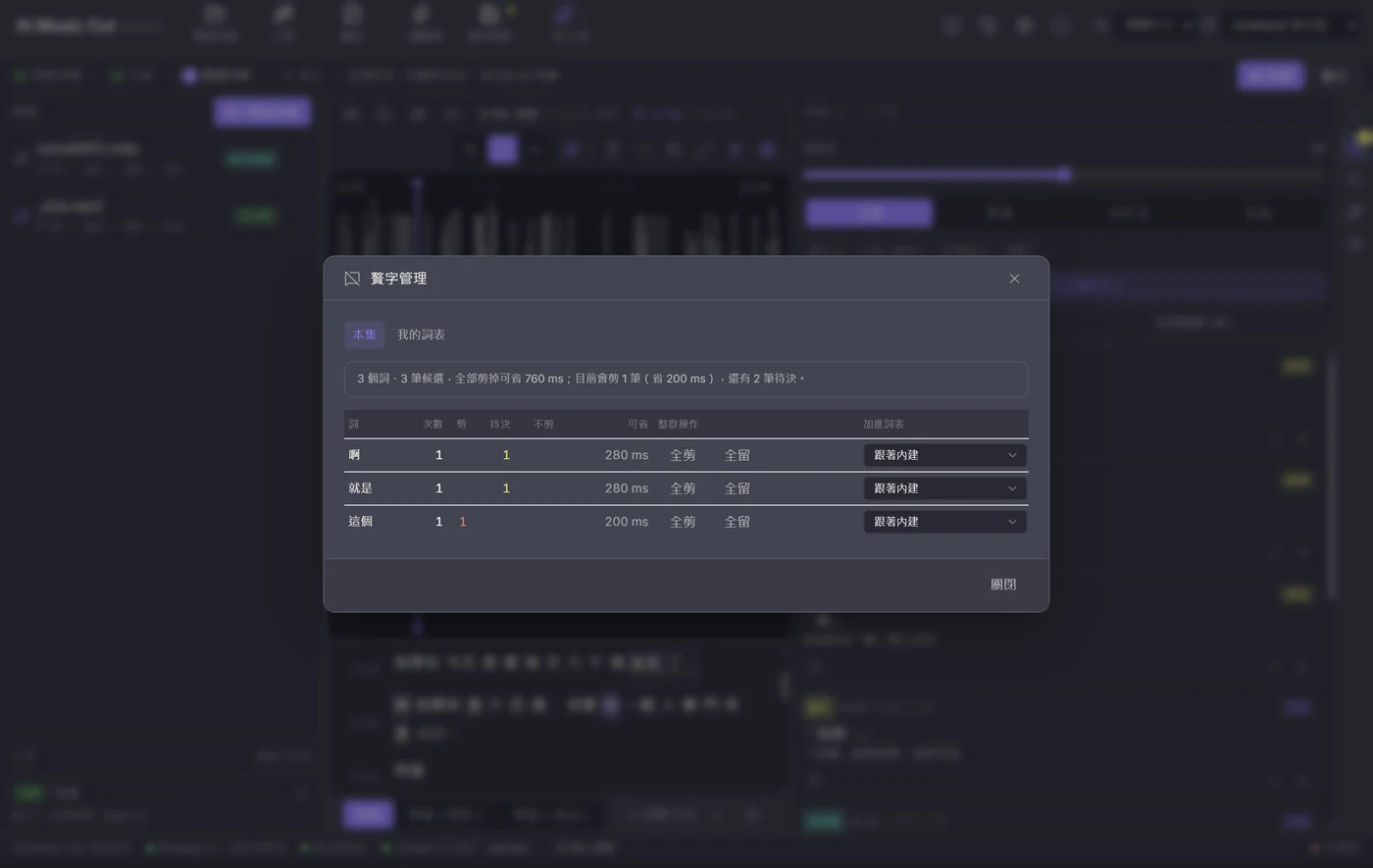
A 57-minute episode yields well over a thousand filler candidates, and there is no reviewing those one by one — but they are only twenty or thirty words. They are laid out as one row per word (count / cut / pending / time saved) with cut-all and keep-all, plus a personal word list that carries across episodes.
Batch several episodes
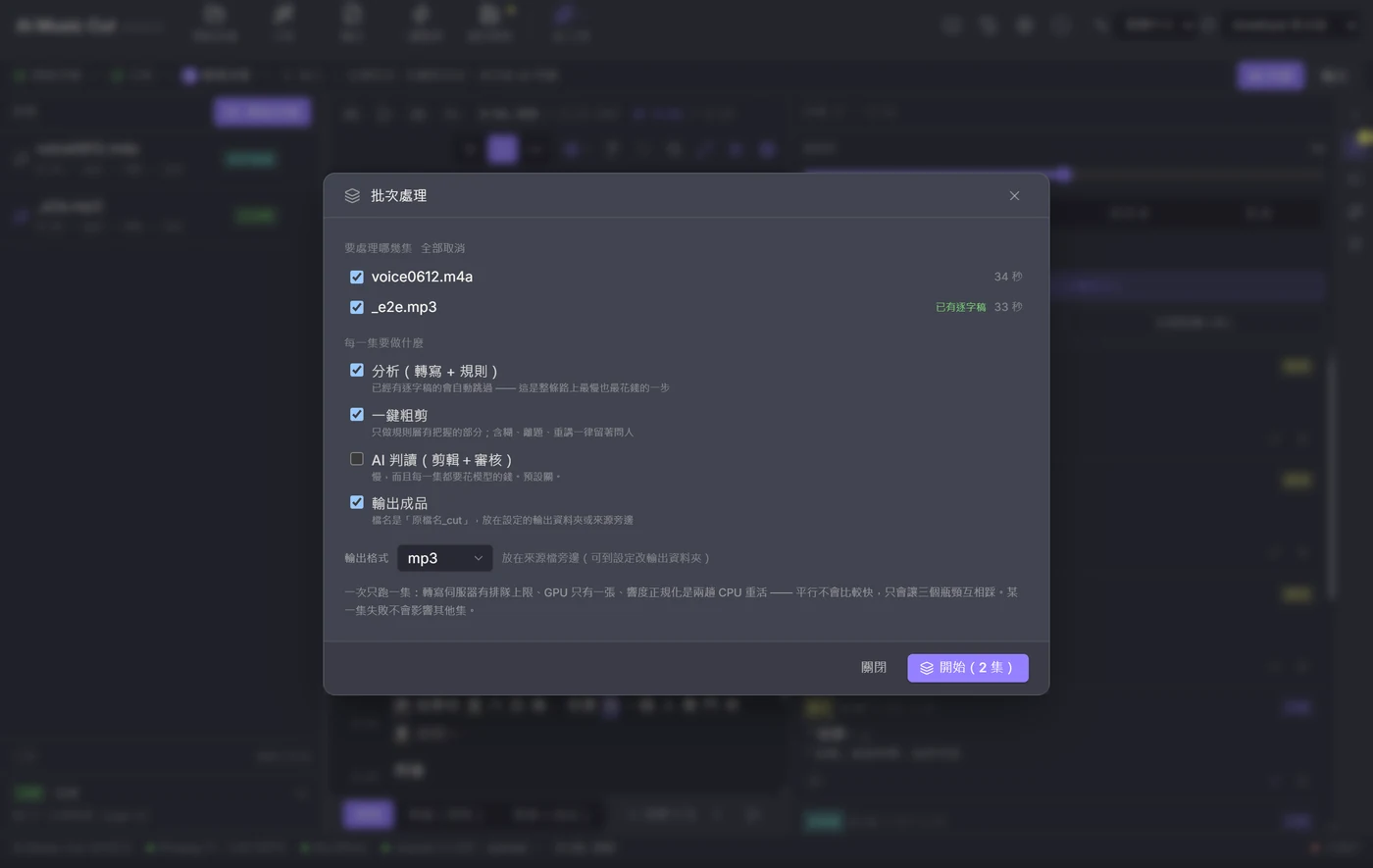
Tick the episodes and the steps (analyse → rough cut → AI judging → export) and let it run. One episode at a time (the transcription queue has a cap and there is one GPU), episodes that already have a transcript skip analysis, and a failure on one does not affect the others.
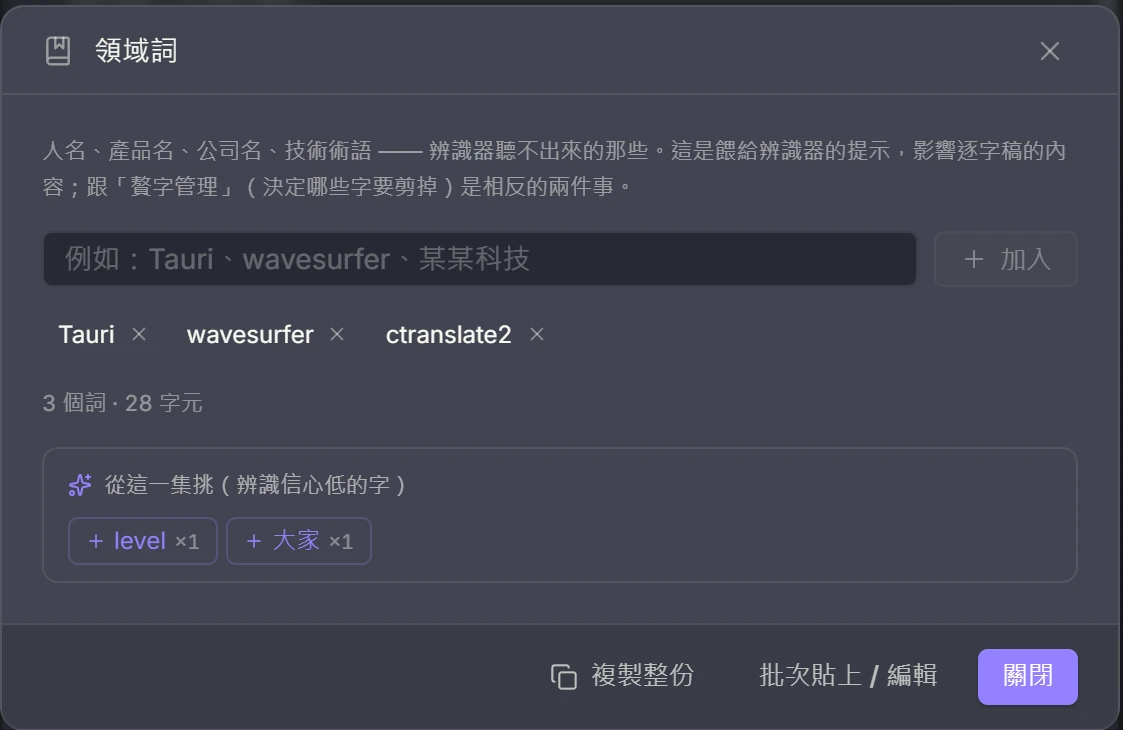
Domain words, so ASR hears them right
Names, products, companies, technical terms — the ones the recogniser mishears. Chip-style add/remove, bulk paste, and suggestions drawn from the words this episode’s recogniser was least sure about (fillers excluded). Nobody can recall from memory which words to add.
Verification after export
Each exported segment's envelope is cross-correlated against the source to catch mis-splices and drift. With a transcript it also re-runs ASR and diffs word by word, listing dropped words, missed cuts and suspect splices.
Everything else it does
AI is optional, not required: waveform, manual editing and export run entirely on your machine with no key at all.
Waveform on open
No analysis step first. The full waveform and time ruler appear in seconds, ready to play and zoom.
Edit by hand
Press S for the selection tool, drag a range, then play (looping optional), cut, keep only, mute, fade, or adjust gain. Wave-Editor-style context menu.
Edit from the transcript
Shift-click to select a range, or double-click a single word to cut it.
Beat grid and snapping
BPM is detected from waveform energy; beat and bar lines are drawn on the timeline and selections snap to them. Wrong guess? Halve or double it, or tap three times along with the track.
Automatic highlight
Pick 15, 30, 60 or 90 seconds and it finds the most chorus-like passage by energy and groove, snapping to bars when a beat grid exists.
Vocal removal and stems
Split into vocals plus accompaniment (2 stems) or vocals / drums / bass / other (4 stems). The accompaniment stem is your instrumental, ready to edit.
AI assistant with a tool loop
Your local claude CLI — or any Anthropic / OpenAI-compatible API, including a local Ollama or LM Studio — drives editing decisions through a built-in MCP server: "cut every 'you know' after the ten-minute mark, but keep the ones that open a sentence." Every tool call is shown. The persona is editable and you can save named skills (conservative cut, strict fillers, explain before acting…) to toggle per episode.
Keyboard review mode
One candidate at a time with the cut auto-auditioned; A accepts, R rejects, and it advances on its own. Identical fillers can be decided as a group.
Three preview modes
Source, cut (live approximation), and cut (rendered). The rendered preview uses the same splicer as the real export, byte-identical to it when levelling is off.
Blade and ripple trimming
B blades, T is the trim tool (drag the middle to roll, either side to ripple), N toggles snapping, Shift+Delete lifts. Right-click a seam for the precision editor: two lanes side by side so you can see whether a cut eats half a word.
Chapters written into the file
Markers and chapters are written into the output: ID3 CHAP for mp3, QuickTime chapters for m4a (Apple Podcasts and Spotify read them), with times converted automatically from source to post-cut positions.
Music lanes with ducking
Two lanes under the waveform hold music and SFX. Ducking is not handed to a compressor to guess — it computes visible, draggable volume points from the speech regions, pinned to output time, so cutting more fillers later does not slide the music.
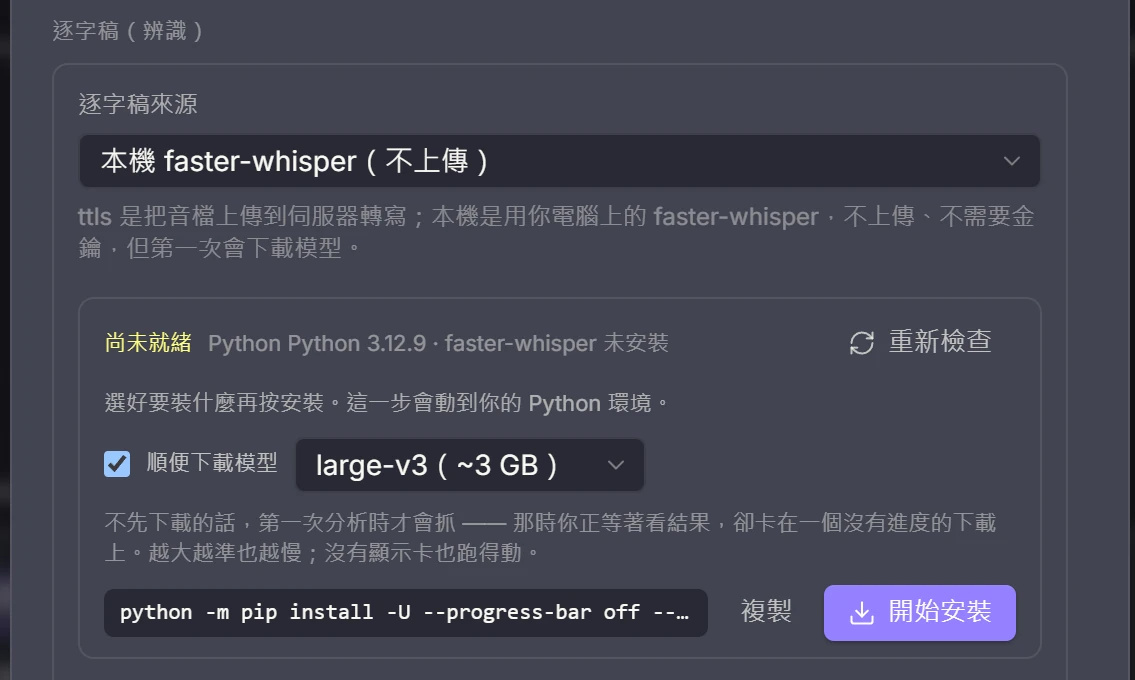
One-click local ASR install
Transcription uses faster-whisper on your own machine. Pick a model (small through large-v3) and press install — the model is fetched too, you see the exact command first, and the output streams line by line. Every model lists the VRAM it needs and is checked against your actual GPU, so you get a plain "this will run" or "you are 1.1 GB short".
Project files
Saved as *.aicut.json with the transcript, candidates, decisions, effects and the AI judgement cache. Reopening the same audio reuses the cache instead of re-running ASR.
What it looks like
The four-step flow strip sits on top, candidate blocks and beat lines overlay the waveform, and the decisions / assistant / verify rail is on the right.
Three things to know before you start
Better said up front than discovered after downloading.
- 1
Half of it works with no key
Viewing the waveform, editing by hand, applying effects (mute, fades, gain) and exporting to mp3 / m4a / wav all run locally, with no key and no network.
- 2
Transcription and vocal separation both run on your machine
Transcripts come from faster-whisper and vocal separation from demucs, both on your own machine: nothing uploaded, no key, no server to keep alive. The first run installs the package and model (you see the exact command first); after that it all stays local. You need Python 3.9 or newer.
- 3
AI judging and the assistant: a CLI or an API
Use the claude / codex CLI you are already signed into (your subscription, no API key), or point them at an Anthropic / OpenAI-compatible endpoint — the official APIs, OpenRouter / DeepSeek / Kimi / GLM, or a local Ollama / LM Studio — with the key kept in your OS keychain. Click the chip in the status bar to switch backend and model. Setting up neither does not affect the two items above.
Everything runs on your machine: no server in the pipeline
Transcription and vocal separation both run on your own machine. The audio never leaves the computer, and no key is involved.
Your audio stays on your disk
Local transcription uploads nothing. Transcripts are cached against the audio fingerprint, so reopening the same episode reuses them instead of recognising it all over again.
The rule layer gets the full signal
The output carries word-level timestamps, no_speech, avg_logprob and compression_ratio, none of them missing, so the rule layer that finds fillers, stutters and mumbles has everything it needs. This is not a cut-down mode.
Runs without a GPU
Loaded with int8 quantisation and the device set to auto: it uses CUDA when it finds one, and grinds along on the CPU when it does not. The difference is how long you wait, not whether it works.
It will not quietly rearrange your Python
Detection probes with importlib instead of really importing it (pulling in ctranslate2 costs seconds, too much just to draw a checkmark), and the install runs python -m pip rather than bare pip, because machines often have several Pythons and "installed but not importable" is the worst failure to debug. You see the exact command before you press the button.
Four models to choose from
The names go straight to faster-whisper; the sizes are what the download takes up. Bigger is more accurate, and slower.
small~0.5 GBFor a weaker machine, or just to confirm the pipeline runs end to end.medium~1.5 GBThe middle ground. Names and technical terms start landing correctly.large-v3-turbo~1.6 GBFeels close to large-v3 and is much faster. Pick this when you are in a hurry.large-v3~3 GBThe default. Use it for podcasts that mix Chinese and English; when VRAM is short, auto steps down for you.The installer can pull the model down at the same time (ticked by default). Skip it and the download starts on your first analysis, while you are waiting on a result behind a download with no progress. pip and the model download stream line by line, so you can tell downloading apart from hanging.
What stays here, and what leaves
Stays on this machine
- Waveform, loudness and beat analysis (Rust, ready seconds after opening a file)
- Every cut computation, effect and export encode (ffmpeg)
- Speech recognition (faster-whisper) and the transcript cache
- Vocal separation and stem splitting (demucs)
- The *.aicut.json project file, including decisions and cached AI judgements
- Post-export audio verification (the render compared against the source, segment by segment)
The only thing that leaves this machine
- AI judging, the assistant and show notes send transcript text to the claude / codex you are signed into or to the API endpoint you configured, never the audio; point that endpoint at a local Ollama or LM Studio and even the text stays on your machine
- Skip AI judging and the whole pipeline is fully offline
Local transcription and separation need Python 3.9 or newer, and the app will not install Python for you. The desktop app and the CLI use the same models with the same parameters, so the same file gives the same transcript in both.
Stack
The audio heavy lifting is in Rust; the interface is React.
Download: one codebase, 9 installers across three platforms
One source tree builds all nine at once: Windows (exe / msi), macOS (Apple silicon and Intel), and Linux (deb / rpm / AppImage), each with a sha256. The desktop app and the CLI share the same editing core, so the result is identical whichever platform you run it on.
Windows 10 / 11
x64-setup.exe (47.3 MB) · x64_en-US.msi (63.6 MB)
The installer bundles an LGPL ffmpeg build, so it works right after install. An ffmpeg you installed yourself still takes precedence.
macOS
aarch64.dmg (10.1 MB) · x64.dmg (10.4 MB)
Separate builds for Apple Silicon and Intel. Install ffmpeg 7 or newer yourself (brew install ffmpeg).
Linux
amd64.deb · x86_64.rpm (6.4 MB each) · amd64.AppImage (80.1 MB)
The deb and rpm declare ffmpeg as a dependency, so your package manager pulls it in. AppImage needs ffmpeg on PATH.
The Windows builds are 40–60 MB larger than the others; that difference is the compressed bundled ffmpeg. There are no Windows ARM64 or Linux aarch64 builds yet; build from source on those platforms.
Build from source
- 1
npm install --legacy-peer-deps: the peer dependencies deliberately use the legacy resolver; without this flag the install fails.
- 2
node scripts/fetch-ffmpeg.mjs (optional): fetches the bundled LGPL ffmpeg. The URL and sha256 are pinned in scripts/ffmpeg-manifest.json and a mismatch fails hard. Skip it and development still works, falling back to ffmpeg on PATH.
- 3
npm run tauri dev: the frontend runs on 1420; the first Rust build takes 5 to 10 minutes, then it is fast.
One-liner (copy and paste into a terminal):
There is a CLI too: aicut
Runs the whole pipeline headless, every subcommand stands on its own, and verify exits with code 2 on problems, so a script or an AI agent can drive it.
Bundle to a single file (Node 20+)
npm run cli:buildTranscript only
node dist-cli/aicut.mjs transcribe ep12.m4aAnalyse into a project file (with AI judging)
node dist-cli/aicut.mjs analyze ep12.m4a --judge --project ep12.aicut.jsonCut and export in one step
node dist-cli/aicut.mjs cut ep12.m4a --judge -o ep12_cut.mp3Remove vocals
node dist-cli/aicut.mjs separate song.mp3 --format wavDetect BPM and beats
node dist-cli/aicut.mjs beats song.mp3 --barsVerify the export (for automation)
node dist-cli/aicut.mjs verify ep12.m4a ep12_cut.mp3The CLI uses the same local models and parameters as the desktop app. Note that it only does global loudnorm; it has no per-segment levelling like the desktop app.
Licence and third-party components
AI Podcast Cut itself is MIT. The Windows installer bundles ffmpeg under LGPL-2.1-or-later (n8.1.2; the download URL and sha256 are pinned in scripts/ffmpeg-manifest.json and a mismatch fails the build). It is used as a separate process with dynamic linking, so it is not linked into the main binary and the app is not a derivative work of ffmpeg. You can drop in your own ffmpeg build in the same directory, or point at a different path in Settings. The full notice and the LGPL text are in THIRD-PARTY-NOTICES.txt in the repo.
Read THIRD-PARTY-NOTICES.txtGet your rough-cut time back
Hand it the mechanical work (fillers, loudness, splices) and keep the judgement about what to say and what to drop. MIT licensed, all the code is there to read.
Every tool here is free and open source
No paywall, no sign-up, and the source is public on GitHub. If one of them saved you time, buy me a coffee so the updates and the next tool keep coming.