
AI Video Cut
A desktop AI video editor. Pick something in the frame (type it, click it, or let an AI agent pick it) and it follows that object across the clip, so you can blur it, replace it, style it or remove it. Everything runs on your own GPU: the video is never uploaded and never used for training. It also ships an equivalent aivc command line and a built-in MCP server, so an agent can drive it for you.

A travel eSIM covering 190+ destinations worldwide
Use TRAVEL30 for 30% off sitewide. Cannot be combined with other promo codes.
Affiliate link. Buying through it may earn this site a small commission, at no extra cost to you.
Three steps: pick it, track it, act on it
At every step you can see what it picked, where it tracked and which pixels it changed.
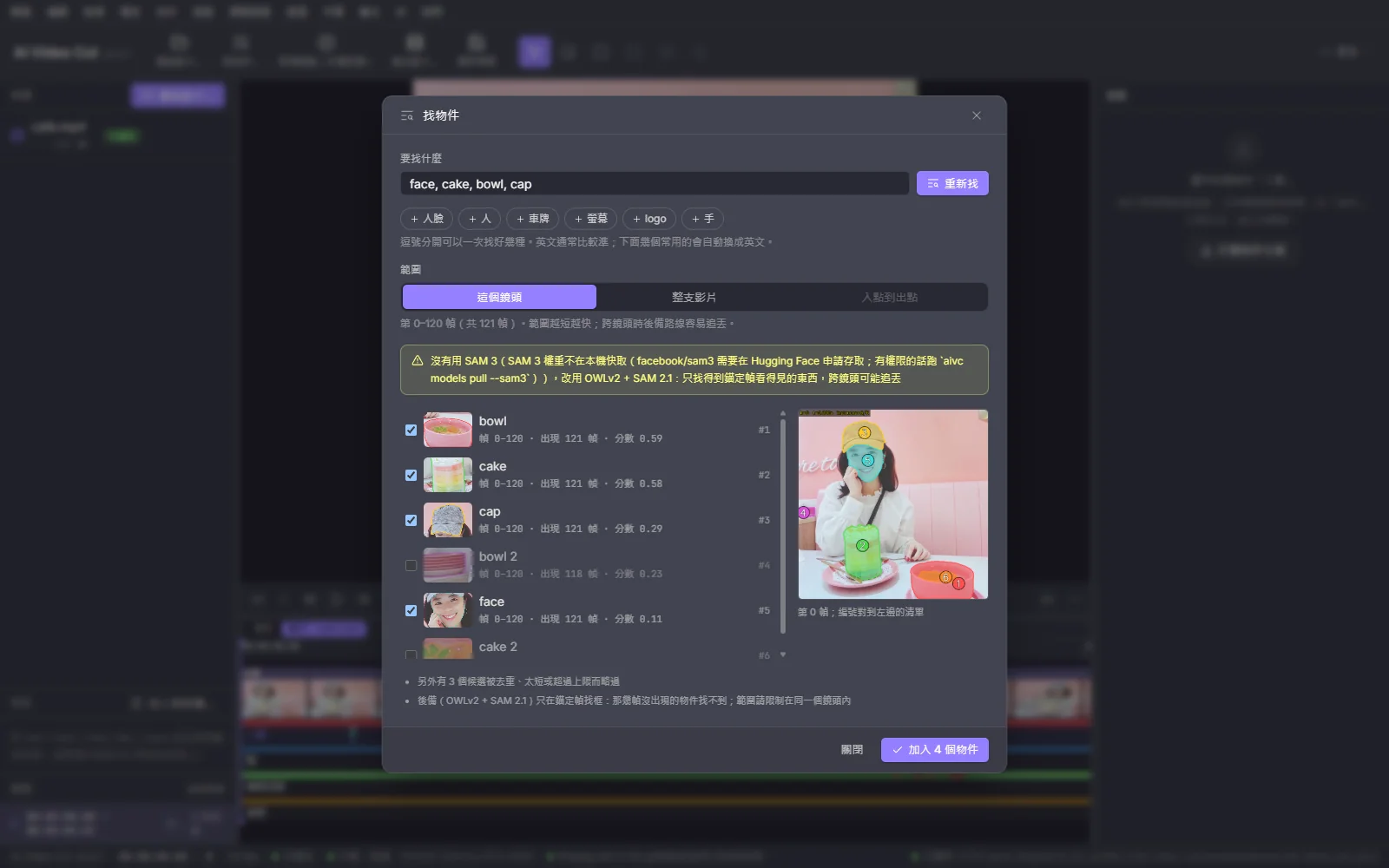
Find it by typing
Type "face, license plate, phone screen, logo" and get every instance with a thumbnail, a score and the frame ranges it appears in; tick the ones you want. Uses SAM 3 if you have access to its gated weights, otherwise falls back to openly licensed OWLv2 + SAM 2.1, and tells you which one it used.
Select it by hand
Left-click to add points, Alt + click to subtract, drag a box, and the selection updates live. If tracking drifts, add a correction on that frame and only that frame onward is recomputed; everything before it stays as is.
Let an AI agent pick it
Hand hard-to-name targets ("the cup in the hand of the person on the left") to Claude Code or Codex. Through the built-in MCP server it looks at frames, proposes boxes or points, checks the overlay and corrects itself.
Track it across the clip
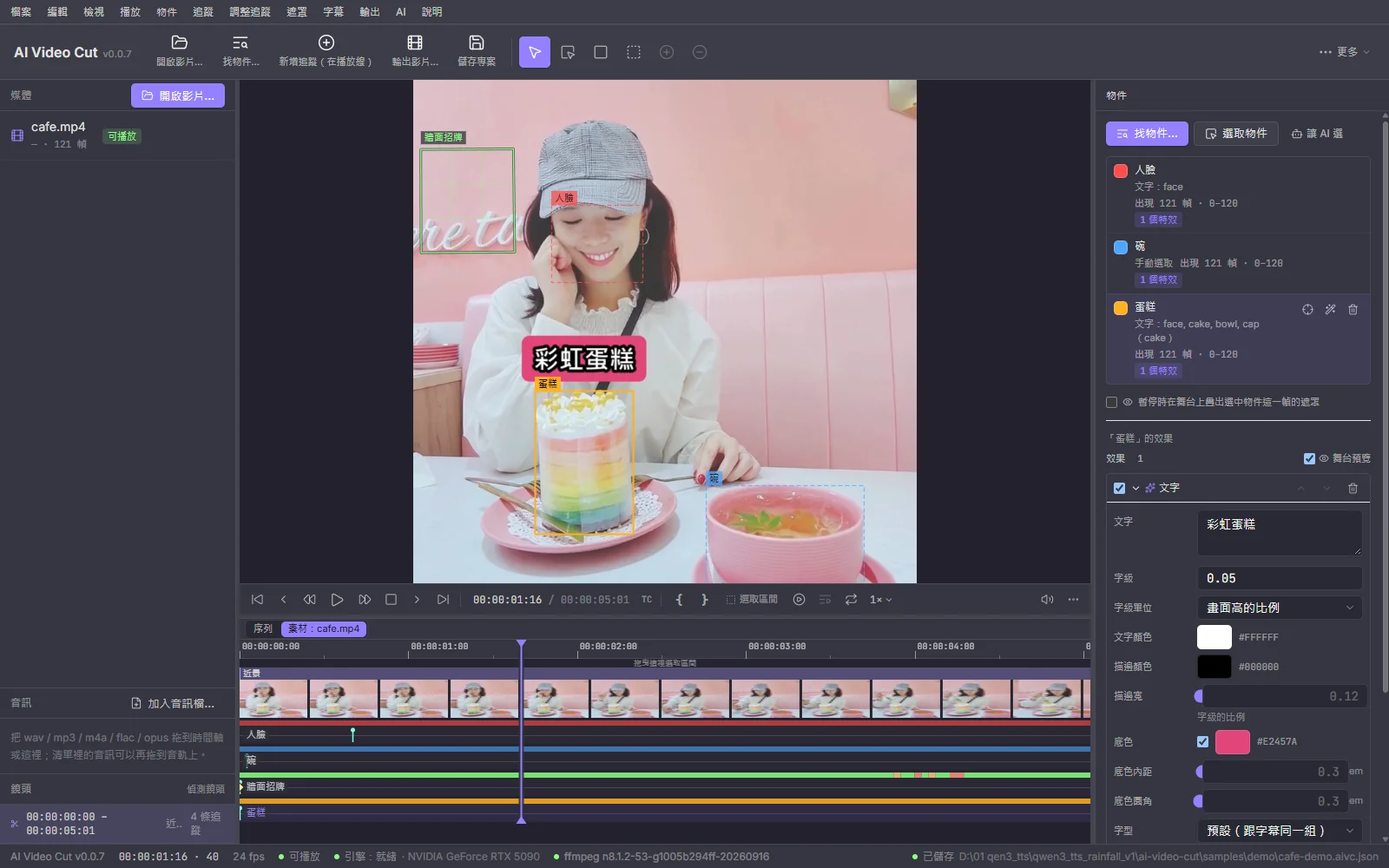
Every object becomes an ObjectTrack: per-frame mask, bounding box, centroid, angle and visible ranges. Effects, replacement and the AI assistant all read the same track instead of re-tracking on their own.
Privacy blur
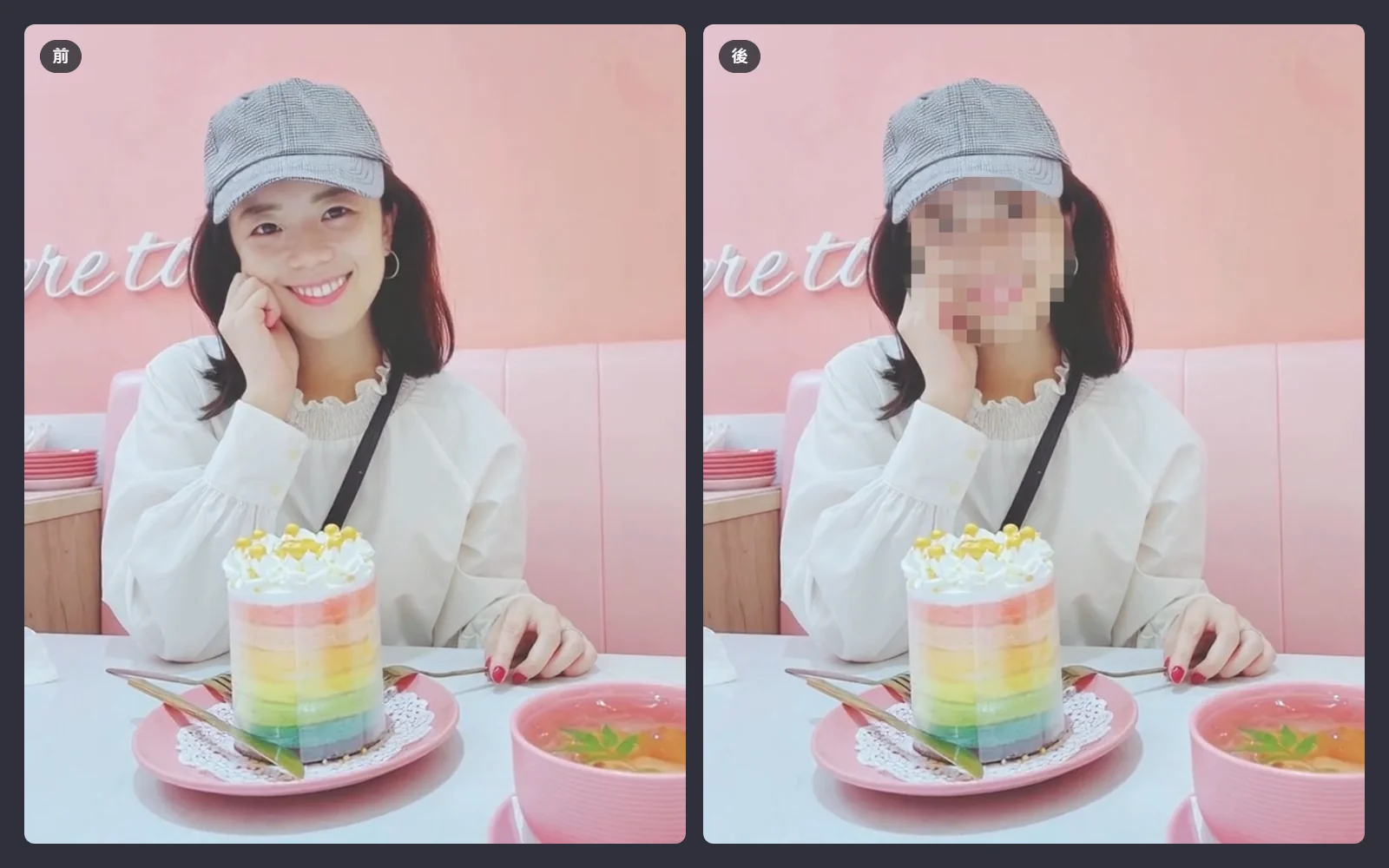
One click finds faces (optionally license plates), applies a mosaic and keeps it locked on. Cell size adapts to the object size; switch to blur if you prefer, with no halo at the edges.
Planar replacement
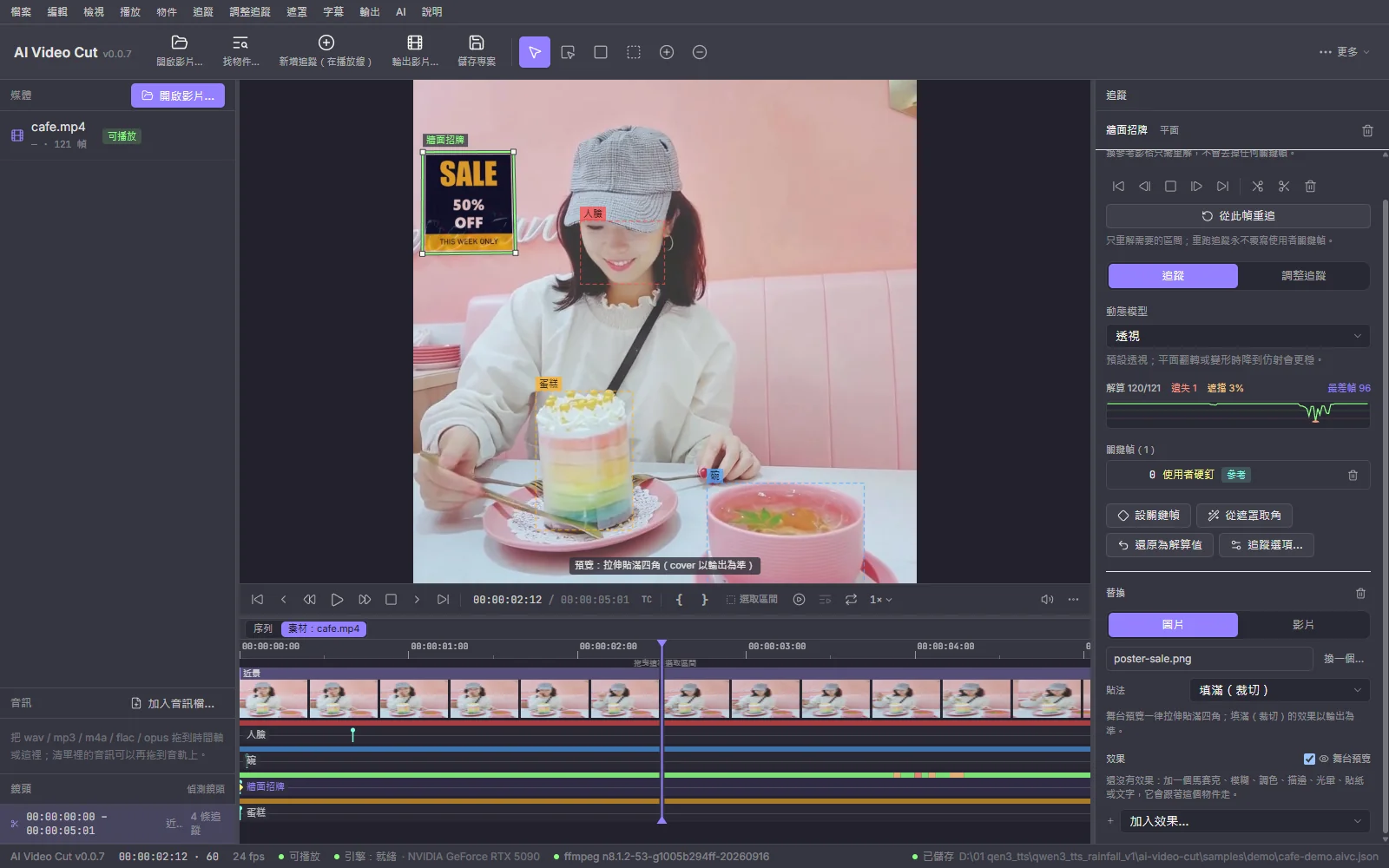
Swap a screen, poster or sign for your own image or video. Every frame is registered against the template directly instead of chained frame to frame, so error does not accumulate; the composite matches the original lighting, motion blur and hand occlusion.
What else it does
Tracking is the building block. Removal, reframing, editing, captions and the AI assistant all plug into the same data.
Object removal
Fills the hole with background that other frames of the same clip actually captured, so it is consistent frame to frame with none of the flicker of generative inpainting. Footage it cannot handle (moving camera, background never revealed) is refused with a reason.
Auto reframe
Turn landscape into 9:16, 4:5 or 1:1. Say "follow the person" and the crop window follows the subject.
Stackable effects
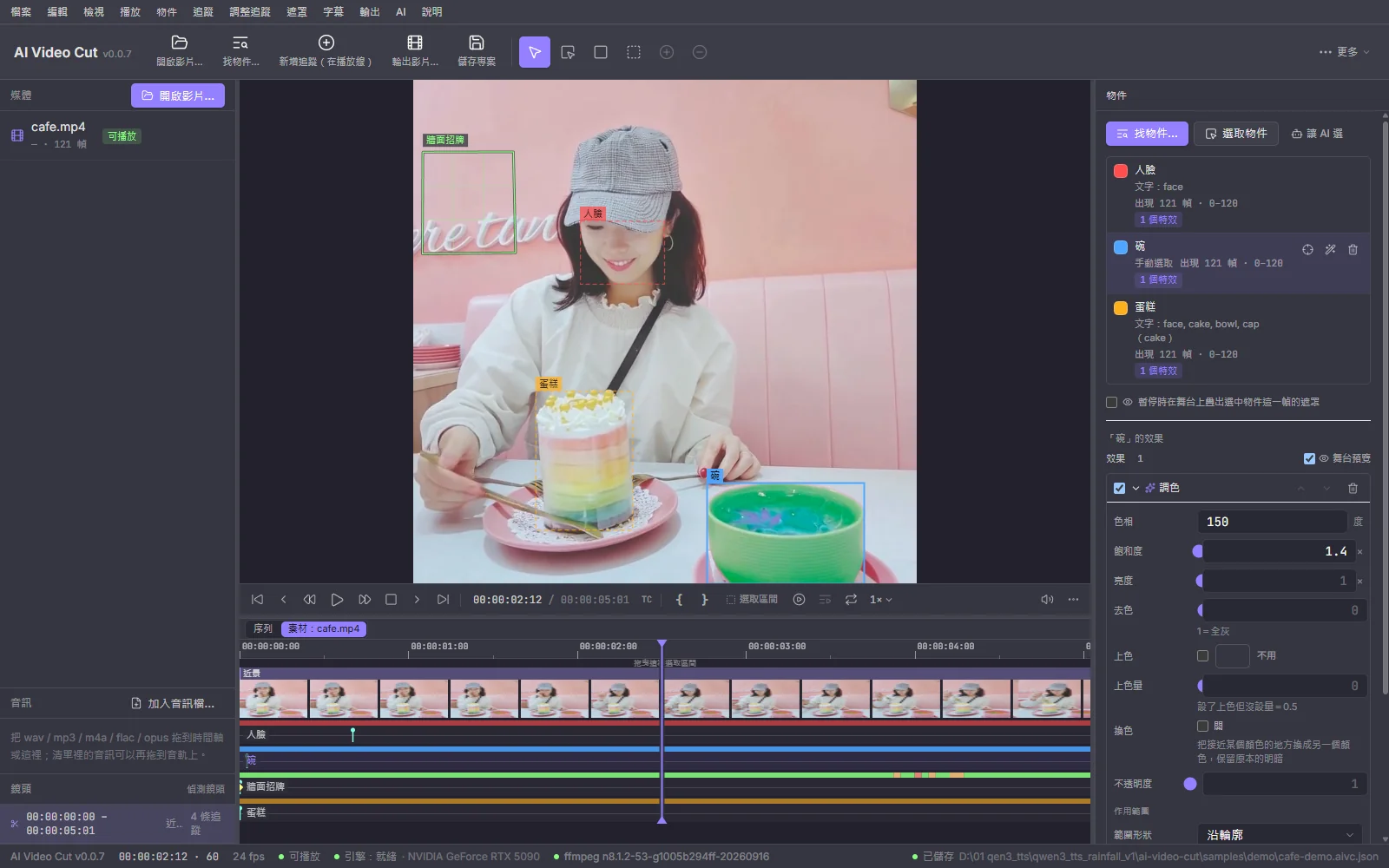
Mosaic, blur, color (hue, saturation, brightness, color swap, computed in linear light), outline, glow, plus stickers and text that follow position only or position, scale and rotation. Reorder them freely.
Export tracking data
Export any ObjectTrack as JSON, CSV or a PNG mask sequence, or as a Nuke corner pin or After Effects keyframes, and take it to another compositor or your own code.
Sequence editing
Split, ripple delete, three-point edits, slide and slip, J / L cuts, remove silence (with a preview of how much it will cut), loudness normalization, with Premiere / Resolve style shortcuts. Editing never invalidates tracks or masks.
Local captions
Local speech recognition with faster-whisper, word-level timing, six animated caption styles, export to SRT / VTT / ASS or burn in. Delete a sentence in the caption panel and the picture is cut with it.
AI chapters, highlights and assistant
Works with a local OpenAI-compatible server (LM Studio, Ollama, llama.cpp), the Claude API, Claude Code CLI or Codex CLI. A sentence like "blur the faces" or "make it vertical" becomes a plan that only runs once you approve it.
Signed auto-update
Checks for new versions in the background, and an update is only installed after its signature verifies. It will not restart on you while a job is running or the project has unsaved changes.
Screenshots
The main editor plus the four core flows: find objects, objects and effects, privacy blur, planar replacement.
Three things to know before you start
Up front, so you don't find out after downloading.
- 1
You need an NVIDIA GPU
Windows 11 x64 with an NVIDIA GPU, 12 GB of VRAM or more recommended, driver R580 or newer (CUDA 13). Without a GPU it does not silently fall back to the CPU (about 0.2 fps); it tells you it cannot run. macOS 14+ on Apple Silicon and Linux x86_64 install, but are still experimental.
- 2
The first run downloads about 6 to 7 GB
On first launch the app walks you through installing the engine: fetch uv, create a Python 3.12 environment, install PyTorch and dependencies, run an environment check, then fetch model weights. It checks for at least 15 GB of free space first, and the data folder can be moved to another drive in Settings.
- 3
After that it works fully offline
The network is only needed to install the engine, download models and check for updates. No video is uploaded, nothing is used for training, no telemetry is sent, and re-exports are unlimited.
Fully local: your video never leaves your machine
Selection, tracking, effects, replacement, removal and captions all run on your own GPU, with no cloud service or API key.
Video stays on your disk
No frame is uploaded and your footage is never used to train models. Project files and tracking data live on your machine.
Only the pixels that should change
Effects and replacement only touch pixels inside their area; every other pixel's yuv420p bytes are written back unchanged. In the difference view, everything outside the area must be pure black.
Track once, reuse everywhere
Effects, replacement, the AI assistant and plugins share the same ObjectTrack. Switching effects does not re-track, and editing does not break tracks.
Agents can drive it too
The built-in MCP server binds to 127.0.0.1 only and rotates a random token on every launch. Settings has a one-line command to copy so your own Claude Code / Codex session can connect.
Models it uses
Models are downloaded the first time they are needed; the app's About dialog lists the same set.
SAM 2.1 hiera-small~184 MB · Apache-2.0Point / box selection and propagating masks forward and backward through the shot. Always installed.OWLv2~600 MB · Apache-2.0Open-vocabulary text detection, the fallback when you have no SAM 3 access; its boxes are handed to SAM 2.1 for masks.SAM 3 (optional)~3.4 GB · SAM LicenseFinds objects straight from text and tracks them every frame, including objects that appear mid-clip. The weights are gated: request access on Hugging Face, then add your HF token in Settings.faster-whisper (optional)~0.5 to 3 GB · MITSpeech recognition for captions with word-level timing. Only needed for captions; pick a model from small to large-v3.No SAM 3 access is fine: text search falls back to OWLv2 + SAM 2.1 automatically, and the UI shows which backend is in use. No model weights ship with the installer; each is downloaded under its own license the first time it is needed.
What stays on this machine, and what leaves
Stays on this machine
- Video decoding, proxies and export encoding (FFmpeg)
- Object selection, mask propagation and per-frame tracking (SAM 2.1 / OWLv2 / SAM 3)
- Effects, planar replacement, object removal and auto reframe
- Caption speech recognition (faster-whisper)
- Project files and ObjectTrack data
The only thing that leaves
- When the AI assistant, chapters or highlights use the Claude API, Claude Code or Codex, your instructions and caption text are sent; when an agent picks an object, it also sees the frames you ask it to look at. With a local LM Studio / Ollama nothing leaves your machine
- Downloads when installing the engine, fetching models and checking for updates
Without cloud AI, nothing goes over the network apart from installs and updates. The desktop app and the aivc CLI use the same engine and models, so the same clip gives the same track in both.
Tech stack
Shell and UI in Tauri / React / Rust, the heavy image work in a Python engine.
Download and install
Completely free, with the source code on GitHub under the MIT license. This is an early preview (0.0.x) and Windows is the development and test platform; macOS and Linux builds are built and tested in CI but the full flow has not yet been walked end to end on real hardware.
Windows 11 (x64)
x64-setup.exe
Installs per user, no admin rights needed, bundles an LGPL FFmpeg. Requires an NVIDIA GPU with driver R580 or newer.
macOS 14+ (Apple Silicon, experimental)
aarch64.dmg
Runs on PyTorch MPS, 16 GB of unified memory or more recommended, no Intel Macs. The app is not notarized, so on first launch choose "Open Anyway" in Privacy & Security. Install ffmpeg first with brew install ffmpeg.
Linux x86_64 (experimental)
amd64.deb · AppImage
Ubuntu 22.04, Debian 12 or newer, or equivalent. The deb pulls in ffmpeg; for the AppImage install ffmpeg and the GStreamer plugins yourself. Also needs NVIDIA driver R580 or newer.
On first launch the app guides you through installing the engine and models (about 6 to 7 GB). Auto-update is built in and only installs updates whose signature verifies; a regular update just swaps the engine package and does not re-download PyTorch.
There's a CLI too: aivc
Every action in the app maps to an aivc subcommand; add --json for JSONL events, so scripts and AI agents can drive it.
Environment check
python -m aivc doctorFind objects by text
python -m aivc find clip.mp4 --text "face, license plate" --out found/Give a vision model a frame with a coordinate grid
python -m aivc frame clip.mp4 --at 120 --grid --out f.pngSelect with a box and propagate through the shot
python -m aivc select clip.mp4 --frame 120 --box 412,300,180,160 --coords norm1000 --propagate 0:600 --out sel/Check a selection (several frames on one sheet)
python -m aivc preview-object clip.mp4 --masks sel/obj1/masks.aivm --frames 0,150,300,450 --out sheet.pngApply a mosaic and export
python -m aivc fx clip.mp4 --masks found/obj1/masks.aivm --effects '[{"type":"mosaic"}]' -o out.mp4Export tracking data
python -m aivc track-export clip.mp4 --masks found/obj1/masks.aivm --format csv --out face.csvpython here means the one in the engine venv (on Windows: %LOCALAPPDATA%\net.markkulab.aivideocut\pyenv\Scripts\python.exe). Paired with Claude Code, the CLI alone is enough to "look at the frame, select, verify, apply effect" without opening the app.
Pick it once, follow it all the way
Hand it the frame-by-frame grind of blurring, replacing and removing, and keep the call on what should be seen. Free and open source, runs entirely on your machine, and your video is never uploaded.
Every tool here is free and open source
No paywall, no sign-up, and the source is public on GitHub. If one of them saved you time, buy me a coffee so the updates and the next tool keep coming.
Deal
Stay online when you work abroad
eSIM 226 is a travel eSIM covering 190+ destinations worldwide: buy the plan before you fly, scan the QR code on landing and you are online. No SIM swap, no roaming bill, and your own number stays in the phone to keep receiving bank SMS. Japan 3GB / 15 days starts around US$3.4, so a short trip never costs a full month. Use TRAVEL30 for 30% off sitewide. Cannot be combined with other promo codes.
- 190+ destinations across Asia, Europe and the Americas
- Instant QR activation, nothing to ship or queue for
- Local rates instead of roaming, no bill shock at home
Affiliate link. Buying through it may earn this site a small commission, at no extra cost to you.