
Super Mermaid for Jira & Confluence
Diagrams inside the issue and inside the page body. The source lives in Atlassian's own storage, and the app never ships it to a third-party server.

A travel eSIM covering 190+ destinations worldwide
Use TRAVEL30 for 30% off sitewide. Cannot be combined with other promo codes.
Affiliate link. Buying through it may earn this site a small commission, at no extra cost to you.
Status: not on the Marketplace yet
Both apps are deployed to an Atlassian Forge development environment and running on a real site — the screenshots below are that site. They have not been submitted for listing yet, so for now the only way in is deploying them to your own site with the Forge CLI. Once the listing is approved this page becomes a one-click install.
Intro video
A few minutes on how both apps work inside Jira and Confluence

Try it right here
This is the same drawing engine both apps ship with. Drag nodes, pull edges, rename things. No install, no sign-in.
A real editor, not a recording. Every change is serialised straight back to Mermaid syntax.
Two apps, one engine
The same renderer, hosted by Jira and by Confluence
Super Mermaid for Jira
Open the diagram panel on any issue: click Source, paste your syntax, Save. Use the + tab to keep several diagrams on the same issue.
Diagrams are stored on the issue itself, so they inherit your existing Jira permissions and backups — and are deleted with the issue.
Super Mermaid for Confluence
Type /Super Mermaid on a page to insert the macro. The diagram is embedded in the page body next to your text, not bolted on beside it.
The source is stored as a macro parameter, so it follows page versioning: copy the page and the diagram comes with it; roll back and you see the diagram as it was.
What you get
What already works today
11 diagram types, paste and go
A flowchart an AI drafted for you, or a sequence diagram you drew by hand — flowchart, sequence, class, state, ER, gantt, pie, mindmap, timeline, user journey and git graph all render right inside the issue or page. No screenshot uploads.
Complex diagrams stay readable for teammates
A busy diagram gets hard to read at a glance — scroll to zoom, drag to pan, pinch-to-zoom on touch devices, and search inside a diagram to jump straight to the matching node.
Export it and drop it anywhere
Need the diagram in a slide deck or a ticket attachment? One click takes it out as a vector or a bitmap — no separate screenshot-and-crop step.
Matches your theme, feels native
Follows your Atlassian theme automatically, and switchable straight from the toolbar so it never looks bolted on.
Chinese, Japanese, Korean render correctly
CJK labels break and wrap oddly in a lot of Mermaid tools — here the font ships inside the app (not fetched from a CDN), so wrapping and centering just work.
One issue, several diagrams
A single ticket often needs both a flowchart and a state machine — tabs in the Jira panel mean you don't have to split it across multiple issues just to fit them.
Share a link instead of a screenshot
Want someone outside your site — or an AI — to look at the same diagram? One click encodes it into a URL and copies it to your clipboard; whoever opens it can view and keep editing, no Jira account needed. The link points at the Super Mermaid live preview on blog.markkulab.net — a site outside Atlassian. The diagram rides in the URL fragment, which browsers never send to a server, but anyone holding the link can see it.
Teammates who don't know the syntax can still edit it
Every Mermaid app on the Marketplace makes you type — you have to read the syntax to change anything. This one lets you drag: move nodes, pull edges, change shapes, tidy the layout in one click. A PM or designer can adjust the diagram themselves, and it serialises straight back to clean Mermaid source with no loss. That's the actual problem this app set out to solve.
Runs on Atlassian: your diagrams live in your own site
The rendering engine, the fonts and every dependency are bundled inside the app, so the app itself makes no request to any external domain at runtime. You can verify that yourself in your browser's Network tab, which beats any claim in a document. The one path outward is the toolbar's share button: you press it deliberately, and even then it only copies a link to your clipboard, nothing is stored, it just displays. That link points at the live preview on blog.markkulab.net, a site outside Atlassian, so opening it takes the diagram out of your site.
- The app itself makes no external requests — open DevTools and see for yourself
- The only way out is the toolbar's share button: it copies a link to your clipboard, nothing is stored, it just displays; that link points at an external site outside Atlassian (blog.markkulab.net), pasting or opening it is your call
- Data lives in an issue property or a macro parameter, never on a third-party server
- The Confluence app requests no API permissions at all
Real screenshots
Taken on a real site, not mockups
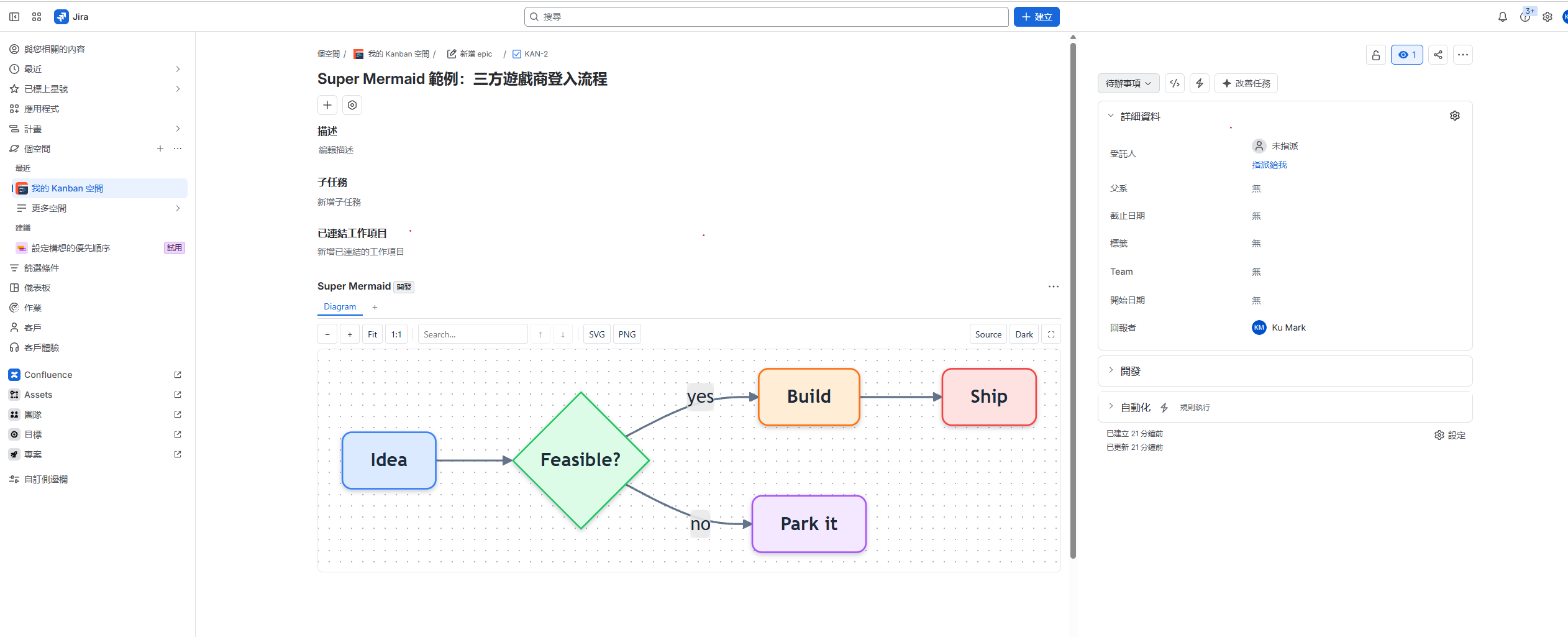
Jira: the diagram panel on an issue
The panel sits in the issue body. The toolbar carries zoom, Fit, 1:1, search, SVG / PNG export, Source and a light/dark switch; the tab strip adds another diagram.
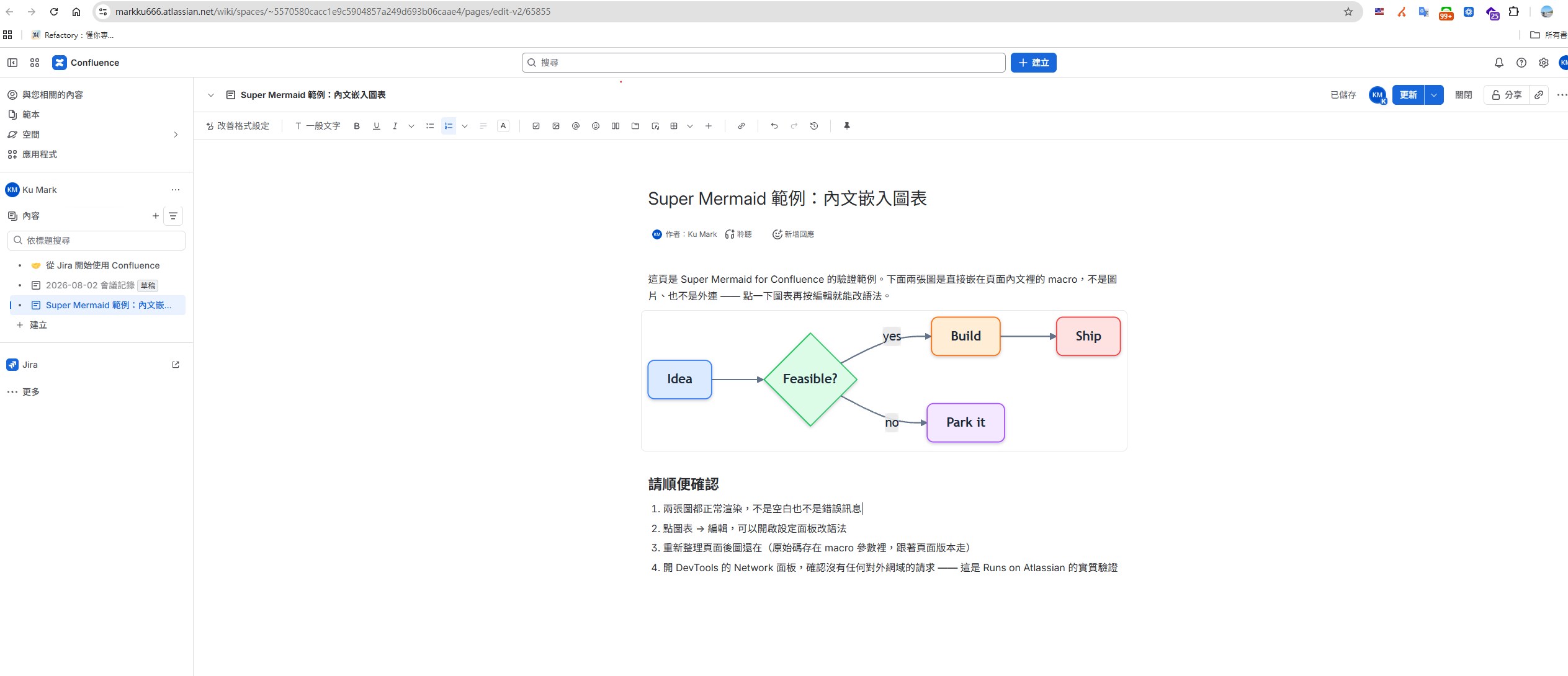
Confluence: embedded in the page body
The macro sits between paragraphs, mixed in with the text. Click the diagram and edit to change the syntax; the source is versioned with the page.
Want it now? Deploy it yourself
- 1
Install the Forge CLI: npm install -g @forge/cli
- 2
forge login with your Atlassian API token
- 3
Clone the source from GitHub, npm install, then forge deploy
- 4
forge install — pick Jira or Confluence and enter your site URL
- 5
Open any issue (or type /Super Mermaid on a page) and the panel is there
Needs an Atlassian Cloud site and admin rights. Data Center is not supported, because Forge is a Cloud-only platform.
More Mermaid tools
Same rendering engine, wherever you need it
VS Code Super Mermaid
Write Markdown in VS Code and get diagrams for free — save the file, see the preview, works offline.
Check it outReact Super Mermaid
Need diagrams inside your own React app? One <MermaidViewer> line gets you themes, zoom and export.
Check it outMermaid Live Preview
Don't want to install anything? Write, preview and share a link straight from the browser.
Check it outFollow it before it lists
Source, install docs and the privacy policy are all on GitHub. Once the listing is approved, this page turns into a Marketplace install button.
Every tool here is free and open source
No paywall, no sign-up, and the source is public on GitHub. If one of them saved you time, buy me a coffee so the updates and the next tool keep coming.

Deal
Stay online when you work abroad
eSIM 226 is a travel eSIM covering 190+ destinations worldwide: buy the plan before you fly, scan the QR code on landing and you are online. No SIM swap, no roaming bill, and your own number stays in the phone to keep receiving bank SMS. Japan 3GB / 15 days starts around US$3.4, so a short trip never costs a full month. Use TRAVEL30 for 30% off sitewide. Cannot be combined with other promo codes.
- 190+ destinations across Asia, Europe and the Americas
- Instant QR activation, nothing to ship or queue for
- Local rates instead of roaming, no bill shock at home
Affiliate link. Buying through it may earn this site a small commission, at no extra cost to you.