
The Problem
In Vue, when switching components we often don't want them to re-render — we want to remember their original state and avoid re-fetching APIs. For these reasons we use keepAlive to preserve state. But keepAlive is a double-edged sword: until you refresh the page, the longer time goes on, the more memory may keep growing, eventually leading to a memory leak.
A common UX example: in a paginated list, after navigating to page 2 and clicking into a detail page, when the user goes back, if you don't remember the previous page number or scroll position via routing, they end up back on page 1 — bad experience. This is exactly where keepAlive shines.
Analyzing the Problem
After looking through plenty of references, I found Vue doesn't offer a convenient way to clear keepAlive. Some people use the brute-force destroy approach, which I personally don't think is very elegant. Later I saw a GitHub issue where people recommended using include to clear the keepAlive cache, and I adapted that into what I needed.
How brute-force deletion works
Get the current component's keepAlive cache
this.$vnode.parent.componentInstance.cache

Get all keepAlive cache keys for the current component
this.$vnode.parent.componentInstance.keys
 You could of course
 forEach the keys to brute-force clear the cache, but it's not very elegant.
In the end, I decided to clear the keep-alive cache via include
First, create a keep-alive.js store in Vuex
const state = {
  allModulekeepAlive: [] // {   moduleName: 'expert',   list: ['x'] }
}

const getters = {
  getListByModuleName: (state) => (moduleName) => {
    const module = state.allModulekeepAlive.find(x => x.moduleName === moduleName)

    if (module) {
      return module.list || []
    }

    return []
  }
}

const actions = {}

const mutations = {
  add(state, payload) {
    if (!payload.moduleName || !payload.componentName) {
      alert('快取參數不完整')
      return
    }

    const module = state.allModulekeepAlive.find(x => x.moduleName === payload.moduleName)

    if (module) {
      if (!module.list.includes(payload.componentName)) {
        module.list.push(payload.componentName)
      }
    } else {
      const newModule = {
        moduleName: payload.moduleName,
        list: [payload.componentName]
      }

      state.allModulekeepAlive.push(newModule)
    }
  },
  removeByModuleName(state, moduleName) {
    if (!moduleName) {
      alert('removeByModuleName快取參數不完整')
      return
    }

    const module = state.allModulekeepAlive.find(x => x.moduleName === moduleName)

    if (module) {
      module.list = []
    }
  },
  removeByComponentName(state, payload) {
    if (!payload.moduleName || !payload.componentName) {
      alert('removeByComponentName快取參數不完整')
      return
    }

    const module = state.allModulekeepAlive.find(x => x.moduleName === payload.moduleName)

    if (module) {
      if (module.list.includes(payload.componentName)) {
        module.list = module.list.filter(x => x !== payload.componentName)
      }
    }
  },
  cleanAll(state) {
    state.allModulekeepAlive = []
  }
}

export default {
  namespaced: true,
  state,
  actions,
  getters,
  mutations
}
Now we can clear caches through these mutations
Add a module cache entry
const cacheObj1 = { moduleName: 'message', componentName: 'MessageDetail' }

vm.$store.commit('keep-alive/add', cacheObj1)
Remove all caches under a module
vm.$store.commit('keep-alive/removeByModuleName', 'message')
Remove a specific ComponentName under the message module
const cacheObj1 = { moduleName: 'message', componentName: 'MessageDetail' }

vm.$store.commit('keep-alive/removeByComponentName', cacheObj1)
Clear all caches
this.$store.commit('keep-alive/cleanAll')


import { mapGetters } from 'vuex'

 ...mapGetters('keep-alive', [
      'getListByModuleName',
    ])
Usage example
<template>
  <div>
    <p>目前 message 模組下的 keep alive 的快取:{{ getListByModuleName('message') }} </p>

    <keep-alive :include="getListByModuleName('message')">
      <router-view />
    </keep-alive>
  </div>
</template>

<script>
import { mapGetters } from 'vuex'

export default {
  metaInfo: {
    title: '訊息'
  },
  // 進入頁面前
  beforeRouteEnter(to, from, next) {
    next(vm => {
      vm.$store.commit('keep-alive/removeByModuleName', 'message')

      const cacheObj1 = { moduleName: 'message', componentName: 'MessageDetail' }

      vm.$store.commit('keep-alive/add', cacheObj1)

      const cacheObj2 = { moduleName: 'message', componentName: 'MessageList' }

      vm.$store.commit('keep-alive/add', cacheObj2)
    })
  },
  // 離開頁面前
  beforeRouteLeave(to, from, next) {
    alert('清除 Message 快取')
    this.$store.commit('keep-alive/removeByModuleName', 'message')
    next()
  },
  computed: {
    ...mapGetters({
      getListByModuleName: 'keep-alive/getListByModuleName'
    })
  },

  created() {
  }
}
</script>
Verifying with Vue Dev Tools
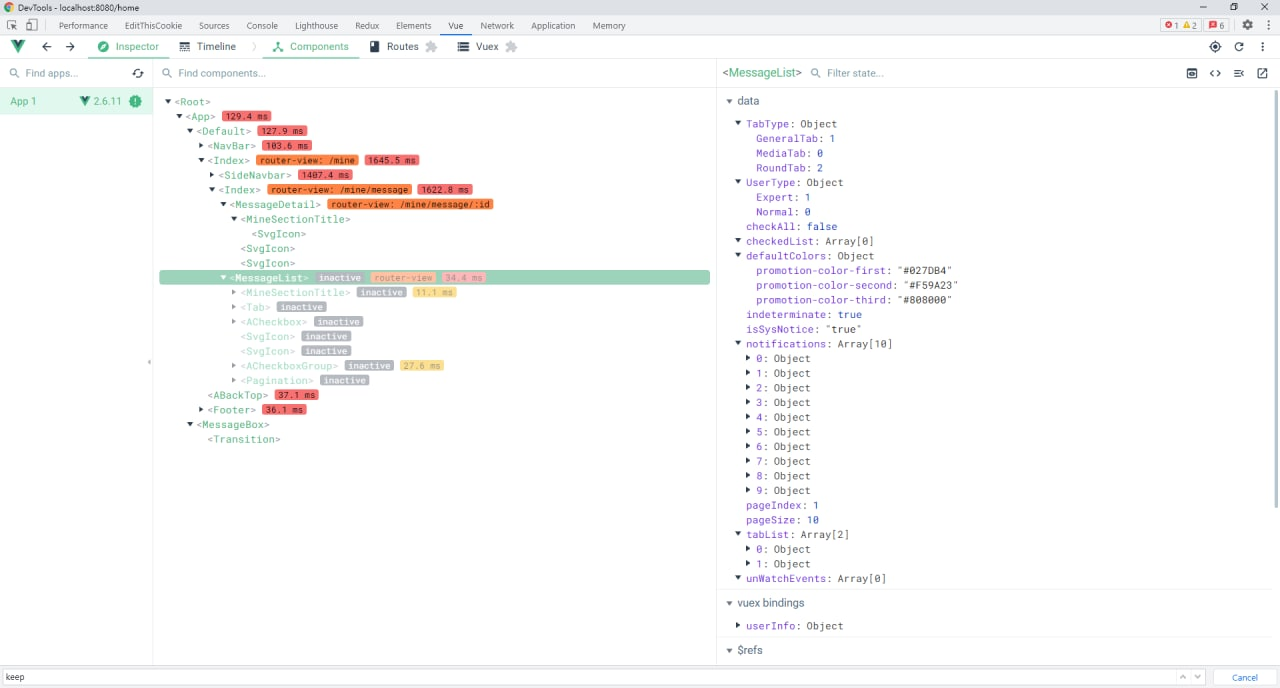
Pattern 1 — leaving the route releases automatically, but you can release earlier via include
<keep-alive>
    <router-view>
        <!-- 所有路徑匹配到的視圖組件都會被緩存! -->
    </router-view>
</keep-alive>
Pattern 2
<keep-alive exclude="a">
  <component>
    <!-- 除了 name 為 a 的組件都將被緩存! -->
  </component>
</keep-alive>可以保留它的狀態或避免重新渲染


Comments