
DB-Kit
One interface for MySQL, MariaDB, PostgreSQL, SQL Server, Oracle, SQLite, MongoDB, Redis, Kafka, Elasticsearch and RabbitMQ — a cross-platform database manager that also puts SSH / SFTP / FTP, Docker, Kubernetes, remote desktop (RDP / VNC / RustDesk) and file compare in the same sidebar. Built on Tauri + Rust, ~10× lighter than Electron, secure and ready to go, available in six UI languages, with a built-in AI assistant (a local CLI or any Anthropic / OpenAI-compatible API), SQL stress testing, SQL review and the dbk command-line tool.

A travel eSIM covering 190+ destinations worldwide
Use TRAVEL30 for 30% off sitewide. Cannot be combined with other promo codes.
Affiliate link. Buying through it may earn this site a small commission, at no extra cost to you.
DB-Kit in 3 Minutes
A quick video tour of what it solves and its highlights.

Supported Data Sources
Relational, document, key-value, event streaming and search — eleven data sources in one workflow
MySQL
Full CRUD, DDL schema editing, EXPLAIN analysis, index management and SSL modes.
MariaDB
A first-class connection type with full MySQL feature parity, plus INSERT / DELETE … RETURNING result sets.
PostgreSQL
Multi-column filtering, field statistics, SSL modes, structure dump and multi-format export.
SQL Server
CRUD, schema tabs (indexes / foreign keys / DDL), stored procedures & functions, SHOWPLAN execution plans and ER diagrams.
Oracle
EZConnect / SID / TNS connection modes and DBMS_XPLAN execution plans; requires the 64-bit Oracle Instant Client (server 12c+).
SQLite
Serverless local file database that works out of the box — great for lightweight projects.
MongoDB
Documents flattened into tables, find / aggregation pipelines, CRUD via JSON, visualized explain, validation rules and a monitoring panel.
Redis
Five structure editors, namespace key tree, Pub/Sub, an ops panel, INFO status and a command console.
Kafka
Topic / partition / consumer-group management, message browsing & producing, offset resets, monitoring & alerts; Schema Registry / Connect / ACLs.
Elasticsearch
Cluster / index tree, a Query DSL editor (JSON envelope with linting and field completion), search / count / aggregations as dual result sets, cluster health overview and mapping viewer; OpenSearch compatible.
RabbitMQ
Vhost / queue tree, non-destructive message preview (basic.get then requeue), publishing with publisher confirms, queue details, purge / delete and a cluster overview.
Core Features
Everyday database operations made consistent and secure
Unified interface
Eleven data sources share one connection tree, data grid and shortcuts; a Ctrl+K command palette fuzzy-jumps to any connection / database / table.
Secure connections
Passwords encrypted in the OS keychain; SSH tunnels with host key verification (TOFU); optional app-lock password, per-connection read-only mode and color labels to tell production from staging.
Full CRUD & filtering
Inline cell editing with safe primary-key writes; multi-column filtering across 9 operators with AND / OR, multi-column sorting, two-way foreign-key navigation and pinned tables.
Query workspace
Syntax highlighting with context-aware column autocomplete, a visual query builder (auto-JOIN from foreign keys), SQL snippets, :name parameterized queries, history & favorites, and 7 editor color themes.
Stacked result sets
Run multiple SQL statements at once and see every result set stacked together — each independently scrollable, sortable and exportable; results before a failing statement are kept.
Advanced object search
Ctrl+Shift+G searches tables / columns / indexes / stored procedures / triggers across databases, including definitions and comments; whole-word and wildcard matching, highlighted hits, jump back to the sidebar tree.
Import & export
Export to CSV / TSV / Excel / JSON / SQL INSERT / Markdown; Excel and CSV import with preview, column mapping and row-level error reporting.
Data transfer
Transfer single tables or whole databases across connections or databases, auto-creating missing target tables, so moving tables between production and staging needs no manual schema setup first.
Schema & data compare
Compare whole databases or single tables: tables, columns, indexes, foreign keys, views and stored procedures, against another connection (production vs staging) or a saved schema snapshot. Every result row has a checkbox, and unticked objects stay out of the sync script; status chips filter the list, each row shows a diff summary, ⇄ swaps source and target, and options such as ignoring name case / comments / defaults sit on the toolbar. Open any object for column-level differences and side-by-side DDL with word-level highlighting, and let the AI summarize the risks and a safe execution order. Sync SQL is ordered by dependencies; destructive statements (DROP, type changes, adding NOT NULL) are grouped separately and need an extra confirmation. Reports export to Markdown / HTML / JSON. Row-level compare streams both sides by primary key with no row limit via dbk compare data.
Execution plans & stats
Visualized EXPLAIN everywhere: SHOWPLAN for SQL Server, DBMS_XPLAN for Oracle, explain stage trees for MongoDB — plus field statistics and distinct-value distribution.
SQL stress testing
Replay the current statement across threads: fixed iterations or a duration with ramp-up, warmup, p50 / p90 / p95 / p99 latency percentiles and a live per-second TPS chart; errors grouped by fingerprint, run on a dedicated pool so interactive connections stay free, with writes and destructive statements blocked by default.
SQL review
A Review tab under the query editor runs 15 static rules as you type: UPDATE / DELETE without WHERE, cartesian joins, functions on columns defeating indexes, the NOT IN NULL trap, NOLOCK dirty reads and more. Dialect-aware, never executes your query, works offline.
Review & Run
Before a data-changing script runs, the AI reviews it (expected before/after changes, risks, fixes); then each statement's affected rows are captured, rollback statements are written to disk, the statement runs and the rows are diffed. The script, review, rollback.sql, diff.md and snapshots land in a folder you choose. Values are captured losslessly by type (BLOBs, time zones, float precision) and rollback statements that can't be proven safe are commented out. AI assistant writes and dbk run use the same pipeline.
DBA review & AI library
Hand SQL, a script or a table's structure to four built-in personas (senior DBA, production gatekeeper, performance, security) or several at once; while connected the DBA verifies with read-only tools (EXPLAIN, structure, indexes) before concluding. Every AI action's prompt, persona and skill is a Markdown file you can override, share from a team git folder, and sync as Claude Code / Codex agents and skills.
Stored procedure integration tests
One JSON test file per procedure: seed data → call the procedure → assert result sets, OUT parameters and the tables it touched, all inside one transaction that rolls back automatically. Record a baseline for regressions, or run the same scenario on SQL Server / MySQL / PostgreSQL and compare for migration checks. AI can draft scenarios from the signature; dbk sp-test emits JUnit for CI.
Schema cache & query cancel
Table / column completion now comes from a single dictionary query cached to disk, so the whole schema is suggested the moment a tab opens, even offline; a running query can be cancelled on the server (KILL QUERY / pg_cancel_backend), killing the statement without dropping the session.
ER diagrams, DDL & docs
Draggable entity-relationship diagrams, DDL schema editing, index management, and one-click whole-database documentation in HTML / Markdown.
Query safety net & backups
A result row cap and query timeouts so a stray SELECT * can't freeze the app; scheduled backups with history; connection pool health checks and monitoring.
In-app updates
When a new version is out, an update window lists what changed; on Windows, "Update now" downloads the installer from GitHub Releases, verifies its SHA-256 and restarts the app after installing.
Kafka streaming
Topics / partitions / consumer groups with offset resets (preview before apply); a message browser with JS filter expressions and Avro / Protobuf decoding; producing with traffic mode and CSV batches.
Kafka monitoring & alerts
Health risk scans, background metric sampling with trend charts; alert rules that fire OS notifications; Schema Registry read/write, Connect connectors and ACL management.
SSH terminal with SFTP / FTP
Tabbed terminals (passwords, private keys in any format, ssh-agent, multi-hop jump hosts), hosts imported from ~/.ssh/config or .xsh files; SFTP / FTP panels open in their own window, upload by drag and drop, resume broken transfers and edit remote files in the app. An activity log keeps the commands and file actions, never passwords. The AI only suggests commands — you press the button.
Docker, Registry & Harbor
Containers / images / volumes / networks in a tree, with info, logs, shell, resources and processes per container; a database running in a container becomes a connection in one click. Browse Registry tags and multi-platform manifests; trigger Harbor vulnerability scans and read the CVEs.
Kubernetes
kubeconfig, tokens, certificates or EKS / GKE / AKS exec login; a namespace → resource tree, events, YAML with dry-run before apply, Pod logs / shell / resource usage. Right-click a database in the cluster to create a connection that port-forwards automatically.
Remote desktop
RDP, VNC / Mac Screen Sharing and RustDesk (Direct IP or RustDesk ID, end-to-end encrypted) right inside a tab. RustDesk and VNC each get a toolbar with screenshots, recording, a virtual keyboard and automatic reconnect; RustDesk adds multiple screens, file transfer and chat, and VNC switches to TLS when the server supports VeNCrypt.
File & folder compare
Side-by-side text with inline differences, apply block by block and save back; folder compare with mirror, one-way or two-way sync that lists every action first; plus a hex binary compare. Either side can be local or any SSH / SFTP / FTP host, and dbk diff / dbk sync fit into scheduled jobs.
Seven gemstone themes
Amethyst / Moonstone / Jade / Garnet / Amber / Ruby / Obsidian, switched from the toolbar along with light / dark, driving both the whole app and SQL editor syntax highlighting.
Six UI languages
Traditional Chinese, Simplified Chinese, English, Japanese, Korean and Vietnamese, switched at runtime with no restart; the GUI, backend error messages and the dbk CLI (--lang) all follow one language setting.
Built-in AI assistant
A side panel wired to your local Claude Code / OpenAI Codex CLI (signed in with your own subscription) or to any Anthropic / OpenAI-compatible API (the official APIs, OpenRouter / DeepSeek / Kimi / GLM, or a local Ollama / LM Studio; keys stay in the OS keychain): streaming Q&A, natural-language SQL / ES DSL generation you preview before applying, plus one-click AI review, tuning advice and stress-report analysis — and the assistant's persona and skills are yours to edit.
dbk command-line tool
Query / browse / export / backup / stress test, plus writes gated behind --yes (and --force for destructive ones); reuses the same connections and keychain and compiles to a slim Tauri-free binary — ideal for servers and scripts.
Screenshots
Real screenshots of the app (dark theme)
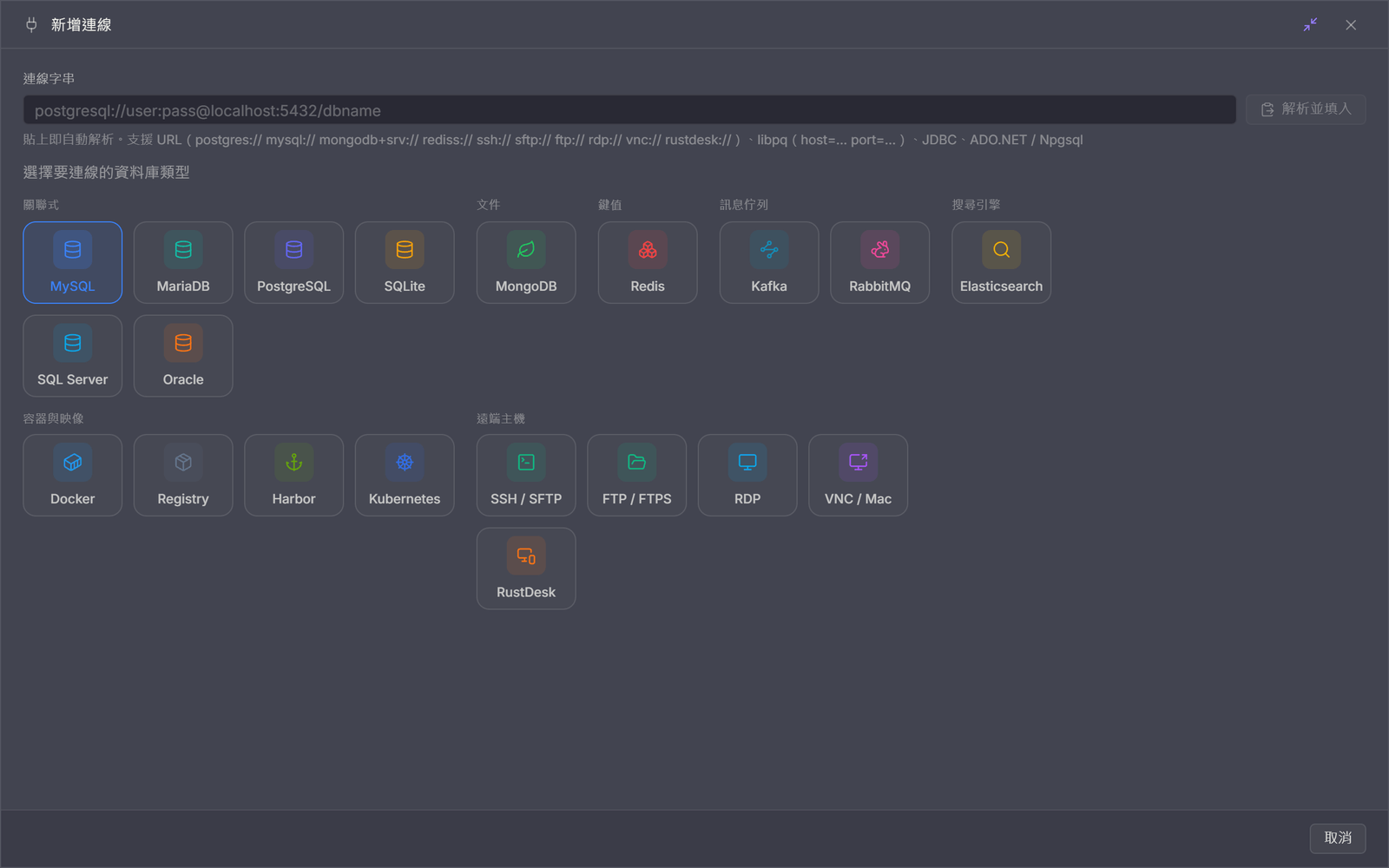
One entry point for everything
New connection puts databases, message queues, search engines, containers and images, and remote hosts in a single picker; paste a connection string (postgres://, ssh://, rdp://, rustdesk://, JDBC, ADO.NET…) and the type and fields fill themselves in.

Table view
Connection tree, tabs, and an inline-editable data grid with safe primary-key writes.
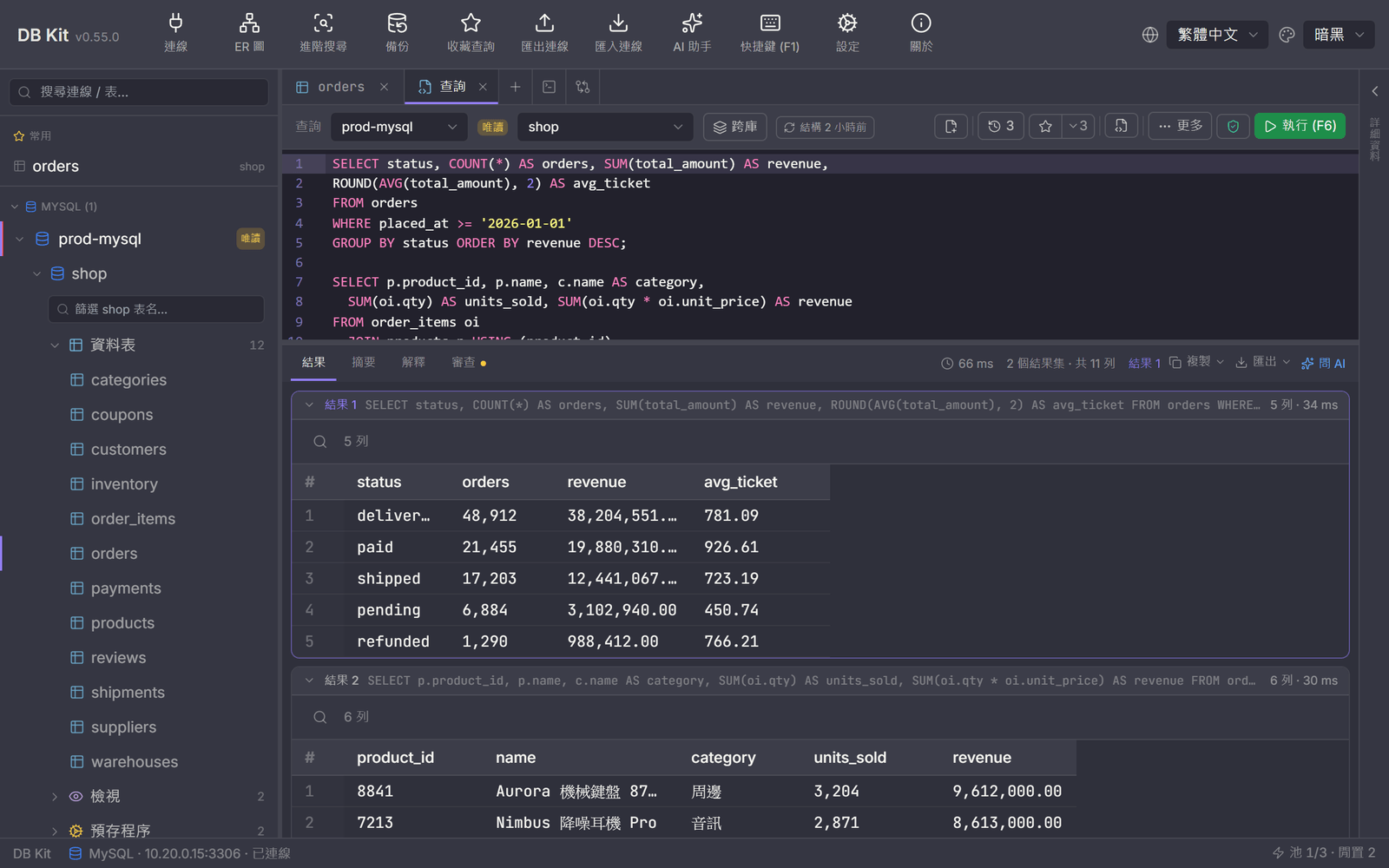
Query editor
SQL syntax highlighting, autocomplete, query history & favorites, run-selection; multi-statement results stacked together.
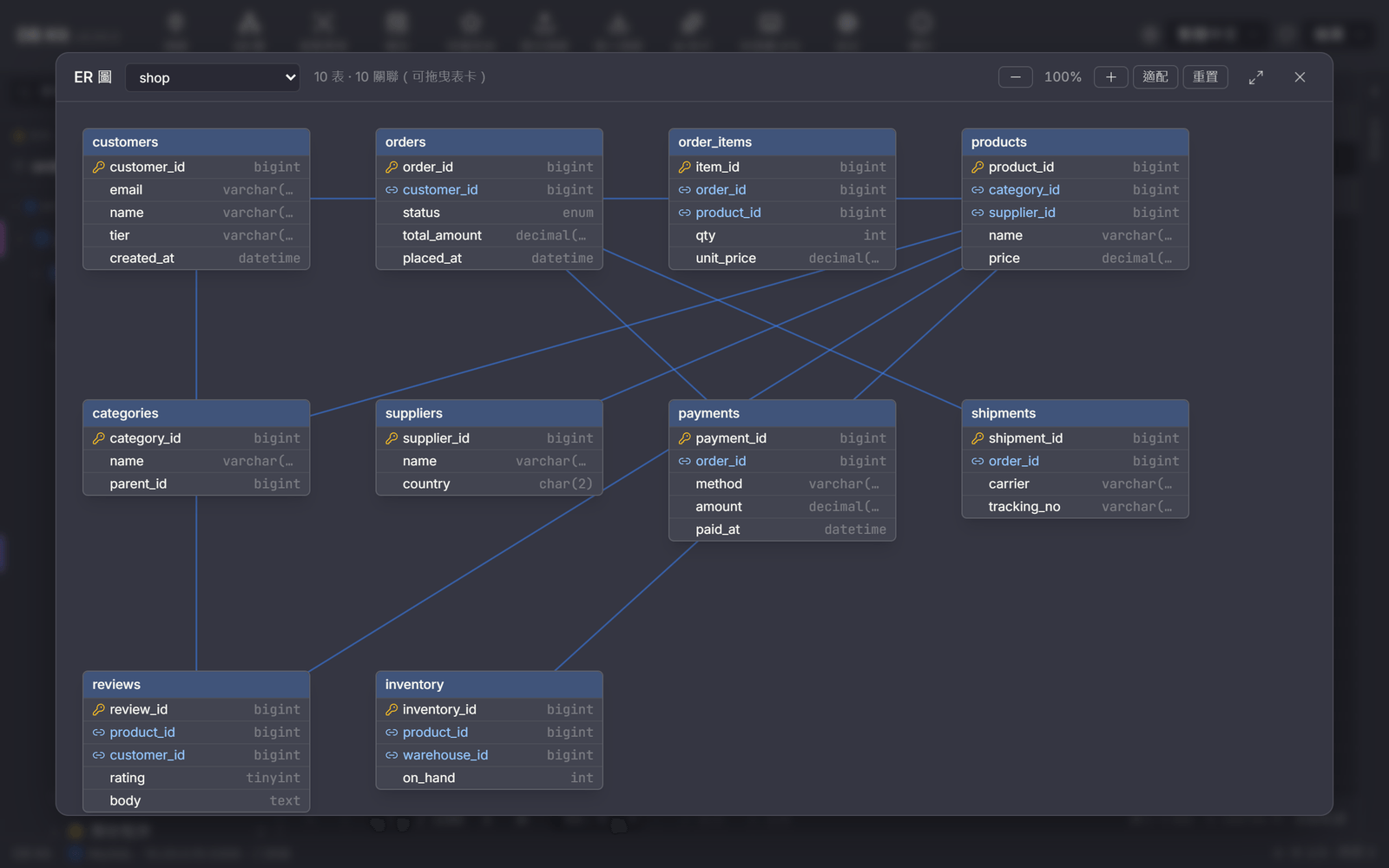
ER diagram
Foreign-key relationships visualized; draggable, zoomable cards with remembered layout.
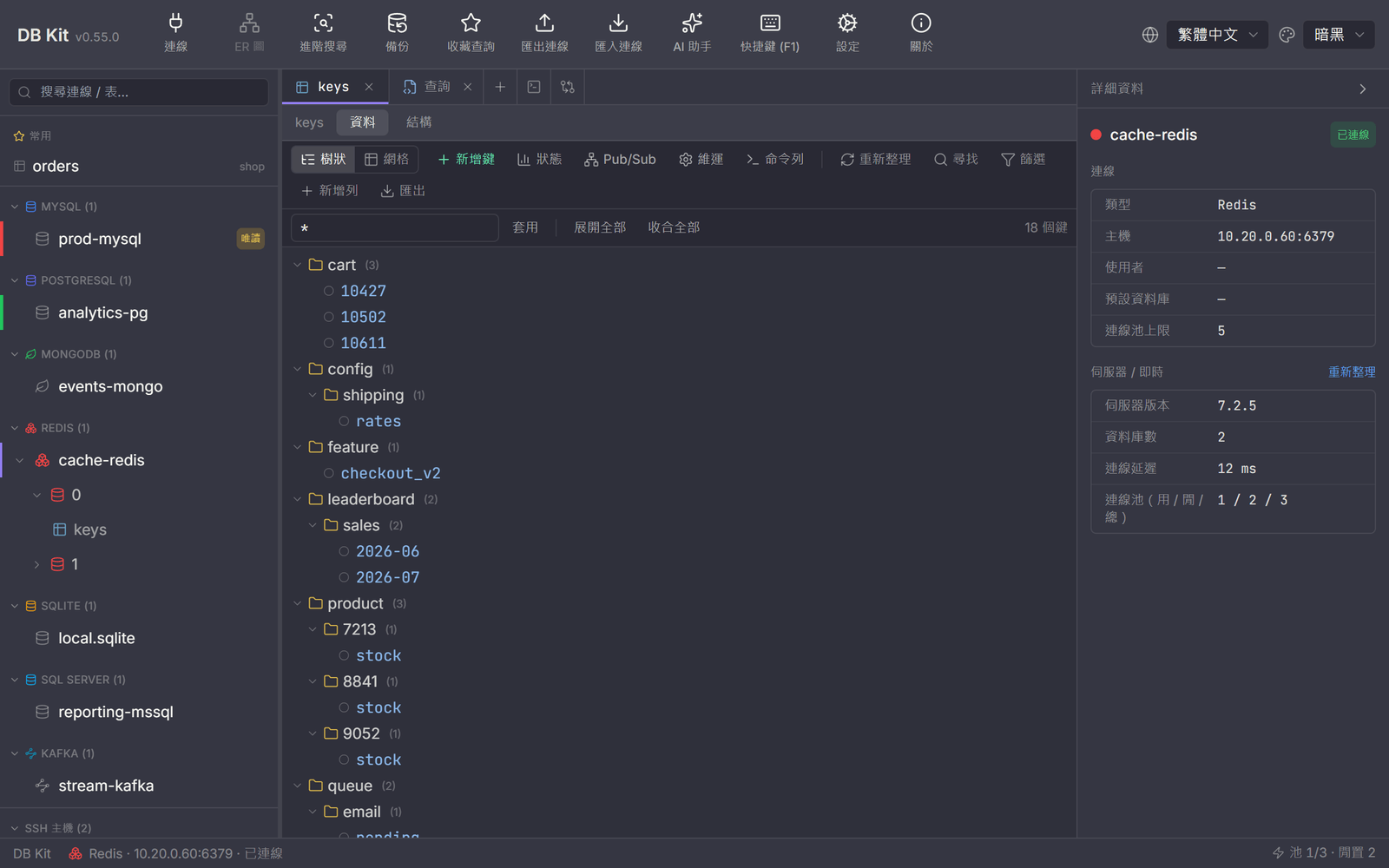
Redis key-value
Namespace key tree, five structure editors, and an INFO server-status panel.
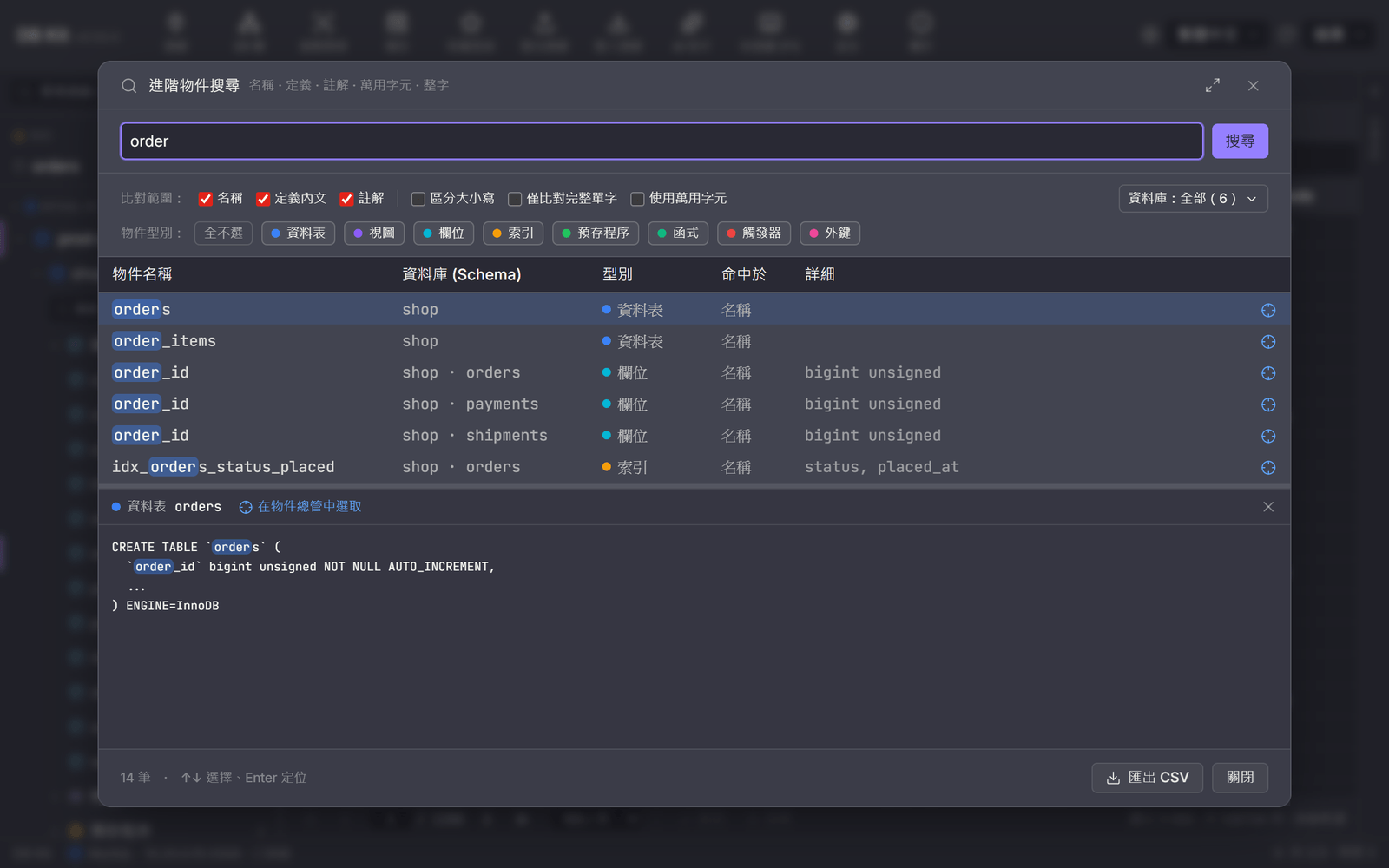
Advanced object search
Ctrl+Shift+G searches tables / columns / indexes / stored procedures across databases, with highlighted hits and one-click jump back to the sidebar tree.
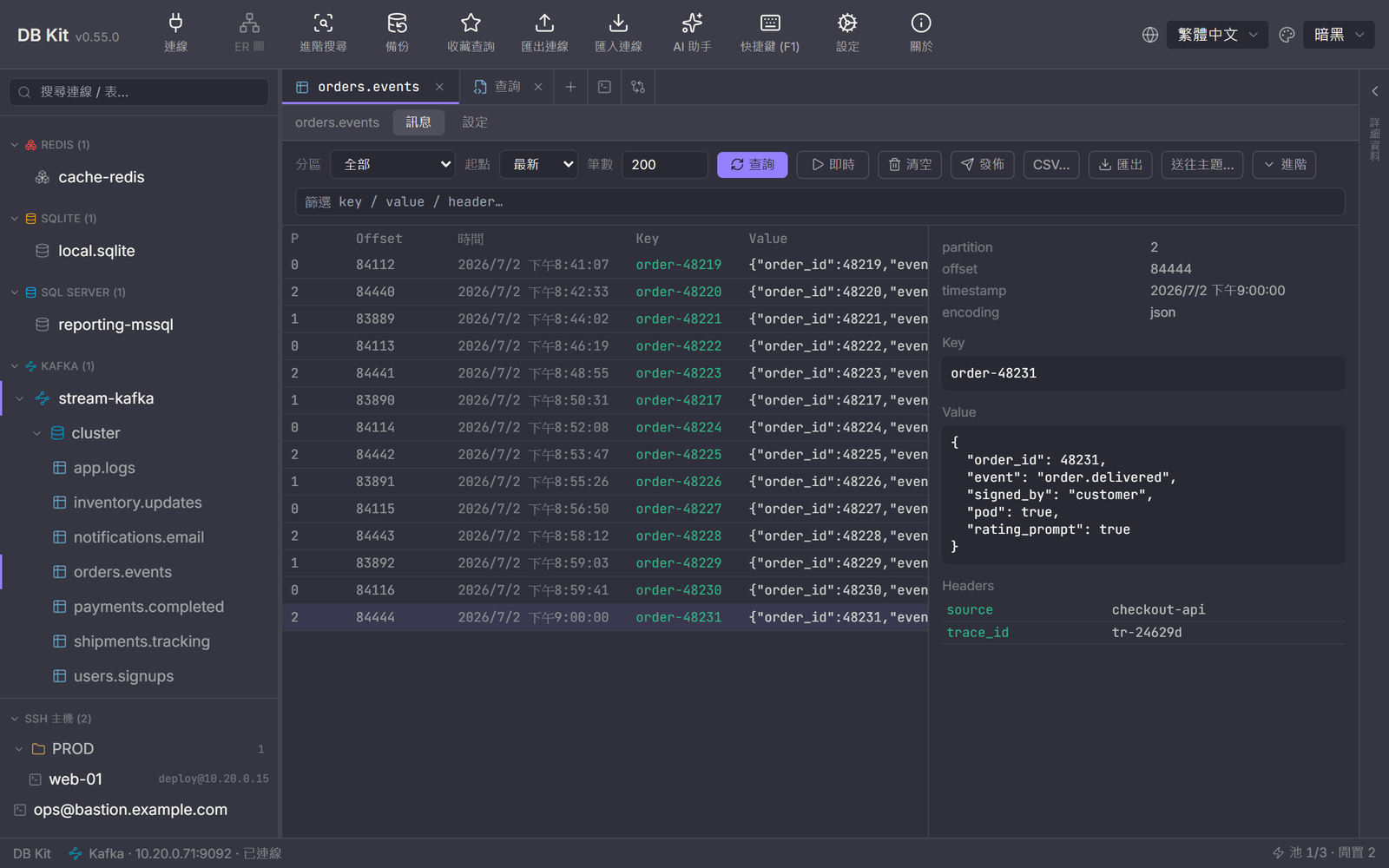
Kafka message browser
Topic tree with partition / offset / key / value at a glance, JSON detail pane with headers; one-shot queries and live tail.
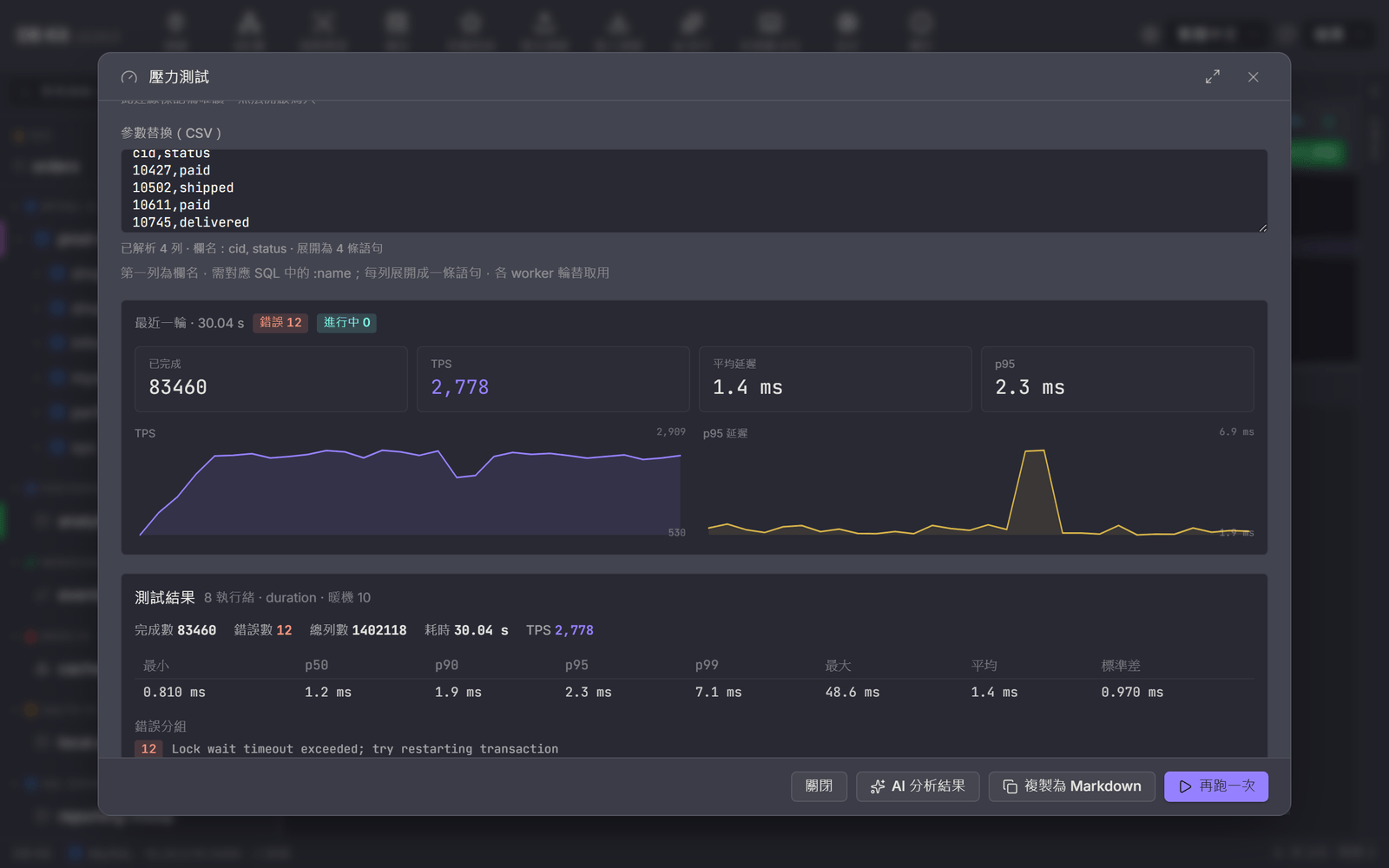
SQL stress test
One query replayed across threads: TPS, mean / standard deviation and p50 / p90 / p95 / p99 latency percentiles, a live per-second chart, and errors grouped by fingerprint.

SQL review
The Review tab under the query editor: 15 static rules across three severity levels listed as you type; click a finding to select the matching range in the editor.
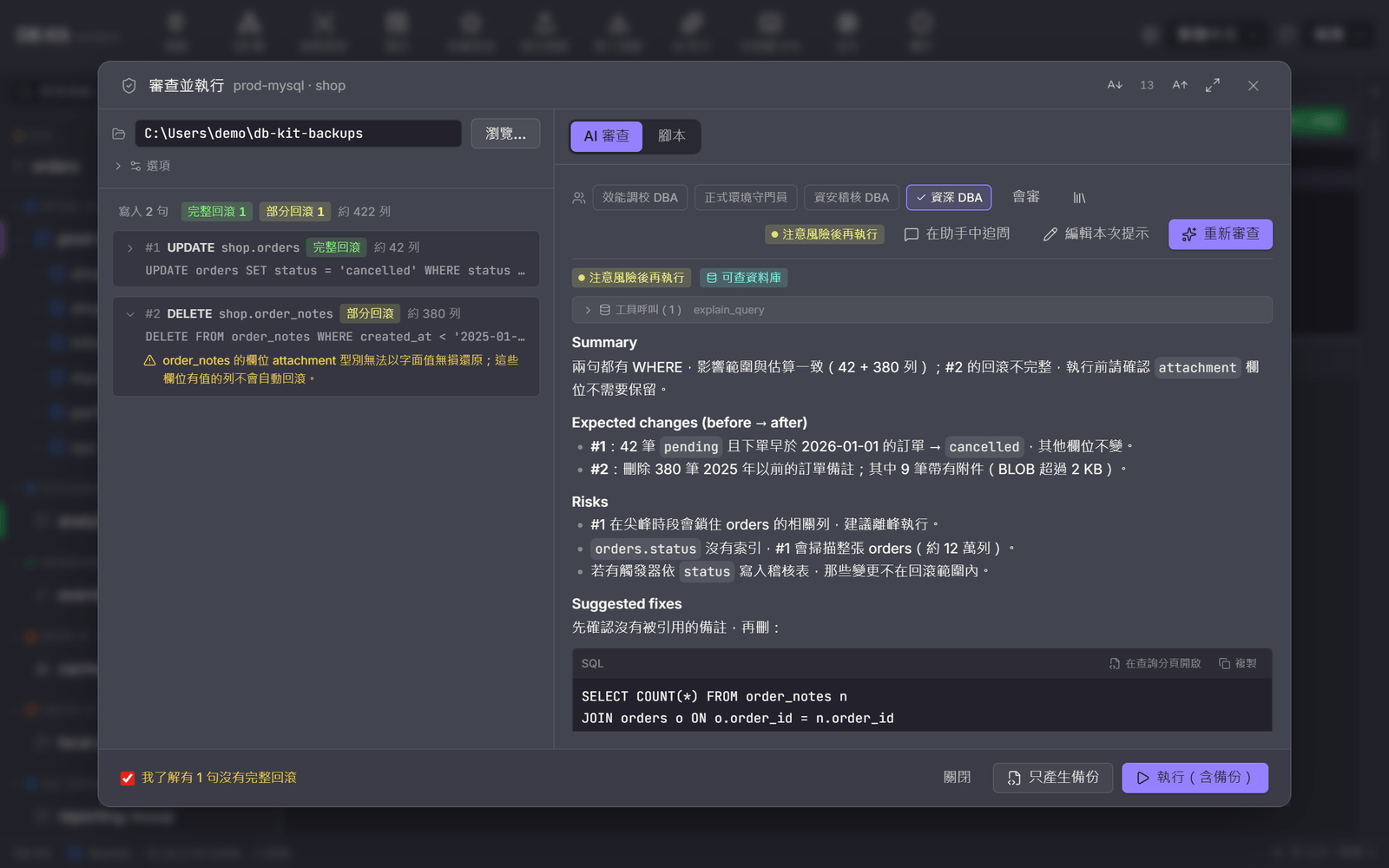
Review & Run
AI review and per-statement analysis before execution: tables touched, estimated rows and rollback level (full / partial / none) on the left; the AI verdict badge, risks and fixes on the right. An incomplete rollback needs an explicit confirmation.
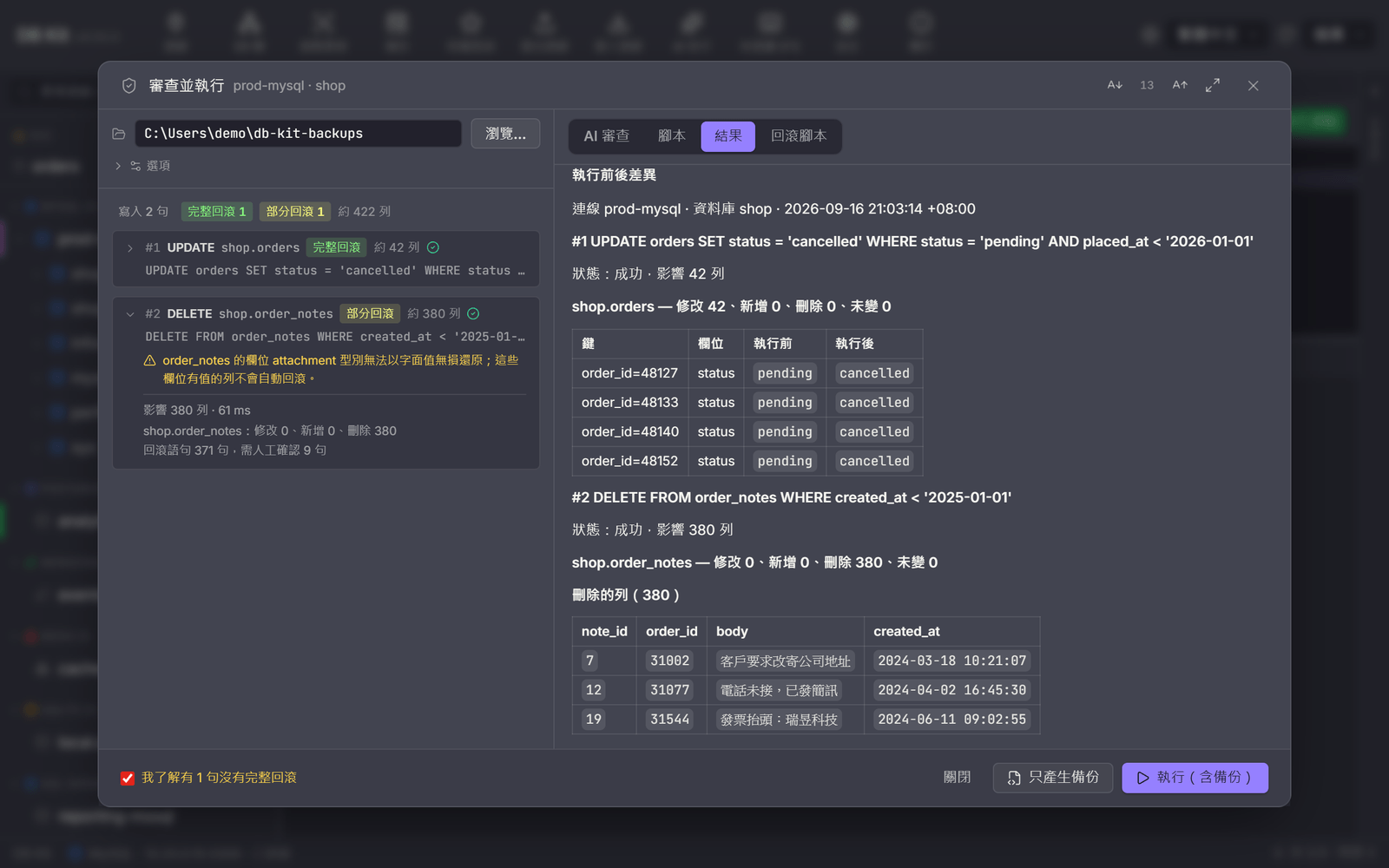
Before / after differences
The Result tab after execution: rows affected and rollback statements per statement, column-by-column before / after values and deleted rows; the full data is saved under snapshots/ in the output folder.
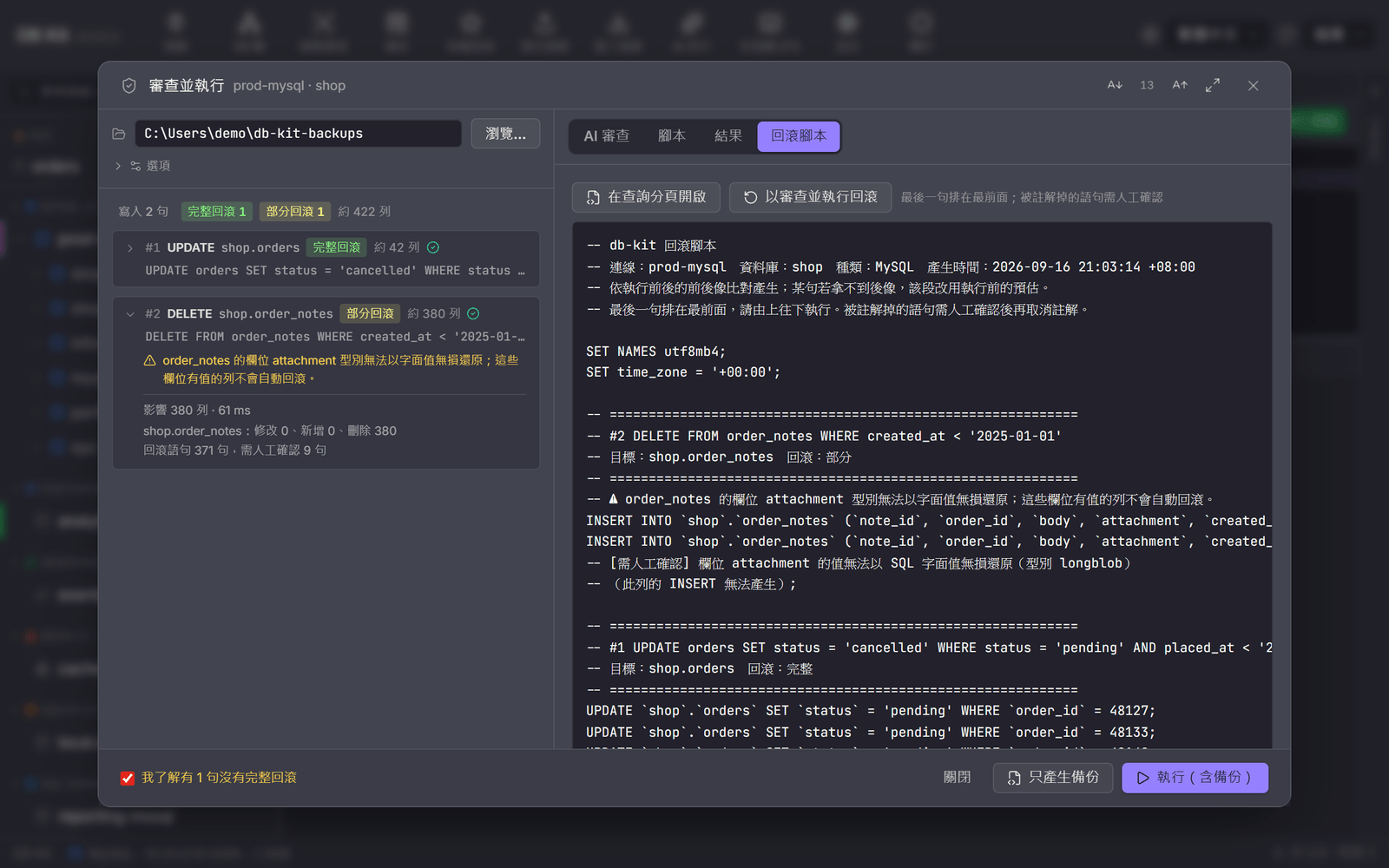
Rollback script
The generated rollback.sql: last statement first, only the columns that actually changed are written back by primary key, and rows that can't be restored losslessly are listed as comments with the reason. The rollback script itself can go through Review & Run.
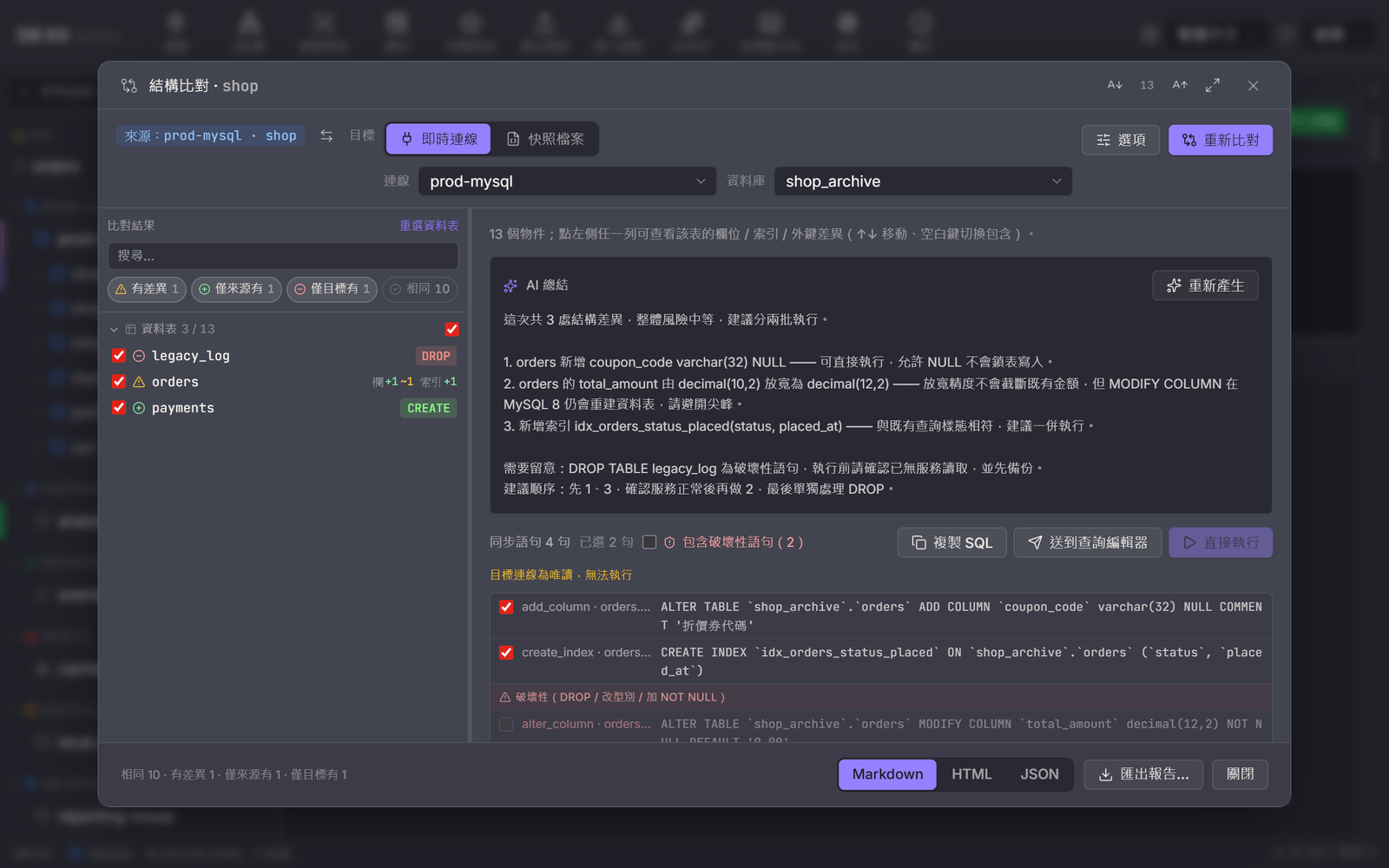
Schema compare
Whole-database results: status chips filter the list on the left, and every row has a checkbox and a diff summary (cols +1 ~1, CREATE, DROP) — unticked objects stay out of the sync script. On the right, the AI summary of risks and execution order; below, the ordered sync statements. Destructive statements are grouped separately and unticked by default, and "Run now" is disabled when the target is read-only.
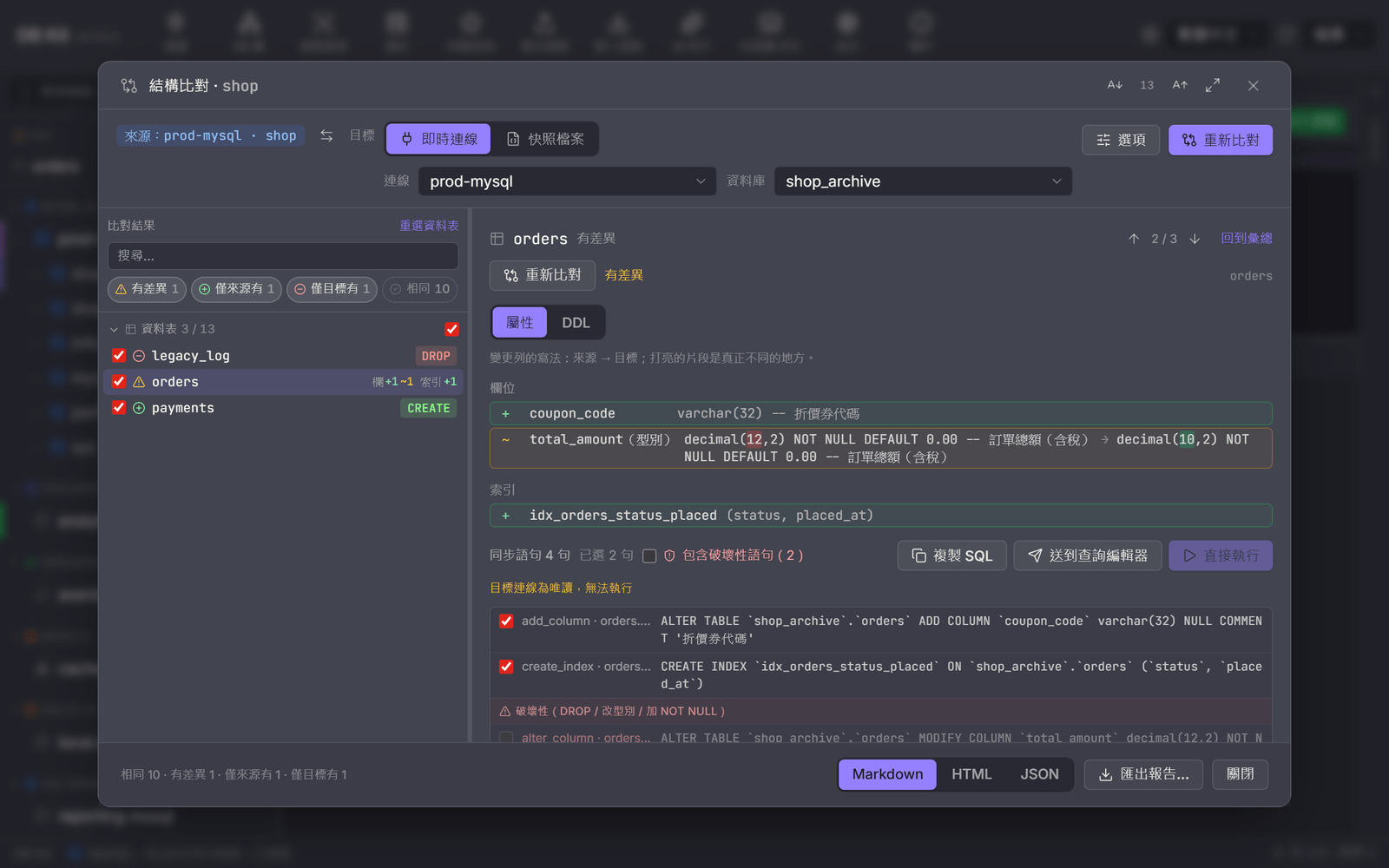
Object differences
Drill into one table: missing columns, changed column types (source → target, with only the parts that differ highlighted) and missing indexes are listed one by one; jump to the previous / next object from the top right, or switch to the DDL tab to see both CREATE statements side by side.
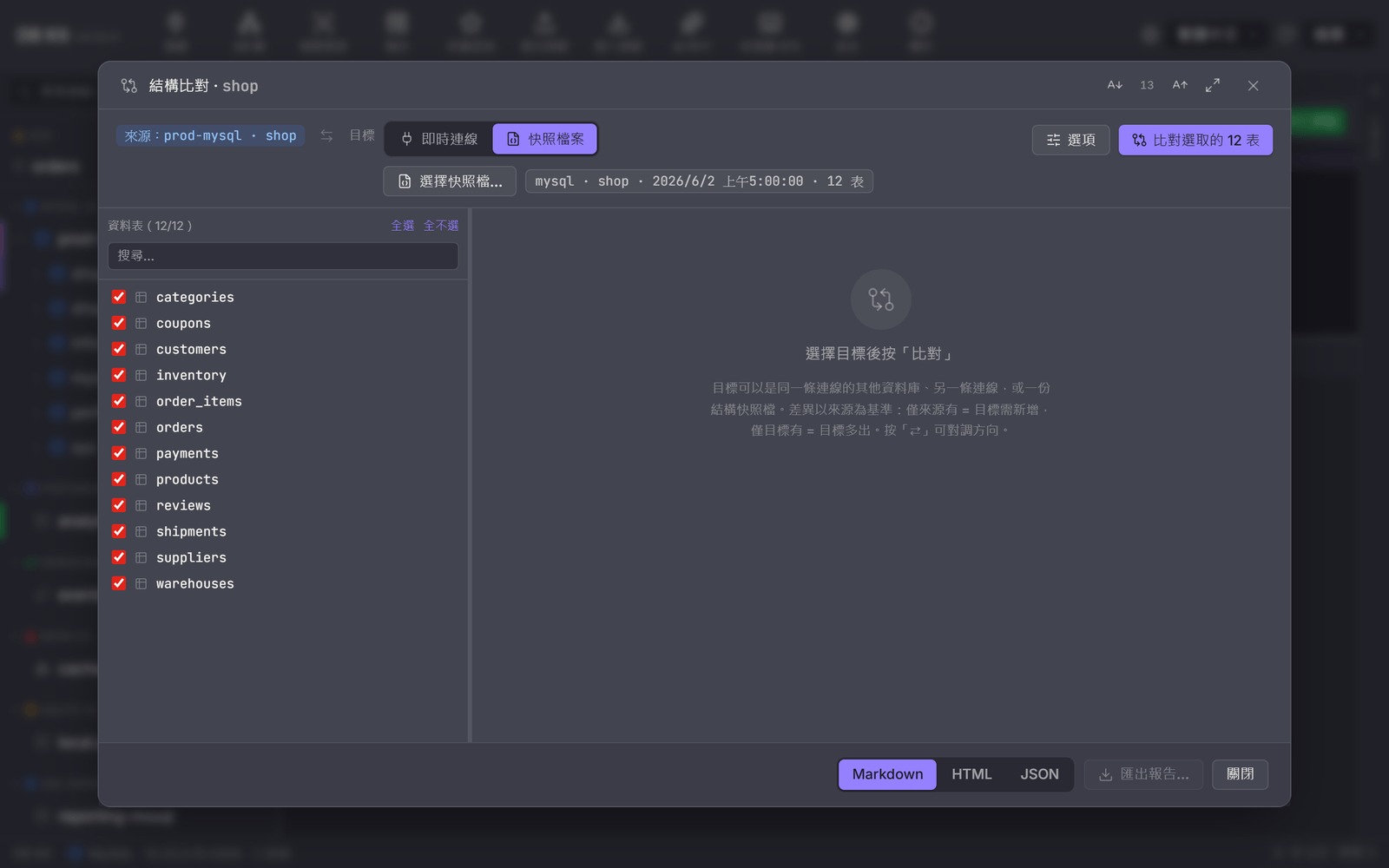
Compare against a snapshot
Switch the target to a snapshot file: load a schema JSON saved earlier (it can live in Git next to your code), check its engine, database, capture time and table count, then compare to see exactly what changed since that release.
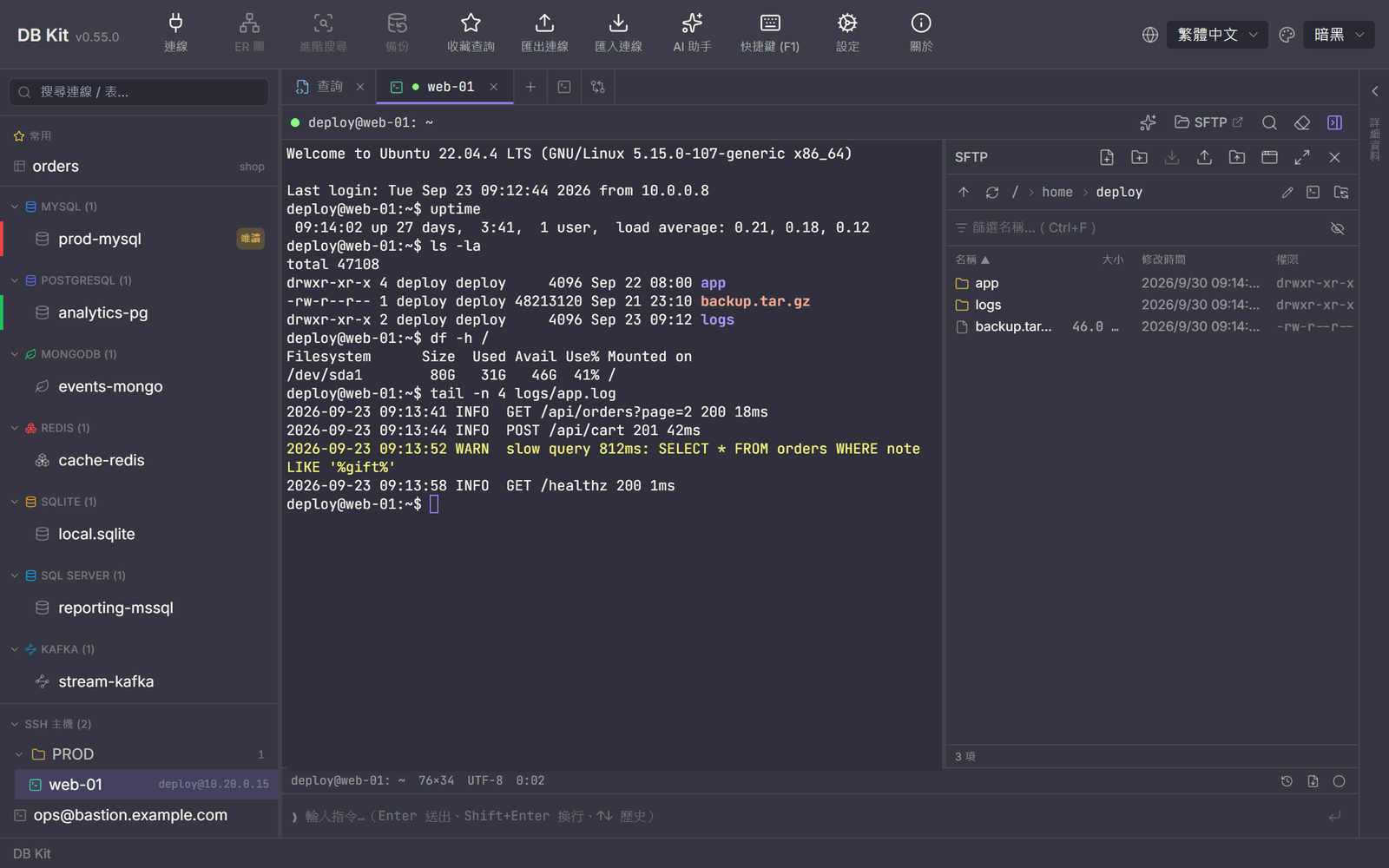
SSH terminal & SFTP
Tabbed terminals with an SFTP panel alongside, a status bar and a command input line at the bottom; SSH hosts live in folders in the same sidebar as your databases.

Docker containers
Containers / images / volumes / networks in the tree, colored by state; container tabs show info, logs, shell, resources and processes, and database containers get "Create database connection".
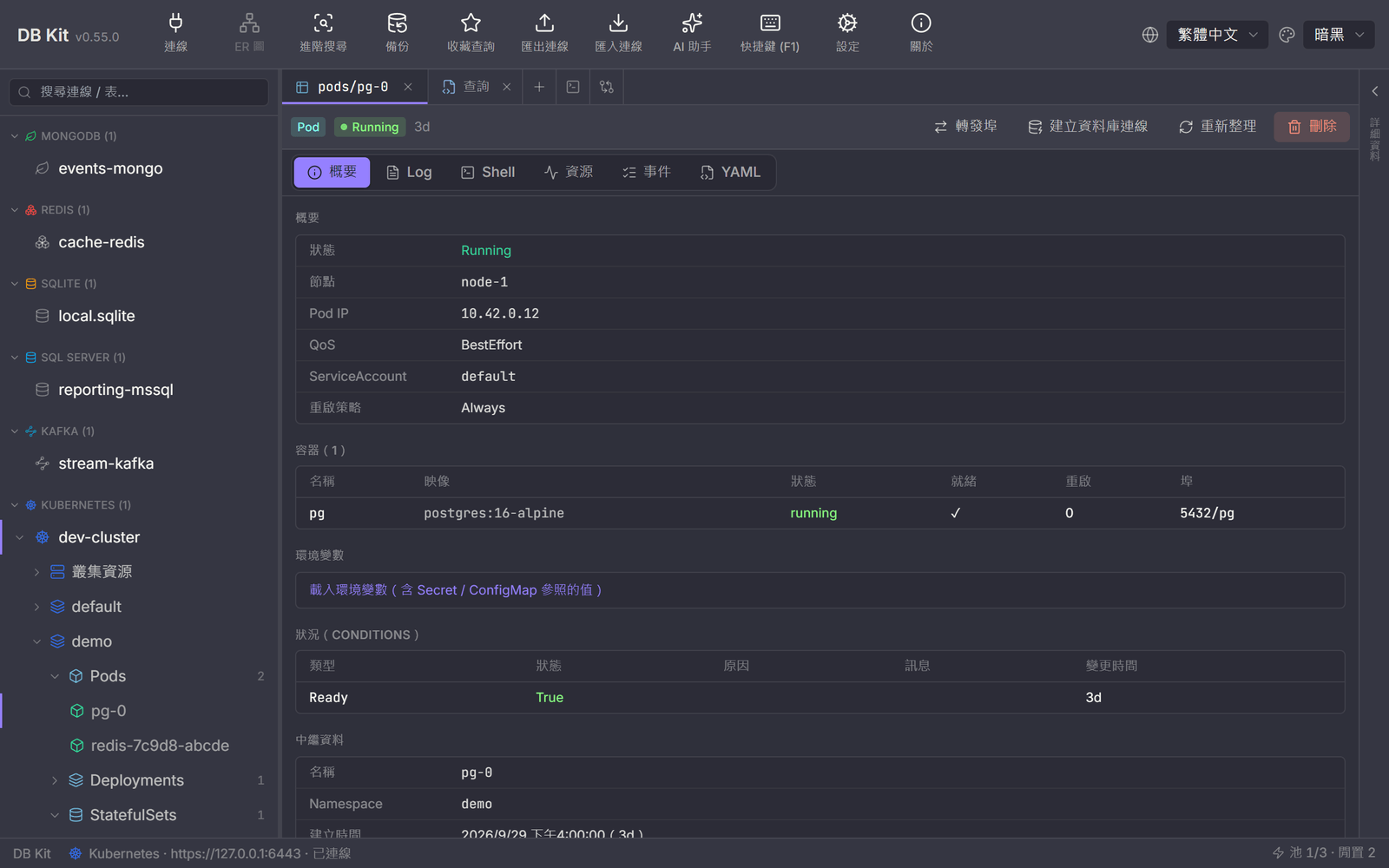
Kubernetes
A namespace → kind → resource tree; Pod tabs show the overview, logs, shell, resources, events and YAML, with port-forward or a direct database connection.
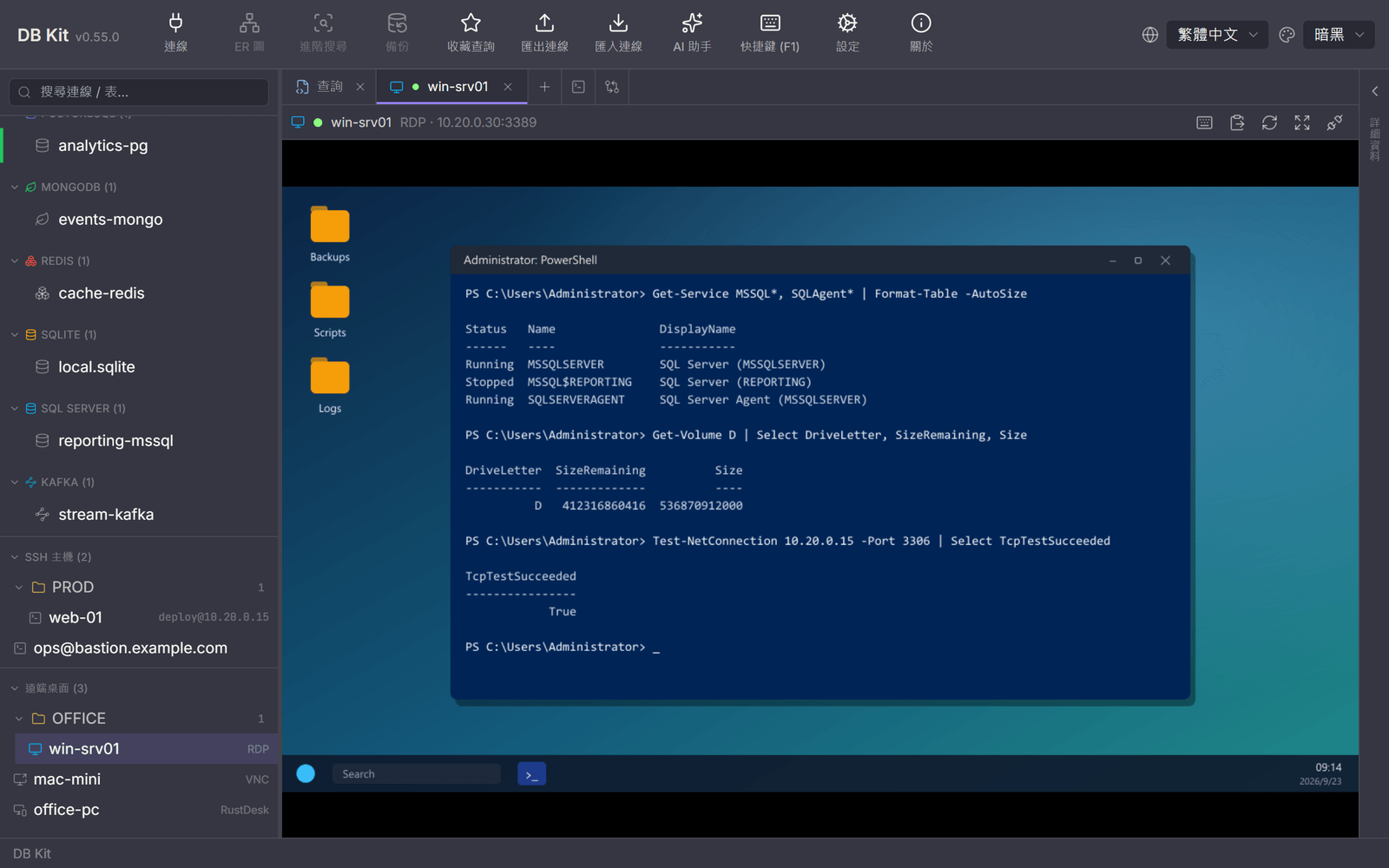
Remote desktop
An RDP session embedded in a tab; the sidebar's remote desktop list groups RDP, VNC / Mac and RustDesk hosts together.
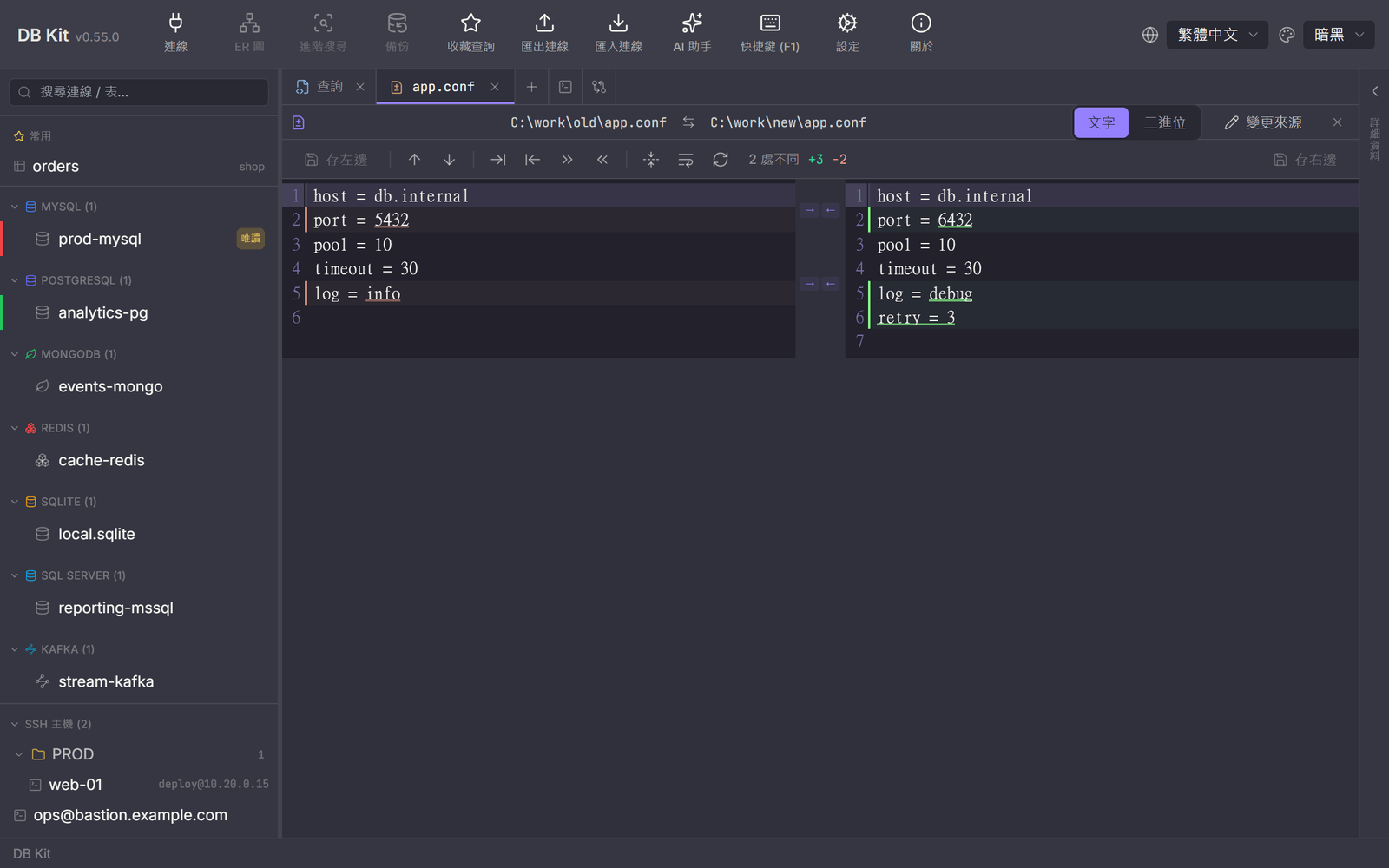
Text compare
Side by side with inline differences highlighted; apply blocks → / ← to the other side and save back to the file — local or on an SSH / FTP host.
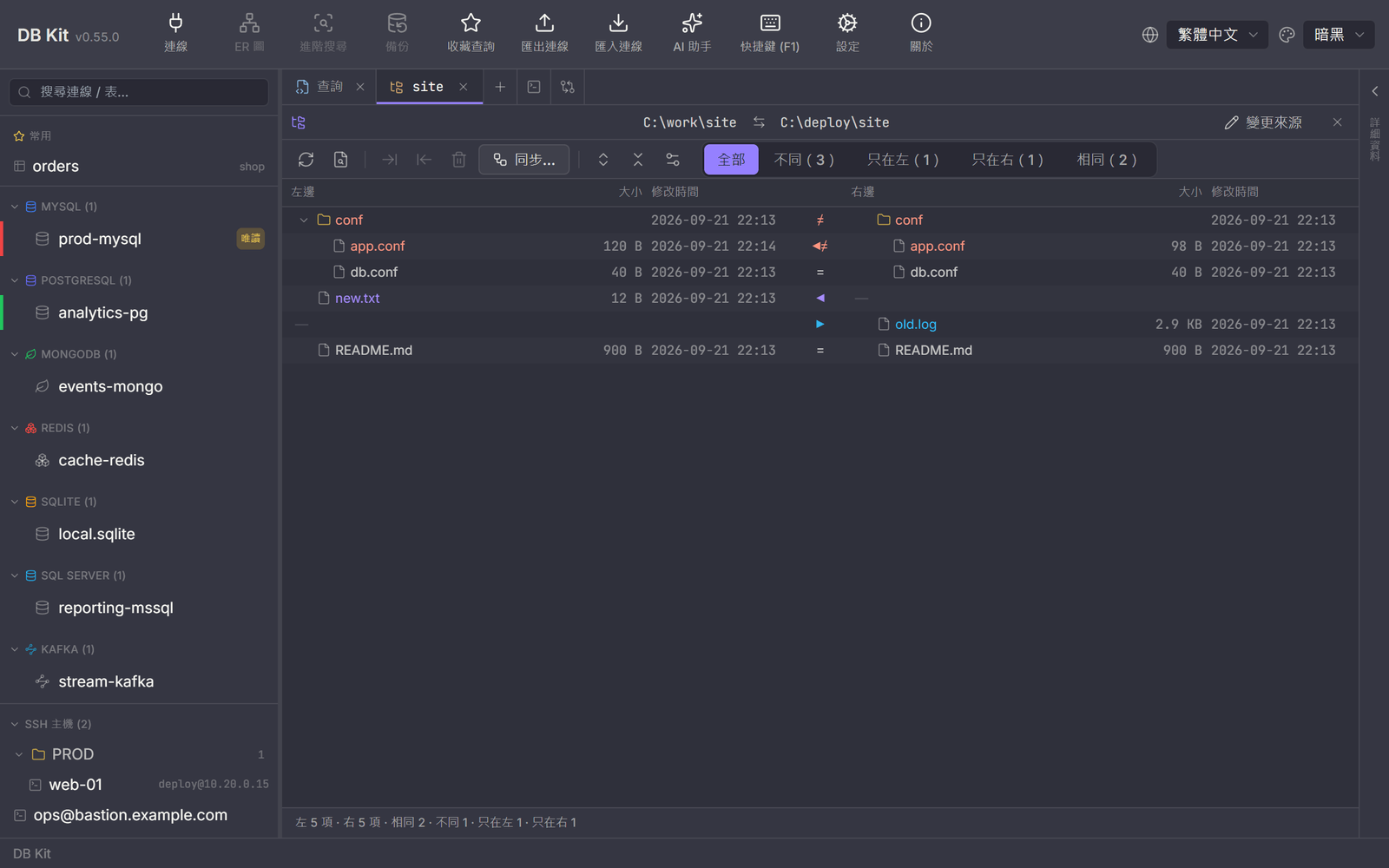
Folder compare
Identical, different and one-side-only entries each get a color and a filter; "Sync…" mirrors or updates one way or both ways, listing every action before it runs.
Tech Stack
Rust backend performance and safety, with a modern frontend experience
Download & Install
Don't want to build it yourself? Grab the installer for your OS from GitHub Releases
Windows 10 / 11
DB.Kit_x.y.z_x64-setup.exe (NSIS, recommended) or _x64_en-US.msi
Download and double-click to run the install wizard.
macOS
DB.Kit_x.y.z_aarch64.dmg (Apple Silicon) / x64.dmg (Intel)
Download the .dmg for your chip and drag the app into Applications.
Linux
.AppImage (no install) / .deb (Debian/Ubuntu) / .rpm (Fedora/RHEL)
chmod +x the .AppImage and run it directly, or install the matching .deb / .rpm package. If the latest release doesn't include Linux files yet, grab the previous release or build from source.
Windows: if SmartScreen warns you, click "More info" → "Run anyway" (the installer isn't paid-code-signed); Tauri needs the WebView2 Runtime — built into Windows 11, and the installer prompts to download it if missing. macOS: the installer isn't Apple-notarized, so if first launch is blocked, right-click the app → "Open", or go to System Settings → Privacy & Security and click "Open Anyway". The app checks GitHub for new versions on startup (or manually from the About dialog), so you won't need to come back for updates. Connecting to Oracle additionally requires the 64-bit Oracle Instant Client (without it, only Oracle connections are affected).
Quick Start
- 1
Install prerequisites: Rust (stable), Node.js 18+, and the Tauri system dependencies.
- 2
Clone https://github.com/markku636/db-kit, enter the project directory and run npm install.
- 3
Run npm run tauri dev for development; run npm run tauri build to produce installers (Windows also has a one-click .msi / .exe build script).
Requires Rust and Node.js 18+; the first build compiles the Rust backend, so allow some time.
The command-line tool dbk
Besides the desktop GUI there's a dbk CLI: read-only queries, browsing, export, backups, stress tests, schema / data compare, review-and-run scripts (per-statement backups + rollback script), stored procedure integration tests (dbk sp-test), file / folder compare and sync (dbk diff / dbk sync), and writes gated behind explicit flags. It reuses the core layer (connection management / export / backup / encryption) without going through Tauri — ideal over SSH, in scripts and in scheduled jobs.
Run a read-only query on a connection saved in the GUI, output CSV
dbk --conn prod-mysql --format csv query "select id,name from users limit 20"Ad-hoc connection (password via env var so it never lands in argv), list tables
DBKIT_PASSWORD=*** dbk --kind mysql --host 10.0.0.5 --user app db listBrowse a table (paging / filtering / sorting)
dbk --conn prod-mysql table data orders --page 0 --page-size 50 --filter "status:=:paid" --sort "created_at:desc"Export a whole table (--data-format takes csv / tsv / xlsx / json / sql / markdown)
dbk --conn prod-mysql export orders --to orders.xlsx --data-format xlsxStress test: 8 threads for 30 seconds with a 5-second ramp, JSON report as a performance baseline
dbk --conn prod-mysql stress "select * from orders where status = 'paid'" --threads 8 --seconds 30 --ramp 5 --format json > baseline.jsonWrites need --yes; without the flag nothing runs and it just prints what it would do (a built-in dry run)
dbk --conn staging exec "update orders set status = 'void' where id = 1001" --yesReview and run a migration script: external AI review, per-statement before-images and a rollback script in the output folder (without --yes only the review and backup are generated)
dbk --conn prod-mysql -d shop run migrate.sql --out ./backups --review-cmd "claude -p" --yesSchema compare: print the DDL that brings prod in line with staging (no DROPs by default; add --apply --yes to run it on the target)
dbk --conn staging -d shop compare schema --dst prod --syncData compare: stream both sides by primary key and write the INSERT / UPDATE statements that make the target match the source
dbk --conn staging -d shop compare data orders --dst prod --sql > sync.sqlCompile a slim Tauri-free binary
cargo build --release --no-default-features --bin dbkThree layers of safety: query / explain only allow read statements (select / with / show / describe / explain / pragma…) and reject anything that writes with a non-zero exit code; writing means switching to exec with --yes; DROP / TRUNCATE / FLUSHDB and UPDATE·DELETE without a WHERE additionally need --force. The check strips strings, comments and parentheses first and only honors a top-level WHERE, so commenting out the condition or hiding it in a subquery won't slip past. stress is always read-only and has no --allow-writes. --kind supports mysql / mariadb / postgres / sqlite / mongo / redis / mssql / oracle (Kafka / Elasticsearch / RabbitMQ are GUI-only); --url takes a single connection string (e.g. oracle://user:pass@host:1521/SERVICE); the global --lang zh-TW|en switches message language (shared with the GUI, --help included). Pairing it with a read-only database account is still recommended as a second line of defense.
Read the full CLI guide (docs/cli.md)Want to manage every database from one interface?
Free, open source (MIT) and cross-platform. See the full docs, installers and source on GitHub.
Every tool here is free and open source
No paywall, no sign-up, and the source is public on GitHub. If one of them saved you time, buy me a coffee so the updates and the next tool keep coming.
Deal
Stay online when you work abroad
eSIM 226 is a travel eSIM covering 190+ destinations worldwide: buy the plan before you fly, scan the QR code on landing and you are online. No SIM swap, no roaming bill, and your own number stays in the phone to keep receiving bank SMS. Japan 3GB / 15 days starts around US$3.4, so a short trip never costs a full month. Use TRAVEL30 for 30% off sitewide. Cannot be combined with other promo codes.
- 190+ destinations across Asia, Europe and the Americas
- Instant QR activation, nothing to ship or queue for
- Local rates instead of roaming, no bill shock at home
Affiliate link. Buying through it may earn this site a small commission, at no extra cost to you.