
Writing the plugin scripts
In Kong custom plugin development, handler.lua and schema.lua are the two core files — they define the plugin's logical behavior and configuration structure.
- handler.lua: writes the plugin's "behavioral logic" — defining how the plugin intercepts or processes API requests and responses
- schema.lua: defines the plugin's "configuration format" — telling Kong what parameters, types, and rules the plugin needs
Writing handler.lua
-- Import required Kong modules
local kong_meta = require "kong.meta"
local cjson = require "cjson.safe"

-- Define basic plugin info
-- PRIORITY: execution priority — higher = earlier
-- VERSION: plugin version
local CustomHandler = {
  PRIORITY = 990,
  VERSION = "1.0",
}

-- The plugin's main handler
-- Runs in the access phase — handles logic before the request is processed
function CustomHandler:access(plugin_conf)
  kong.log(">>>>>>>> plugin starting <<<<<<<<")

  -- Extract parameters from the plugin config
  kong.log(">>>>>>>>> Step 1: load config parameters <<<<<<<<<")
  local METHOD = plugin_conf.method
  local HEADERS = plugin_conf.headers
  local BODY = plugin_conf.body
  kong.log(">>>>>>>>> config loaded <<<<<<<<<")

  -- Log config info
  kong.log(">>>>>>>>> Step 2: log config info <<<<<<<<<")
  kong.log(">>>>>>>>> request method = ", cjson.encode(METHOD), "<<<<<<<<<")
  kong.log(">>>>>>>>> request headers = ", cjson.encode(HEADERS), "<<<<<<<<<")
  kong.log(">>>>>>>>> request body = ", cjson.encode(BODY), "<<<<<<<<<")
  kong.log(">>>>>>>>> config logged <<<<<<<<<")

  -- The access phase doesn't require a return value; the request continues processing
  -- To modify the request, set headers or other attributes here
end

return CustomHandler
Writing schema.lua
local typedefs = require "kong.db.schema.typedefs"

return {
  name = "log-traffic",
  fields = {
    { protocols = typedefs.protocols_http },
    { config = {
        type = "record",
        -- Add fields matching the config used in handler.lua
        fields = {
          { method = { type = "string", default = "GET"} },
          { headers = {
            type = "map",
            keys = typedefs.header_name {
              match_none = {
                {
                  pattern = "^[Hh][Oo][Ss][Tt]$",
                  err = "cannot contain 'Host' header",
                },
                {
                  pattern = "^[Cc][Oo][Nn][Tt][Ee][Nn][Tt]%-[Ll][Ee][nn][Gg][Tt][Hh]$",
                  err = "cannot contain 'Content-Length' header",
                },
              },
            },
            values = {
              type = "string",
              referenceable = true,
            },
          }},
          { body = {
            type = "map",
            keys = {
              type = "string",
              referenceable = true,
            },
            values = {
              type = "string",
              referenceable = true,
            },
          }},
        },
      },
    },
  },
}
P.S. VS Code emmyLua can speed up development.
Deploying the custom plugin
Kong recommends placing custom Plugins under Kong's Lua path or under /usr/local/share/lua/5.1/kong/plugins/ in the Docker image. During development, keeping it inside the project folder is fine — copy it to the right place at deployment time, or use a Docker volume mount.
Copy the plugin into the container
docker cp log-traffic kong:/usr/local/share/lua/5.1/kong/plugins
Enter the Kong container
docker exec -it -u root kong /bin/sh
Install an editor
apt update && apt install -y vim
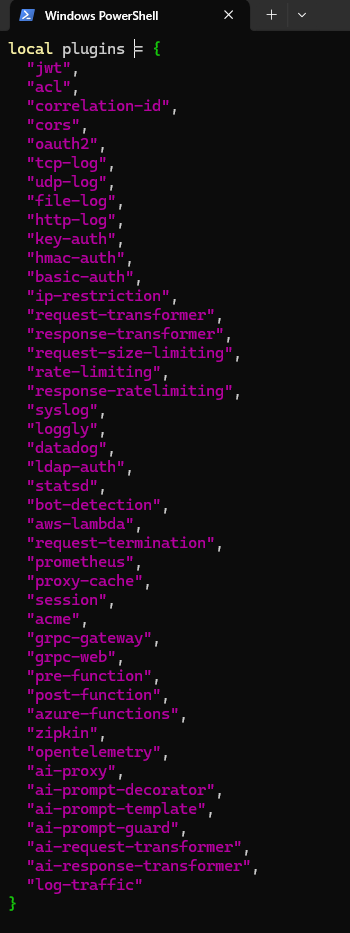
Edit the plugin list
vim /usr/local/share/lua/5.1/kong/constants.lua
Add your plugin's name "log-traffic" to the plugin list.
Set Kong configuration
| File location | Description |
|---|---|
/etc/kong/kong.conf.default | Default template — don't modify directly |
/etc/kong/kong.conf | Live config (copied from default) |
Create/edit /etc/kong/kong.conf:
vim /etc/kong/kong.conf
Add the following:
plugins = bundled,log-traffic  # Specify which plugins to load
# lua_package_path = /kong/plugins/?.lua;; # Specify the custom-plugin directory
Restart the Docker container
docker restart kong
Check whether the custom plugin loaded
After restart, check whether your custom plugin is in the supported list:
http://localhost:8001/plugins/enabled
Apply the plugin to a service or route
Apply to a service:
POST http://localhost:8001/services/{service}/plugins
Content-Type: application/json

{
  "name": "log-traffic"
}
Apply to a route:
POST http://localhost:8001/routes/{route}/plugins
Content-Type: application/json

{
  "name": "log-traffic"
}
View applied plugins: http://localhost:8001/plugins/
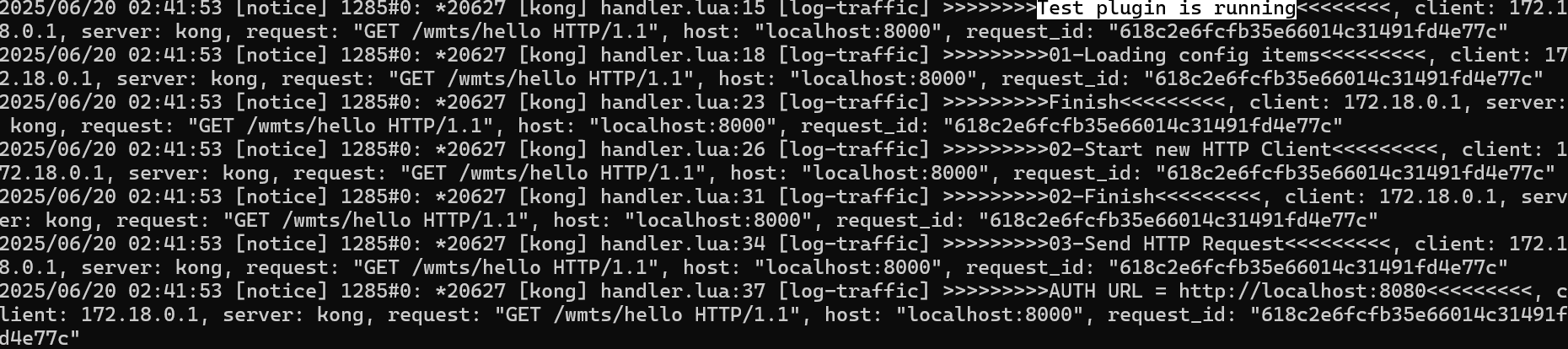
Verify it works
Check Docker logs to confirm the plugin is running:
docker logs kong
Common dev and debug tips
1. Plugin Hot Reload
Kong itself doesn't support Lua Plugin hot reload — every plugin change requires restarting the Kong container. During development:
- Use a Docker volume to mount the plugin directory — restart the container to load new code.
- Write a simple shell script that auto-restarts Kong and tails logs to boost dev efficiency.
2. Plugin logging and debugging
- Use
kong.log.inspect()for convenient table-structure output — easier to debug. - You can use
print()too, but preferkong.logAPIs so logs appear in Kong's standard log stream.
Example:
kong.log.inspect(plugin_conf)
3. Plugin lifecycle (phases)
Kong Plugins support multiple execution phases. Common ones:
access: before request is processedheader_filter: process response headerbody_filter: process response bodylog: after request ends
Implement phase-specific functions as needed:
function CustomHandler:header_filter(conf)
  kong.response.set_header("X-My-Plugin", "active")
end
4. Plugin testing
- Use Postman or curl to test APIs — verify the plugin intercepts and processes correctly.
- Use Kong's Admin API to query plugin status and logs.
5. Plugin parameter validation
- schema.lua can set defaults, required fields, types, and regex validation — reducing errors.
- If validation fails, Kong automatically returns 400.
Advanced applications
1. Database interaction
If your plugin needs to access the database, use Kong's DAO (Data Access Object) API — e.g., for Postgres:
local dao = kong.db.your_custom_table
local row, err = dao:select({ id = some_id })
2. External API calls
Use a Lua HTTP client (like resty.http) to call external APIs from inside the plugin:
local http = require "resty.http"
local httpc = http.new()
local res, err = httpc:request_uri("https://api.example.com", { method = "GET" })
Local debugging tips
- In docker.yaml, db host or redis host must use static IPs — not Docker network names — or debugging will break.
host = os.getenv("KONG_PG_HOST") or "192.168.201.101",
- Local debug can't read env vars from the docker.yaml, so provide defaults:
 return {
    host = os.getenv("KONG_PG_HOST") or "192.168.201.101",
    port = tonumber(os.getenv("KONG_PG_PORT")) or 5432,
    database = os.getenv("KONG_PG_DATABASE") or "kong",
    user = os.getenv("KONG_PG_USER") or "kong",
    password = os.getenv("KONG_PG_PASSWORD") or "kong",
    pool_size = 10,
    pool_name = "custom_acl_pool"
  }
- try catch
In Lua (including Kong plugin development), pcall(function) is short for "protected call" — used to safely execute potentially-failing code without crashing the entire request flow.
Main use: catch runtime errors. If the function has an error inside (DB connection failure, syntax errors, etc.), pcall catches it without letting the Lua script crash. Returns error info: pcall returns two values — success (boolean indicating whether an error occurred) and result (return value on success, error message on failure).
FAQ
Q: My plugin isn't taking effect — what should I do?
A:
- Check whether the plugin is in
/usr/local/share/lua/5.1/kong/plugins/ - Check whether it's added to the plugins list in
/etc/kong/kong.conf - Verify schema.lua and handler.lua syntax
- Check Kong logs for error messages
Q: How do I manage multiple custom Plugins?
A:
- Put each plugin in its own folder for maintenance
- Write a Makefile or shell script for auto-deployment to Docker


Comments