
Background
This is my second time working on an Amazon Pay integration. The first time was right after I joined the company, helping to fix an issue where Amazon Pay was constantly dropping orders. This time, I'm re-integrating Amazon Pay for a German e-commerce site, and I've taken this opportunity to refine the integration techniques.
Related Documentation
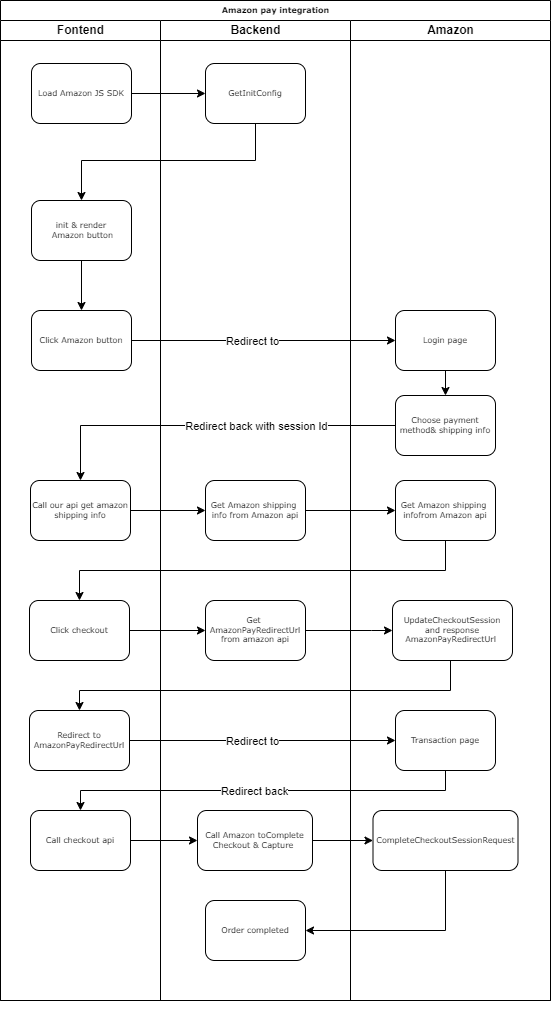
Integration Flowchart
Amazon Pay Checkout is actually quite similar to PayPal Express Checkout.
First, Obtain the Necessary Amazon Pay Keys
Next, go to the seller central > select Sandbox View > Integration central
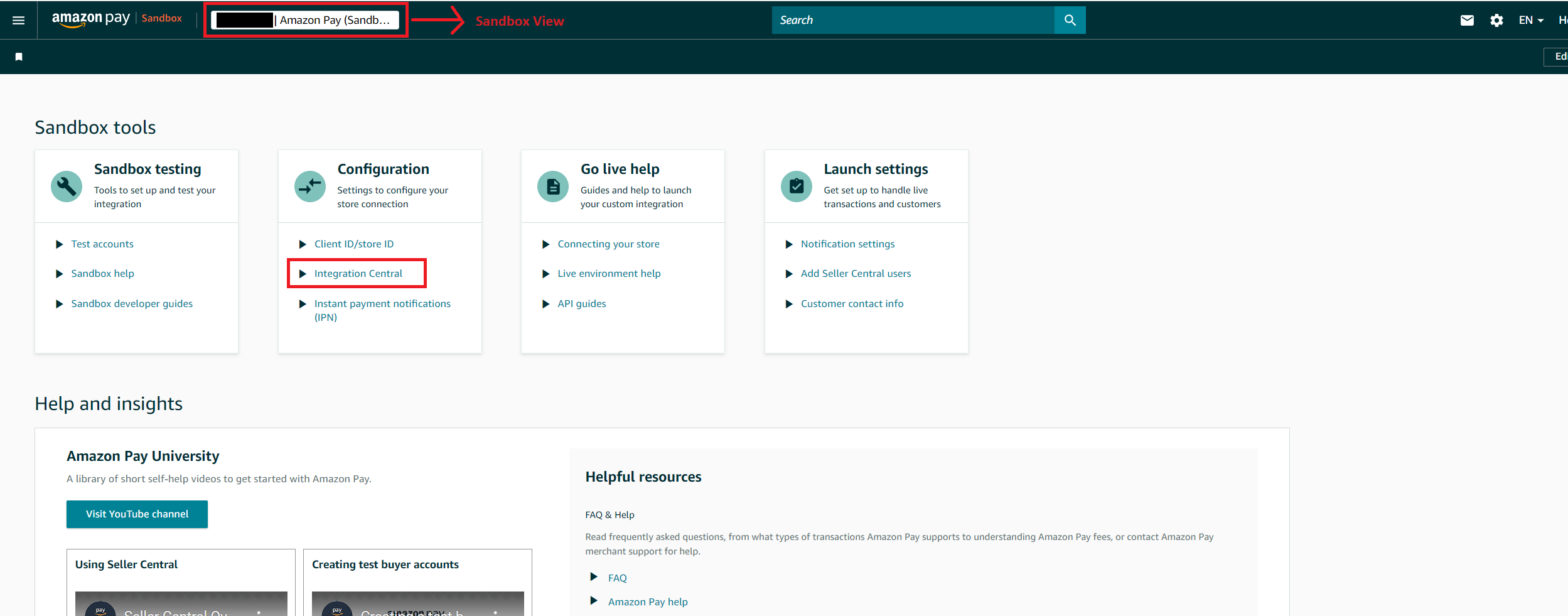
I have accounts for two different countries, and after comparing them, I found a bug here. One of the accounts couldn't find the "Self-Developed" option, so the "Create keys" button (for uploading a public key) wasn't displayed.
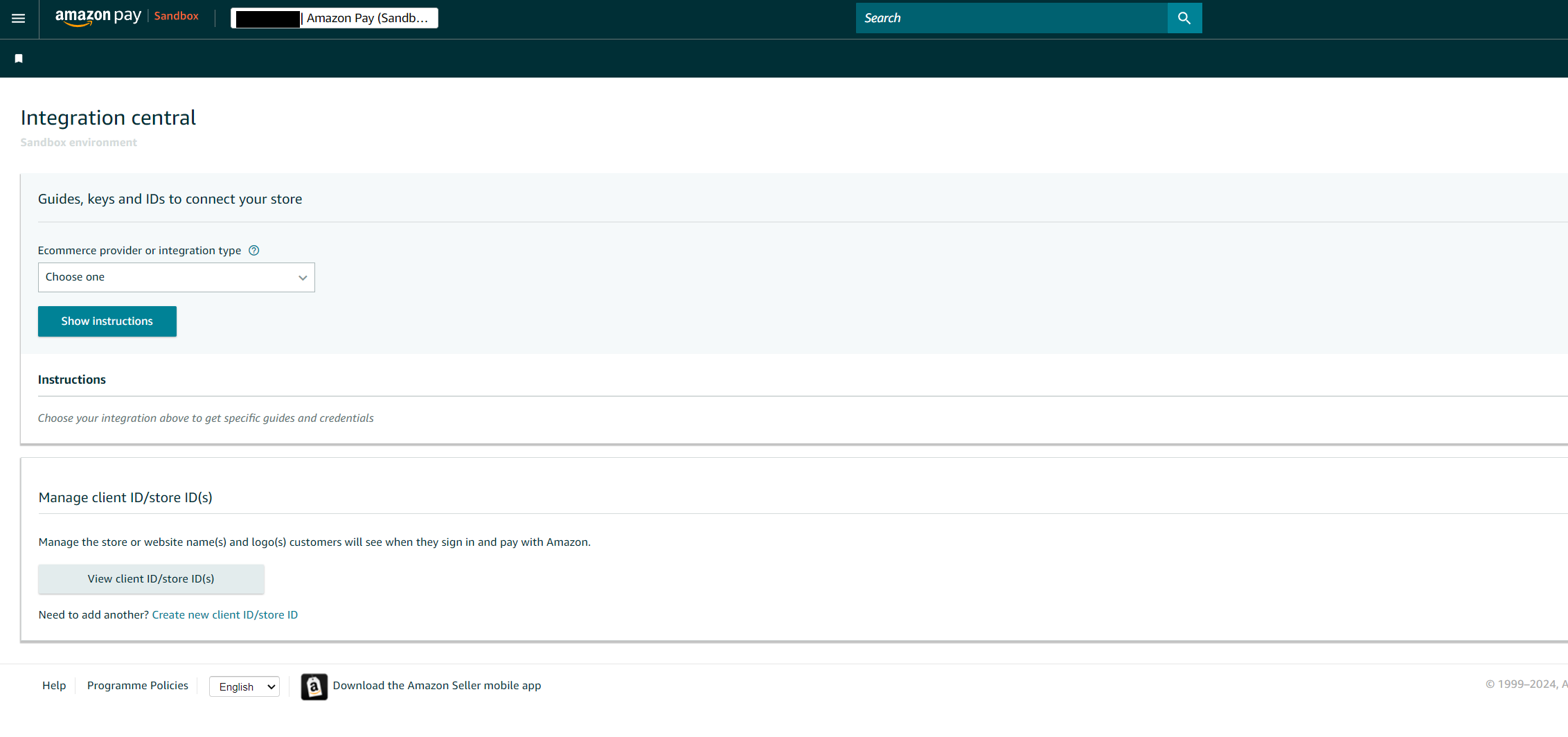 If you don't have the "Self-developed" dropdown option, you can select "Woo Commerce" instead.
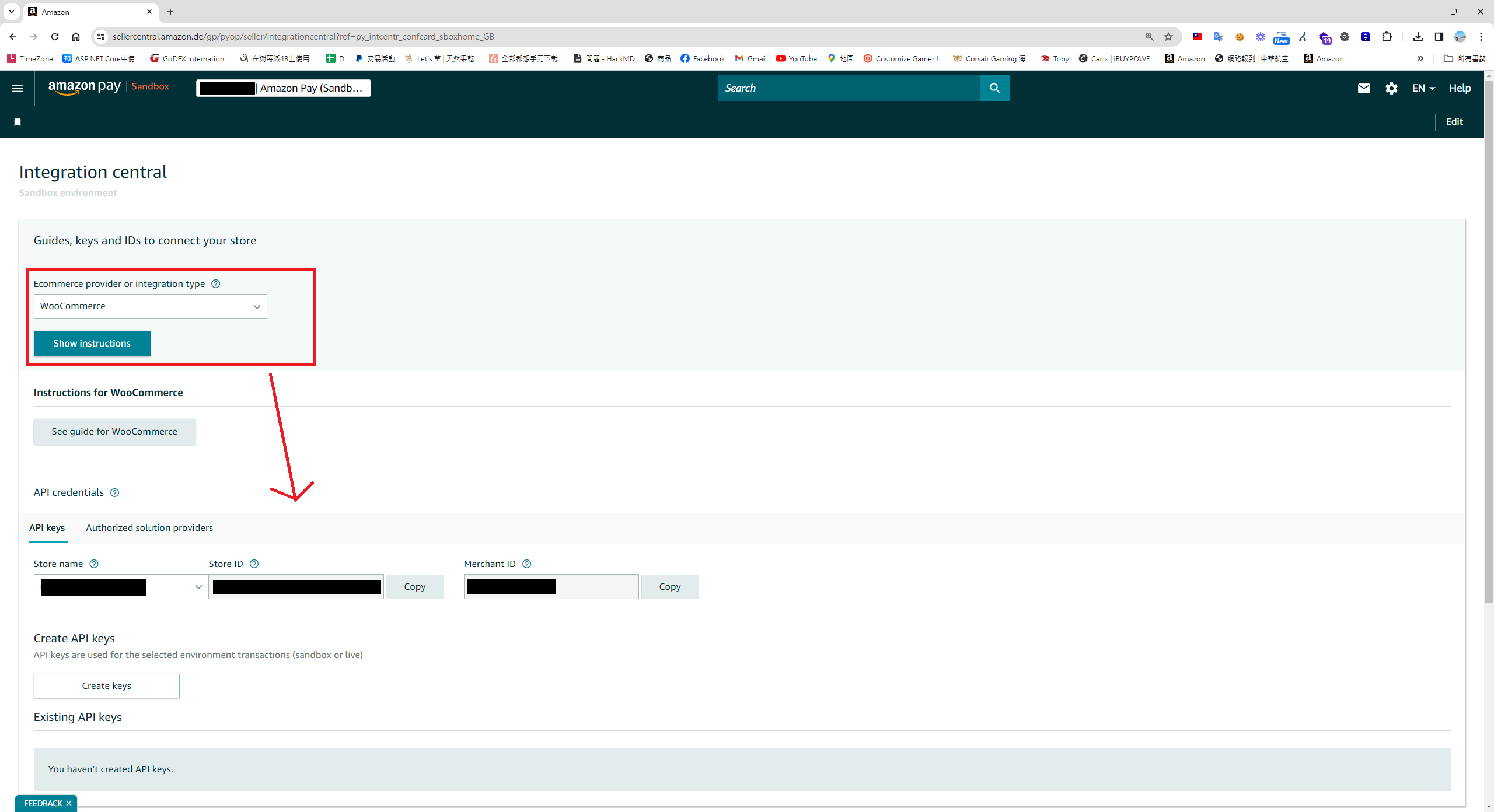
Following the official Doc, generate an RSA public and private key.
ssh-keygen -t rsa -b 2048 -m PKCS8 -f privateKey.pem
ssh-keygen -f privateKey.pem -e -m PKCS8 > publicKey.pub
The first option seems to be broken; it only generates a public key and doesn't let you download the private key. Please choose the second option and upload your Amazon Pay public key yourself.
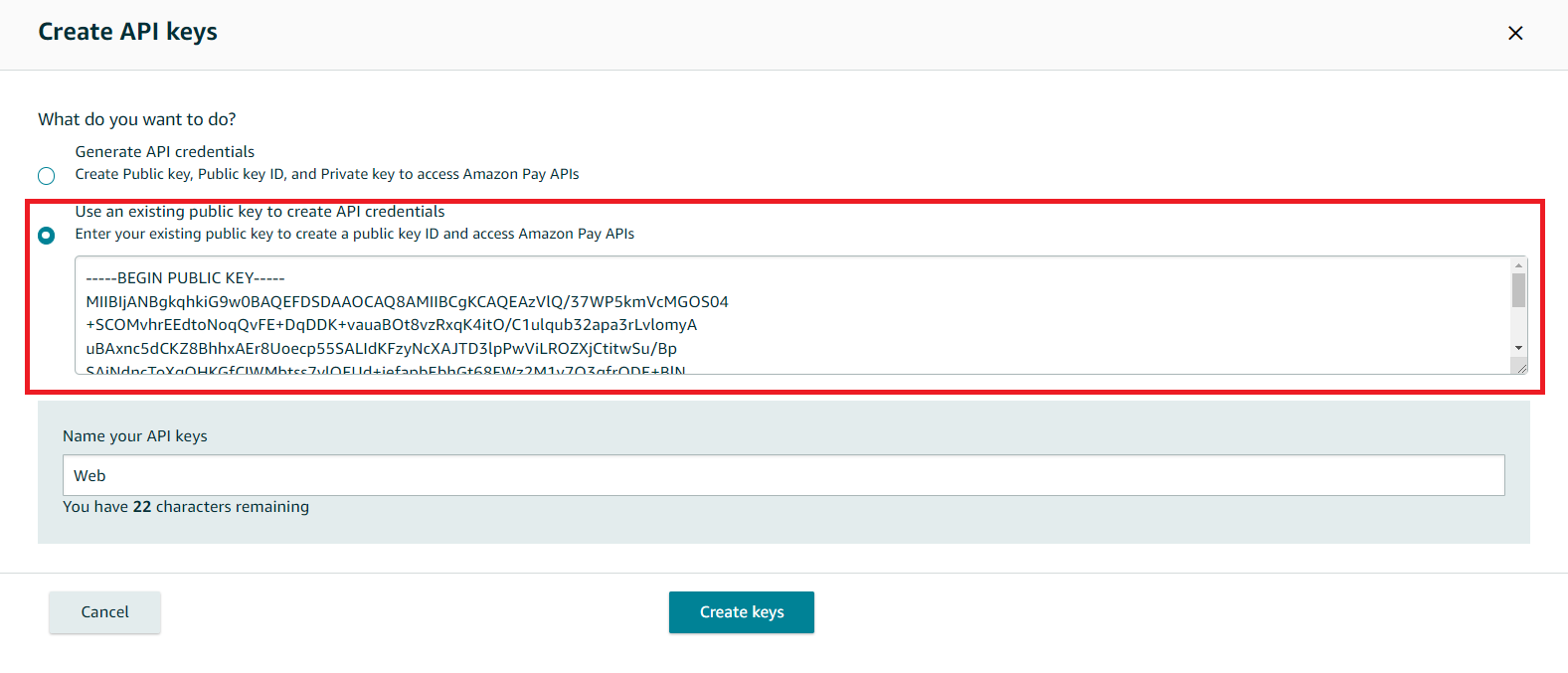
On this screen, you'll find most of the keys you need.
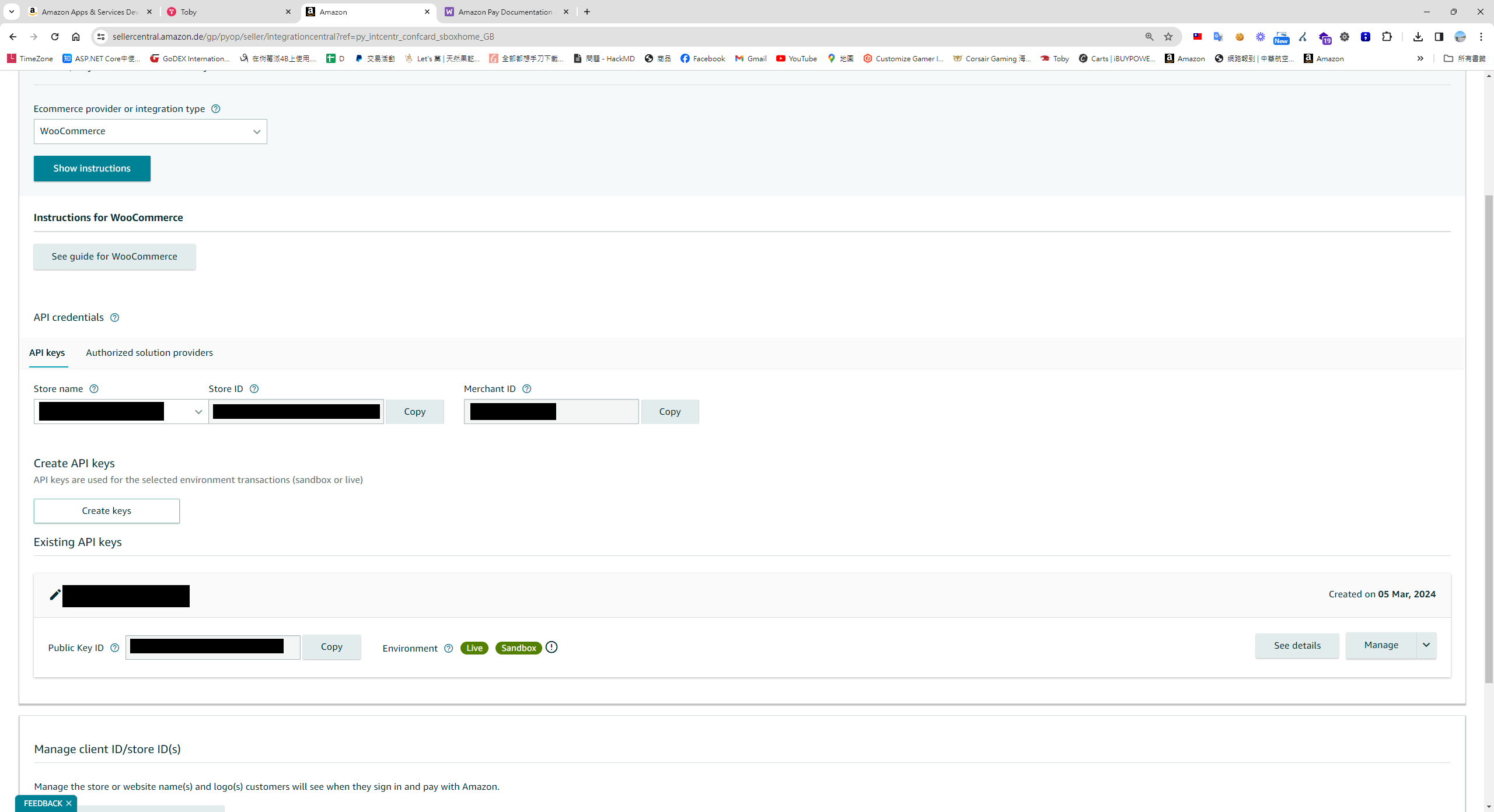
However, you'll need to find the Store ID and Client Secret on a different page.
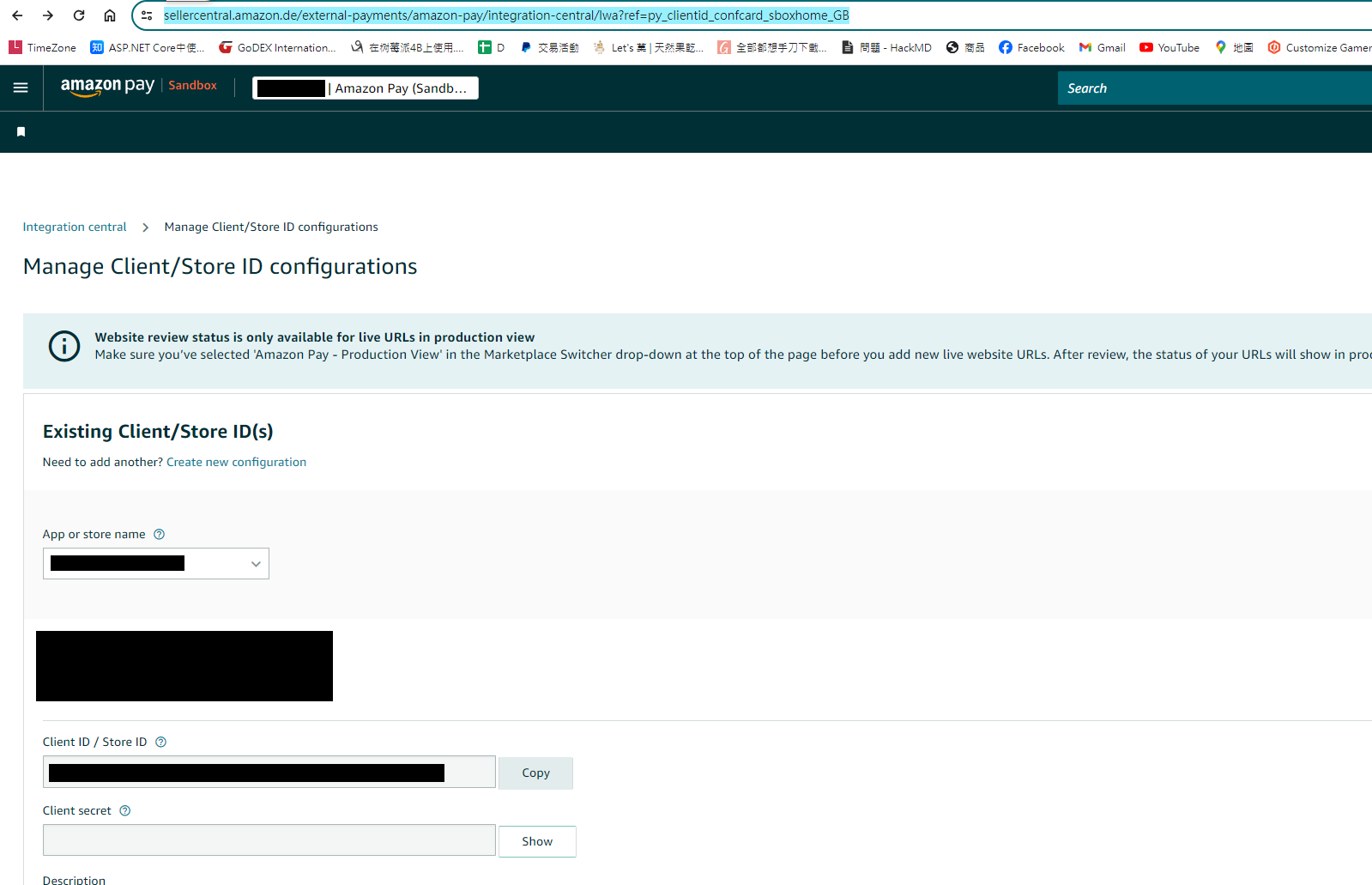
Important Notes for Testing
- Because Amazon Pay's payment flow involves multiple redirects, you need HTTPS and your own domain. I used a Cloudflare Tunnel as a reverse proxy for testing.
- It's quite convenient that the production and test keys are the same. To use the Sandbox environment, you just need to set
isSandboxtotrueduring initialization. - Regarding test accounts, go to the seller central, switch to Sandbox view, and you'll find Test accounts. You can add sandbox test accounts here.
Frontend Example - React (Next.js App Router)
'use client';
import { PaymentReturnType } from '@/const/cart/payment-image';
import { PaymentOptions } from '@/const/payment/payment-option';
import {
    useBuildPaymentInfoMutation,
    useCaptureMutation,
    useLazyGetConfigQuery,
    useProcessMutation,
} from '@/redux/api/test-payment-apiSlice';
import { IGeneralPaymentInfo, IGeneralPaymentResult, IGernalPaymentParams } from '@/typing/cart';
import { ApiResponse } from '@/typing/common';
import { useSearchParams } from 'next/navigation';
import { useEffect, useRef } from 'react';
import { v4 as uuidv4 } from 'uuid';

export default function TestAmaonPay() {
    const gernalPaymentParams: IGernalPaymentParams = {
        paymentTypeCode: PaymentOptions[PaymentOptions.Paypal],
        orderNo: uuidv4(),
    } as IGernalPaymentParams;

    const [GetConfig, result] = useLazyGetConfigQuery(); // rtk query 取得sdk 初始化的參數

    const [Process] = useProcessMutation(); // rtk query 用來呼叫建立建立授權訂單的api

    const [Capture] = useCaptureMutation(); // rtk query 用來呼叫提取信用及完成訂單的api
    const [BuildPaymentInfoMutation] = useBuildPaymentInfoMutation(); // rtk query 用來取得Amazon Pay 付款資訊

    const amazonCheckoutSessionId = useRef('');
    const amazonHasRedirectedBack = useRef(false);

    const searchParams = useSearchParams();

    const loadAmazonPay = () => {
        const script = document.createElement('script');

        script.src = 'https://static-eu.payments-amazon.com/checkout.js';
        script.async = true;
        script.onload = () => {
            // debugger;
            if (window.amazon && window.amazon.Pay) {
                GetConfig(gernalPaymentParams.paymentTypeCode)
                    .unwrap()
                    .then((data: any) => {
                        if (!data) {
                            return;
                        }
                        window.amazon.Pay.renderButton('#amazonpaybutton', {
                            merchantId: data.merchantId,
                            sandbox: data.isSandbox === 'True', // dev environment
                            ledgerCurrency: data.ledgerCurrency, // Amazon Pay account ledger currency
                            checkoutLanguage: 'en_GB', // render language
                            productType: 'PayAndShip', // checkout type
                            placement: 'Cart', // button placement
                            buttonColor: 'Gold',
                            createCheckoutSessionConfig: {
                                payloadJSON: data.payloadJSON,
                                signature: data.signature,
                                publicKeyId: data.publicKeyId,
                            },
                        });
                    });
            }
        };
        document.body.appendChild(script);
    };

    const getPaymentInfoFromToken = (token: string) => {
        const params: IGernalPaymentParams = { ...gernalPaymentParams, paymentGatewaySessionID: token };

        BuildPaymentInfoMutation(params)
            .unwrap()
            .then((res: ApiResponse<IGeneralPaymentInfo>) => {
                document.getElementById('paymentInfo')!.innerText = JSON.stringify(res.data);
            });
    };

    useEffect(() => {
        // Dynamically load the Amazon Pay script
        loadAmazonPay();
        const session = searchParams?.get('amazonCheckoutSessionId') || '';

        const isComplete = searchParams?.get('isComplete') || '';

        if (session) {
            amazonCheckoutSessionId.current = session;
            amazonHasRedirectedBack.current = true;

            if (!isComplete) {
                getPaymentInfoFromToken(session);
            } else {
                const params: IGernalPaymentParams = {
                    ...gernalPaymentParams,
                    paymentGatewaySessionID: session,
                };

                Capture(params)
                    .unwrap()
                    .then((res: ApiResponse<IGeneralPaymentResult>) => {
                        if (res.isSuccess) {
                            alert('Payment success');
                        }
                    });
            }
        }
    }, []); // Empty dependency array means this effect runs once on mount

    const clickHandler = () => {
        const params: IGernalPaymentParams = {
            ...gernalPaymentParams,
            paymentGatewaySessionID: amazonCheckoutSessionId.current,
        };

        Process(params)
            .unwrap()
            .then((res: ApiResponse<IGeneralPaymentResult>) => {
                // debugger;
                if (res.isSuccess && res.data.paymentReturnType === PaymentReturnType.RedirectUrl) {
                    location.href = res.data.paymentReturnValue;
                }
            });
    };

    return (
        <div>
            <h1>test amazon pay</h1>
            <div id="amazonpaybutton"></div>
            <div id="paymentInfo"></div>

            <button
                className="bg-blue-500 hover:bg-blue-700 text-white font-bold py-2 px-4 rounded"
                onClick={clickHandler}
            >
                Checkout
            </button>
        </div>
    );
}
Backend Example - C#
First, install the Amazon.Pay.API.SDK NuGet package.
Define the backend configuration - Appsetting.json
"Payment": {
    "PaymentOptions": [
 {
   "PaymentName": "AmazonPay",
   "ClientId": "Your clientId", // live and sandbox are the same
   "Secret": "Your clientId secret", // live and sandbox are the same
   "IsSandbox": true,
   "StoreID": "",
   "StoreName": "Your storename",
   "MerchantID": "Your MerchantID", // from amazon
   "PublicKeyID": "Upload to amazon backoffice PublicKeyID", // 將公鑰上傳amazon pay 產上的ID
   "PrivateKey": "Your private key", // 透過電腦自己產的公鑰,base64 加密起來就不用額外檔案
   "EndPoint": "https://api.paypal.com"
  }
 ]
 }
Initialize the Amazon SDK's WebStoreClient. Since it's used frequently later on, I've extracted it into its own function.
 private WebStoreClient InitiateClient()
 {
    var payConfiguration = new ApiConfiguration
    (
        region: Region.Europe,
        environment: GeneralPaymentConfig.IsSandbox ? Amazon.Pay.API.Types.Environment.Sandbox : Amazon.Pay.API.Types.Environment.Live,
        publicKeyId: GeneralPaymentConfig.PublicKeyID,
        privateKey: System.Text.Encoding.UTF8.GetString(Convert.FromBase64String(GeneralPaymentConfig.PrivateKey))
    );

    var client = new WebStoreClient(payConfiguration);

    return client;
 }
Fetch the required parameters for initializing the Amazon button from the backend.
 public async Task<Result<Dictionary<string, string>>> GetConfig(string returnUrl = "")
 {
    var req = HttpContext.Current.Request;
    var result = new Result<Dictionary<string, string>> { IsSuccess = false, Message = "" };
    try
    {
       if (string.IsNullOrWhiteSpace(returnUrl))
       {
          returnUrl = "/en/test-payment/";
       }

       string ChangePaymentReferID = string.Empty;
       var isChangePayment = !string.IsNullOrEmpty(ChangePaymentReferID);  // for change payment

       var client = InitiateClient();
       var request = new CreateCheckoutSessionRequest(
           checkoutReviewReturnUrl: AppSettingsConstVars.FrontendUrl + returnUrl + (isChangePayment ? $"/payments?id={ChangePaymentReferID}" : ""),
           storeId: GeneralPaymentConfig.StoreID
       );
       request.PaymentDetails.CanHandlePendingAuthorization = false;
       request.DeliverySpecifications.AddressRestrictions.Type = RestrictionType.Allowed;
       request.DeliverySpecifications.AddressRestrictions.AddCountryRestriction("DE");

       //generate the button signature
       var signature = client.GenerateButtonSignature(request);
       var payload = request.ToJson();

       result.Data.Add("signature", signature);
       result.Data.Add("payloadJSON", payload);
       result.Data.Add("publicKeyId", GeneralPaymentConfig.PublicKeyID);
       result.Data.Add("merchantId", GeneralPaymentConfig.MerchantID);
       result.Data.Add("isSandbox", GeneralPaymentConfig.IsSandbox.ToString()); // need test
       result.Data.Add("ledgerCurrency", HardCodeKey.BasedCurrency);

       result.Success();
    }
    catch (Exception ex)
    {
       NLogUtil.WriteSEQLog($"[Paypal][GetConfig]Error:{ex.Message},StackTrace:{ex.StackTrace}", NLog.LogLevel.Error);
    }

    return result;
 }
Next, implement fetching the shipping address.
 public async Task<Result<GeneralPaymentInfo>> GetPaymentInfoAsync(GernalPaymentParameter paymentParameter)
 {
    Result<GeneralPaymentInfo> result = new Result<GeneralPaymentInfo> { IsSuccess = false, Message = "" };

    try
    {
       var client = InitiateClient();
       var getInfo = client.GetCheckoutSession(paymentParameter.PaymentGatewaySessionID);

       if (getInfo == null)
       {
          throw new Exception($"[AmazonPayService][GetPaymentInfoAsync]:{getInfo.RawResponse}");
       }

       result.Data.Address = ConvertToGeneralAddress(getInfo.ShippingAddress, getInfo.Buyer.Email);

       result.Success();
    }
    catch (Exception ex)
    {
       NLogUtil.WriteSEQLog($"[Paypal][GetPaymentInfoAsync]Error:{ex.Message},StackTrace:{ex.StackTrace}", NLog.LogLevel.Error);
    }

    return result;
 }

 private GeneralAddress ConvertToGeneralAddress(Address amazonShipAddress, string Mail)
{
   GeneralAddress generalAddress = new GeneralAddress();
   generalAddress.Line1 = amazonShipAddress.AddressLine1;
   generalAddress.Line2 = (string.IsNullOrEmpty(amazonShipAddress.AddressLine2) && string.IsNullOrEmpty(amazonShipAddress.AddressLine3)) ? "" : string.Join(",", amazonShipAddress.AddressLine2, amazonShipAddress.AddressLine3);
   generalAddress.FirstName = GetMaxLengthStr(ParseName(amazonShipAddress.Name).Item1, 80);
   generalAddress.LastName = GetMaxLengthStr(ParseName(amazonShipAddress.Name).Item2, 80);
   generalAddress.CountryCode = amazonShipAddress.CountryCode;
   generalAddress.PostalCode = amazonShipAddress.PostalCode;
   generalAddress.City = amazonShipAddress.City;
   generalAddress.StateProvinceCode = amazonShipAddress.StateOrRegion;
   generalAddress.Phone = amazonShipAddress.PhoneNumber;
   return generalAddress;
}

private string GetMaxLengthStr(string Text, int Max)
{
   if (string.IsNullOrWhiteSpace(Text))
   {
      return "";
   }

   return Text.Substring(0, Math.Min(Max, Text.Length));
}

private Tuple<string, string> ParseName(string Name)
{
   if (string.IsNullOrWhiteSpace(Name))
   {
      return Tuple.Create("", "");
   }

   var names = Name.Split(' ');

   if (names.Length == 1)
   {
      return Tuple.Create(Name, "");
   }

   var last = names.Last();

   return Tuple.Create(Name.Replace(last, "").Trim(), last);
}
Get the Amazon Transaction Page URL (PurchaseGetAmazonPayRedirectUrl)
 public async Task<Result<GeneralPaymentResult>> ProcessAsync(GernalPaymentParameter paymentParameter, string returnUrl)
 {
    Result<GeneralPaymentResult> result = new Result<GeneralPaymentResult> { IsSuccess = false, Message = "Please select another credit card or change payment method and try again." };

    try
    {
       var client = InitiateClient();
       var request = new UpdateCheckoutSessionRequest();

       if (string.IsNullOrWhiteSpace(returnUrl))
       {
          returnUrl = "/en/test-payment/?isComplete=true";
       }

       request.WebCheckoutDetails.CheckoutResultReturnUrl = AppSettingsConstVars.FrontendUrl + returnUrl;

       var currencyCode = (Currency)Enum.Parse(typeof(Currency), HardCodeKey.BasedCurrency);

       request.PaymentDetails.ChargeAmount.Amount = HardCodeKey.Payment.TestAmount;
       request.PaymentDetails.ChargeAmount.CurrencyCode = currencyCode;
       request.PaymentDetails.CanHandlePendingAuthorization = false;
       request.PaymentDetails.PaymentIntent = Authorize ? PaymentIntent.Authorize : PaymentIntent.AuthorizeWithCapture;

       NLogUtil.WriteSEQLog($"[AmazonPay][AmazonV2Helper][PurchaseGetAmazonPayRedirectUrl][UpdateCheckoutSession][Authorize]:{Authorize}", NLog.LogLevel.Info);
       request.MerchantMetadata.MerchantReferenceId = paymentParameter.OrderNo;

       request.MerchantMetadata.MerchantStoreName = GeneralPaymentConfig.StoreName;
       request.MerchantMetadata.NoteToBuyer = GetProductDescription();

       var updateResult = client.UpdateCheckoutSession(paymentParameter.PaymentGatewaySessionID, request);

       if (updateResult.Success)
       {
          result.Data.PaymentReturnType = PaymentReturnType.RedirectUrl;
          result.Data.PaymentReturnValue = updateResult.WebCheckoutDetails.AmazonPayRedirectUrl;
          result.Success();

          // TODO Remove this log when stable
          NLogUtil.WriteSEQLog($"[AmazonPayService][ProcessAsync][UpdateCheckoutSession][Success]{JsonConvert.SerializeObject(updateResult)}", NLog.LogLevel.Info);
       }
       else
       {
          NLogUtil.WriteSEQLog($"[AmazonPayService][ProcessAsync][UpdateCheckoutSession][Error]Request:{JsonConvert.SerializeObject(request)},Response:{JsonConvert.SerializeObject(updateResult)}", NLog.LogLevel.Error);
       }
    }
    catch (Exception ex)
    {
       NLogUtil.WriteSEQLog($"[Paypal][ProcessAsync]Error:{ex.Message},StackTrace:{ex.StackTrace}", NLog.LogLevel.Error);
    }

    return result;
 }
Complete the Order and Capture Payment
 public virtual async Task<Result<GeneralPaymentResult>> CaptureAsync(GernalPaymentParameter paymentParameter)
 {
    var result = new Result<GeneralPaymentResult> { IsSuccess = true, Message = "No need implemented" };

    try
    {
       var currencyCode = (Currency)Enum.Parse(typeof(Currency), HardCodeKey.BasedCurrency);
       var client = InitiateClient();
       var request = new CompleteCheckoutSessionRequest(HardCodeKey.Payment.TestAmount, currencyCode);
       CheckoutSessionResponse complete = client.CompleteCheckoutSession(paymentParameter.PaymentGatewaySessionID, request);

       if (complete.Success)
       {
          var paymentTransition = new GeneralPaymentTransition();
          paymentTransition.Authcode = complete.ChargeId;
          paymentTransition.TransactionID = complete.ChargeId;
          paymentTransition.Amount = HardCodeKey.Payment.TestAmount.ToString(); // todo
          paymentParameter.PaymentTypeCode = GeneralPaymentConfig.PaymentName;
          result.Data.PaymentTransition = paymentTransition;
          NLogUtil.WriteSEQLog($"[Paypal][CaptureAsync][Complete][Success]complete:{JsonConvert.SerializeObject(complete)}", NLog.LogLevel.Info);
          result.Success();
       }
       else
       {
          NLogUtil.WriteSEQLog($"[Paypal][CaptureAsync][Complete][Fail]complete:{JsonConvert.SerializeObject(complete)}", NLog.LogLevel.Error);
       }
    }
    catch (Exception ex)
    {
       NLogUtil.WriteSEQLog($"[Paypal][CaptureAsync]Error:{ex.Message},StackTrace:{ex.StackTrace}", NLog.LogLevel.Error);
    }

    return result;
 }
In Conclusion
The Amazon Pay integration method feels quite dated, with all the page redirects. Plus, features in the admin panel often break. Having integrated it twice now, I can say it's not a very smooth process.


Comments