
1. Problems caused by the rubber-band behavior
When developing mobile web, you often run into iOS's rubber-band bounce. Combined with pull-to-refresh and pull-up-to-load-more, the UX can actually be quite nice. But in practice every scrollable area gets this bounce, which can lead to scrolling jank or even getting stuck.
- When the scroll position is at the top, you get the spring effect

- When the scroll position is at the bottom, you get the spring effect

- With multiple nested scroll areas, scrolling past the boundary becomes unsmooth and can even freeze.
2. Common solutions
On native iOS, a single line of code disables the bounce. On the web, it is more troublesome.
Option 1. Use CSS fixed
Our existing mobile architecture converts every px to rem via PostCSS, so it is hard to compute pixel-perfect values. fixed does not fit.
Option 2. Hand-rolled JavaScript
Globally blocking and adding exceptions one by one is too tedious — too many places to change and too time-consuming.
Option 3. Use the inobounce JS library
Option 4. Use a virtual scroller (only works in specific scenarios)
3. How to use inobounce.js
Step 1. Enable inobounce on iOS devices
if (this.isiOS) {
  inobounce.enable()
}
Step 2. CSS for the scrollable container
overflow-xoroverflow-yset toautoorscroll-webkit-overflow-scrollingset totouch
4. After adopting inobounce, most rubber-band issues went away, but new problems showed up. So I decided to modify the inobounce source directly based on its existing logic.
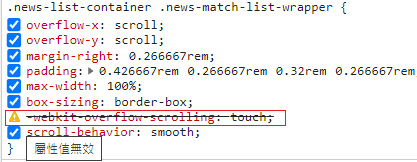
Issue 1. Touch does not work when emulating iOS in Chrome. Investigation showed that the -webkit-overflow-scrolling CSS property has no effect in Chrome.
var isDesktopDebugMode = window.navigator.vendor === 'Google Inc.'
      var scrolling = style.getPropertyValue('-webkit-overflow-scrolling') === 'touch' || isDesktopDebugMode
Issue 2. inobounce.js does not support horizontal scrolling. We can mirror the vertical-scroll logic to add horizontal support.
5. The final modified inobounce.js
/*! iNoBounce - v0.2.1
 * https://github.com/lazd/iNoBounce/
 * Copyright (c) 2013 Larry Davis <[email protected]>; Licensed BSD */
(function(global) {
  // Stores the Y position where the touch started
  var startY = 0
  var startX = 0

  // Store enabled status
  var enabled = false

  var supportsPassiveOption = false
  try {
    var opts = Object.defineProperty({}, 'passive', {
      get: function() {
        supportsPassiveOption = true
      }
    })
    window.addEventListener('test', null, opts)
  } catch (e) {}

  var handleTouchmove = function(evt) {
    // Get the element that was scrolled upon
    var el = evt.target

    // Allow zooming
    var zoom = window.innerWidth / window.document.documentElement.clientWidth
    if (evt.touches.length > 1 || zoom !== 1) {
      return
    }

    // Check all parent elements for scrollability
    while (el ! document.body && el ! document) {
      // Get some style properties
      var style = window.getComputedStyle(el)

      if (!style) {
        // If we've encountered an element we can't compute the style for, get out
        break
      }

      // Ignore range input element
      if (el.nodeName = 'INPUT' && el.getAttribute('type') = 'range') {
        return
      }

      // chrome 在桌面版模擬 ios webkit-overflow-scrolling 屬性沒有作用
      var isDesktopDebugMode = window.navigator.vendor === 'Google Inc.'
      var scrolling = style.getPropertyValue('-webkit-overflow-scrolling') === 'touch' || isDesktopDebugMode

      var overflowY = style.getPropertyValue('overflow-y')
      var scrollableY = overflowY = 'auto' || overflowY = 'scroll'
      var height = parseInt(style.getPropertyValue('height'), 10)
      var width = parseInt(style.getPropertyValue('width'), 10)

      // Determine if the element should scroll

      var isScrollableY = scrolling && scrollableY

      var canScrollY = el.scrollHeight > el.offsetHeight // 能不能滑

      var curY = evt.touches ? evt.touches[0].screenY : evt.screenY

      if (isScrollableY && canScrollY) {
        // Get the current Y position of the touch

        // Determine if the user is trying to scroll past the top or bottom
        // In this case, the window will bounce, so we have to prevent scrolling completely
        var isAtTop = startY <= curY && el.scrollTop === 0
        var isAtBottom =
          startY >= curY && el.scrollHeight - el.scrollTop === height

        // Stop a bounce bug when at the bottom or top of the scrollable element
        if (isAtTop || isAtBottom) {
          console.log('prevent')
          evt.preventDefault()
        }

        // No need to continue up the DOM, we've done our job
        return
      }

      // 橫向捲動

      var overflowX = style.getPropertyValue('overflow-x')
      var scrollableX = overflowX = 'auto' || overflowX = 'scroll'
      var isScrollableX = scrolling && scrollableX
      var canScrollX = el.scrollWidth > el.offsetWidth

      if (isScrollableX && canScrollX) {
        // debugger
        // Get the current X position of the touch
        var curX = evt.touches ? evt.touches[0].screenX : evt.screenX

        // Determine if the user is trying to scroll past the top or bottom
        // In this case, the window will bounce, so we have to prevent scrolling completely
        var isAtLeft = startX <= curX && el.scrollLeft === 0
        var isAtRight =
          startX >= curX && el.scrollWidth - el.scrollLeft === width

        // Stop a bounce bug when at the bottom or top of the scrollable element
        if (isAtLeft || isAtRight) {
          evt.preventDefault()
        }

        // No need to continue up the DOM, we've done our job
        return
      }

      // Test the next parent
      el = el.parentNode
    }

    // Stop the bouncing -- no parents are scrollable
    evt.preventDefault()
  }

  var handleTouchstart = function(evt) {
    // Store the first Y position of the touch
    startY = evt.touches ? evt.touches[0].screenY : evt.screenY
    startX = evt.touches ? evt.touches[0].screenX : evt.screenX
  }

  var enable = function() {
    // Listen to a couple key touch events
    window.addEventListener(
      'touchstart',
      handleTouchstart,
      supportsPassiveOption ? { passive: false } : false
    )
    window.addEventListener(
      'touchmove',
      handleTouchmove,
      supportsPassiveOption ? { passive: false } : false
    )
    enabled = true
  }

  var disable = function() {
    // Stop listening
    window.removeEventListener('touchstart', handleTouchstart, false)
    window.removeEventListener('touchmove', handleTouchmove, false)
    enabled = false
  }

  var isEnabled = function() {
    return enabled
  }

  // Enable by default if the browser supports -webkit-overflow-scrolling
  // Test this by setting the property with JavaScript on an element that exists in the DOM
  // Then, see if the property is reflected in the computed style
  var testDiv = document.createElement('div')
  document.documentElement.appendChild(testDiv)
  testDiv.style.WebkitOverflowScrolling = 'touch'
  var scrollSupport =
    'getComputedStyle' in window &&
    window.getComputedStyle(testDiv)['-webkit-overflow-scrolling'] === 'touch'
  document.documentElement.removeChild(testDiv)

  if (scrollSupport) {
    enable()
  }

  // A module to support enabling/disabling iNoBounce
  var iNoBounce = {
    enable: enable,
    disable: disable,
    isEnabled: isEnabled
  }

  if (typeof module !== 'undefined' && module.exports) {
    // Node.js Support
    module.exports = iNoBounce
  }
  if (typeof global.define === 'function') {
    // AMD Support
    (function(define) {
      define('iNoBounce', [], function() {
        return iNoBounce
      })
    })(global.define)
  } else {
    // Browser support
    global.iNoBounce = iNoBounce
  }
})(this)
6. Conclusion
On the web, perfectly avoiding rubber-band bounce seems impossible. A better approach is to redesign the layout: pin the top with CSS fixed so that when the page snaps back, there is something covering the top, and the scroll feels less weird.
inobounce.js can solve:
- Pull-down rubber-band on first load
- Scroll-stuck issues across multiple nested scroll areas
What it cannot solve yet:
- While actively scrolling, when you hit the top or bottom you still see one rubber-band bounce. JS cannot prevent the scroll from going to a negative offset; the bounce-prevention only kicks in after
scrollToplands back at 0.


Comments