
Why Use Rolling Updates for Applications?
Today's e-commerce sites operate nearly 24/7, 365 days a year, meaning users could be on the system at any time. With traditional deployment methods, the website is unavailable during the update process. This can lead to a poor user experience, such as users seeing error pages or being forcibly logged out. If maintenance downtime is too long, users might turn to other platforms to place their orders, resulting in customer churn.
Rolling deployments, on the other hand, reduce deployment downtime, provide a better user experience, and increase the system's operational uptime.
According to Six Strategies for Application Deployment, rolling deployment is a relatively easy strategy to implement. This post outlines a design for a rolling deployment using Microsoft's open-source .NET project, YARP, for software load balancing.
Design Approach
1. First, Group the Servers
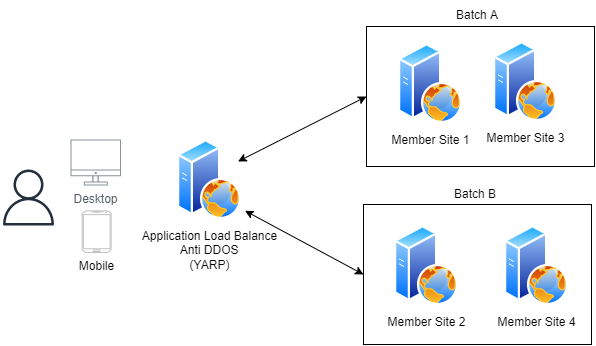 In the LTM (Local Traffic Manager), we divide the servers into three groups: All Server, Batch A, and Batch B.
Depending on the deployment phase, the LTM will switch traffic to different active server groups.
In the LTM (Local Traffic Manager), we divide the servers into three groups: All Server, Batch A, and Batch B.
Depending on the deployment phase, the LTM will switch traffic to different active server groups.
All Server Group 192.168.0.1 192.168.0.2 192.168.0.3 192.168.0.4
Batch A Group 192.168.0.1 192.168.0.3
Batch B Group 192.168.0.2 192.168.0.4
2. Deployment Process for Batch A Server Group (Users Served by Batch B)
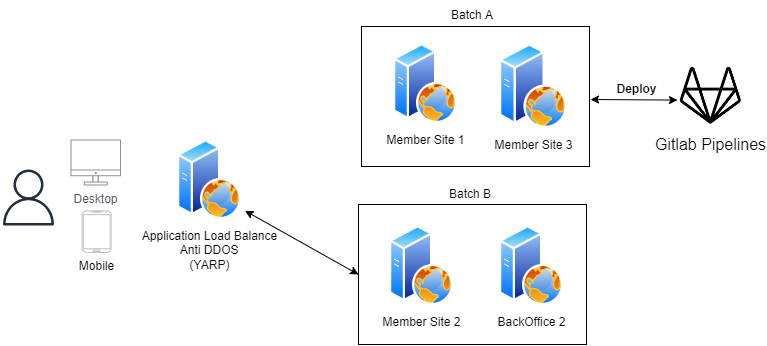
1. Call the LTM API to switch traffic to the Batch B group.
2. Deploy the application.
3. Perform internal testing.
4. Call the LTM API to switch traffic to the Batch A group.
3. Deployment Process for Batch B Server Group (Users Served by Batch A)
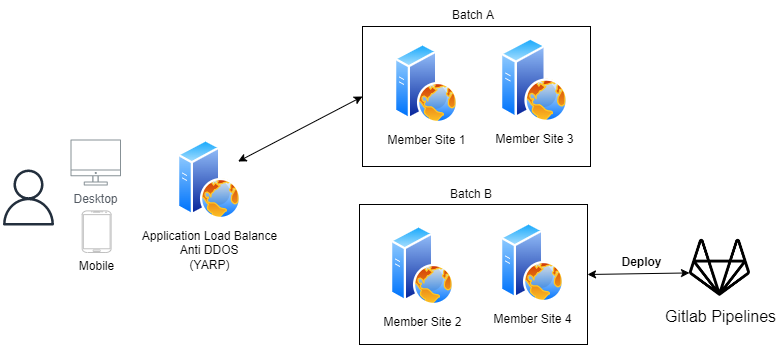
1. Deploy the application.
2. Perform internal testing.
3. Call the LTM API to switch traffic to the All Server group.
4. Verify the Production Environment
5. Complete the Application Deployment
Special Considerations
- If the backend API has changes, it must be deployed before the frontend.
- On the backend, APIs must remain backward-compatible for several versions before obsolete features can be removed.
How to Implement
Finally, by referencing the sample code in Microsoft's official YARP documentation, we can see that it's easy to specify a server group (Cluster) using ReassignProxyRequest and modify the current group via an API to achieve both A/B testing and rolling deployments. However, as I haven't had time to implement this yet, I'm just writing down the design concept for now.
public void Configure(IApplicationBuilder app, IProxyStateLookup lookup)
    {
        app.UseRouting();
        app.UseEndpoints(endpoints =>
        {
            endpoints.MapReverseProxy(proxyPipeline =>
            {
                // Custom cluster selection
                proxyPipeline.Use((context, next) =>
                {
                    if (lookup.TryGetCluster(ChooseCluster(context), out var cluster))
                    {
                        context.ReassignProxyRequest(cluster);
                    }

                    return next();
                });
                proxyPipeline.UseSessionAffinity();
                proxyPipeline.UseLoadBalancing();
            });
        });
    }

private string ChooseCluster(HttpContext context)
{
        // Decide which cluster to use. This could be random, weighted, based on headers, etc.
        return Random.Shared.Next(2) == 1 ? "cluster1" : "cluster2";
}
References
Previous article I wrote about YARP
YARP Official Documentation - A/B testing
Thoughts and Introduction to Zero-Downtime Application Publishing


Comments