
Introduction
In recent years, the React front-end ecosystem has become increasingly rich. A vast number of packages are developed with React, and it's being adopted by more and more companies. This made me want to understand React as well. Having gone from Angular to Vue, and now to React, I've finally collected all three major front-end frameworks. I guess I can summon the dragon now.
The Advantages of the Three Major Frameworks
Angular - The framework has clear specifications, a complete solution, and a powerful CLI, making it easier for back-end developers to get started.
Vue - Fast development, simple API, and lightweight to use. It's relatively easy to integrate into and rewrite legacy systems.
React - A more complete front-end ecosystem. Writing it feels closer to plain JS syntax. For many companies, it's stable and secure, and version upgrades don't require a complete rewrite.
Project Setup
Create a React project with TypeScript
npx create-react-app jira --template typescript
P.S. npx is very smart about identifying modules. If a module exists, it uses it. If not, it temporarily downloads it and then deletes it after use.
Change baseUrl in typescript.json to set the default directory to src
Add src
{
  "compilerOptions": {
   "baseUrl": "src",
...
}
Two Properties in React That Trigger Rerenders
React State
When state changes -> it affects the virtual DOM -> the DOM is re-rendered, and the page updates.
React Props (Passed from outside)
class component
class ContactInfoBlock extends React.Component {
  constructor(props) {
    super(props);
  }
  ...
}
function component
import { FC } from "react";
const ContactInfoBlock: FC<ContractProps> = () => {
...
}
Rendering with for loops - You just write your own map to render.
import React from "react";

export const Test = () => {
  let items = [1, 3, 5, 7];

  return (
    <div>
      {items?.map((item, index) => (
        <span key={index}>{item}</span>
      ))}
    </div>
  );
};

export default Test;
Conditional Rendering - You also write a function that returns an HTML tag
import React from "react";

export const Test = () => {
  let items = [1, 3, 5, 7];

  function showItem(item: Number) {
    if (item === 3) {
      return;
    } else {
      return <h1 key={item.toString()}>{item}</h1>;
    }
  }

  return <div>{items?.map((item, index) => showItem(item))}</div>;
};

export default Test;
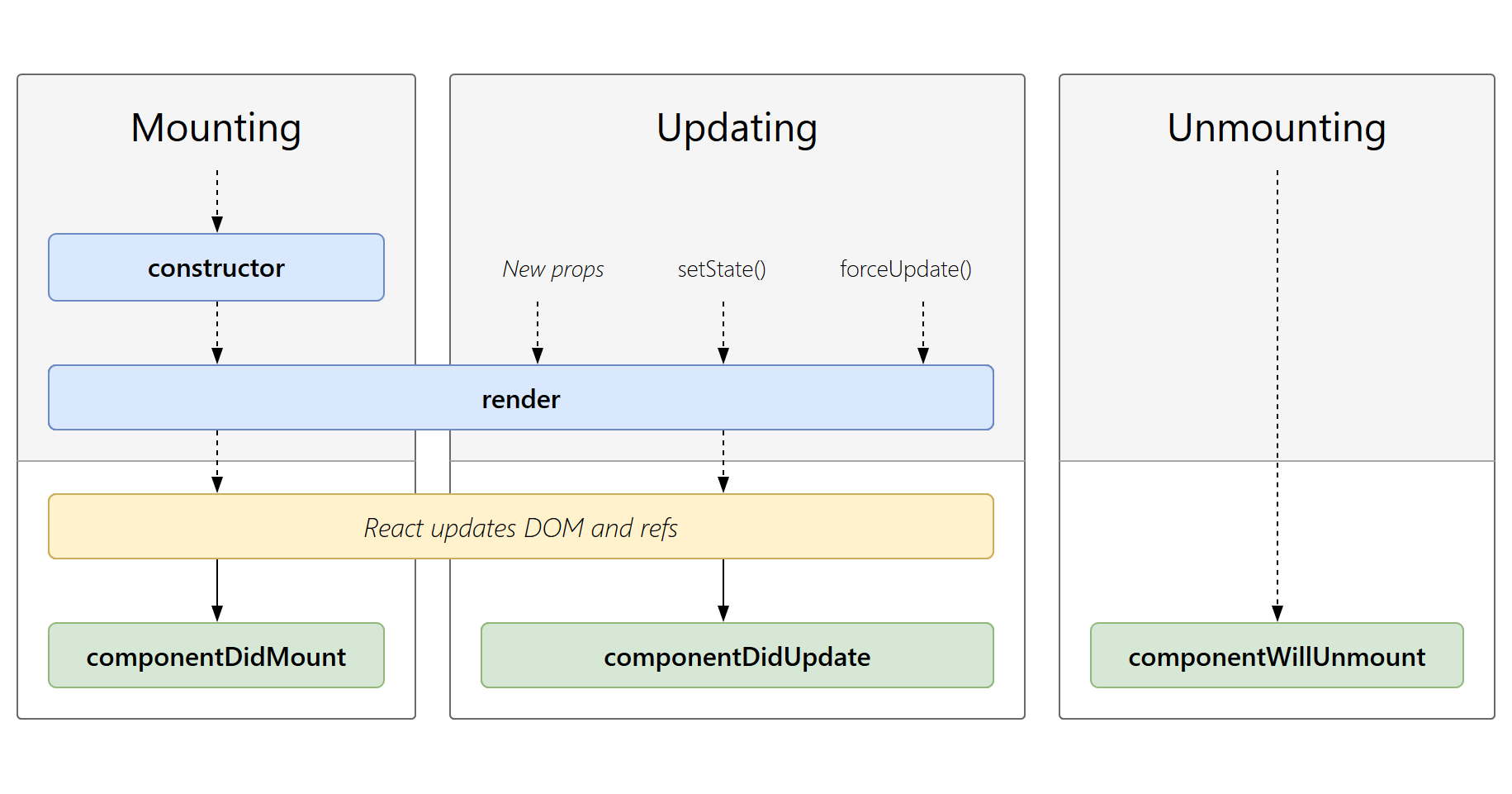
Component Lifecycle Has Become Much Simpler
Mounting: Inserted into the real DOM
Updating: Being re-rendered
Unmounting: Removed from the real DOM
Thoughts
When I started writing React, I noticed it lacked a lot of syntactic sugar, which felt strange at first. The code is really closer to plain JS. The rendering engine has almost no framework-specific syntax; it's just pure JS. Here are the biggest differences I noticed:
- Lacks a lot of framework-specific syntactic sugar
- The only things that trigger a component re-render are props and state (which makes it very simple)
- A simpler lifecycle - Mounting, Updating, Unmounting
- Conditional rendering - You just write a function that returns an HTML tag
- Rendering loops - You just write your own
mapto render - A high degree of freedom in how you write code (which isn't necessarily a good thing) But one thing all three major frameworks have in common is a growing trend towards full TypeScript support.


Comments