
Why Use SVG & SVG Sprite?
- When a browser scales a raster image, it becomes blurry and pixelated.
- Loading dozens of tiny icons as separate HTTP requests puts pressure on the server and slows down the page. Combining them reduces the number of requests and speeds up load time.
What Is SVG?
Open an SVG file in a text editor and you'll see that it stores paths and colors as text, structured very much like HTML — a tree of tags and attributes. Because of this, the same graphic can be scaled to any size without losing quality.
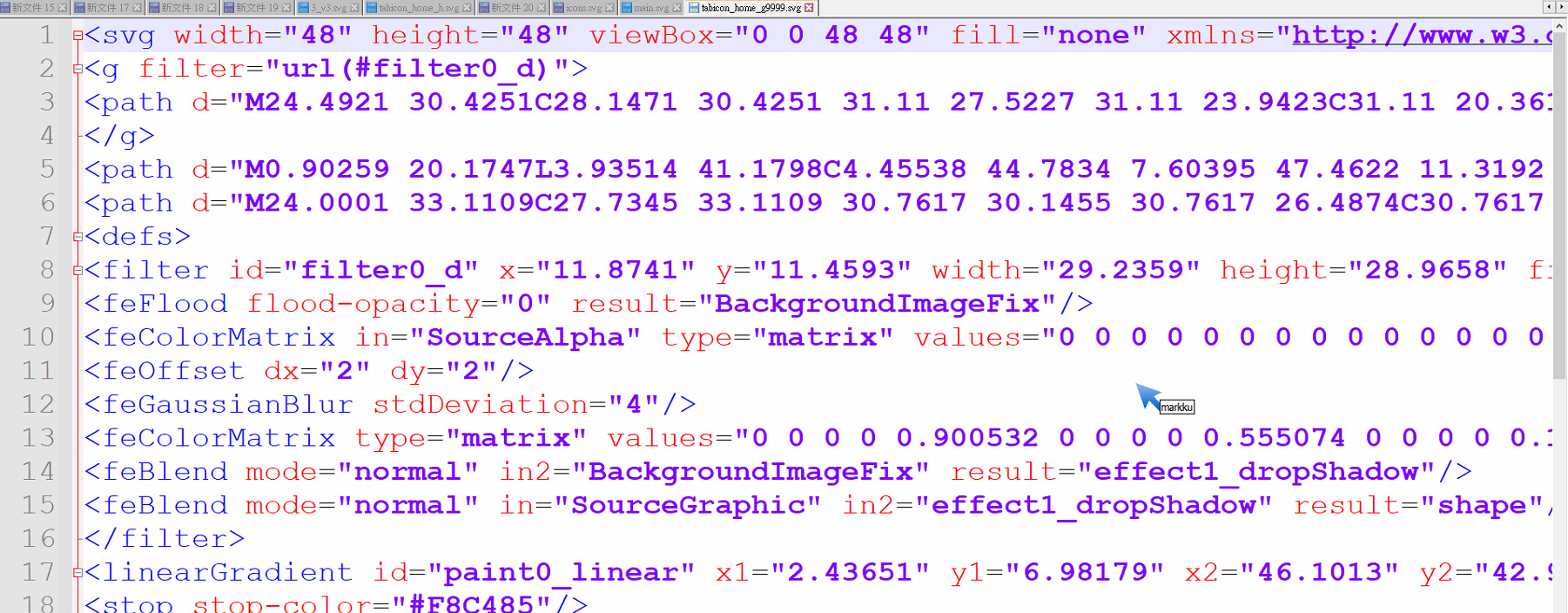
Pros and Cons
Pros
- No pixelation — vector-based, scales cleanly at any size
- Text within the image is selectable and copyable
- Colors can be changed via CSS
Cons
- File size is slightly larger than raster equivalents (best suited for simple icons)
- Not supported in older browsers (e.g., IE 11)
Ways to Load SVG Sprite in a Website
Method 1 — CSS Sprite: combine icons into one image and use background-position to show each one
.icon-match-event-3 {
  width: 24px;
  height: 24px;
  zoom: 0.8;
  background-position: -28px -4px;
  background-repeat: no-repeat;
  background-thumbnail: url(~@/assets/images/icon/match-event/match-event.svg);
}
Method 2 — Inline SVG Sprite: merge all SVG paths into a single <svg> element rendered in the HTML, and switch icons via :xlink:href=#targetId
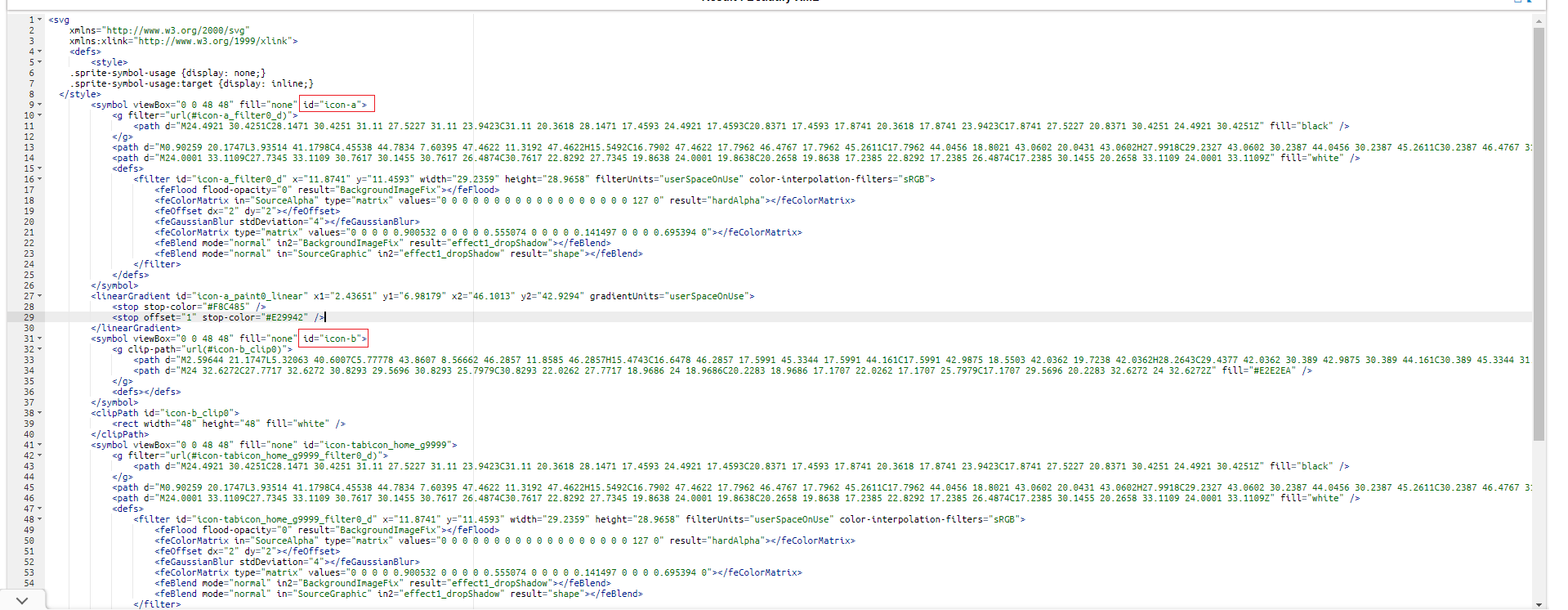
  <svg :class="svgClass" aria-hidden="true">
    <use :xlink:href="`#${svgId}`" />
  </svg>
Special SVG Behaviors to Know
- When SVGs are loaded, the CSS
displaydefaults tonone— they won't appear on the page unless you explicitly set adisplayvalue. MDN SVG display attribute - When the page is zoomed, SVGs can escape the normal document flow. DevTools may not reflect the zoomed dimensions accurately.
- SVG files are plain text and can be opened and edited in any text editor — the structure is HTML-like.
- Compressing SVG file size: drawing tools often produce SVGs with many unused attributes that bloat file size. A webpack plugin can strip these. Example: vue-svgo-loader
Simplifying SVG Loading in a Vue Project
To use icons as conveniently as icon fonts, we use an SVG loader.
Install
npm install svg-sprite-loader --save-dev
npm install svgo svgo-loader --save-dev
Update vue.config.js
chainWebpack: (config) => {
    config.module
      .rule('svg')
      .exclude.add(resolve('src/assets/images/svg-icon'))
      .end()

    config.module
      .rule('icons')
      .test(/\.svg$/)
      .include.add(resolve('src/assets/images/svg-icon'))
      .end()
      .use('svg-sprite-loader')
      .loader('svg-sprite-loader')
      .options({
        symbolId: 'icon-[name]',
        extract: true,
        outputPath: 'static/img/',
        publicPath: 'static/img/',
        spriteFilename: 'main.svg'
      })
      .end()
      .use('svgo-loader') // 最佳化 svg (優化寫法及移除不需要的 attibute , 約可以減少30% 以上的圖檔大小)
      .loader('svgo-loader')
      .end()

    config.plugin('svg-sprite') // extract: true 才需要
      .use(require('svg-sprite-loader/plugin'))
}
Create the SvgIcon Vue Component
<template>
  <svg :class="svgClass" aria-hidden="true">
    <use :xlink:href="`#icon-${iconName}`" />
  </svg>
</template>

<script>

export default {
  name: 'SvgIcon',
  props: {
    iconName: {
      type: String,
      default: '',
      required: false
    }
  },
  data: function() {
    return {

    }
  },
  computed: {
    svgClass() {
      if (this.iconClass) {
        return 'svg-icon ' + 'icon-' + this.iconClass
      } else {
        return 'svg-icon'
      }
    }
  }

}
</script>

<style>
.svg-icon {
  display: inline-block;
  overflow: hidden;
  width: 32px;
  height: 32px;
  fill: currentColor;
}
</style>
Load main.svg in the Root App Component
<template>
  <div>
    <Layout id="app" />
    <span v-if="htmlSvgString.length" v-once id="mainSvg" v-html="htmlSvgString" />
  </div>
</template>

<script>
import Layout from '@/views/layout'
export default {
  components: { Layout },
  data: function() {
    return {
      htmlSvgString: ''
    }
  },
  created() {
    const that = this
    fetch('./static/images/main.svg')
      .then(r => r.text())
      .then(text => {
        that.htmlSvgString = text
      })
  }
}
</script>


<style lang="scss">
#mainSvg {
  position: absolute;
  width: 0;
  height: 0;

  svg {
    position: absolute;
    width: 0;
    height: 0;
  }
}

// 如果要改色,要指定id,原本的顏色會掉,會吃父層的顏色
 #icon-dropdown_b {
   path {
     fill: currentColor;
   }
 }
</style>
Register Globally in main.js
import SvgIcon from '@/components/SvgIcon'
Vue.component('Icon', SvgIcon)

// 引入至 web pack
const requireAll = requireContext => requireContext.keys().map(requireContext)
const req = require.context('@/assets/images/svg-icon', true, /\.svg$/)
requireAll(req)
Place Your SVG Files in the svg-icon Folder
Usage in Templates
// icon-name 填入 icon 的檔案名稱
<SvgIcon :icon-name="getIconFileName(tab)" class="tab-icon" />
Additional Notes
- If you can't change an SVG's color, check whether the inner
<path>elements have a hardcoded fill color — change it tocurrentColor:
 #icon-dropdown_b {
   path {
     fill: currentColor;
   }
 }
- To bundle icons into multiple sprites organized by subfolder, see Generating Multiple Sprites.
- Icon fonts only support single colors. You can upload SVG files to IcoMoon to generate an icon font.
- Windows Explorer cannot preview SVG files by default. Install svg-explorer-extension to enable previews.


Comments