Mark Ku's Blog

Problem to Solve

I want to be able to remotely connect to my Raspberry Pi from anywhere, anytime, as long as there's an internet connection, without any firewall configuration—similar to how TeamViewer works.

Development Environment

  • Raspberry Pi 4B 8G
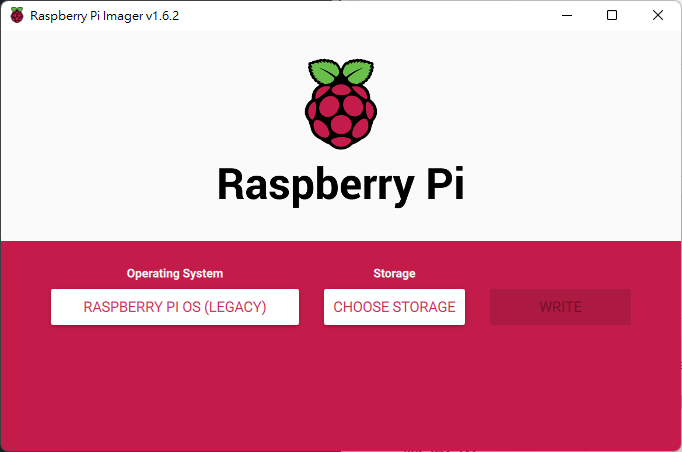
  • RASPBERRY PI OS Raspberry Pi Imager v1.6.2 window for OS and storage selection

Install the vim Editor

sudo apt-get install vim

Download frpc

wget https://github.com/fatedier/frp/releases/download/v0.38.0/frp_0.38.0_linux_arm.tar.gz

Decompress

tar -zxvf frp_0.38.0_linux_arm.tar.gz

Create a Directory

sudo mkdir /var/fprc

Move frpc to /var/frpc

sudo mv ./frp_0.38.0_linux_arm/* /var/frpc/

Edit the frpc.ini Configuration File

sudo vim /var/frpc/frpc.ini
[common]
server_addr = your frps server domain
server_port = 7000
auth_token = 123456
pool_count = 10000

[pi-ssh]
type = tcp
custom_domains = pi-ssh.abc.net
remote_port = 6667
local_port = 22
local_ip = 127.0.0.1

[pi-vnc]
type = tcp
custom_domains = pi-vnc.abc.net
local_port = 5900
remote_port = 6666
local_ip = 127.0.0.1

Test if it Can Run

sudo ./frpc -c ./frpc.ini

Register frpc as a Service to Start on Boot

sudo vi /lib/systemd/system/frpc.service

[Unit]
Description=FRPC
After=network.target
Wants=network.target

[Service]
Restart=on-failure
RestartSec=5

ExecStart=/var/frpc/frpc -c /var/frpc/frpc.ini

[Install]
WantedBy=multi-user.target

Start the Service

sudo systemctl enable frpc.service //開機時自動啟動 FRPC服務
sudo systemctl start frpc.service //啟動 FRPC 服務
sudo systemctl status frpc.service // 檢查狀態
sudo systemctl is-failed frpc.service // 查看失敗狀態
sudo systemctl daemon-reload  // reload 
sudo reboot // 重開機

Author

Mark Ku

擁有 10+ 年經驗的資深軟體工程師,現為 AI 應用 Builder,專注於大型平台架構與簡化複雜系統設計,從電商系統到訂閱與收費平台,結合 AI Agent、AI 整合與自動化開發,打造高效率且可持續演進的產品技術基礎。Read More

Found this useful?

The author's free tools, daily podcasts and newsletter are all here.

Mark Ku · This article is licensed under CC BY 4.0. Credit the author and link back to the original when reusing it.

Comments

Subscribe to Newsletter

Subscribe to get new posts delivered instantly — never miss a tech share.

By submitting, you agree to receive emails. You can anytime.

Popular Posts

View all
Mark Ku
··602

Oracle Cloud Always Free Tier: Linux Host and Static IP for a $0 Cloud Solution

Oracle Cloud Always Free Tier: Linux Host and Static IP for a $0 Cloud Solution
Mark Ku
··490

Say Goodbye to Postman's Fee Trap! A Hands-on Guide to Bruno, the Open-Source Git-Native API Testing Powerhouse.

Say Goodbye to Postman's Fee Trap! A Hands-on Guide to Bruno, the Open-Source Git-Native API Testing Powerhouse.
Mark Ku
··333

A Free, Open-Source, Notion-like Knowledge Base — A Complete Guide to Deploying and Backing Up Outline Wiki

A Free, Open-Source, Notion-like Knowledge Base — A Complete Guide to Deploying and Backing Up Outline Wiki
Mark Ku
··264

Training Your Own AI Voice: Hardware Requirements, Open-Source Model Comparison, and LoRA Fine-Tuning

Training Your Own AI Voice: Hardware Requirements, Open-Source Model Comparison, and LoRA Fine-Tuning
Mark Ku
··221

Building an Efficient API Management Platform: Deploying Kong Gateway from Scratch - Part 1

Building an Efficient API Management Platform: Deploying Kong Gateway from Scratch - Part 1
Mark Ku
··215

Setting Up Samba on Ubuntu to Share Folders with Windows 11

Setting Up Samba on Ubuntu to Share Folders with Windows 11