
Background
These problems surfaced during the two weeks before the German website's production go-live, as we were setting up the live environment. I'm writing this down as a record.
Windows Subsystem for Linux Kernel Too Old
While building the CI/CD pipeline for the German production environment two weeks before launch, Docker builds kept failing. After investigation and research I couldn't find a clear answer online — probably because running Docker on Windows servers is uncommon enough that there isn't much community experience to draw from.
After comparing environments, I realized our Taiwan development machines were all running Docker on Windows 11, while the Windows Server 2019 production host maps to a Windows 10 kernel. The outdated Linux kernel inside WSL caused Docker builds to fail. After multiple reinstallations and attempts on different machines the issue persisted: everything worked fine in the Taiwan dev environment, but the build consistently failed in production.
My hypothesis was that this was tied to the Windows version: Windows Server 2019 corresponds to Windows 10, while Windows Server 2022 corresponds to Windows 11. In the end we provisioned a Windows 11 host, ran the build there, and pushed the image to production.
Because the US data center lacked a Windows 11-equivalent server build, we borrowed a server from the US production line, spun up a Windows 11 VM on it, ran CI/CD from there, and pushed the image to the US data center.
Strapi Iterates Too Fast — Build Errors and Oversized Image
Our CMS is Strapi, but its rapid release cadence caused dependency resolution issues when using Yarn — certain plugins couldn't be recognized correctly. Switching from Yarn to npm resolved that.
As mentioned, we were using a borrowed Windows 11 VM in the US for CI/CD. Pushing images from the US office to the IDC production environment added noticeable latency even within California. To improve transfer speed, we switched to a lightweight Node base image (node:18.17.0-alpine3.18), compressing the image size from 3.8 GB down to 1.5 GB.

Docker Container DNS Resolution Failure
After all environments were deployed, DNS queries from inside Docker containers started failing. The error looked like this:
Error fetch multi lang data, fallback to local file, environment: production, error: {"cause":{"errno":-3001,"code":"EAI_AGAIN","syscall":"getaddrinfo","hostname":"e645f404c07e0ac86.ibuypower.com"}}
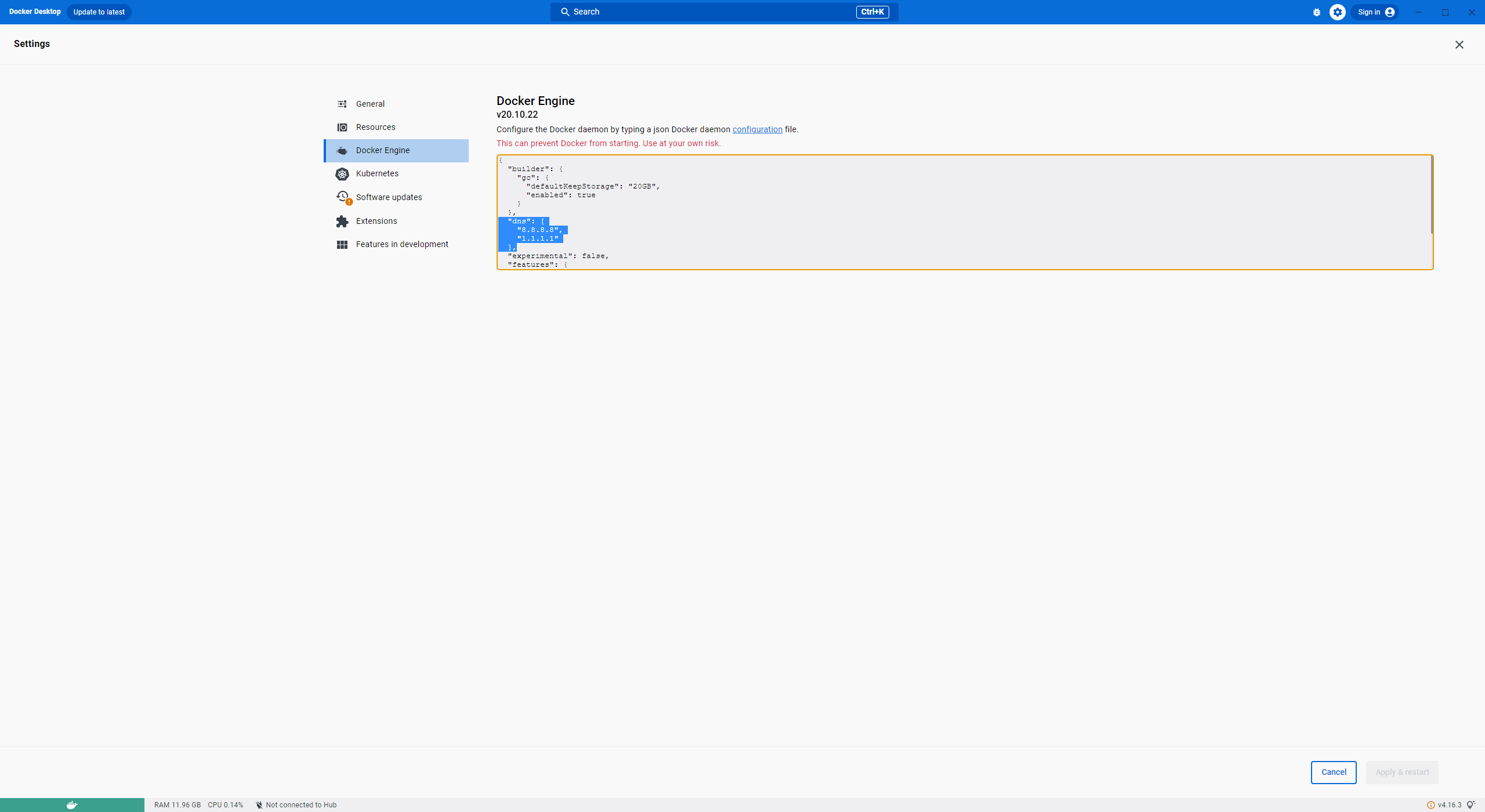
Docker isolates the OS and network stack from the host — it does not inherit the host's DNS settings by default. We resolved the container DNS issue by explicitly adding DNS servers to the Docker daemon configuration:
  "dns": [
    "8.8.8.8",
    "1.1.1.1"
  ],
SQL Server Version Too Old — Works in Staging, Breaks in Production
Error: Client network socket disconnected before secure TLS connection was established
On deployment day, after the application was deployed, TLS-related errors kept appearing. Comparing environments revealed that staging used SQL Server 2017, while the German production database was SQL Server 2016. SQL Server 2016 uses the deprecated TLS 1.0, which newer application stacks refuse to negotiate with. The fix was to upgrade the production database to SQL Server 2017 — adding three hours to the deployment window.
Page Rendering Hanging
After the site went live, some pages occasionally hung. As you'd expect with Next.js server-side rendering, if any API call is slow or never returns, the page render stalls. After adding logs and analyzing the behavior, we traced the root cause to the multi-language API being called too frequently, which caused SharePoint to start throttling requests. The solution was to cache the Office 365 multi-language data in Redis. This not only resolved the throttling issue but also significantly improved page load speed and stability.
Summary
Technical problems always look simple in retrospect, but diagnosing the root cause under pressure and still shipping on time is never easy. Just dealing with these DevOps issues alone had me working overtime for over two weeks. In the end, despite all the obstacles, the Germany site launched on July 1st. The key lesson: when running Windows Server environments, keep the OS and all components up to date to avoid this class of technical issues.


Comments