
Overview
This article quickly compares DinD, DooD, Kaniko, BuildKit, and Buildah — and provides a minimal viable configuration for GitLab Runner on K8s with common gotchas resolved.
TL;DR: For building images on K8s — if you want compatibility and security, prioritize Kaniko; if you want performance and caching, pick BuildKit; only use DinD/DooD in trusted environments or for one-off needs.
Tool comparison
| Tool | Daemon required | Privileged required | Performance | Compatibility | Best for |
|---|---|---|---|---|---|
| DinD | ✅ | ✅ | Medium | High | Small-team quick CI |
| DooD | ✅ (host) | ✅ | High | High | Internal-use CI |
| Kaniko | ❌ | ❌ | Medium | High | Cloud-native CI/CD |
| BuildKit | ✅ (buildkitd) | ✅/rootless | High | High | Need caching/performance |
| Buildah | ❌ | ❌ (rootless OK) | Medium | High | OpenShift / Red Hat ecosystems |
DinD vs DooD
People often get confused by these two terms — the diagram below makes the difference clear quickly:

DinD (Docker-in-Docker)
- In CI/CD pipelines, no need to mount docker.sock
- Can connect via TCP
- Suitable for isolated CI/CD environments
Pros:
- Simple setup, clear dependencies, fully compatible with Docker commands
- Container-internal isolation, convenient for one-off testing
Cons:
- Requires privileged mode — higher risk
- Medium performance — nested cgroups bring extra overhead
- Often runs into network and permission limits on managed K8s/VMs in the cloud
DooD (Docker-outside-of-Docker)
- The container doesn't run its own Docker
- Directly mounts the host's Docker socket (
/var/run/docker.sock) into the container - Better performance, but lower security
Pros:
- Best performance — reuses host's Docker cache
- Fast startup
Cons:
- Equivalent to exposing host Docker permissions to the container — unsuitable for multi-tenancy
- Tied to the node — K8s portability and flexibility are reduced
Why do most online examples use Docker 20.10?
Docker 20.10 was released in late 2020 as a long-term-stable release with continuous security updates. Many Linux distros bundle this version, ecosystem support is strongest, and most automation tools (GitLab Runner, Drone, Jenkins, etc.) were originally tested against it — so it's the most stable and reliable.
Starting from Docker 23.x, many features have changed back and forth, with config and APIs shifting — leading to legacy example code breaking outright. On Kubernetes or GitLab Runner, you may hit build failures.
Deployment guide for the various build approaches
1. K8s DinD deployment (GitLab Runner needs privileged=true)
I tried many times — DinD in K8s, I couldn't get it to work in the same Pod. The principle should be connecting through Docker remote management port 2375 to build, but given my company's security considerations, I didn't pursue it further.
2. K8s DooD deployment
Need to mount /var/run/docker.sock and share the host's Docker daemon.
Prerequisites
Install Docker on the host machine.
GitLab CI config
stages:
  - build

variables:
  IMAGE: $CI_REGISTRY_IMAGE/$CI_BUILD_REF_NAME:$CI_PIPELINE_ID
  K8S_NAMESPACE: "kong-api-gateway"
  KONG_SECRET_NAME: "kong-api-gateway-secret"
  DOCKER_TLS_CERTDIR: ""
  DOCKER_DRIVER: overlay2

build:
  stage: build
  image: docker:20.10
  services:
    - name: docker:20.10
  before_script:
    - docker login -u $CI_REGISTRY_USER -p $CI_REGISTRY_PASSWORD $CI_REGISTRY
  script:
    - echo "= Building Kong API Gateway Docker image (DooD) ="
    - echo "Target image: ${IMAGE}"
    - echo "Build context: ${CI_PROJECT_DIR}"
    - docker build -f Dockerfile.kong -t "${IMAGE}" "${CI_PROJECT_DIR}"
    - docker push "${IMAGE}"
  only:
    - main
  tags:
    - K8s-Runner
GitLab Runner (Helm Values)
gitlabUrl: https://gitlab.com
runnerRegistrationToken: "xxx"
unregisterRunners: true

fullnameOverride: "k8s-cd-gitlab-runner"

serviceAccount:
  create: true
  name: gitlab-runner

runners:
  privileged: true
  tags: "deploy"
  config: |
    [[runners]]
      [runners.kubernetes]
        image = "docker:20.10"
        service_account = "gitlab-runner"
        service_account_overwrite_allowed = ".*"
        [runners.kubernetes.pod_security_context]
          run_as_non_root = false
          run_as_user = 0
        [runners.kubernetes.container_security_context]
          privileged = true
        [runners.kubernetes.resources]
          limits = { "cpu" = "1000m", "memory" = "2Gi" }
          requests = { "cpu" = "500m", "memory" = "1Gi" }
        [runners.kubernetes.environment]
          DOCKER_OPTS = "--insecure-registry 192.168.50.57:30000"
        [[runners.kubernetes.volumes.host_path]]
          name = "docker-socket"
          mount_path = "/var/run/docker.sock"
          host_path = "/var/run/docker.sock"
          mount_propagation = "HostToContainer"

securityContext:
  allowPrivilegeEscalation: true
  readOnlyRootFilesystem: false
  runAsNonRoot: false
  privileged: true
  capabilities:
    add: ["SYS_ADMIN"]

podSecurityContext:
  runAsUser: 0
  fsGroup: 0
RBAC config
# gitlab-runner-rbac.yaml
apiVersion: v1
kind: ServiceAccount
metadata:
  name: gitlab-runner
  namespace: k8s-cd-gitlab-runner
---
apiVersion: rbac.authorization.k8s.io/v1
kind: Role
metadata:
  namespace: k8s-cd-gitlab-runner
  name: gitlab-runner-role
rules:
- apiGroups: [""]
  resources: ["pods", "pods/attach", "pods/exec", "pods/log", "pods/portforward", "pods/proxy", "pods/status"]
  verbs: ["get", "list", "watch", "create", "update", "patch", "delete"]
- apiGroups: [""]
  resources: ["secrets", "configmaps", "persistentvolumeclaims", "services", "endpoints"]
  verbs: ["get", "list", "watch", "create", "update", "patch", "delete"]
- apiGroups: [""]
  resources: ["events"]
  verbs: ["get", "list", "watch", "create", "update", "patch"]
- apiGroups: [""]
  resources: ["namespaces"]
  verbs: ["get", "list", "watch"]
- apiGroups: ["apps"]
  resources: ["deployments", "statefulsets", "daemonsets"]
  verbs: ["get", "list", "watch", "create", "update", "patch", "delete"]
- apiGroups: ["batch"]
  resources: ["jobs", "cronjobs"]
  verbs: ["get", "list", "watch", "create", "update", "patch", "delete"]
- apiGroups: ["extensions"]
  resources: ["deployments", "statefulsets", "daemonsets"]
  verbs: ["get", "list", "watch", "create", "update", "patch", "delete"]
---
apiVersion: rbac.authorization.k8s.io/v1
kind: RoleBinding
metadata:
  name: gitlab-runner-rolebinding
  namespace: k8s-cd-gitlab-runner
subjects:
- kind: ServiceAccount
  name: gitlab-runner
  namespace: k8s-cd-gitlab-runner
roleRef:
  kind: Role
  name: gitlab-runner-role
  apiGroup: rbac.authorization.k8s.io
Deployment commands
# Deploy
helm repo add gitlab https://charts.gitlab.io
helm repo update
kubectl create namespace k8s-cd-gitlab-runner
kubectl apply -f ./rbac.yaml
helm install gitlab-runner -f values.yaml gitlab/gitlab-runner --namespace k8s-cd-gitlab-runner --create-namespace

# Update
helm upgrade gitlab-runner -f values.yaml gitlab/gitlab-runner --namespace k8s-cd-gitlab-runner
Note: This method works on self-hosted Ubuntu K8s, but on RKE2 some security settings may prevent binding
/var/run/docker.sock.
3. Kaniko deployment
Best security: builds don't need a Docker daemon or privileged mode. Excellent compatibility on managed K8s, supports common Dockerfile commands, easy migration and debugging — but builds are 20–30% slower than DinD or DooD.
Helm Values config
gitlabUrl: https://gitlab.com/
runnerRegistrationToken: ""  # The token you see in GitLab -> Settings -> CI/CD -> Runners
unregisterRunners: true

fullnameOverride: "k8s-cd-gitlab-runner"

serviceAccount:
  create: false
  name: gitlab-runner

runners:
  privileged: false
  tags: "K8s-Runner"
  config: |
    [[runners]]
      [runners.kubernetes]
        image = "gcr.io/kaniko-project/executor:debug"
        service_account = "gitlab-runner"
        service_account_overwrite_allowed = ".*"
        privileged = false
Deployment command
helm install gitlab-runner -f values.yaml gitlab/gitlab-runner --namespace k8s-cd-gitlab-runner --create-namespace
GitLab CI config
stages:
  - build

variables:
  IMAGE: $CI_REGISTRY_IMAGE/$CI_BUILD_REF_NAME:$CI_PIPELINE_ID
  K8S_NAMESPACE: "kong-api-gateway"
  KONG_SECRET_NAME: "kong-api-gateway-secret"

build:
  stage: build
  image: gcr.io/kaniko-project/executor:debug
  variables:
    DOCKER_CONFIG: /kaniko/.docker
  before_script:
    - mkdir -p /kaniko/.docker
    - echo "{\"auths\":{\"$CI_REGISTRY\":{\"username\":\"$CI_REGISTRY_USER\",\"password\":\"$CI_REGISTRY_PASSWORD\"}}}" > /kaniko/.docker/config.json
  script:
    - echo "= Building Kong API Gateway Docker image (Kaniko) ="
    - echo "Target image: ${IMAGE}"
    - echo "Build context: ${CI_PROJECT_DIR}"
    - /kaniko/executor --context "${CI_PROJECT_DIR}" --dockerfile "Dockerfile.kong" --destination "${IMAGE}" --cache=true --cleanup
  only:
    - main
  tags:
    - K8s-Runner

create-secret:
  stage: create-secret
  image:
    name: bitnami/kubectl:latest
  script:
    - echo "= Preparing target namespace and image-pull secret ="
    - kubectl get namespace ${K8S_NAMESPACE} || kubectl create namespace ${K8S_NAMESPACE}
    - kubectl delete secret ${KONG_SECRET_NAME} -n ${K8S_NAMESPACE} --ignore-not-found=true || true
    - kubectl create secret docker-registry ${KONG_SECRET_NAME} \
        --docker-server=$CI_REGISTRY \
        --docker-username=$CI_REGISTRY_USER \
        --docker-password=$CI_REGISTRY_PASSWORD \
        --docker-email=none \
        -n ${K8S_NAMESPACE}
  only:
    - main
  tags:
    - K8s-Runner
4. BuildKit deployment
A new instruction set and image format from Docker, but still based on DinD or DooD operationally.
BuildKit has two common modes:
Mode 1: Docker (DinD / DooD) + BuildKit
Just set environment variables:
variables:
  DOCKER_BUILDKIT: "1"
  BUILDKIT_PROGRESS: plain
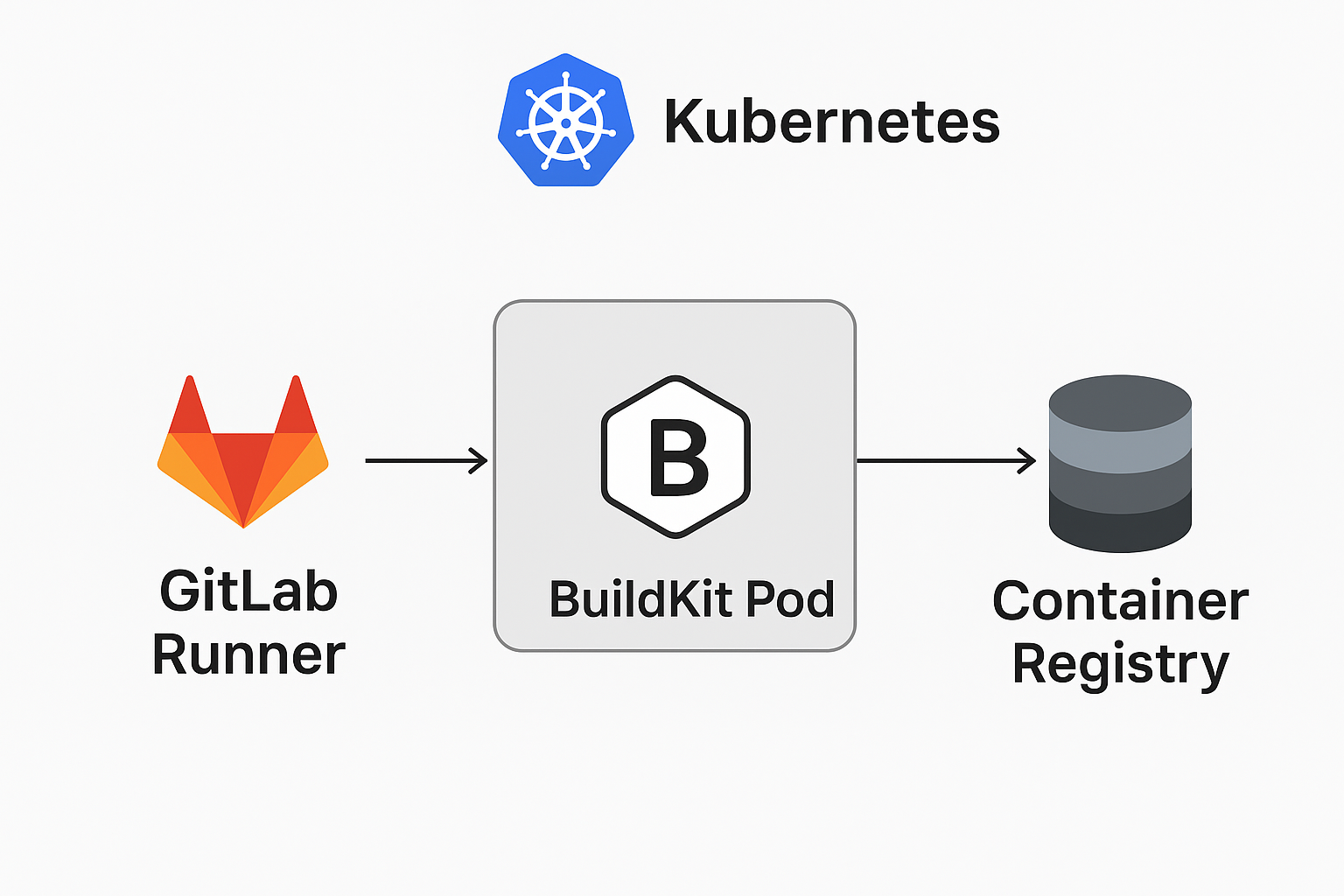
Mode 2: GitLab Runner + BuildKit Pod
- Deploy a buildkitd DaemonSet or Deployment in K8s
- Each runner job uses the buildctl CLI to call the in-cluster buildkitd service to build
- No need to mount
/var/run/docker.sock— security higher than DinD
Deployment recommendations
When to use each
- Small-team quick CI: use DinD
- Internal-use CI: use DooD
- Cloud-native CI/CD: use Kaniko
- Need caching/performance: use BuildKit
- OpenShift/Red Hat systems: use Buildah
Security considerations
- DinD and DooD require privileged mode — lower security
- Kaniko and BuildKit don't require privileged mode — higher security
- For production, recommend Kaniko or BuildKit
Advanced: moby/BuildKit has more complex setup, which I haven't researched. Requires deploying buildkitd Pods — both based on DinD / DooD operationally.
Conclusion
Configuring these environments is troublesome — small differences in environment can produce different behavior. Knowing several build methods means you can handle different environments. As time and tech iterate, these issues should diminish.
Actually, the cleaner approach is splitting CI and CD — safer, simpler config, no K8s-CI compatibility errors.


Comments