
Introduction
This post is a written-up version of an internal sharing session from 2026/03/12, covering several themes:
- A practical comparison of AI dev tools (Copilot / Cursor / Claude)
- Hands-on experience with Gemini 3.1 across image, video, and audio generation
- The rise of CLI tools
- A real-world pitfall: when AI fails to derive SQL logic
- New development workflows I'm experimenting with, and a Claude hook-based knowledge distillation flow
AI Dev Tool Comparison
The three tools most often compared right now:
| Tool | Cost | Beginner UX | Productivity | Notes |
|---|---|---|---|---|
| GitHub Copilot | Cheapest | Average | Average | $20 Pro tier; you have to keep babysitting "Continue" |
| Cursor | Relatively pricey (high-volume On Demand can blow up the bill) | Best UX | High | Two weeks of usage burned through half of the team budget |
| Claude Code | High volume but good value | Average | Highest | Dynamic quota, like throttled "all-you-can-eat", hard to overrun the bill |
My Personal Ranking
Productivity:    Claude > Cursor > Copilot
Beginner UX:     Cursor > Claude > Copilot
Cost:            Copilot > Claude > Cursor
Why I Chose Claude
The Claude Max plan uses a 5x dynamic quota model, similar to a "throttled all-you-can-eat" plan. Once Opus usage exceeds the limit, the system automatically falls back to Sonnet, or resets after 5 hours; the design makes it hard to actually blow up the bill. For developers spending close to $100 USD/month on AI tools, upgrading to Claude Max 5x usually ends up cheaper.
Standout Features of Claude Code
- It has its own MCP marketplace that makes finding integrations easy
- Cross-project memory persists, with each project's memory stored at:
When switching projects, the AI auto-loads the matching context, so you don't have to re-explain the background.C:\Users\{username}\.claude\projects\{project}\memory\MEMORY.md - Compared to other tools, its understanding of project structure is more accurate (Copilot often drops skills into the wrong folder)
The one downside: account switching can be flaky and login often fails, especially when you hold two Claude 5x subscriptions at once (one work, one personal).
Gemini 3.1: Image, Video, Audio
I've been trying out almost every Gemini 3.1 capability recently: images, video, background music, music with vocals, and TTS.
TTS Chinese Voice Quality Ranking
VoAI > Azure TTS > Gemini
Gemini's Chinese TTS still isn't great today.
Image Generation: Big Leap on Chinese Characters
Complex Chinese characters used to come out wrong or garbled when generated through Google's models. Gemini 3.1 has clearly improved here.
Nana Banana icon (v1)

Nana Banana (Gemini 3.1 v2)

Chinese character test (Gemini 3.1)
Here's what the Chinese character generation looks like now—a lot of the old garbled-character issues are fixed in 3.1:

I made a menu for a friend. Items like mochi and pineapple bun used to render incorrectly all the time, but now even complex Chinese characters come out crisp.
Object Composition (People + Scenes)
Beyond image generation and editing, Gemini 3.1 supports object composition (person + person, person + object), which is useful for e-commerce product-in-scene compositing.
Experiment: "Auntie helps you buy a scooter" photo + a friend's photo = Auntie buying a scooter


Video generation is also solid—you can upload your own footage and have it generate video from there.
The Rise of CLI Tools
I've noticed an interesting trend: more and more AI tools are shipping CLI versions.
Google Quietly Released the gws CLI
Google has officially released a CLI called gws. A single command lets you operate every Google Workspace service: Drive, Gmail, Calendar, Sheets, Docs, Chat...
The best part is that it doesn't hard-code commands. Everything is dynamically generated through the Discovery Service, so when Google adds a new endpoint, the CLI picks it up automatically—no waiting for an update.
It also bundles an MCP Server so you can plug it directly into Claude Desktop, Gemini CLI, or any AI Agent. It comes with 100+ Agent Skills out of the box, and works with regular Gmail accounts—not just Workspace Enterprise.
Bash May Be the Most Agent-Friendly Tool
Beyond gws, GitHub Copilot has also released a CLI version. The pattern across the big players is clear: they're all moving toward CLIs, and Bash may simply be the easiest environment for an AI Agent to operate in.
This perhaps hints at an opportunity—we can build Bash tooling for AI Agents that simultaneously logs what the user did, for analysis or auditing.
Real Case: AI Fails to Derive SQL Logic
Last week I ran into a case that left a strong impression.
The Setup
I asked the AI to derive SQL logic from existing application code, then had SQL Server's AI assist verify it. Even so, I couldn't get a correct service usage statistics query.
Root Cause
The issue wasn't a lack of AI capability—it was the data model itself:
- Two key columns lived in different tables
- Each had its own JOIN to different lookup tables, with no clear logical basis
- Some data lived in external extension tables
- Inconsistent naming, similar spellings, and overlapping uses
- No general design conventions, and no clean data semantics
In a setup like this, all the AI can do is "guess at the logic"—the database simply doesn't expose the semantics needed to derive an answer.
Another Example
The previous backend team wasn't willing to coordinate with the frontend, so the frontend ended up hard-coding display names that came directly from the database. The AI couldn't make sense of it and just gave up. These kinds of tech debt have to be cleared out incrementally before AI collaboration can run smoothly.
The Core Idea
What you feed the AI is the structure you'll get back (Garbage in, Garbage out)
Generative AI reasons over what you give it and produces something similar. Feed it bad code and you'll get bad code back.
Trying New Development Approaches
I'm currently exploring a few new directions:
Full Stack in a Single Folder
Putting frontend and backend in the same folder so the AI can see the entire context at once for full-stack work. That said, on systems with messy architecture the AI's speedup is limited—you have to break tasks into small pieces and steadily refactor the code and structure while distilling related knowledge docs along the way.
Auto-Generated Agent Skills
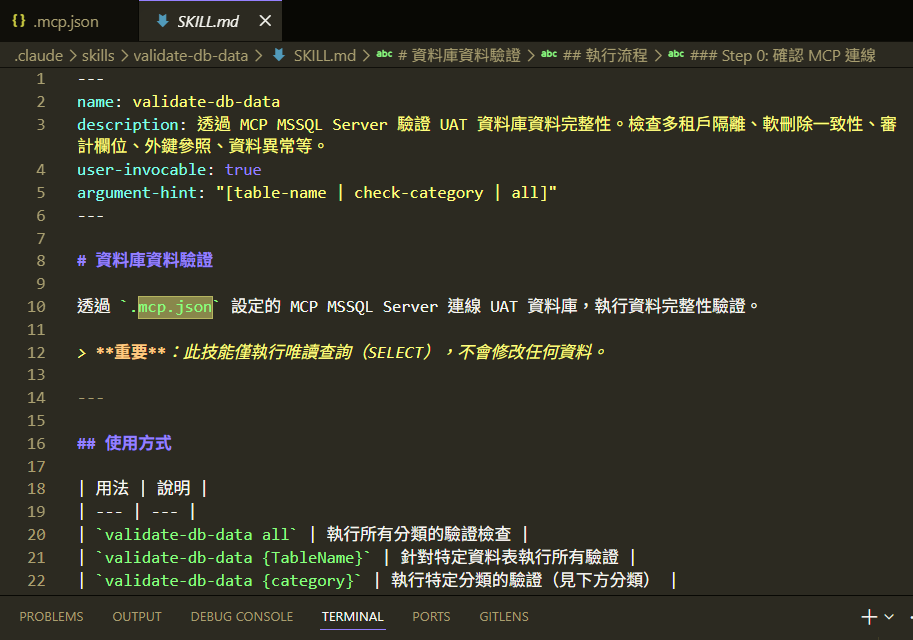
Most of the time, I let the AI generate the matching Agent Skill from the code patterns it just produced. That way the Skill stays consistent with the actual code structure, instead of becoming a hand-maintained doc that drifts out of date.
I also designed a Command mechanism so Skills update automatically as the code evolves. Just run:
/sync-skill
The AI re-generates and syncs all Skills based on the current code structure and logic.
MSSQL MCP for Database Verification
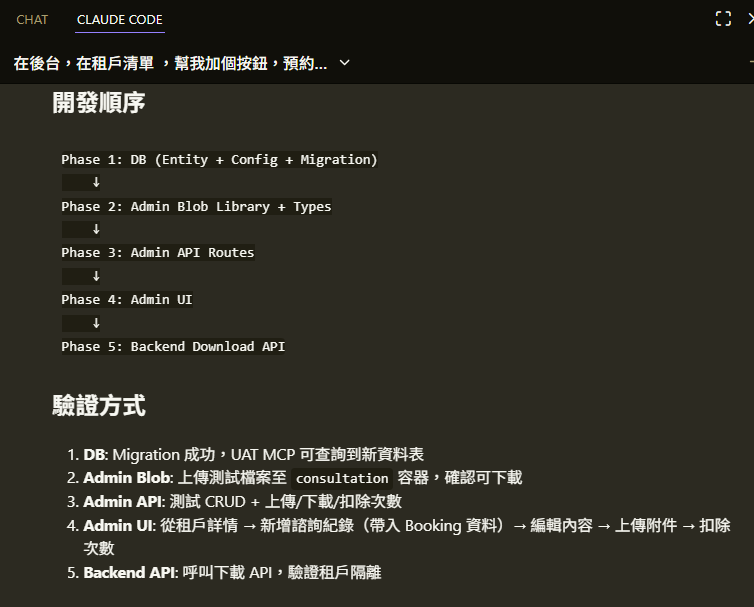
The MSSQL MCP from the Claude marketplace lets the AI directly understand the database schema and verify data (I recommend setting it to read-only and only connecting to UAT).
In practice, after I create a Skill, the AI uses MSSQL MCP through a service principal to connect to the database, querying and verifying data while it plans features or debugs. That removes a lot of manual SQL round-tripping.
Figma MCP: Let the AI Read Designs Directly
With Figma MCP, Claude can connect directly to Figma and read layer structure, component properties, spacing, colors, and so on. Real use cases:
- Design-to-Code: After reading a Figma file, the AI generates matching React components and Tailwind styles—no more manual screenshots or pixel-pushing comparison
- Design system validation: The AI can check whether the implementation matches the design (spacing, typography, colors)
- Rapid prototyping: Hand the AI a Figma page link and it can produce UI code that closely matches the design
Setup is simple: add the Figma MCP to Claude Code's MCP config, authorize, and you can reference Figma files directly in conversation.
Chrome DevTools MCP: Give the AI Eyes on the Browser
Chrome DevTools MCP lets the AI operate the browser's DevTools, including:
- Capturing page screenshots: The AI sees the actual rendered output and can compare against the design or expected look
- Reading console logs: It pulls browser console errors automatically—no copy/paste needed
- Inspecting network requests: It can trace API calls, response statuses, and payload formats
- DOM manipulation: Run JavaScript directly to inspect or tweak page elements
The combo I lean on most: Figma MCP reads the design → write code → Chrome DevTools MCP captures the screenshot to compare results. That forms a complete design → development → verification loop and dramatically cuts the manual back-and-forth.
Sequential Thinking MCP: Teach the AI to "Think First"
Another one worth recommending is @modelcontextprotocol/server-sequential-thinking, which gives the AI structured step-by-step reasoning. Faced with a complex problem, the AI doesn't blurt out an answer—it breaks the thought process into multiple steps and reasons, verifies, and corrects along the way.
It's especially good for:
- Complex architecture design and option evaluation
- Multi-step debugging reasoning (e.g., tracing data flow)
- Analytical tasks that need iterative refinement
It pairs even better with the MSSQL MCP mentioned earlier: the AI plans a query strategy via Sequential Thinking, then verifies it for real through MSSQL MCP. That cuts down on guesswork significantly.
Building Dev Docs with Claude Hooks
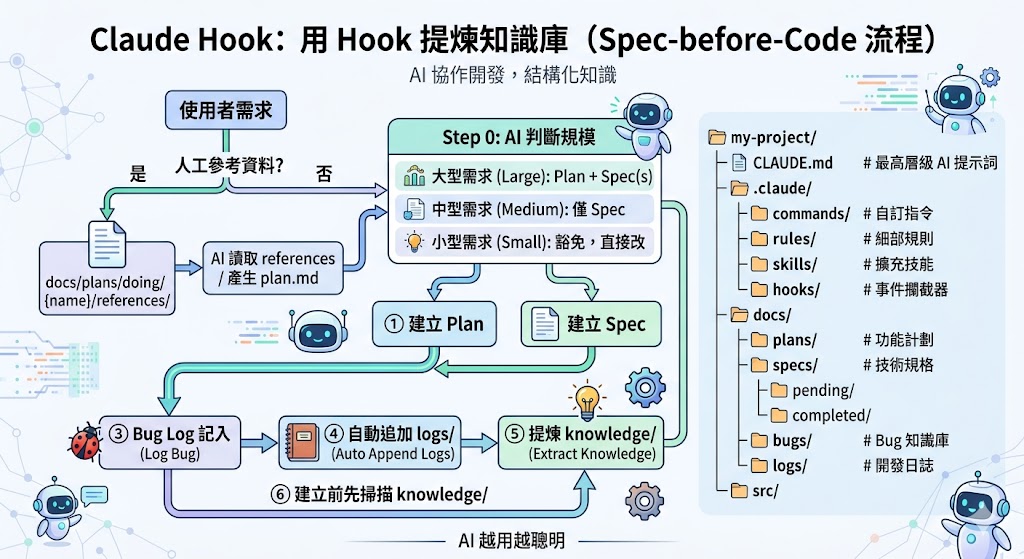
Use Claude Hooks to auto-build dev-related documents. On one hand, you can see what the AI did and capture the lessons; further down the line you can pipe this into Azure DevOps to automatically log completed feature requests.
Distilling Knowledge and Leaving Plan Docs Behind (Claude Hook Flow)
When a project carries tech debt, AI collaboration efficiency takes a hit—you often have to slice tasks very fine just to get to 60–70% of a feature. Before fully understanding the architecture, you can't make broad changes safely, so I started thinking: how can I make the AI auto-build a Knowledge Base while it fixes problems, to speed up future work?
Core Goals
- The AI gets smarter over time and clearly knows what it changed
- Plans are written before code (before code)
- At session end, it archives and distills knowledge
I originally tried Rules to nudge the AI, but they weren't enforced strongly enough. I switched to Hooks, which force execution at specific lifecycle events.
Workflow Design
User Request
    │
    ├──── Any human-prepared references? (PDF/Markdown/SQL etc.)
    │     ├── Yes → drop into docs/plans/doing/{name}/references/
    │     │        → AI reads references/ → produces plan.md
    │     └── No  → fall through to Step 0 below
    │
    ▼
┌─────────────────────────────────┐
│  Step 0: AI sizes the task       │
│  Large  → Plan + Spec(s)         │
│  Medium → Spec only              │
│  Small  → exempt, just edit      │
└──────┬──────────┬───────────────┘
       │          │
   Large req   Medium req
       │          │
       ▼          ▼
  ① Create Plan ② Create Spec
       │          │
       └────┬─────┘
            │
       ③ Log Bugs into the spec
            │
       ④ Auto-append to logs/
            │
       ⑤ Distill into knowledge/
            ▲
       ⑥ Scan knowledge/ before creating new docs
Related prompt resource: markku636/GeneralPrompt
Claude Code Project Folder Structure (For Reference)
my-project/
├── CLAUDE.md               # Top-level AI prompts and project conventions (auto-loaded)
├── README.md               # Human-facing project description
├── .claude/                # Claude Code Agent advanced config
│   ├── commands/           # Custom slash commands (e.g. /review, /test)
│   ├── rules/              # Resident fine-grained rules (supplement to CLAUDE.md)
│   ├── skills/             # On-demand expandable skills
│   └── hooks/              # Lifecycle event interceptors (PreToolUse, SessionEnd)
├── src/                    # Source code
└── package.json
Renting Out a Body (Uber-for-Lobsters Edition)
Someone built a fun MCP and website that lets the AI lobsters you raise commission humans in the real world to do tasks for them—and pay us for it.
Maybe one day we'll all be working part-time for the lobsters.
Free AI Resources
| Tool | How | Allowance |
|---|---|---|
| GitHub Copilot | Email + credit card | 1-month free trial (subscribe near month-end to stretch usage) |
| Google Cloud | Email + credit card | $300 USD / 3 months, can play with Vertex AI |
| Gemini Pro | Student plan | Free for one year (tutorials on YouTube) |
| Claude | Visit claude.ai/acquired in your browser | $10 USD/month for 3 consecutive months |
Wrap-Up
A few takeaways:
- Claude has the most complete ecosystem overall: its dynamic-quota model keeps the bill predictable, it offers cross-project memory, and like Cursor it can run multiple tasks in parallel without stalling.
- Gemini 3.1 image generation is now production-ready, with the Chinese character garble largely resolved.
- CLI is the most agent-friendly environment, and every major player is moving in that direction.
- Data quality determines AI output quality—tech debt directly limits how effective AI collaboration can be.
- Claude Hooks let you enforce a knowledge base, so the AI gets smarter the more you use it.
A line to leave you with:
Garbage in, Garbage out — the AI learns whatever you give it. Clean up your code and data structure first, and the AI can actually help.


Comments