
Introduction
AI Pair Programming isn't new anymore, but a lot of people still use Claude Code in "ask a question, get some code" mode. The Claude Code ecosystem has actually become quite rich — from cross-session memory and scheduled automation to MCP extensions and security scanning — and combining these small techniques takes development efficiency up another level.
This article collects the techniques I use day to day with Claude Code, from basic setup to advanced automation. Newcomers can read top to bottom; if you're more experienced, jump straight to the section you want.
Default Folder Structure for Claude Code
When you first start using Claude Code, it's easy to get confused about where each setting belongs. Let's start by understanding the folder structure.
my-project/
├── CLAUDE.md               # Top-level AI prompt and project guidelines (project memory, auto-loaded on launch)
├── README.md               # Project description for humans
├── .claude/                # Advanced settings folder for the Claude Code Agent
│   ├── commands/           # Custom slash commands (e.g. /review.md, /test.md)
│   ├── rules/              # Persistent fine-grained rules (complementing CLAUDE.md)
│   ├── skills/             # On-demand extended skills or specialised workflows (Skill modules)
│   └── hooks/              # Lifecycle event interceptors (e.g. PreToolUse, SessionEnd)
├── src/                    # Source code
└── package.json            # Project config
A few key points:
- CLAUDE.md is the AI's "project manual" — auto-loaded at the start of every conversation. The more precise the rules you put here, the better the result.
- commands/ is where custom slash commands live, e.g.
/write-blog,/create-spec. Useful for wrapping a complex workflow into a single command. - rules/ is for persistent rules — for example "always create a Spec before changing code", a behavioural constraint that spans tasks.
- hooks/ are shell-layer interceptors, more enforcing than rules. They can inject custom logic before or after the AI actually performs an operation.
Basic Setup — settings.json
The Claude Code project config file is .claude/settings.json, controlling permissions, performance, and other behaviours. Here's the setup I commonly use:
{
  "permissions": {
    "allow": [
      "Bash(*)",
      "Edit(*)",
      "Write(*)",
      "NotebookEdit(*)",
      "mcp__*"
    ]
  },
  "effortLevel": "high"
}
A few things to note:
- permissions.allow: by default Claude Code prompts for confirmation on every Bash, Edit, Write, etc. Setting
allowskips those prompts and dramatically improves flow.Bash(*): allow any shell commandEdit(*),Write(*): allow direct file edits and creationNotebookEdit(*): allow Jupyter Notebook editsmcp__*: allow all MCP tool calls
- effortLevel:
"high"makes Claude spend more compute on answers and reasoning, producing higher quality output — good for complex development tasks.
⚠️ Wide-open permissions are fine for individual development. For team-shared environments, narrow the scope as needed, e.g.
Bash(npm run *)to only allow specific commands.
Claude Hook — Automated Interception and Knowledge Distillation
I have a habit called Write docs before code: I want Claude to organise plans and specs before it actually starts writing code.
I started by using Rules to enforce this and wrote plenty of "please create a Spec before changing code" instructions. In practice, the model frequently ignored those rules and just started editing code with no docs at all.
Switching to Hook + a custom Bash script, binding the flow directly to the pre-execution phase of Edit/Write (PreToolUse event), changed things. The AI couldn't take shortcuts anymore — without documentation it can't proceed; once done it auto-archives, and the whole flow runs smoothly.
Claude Hook can intercept and run custom logic before or after Claude performs specific operations (Edit, Write, etc.). Configured under the hooks section of .claude/settings.json, it supports PreToolUse and PostToolUse events.
Common scenarios:
- Spec-before-Code: enforce writing a spec before code changes
- Lint checks: auto-format on write
- Security checks: intercept operations that may include sensitive info
Use Hook to Build a Knowledge Base (Spec-before-Code Flow)
In practice I've run into plenty of tech debt that drags down AI collaboration efficiency, forcing me to break work into very small pieces just to land 60–70% of a feature. So I designed a mechanism where the AI builds up a Knowledge Base while it fixes issues, accelerating future development:
- Before Code: AI must write a Plan / Spec before coding
- During Code: bugs auto-logged, dev-process notes appended
- After Code: archive on completion, distill knowledge
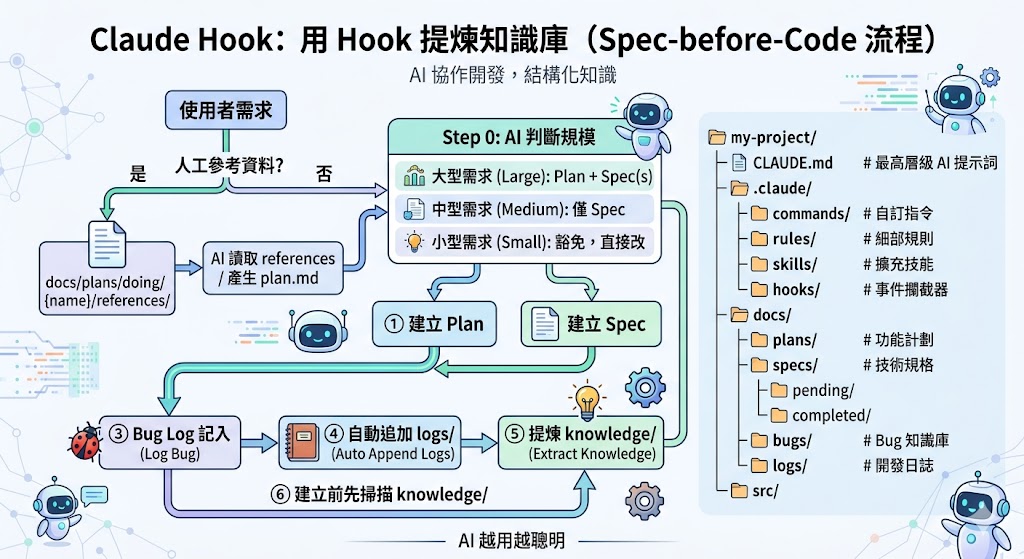
The core goal of this flow is to make AI smarter the more you use it — every dev cycle leaves behind structured knowledge, and next time a similar problem comes up the AI can reference it directly instead of starting from scratch.
Related prompt resources: markku636/GeneralPrompt
Recommended MCPs
MCP (Model Context Protocol) is Claude Code's extension protocol for connecting AI to external tools and services. The list below is ordered from "works out of the box" to "needs extra setup". Newcomers can start with the "must-have basics".
Must-Have Basics
These MCPs are useful in nearly every project and the value shows up immediately. Install these first.
Context7 — Live Library Docs
Solves the problem of AI suggesting outdated APIs. Context7 fetches the latest library documentation in real time, especially useful with fast-moving frameworks like React and Next.js.
Tavily MCP — Real-Time Web Search
Gives the AI live web access and high-quality knowledge sources, with advanced filtering and domain-specific search.
Sequential Thinking — AI Reasoning Booster
Lets Claude analyse complex problems in a structured way — a good fit for architecture design, large-scale refactoring, and other deep-reasoning scenarios.
{
  "mcpServers": {
    "sequential-thinking": {
      "command": "npx",
      "args": ["-y", "@modelcontextprotocol/server-sequential-thinking"]
    }
  }
}
Memory MCP — Long-Term Memory
By default each Claude Code conversation is independent, but with Memory MCP, it can remember context across sessions.
Setup
Add the following to .claude/settings.json or your project's MCP config:
{
  "mcpServers": {
    "memory": {
      "command": "npx",
      "args": ["-y", "@modelcontextprotocol/server-memory"],
      "env": {
        "MEMORY_FILE_PATH": ".claude/memory/memory.jsonl"
      }
    }
  }
}
Practical scenarios
- Project preferences: remember things like "this project uses Tailwind, not CSS Modules"
- People info: remember which team member owns which module
- Decision records: remember "why we picked option A over option B"
The memory file lives at .claude/memory/memory.jsonl, can be version-controlled, and shared with the team.
Development Tool Integrations
MCPs for specific development scenarios — install as needed.
Chrome DevTools MCP — Live Browser Debugging
Gives Claude direct access to the Chrome DevTools Protocol, so it can read console logs, network requests, DOM structure, and other browser info in real time. No more screenshotting and pasting error messages — debugging efficiency jumps.
Playwright MCP — Browser Automation
Drives the browser for automated testing, UI verification, and frontend debugging. Frequently rated as one of the biggest productivity-boosting MCPs for developers.
Figma MCP — Pixel-Perfect Implementation
Previously, getting AI to slice up a design meant showing it screenshots — but screenshots lose detail. A pink button might be misread as orange, and spacing and font sizes turn into guesswork. With Figma MCP, Claude reads structured data straight from the Figma file (colour values, spacing, fonts, component hierarchy) and either turns it into a design-system.md or generates the matching component code directly. The fidelity is on a different level.
Docker MCP — Container Management and Orchestration
Lets the AI build, run, and manage containerised apps — useful when you operate Docker environments during development.
Database and Backend Integrations
These need extra connection config. Confirm DB account permissions before enabling.
MSSQL MCP — Database Queries
Lets Claude query SQL Server databases directly — a fit for when you need to query data while developing:
{
  "mcpServers": {
    "mssql": {
      "command": "npx",
      "args": ["-y", "@connorbritain/mssql-mcp-server@latest"],
      "env": {
        "SERVER_NAME": "your-server.database.windows.net",
        "DATABASE_NAME": "YourDatabase",
        "SQL_AUTH_MODE": "aad",
        "SQL_PORT": "1433",
        "READONLY": "true",
        "AZURE_TENANT_ID": "your-tenant-id",
        "AZURE_CLIENT_ID": "your-client-id",
        "AZURE_CLIENT_SECRET": "your-client-secret"
      }
    }
  }
}
💡 Set
READONLY: trueto avoid the AI accidentally executing writes.
Supabase MCP — Database and Backend Management
A remote MCP server. The AI can query Postgres directly, run SQL, inspect logs, deploy Edge Functions, manage branches via Index.dev, with OAuth authentication — no manual token wrangling.
Enterprise Integrations
For large teams or enterprise environments.
Azure DevOps MCP
@azure-devops/mcp covers nearly every major Azure DevOps feature — Work Items, Pipelines, Repo search, Wiki edits, Test Plans, Advanced Security — making it suitable for teams that rely heavily on Azure DevOps and want to drive it from Claude Code.
Claude Schedule — Automated Scheduling
Claude Schedule lets you configure recurring tasks so Claude can handle repetitive work automatically.
Example: Daily AI News Roundup
Set up a job that runs every morning at 8 AM and has Claude:
- Search for the day's important AI news
- Format it as a summary
- Save it to a designated folder
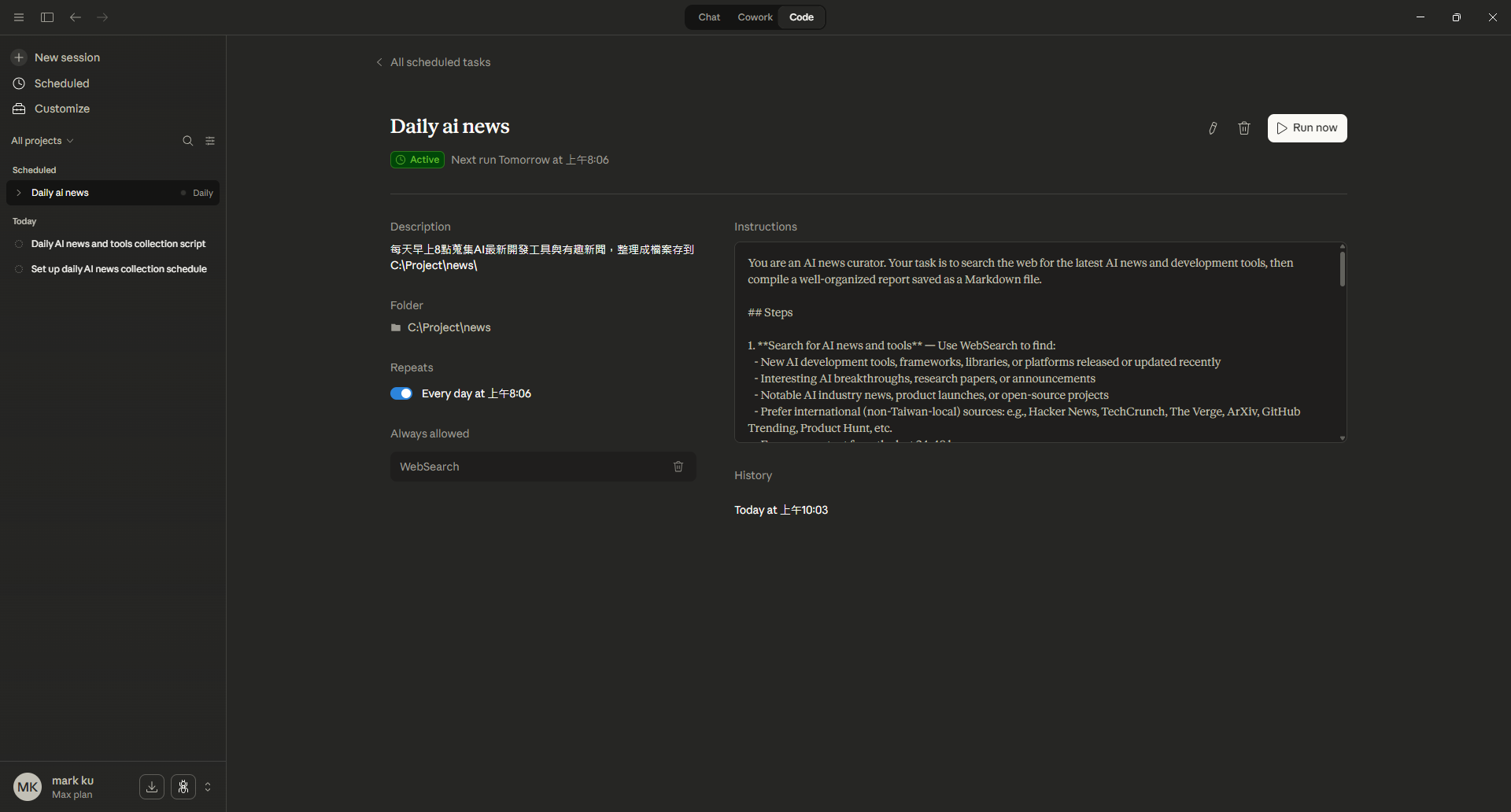
Above is the actual scheduling UI: pick the run time and target folder, and describe what the AI should do in Instructions (search the latest AI dev tools, research papers, industry news, etc.). Claude will then run on schedule.
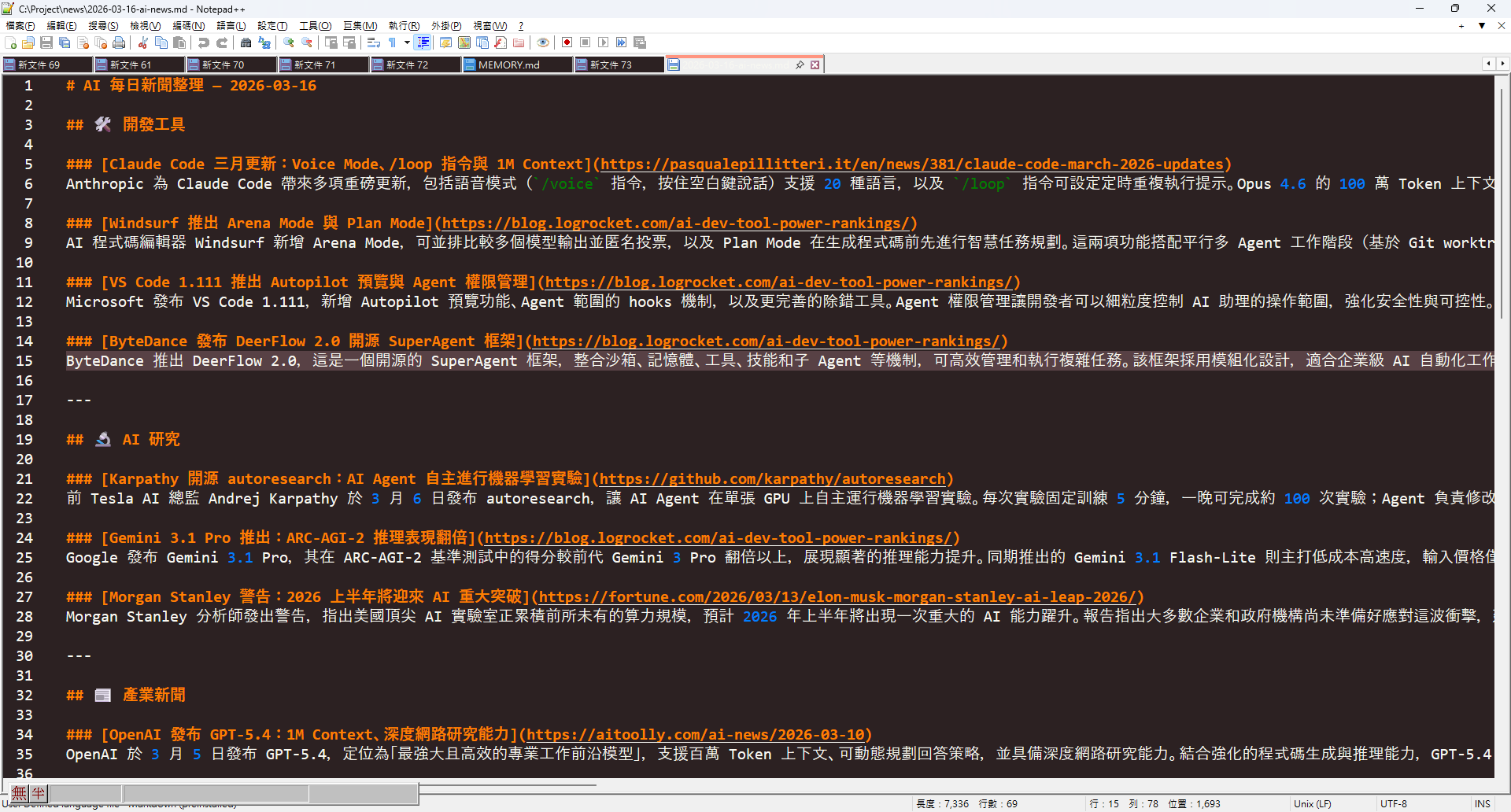
Below is the scheduled output — a tidy daily AI news summary with dev tool updates, AI research progress, and industry news, each item linked to its source:
Other scheduling use cases:
- Daily code review reminder: check PR status
- Auto-generated weekly reports: round up the week's commits and progress
- Dependency update checks: scan for outdated packages on a schedule
Claude Security Scanning
AI Pair Programming speeds up development but can also amplify risk — AI generates a lot of code, and human review can't keep up.
Approach
Have the AI run a sweep before testing or release:
- Ask Claude directly: paste code into Claude and ask it to look for common vulnerabilities (SQL Injection, XSS, CSRF, etc.)
- Integrate into the pipeline: best practice is to integrate security scanners into the CI/CD pipeline so each deploy gets checked automatically
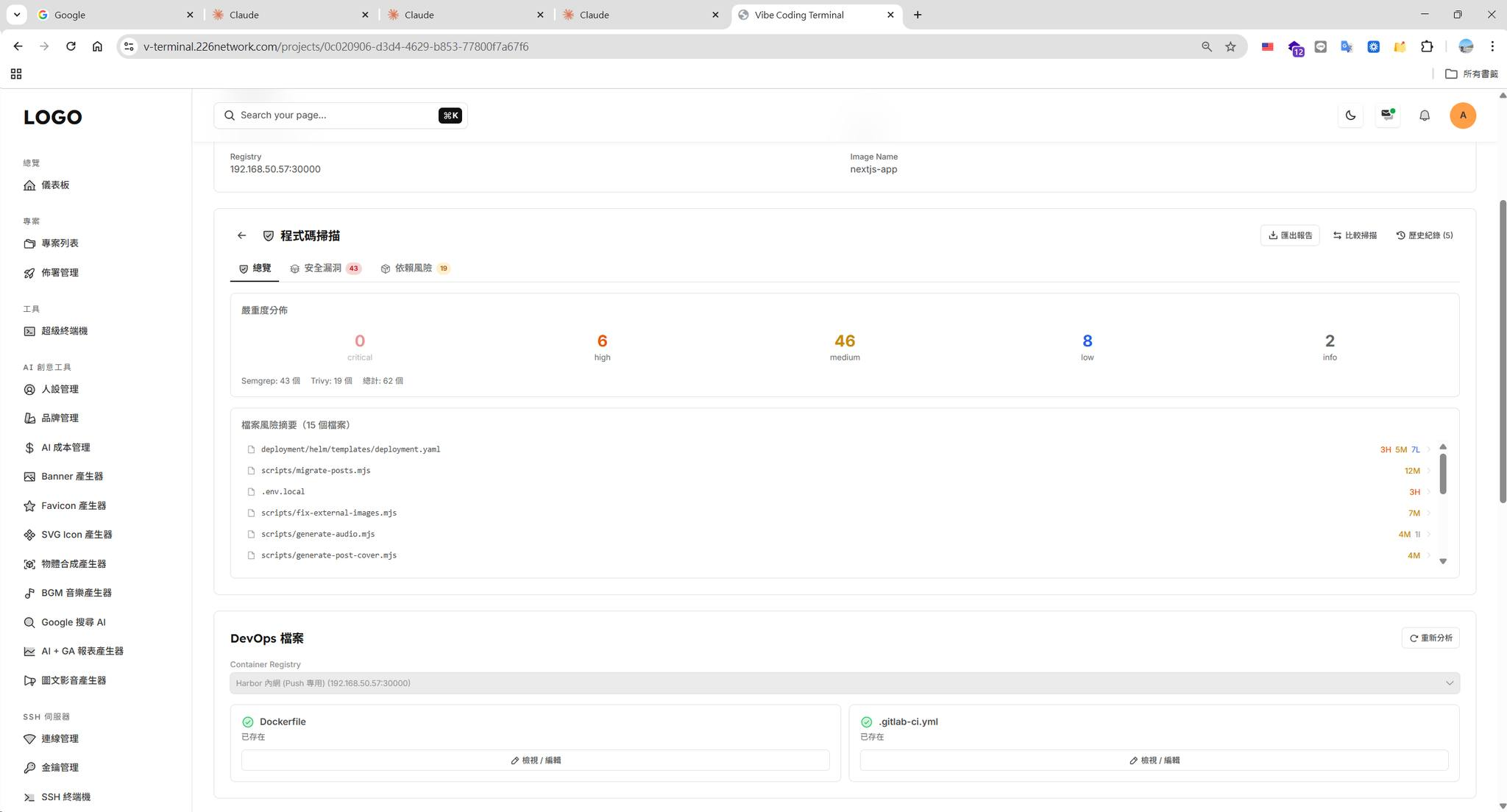
Above is a dashboard combining Semgrep (static analysis) and Trivy (dependency vulnerabilities), giving you an at-a-glance view of severity distribution (critical / high / medium / low) and per-file risk summaries. Combined with CI/CD pipeline triggers, it ensures every deploy passes a security check.
Suggested Flow
Development done → AI Code Review → Security Scan → Testing → Deploy
                       ↑                ↑
                  Claude Code      Pipeline integration
                  manually triggered (e.g. Semgrep, Trivy, Snyk)

The point isn't to replace specialised security tools, but to add another line of defence during development and catch issues earlier.
Claude Code + GitHub Remote Development
Claude Code integrates directly with GitHub, so you can operate your GitHub repo through the Claude web UI without a local dev environment.
Claude Code Remote Control
Lets you operate the Claude Session on your home computer remotely from your phone — develop anywhere, anytime.
Conclusion
Claude Code is more than an AI code generator. Used well alongside the surrounding ecosystem, it builds a complete dev workflow:
- Folder structure: get clear on the roles of CLAUDE.md, commands/, rules/, hooks/ and your setup becomes much more organised
- MCP extensions: from must-haves (Context7, Memory) to advanced integrations (databases, DevOps), pick what you need
- Schedule: automate repetitive work and free up human time
- Hook: enforce Spec creation so the AI gets smarter with every cycle
- Security scanning: an extra line of defence during development
- GitHub remote development: operate the repo via the web, no local environment required
- Remote Control: combine the
-pflag with GitHub Actions to integrate Claude into automated workflows
Each of these is simple on its own, but combined they form a high-leverage AI-assisted development environment.


Comments