---
title: "From Copilot to Cursor to Claude: Auto-Distilling Knowledge Docs During Development with Claude Code Hooks"
description: "A real-world comparison of Claude, Cursor, and GitHub Copilot, plus notes on Gemini 3.1 image generation, the rise of CLI tools, an SQL reasoning failure case, and a Claude Code hook-driven knowledge distillation workflow."
canonical_url: "https://blog.markkulab.net/en/post/ai-tools-sharing-claude-gemini"
author: "Mark Ku"
author_url: "https://blog.markkulab.net/en/author/mark-ku"
site: "Mark Ku's Tech Notes"
date_published: "2026-03-12 10:00:00 +0800"
category: "AI"
tags: ["ai", "claude", "gemini", "cursor", "copilot", "developer-experience", "mcp", "claude-code"]
language: "en"
license: "CC BY 4.0"
license_url: "https://creativecommons.org/licenses/by/4.0/"
attribution: "when reusing or quoting, credit the author and link back to the original"
---
# From Copilot to Cursor to Claude: Auto-Distilling Knowledge Docs During Development with Claude Code Hooks
> **TL;DR** — 歡迎收聽 Mark 的 Tech Insights,我是主持人璦廷。選對程式開發輔助工具,往往能讓工作事半功倍。今天帶您了解幾款熱門工具的差異與最新自動化流程。 讓我們來看看實測結果,Claude Code 憑藉動態限額機制與精準的專案結構掌握度脫穎而出。這個重點值得注意:隨著各大科技巨頭將工具轉向命令列介面,終端機已成為人工智慧代理最活躍的舞台。 然而,人工智慧並非萬靈丹。當面對命名混亂、缺乏規範的資料庫時,人工智慧也無法正確推導邏輯。這印證了「輸入垃圾,輸出也是垃圾」的觀念,清理技術債仍是順暢協作的前提。 為解決此問題,作者導入 Claude Hook 機制,強制人工智慧在開發前後撰寫計畫並提煉知識文件,藉此建立專屬知識庫,讓人工智慧越用越聰明。 總結來說,建立自動化知識提煉流程是現代開發的關鍵。這也讓我們思考:該如何優化手邊的系統架構,來迎接更高效的人機協作時代呢?
## Introduction
This post is a written-up version of an internal sharing session from 2026/03/12, covering several themes:
- A practical comparison of AI dev tools (Copilot / Cursor / Claude)
- Hands-on experience with Gemini 3.1 across image, video, and audio generation
- The rise of CLI tools
- A real-world pitfall: when AI fails to derive SQL logic
- New development workflows I'm experimenting with, and a Claude hook-based knowledge distillation flow
## AI Dev Tool Comparison
The three tools most often compared right now:
| Tool | Cost | Beginner UX | Productivity | Notes |
|------|------|-------------|--------------|-------|
| GitHub Copilot | Cheapest | Average | Average | $20 Pro tier; you have to keep babysitting "Continue" |
| Cursor | Relatively pricey
(high-volume On Demand
can blow up the bill) | Best UX | High | Two weeks of usage burned through
half of the team budget |
| Claude Code | High volume
but good value | Average | Highest | Dynamic quota,
like throttled "all-you-can-eat",
hard to overrun the bill |
### My Personal Ranking
```
Productivity: Claude > Cursor > Copilot
Beginner UX: Cursor > Claude > Copilot
Cost: Copilot > Claude > Cursor
```
### Why I Chose Claude
The Claude Max plan uses a 5x dynamic quota model, similar to a "throttled all-you-can-eat" plan. Once Opus usage exceeds the limit, the system automatically falls back to Sonnet, or resets after 5 hours; the design makes it hard to actually blow up the bill. For developers spending close to $100 USD/month on AI tools, upgrading to Claude Max 5x usually ends up cheaper.
### Standout Features of Claude Code
- It has its own **MCP marketplace** that makes finding integrations easy
- **Cross-project memory persists**, with each project's memory stored at:
```
C:\Users\{username}\.claude\projects\{project}\memory\MEMORY.md
```
When switching projects, the AI auto-loads the matching context, so you don't have to re-explain the background.
- Compared to other tools, **its understanding of project structure is more accurate** (Copilot often drops skills into the wrong folder)
> The one downside: account switching can be flaky and login often fails, especially when you hold two Claude 5x subscriptions at once (one work, one personal).
---
## Gemini 3.1: Image, Video, Audio
I've been trying out almost every Gemini 3.1 capability recently: images, video, background music, music with vocals, and TTS.
### TTS Chinese Voice Quality Ranking
```
VoAI > Azure TTS > Gemini
```
Gemini's Chinese TTS still isn't great today.
### Image Generation: Big Leap on Chinese Characters
Complex Chinese characters used to come out wrong or garbled when generated through Google's models. Gemini 3.1 has clearly improved here.
**Nana Banana icon (v1)**

**Nana Banana (Gemini 3.1 v2)**

**Chinese character test (Gemini 3.1)**
Here's what the Chinese character generation looks like now—a lot of the old garbled-character issues are fixed in 3.1:

I made a menu for a friend. Items like mochi and pineapple bun used to render incorrectly all the time, but now even complex Chinese characters come out crisp.
### Object Composition (People + Scenes)
Beyond image generation and editing, Gemini 3.1 supports object composition (person + person, person + object), which is useful for e-commerce product-in-scene compositing.
**Experiment: "Auntie helps you buy a scooter" photo + a friend's photo = Auntie buying a scooter**
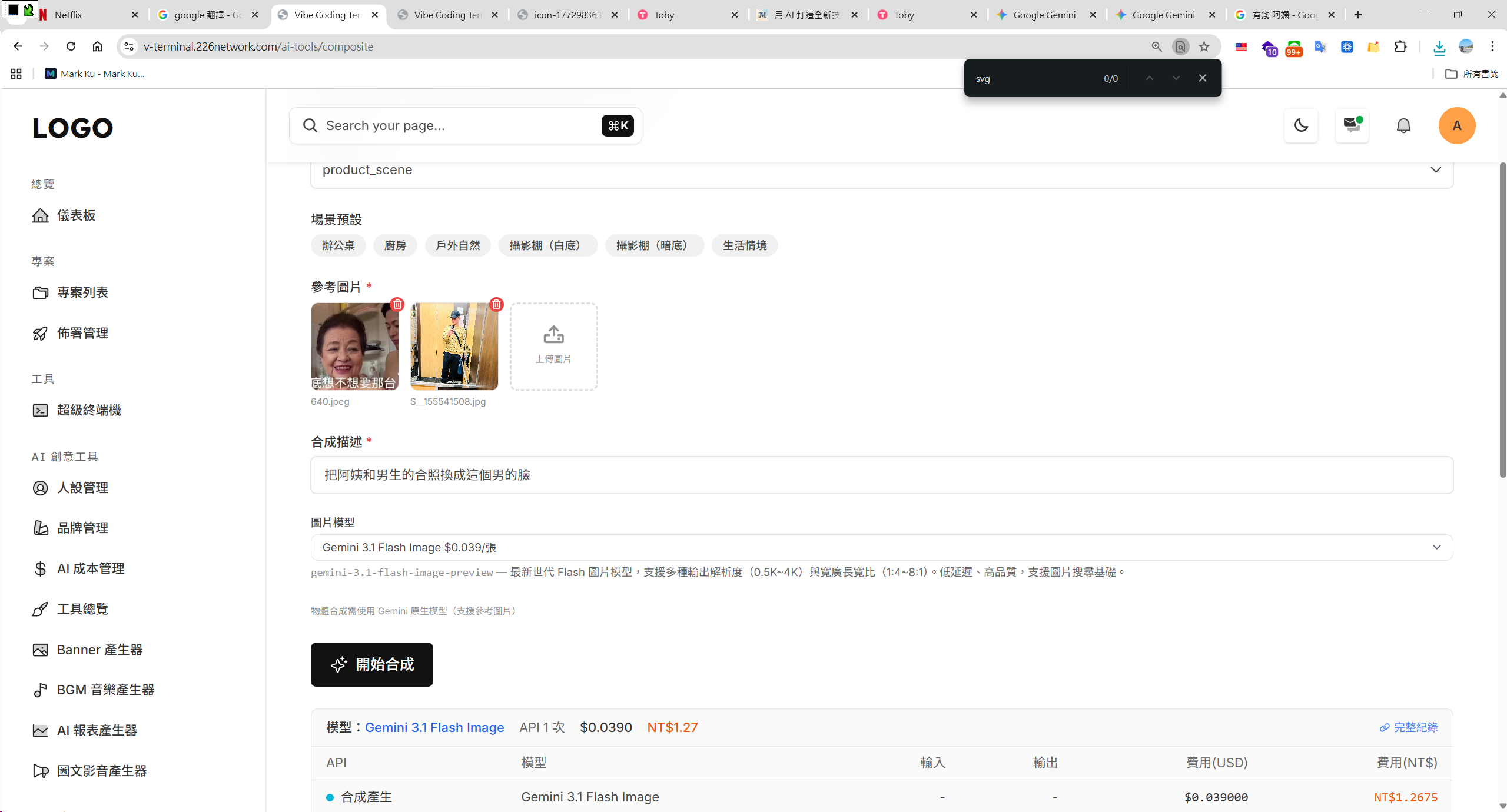

Video generation is also solid—you can upload your own footage and have it generate video from there.
---
## The Rise of CLI Tools
I've noticed an interesting trend: **more and more AI tools are shipping CLI versions**.
### Google Quietly Released the gws CLI
Google has officially released a CLI called `gws`. A single command lets you operate every Google Workspace service: Drive, Gmail, Calendar, Sheets, Docs, Chat...
The best part is that it doesn't hard-code commands. Everything is **dynamically generated through the Discovery Service**, so when Google adds a new endpoint, the CLI picks it up automatically—no waiting for an update.
It also bundles an **MCP Server** so you can plug it directly into Claude Desktop, Gemini CLI, or any AI Agent. It comes with 100+ Agent Skills out of the box, and works with regular Gmail accounts—not just Workspace Enterprise.
### Bash May Be the Most Agent-Friendly Tool
Beyond gws, GitHub Copilot has also released a CLI version. The pattern across the big players is clear: they're all moving toward CLIs, and **Bash may simply be the easiest environment for an AI Agent to operate in**.
> This perhaps hints at an opportunity—we can build Bash tooling for AI Agents that simultaneously logs what the user did, for analysis or auditing.
---
## Real Case: AI Fails to Derive SQL Logic
Last week I ran into a case that left a strong impression.
### The Setup
I asked the AI to derive SQL logic from existing application code, then had SQL Server's AI assist verify it. Even so, I couldn't get a correct **service usage statistics query**.
### Root Cause
The issue wasn't a lack of AI capability—it was the **data model itself**:
- Two key columns lived in different tables
- Each had its own JOIN to different lookup tables, with no clear logical basis
- Some data lived in external extension tables
- Inconsistent naming, similar spellings, and overlapping uses
- No general design conventions, and no clean data semantics
In a setup like this, all the AI can do is "guess at the logic"—the database simply doesn't expose the semantics needed to derive an answer.
### Another Example
The previous backend team wasn't willing to coordinate with the frontend, so the frontend ended up hard-coding display names that came directly from the database. The AI couldn't make sense of it and just gave up. These kinds of tech debt have to be cleared out incrementally before AI collaboration can run smoothly.
### The Core Idea
> **What you feed the AI is the structure you'll get back (Garbage in, Garbage out)**
Generative AI reasons over what you give it and produces something similar. Feed it bad code and you'll get bad code back.
---
## Trying New Development Approaches
I'm currently exploring a few new directions:
### Full Stack in a Single Folder
Putting frontend and backend in the same folder so the AI can see the entire context at once for full-stack work. That said, on systems with messy architecture the AI's speedup is limited—you have to break tasks into small pieces and steadily refactor the code and structure while distilling related knowledge docs along the way.
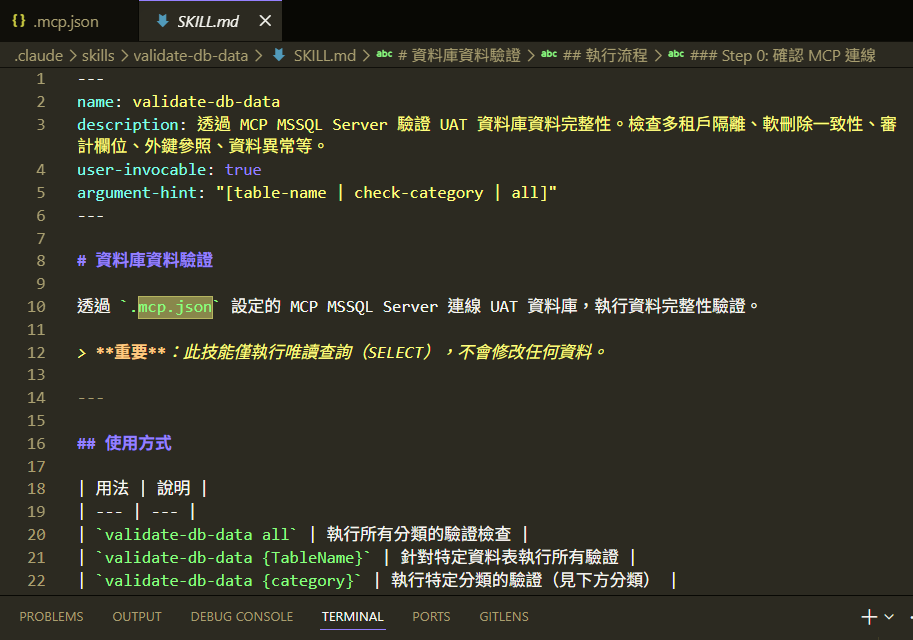
### Auto-Generated Agent Skills
Most of the time, I let the AI generate the matching Agent Skill from the code patterns it just produced. That way the Skill stays consistent with the actual code structure, instead of becoming a hand-maintained doc that drifts out of date.
I also designed a Command mechanism so Skills update automatically as the code evolves. Just run:
```
/sync-skill
```
The AI re-generates and syncs all Skills based on the current code structure and logic.
### MSSQL MCP for Database Verification
The **MSSQL MCP** from the Claude marketplace lets the AI directly understand the database schema and verify data (I recommend setting it to read-only and only connecting to UAT).
In practice, after I create a Skill, the AI uses MSSQL MCP through a service principal to connect to the database, querying and verifying data while it plans features or debugs. That removes a lot of manual SQL round-tripping.
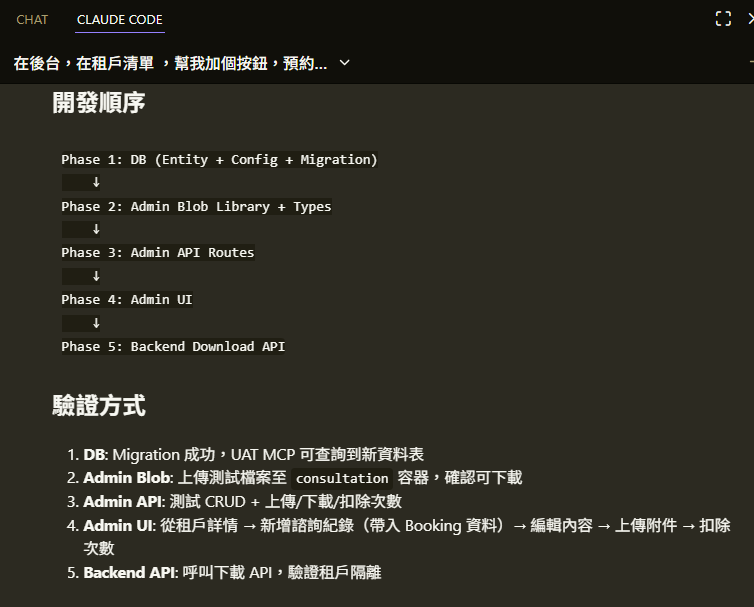
### Figma MCP: Let the AI Read Designs Directly
With **Figma MCP**, Claude can connect directly to Figma and read layer structure, component properties, spacing, colors, and so on. Real use cases:
- **Design-to-Code**: After reading a Figma file, the AI generates matching React components and Tailwind styles—no more manual screenshots or pixel-pushing comparison
- **Design system validation**: The AI can check whether the implementation matches the design (spacing, typography, colors)
- **Rapid prototyping**: Hand the AI a Figma page link and it can produce UI code that closely matches the design
Setup is simple: add the Figma MCP to Claude Code's MCP config, authorize, and you can reference Figma files directly in conversation.
### Chrome DevTools MCP: Give the AI Eyes on the Browser
**Chrome DevTools MCP** lets the AI operate the browser's DevTools, including:
- **Capturing page screenshots**: The AI sees the actual rendered output and can compare against the design or expected look
- **Reading console logs**: It pulls browser console errors automatically—no copy/paste needed
- **Inspecting network requests**: It can trace API calls, response statuses, and payload formats
- **DOM manipulation**: Run JavaScript directly to inspect or tweak page elements
The combo I lean on most: Figma MCP reads the design → write code → Chrome DevTools MCP captures the screenshot to compare results. That forms a complete **design → development → verification** loop and dramatically cuts the manual back-and-forth.
### Sequential Thinking MCP: Teach the AI to "Think First"
Another one worth recommending is **@modelcontextprotocol/server-sequential-thinking**, which gives the AI structured step-by-step reasoning. Faced with a complex problem, the AI doesn't blurt out an answer—it breaks the thought process into multiple steps and reasons, verifies, and corrects along the way.
It's especially good for:
- Complex architecture design and option evaluation
- Multi-step debugging reasoning (e.g., tracing data flow)
- Analytical tasks that need iterative refinement
It pairs even better with the MSSQL MCP mentioned earlier: the AI plans a query strategy via Sequential Thinking, then verifies it for real through MSSQL MCP. That cuts down on guesswork significantly.
### Building Dev Docs with Claude Hooks
Use **Claude Hooks** to auto-build dev-related documents. On one hand, you can see what the AI did and capture the lessons; further down the line you can pipe this into Azure DevOps to automatically log completed feature requests.
---
## Distilling Knowledge and Leaving Plan Docs Behind (Claude Hook Flow)
When a project carries tech debt, AI collaboration efficiency takes a hit—you often have to slice tasks very fine just to get to 60–70% of a feature. Before fully understanding the architecture, you can't make broad changes safely, so I started thinking: how can I make the AI auto-build a Knowledge Base while it fixes problems, to speed up future work?
### Core Goals
- The AI gets smarter over time and clearly knows what it changed
- Plans are written before code (before code)
- At session end, it archives and distills knowledge
I originally tried Rules to nudge the AI, but they weren't enforced strongly enough. I switched to **Hooks**, which force execution at specific lifecycle events.
### Workflow Design
```
User Request
│
├──── Any human-prepared references? (PDF/Markdown/SQL etc.)
│ ├── Yes → drop into docs/plans/doing/{name}/references/
│ │ → AI reads references/ → produces plan.md
│ └── No → fall through to Step 0 below
│
▼
┌─────────────────────────────────┐
│ Step 0: AI sizes the task │
│ Large → Plan + Spec(s) │
│ Medium → Spec only │
│ Small → exempt, just edit │
└──────┬──────────┬───────────────┘
│ │
Large req Medium req
│ │
▼ ▼
① Create Plan ② Create Spec
│ │
└────┬─────┘
│
③ Log Bugs into the spec
│
④ Auto-append to logs/
│
⑤ Distill into knowledge/
▲
⑥ Scan knowledge/ before creating new docs
```
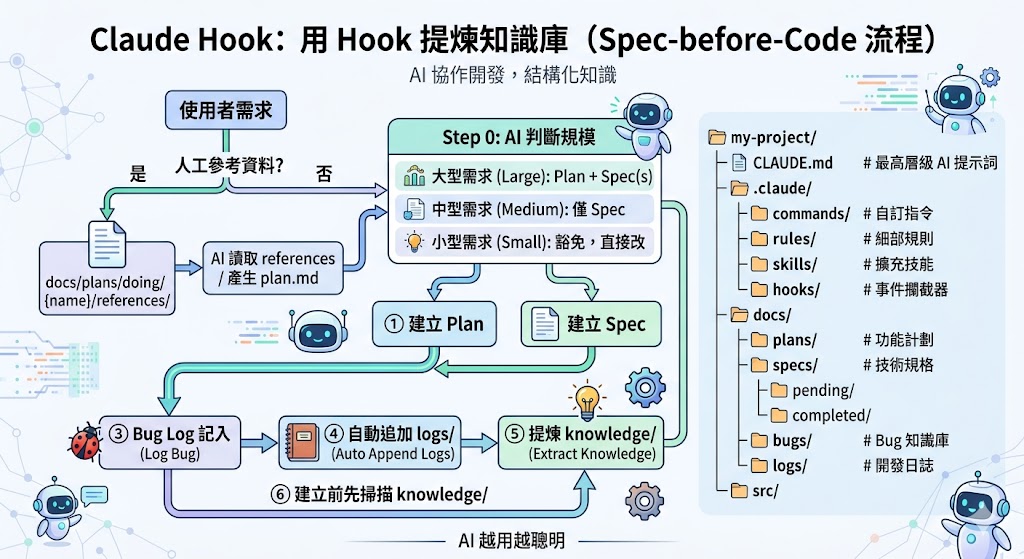
Related prompt resource: [markku636/GeneralPrompt](https://github.com/markku636/GeneralPrompt)
---
## Claude Code Project Folder Structure (For Reference)
```
my-project/
├── CLAUDE.md # Top-level AI prompts and project conventions (auto-loaded)
├── README.md # Human-facing project description
├── .claude/ # Claude Code Agent advanced config
│ ├── commands/ # Custom slash commands (e.g. /review, /test)
│ ├── rules/ # Resident fine-grained rules (supplement to CLAUDE.md)
│ ├── skills/ # On-demand expandable skills
│ └── hooks/ # Lifecycle event interceptors (PreToolUse, SessionEnd)
├── src/ # Source code
└── package.json
```
---
## Renting Out a Body (Uber-for-Lobsters Edition)
Someone built a fun MCP and website that lets the AI lobsters you raise commission humans in the real world to do tasks for them—and pay us for it.
> Maybe one day we'll all be working part-time for the lobsters.
🔗 [rentahuman.ai](https://rentahuman.ai/)
---
## Free AI Resources
| Tool | How | Allowance |
|------|-----|-----------|
| GitHub Copilot | Email + credit card | 1-month free trial (subscribe near month-end to stretch usage) |
| Google Cloud | Email + credit card | $300 USD / 3 months, can play with Vertex AI |
| Gemini Pro | Student plan | Free for one year (tutorials on YouTube) |
| Claude | Visit `claude.ai/acquired` in your browser | $10 USD/month for 3 consecutive months |
---
## Wrap-Up
A few takeaways:
- **Claude has the most complete ecosystem overall**: its dynamic-quota model keeps the bill predictable, it offers cross-project memory, and like Cursor it can run multiple tasks in parallel without stalling.
- **Gemini 3.1 image generation is now production-ready**, with the Chinese character garble largely resolved.
- **CLI is the most agent-friendly environment**, and every major player is moving in that direction.
- **Data quality determines AI output quality**—tech debt directly limits how effective AI collaboration can be.
- **Claude Hooks let you enforce a knowledge base**, so the AI gets smarter the more you use it.
A line to leave you with:
> **Garbage in, Garbage out** — the AI learns whatever you give it. Clean up your code and data structure first, and the AI can actually help.
## References
- [Google Gemini API model list](https://ai.google.dev/gemini-api/docs/models?hl=zh-tw)
- [GeneralPrompt - markku636](https://github.com/markku636/GeneralPrompt)
- [rentahuman.ai](https://rentahuman.ai/)
---
## About this article and its author
Originally published on [Mark Ku's Tech Notes](https://blog.markkulab.net/en/post/ai-tools-sharing-claude-gemini)
License: [CC BY 4.0](https://creativecommons.org/licenses/by/4.0/) — when reusing or quoting, credit the author and link back to the original
### About the author
**[Mark Ku](https://blog.markkulab.net/en/author/mark-ku)** — Software Solution Provider
- 10+ years senior software engineer, now an AI Builder
- Focused on large-platform architecture — North-American e-commerce, AI SaaS subscription billing
- Combining AI Agents and automation to build evolvable product foundations
### Free tools built by the author
All of these are free to use:
- [Free PDF Sign Tool](https://blog.markkulab.net/en/tools/pdf-sign): Online PDF sign tool — draw, type, or upload a signature, then drag, resize, and download. Everything runs in your browser; nothing is uploaded.
- [VS Code Refactory](https://blog.markkulab.net/en/tools/refactory): Refactory is a VS Code refactoring extension: 34 actions plus a 37-rule code-smell inspection layer with a Code Health dashboard, across 18 languages, backed by 534 tests. It learns your repo's conventions: where interfaces live, where DI is registered, whether 'use client' belongs. It ranks files by git churn × complexity so you know what to fix first, and hands any smell to the Claude Code already on your machine. Free to use, and your source never leaves your computer.
- [DB-Kit Database Manager](https://blog.markkulab.net/en/tools/db-kit): DB-Kit is a lightweight, cross-platform database manager built with Tauri + Rust + React. Manage MySQL, MariaDB, PostgreSQL, SQL Server, Oracle, SQLite, MongoDB, Redis, Kafka, Elasticsearch and RabbitMQ from one consistent interface: passwords encrypted in the OS keychain, SSH tunnels, full CRUD, a visual query builder, stacked multi-statement result sets, cross-connection data transfer and compare/sync, Excel / CSV import & export, visualized execution plans, ER diagrams, scheduled backups, SQL stress testing with p50–p99 latency percentiles, a 15-rule SQL review engine, Kafka message browsing with monitoring & alerts, a bilingual UI (Traditional Chinese / English), a built-in AI assistant (natural-language SQL, AI review and tuning advice) and the dbk CLI. Free and open source (MIT), with installers for Windows, macOS and Linux.
- [VS Code Super Mermaid](https://blog.markkulab.net/en/tools/super-mermaid): Super Mermaid is a VS Code extension for beautiful Mermaid diagrams out of the box: auto-colored live preview, mouse pan & zoom, high-res PNG / SVG export, 21 templates and multiple themes. Free and open source (MIT).
- [React Super Mermaid](https://blog.markkulab.net/en/tools/react-super-mermaid): react-super-mermaid is an open-source React component library: render beautiful Mermaid diagrams with a single , with built-in colorful / sketch themes, pan & zoom, in-diagram search, and high-res SVG / PNG export. Lightweight, SSR-safe, fully typed. Free and open source (MIT).
- [Jira / Confluence Super Mermaid](https://blog.markkulab.net/en/tools/jira-super-mermaid): An Atlassian Forge app: write Mermaid syntax directly inside a Jira issue or a Confluence page and get flowcharts, sequence diagrams, state machines and Gantt charts. 11 diagram types, SVG / PNG export, light and dark themes, full CJK support. Runs on Atlassian: your diagrams live in your own site and the app calls no third-party service. Free, coming soon to the Atlassian Marketplace.
- [Mermaid Live Preview](https://blog.markkulab.net/en/tools/mermaid-preview): Write Mermaid in your browser, see it render instantly, and share the whole diagram as a single link. No sign-up, nothing uploaded to a server, and mermaid.live share links work as-is.
- [React Intl Phone Number](https://blog.markkulab.net/en/tools/react-intl-phone-number): react-intl-phone-number is an open-source React component: framework-agnostic and antd-free, with E.164 in/out, a searchable flag / country-code dropdown, configurable validation levels (strict / mobile-strict / loose), themeable CSS, and i18n — phone logic powered by google-libphonenumber. Lightweight and fully typed. Free and open source (MIT).
- [Uptime Kuma Cluster](https://blog.markkulab.net/en/tools/uptime-kuma-cluster): Turn single-node Uptime Kuma into a highly available cluster: OpenResty + Lua smart load balancing, shared MariaDB state, health checks and automatic failover, plus cluster-management REST APIs. One Docker Compose command to start. Free and open source (MIT).
- [Special Education](https://blog.markkulab.net/en/education): Learning materials crafted for special education students
### Daily podcasts
- [Mark's Tech Insights — Daily AI News](https://blog.markkulab.net/en/category/tech-news): Daily curated AI and tech trends. Catch the latest developments via audio summaries — covering AI applications, software architecture, DevOps, and engineering practice. — RSS: https://blog.markkulab.net/feed.xml
- [AI股市蝦聊](https://blog.markkulab.net/en/category/ai-stock-chat): Every trading day, an AI-analyzed take on the Taiwan stock market, delivered as a two-host conversation covering the session and the next-day outlook. — RSS: https://blog.markkulab.net/ai-stock-chat/feed.xml
- [開源好物週報](https://blog.markkulab.net/en/category/open-source-weekly): A weekly two-host pick of free open-source tools surfaced from real Hacker News, GitHub, and Reddit buzz — what pain they solve and the fastest way to get started. — RSS: https://blog.markkulab.net/open-source-weekly/feed.xml
### Newsletter
[Subscribe to the newsletter](https://blog.markkulab.net/en/subscribe) — Be the first to know about new posts. No spam, unsubscribe anytime.