
The difference between state and props
In React, the main triggers for re-rendering are props and state.
1. props
Parameters passed in from outside the component. They are read-only and immutable — once created, they cannot be changed; you can only destroy and recreate to change the data. React decides whether an object has been modified by comparing memory references.
2. state
- Private state belonging to a component, mainly used for passing data inside it. Apart from initialization in the constructor, modifications must go through
setState, otherwise no re-render will happen (setStateis asynchronous and doesn't update immediately). - Any state change in React that should trigger a render must call
setState. - React's
setStateis asynchronous; the second-argument callback is the way to read the final value.
this.setState ({ count: this.state.count + 1 }, () => {
 console.log(this.state.count);
});
- Calling
setStatetwice with the same operation only runs once. You can pass a function to read the previous lifecycle's state (preState,preProps):
onClick={() => {
            this.setState(
              (preState, preProps) => {
                return { count: preState.count + 1 };
              }
            );

            this.setState(
              (preState, preProps) => {
                return { count: preState.count + 1 };
              }
            );
          }}
React components come in two flavors
React Class Component (the old style)
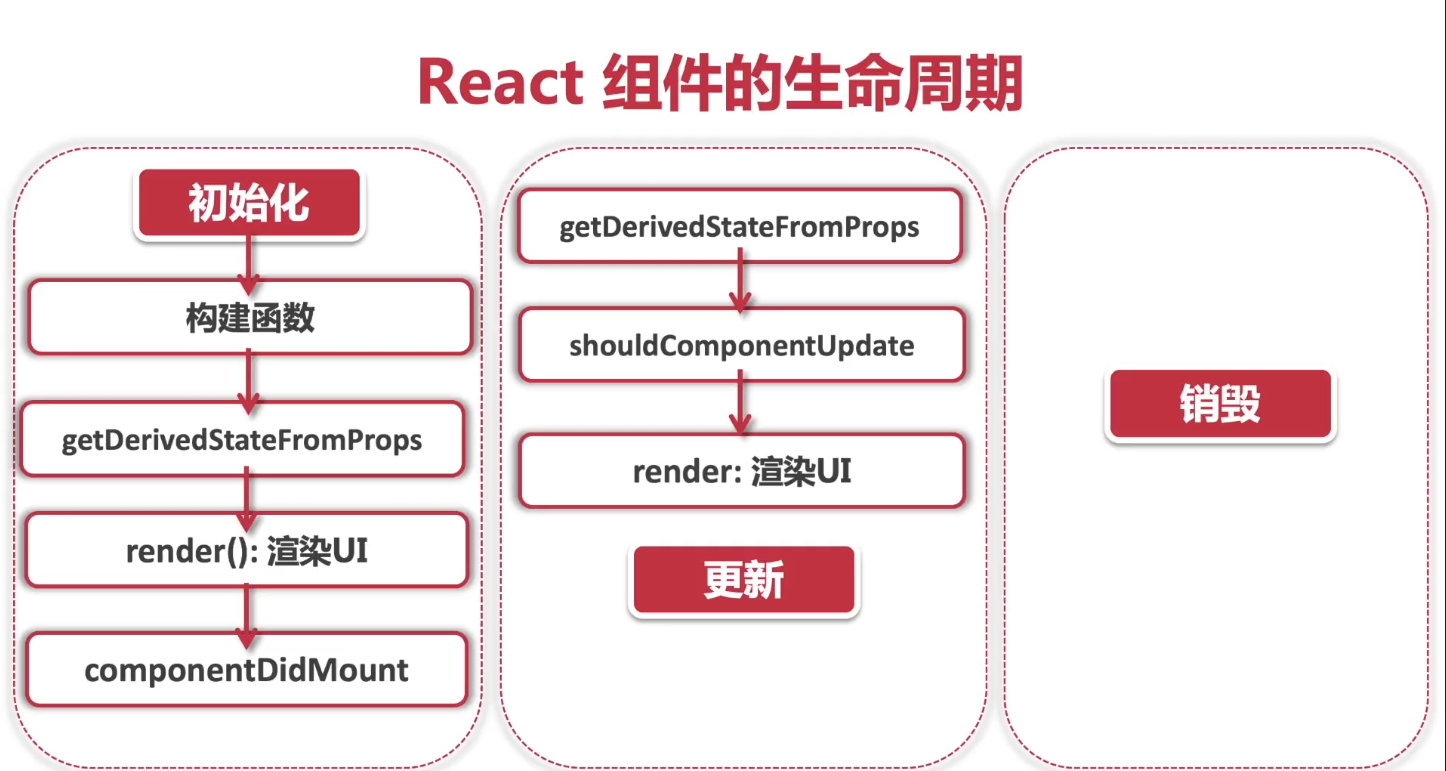
Lifecycle 1: Initialization
componentDidMount() — fires right after the component is mounted
Lifecycle 2: Update
Called when the component receives a new prop or after an update.
static getDerivedStateFromProps(props, state)
componentDidUpdate(prevProps, prevState)
P.S. Be careful: any setState call inside the component will re-trigger componentDidUpdate, so make sure your logic doesn't recurse infinitely.
shouldComponentUpdate — should the component update? Default true; return false to skip the update.
shouldComponentUpdate(nextProps, nextState) {
  return true; // 反回true 更新 false 不更新
}
Lifecycle 3: Destruction
componentWillUnmount() — called right before the component is destroyed; useful for avoiding memory leaks.
Function component (new projects' default App.tsx is also a function component now)
interface RobotProps {
  id: number;
  name: string;
  email: string;
}

interface RobotState {
  random:number
}

const Robot: React.FC<RobotProps,RobotState> = ({ id, name, email }) => {
const value = useContext(appContext)

  return (
          <div className={styles.cardContainer}>
            <img alt="robot" src={`https://robohash.org/${id}`} />
            <h2>{name}</h2>
            <p>{email}</p>
            <p>{value.username}</p>
          </div>
  );
};

export default Robot;
Two ways to get the correct this inside a function
1. bind this
onClick={this.handlerClick.bind(this)}>
2. arrow function — this will point to the React object itself
handlerClick = (e) => {
    this.setState({ isOpen: !this.state.isOpen });
};


Comments