
Context
- One day, we discovered that bots had registered over 10,000 member accounts on our site.
- Visa notified us that too many bots were attempting to use non-existent card numbers. The failure rate was so high that they threatened to suspend our credit card payment processing.
- We also found bots attempting to reset passwords and check order statuses. We evaluated Google reCAPTCHA v2/v3 and found the user experience wasn't great. Google reCAPTCHA often takes a long time to solve, wasting a lot of the user's time. So, I asked my colleague to research and integrate Cloudflare Turnstile.
How It Works
- Behavioral Analysis: Analyzes user behavior patterns (such as mouse movements, keyboard inputs, scrolling behavior, etc.) to determine if the user is a real human.
- Machine Learning: Uses machine learning models trained on real-world data to identify and adapt to new automated threats.
- Privacy Protection: Protects user privacy by not relying on personally identifiable information for verification. Instead, it uses non-personally identifiable behavioral characteristics and patterns.
- Accessibility: Provides accessible access for all users, including those with visual impairments, without relying on visual challenges.
- Flexibility and Customization: Allows website owners to customize protection levels and user experience based on their needs, from automatic background checks to triggering a manual challenge when high risk is detected.
Why We Chose Cloudflare Turnstile
While searching for a solution, we discovered Cloudflare Turnstile. It's free, easy to integrate, offers a great user experience, has fewer false positives, and provides relevant reporting services.
Integration Method
1. Read the integration documentation
2. Register and obtain your Turnstile Site Key and Secret Key
First, you need to register your site in the Cloudflare Turnstile dashboard to get a Site Key and a Secret Key. The Site Key will be used for front-end integration, and the Secret Key will be used for server-side verification.
3. Front-end Integration
In your web page, you need to add the Turnstile JavaScript library and initialize it with your Site Key. This typically involves adding a specific element to your HTML form. The Cloudflare script will automatically handle this element, presenting a challenge to the user if necessary.
<script src="https://challenges.cloudflare.com/turnstile/v0/api.js" async defer></script>
<div class="turnstile" data-sitekey="你的站點密鑰"></div>

 const widgetId = turnstile.render(`#${containerId}`, {
            sitekey,
            language: 'en',
            action,
            execution,
            callback: function (token: string) {
                // console.log(`${widgetId}: Challenge Success ${token}`);
                setTurnstileToken(token);
            },
            'expired-callback': function () {
                // console.log('Expired Callback');

                // refresh token
                setTurnstileToken('');
                turnstile.reset(`#${containerId}`); // 當過期時,透過這方法重新刷新這個 token
                turnstile.execute(`#${containerId}`);
            },
        });
4. Server-side Verification
When the form is submitted, Turnstile generates a token. This token needs to be sent to your server to verify if the user's request is legitimate. In C#, you can use the HttpClient class to send a request to Cloudflare's verification API, passing in the token and your Secret Key.
using System.Net.Http;
using System.Threading.Tasks;
using Newtonsoft.Json;

public class TurnstileVerification
{
    private const string VerifyUrl = "https://challenges.cloudflare.com/turnstile/v0/siteverify";
    private readonly string _secretKey;

    public TurnstileVerification(string secretKey)
    {
        _secretKey = secretKey;
    }

    public async Task<bool> VerifyTokenAsync(string token)
    {
        using (var httpClient = new HttpClient())
        {
            var response = await httpClient.PostAsync(VerifyUrl, new FormUrlEncodedContent(new[]
            {
                new KeyValuePair<string, string>("secret", _secretKey),
                new KeyValuePair<string, string>("response", token),
            }));

            if (response.IsSuccessStatusCode)
            {
                var responseContent = await response.Content.ReadAsStringAsync();
                var verificationResponse = JsonConvert.DeserializeObject<TurnstileVerificationResponse>(responseContent);
                return verificationResponse.Success;
            }
        }

        return false;
    }
}

public class TurnstileVerificationResponse
{
    [JsonProperty("success")]
    public bool Success { get; set; }

    // 根據需要添加更多屬性
}
4. Handling the Verification Result
Based on the return value of the VerifyTokenAsync method, you can decide whether to process the user's request. If verification is successful (returns true), you can proceed with the request. If it fails, you may need to reject the request or ask the user to try again.
Results
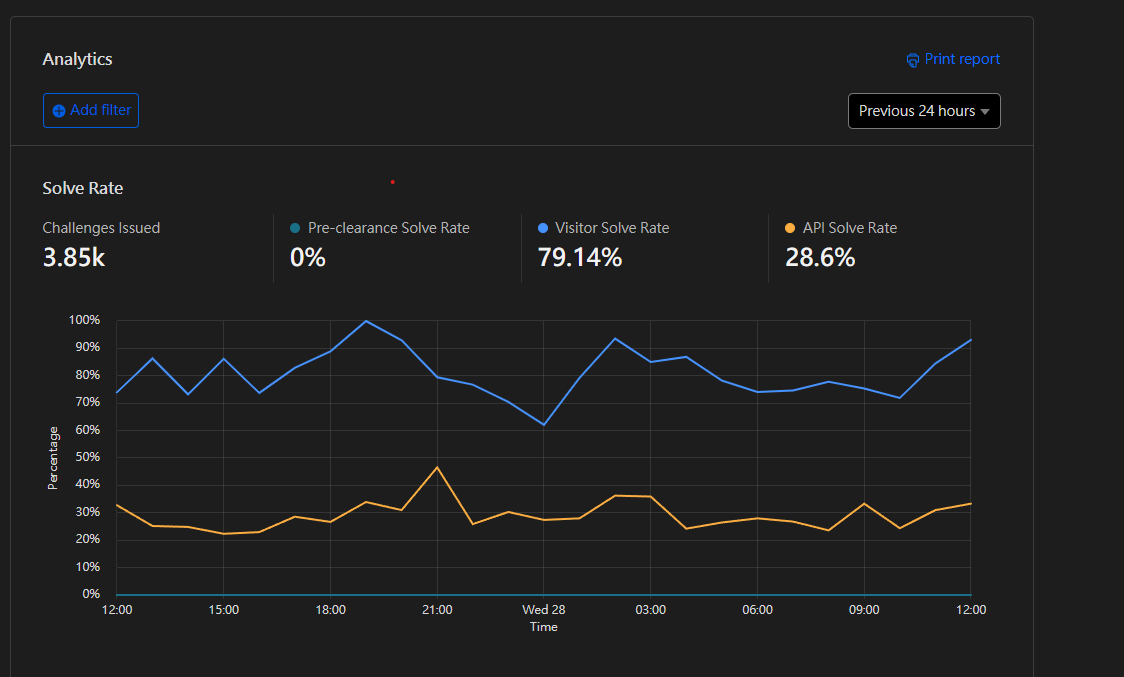
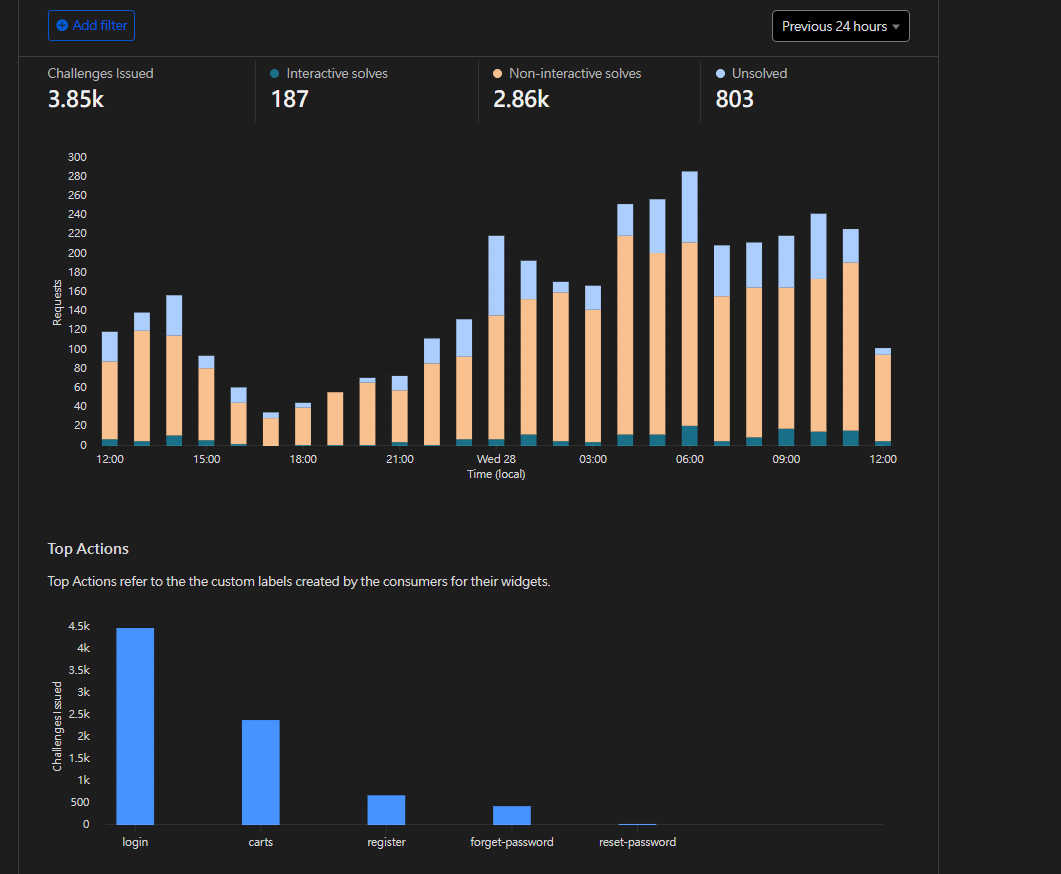
After deploying Cloudflare Turnstile, we blocked over 20-30% of bot requests for password resets, logins, account creation, and malicious credit card testing.


Comments