
Handling a Security Incident
While investigating a security incident, we found that an attacker had left a backdoor script on the server, and the site's JS had been tampered with to redirect users to a fake Flash page. After looking into it, I suspected we'd been hit by a WebShell attack.
What is a WebShell Attack?
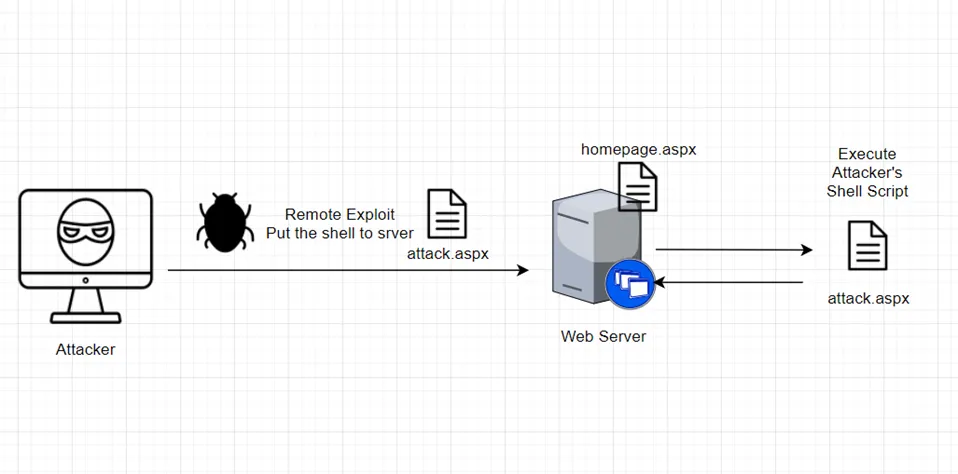
Looking at the diagram on the cover image, attackers may have used vectors like:
vulnerabilities in Microsoft products (Windows, IIS, .NET Framework), or an employee's infected machine being used as a stepping stone,
combined with overly broad write permissions on the web server,
to drop a prepared backdoor script
into our web server.
Because the web script engine recognizes the script,
simply opening the page is enough to execute it.
Questions
Looking at this as a developer, a lot of questions came up.
Why did some process have permission to modify our code?
Why is this script even able to run on the server?
Don't we use MVC across the company now? Why is the ASPX engine still around?
Simulating the Scenario
After going through a lot of references, I wrote a PoC script (ASPX) to simulate the situation. Since I couldn't simulate how the file got in, I uploaded it manually instead, and confirmed that the code could indeed write arbitrary files.
<%@ Page Language="C#" %>
<%@ Import Namespace="System"%>
<%@ Import Namespace="System.IO"%>
<%@ Import Namespace="System.Text"%>

<!DOCTYPE html PUBLIC "-//W3C//DTD XHTML 1.0 Transitional//EN" "http://www.w3.org/TR/xhtml1/DTD/xhtml1-transitional.dtd">
<script runat="server">


        protected void Page_Load(object sender, EventArgs e)
        {

			  string currentdir =  HttpContext.Current.Server.MapPath("~")
              string path = currentdir + "/HackTest.txt";


                // Create the file, or overwrite if the file exists.
                using (FileStream fs = File.Create(path))
                {
                    byte[] info = new UTF8Encoding(true).GetBytes("This is some text in the file.");
                    // Add some information to the file.
                    fs.Write(info, 0, info.Length);
                }

                // Open the stream and read it back.
                using (StreamReader sr = File.OpenText(path))
                {
                    string s = "";
                    while ((s = sr.ReadLine()) != null)
                    {
                        Console.WriteLine(s);
                    }
                }

		}

</script>

<html xmlns="http://www.w3.org/1999/xhtml">
<head runat="server">
    <title></title>
</head>
<body>

</body>
</html>
In the end, after reading Will's blog post, I found that IIS's default directory is safe, but once we moved it to drive X, it inherited the extra permissions from drive X. Sure enough, our IIS directory was both writable and modifiable.
My Final Solution
- Remove unnecessary script engines from web.config (ASPX, ASP, ...).
- Review IIS directory permissions and disable inheritance from drive D — restrict users to read-only, with no script execution or write access.
- Review the IIS Request Filtering settings.
- Run Windows Update at least every six months. Apply patches early when Microsoft publishes major security advisories. You can check the Windows Update guide site for major security vulnerabilities.
References
IIS execution identity and Windows access control aren't what you think How to Secure a Site in IIS Government Configuration Baseline (GCB) IIS 8.5 Government Configuration Baseline rollout and assessment tool .NET Security Application/Web Development - Overview .NET Security Application/Web Development - Overview - 2 .NET Security Application/Web Development - Overview - 3 .NET Security Application/Web Development - Overview - 3


Comments