Mark Ku's Blog

Background

I currently work at an e-commerce company whose products mainly serve the US, Germany, and Canada. A few days before Black Friday, we noticed that the site was constantly being hit by DDoS attacks. One day the site went down completely, which is when we started a deeper investigation.

I previously wrote an article on DDoS defense concepts. This post applies those defense rules in Cloudflare WAF.

Reviewing Cloudflare's security report, on the 12th we received roughly 20 million malicious requests targeting our site.
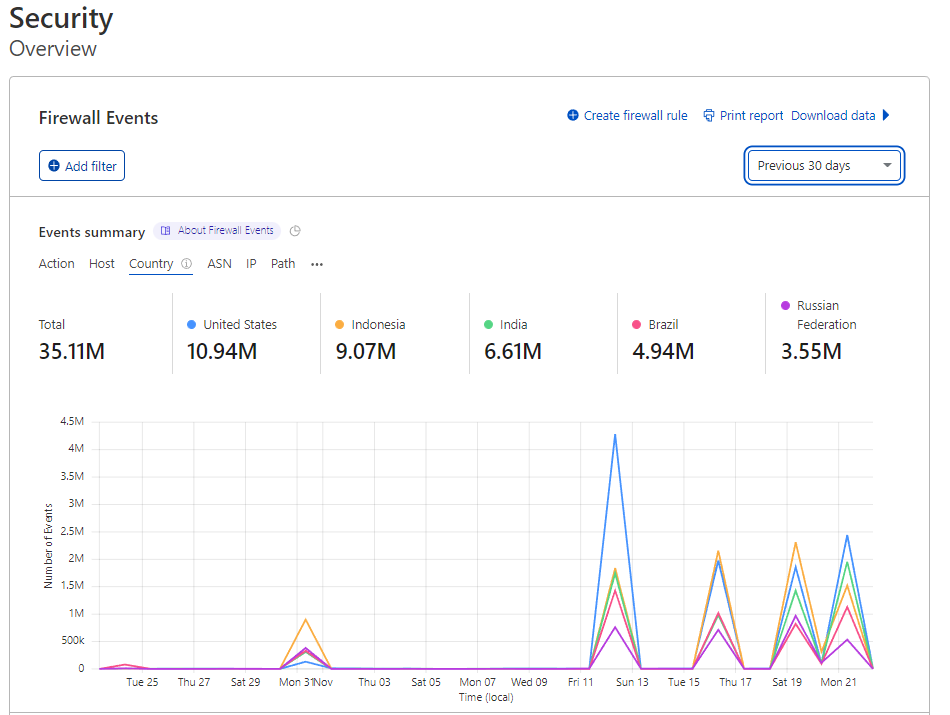

Cloudflare Firewall Events dashboard showing country totals and event timeline
Cloudflare WAF security report showing blocked, challenged, and allowed requests

Thinking about it from a sysadmin's perspective, many questions came to mind. Why would a single IP make such a huge volume of requests?
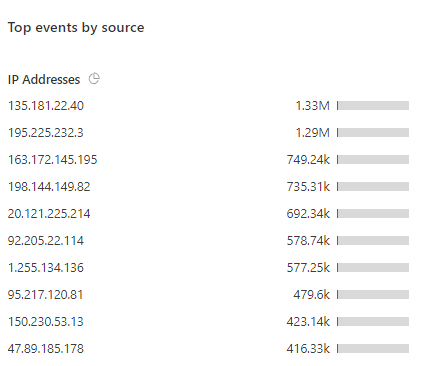
Top IP addresses by event volume with bar graphs

And why are there so many countries we don't even operate in sending heavy traffic to our site?
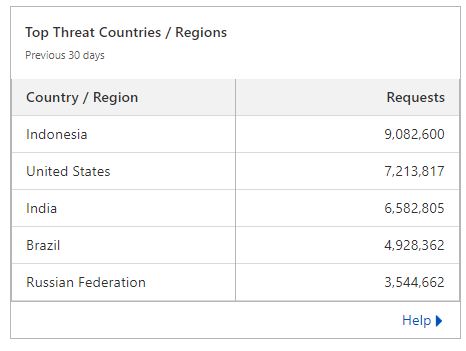
Table of top threat countries by request volume

Although we use the Enterprise tier of Cloudflare, the default settings - while blocking most DDoS - still let some attacks slip through given the sheer volume. I spent a lot of time learning Cloudflare, reviewed every setting, discussed with my boss, and then put together a DDoS prevention plan using Web Application Firewall rules to protect our business during Black Friday, with our US boss's approval.
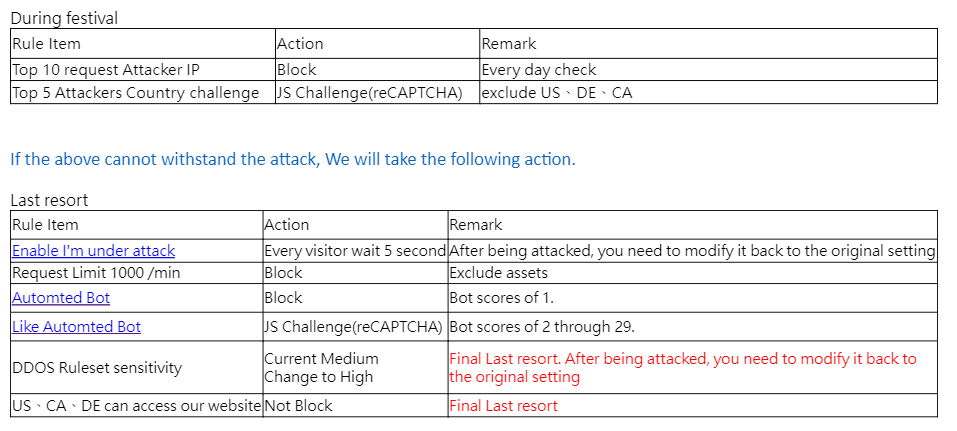
Cloudflare DDoS prevention rules table with festival and last resort actions

To avoid false positives that hurt the business, we only blocked single IPs making excessive requests. Below is the block screen.
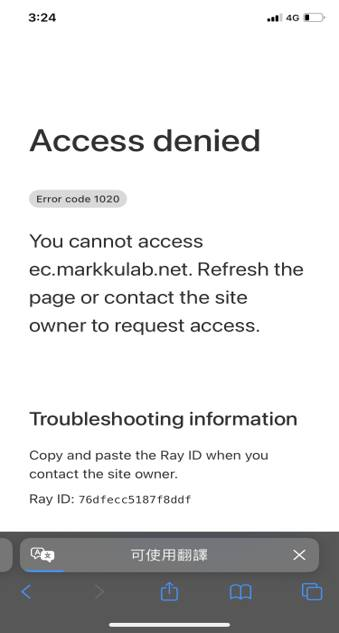
Cloudflare access denied error 1020 block screen on mobile

To avoid false positives, before adding an IP to the blocklist we look it up and report it on abuseipdb.
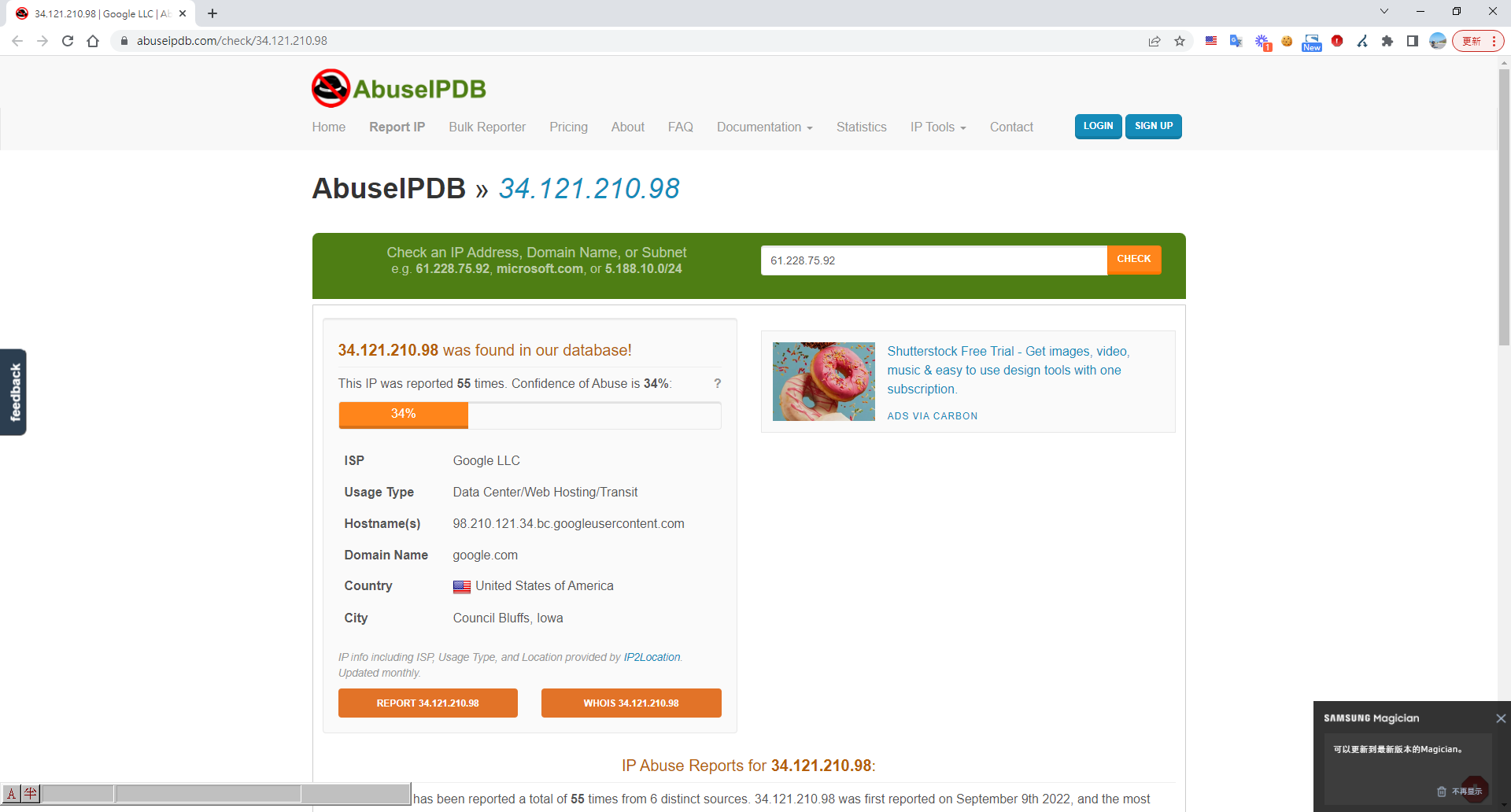
AbuseIPDB report for IP 34.121.21

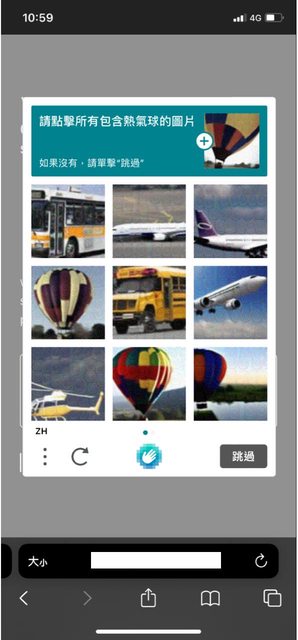
For other rules, to avoid false positives that affect orders, we only enable human verification. Users must pass it before entering the site.
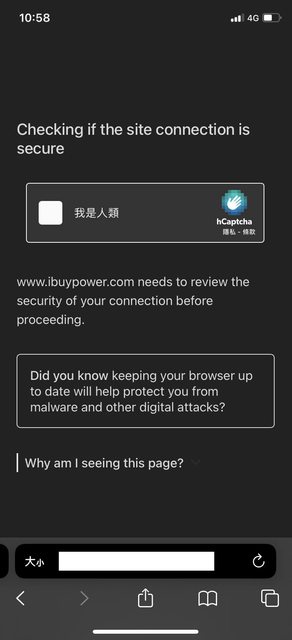
Mobile screen showing Cloudflare hCaptcha security check for ibuypower.com
Human verification CAPTCHA on mobile, select hot air balloons

Now let's start creating WAF rules - Create Firewall rules

Go to Cloudflare admin > Security > WAF > Create firewall rule
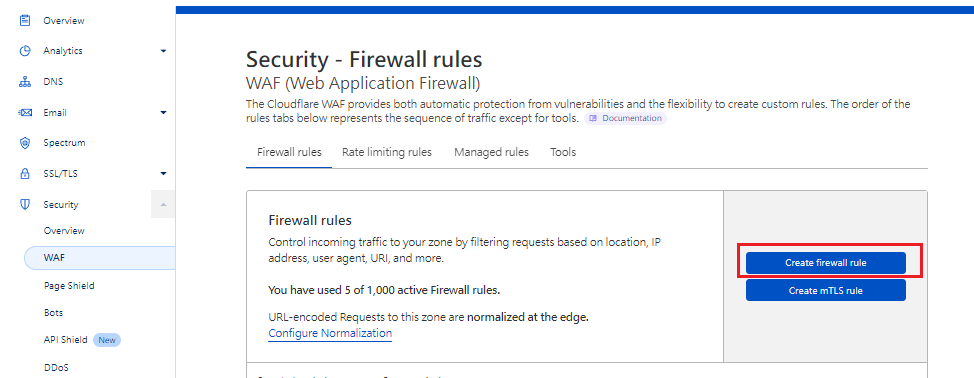
Cloudflare WAF rules page, Create firewall rule button highlighted

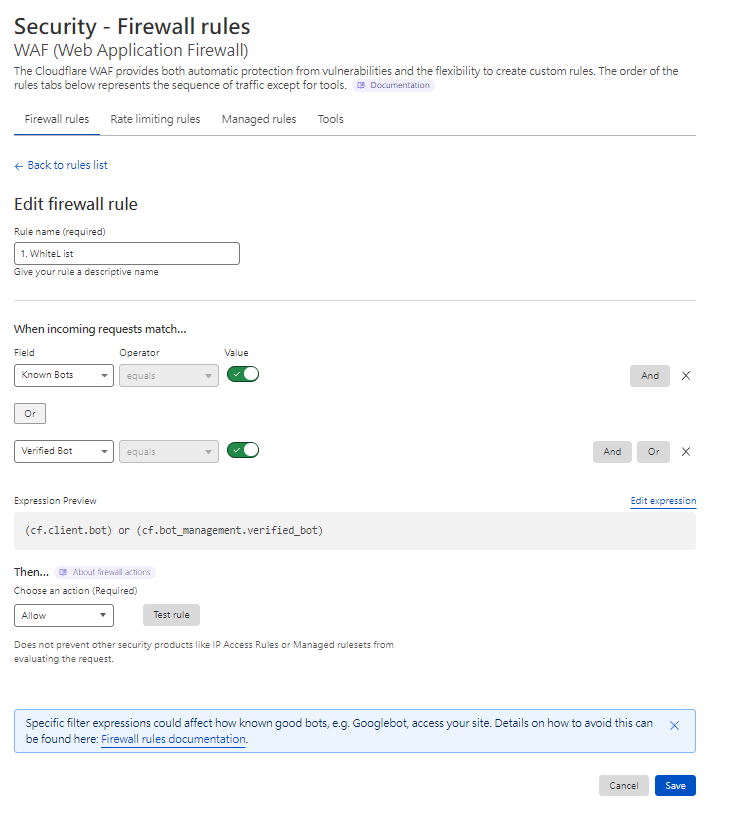
Rule 1. Allowlist - White List

Cloudflare WAF edit firewall rule screen for whitelisting known bots

Rule 2. Blocklist - IP Block (attacker)
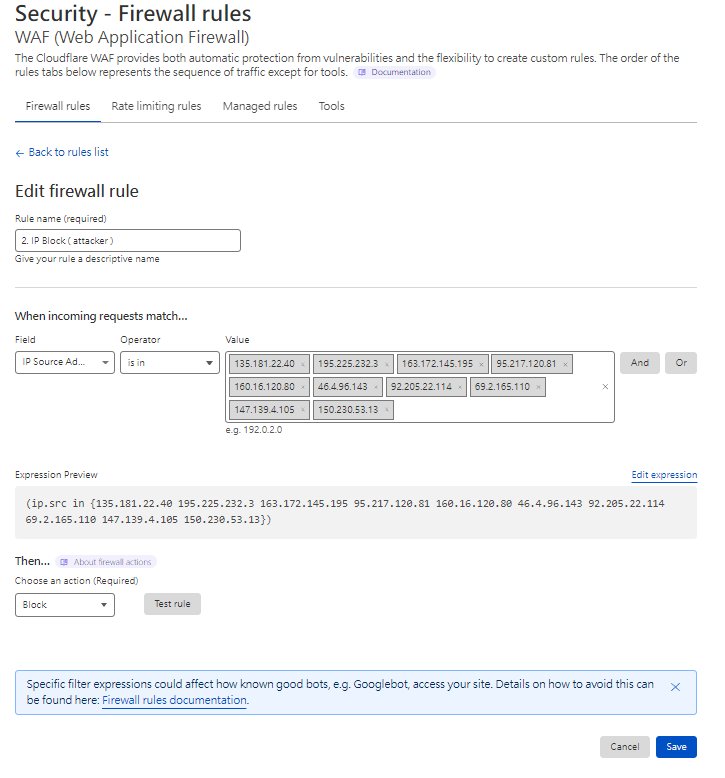
Cloudflare WAF rule blocking listed attacker IP addresses

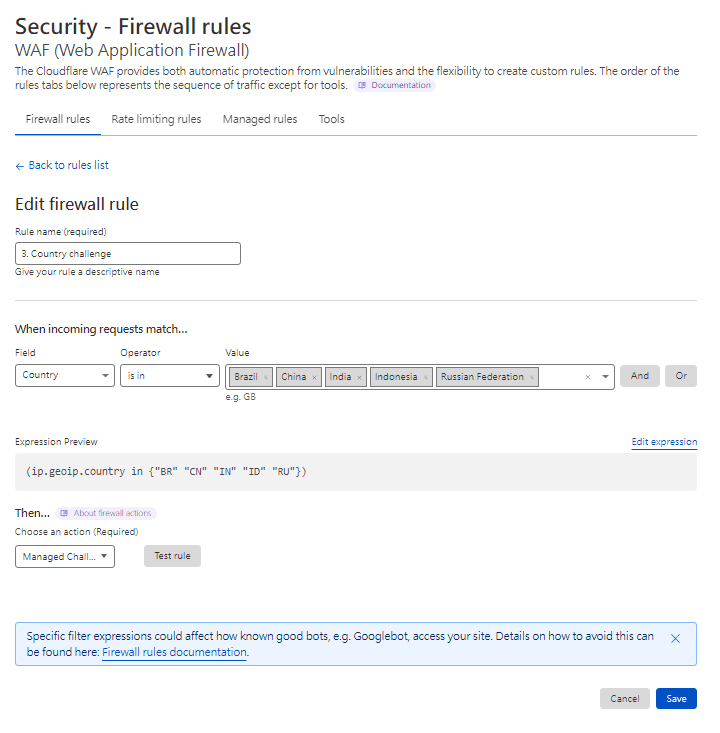
Rule 3. Country challenge

Cloudflare WAF rule challenging traffic from Brazil, China, India, Indonesia, Ru

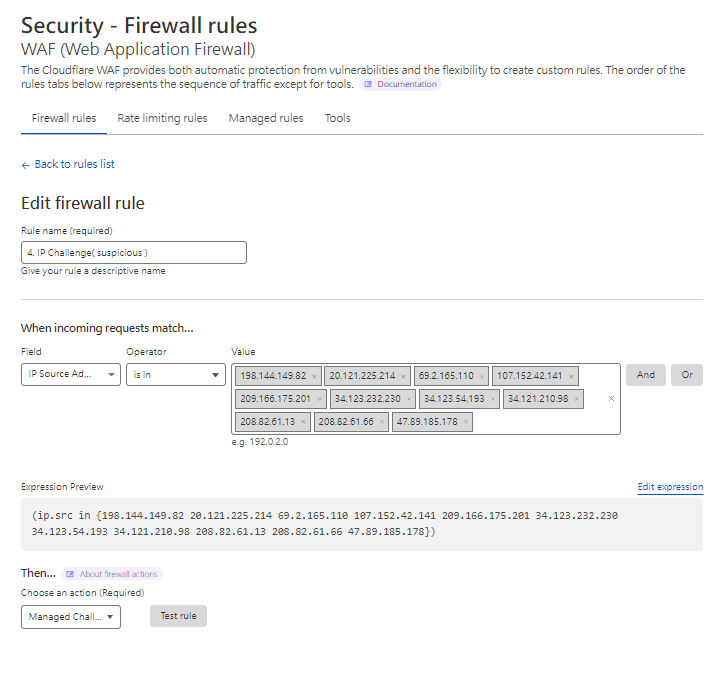
Rule 4. IP Challenge (suspicious)

Cloudflare WAF editing a suspicious IP challenge firewall rule

Rule 99. Bot challenge - Automated (last resort)
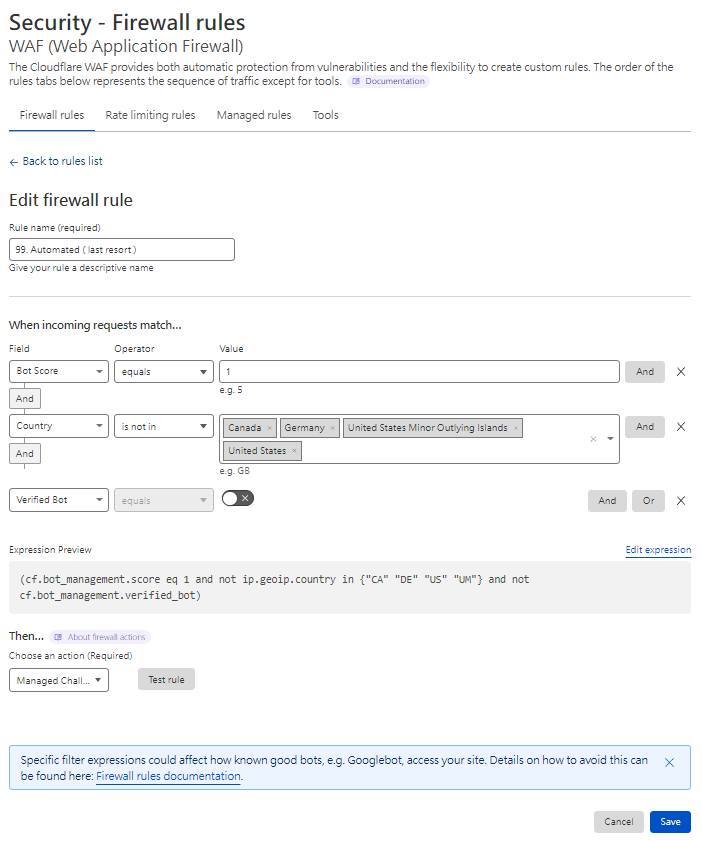
Cloudflare WAF editing an automated bot challenge firewall rule

Rule 99. Likely automated challenge (last resort)
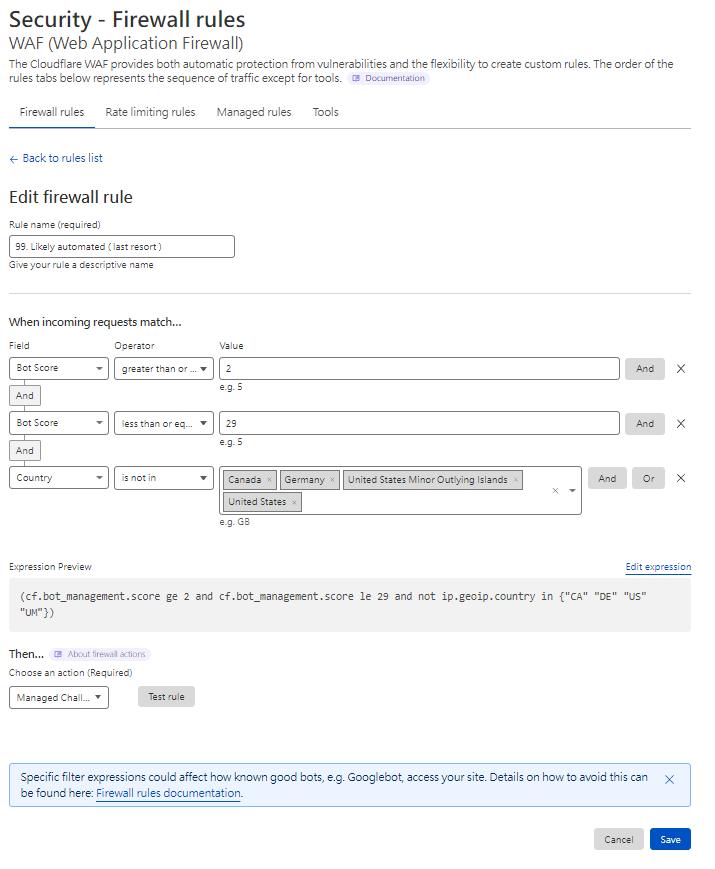
Cloudflare WAF editing a bot challenge firewall rule

Rule 99. Request rate limit (last resort)
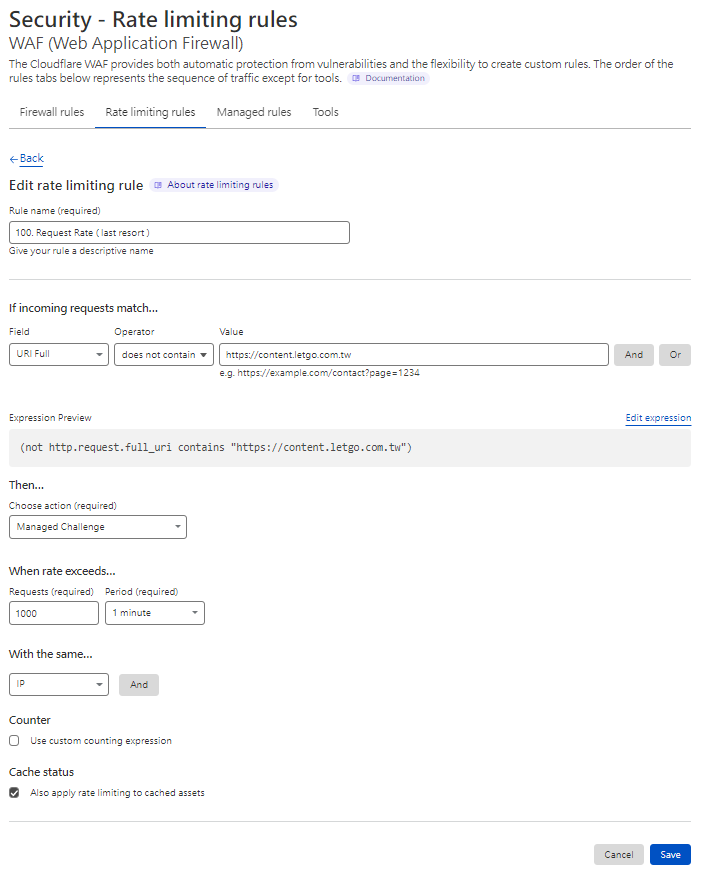
Cloudflare WAF editing a request rate limiting rule with managed challenge

Rule 100. Only allow operating countries - Non-operating country
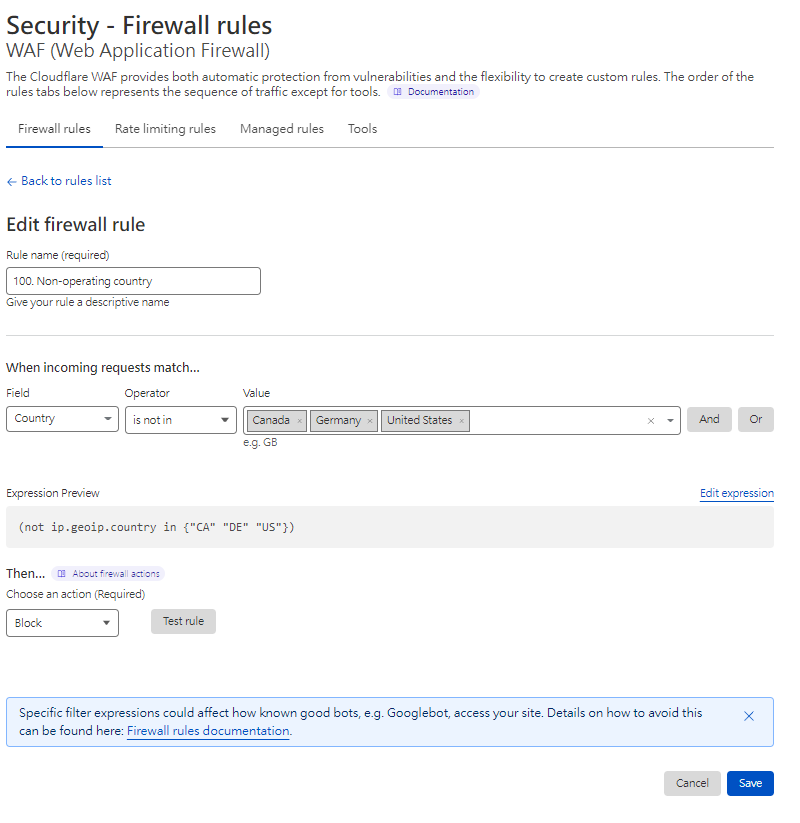
Cloudflare WAF firewall rule blocking non-operating countries

You can also tune DDoS sensitivity (Security > Settings > DDoS > Configure > Security Level > Medium)
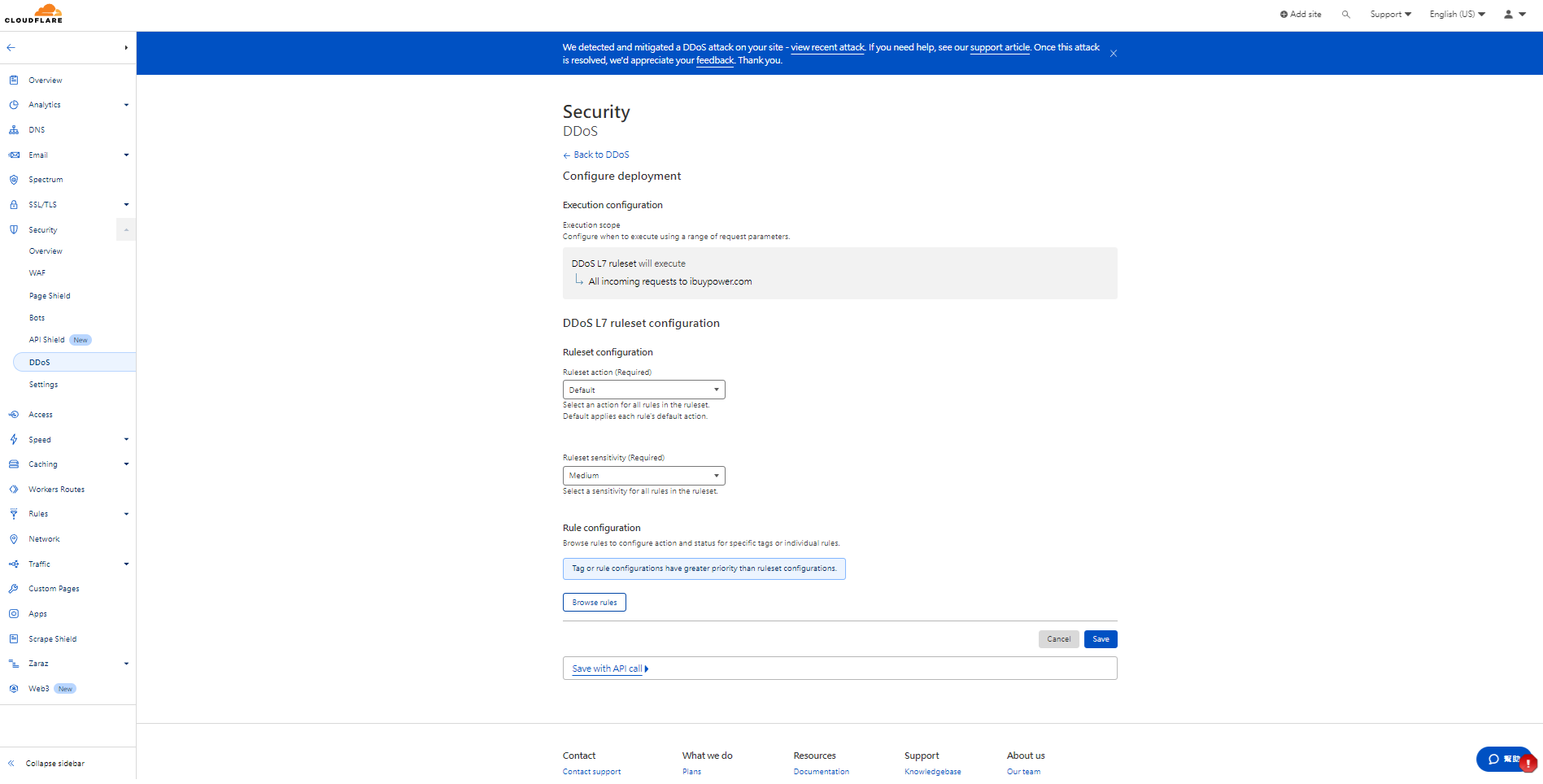
Cloudflare dashboard displaying DDoS L7 ruleset sensitivity configuration

If nothing else holds, you can turn on "I'm Under Attack" mode. All users wait five seconds before entering the site. Remember to switch it back when done. Security > Settings > DDoS > Configure > Security Level > Enable I'm Under Attack mode
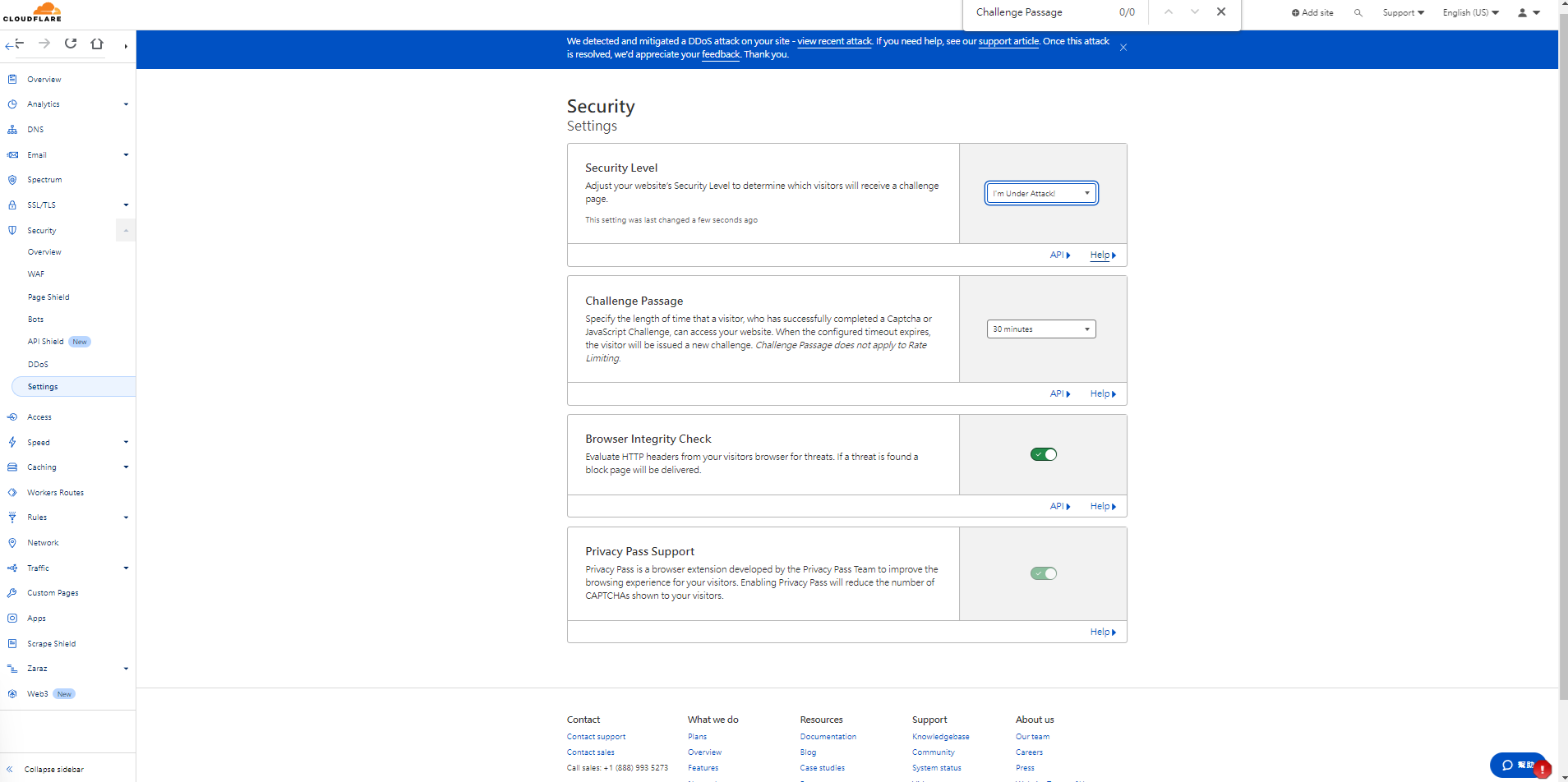
Cloudflare security settings with I'm Under Attack mode enabled

Effectiveness

Across Thanksgiving and Black Friday (three days), we faced 7 DDoS attacks totaling more than 13 million malicious requests, with the highest single burst hitting 3 million requests at once. After the fifth attack the site stalled for about 30 seconds. The reports showed the attack pattern shift from concentrated IPs and countries to small, dispersed traffic. We finally decided to leverage Cloudflare's machine-learning-based rules. Without hurting the business, only single IPs sending massive request volumes were outright blocked, while everything else was sent to human verification. We made it through this year's Black Friday smoothly. It was a pretty intense Black Friday - many external services also experienced anomalies.

A total of 13.63 million requests received
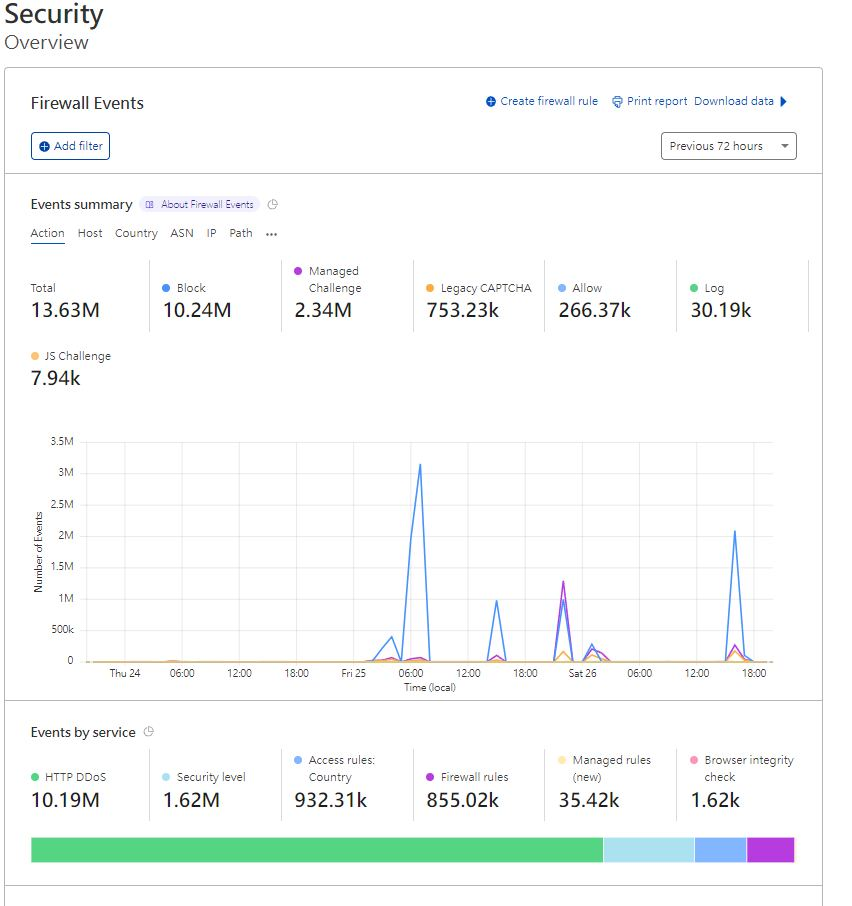
Cloudflare Firewall Events dashboard showing Black Friday DDoS defense statistic

WAF helped block over 5 million requests
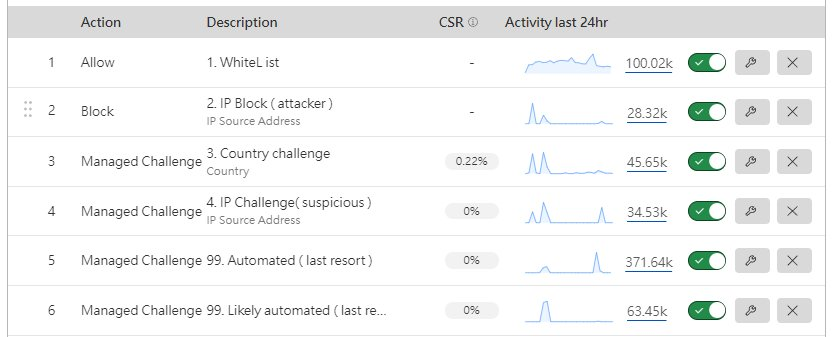
Cloudflare WAF rules table showing activity and challenge metrics

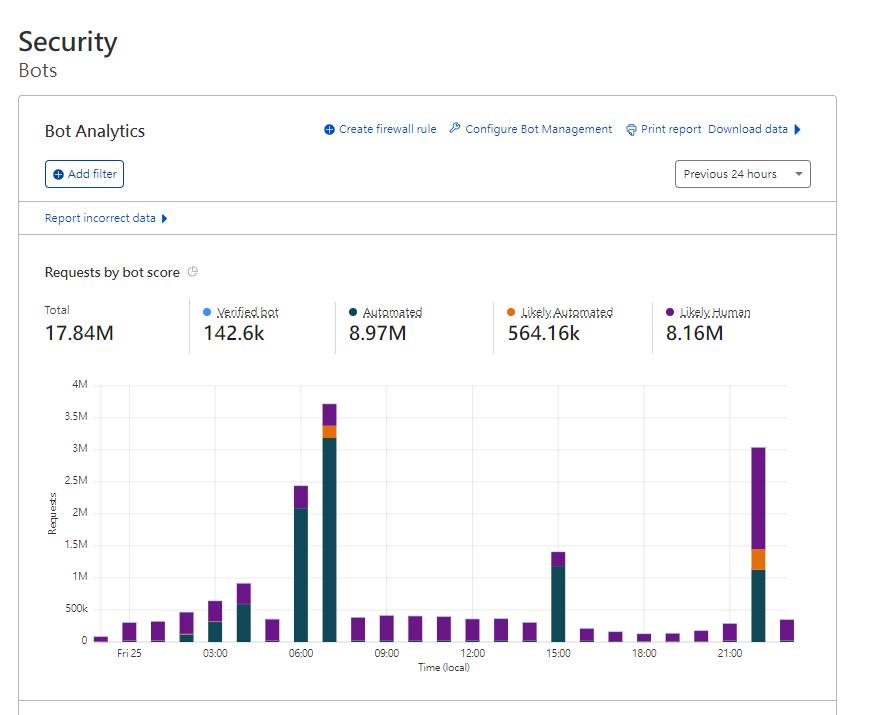
Bot analytics report

Cloudflare Bot Analytics bar chart of requests by bot score on Black Friday

Author

Mark Ku

擁有 10+ 年經驗的資深軟體工程師,現為 AI 應用 Builder,專注於大型平台架構與簡化複雜系統設計,從電商系統到訂閱與收費平台,結合 AI Agent、AI 整合與自動化開發,打造高效率且可持續演進的產品技術基礎。Read More

Found this useful?

The author's free tools, daily podcasts and newsletter are all here.

Mark Ku · This article is licensed under CC BY 4.0. Credit the author and link back to the original when reusing it.

Comments

Subscribe to Newsletter

Subscribe to get new posts delivered instantly — never miss a tech share.

By submitting, you agree to receive emails. You can anytime.

Popular Posts

View all
Mark Ku
··602

Oracle Cloud Always Free Tier: Linux Host and Static IP for a $0 Cloud Solution

Oracle Cloud Always Free Tier: Linux Host and Static IP for a $0 Cloud Solution
Mark Ku
··492

Say Goodbye to Postman's Fee Trap! A Hands-on Guide to Bruno, the Open-Source Git-Native API Testing Powerhouse.

Say Goodbye to Postman's Fee Trap! A Hands-on Guide to Bruno, the Open-Source Git-Native API Testing Powerhouse.
Mark Ku
··334

A Free, Open-Source, Notion-like Knowledge Base — A Complete Guide to Deploying and Backing Up Outline Wiki

A Free, Open-Source, Notion-like Knowledge Base — A Complete Guide to Deploying and Backing Up Outline Wiki
Mark Ku
··268

Training Your Own AI Voice: Hardware Requirements, Open-Source Model Comparison, and LoRA Fine-Tuning

Training Your Own AI Voice: Hardware Requirements, Open-Source Model Comparison, and LoRA Fine-Tuning
Mark Ku
··218

Building an Efficient API Management Platform: Deploying Kong Gateway from Scratch - Part 1

Building an Efficient API Management Platform: Deploying Kong Gateway from Scratch - Part 1
Mark Ku
··217

Setting Up Samba on Ubuntu to Share Folders with Windows 11

Setting Up Samba on Ubuntu to Share Folders with Windows 11

Readers also read