
Introduction
I have several projects calling AI simultaneously: blog post and podcast generation, stock tools, eSIM plan comparison, plus the Agent I use for daily coding. Previously, each project integrated vendors independently: Claude for writing, NVIDIA free models for volume, OpenAI for images, local Ollama on the LAN for on-prem models. The result was three classic problems:
- Scattered keys: Every project's
.envheld a copy of vendor keys; rotating one meant updating multiple places. - Opaque costs: You only found out which project burned the most money at month-end.
- Single points of failure: NVIDIA quota exhausted, Claude returns 429, the whole pipeline stops, requiring manual code changes to switch models.
So I self-hosted a LiteLLM Proxy (v1.108) as my personal on-prem AI API Gateway. Externally it presents https://litellm.markkulab.net. All applications hit this single OpenAI-compatible endpoint; the Gateway decides which model actually receives the request, falls back when quota runs out, and logs usage and spend. Upstream keys live only on the Gateway.
Reasons for choosing LiteLLM were practical:
- OpenAI-compatible: Applications only swap
base_urland the key; code barely changes. - Cloud and local treated equally: Anthropic, NVIDIA, OpenAI, Ollama, self-hosted services are all just rows in
model_list. - Governance built-in: Virtual Keys, budgets, rate limits, fallbacks, usage dashboard, all available out of the box, plus an Admin UI for web-based config changes.
Overall Architecture
A request passes through three layers in sequence:
- Virtual Key validation: Which models this key can access, remaining budget, requests per minute.
- Router: Maps the application-specified model name (usually a purpose-based alias) to an actual deployment.
- Fallback chain: If the primary model fails, it tries the next in order; if all cloud options fail, it falls back to local.
Every call's tokens, cost, latency, and success/failure are written to PostgreSQL; the Admin UI dashboard computes its metrics from this data.
1. Unifying Cloud and Local Models
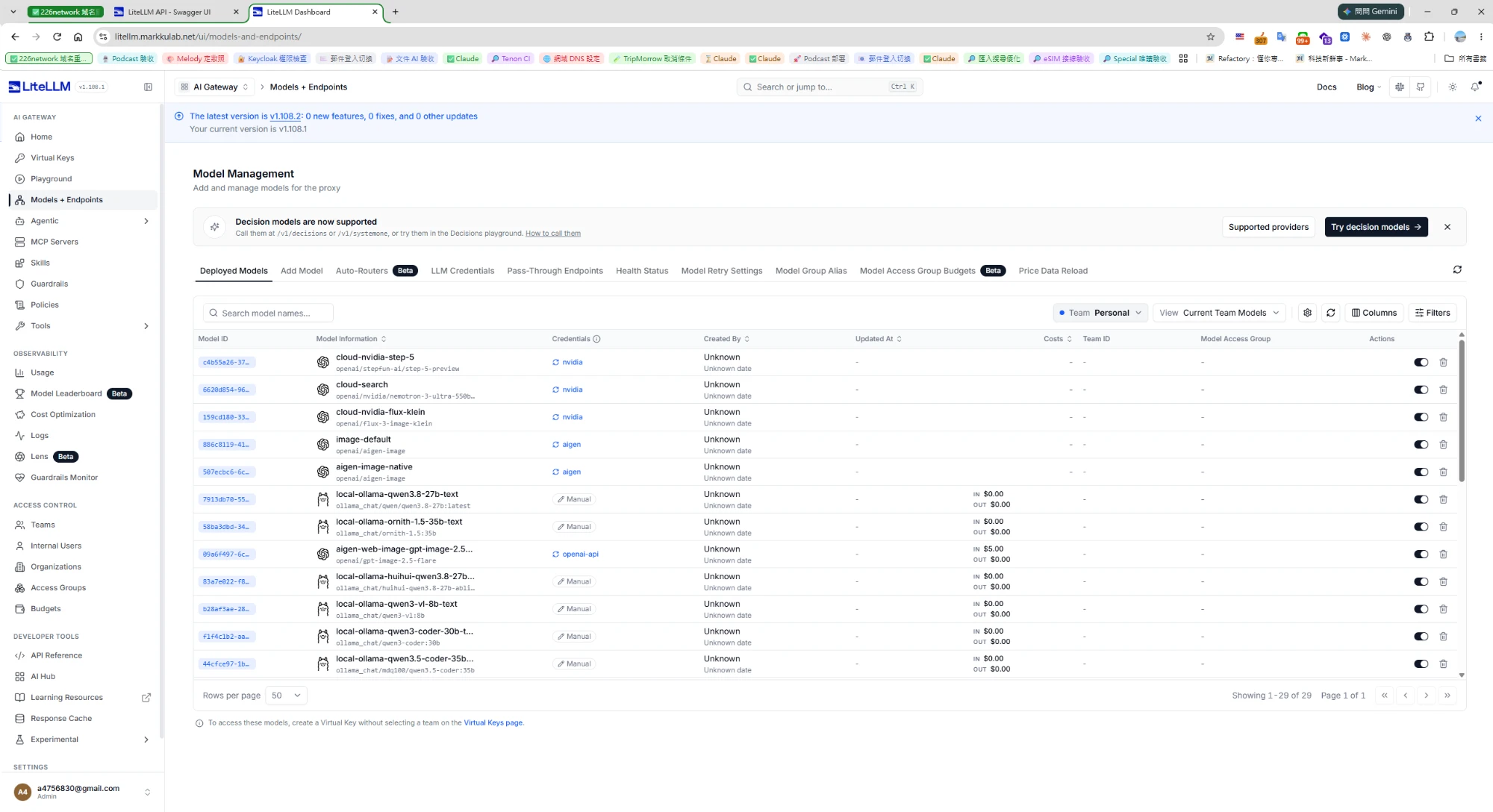
Currently 29 models are registered on the Gateway, broadly falling into four categories:
| Source | Examples | Credentials |
|---|---|---|
| Cloud Claude | cloud-claude、cloud-claude-sonnet、cloud-claude-haiku | Anthropic |
| NVIDIA free models | cloud-nvidia-mistral-large、cloud-nvidia-glm-flash、cloud-nvidia-step-5、cloud-nvidia-nemotron-ultra、cloud-nvidia-nemotron-super-vl、cloud-nvidia-flux-klein (image gen) | nvidia |
| Cloud image gen | cloud-openai-image、aigen-web-image-gpt-image-2.5-flare | openai-api |
| Local | Ollama's local-ollama-qwen3.8-27b-text、local-ollama-ornith-1.5-35b-text、local-ollama-qwen3-coder-30b-text、local-ollama-qwen3.5-coder-35b-text、local-ollama-qwen3-vl-8b-text; self-hosted image gen image-default、aigen-image-native | aigen/Manual |
I deliberately prefixed names with cloud- and local- so logs and leaderboards instantly reveal whether a call was paid or local.
The Credentials column in the screenshot is also telling: all NVIDIA models point to the same nvidia credential, ai-gen points to aigen, and local Ollama shows Manual since no key is needed. Upstream keys exist only on the Gateway; models merely "reference" them, key management expands on this below.
config.yaml Example
I usually add models via the Admin UI, but YAML is clearer for documentation. Below is a condensed example (keys all read from environment variables):
# 可重複使用的上游憑證:模型只寫名字,不重複貼金鑰
credential_list:
  - credential_name: nvidia
    credential_values:
      api_key: os.environ/NVIDIA_API_KEY
      api_base: https://integrate.api.nvidia.com/v1

model_list:
  # 雲端 Claude
  - model_name: cloud-claude
    litellm_params:
      model: anthropic/claude-sonnet-5        # 換成你要用的版本
      api_key: os.environ/ANTHROPIC_API_KEY

  # NVIDIA 免費模型:走 OpenAI 相容格式,引用 nvidia 憑證
  - model_name: cloud-nvidia-step-5
    litellm_params:
      model: openai/stepfun-ai/step-5-preview
      litellm_credential_name: nvidia

  # 地端 Ollama:單價明確設 0,儀表板才不會把它算進花費
  - model_name: local-ollama-qwen3.8-27b-text
    litellm_params:
      model: ollama_chat/qwen/qwen3.8-27b:latest
      api_base: http://<ollama-host>:11434
      input_cost_per_token: 0
      output_cost_per_token: 0
The ollama_chat/ prefix routes to Ollama's /api/chat, which handles multi-turn chat and tool calling better than ollama/; recommended for local chat models.
2. Purpose Aliases: Applications Only Say "What I Want to Do"
Applications don't hardcode model names; they call a handful of purpose aliases:
| Purpose Alias | Purpose |
|---|---|
text-default | General text generation, summarization, translation |
search-default | Tasks requiring web search |
vision-default | Vision, OCR |
image-default | Text-to-image |
tts-default | Text-to-speech |
On the blog side: when no model is specified via env var, it defaults to these aliases, and the Gateway decides the actual model and fallback order. Swapping models, reordering, adding a local host, only the Gateway changes; applications don't redeploy.
import os
from openai import OpenAI

client = OpenAI(
    base_url=os.environ["LITELLM_BASE_URL"],   # 例如 https://litellm.markkulab.net/v1
    api_key=os.environ["LITELLM_API_KEY"],     # 這是 Virtual Key,不是供應商金鑰
)

resp = client.chat.completions.create(
    model="text-default",                     # 只說用途,不指定廠牌
    messages=[{"role": "user", "content": "幫我把這段整理成三點摘要"}],
)
print(resp.choices[0].message.content)
3. Fault-Tolerant Failover: Auto-Degrade When Quota Exhausted
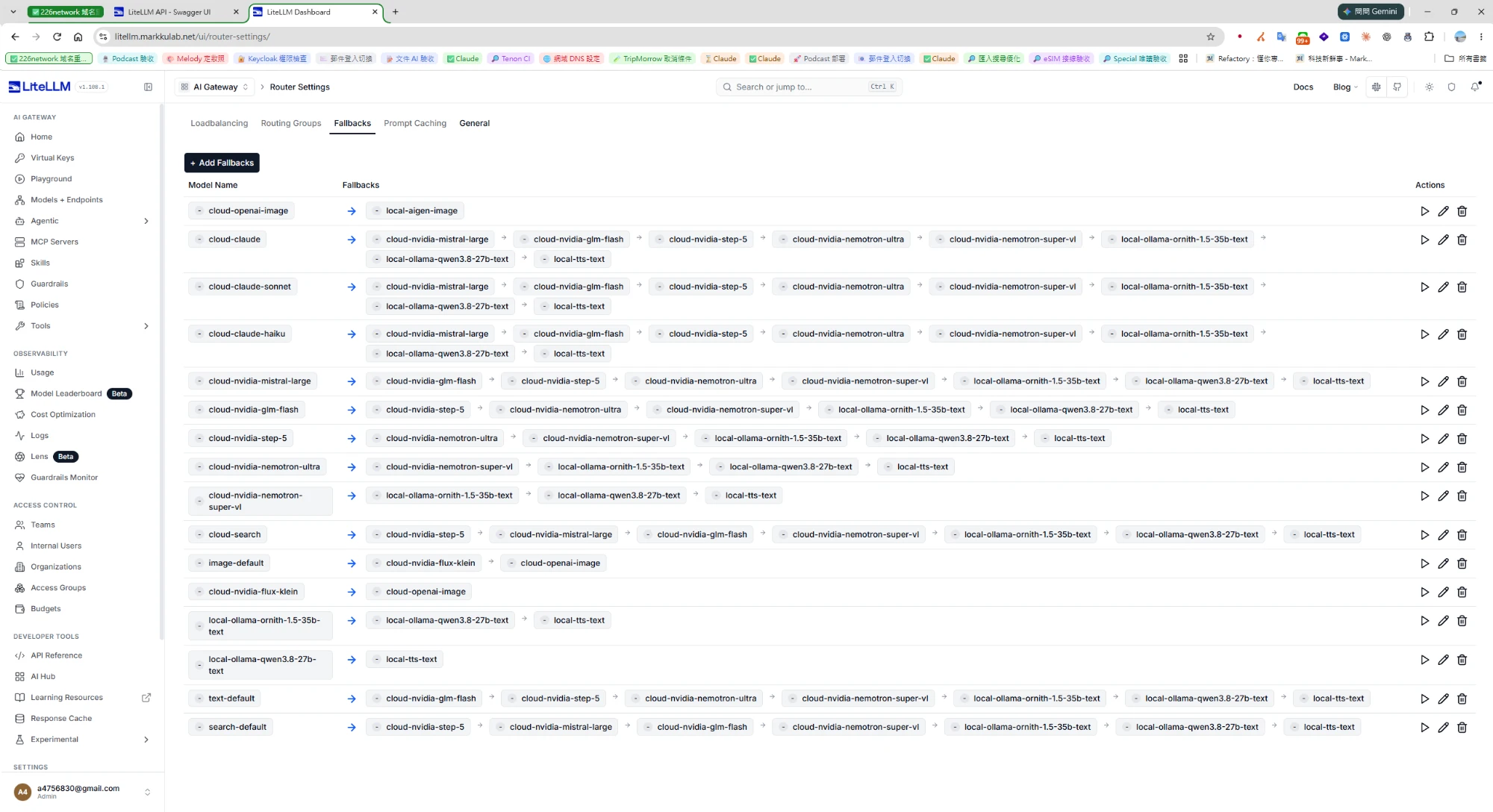
This is the highest-value part of the architecture. In Router Settings' Fallbacks tab, each model has its own fallback chain. Take cloud-claude for example:
The principle is paid cloud → free cloud → local last resort:
- Paid models first, best quality.
- NVIDIA free models next, they have rate limits and often return 429, but one fails, the next tries; overall availability stays high.
- Local at the end, slower, but never fails due to quota exhaustion.
Other chains follow the same logic:
| Model | Fallback Order |
|---|---|
text-default | glm-flash → step-5 → nemotron-ultra → nemotron-super-vl → local ornith → local qwen3.8 → local-tts-text |
search-default | step-5 → mistral-large → glm-flash → nemotron-super-vl → local ornith → local qwen3.8 → local-tts-text |
image-default | NVIDIA flux-klein → cloud-openai-image |
cloud-openai-image | local ai-gen image gen |
Image gen is two-stage: image-default failure falls back to NVIDIA's flux-klein, then OpenAI; while cloud-openai-image itself has local ai-gen as its final line of defense.
In YAML it looks roughly like this:
router_settings:
  num_retries: 2          # 同一個模型先重試幾次
  allowed_fails: 3        # 一分鐘內失敗幾次就先冷卻
  cooldown_time: 60       # 冷卻秒數,期間直接跳過這個部署
  max_fallbacks: 10       # 預設只會往下試 5 個,鏈長的話要調大
  fallbacks:
    - cloud-claude:
        - cloud-nvidia-mistral-large
        - cloud-nvidia-glm-flash
        - cloud-nvidia-step-5
        - cloud-nvidia-nemotron-ultra
        - cloud-nvidia-nemotron-super-vl
        - local-ollama-ornith-1.5-35b-text
        - local-ollama-qwen3.8-27b-text
        - local-tts-text
In the Admin UI Fallbacks tab, each row has a ▶ button to test the entire chain. Click it after reordering, far better than discovering a broken chain in production.
4. Usage Stats and Cost Calculation
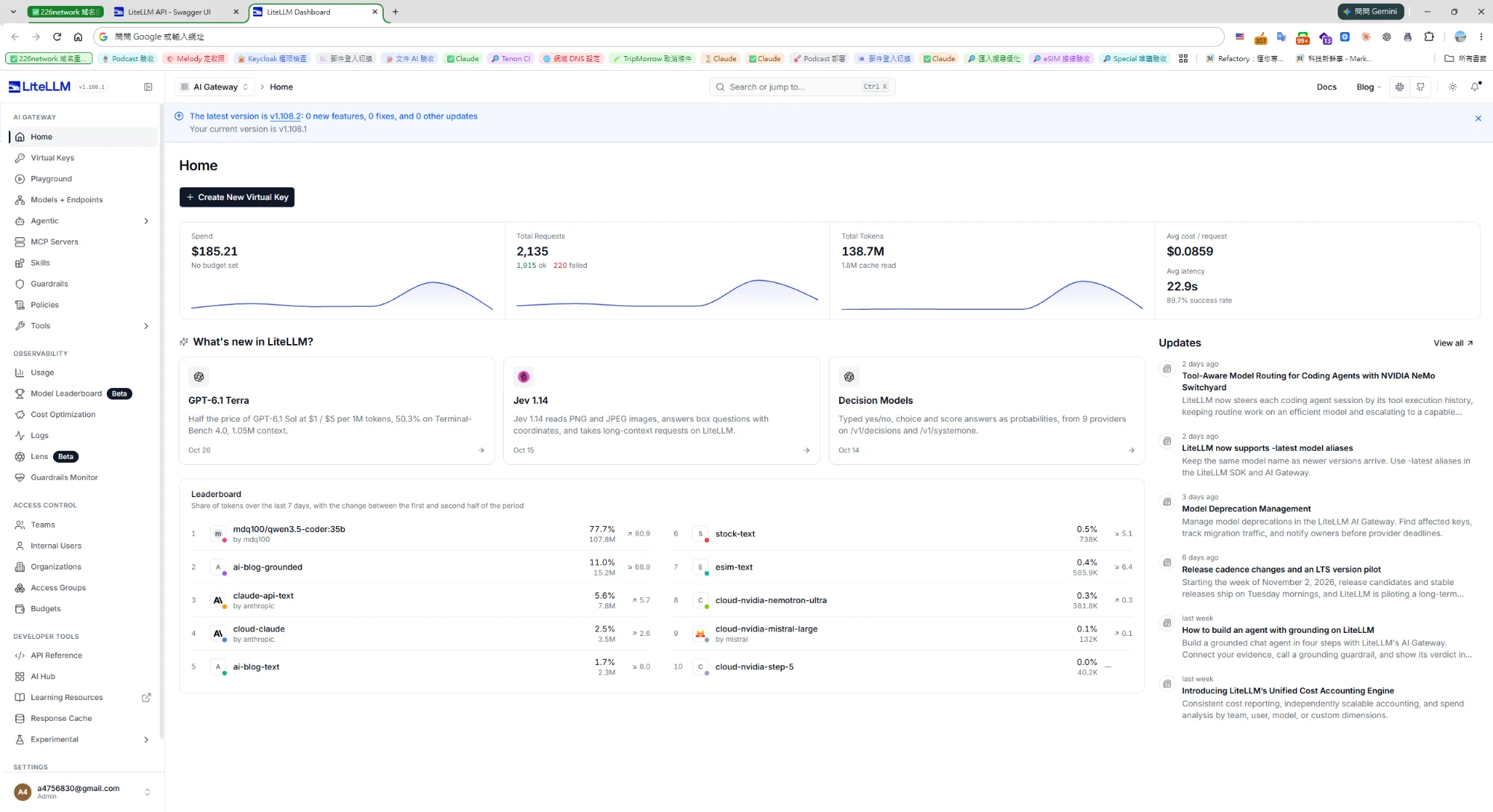
The LiteLLM homepage dashboard surfaces the most-watched numbers. Here are my cumulative figures:
| Metric | Value |
|---|---|
| Total Spend | $185.21 |
| Total Requests | 2,135 (1,915 success, 220 failed) |
| Total Tokens | 138.7M (1.8M cache reads) |
| Avg Cost/Request | $0.0859 |
| Avg Latency | 22.9 sec |
| Success Rate | 89.7% |
The Leaderboard below is more interesting, it shows each model's token share over the last 7 days:
mdq100/qwen3.5-coder:35b(local Ollama) takes 77.7%, 107.8M tokens, cost $0.ai-blog-grounded11.0%,claude-api-text5.6%,cloud-claude2.5%,ai-blog-text1.7%.stock-text,esim-text(application-named aliases) each under 1%; NVIDIA's models even less.
In other words, nearly 80% of tokens are consumed locally, contributing 185.21. Batch, long-context, code tasks go local; paid quota reserved for quality-critical work, this split is obvious at a glance on the dashboard.
How Cost Is Calculated
LiteLLM multiplies per-model unit price by input/output tokens on every call. Common cloud models have built-in pricing; missing prices must be supplied manually. The Models + Endpoints Costs column reveals three states:
- Local Ollama shows
IN $0.00 / OUT $0.00: I explicitly set it to 0, meaning "definitely free." aigen-web-image-gpt-image-2.5-flareshowsIN $5.00: Manually entered unit price, so cost accrues.- NVIDIA models column is empty: No unit price, so no spend generated. Fine for free models, but if you later switch to a paid tier, remember to add pricing or the dashboard will undercount.
Recommend making "every model has an explicit unit price (even if 0)" a pre-deployment checklist item; only then is the Spend figure trustworthy.
5. Key Management: Applications Never Touch Vendor Keys
Keys operate at two layers:
| Layer | Location | Access |
|---|---|---|
| Upstream vendor keys (Anthropic, NVIDIA, OpenAI...) | Gateway's LLM Credentials | Gateway only |
| Virtual Keys | Each application's env vars | Each application owns its own |
Each application gets its own Virtual Key, bound to allowed models, budget, and rate limits:
curl -X POST "https://litellm.markkulab.net/key/generate" \
  -H "Authorization: Bearer $LITELLM_MASTER_KEY" \
  -H "Content-Type: application/json" \
  -d '{
    "key_alias": "ai-blog",
    "models": ["text-default", "search-default", "image-default", "tts-default"],
    "max_budget": 20,
    "budget_duration": "30d",
    "rpm_limit": 30,
    "tpm_limit": 200000,
    "metadata": { "project": "ai-blog" }
  }'
Benefits:
- Rotate upstream keys in one place; applications notice nothing.
- If an application's key leaks, revoke that one key; other applications unaffected, vendor keys never exposed.
- Budgets reset by
budget_durationautomatically, e.g.,30dresets every 30 days. Note the unit:30mis 30 minutes, not 30 months. modelsallowlist restricts each application to its designated aliases; no one sneaks direct calls to the most expensive model.
The general_settings master key and DB connection likewise come from env vars, never hardcoded in files:
general_settings:
  master_key: os.environ/LITELLM_MASTER_KEY
  database_url: os.environ/DATABASE_URL
  store_model_in_db: true   # 讓 Admin UI 新增的模型、Fallback 存進資料庫
6. Wiring Up OpenCode in Practice
Once the Gateway was up, the coding Agent joined the party. Using OpenCode as an example, add LiteLLM as an OpenAI-compatible provider in its config:
{
  "$schema": "https://opencode.ai/config.json",
  "provider": {
    "litellm": {
      "npm": "@ai-sdk/openai-compatible",
      "name": "LiteLLM (markkulab)",
      "options": {
        "baseURL": "https://litellm.markkulab.net/v1",
        "apiKey": "{env:LITELLM_API_KEY}"
      },
      "models": {
        "cloud-claude-sonnet": { "name": "Claude Sonnet 5 (LiteLLM)" },
        "cloud-claude-haiku": { "name": "Claude Haiku 4.5 (LiteLLM)" },
        "local-ollama-ornith-1.5-35b-text": { "name": "Local Ornith 1.5 35B" },
        "local-ollama-qwen3-coder-30b-text": { "name": "Local Qwen3 Coder 30B" },
        "local-ollama-qwen3-vl-8b-text": {
          "name": "Local Qwen3-VL 8B",
          "limit": { "context": 32768, "output": 8192 }
        }
      }
    }
  }
}
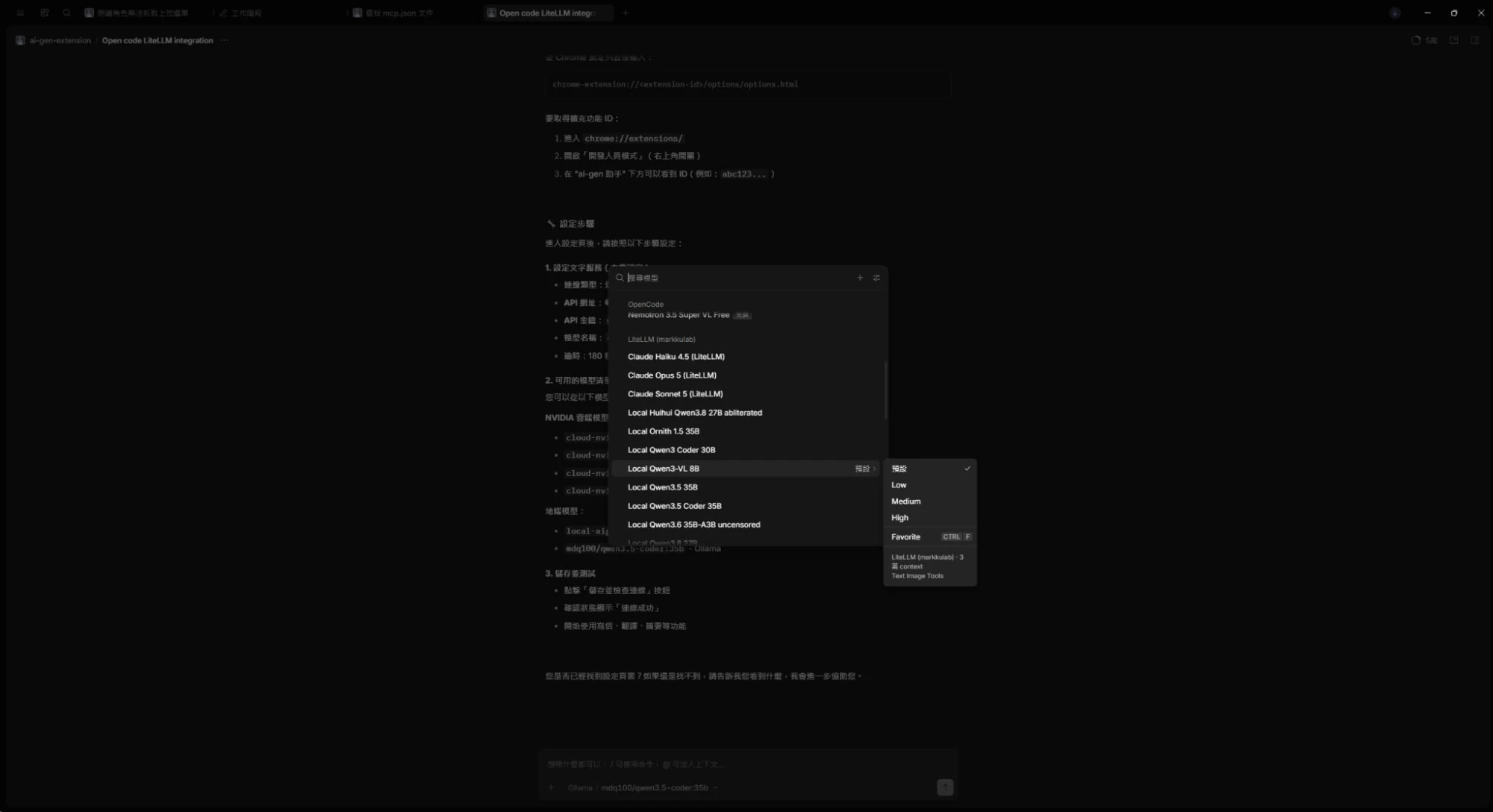
Fill models's key with the model_name from LiteLLM; name is the display name in OpenCode's menu. Once configured, /models gains a whole "LiteLLM (markkulab)" group, exactly as in the screenshot:
- Cloud and local in one list: Claude Opus 5, Sonnet 5, Haiku 4.5 sit alongside local Qwen3.5 Coder 35B, Ornith 1.5 35B, Qwen3-VL 8B; switching models requires zero provider config changes.
- Single Virtual Key: The OpenCode machine sees no Anthropic or NVIDIA keys;
{env:LITELLM_API_KEY}reads from env vars. - Declare
limit.contextfor local models: Local context windows are often far smaller than cloud; telling OpenCode the limit lets it compress conversation history proactively instead of overflowing into errors. - Fallback is transparent to the Agent: Select Claude, hit 429, Gateway follows the fallback chain; OpenCode doesn't interrupt. Trade-off: later models may be weaker; if quality drops mid-task, check LiteLLM Logs to see which model actually responded.
That same Virtual Key's usage appears on the dashboard too, Agent token consumption and cost tracked clearly alongside other apps.
Minimal Runnable Deployment Example
To try it yourself, LiteLLM + PostgreSQL is enough to run (example below; pin image versions for production):
# docker-compose.yml
services:
  litellm:
    image: ghcr.io/berriai/litellm:main-stable
    command: ["--config", "/app/config.yaml", "--port", "4000"]
    ports:
      - "4000:4000"
    volumes:
      - ./config.yaml:/app/config.yaml:ro
    env_file: .env          # LITELLM_MASTER_KEY、DATABASE_URL、各家 API key
    depends_on:
      - postgres
    restart: unless-stopped

  postgres:
    image: postgres:16
    environment:
      POSTGRES_DB: litellm
      POSTGRES_PASSWORD: ${POSTGRES_PASSWORD}
    volumes:
      - pgdata:/var/lib/postgresql/data
    restart: unless-stopped

volumes:
  pgdata:
Once up, open http://localhost:4000/ui, log in with the master key, and you're at the Admin UI from the screenshots. If you later run multiple LiteLLM instances, add Redis to share rate-limit counters and cooldown state.
Pitfalls and Trade-offs
1. Fallback Chain Too Long, Tail Models Never Reached
My cloud-claude chain has 8 models, but LiteLLM Router's default max_fallbacks is only 5. Without increasing it, the local last-resort models never get a turn, the config is effectively dead. Long-chain users: bump this value and test with the UI's ▶ button.
2. Local VRAM Is Shared
Two 30B-class models launched simultaneously on the same GPU host via Ollama will fight for VRAM, causing errors that trigger the next fallback, cascading into chain failure. Mitigations:
- On Ollama side, set
OLLAMA_MAX_LOADED_MODELSandOLLAMA_NUM_PARALLELto control concurrent loads and parallelism. - On LiteLLM side, set
rpmormax_parallel_requestson local deployments so the Gateway doesn't flood them.
3. Average Latency of 22.9 Sec Needs Context
This number is inflated by local models and long-form generation. Real-time interactions (chat, completion) should put fast cloud models at the front of the chain; batch, long-context, code refactoring can prefer local. One alias doesn't have to serve all scenarios; create a dedicated real-time alias if needed.
4. Having Fallback Doesn't Mean Zero Failures
The dashboard still shows 220 failures. Some errors survive model-switching: context window exceeded, content blocked by safety policies. LiteLLM offers context_window_fallbacks and content_policy_fallbacks to handle these cases; the rest require manual Log inspection.
5. Pick One Source of Truth: UI or YAML
Enabling store_model_in_db makes UI changes persist to the database, while config.yaml also holds a copy. Editing both invites confusion over which is live. My practice: daily tweaks in UI; YAML holds only boot-time essentials.
Conclusion
| Aspect | Before | After |
|---|---|---|
| Model Management | Each project wired vendors independently | Single entry, 29 models, a few purpose aliases |
| Keys | Vendor keys scattered across projects | Upstream keys only on Gateway; apps hold Virtual Keys |
| Cost | Month-end surprise | Real-time Spend dashboard, per-model token share |
| Resilience | Cloud 429 = full stop | Auto-fallback; cloud down → local catches |
| Token Economics | All paid | Local consumes ~77.7% of tokens at $0 |
Next steps:
- Set budgets on every Virtual Key: Dashboard still says "No budget set", top priority.
- Add Guardrails for input filtering: Block PII and sensitive content before hitting upstream.
- Integrate OpenTelemetry: Currently only aggregate numbers; want visibility into queue vs. inference vs. fallback latency.
If you share the "multi-project, multi-model, runaway cost, single-point-of-failure" pain, start with one config.yaml plus PostgreSQL, get the text-default fallback chain working, experience "cloud fails, local catches," then gradually migrate keys, budgets, and observability.
References
- LiteLLM Official Docs: Proxy Server
- LiteLLM Official Docs: Fallbacks, Retries, and Cooldowns
- LiteLLM Official Docs: Virtual Keys
- LiteLLM Official Docs: Cost Tracking
- Ollama API Docs
- Docker Install Ollama LLM with Hardware Acceleration Benchmark
- NVIDIA Free AI API Hands-on and Terms
- Token Monitor Hands-on and Team Edition Revamp
- More Flexible Open-Source API Gateway APISIX
- Tools First, Then MCP, Then Agent: Building a Fully Local AI Assistant with Hermes Agent


Comments