
Complete Guide to Debugging Lua in VSCode (with OpenResty Example)
Why learn Lua debugging?
Lua is widely used in embedded systems, games, and high-performance scenarios like Nginx/OpenResty. Lua is lightweight to write, but bug-hunting without good tools is painful. This article walks through setting up a modern Lua debugging environment in VSCode — set breakpoints, step through code, inspect variables in real time. Big efficiency boost!
Must-install VSCode extensions
- EmmyLua: Lua intellisense and breakpoint debugging
Best practice: VSCode + Docker for Lua debugging (using OpenResty)
This project actually uses VSCode + Docker + EmmyLua for Lua breakpoint debugging. Here's the complete workflow and configuration:
1. Project structure and key files
docker-compose.yml: defines the openresty service, port mapping, volume mountsconf/nginx.conf: Nginx and OpenResty configurationlua/myapp.lua: main Lua business logic and debug entry pointlua/.vscode/launch.json: VSCode debug configuration
2. Docker port and volume setup
docker-compose.yml should include:
version: '3.8'
services:
  openresty:
    build: .
    container_name: openresty-dev
    ports:
      - "8080:80"      # HTTP
      - "8081:443"     # HTTPS
      - "9966:9966"    # EmmyLua Debugger (Lua debugging)
    volumes:
      - ./conf/nginx.conf:/usr/local/openresty/nginx/conf/nginx.conf:ro
      - ./lua:/usr/local/openresty/nginx/lua
      - ./logs:/usr/local/openresty/nginx/logs
      - ./db/GeoLite2-City.mmdb:/usr/local/openresty/nginx/lua/GeoLite2-City.mmdb:ro
    environment:
      TZ: Asia/Taipei
    restart: unless-stopped
8080:80: external HTTP service8081:443: external HTTPS service (if SSL is configured)9966:9966: Lua debugging (EmmyLua Debugger port)TZ: Asia/Taipei: container timezone — useful for log alignmentrestart: unless-stopped: auto-restart container unless manually stopped- Adjust other volume mounts to match your project paths
2.5 Sample Dockerfile
Below is the Dockerfile for OpenResty + Lua debugging used in this project — bundled with lua-resty-maxminddb, EmmyLua Debugger, GeoLite2-City database, etc.:
FROM openresty/openresty:alpine-fat

# Install required packages and tools
RUN apk add --no-cache \
    git \
    build-base \
    cmake \
    libmaxminddb-dev \
    perl \
    libmaxminddb \
    wget \
    tar \
    unzip \
    luarocks

# Install lua-resty-maxminddb
RUN luarocks install lua-resty-maxminddb

# Set timezone
ENV TZ=Asia/Taipei

# Create directory structure
RUN mkdir -p /usr/local/openresty/nginx/lua \
    && mkdir -p /usr/local/openresty/nginx/logs \
    && mkdir -p /usr/local/openresty/nginx/db

# Download latest MaxMind GeoLite2-City database
RUN wget -O /tmp/GeoLite2-City.tar.gz "https://download.maxmind.com/app/geoip_download?edition_id=GeoLite2-City&license_key=<YOUR_LICENSE_KEY>&suffix=tar.gz" \
    && tar -xzf /tmp/GeoLite2-City.tar.gz -C /tmp \
    && find /tmp -name "GeoLite2-City.mmdb" -exec cp {} /usr/local/openresty/nginx/db/ \; \
    && rm -rf /tmp/GeoLite2-City.tar.gz /tmp/GeoLite2-City_*

# = Download and build emmy_core.so =
WORKDIR /tmp
RUN git clone https://github.com/EmmyLua/EmmyLuaDebugger.git \
    && cd EmmyLuaDebugger \
    && mkdir build && cd build \
    && cmake .. -DCMAKE_BUILD_TYPE=Release -DLUA_INCLUDE_DIR=/usr/local/openresty/luajit/include/luajit-2.1 \
    && make \
    && find . -name emmy_core.so -exec cp {} /usr/local/openresty/lualib/emmy_core.so \; \
    && cd / && rm -rf /tmp/EmmyLuaDebugger

# Set Lua module paths
ENV LUA_PATH="/usr/local/openresty/lualib/?.lua;;"
ENV LUA_CPATH="/usr/local/openresty/lualib/?.so;;"

# Default startup
CMD ["/usr/local/openresty/bin/openresty", "-g", "daemon off;"]
Note:
- For
license_key=<YOUR_LICENSE_KEY>, register at MaxMind to get your dedicated key.- This key is personal — don't expose it publicly or commit to version control.
- Without a valid key, the GeoLite2-City database can't be downloaded.
3. Enable debugging in your Lua code
At the top of lua/myapp.lua, add:
local dbg = require("emmy_core")
dbg.tcpListen("0.0.0.0", 9966)  -- have the in-container debugger listen on all interfaces
dbg.waitIDE()                   -- wait for the IDE to connect before continuing
dbg.breakHere()                 -- enter breakpoint
4. VSCode debug configuration
Add to lua/.vscode/launch.json:
{
    "version": "0.2.0",
    "configurations": [
        {
            "type": "emmylua_new",
            "request": "attach",
            "name": "Attach by process id",
            "pid": 0,
            "processName": "",
            "captureLog": false,
            "host": "localhost",
            "port": 9966,
            "cwd": "${workspaceFolder}/lua",
            "ext": [".lua", "lua.txt", ".lua.bytes"]
        }
    ]
}
Set
hosttolocalhostsince we've already mapped port 9966 from the container to the host.
5. Startup and debugging flow
- Restart the openresty container (
docker-compose restart openresty). - Start debugging in VSCode (F5), select the attach config from above.
- Trigger the corresponding HTTP request (e.g.,
http://localhost:8080/); execution will stop at the breakpoint. - Happy step-debugging!
[Worked example] Debugging with myapp.lua
Using lua/myapp.lua as an example, here's how to set breakpoints and inspect variables:
local dbg = require("emmy_core")
dbg.tcpListen("0.0.0.0", 9966)
dbg.waitIDE()
dbg.breakHere()

local cjson = require 'cjson'
local geo = require 'resty.maxminddb'
geo.init("/usr/local/openresty/nginx/lua/GeoLite2-City.mmdb")

-- Suppose this function looks up the IP location
local function get_country(ip)
    local res, err = geo.lookup(ip)
    if not res then
        ngx.log(ngx.ERR, "Geo lookup error: ", err)
        return nil
    end
    return res
end

local ip = ngx.var.arg_ip or ngx.var.remote_addr
local country_info = get_country(ip)
ngx.say(cjson.encode(country_info))
Just insert the debug code at the top of myapp.lua, and you can step through every variable with VSCode breakpoints!
[Nginx config example] Routing requests to myapp.lua
Next, configure nginx.conf to route requests through OpenResty to myapp.lua:
location /lua {
    default_type 'text/plain';
    content_by_lua_file /usr/local/openresty/nginx/lua/myapp.lua;
}
With this config, when you visit http://localhost:8080/lua, Nginx routes the request to myapp.lua and returns the result.
When a client (browser, curl) requests http://localhost:8080/lua, Nginx hands the request to myapp.lua and returns the result. You can also adjust routing as needed.
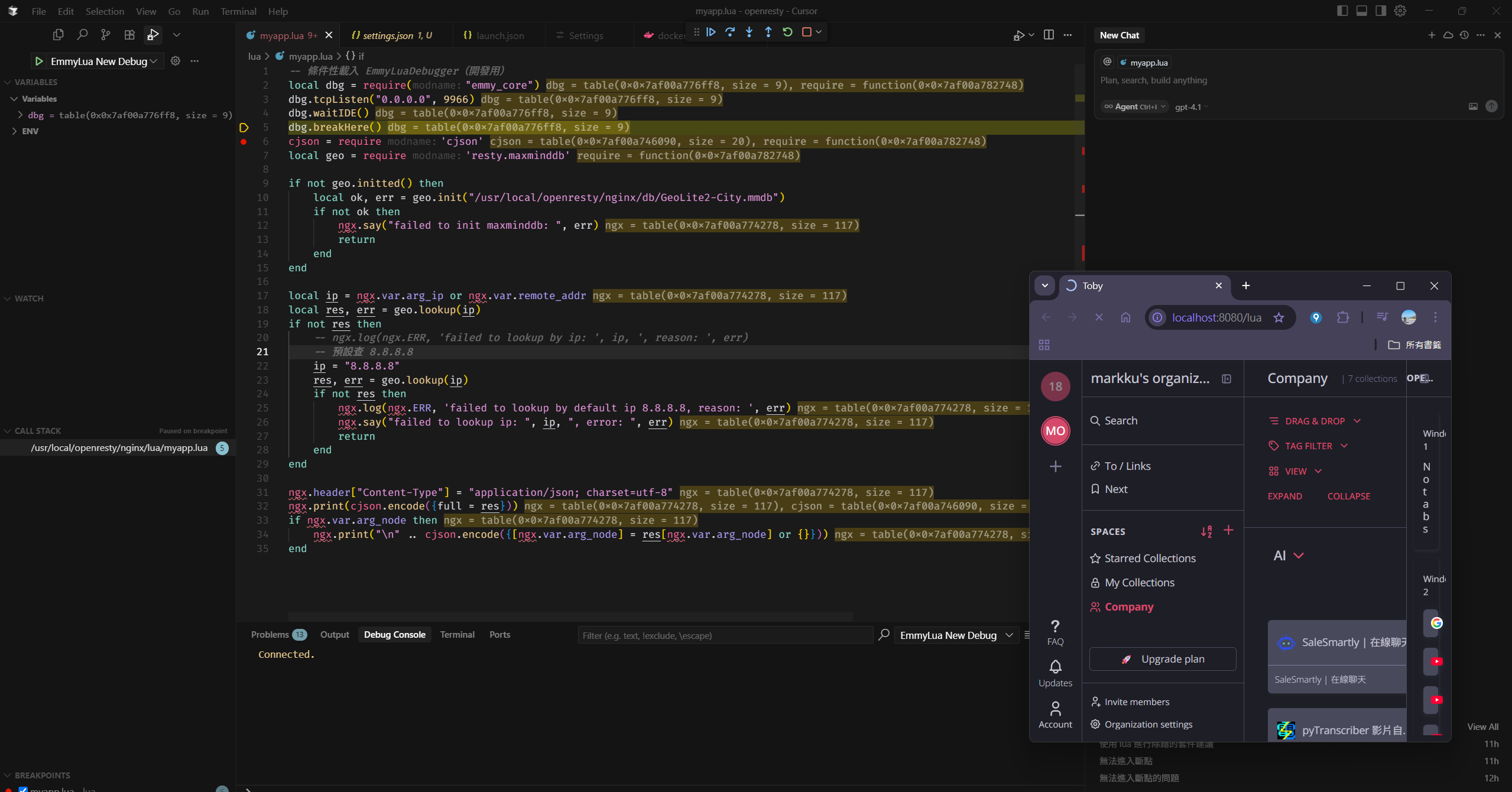
GitHub sample project
For complete sample code, see: https://github.com/markku636/openresty-deubug
Common Lua debugging techniques
- Check the Error Log
/usr/local/openresty/nginx/logs/error.log
First place to look for issues. - Enable Debug Log
- OpenResty: set
error_log ... debug;innginx.conf
- OpenResty: set
- Add log calls in Lua scripts
ngx.log(ngx.ERR, "Debug info: ", cjson.encode(var)) - API testing
Use Postman/curl to call APIs and inspect responses. - VSCode debug attach failing?
- Confirm
dbg.tcpListen("0.0.0.0", 9966), notlocalhost. - Verify
9966:9966is indocker-compose.yml. - VSCode's
hostshould be set tolocalhost. - Check whether firewall or security software is blocking the port.
- Confirm
- Logs not visible?
- Check
/usr/local/openresty/nginx/logs/error.log. - Lua scripts can use
ngx.log(ngx.ERR, "debug info")as an aid.
- Check
Remote debugging in containers (Docker)
| Method | Command / Description |
|---|---|
| Get inside container & tail logs | docker exec -it openresty-dev /bin/shtail -f /usr/local/openresty/nginx/logs/error.log |
| View container logs directly | docker logs -f openresty-dev |
| Mount local directory | docker run -v /your/local/logs:/usr/local/openresty/nginx/logs ... openresty |
| Capture traffic | sudo tcpdump -i docker0 port 8080 |
| VSCode Remote | Edit and debug files inside the container via VSCode |


Comments