
Preface
A question I've been getting a lot lately: in the AI era, how should we actually refactor legacy systems? Let me consolidate my recent thinking and approach into one article.
1. AI accelerates development — and amplifies risk
Vibe Coding / AI Pair Programming really can multiply software productivity. But it can equally multiply bugs, technical debt, and system complexity (extra code, over-engineering). When a major system error happens, engineers still have to step in — and because much of the code wasn't typed line by line, when something breaks, it's not always obvious where.
So talking about refactoring in the AI era, what we really need is to make the system more understandable, not just chase "produce more code."
2. Before you rewrite: make sure you have "headroom"
From my past experience rewriting a system, the people before and after were the same team. The old system's core features kept hitting issues while new requirements kept coming in, and dev resources were constantly pulled both ways. The result: nearly a year and a half just stabilizing the old system's requirements, drawing clear boundaries, before the team had real headroom to talk about a rewrite.
P.S. The practices below are what I've gathered — adjust based on your actual resources and task priorities.
3. Requirement consolidation: clarify before you act
Against this backdrop, requirement consolidation itself becomes a critical engineering task — not just "write some specs":
-
Comprehensive inventory
Includes unused features, known issues and potential leaks, the long-standing wishlist from the business side, the actual usage scenarios, resource quotas, and the responsibilities and role boundaries of each department. -
Redesign, don't rubber-stamp
For each item in the inventory, rethink: what's worth keeping, what needs adjusting, what shouldn't have existed in the first place, or what's so big it must be deferred. -
Surface uncertainty
Take known unknowns and proactively put them on the table — convert them into known, manageable risks and decision criteria. For example: draw flow diagrams. -
Redefine processes when needed
Some problems aren't rooted in the system but in the workflow itself. Have the courage to redefine the workflow, not just paper over it with technical brute force.
P.S. Thanks to Big Bro Lei N from 104 for the perspectives and reminders shared here.
4. Use API Gateway to separate old and new systems
From a technical angle, if the old system already has APIs, you can first set up a unified entry point (API Gateway):
All requests no longer hit the old system's IP directly — they go through the API Gateway:
/api/v1/orders  -> Old System
/api/v2/orders  -> New Microservice
Versioning hides both old and new behind the Gateway, so you can migrate one API at a time instead of rewriting everything at once. Old APIs get phased out gradually, and any future old/new version management is much easier.
5. Lay out an AI-readable architecture guide
The point isn't how thick the docs are — it's the consistency of logic and structure:
- System architecture
- Database schema
- Code style and conventions
- File naming and folder placement rules
- Relationships between modules
- Data flow diagrams (Mermaid is great for AI to consume)
- How unit tests should be written
These aren't only for humans — they help AI build "context." During the build phase, you can pair them with tools that enforce constraints:
- Frontend: ESLint to keep code style unified.
- .NET: Roslyn Analyzer +
.editorconfigto enforce conventions in the build pipeline.
This way AI doesn't "produce a different style every time," and it can better grasp the architecture you actually want.
Also, critical business logic should have tests. The pattern: a human first writes out the scenarios and input/output, then asks AI to help generate or fill in the tests — ensuring "the same input always produces the expected output." That keeps risk relatively lowest.
6. Inventory features for refactoring; decide AI's involvement
First list out the features that need refactoring, then use fault tolerance to decide how far AI can go:
- High tolerance: AI can generate automatically, with human spot-checks or rough validation.
- Low tolerance: must have human review, AI is only an assistant. Even after launch, humans should observe for a few days, or set up monitoring alerts.
Not every spot is suited for full automation — some places require an engineer to read line by line, or test by hand.
7. Use AI as a Code Reviewer
You can have AI do code review — let it scan for issues, evaluate risk, and suggest fixes — but the final decisions and trade-offs still belong to humans. For example, GitHub + Copilot can automatically trigger AI Review in your PR flow, scanning for potential risks first.
P.S. Cursor has a similar mechanism.
8. When things really break, you need to see it fast
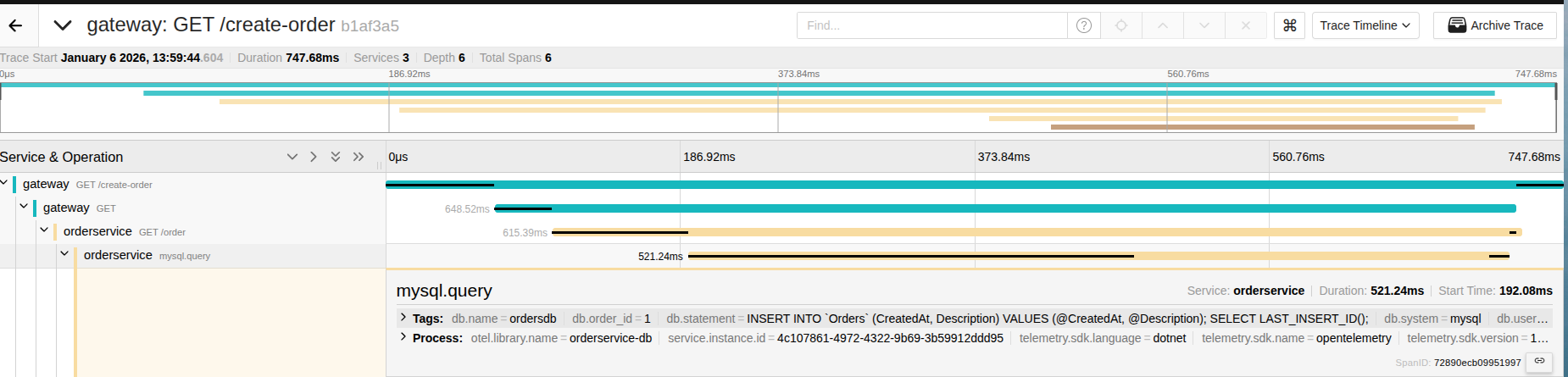
When most of the code is AI-produced, the team's familiarity with system details is usually low. You'll need error status codes and well-placed logs as anchors to quickly narrow down the problem.
- Active monitoring (periodic requests / website service monitoring):
uptime-kuma - Passive monitoring (someone using it notices it's broken or slow):
Prometheus + Grafana, orJaegerfor custom-metric monitoring
At minimum, you want a few real-time observability signals:
- API error rate
- Latency
- Some custom business-process metrics for critical flows
9. If you can't diagnose quickly, you need a safe rollback
You will make mistakes during refactoring, so the escape route must be planned and prepared in advance. The mistakes you'll make, others are likely to make too. When something does break, treat it as an opportunity to improve the existing refactor and deploy flow — let the whole system iterate forward, step by step, and mature over time.
Common rollback approaches:
- Direct Git revert, rebuild container or app container
- Switch back to old system at the API Gateway
- k8s rollback
10. From WinForm to Web: migrating the UX
The biggest challenge in moving from WinForm to Web isn't tech — it's the users' existing operational habits. People used to fly through WinForm with combo boxes and hotkeys, fast and intuitive. Going to Web means rethinking interaction design so it feels just as smooth — or even faster.
- Quick selection: use autocomplete with full keyboard support (hotkeys) and focus management.
- Low-latency feedback: avoid full-page reloads — modern frontend frameworks make "no reload" UX trivial.
- Batch and shortcuts: keep common hotkeys and batch-operation capabilities to shorten action paths.
- Consistent semantics: reuse the old system's terminology and flow mapping to lower the learning curve.
11. Responsive design: Mobile-first and Tailwind CSS
Most people now browse on phones, so design typically starts mobile-first. I recommend Tailwind — it's mobile-first by design, with mature responsive variants and utility classes for various device sizes, and it's easy to extend.
- Public-facing site: start from mobile, then enhance for desktop.
- Admin system: admin features are usually numerous; making everything fully RWD is expensive. Unless a feature is essential, do RWD only on the parts that need it.
- Desktop system: focus on the efficiency of dense operations, close to users' daily habits.
Reflections
Refactoring at its core is reducing system uncertainty. If the structure is complex and lacks consistency, then a system that was already messy will, with AI's amplification, become "many times messier." Don't expect AI to rewrite everything for you — use AI to help with the parts that are clearly defined and logically explicit. When the system becomes "understandable" — for engineers and for AI alike — that's when refactoring and rewriting actually pay off.


Comments