
Background
I wanted to build a product recommendation bot, but I found that the technical barrier and cost of training my own model were too high. Furthermore, the responses after training had a certain degree of randomness. Therefore, I decided to use AI Agent technology with a pre-trained large language model.
To prevent the AI from hallucinating, this chapter will focus on using a vector database. This gives the AI access to external knowledge and allows us to instruct the large language model not to generate answers if it doesn't know something.
First, what is a vector database?
The term "vector database" might sound abstract. Essentially, a vector database is used to store multi-dimensional data. A large language model vectorizes the data, which is then stored in the vector database. This allows us to calculate similarity based on the distance and other weights between data points.
Simply put, a vector database places similar data, like "dog" and "animal," close together. This way, when you search for an image of a dog, the system can quickly find similar images or information.
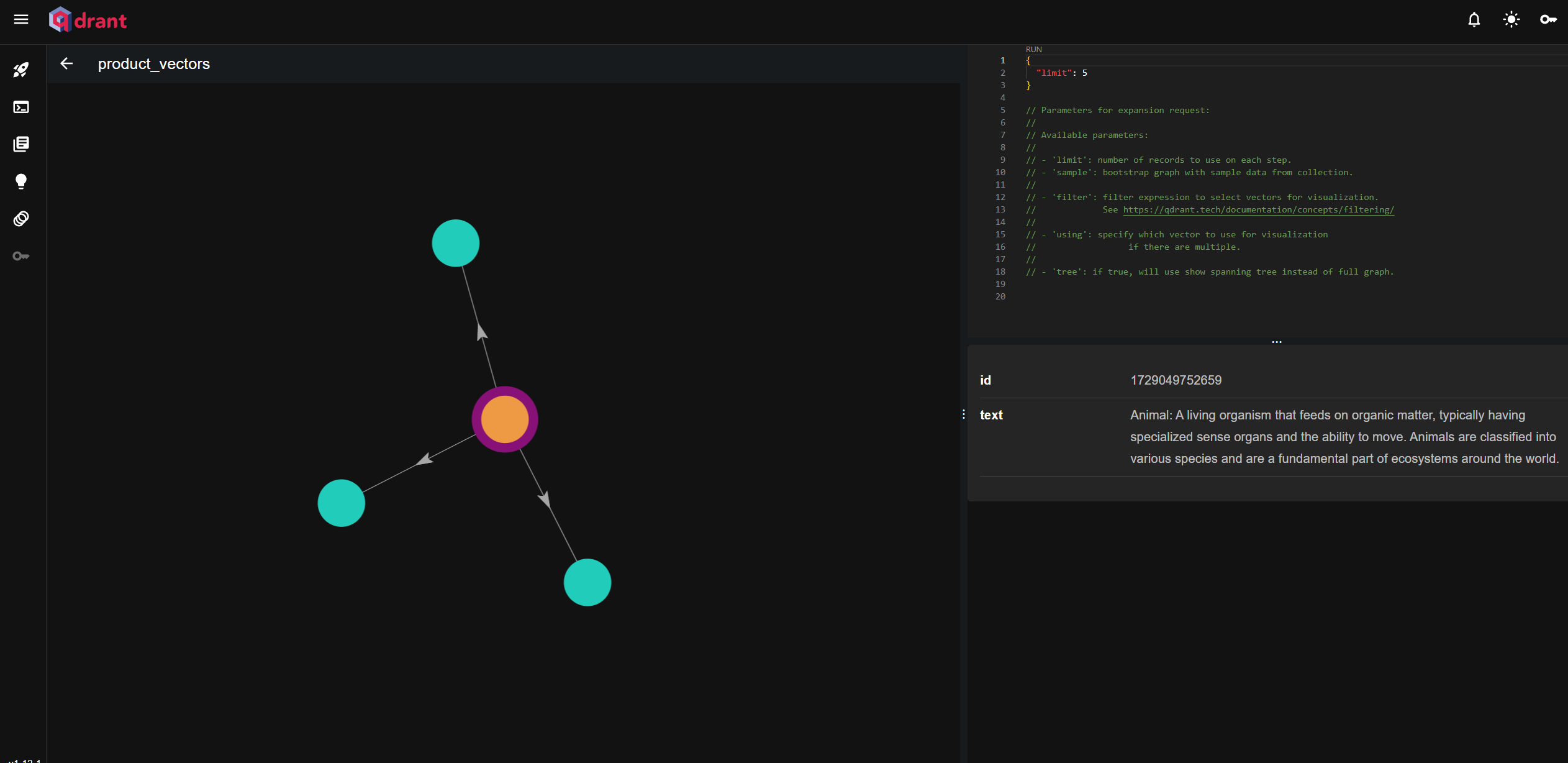
Why is vectorization necessary?
We all know that GPUs excel at mathematical and graphical computations. Vectorization is the process of converting data into numerical vectors. This speeds up calculations, makes it easier for machine learning models to process, and allows different types of data (like text and images) to be compared. These characteristics make it very suitable for recommendation and image search systems.
Diagram of Vector Data
* 向量A:
[3.2, 4.1, 5.7, 8.9, 1.0]
* 向量B:
[1.5, 2.8, 9.3, 0.4, 6.5]
* 向量C:
[7.1, 0.3, 4.8, 5.5, 2.2]
P.S. Each number represents a specific category, mapped using a predefined dictionary. However, it could also be a range mapping. For example: dog: 1, cat: 2
What does vectorized data contain?
Within a long series of vector values, the data includes key features, dimensions, distance metrics, weight distribution, and contextual relationships.
How LangChain operates on a vector database
Get data from various sources (Source) > Load it into the application (Load) > Transform the data by cleaning, formatting, and splitting it into smaller chunks > Vectorize (Embed) > Store in a vector database (Store) > Retrieve similar data (Retrieve)
First, let's learn how to programmatically vectorize text (Embedding)
Install packages
npm i @langchain/ollama @langchain/core
First, let's write an Embedding API in Next.js (/api/lang-chain/ollama-embedding)
import { OllamaEmbeddings } from '@langchain/ollama';
import { MemoryVectorStore } from 'langchain/vectorstores/memory';
import { NextApiRequest, NextApiResponse } from 'next';

// 定義 Next.js API 處理器,處理 API 請求
export default async function handler(req: NextApiRequest, res: NextApiResponse) {
    try {
        const { text } = req.body;

        // 檢查是否有文字內容
        if (!text) {
            return res.status(400).json({ message: '文字內容為必填項' });
        }

        // 初始化 OllamaEmbeddings,設定模型和基礎 URL
        const embeddings = new OllamaEmbeddings({
            model: 'llama3.2', // 預設模型
            baseUrl: 'http://localhost:11434', // 預設的 API 基礎 URL
        });

        // 使用 OllamaEmbeddings 將文字轉換為向量並存入 MemoryVectorStore 中
        const vectorstore = await MemoryVectorStore.fromDocuments([{ pageContent: text, metadata: {} }], embeddings);

        // 將向量儲存庫作為檢索器,並設置返回單一文件
        const retriever = vectorstore.asRetriever(1);

        // 檢索最相似的文字,根據給定的查詢進行檢索
        const retrievedDocuments = await retriever.invoke('What is LangChain?');

        // 將文字(text)轉換為向量的方法。
        const singleVector = await embeddings.embedQuery(text);

        // 返回檢索結果
        res.status(200).json({ retrievedDocuments, singleVector });
    } catch (error) {
        // 捕捉錯誤並返回 500 狀態碼
        console.error('Error handling request:', error);
        res.status(500).json({ error: '處理請求時發生錯誤' });
    }
}
Usage
curl -X POST http://localhost:3001/api/lang-chain/ollama-embedding \
  -H "Content-Type: application/json" \
  -d '{"text": "LangChain is the framework for building context-aware reasoning applications"}'
Next, let's install and programmatically operate a vector database
What is qdrant?
Qdrant is a very popular vector database used for storing and retrieving high-dimensional vector data. It's well-suited for similarity searches, such as in recommendation systems and text/image search. It also features an easy-to-use RESTful API and a visual dashboard for managing and viewing vector data.
Start the Qdrant vector database container
docker run -d --name qdrant-container -p 6333:6333 --restart=always qdrant-container qdrant/qdrant
Access the Dashboard
http://localhost:6333/dashboard
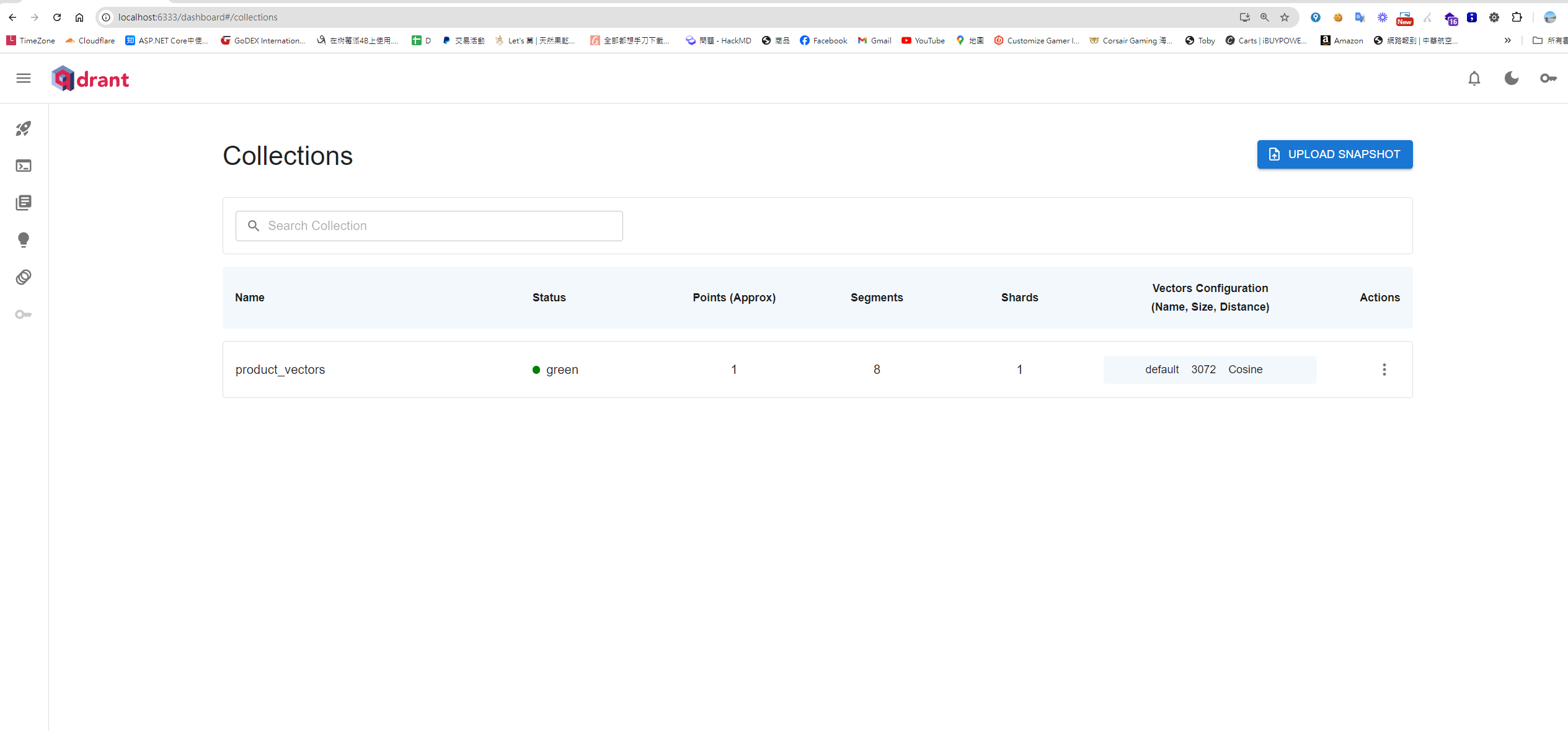
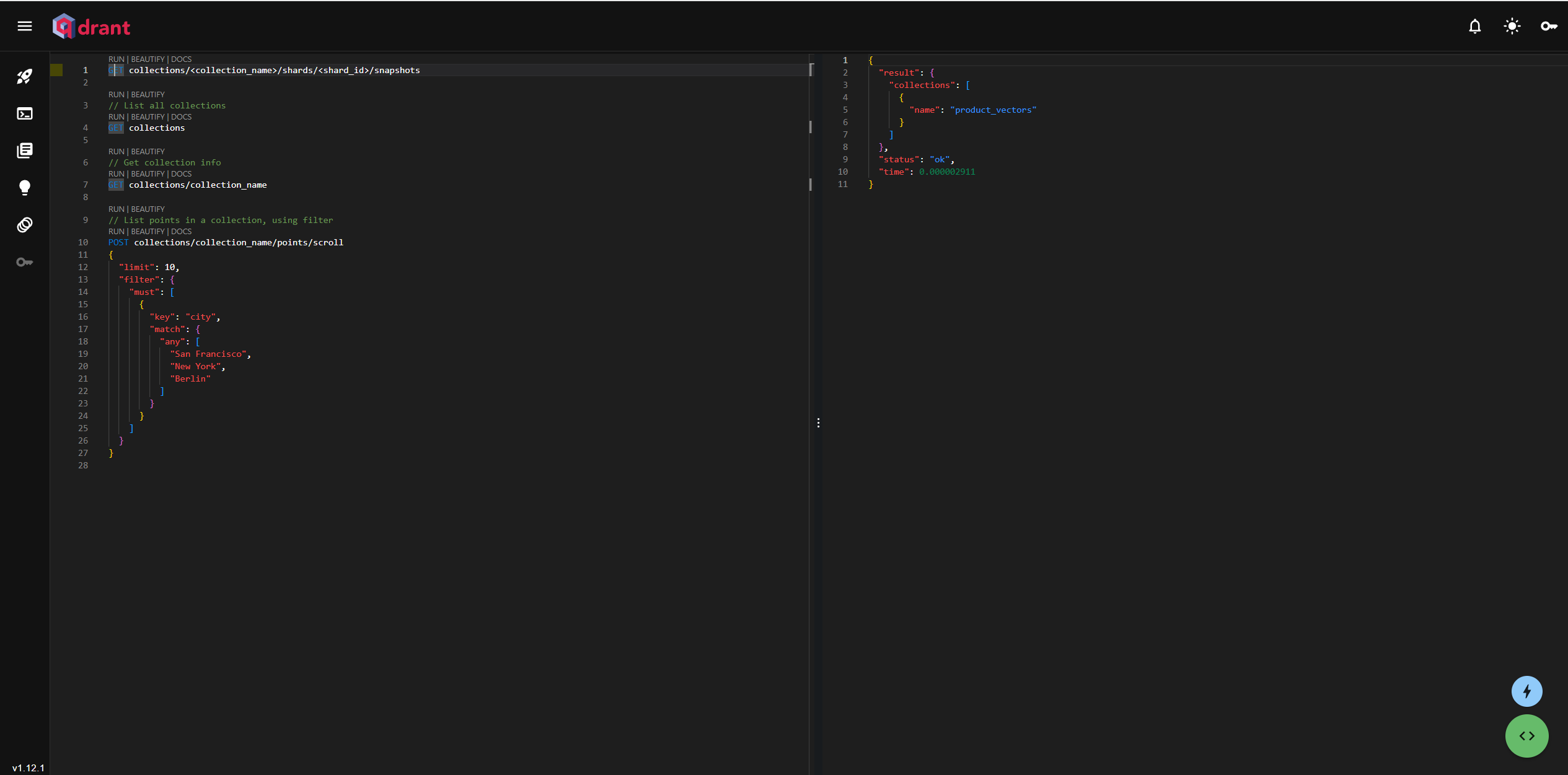
It also supports operating the vector database via a RESTful API
##  測試健康度
curl http://127.0.0.1:6333/healthz

## 取得所有的集合
curl -X GET "http://localhost:6333/collections"
Install related packages
npm install @qdrant/js-client-rest --save
Next, let's write a Next.js API to add data to a collection using Llama for embedding (/api/lang-chain/insert-vector-database)
import { OllamaEmbeddings } from '@langchain/ollama';
import { QdrantClient } from '@qdrant/js-client-rest'; // 引入 Qdrant 客戶端
import { NextApiRequest, NextApiResponse } from 'next';

// 初始化 Qdrant 客戶端
const qdrantClient = new QdrantClient({ url: 'http://localhost:6333' });

// 初始化 OllamaEmbeddings
const embeddings = new OllamaEmbeddings({
    model: 'llama3.2',
    baseUrl: 'http://localhost:11434',
});

// 定義集合名稱
const collectionName = 'product_vectors';

// 定義向量點的界面
interface VectorPoint {
    id: number | string;
    vector: number[];
    payload: { text: string };
}

// 定義 Next.js API 處理器
export default async function handler(req: NextApiRequest, res: NextApiResponse) {
    try {
        const { text } = req.body;

        // 檢查是否有文字內容;
        if (!text) {
            return res.status(400).json({ message: '文字內容為必填項' });
        }

        // 生成文字的嵌入向量
        const vector: number[] = await embeddings.embedQuery(text);

        // 定義要插入的點
        const points: VectorPoint[] = [
            {
                id: Date.now(), // 使用當前時間作為唯一 ID
                vector: vector, // 插入生成的向量
                payload: { text }, // 存放文字數據
            },
        ];

        // 檢查集合是否已存在,若不存在則創建
        try {
            const collectionExists = await qdrantClient.getCollection(collectionName);

            if (!collectionExists) {
                await qdrantClient.createCollection(collectionName, {
                    vectors: {
                        size: 1000, // 向量大小
                        distance: 'Cosine', // 距離度量使用 Cosine
                    },
                });
            }
        } catch (error) {
            console.log(`集合 ${collectionName} 不存在,正在創建...`);
            await qdrantClient.createCollection(collectionName, {
                vectors: {
                    size: vector.length,
                    distance: 'Cosine',
                },
            });
        }

        // 將向量插入 Qdrant
        await qdrantClient.upsert(collectionName, { points });

        res.status(200).json({ message: '向量已成功插入 Qdrant' });
    } catch (error) {
        console.error('插入向量時發生錯誤:', error);
        res.status(500).json({ message: '插入向量時發生錯誤', error: error });
    }
}
Usage
# Dumpling
curl -X POST http://localhost:3001/api/lang-chain/insert-vector-database \
  -H "Content-Type: application/json" \
  -d '{"text": "Dumpling: A small dough pocket, often filled with meat, vegetables, or other ingredients, commonly boiled or steamed. Dumplings, such as Chinese \"shui jiao,\" are a popular dish in many cultures and can be served with various dipping sauces."}'
Then, write another Next.js API to retrieve similar items from the vector database using Llama (/api/lang-chain/query-vector-database)
import { OllamaEmbeddings } from '@langchain/ollama';
import { QdrantClient } from '@qdrant/js-client-rest'; // 引入 Qdrant 客戶端
import { NextApiRequest, NextApiResponse } from 'next';

// 初始化 qdrant 客戶端
const qdrantClient = new QdrantClient({ url: 'http://localhost:6333' });

// 初始化 OllamaEmbeddings
const embeddings = new OllamaEmbeddings({
    model: 'llama3.2',
    baseUrl: 'http://localhost:11434',
});

// 定義集合名稱
const collectionName = 'product_vectors';

// 定義 Next.js API 查詢處理器
export default async function handler(req: NextApiRequest, res: NextApiResponse) {
    try {
        const { text } = req.body;

        // 檢查是否有文字內容
        if (!text) {
            return res.status(400).json({ message: '文字內容為必填項' });
        }

        // 生成文字的嵌入向量
        const vector: number[] = await embeddings.embedQuery(text);

        // 使用生成的向量在 Qdrant 中查詢相似的向量
        const searchResults = await qdrantClient.search(collectionName, {
            vector: vector,
            limit: 5, // 查詢的最大結果數量
        });

        res.status(200).json({ results: searchResults });
    } catch (error) {
        console.error('查詢向量時發生錯誤:', error);
        res.status(500).json({ message: '查詢向量時發生錯誤', error: error });
    }
}
Usage
curl -X POST http://localhost:3001/api/lang-chain/query-vector-database \
  -H "Content-Type: application/json" \
  -d '{"text": "What is LangChain"}'
Returned result
{
  "results": [
    {
      "id": 1728983487057,
      "version": 0,
      "score": 0.41997233, => 相似度
      "payload": {
        "text": "LangChain is the framework for building context-aware reasoning applications" => 回傳的資料
      }
    }
  ]
}
Advanced Query Applications
Inserting with structure
Vector databases can store both structured and unstructured data. Using structured data can make queries more precise.
Inserting unstructured data
qdrantClient.upsert({
    collection_name: 'your_collection_name',
    points: [
        {
            id: 1, // 唯一識別符
            vector: vector, // 向量資料
            payload: { text: "your_original_text" } // 非結構化資料作為 payload 插入
        }
    ]
});
Inserting structured data
 qdrantClient.upsert({
    collection_name: 'products_collection',
    points: [
        {
            id: productData.id, // 唯一識別符
            vector: productData.features, // 插入特徵向量
            payload: { // 結構化資料作為 payload 插入
                name: productData.name, // 結構化資料
                price: productData.price, // 結構化資料
                rating: productData.rating, // 結構化資料
                category: productData.category // 結構化資料
            }
        }
    ]
});
Advanced query parameters
Since vector databases can store both structured and unstructured data, you can also query based on specific attributes.
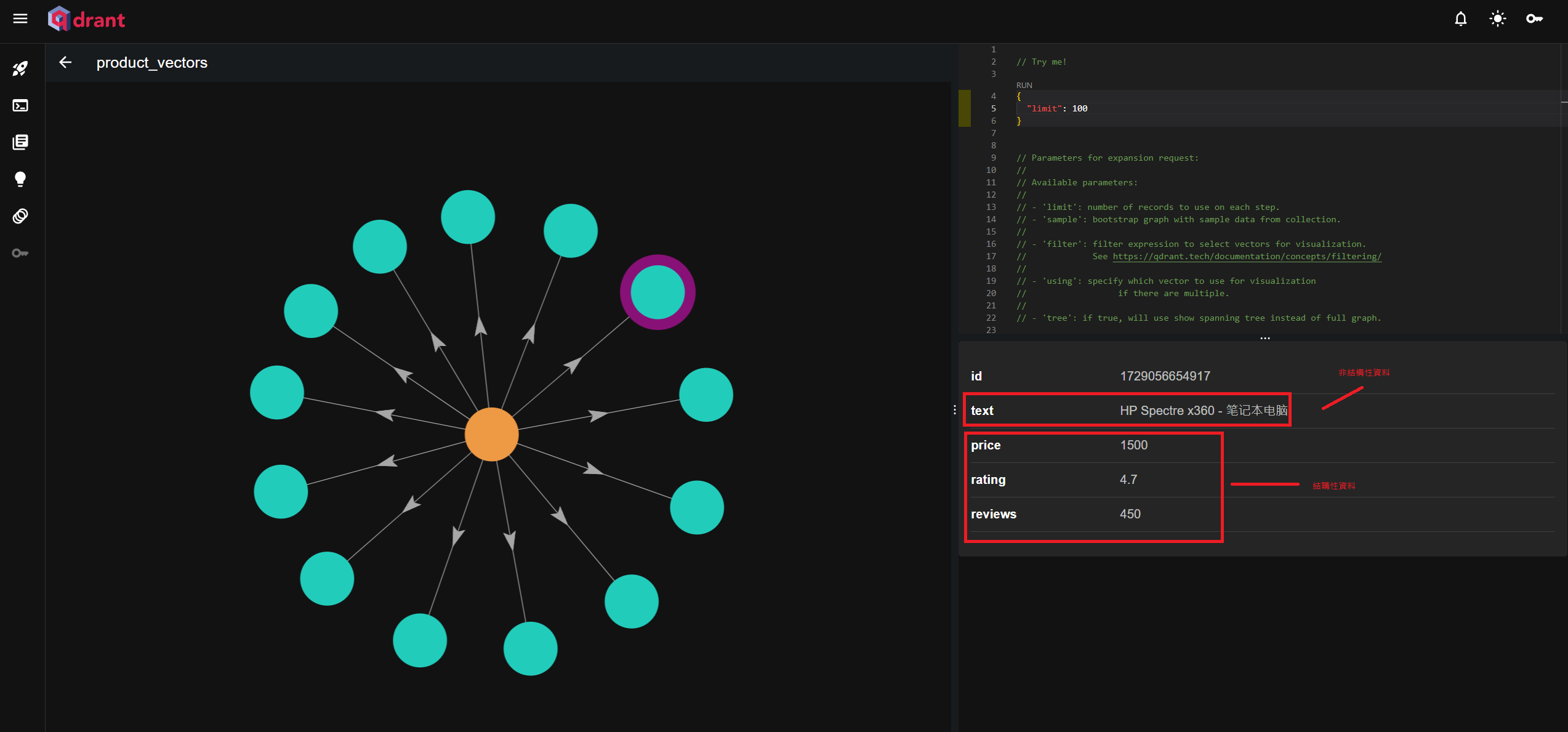
const searchResults = await qdrantClient.search(collectionName, {
    vector: [0.5, 0.2, ...], // 用於查詢的向量
    limit: 5, // 限制返回 5 筆結果
    filter: {
        must: [
            {
                key: 'price',
                range: {
                    gte: 1000, // 價格至少 1000
                    lte: 2000  // 價格最多 2000
                }
            },
        ]
    },
    hnsw_ef: 200, // 調整查詢效率
    with_payload: true, // 返回結果中的 payload 資料
    score_threshold: 0.7, // 只返回相似度高於 0.7 的結果
});
Recent thoughts on using AI
I've been feeling this strongly lately: the emergence of AI has certainly taken over some basic tasks. By using AI, engineers can do more and learn things more efficiently. As the barrier to learning various subjects becomes lower, a lot of knowledge can be acquired just by chatting with an AI. It's become easier for people to access information, allowing us to spend more time on extracting knowledge, gaining insights, planning, validating, and making decisions.
References
- Basic Practice with Qdrant Vector Database
- Implementing Semantic Similarity Matching with Qdrant Vector Database
- Developing Large Models with Node.js and LangChain
- Qdrant Official Website
Related articles in this series
- Building an AI Bot API in Next.js with LangChain and Open-Source Llama AI Part 1 - Getting Started with LangChain
- Building an AI Bot API in Next.js with LangChain and Open-Source Llama AI Part 2 - Creating an AI Agent with Memory
- Building an AI Bot API in Next.js with LangChain and Open-Source Llama AI Part 3 - Adding a Vector Database to Give the AI an External Brain
- Building an AI Bot API in Next.js with LangChain and Open-Source Llama AI Part 4 - AI Product Recommendation API


Comments