
Dev Workflow Series — No More Manual Release Notes, Use PowerShell + git log
The Problem
When a feature is finished and ready to deploy to the next environment, we usually have to "manually log" what changed, so if the next environment hits an issue, we can quickly trace it back to a release. To let developers stay focused on dev, I built a PowerShell automation script that creates a Git tag and produces the Release Note.
Current Versioning Scheme
Trigger CI/CD via git tag to build automatically.
b-3.0.1 => b-3.0.2
b is the beta environment, 3.0 is the major version, the last digit is the minor version.
Before Writing the Script — Get Familiar with Git Commands
Find all commit logs between two tags
git log --pretty="%s (%h - %an)" "b-0.0.1..b-0.0.2" | grep -i -E '(bug|feature|support|study|task|design) #[0-9]+ '
P.S. You can append filter conditions to find matching logs.
Find the previous version tag in the Beta environment
git describe --tags --abbrev=0 --match "b-[0-9]*
Gotcha — running git log in PowerShell shows garbled Chinese
- Git's default encoding is UTF-8, but our commit messages need to be set to big5 via git config.
git config --global core.quotepath false
git config --global gui.encoding big5
git config --global i18n.commit.encoding big5
git config --global i18n.logoutputencoding big5
- On English-locale OS, you need to go to Control Panel > Administrative > Region and adjust the language encoding.
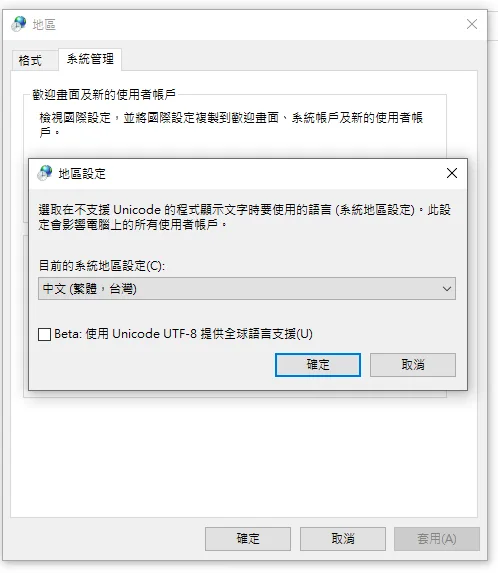
P.S. You can also use the chcp 950 command to test whether the OS supports big5 encoding.
Execution Screenshots
-
On run, the script shows the previous Beta version and asks you to enter the new Beta version
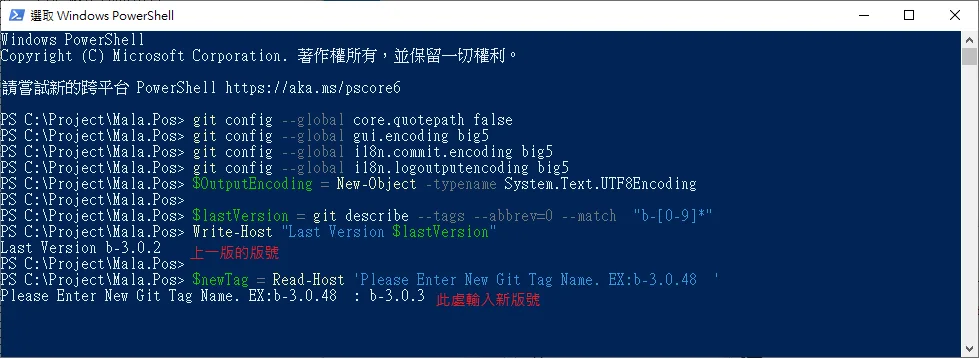
-
After completion
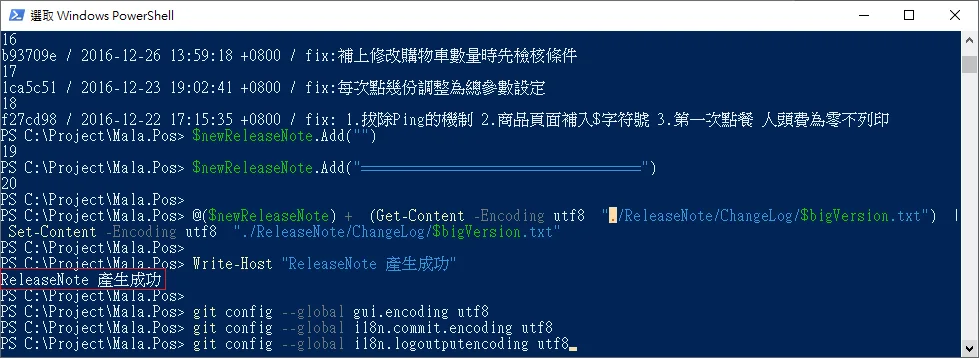
-
Result The Git log commit messages are auto-prepended to the Release Note
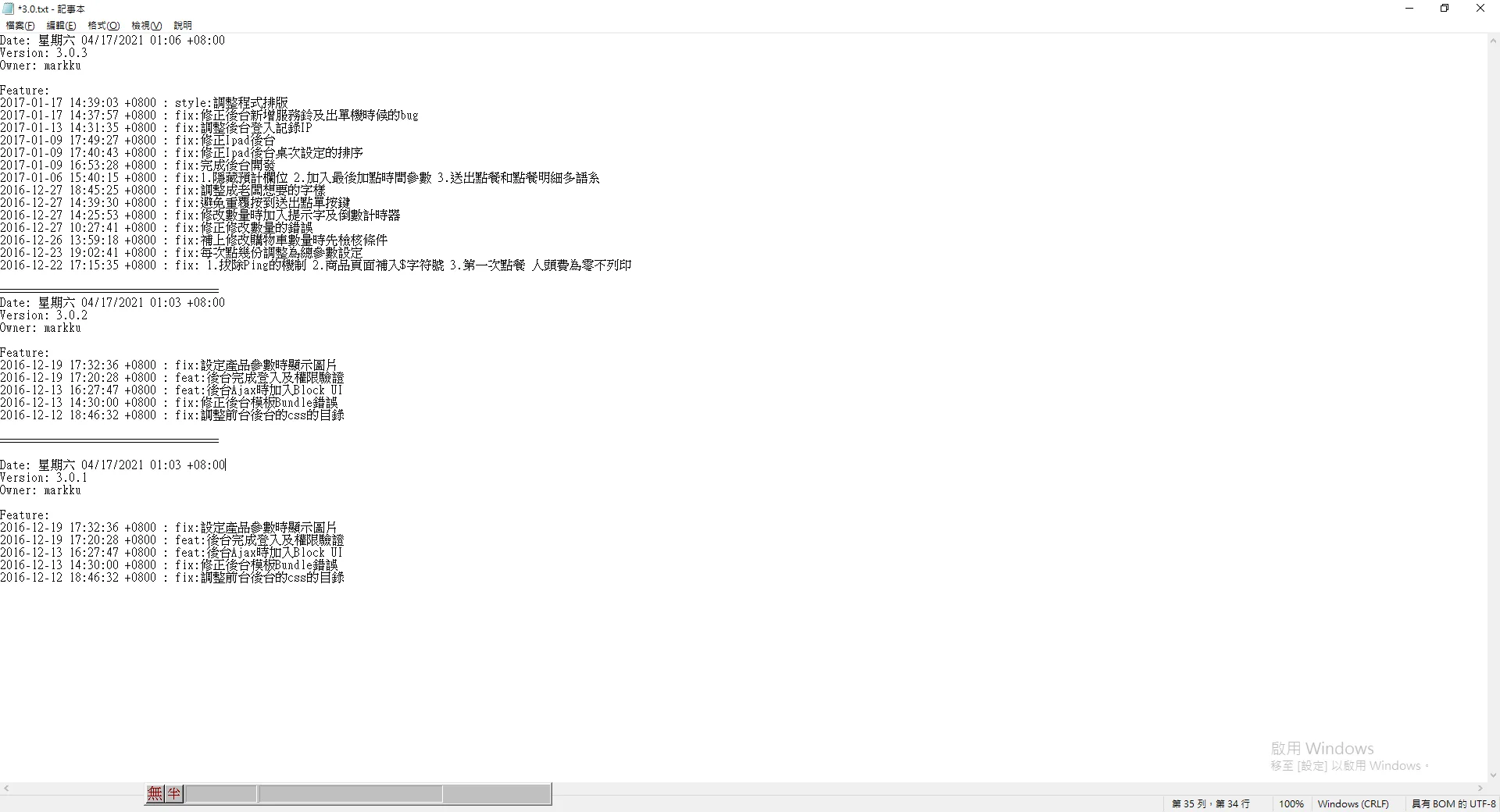
Auto generate release note script
I originally wrote this with DOS commands and it was painful. After a colleague's suggestion I switched to PowerShell — the code is much cleaner and saves a lot of time and effort.
git config --global core.quotepath false
git config --global gui.encoding big5
git config --global i18n.commit.encoding big5
git config --global i18n.logoutputencoding big5
$OutputEncoding = New-Object -typename System.Text.UTF8Encoding

$lastVersion = git describe --tags --abbrev=0 --match  "b-[0-9]*"
Write-Host "Last Version $lastVersion"

$newTag = Read-Host 'Please Enter New Git Tag Name. EX:b-3.0.48  '
# $lastVersion = Read-Host 'Please Enter lastVersion  '


# $newTag= "b-3.0.1"
# $lastVersion = git describe --tags --abbrev=0 --match  "b-[0-9]*"
Write-Host "$lastVersion "
git tag -f $newTag
$fullVersionNo = $newTag.Split("-")[1]
$versionCharArray =$fullVersionNo.Split(".")


$bigVersion = ($versionCharArray[0],$versionCharArray[1]) -join "."
Write-Host $bigVersion

[string[]]$lines = git log --pretty="%n|%h|%ai|%s" "$lastVersion..$newTag"
$datetimeNow = Get-Date -Format "dddd MM/dd/yyyy HH:mm K"
$owner = git config user.name
$newReleaseNote = New-Object System.Collections.ArrayList

# $newReleaseNote.Add("$lastVersion - $newTag")

$newReleaseNote.Add("Date: $datetimeNow")
$newReleaseNote.Add("Version: $fullVersionNo")
$newReleaseNote.Add("Owner: $owner")
$newReleaseNote.Add("")
$newReleaseNote.Add("Feature:")
foreach ($line in $lines) {
     $line = $line.Trim()
	 # $newReleaseNote.Add("$line")
     if ([String]::IsNullOrEmpty($line)) {
       continue
     }
     else
	 {
	 $Matches = $line.Split("|")
       $hash = $Matches[1]
       $datetime = $Matches[2]
       $subject = $Matches[3]
	   $newReleaseNote.Add("$datetime : $subject")
	   Write-Host "$hash / $datetime / $subject"
     }

 }
$newReleaseNote.Add("")
$newReleaseNote.Add("===================================")

@($newReleaseNote) +  (Get-Content -Encoding utf8  "./ReleaseNote/ChangeLog/$bigVersion.txt")  | Set-Content -Encoding utf8  "./ReleaseNote/ChangeLog/$bigVersion.txt"

Write-Host "ReleaseNote 產生成功"

git config --global gui.encoding utf8
git config --global i18n.commit.encoding utf8
git config --global i18n.logoutputencoding utf8


Comments