
Preface
Managing Kubernetes used to mean kubectl or Dashboard — and when I'm out, that means VPN and remembering commands. A pain. This time I turned the open-source project KubeWizard into a LINE Bot Agent API: chat from your phone to query resources, view logs, restart services, plus automation and pluggable tools — a real upgrade for the ops experience.
Main features:
- Text-based K8s management (query resources / view Logs / restart)
- REST API event entry point (Prometheus / GitOps / Webhook)
- Pluggable tools — add AI helpers and automation scripts as needed
- Per-user isolated memory + smart context
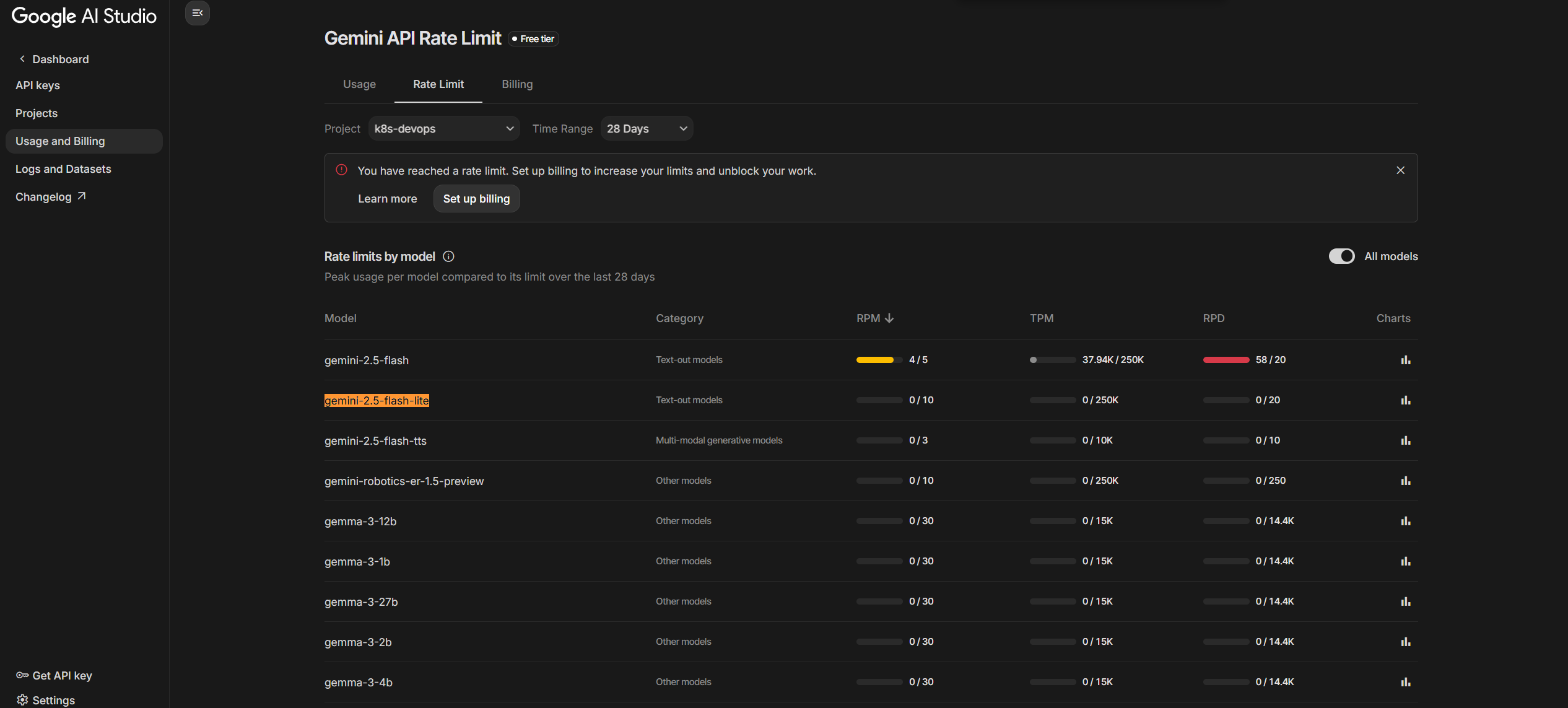
I picked Google Gemini because:
- Has a Free Tier (enough for this)
- Integrates smoothly with Python / FastAPI / LangChain
- Good multilingual understanding — sufficient for ops scenarios
For Gemini API rate limits, see the official docs: Gemini API Rate limits
Why use LINE + Agent for K8s management?
✅ Anytime, anywhere
- No VPN, no terminal — your phone is enough
- Per-user sessions stay independent
🔗 Event-entry integration
- REST API can plug into Prometheus, GitLab, Argo CD, AlertManager Webhooks
- When alerts come in, the bot can reply on LINE with diagnostics and action options
🧠 Smart extensions
- Tools mode: K8s queries, Pipeline, Jira, log analysis, Search, HTTP calls to other APIs
- AI helps generate YAML, summarize errors, suggest fixes
🎯 Conversation memory
- Redis stores context + Token Buffer auto-summarizes
- Per-user routing — no cross-talk
Architecture overview
End-to-end flow: user message → LINE → Webhook → Agent → Tools → reply
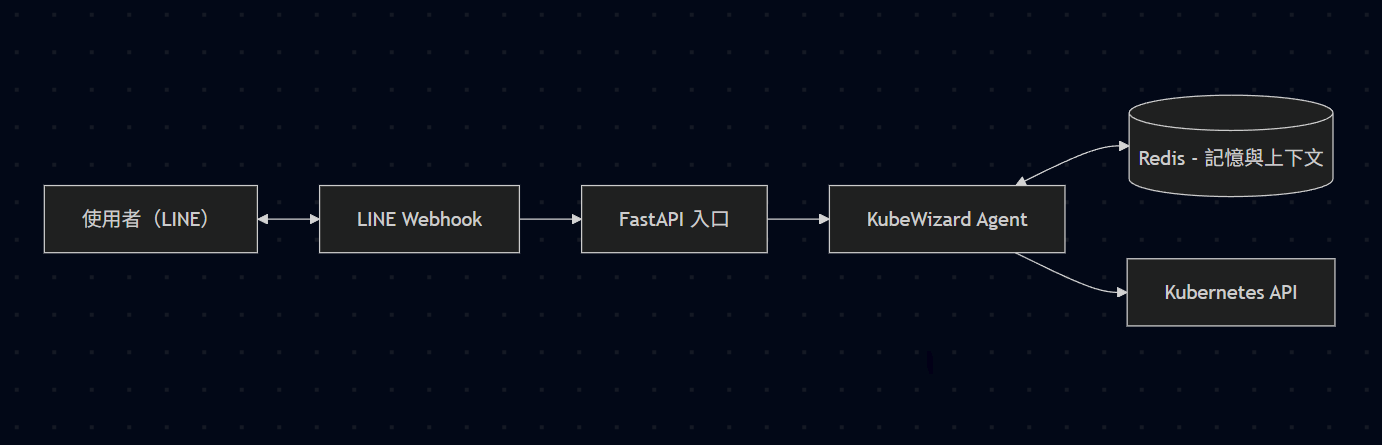
The architecture has four layers:
| Layer | Role | Description |
|---|---|---|
| Interface | LINE Bot / REST API | Multiple entry points, webhooks, alert/event injection |
| Intelligence | Agent + LLM | Decides whether to use tools, integrates output, maintains context |
| Tools | KubeTool / Search / RequestsGet / human-in-the-loop | Pluggable design, easy to extend, permission-isolated |
| State | Redis / Kubernetes SDK | Conversation memory, cluster operations, resource snapshots |
Why use the Python Kubernetes SDK instead of calling kubectl directly?
| Aspect | Python SDK | Direct kubectl |
|---|---|---|
| Security | Avoids string injection | Need careful command-string handling |
| Error handling | Structured exceptions | Hard to parse from text |
| Image size | Lightweight image | Need to install the CLI |
| Programmability | Object-based, easy to wrap | Need to parse output strings |
| RBAC integration | Native credentials/SA | Need to mount kubeconfig |
Auto-detect environment:
def load_k8s_config():
    if os.path.exists("/var/run/secrets/kubernetes.io/serviceaccount/token"):
        config.load_incluster_config()
    else:
        config.load_kube_config()
Common mappings: kubectl get pods -n X → v1.list_namespaced_pod(namespace=X).
Step 1: Set up the LINE Bot (prerequisites)
-
Go to LINE Developers:
https://developers.line.biz/console/ -
Create a Provider
-
Create a Messaging API Bot
-
Get the Channel settings and write to
.env:
LINE_CHANNEL_SECRET=your_channel_secret
LINE_CHANNEL_ACCESS_TOKEN=your_access_token
- Set the Webhook URL, e.g.:
https://your-domain.com/linebot/callback
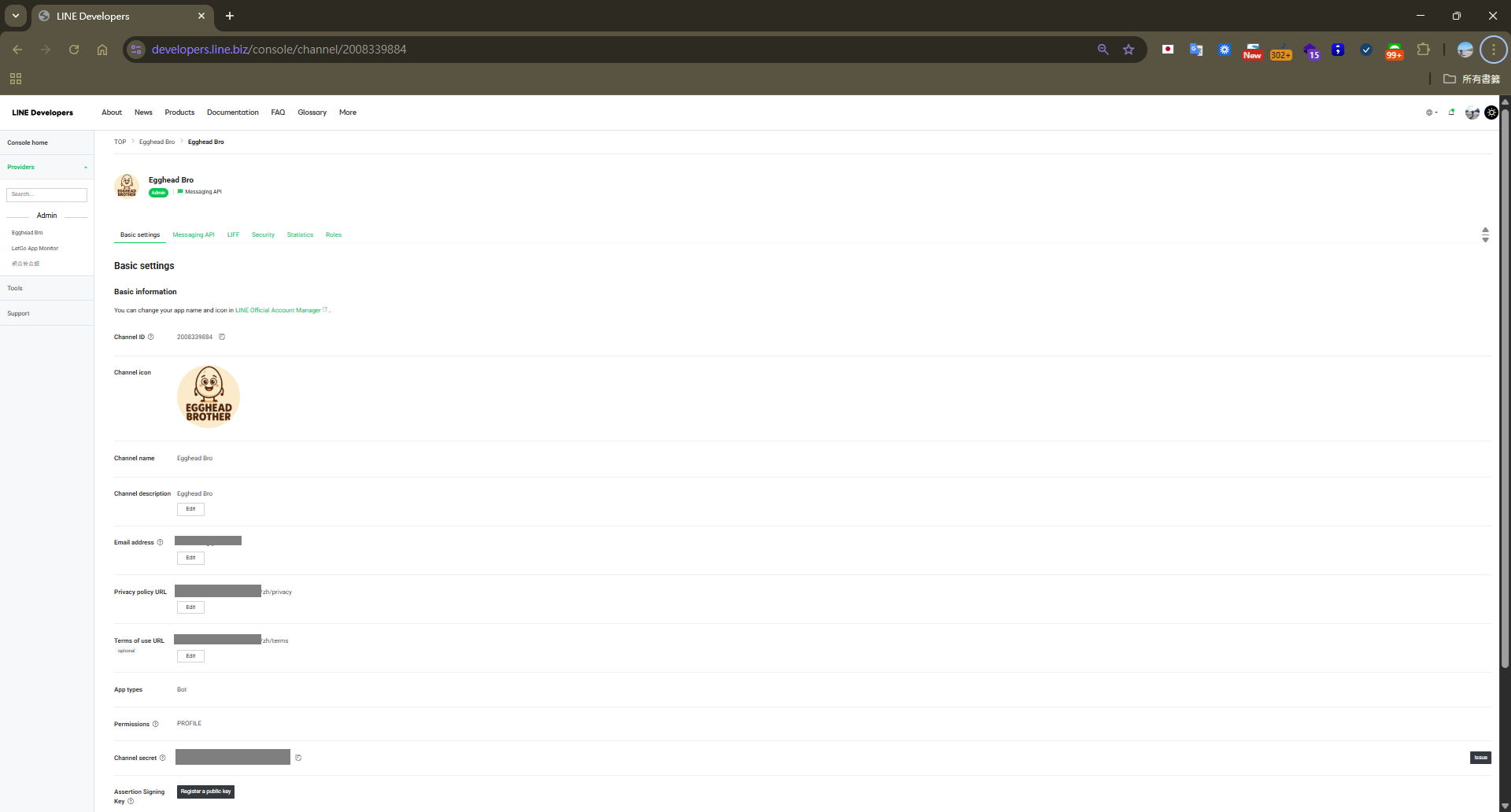 For Webhook testing, use ngrok to expose your local server.
Recommended Webhook Settings
| Item | Value |
|---|---|
| Webhook URL | https://example.com/linebot/callback |
| Use webhook | ✅ Enabled |
Must use HTTPS. Click Verify to confirm after success.
Step 2: Core components for "LINE Bot Agent API"
By default, KubeWizard does single-turn Q&A. To make it a truly useful Agent, we add memory, tool selection, and multiple entry points.
Core design
| Component | Function | Implementation |
|---|---|---|
| Agent | Analyzes messages and decides whether to use Tools | LangChain OpenAI Tools Agent |
| Tools | Provides functionality as plugins (K8s, Pipeline, AI, etc.) | LangChain BaseTool |
| Memory | Stores context and user state in Redis | RedisChatMessageHistory + ConversationTokenBufferMemory |
| API | Provides REST API and LINE Webhook | FastAPI |
Modular features (Tools)
Each feature is a standalone Tool — extension is easy. Here's the KubeTool implementation:
from langchain_core.tools import BaseTool
from kubernetes import client, config
from pydantic import BaseModel, Field

class KubeInput(BaseModel):
    """Parameter model for the Kubernetes tool"""
    commands: str = Field(
        ...,
        example="kubectl get pods",
        description="The kubectl-related command to execute"
    )

class KubeTool(BaseTool):
    """Kubernetes tool — executes K8s operations via the Python SDK"""

    name: str = "KubeTool"
    description: str = """Tool for running k8s-related commands on a Kubernetes cluster.
    Supports get/describe/logs/list operations.
    Special features:
    - Use 'kubectl list all' for a quick overview of all namespaces and pods
    - Use 'kubectl list namespaces' to list all namespaces
    - Use 'kubectl list pods' to view all pods grouped by namespace
    """
    args_schema: Type[BaseModel] = KubeInput

    def __init__(self, **kwargs):
        super().__init__(**kwargs)
        # Auto-detect environment and load config
        try:
            config.load_incluster_config()  # In-Pod environment
            logger.info("Using in-cluster config (Pod environment)")
        except:
            config.load_kube_config()  # Local environment
            logger.info("Using local kubeconfig")

        self.v1 = client.CoreV1Api()
        self.apps_v1 = client.AppsV1Api()

    def _run(self, commands: str) -> str:
        """Execute kubectl command and return result"""
        # Parse the command and convert to SDK API calls
        # E.g., kubectl get pods -n default
        # Becomes: self.v1.list_namespaced_pod(namespace="default")
        ...
Agent decision logic
# Agent initialization
from langchain.agents import create_openai_tools_agent, AgentExecutor
from langchain_google_genai import ChatGoogleGenerativeAI

# Define available tools
tools = [
    KubeTool(),
    SearchTool(),
    RequestsGet(),
    human_console_input()
]

# Create the Agent
agent = create_openai_tools_agent(
    llm=ChatGoogleGenerativeAI(model="gemini-2.5-flash"),
    tools=tools,
    prompt=system_prompt
)

agent_executor = AgentExecutor(
    agent=agent,
    tools=tools,
    memory=memory,
    verbose=True
)

# Flow: user question → Agent analyzes → picks tool → executes → returns result
result = agent_executor.invoke({"input": "list all pods"})
My "Vibe Coding" iteration takeaways (real gotchas)
This time I didn't write a pile of design docs first — I built and adjusted in the rhythm I call "Vibe Coding," which roughly looks like this:
- Get something running first: build a minimal
KubeAgentwith oneKubeTool, where "list pods" works in the CLI is the first milestone. - Observe the model's "personality": does it hallucinate? Does it skip the tool when it should query? If yes, add a Prompt note: "analyze the question first, then decide whether to query."
- Add one capability at a time: e.g., add
search, then test 2-3 scenarios to confirm it actually uses it before addingRequestsGet,human_console_input. - Handle dangerous operations separately: I noticed delete / restart operations shouldn't be fully entrusted to the model, so I split out a
KubeToolWithApproverequiring human confirmation. - Add memory only when conversations get long: don't rush Redis at first — wait until you genuinely feel "the bot forgets earlier turns," then plug in Redis + Token Buffer and watch token usage stabilize.
- Optimize when real pain hits: e.g., when API gets slow or K8s is queried too often, then add "only fetch global state when keywords match." Don't pre-optimize for every imagined scenario.
- Helm last: once standalone Docker / Compose is solid, package env vars, Secrets, and RBAC into a Helm Chart — turning it into a template you can drop into any cluster.
The core mindset is simple:
- Useful first, pretty later.
- Each iteration solves one real problem (e.g., memory mixing, replies too long, accidentally deleted resources).
- Use logs to see what the Agent is doing: skipping tools or using the wrong one usually means Prompt / tool descriptions need tuning.
- Use SDKs wherever possible — string-glue commands are a maintenance burden.
Technical highlights, challenges, and solutions (plain language)
This section is "real gotchas I hit during implementation" — picking a few representative ones:
- Don't run
kubectldirectly — use the Python SDK
- Problem: string-building
kubectlinvites shell injection, error messages are hard to handle, and the image needs an extra CLI. - Solution: parse common commands like
kubectl get pods -n defaultand map them to Python SDK calls likev1.list_namespaced_pod(namespace="default"), then format the output as a table. - Benefit: controlled output, better security, easier to wrap as a Tool. Implemented in
tools/kubetool_sdk.py.
- One codebase that runs both locally and inside K8s
- Problem: locally you read
kubeconfig, in-cluster you use ServiceAccount. Hardcoding either way means you forget the other. - Solution: at startup, check whether the Pod's ServiceAccount token exists. If yes,
load_incluster_config(); otherwise fall back toload_kube_config(). - Benefit: same code for dev, test, and prod. Centralized in
utils/k8s_config.py.
- Conversation memory grows; control Token cost
- Problem: chat history balloons with use, slowing responses and inflating Token bills.
- Solution: store each user's conversation in Redis, use
ConversationTokenBufferMemoryto cap length, and have the model summarize older messages once a threshold is hit. - Benefit: users still feel "memory" exists, but the backend isn't dragged down by the full history. Logic in
agents/kube_agent.py.
- Multiple users — don't mix memories
- Problem: if everyone writes to the same session, the Bot remembers wrong — A's last question gets B's context next.
- Solution: include
user_idin the Redis key — each user gets an independent conversation space. - Benefit: every user on LINE feels like they have their own assistant, no cross-talk. Also in
agents/kube_agent.py.
- Dangerous operations need a "brake"
- Problem: actions like deleting Pods or restarting Deployments are risky if the model decides to do them on its own.
- Solution: split tools into two —
KubeTool(safe queries), andKubeToolWithApprove(requires human confirmation). Before any real change, ask first. - Benefit: daily checks are smooth; cluster modifications still get human eyes. Implemented in
tools/kubetool_sdk.py.
- Don't query the entire cluster for every question
- Problem: querying every namespace/pod for every question is slow and wasteful.
- Solution: only attach a global snapshot when keywords like "list," "all," "what's there" appear; for follow-ups, only query things related to the previous question.
- Benefit: more stable response time, less stress on API / K8s. Logic in input pre-processing of
kube_agent.py.
- Minimize RBAC permissions
- Problem: cluster-admin is convenient but maximally risky.
- Solution: default to namespace-scoped Role; switch to ClusterRole only for cross-namespace needs. Both controlled via Helm
values.yaml. - Benefit: start safer, expand permissions only when needed. See
helm/values.yamland the RBAC section.
- Make replies "ops-friendly"
- Problem: dumping raw output is hard to read on a phone.
- Solution: enforce output format in the Prompt — simple tables + key indicators. Make the most important information (which Pod failed, which Service has no backend) visible at a glance.
- Benefit: no more squinting at logs — straight to the next decision. Format hints live in the system prompt of
agents/kube_agent.py.
None of these are deep "AI techniques" — they're more about gradually tuning a chatty Bot until it's actually useful in real ops.
RBAC permission setup (recommended)
Below are the recommended minimum permissions, supporting both Namespace Scoped and Cluster Wide modes.
Namespace Scoped (recommended, principle of least privilege)
When to use:
- You only need to manage resources in specific namespaces
- You don't need cluster-admin to deploy
- Safer, more aligned with enterprise security policies
apiVersion: v1
kind: ServiceAccount
metadata:
  name: kubewizard-bot
  namespace: default
---
apiVersion: rbac.authorization.k8s.io/v1
kind: Role
metadata:
  name: kubewizard-bot-role
  namespace: default
rules:
  # Core resources
  - apiGroups: [""]
    resources: ["pods", "services", "endpoints", "events", "configmaps", "secrets", "persistentvolumeclaims"]
    verbs: ["get", "list", "watch", "create", "update", "patch"]

  # Pod logs (read-only)
  - apiGroups: [""]
    resources: ["pods/log"]
    verbs: ["get", "list"]

  # Apps resources
  - apiGroups: ["apps"]
    resources: ["deployments", "replicasets", "statefulsets", "daemonsets"]
    verbs: ["get", "list", "watch", "create", "update", "patch"]

  # Batch resources
  - apiGroups: ["batch"]
    resources: ["jobs", "cronjobs"]
    verbs: ["get", "list", "watch", "create", "update", "patch"]

  # Networking resources
  - apiGroups: ["networking.k8s.io"]
    resources: ["ingresses", "networkpolicies"]
    verbs: ["get", "list", "watch", "create", "update", "patch"]
---
apiVersion: rbac.authorization.k8s.io/v1
kind: RoleBinding
metadata:
  name: kubewizard-bot-binding
  namespace: default
subjects:
  - kind: ServiceAccount
    name: kubewizard-bot
    namespace: default
roleRef:
  kind: Role
  name: kubewizard-bot-role
  apiGroup: rbac.authorization.k8s.io
Cluster Wide (advanced)
When to use:
- Need to manage resources across namespaces
- Need to view cluster-level resources like nodes, namespaces
- Need cluster-admin to deploy
apiVersion: v1
kind: ServiceAccount
metadata:
  name: kubewizard-bot
  namespace: default
---
apiVersion: rbac.authorization.k8s.io/v1
kind: ClusterRole
metadata:
  name: kubewizard-bot-cluster-role
rules:
  # Namespace-scoped resources (all namespaces)
  - apiGroups: [""]
    resources: ["pods", "services", "endpoints", "events", "configmaps", "secrets", "persistentvolumeclaims"]
    verbs: ["get", "list", "watch", "create", "update", "patch"]

  - apiGroups: [""]
    resources: ["pods/log"]
    verbs: ["get", "list"]

  - apiGroups: ["apps"]
    resources: ["deployments", "replicasets", "statefulsets", "daemonsets"]
    verbs: ["get", "list", "watch", "create", "update", "patch"]

  - apiGroups: ["batch"]
    resources: ["jobs", "cronjobs"]
    verbs: ["get", "list", "watch", "create", "update", "patch"]

  - apiGroups: ["networking.k8s.io"]
    resources: ["ingresses", "networkpolicies"]
    verbs: ["get", "list", "watch"]

  # Cluster-level resources (read-only)
  - apiGroups: [""]
    resources: ["nodes", "namespaces", "persistentvolumes"]
    verbs: ["get", "list", "watch"]
---
apiVersion: rbac.authorization.k8s.io/v1
kind: ClusterRoleBinding
metadata:
  name: kubewizard-bot-cluster-binding
subjects:
  - kind: ServiceAccount
    name: kubewizard-bot
    namespace: default
roleRef:
  kind: ClusterRole
  name: kubewizard-bot-cluster-role
  apiGroup: rbac.authorization.k8s.io
Helm Chart configuration (recommended)
The project includes a complete Helm Chart. Configure easily via values.yaml:
# values.yaml

# RBAC config
rbac:
  # Whether to create RBAC resources
  create: true

  # Use Role (false) or ClusterRole (true)
  # Set false to avoid needing cluster-admin
  clusterWide: false

  # Custom RBAC rules
  rules:
    - apiGroups: [""]
      resources: ["pods", "services"]
      verbs: ["get", "list", "watch"]
Deployment:
# 1. Namespace-Scoped deployment (recommended)
helm install kubewizard ./helm \
  --set rbac.clusterWide=false \
  --set secrets.AI_GOOGLE_API_KEY="your-api-key" \
  --namespace default

# 2. Cluster-Wide deployment
helm install kubewizard ./helm \
  --set rbac.clusterWide=true \
  --set secrets.AI_GOOGLE_API_KEY="your-api-key" \
  --namespace default

# 3. Verify RBAC permissions
kubectl auth can-i list pods \
  --as=system:serviceaccount:default:kubewizard-bot \
  -n default
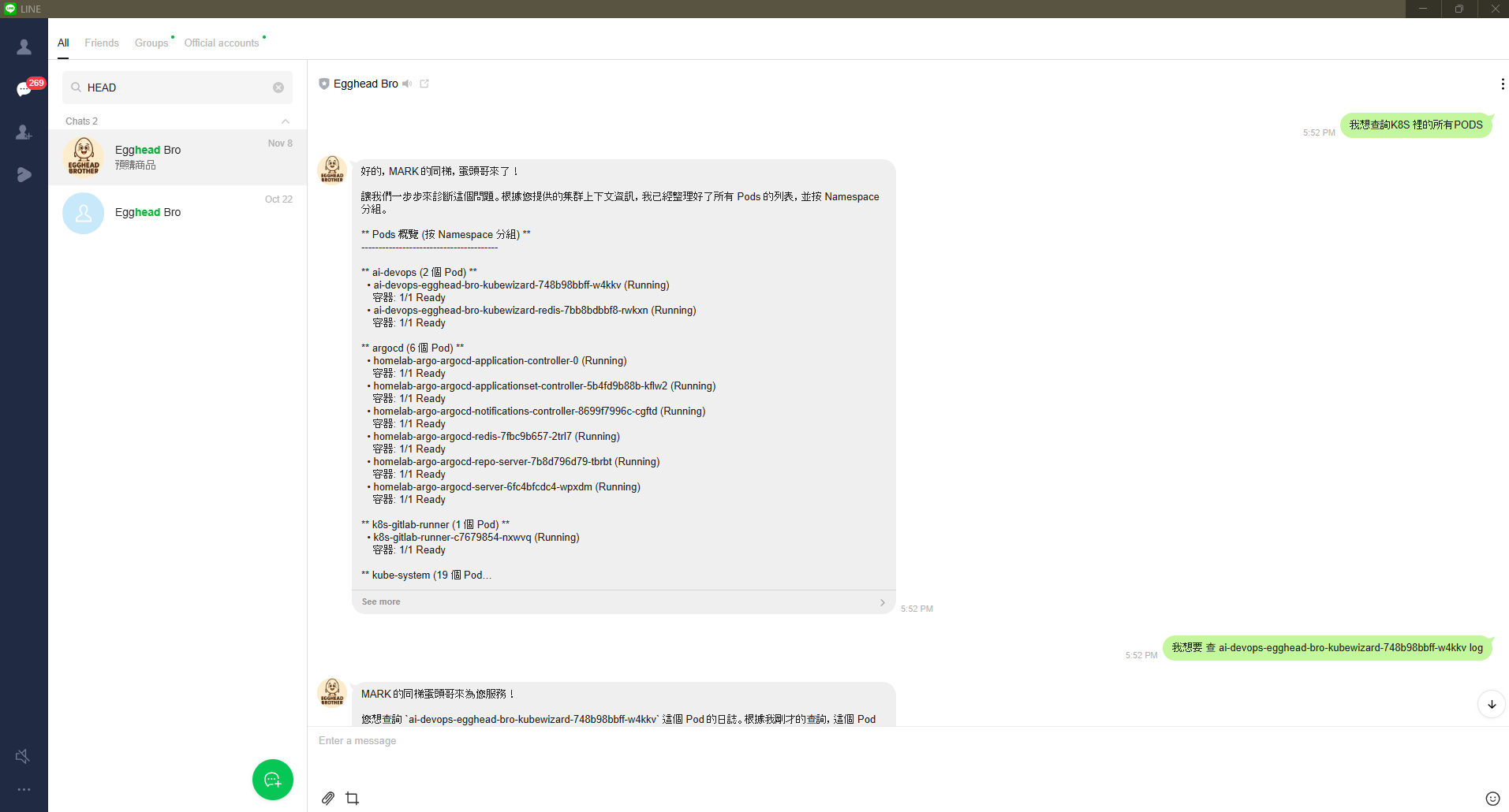
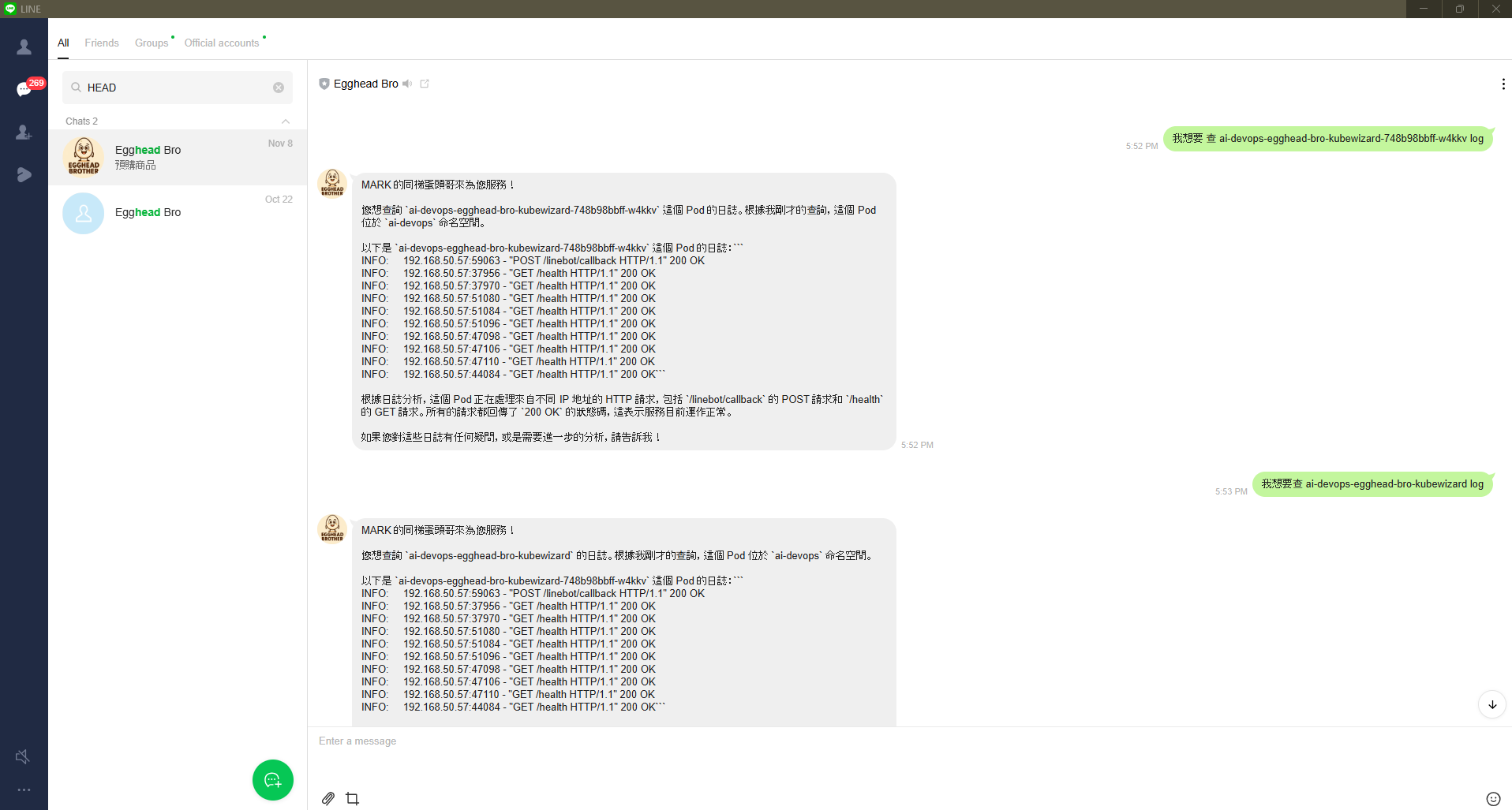
Demo (text version)
Example 1: Querying Pod status
You: Show me Pods in the default namespace
Bot:
📦 Namespace: default
================================
NAME                         READY   STATUS              RESTARTS   AGE
nginx-deployment-7d8f...     1/1     Running            0          2d
redis-master-0               1/1     Running            0          5d
payment-service-abc123       0/1     CrashLoopBackOff   5          10m

Total: 3 pods (2 Running, 0 Pending, 1 CrashLoopBackOff)
⚠️ Issue detected: payment-service-abc123 is in CrashLoopBackOff
Need to view Logs?
You: Show me the logs of that crashed one
Bot:
🔍 Recent logs for payment-service-abc123:

2025-11-22 10:30:15 [ERROR] Failed to connect to database
2025-11-22 10:30:15 [ERROR] Connection refused: mysql:3306
2025-11-22 10:30:15 [FATAL] Application startup failed

💡 Possible causes:
1. MySQL Service doesn't exist or isn't reachable
2. Misconfigured environment variable (DB_HOST)
3. Network policy blocking the connection

Suggested checks:
- kubectl get svc -n default | grep mysql
- Confirm Pod environment variable settings
You: Try restarting it
Bot:
🔄 Restarting Deployment: payment-service

✅ Executed: kubectl rollout restart deployment/payment-service -n default
⏳ Waiting for new Pods to start...

📊 Update status:
- Old Pods: terminating
- New Pods: creating
- ETA: ~30 seconds

I'll keep monitoring and report back.
Example 2: Diagnosing network issues
You: Why is my Ingress unreachable?
Bot: Let me diagnose your Ingress.
🔍 Diagnostic steps:

1️⃣ Check the Ingress resource
✅ Ingress 'my-app' exists
✅ Ingress Controller is running

2️⃣ Check the Service
✅ Service 'my-app-svc' exists (ClusterIP: 10.96.1.100)

3️⃣ Check the Pods
⚠️ Issue found: Service has no available backend Pods!

EndpointSlice info:
- my-app-svc: 0/3 endpoints ready

📋 Suggested fixes:
1. Check whether Deployment selector matches the Service
2. Check whether Pod labels are correct
3. Run: kubectl describe service my-app-svc -n default

Want me to run these checks for you?
Example 3: Smart context memory
You: List all namespaces
Bot:
📋 All Namespaces:
1. default
2. kube-system
3. kube-public
4. production
5. staging
6. monitoring

Total: 6 namespaces
You: What's in production?
Bot: (intelligently remembers "production" namespace from previous turn)
📦 Namespace: production
================================

Deployments:
- api-gateway (3/3 Ready)
- user-service (2/2 Ready)
- order-service (5/5 Ready)

Services:
- api-gateway-svc (LoadBalancer)
- user-service-svc (ClusterIP)
- order-service-svc (ClusterIP)

Total: 3 Deployments, 3 Services, 10 Pods (all healthy)
You: Restart api-gateway
Bot: (remembers we're talking about api-gateway in production namespace)
Confirm restarting api-gateway in production namespace?
This will cause a brief service interruption.

[Confirmed]

🔄 Executing: kubectl rollout restart deployment/api-gateway -n production
✅ Restart succeeded! New Pods are running and ready.
Closing
This article shows how to integrate KubeWizard with LINE Bot to build a chat-based K8s assistant. Key points:
📚 References
- Quick Start Guide
- LINE Bot Integration Docs
- Kubernetes Configuration Guide
- Helm Chart Deployment Guide
Special thanks to the following open-source projects:
- LangChain — Powerful LLM application framework
- Google Gemini — Excellent AI model
- Kubernetes Python Client — Official Python SDK
- FastAPI — Modern web framework


Comments