
Preface
As an engineer, I'm constantly asked by colleagues: "Can you pull this report for me?" or "What were last month's revenue numbers?" Each time I'd have to drop what I was doing, write code to query the database, and then come back. It actually eats up a lot of time.
So I started thinking: could AI handle this for us?
Imagine just "talking" to your computer: "Get me a list of all paying customers." The AI then queries the database, formats the results into a report — no programming required, anyone can use it!
This article shares how I leveraged a large language model (LLM) to quickly build such an intelligent reporting system. A working prototype in a single morning, with later refinements based on real-world usage.
How does this system work?
In simple terms, the flow looks like this:
What you say → AI translates into computer-readable instructions → Database returns results → Report is shown
For example:
- You enter: "List all paying users, including company name and expiration date"
- The AI automatically converts this into a database query
- The system runs the query and presents results in a clean table
P.S. With traditional programming this used to take a lot of time. Now AI can quickly generate the SQL and the report structure for you.
┌──────────────────────────────────────────────────────────────┐
│                      System Workflow                          │
├──────────────────────────────────────────────────────────────┤
│                                                              │
│   👤 User types in the admin panel                            │
│   "List paying users with company name, plan type, and       │
│    expiration date"                                           │
│        │                                                     │
│        ▼                                                     │
│   ┌─────────────────────────────────────────────┐            │
│   │           🤖 AI Assistant (LangChain)        │            │
│   │  ┌───────────────────────────────────────┐  │            │
│   │  │  📚 Built-in knowledge                 │  │            │
│   │  │  - Knows the company's business rules  │  │            │
│   │  │  - Knows what data can't be queried    │  │            │
│   │  │  - Knows how to protect sensitive data │  │            │
│   │  └───────────────────────────────────────┘  │            │
│   └─────────────────────────────────────────────┘            │
│        │                                                     │
│        ▼                                                     │
│   ┌─────────────────┐    ┌─────────────────┐                 │
│   │ Translate to SQL │ → │  Safety checks  │                 │
│   └─────────────────┘    └─────────────────┘                 │
│        │                         │                           │
│        ▼                         ▼                           │
│   ┌─────────────────────────────────────────────┐            │
│   │              📊 Database                     │            │
│   └─────────────────────────────────────────────┘            │
│                                                              │
└──────────────────────────────────────────────────────────────┘
What tools did I use?
| Tool | Function | Why I chose it |
|---|---|---|
| Next.js | Web framework | Handles both frontend and backend, fast dev cycle |
| LangChain | AI assistant framework | Ready-to-use database query capability |
| Gemini 2.0 Flash | The AI brain | Google's model — cheap and fast |
| TypeORM | DB connection layer | Secure connection to Azure DB |
| Tailwind CSS | Styling utility | Looks great on mobile and desktop |
What does the AI brain do in this system?
In this system, the AI (large language model) acts like a "super translator" — its job is to translate what you say into database commands the computer understands.
What's the AI's job?
┌─────────────────────────────────────────────────────────────────┐
│                Role of the AI in the system                      │
├─────────────────────────────────────────────────────────────────┤
│                                                                 │
│  What you say                  Computer command                  │
│  ┌─────────────────┐           ┌─────────────────────────────┐  │
│  │ "List all       │    AI     │ SELECT TOP 1000             │  │
│  │  paying users"  │   ───→    │   company_name, plan_type   │  │
│  │                 │ translate │ FROM users_table...          │  │
│  └─────────────────┘           └─────────────────────────────┘  │
│                                                                 │
└─────────────────────────────────────────────────────────────────┘
The AI needs to learn three things first
-
Know the database schema
- What tables exist? What does each table store?
- How are tables related? (e.g., relationship between customers and orders)
-
Understand the company's business rules
- What counts as a "paying user"? (Has a credit card on file and hasn't canceled)
- What's a "test account"? How do we exclude them?
-
Follow safety rules
- Which operations are forbidden? (No deleting or modifying data)
- Which fields can't be queried? (Passwords, secret keys, etc.)
Why Gemini 2.0 Flash?
There are many AI models out there. I picked Google's Gemini 2.0 Flash because:
| Model | Pros | Cons | Good for |
|---|---|---|---|
| GPT-4o | Strong reasoning | Pricier | Complex analysis |
| Claude 3.5 | Great with long docs | More usage limits | Document processing |
| Gemini 2.0 Flash ✅ | Cheap, fast | Slightly weaker on complex reasoning | Report queries (this project) |
For "structured-format" tasks like report queries, Gemini 2.0 Flash has the best price/performance:
- Super cheap — Less than NT$50 per month for typical usage
- Fast response — Generates a query in 1-2 seconds
- Accurate translation — Solid grasp of database query syntax
Telling the AI "who you are"
We tell the AI its role and rules upfront — like onboarding a new employee with the company handbook:
const aiAssistantConfig = `
## Your identity
You are the company's data analyst, here to help everyone query reports.

## Rules you must follow
1. You can only "query" data — no inserts, updates, or deletes
2. Limit each query to 1,000 rows
3. Don't show deleted data
4. Sensitive fields like passwords must not be queried

## Business rules you know
- Paying user = has credit card AND hasn't canceled subscription
- Test account = email containing "xxx"
`;
The benefits of this design:
- Predictable behavior — AI won't do anything dangerous
- Consistent results — Every query applies the same rules
- Easy to tune — To add a new rule, edit this one config
Don't 100% trust the AI: three layers of defense
Even though AI is smart, we can't fully trust it. What if someone deliberately enters malicious instructions? The system has three lines of defense:
┌─────────────────────────────────────────────────────────────────┐
│                  Three layers of safety                          │
├─────────────────────────────────────────────────────────────────┤
│                                                                 │
│  Layer 1: Tell the AI the rules upfront                         │
│  ────────────────────────                                       │
│  Tell the AI "what you can and can't do"                        │
│  → Blocks 80% of dangerous operations right here                │
│                                                                 │
│  Layer 2: Code-level re-check                                   │
│  ────────────────────────                                       │
│  The code re-checks every command the AI generates              │
│  → Even if the AI is tricked, code catches the danger           │
│                                                                 │
│  Layer 3: Database permission limits                            │
│  ────────────────────────                                       │
│  The DB account only has read permission — can't write at all   │
│  → Final line of defense to keep data safe                      │
│                                                                 │
└─────────────────────────────────────────────────────────────────┘
My tech stack
For this system I picked Next.js — a full-stack web framework (React + Node).
Benefit 1: All code in one place
The traditional approach splits frontend and backend into two projects. With Next.js, everything lives together:
my-project/
├── src/
│   ├── app/              # Pages users see
│   │   └── reports/
│   │       └── page.tsx
│   ├── app/api/          # Backend handlers
│   │   └── reports/
│   │       └── route.ts
│   └── lib/              # Shared utility code
│       └── langchain-sql.ts
Why this matters:
- AI assistants help more easily — Tools like Cursor or Copilot have context-length limits; with everything in one project, AI can understand the system better
- Code can be shared — Write once, use in both frontend and backend
- Edit one place, changes apply immediately — No switching back and forth
Benefit 2: AI library integration
LangChain is a library purpose-built for AI applications, and there's a Node version that drops right into Next.js:
// A few lines is all it takes to let AI query the database
const ai = new ChatVertexAI({ model: 'gemini-2.5-flash-001' });
const database = await SqlDatabase.fromDataSourceParams({ appDataSource });
const aiAssistant = await createSqlAgent(ai, new SqlToolkit(database, ai));

const result = await aiAssistant.invoke({ input: 'List paying users' });
Benefit 3: Web pages that adapt to all screen sizes
With Tailwind CSS, you can easily make pages look great on phone, tablet, and desktop:
// One column on phone, two on tablet, three on desktop
<div className="grid grid-cols-1 md:grid-cols-2 lg:grid-cols-3 gap-4">
P.S. Next.js uses a request-based lifecycle — each request runs independently — so it's not suited for long-running jobs or heavy computation. For those, hand the work off to a background worker / job queue to avoid hurting request performance and overall stability.
Saving big time with a paid template
To accelerate development, I bought an off-the-shelf admin template (Isomorphic) for about NT$800.
Free template vs paid template
There's also the free shadcn-ui, which is genuinely great:
- Founder works at the well-known company Vercel
- Over 100k stars on GitHub
But the real difference is "how much time you save":
| Comparison | Free template | Paid template |
|---|---|---|
| Integration time | Tune it yourself | Plug-and-play |
| Stability | Test it yourself | Already battle-tested |
| Run into issues | Higher chance | Lower chance |
| Price | Free | About NT$800 |
Was it worth it?
┌─────────────────────────────────────────────────────────────┐
│  ROI analysis                                                │
├─────────────────────────────────────────────────────────────┤
│                                                             │
│  Template cost:  About NT$800                                │
│                                                             │
│  Time saved:  At least 2 weeks                               │
│    - UI page development                                    │
│    - Phone, tablet, desktop responsiveness                   │
│    - Cross-browser testing                                  │
│    - SEO setup                                              │
│                                                             │
│  Verdict:  2 weeks of engineer salary >> NT$800 → totally   │
│            worth it!                                        │
│                                                             │
└─────────────────────────────────────────────────────────────┘
What the template ships with
A professional template usually includes:
- ✅ SEO — Helps Google find your site
- ✅ Works on all devices — Phone, tablet, desktop all tested
- ✅ Consistent visual style — Colors, spacing, typography all designed
- ✅ Common UI components — Tables, forms, charts, notifications
- ✅ Dark mode — Easy on the eyes at night
This gives the project "production-quality" polish from day one, so you can focus on the features that actually matter.
This architecture is great for AI-assisted development
These days everyone uses AI tools (like Cursor or Copilot) to help write code, and this architecture is especially well-suited:
┌─────────────────────────────────────────────────────────────┐
│  Why AI assistants love this architecture                   │
├─────────────────────────────────────────────────────────────┤
│                                                             │
│  1. Everything in one project                               │
│     → AI can grasp the whole project at once                │
│                                                             │
│  2. Type checking (TypeScript)                              │
│     → AI mistakes get caught immediately                    │
│                                                             │
│  3. Unified styling approach                                │
│     → AI tunes UI faster                                    │
│                                                             │
│  4. File structure mirrors URLs                             │
│     → Easy for AI to map files to pages                     │
│                                                             │
│  5. Modular AI library (LangChain)                          │
│     → Swap in different AI models                           │
│     → Works with Google, OpenAI, Claude                     │
│                                                             │
└─────────────────────────────────────────────────────────────┘
This is also why the prototype came together in a single morning — pick the right tools + AI assistance, and the rest is just iterating against real-world feedback.
What does the actual code look like?
Below is a simplified version of the core code so you can see the basic principles.
Step 1: Connect to the database
First, the program needs to connect to the database. Use the secure approach (don't hardcode passwords):
// Database connection code
import { DataSource } from 'typeorm';

async function connectDatabase() {
  const connection = new DataSource({
    type: 'mssql',                              // Microsoft SQL Server
    host: process.env.AZURE_SQL_SERVER,         // DB host (read from env)
    database: process.env.AZURE_SQL_DATABASE,   // DB name
    // ... other secure auth settings
  });

  await connection.initialize();  // Establish connection
  return connection;
}
Step 2: Cache the database structure
The database structure (tables, columns) doesn't change often, so caching it saves money:
// Cache mechanism: remember the DB structure, no need to re-query each time
let cache = null;
const cacheTTL = 60 * 60 * 1000; // Refresh after 60 minutes

function isCacheValid() {
  if (!cache) return false;
  return new Date() < cache.expiresAt;
}
Step 3: Set up the AI's "rule book"
This is the most important part — tell the AI what it can and can't do:
const aiRuleBook = `
## Your identity
You are the company's data analyst, here to help with report queries.

---

## Things you absolutely cannot do

### Forbidden operations
- No insert
- No update
- No delete
- No schema changes

### Fields you cannot query (sensitive)
- Password fields
- Keys and tokens

### Query limits
- Max 1,000 rows per query
- Must include filter conditions

---

## Company rules you know

### Main tables
- Customer table — basic customer info (ID, plan type, canceled flag, etc.)
- Customer detail table — company name, contact, etc.
- Payment history table — payment records

### Key business rules

#### Don't show deleted data
- Auto-exclude soft-deleted rows in queries

#### Exclude test accounts
- Emails containing "IQT" are test accounts

#### Definition of paying user
Has credit card + hasn't canceled subscription + not expired
`;
How does safety work?
Even if the AI is smart, we add extra layers of defense to make sure nothing goes wrong.
Defense 1: code-level checks
Before running a query, the code checks for dangerous operations:
// Dangerous operations blacklist
const blocklist = ['INSERT', 'UPDATE', 'DELETE', 'DROP TABLE'];

function checkSafety(queryStatement) {
  // 1. Must start with SELECT
  if (!queryStatement.startsWith('SELECT')) {
    return { safe: false, error: 'Read-only — no other operations allowed' };
  }

  // 2. Check for dangerous operations
  for (const banned of blocklist) {
    if (queryStatement.includes(banned)) {
      return { safe: false, error: `Forbidden operation detected: ${banned}` };
    }
  }

  // 3. Check for queries against sensitive fields
  // ... similar logic

  return { safe: true };
}
Defense 2: auto-add row limits
If the AI forgets to add a row limit, the code auto-injects one:
function autoAddLimit(queryStatement) {
  // If no row limit is set, add "TOP 1000"
  if (!queryStatement.includes('TOP')) {
    return queryStatement.replace('SELECT', 'SELECT TOP 1000');
  }
  return queryStatement;
}
Defense 3: database-level permission
The most reliable approach is to set DB permissions: this account can only "read," not "write":
-- DB setup: read-only role
CREATE ROLE [report_query_role];
GRANT SELECT TO [report_query_role];        -- Only SELECT
DENY INSERT, UPDATE, DELETE TO [report_query_role];  -- Block writes
What does the user see?
Simple, intuitive UI
┌─────────────────────────────────────────────────────────────────┐
│  🤖 Smart report assistant                                       │
│                                                                 │
│  Just ask in plain English! Type what you want — AI handles it  │
├─────────────────────────────────────────────────────────────────┤
│                                                                 │
│  📝 Quick examples (one-click)                                   │
│  ┌─────────────┐ ┌──────────────┐ ┌──────────────┐             │
│  │ Paying users │ │ New customers │ │ Plan stats    │             │
│  └─────────────┘ └──────────────┘ └──────────────┘             │
│                                                                 │
│  ┌─────────────────────────────────────────────────────────┐   │
│  │ Type what you want to query...                           │   │
│  │                                                          │   │
│  │ E.g.: List all paying customers with company name and    │   │
│  │       expiration date                                    │   │
│  │                                                          │   │
│  └─────────────────────────────────────────────────────────┘   │
│                                                                 │
│  ┌──────────────┐  ┌──────────────┐                            │
│  │ 🪄 Generate   │  │ ▶️ Run now    │                            │
│  └──────────────┘  └──────────────┘                            │
│                                                                 │
└─────────────────────────────────────────────────────────────────┘
Results in different views
Query results can be shown in various ways depending on what you need:
- 📊 Table — See the full data
- 📈 Bar chart — Compare numbers across categories
- 📉 Line chart — See trends over time
- 🥧 Pie chart — See proportions
Real-world examples
Example 1: Querying paying customers
User input: List all paying customers, including company name, plan type, and expiration date

The AI automatically:
- Understands what the user wants
- Finds the matching tables
- Generates a correct query
- Runs the query and returns results
The result is a clean table of paying customers!
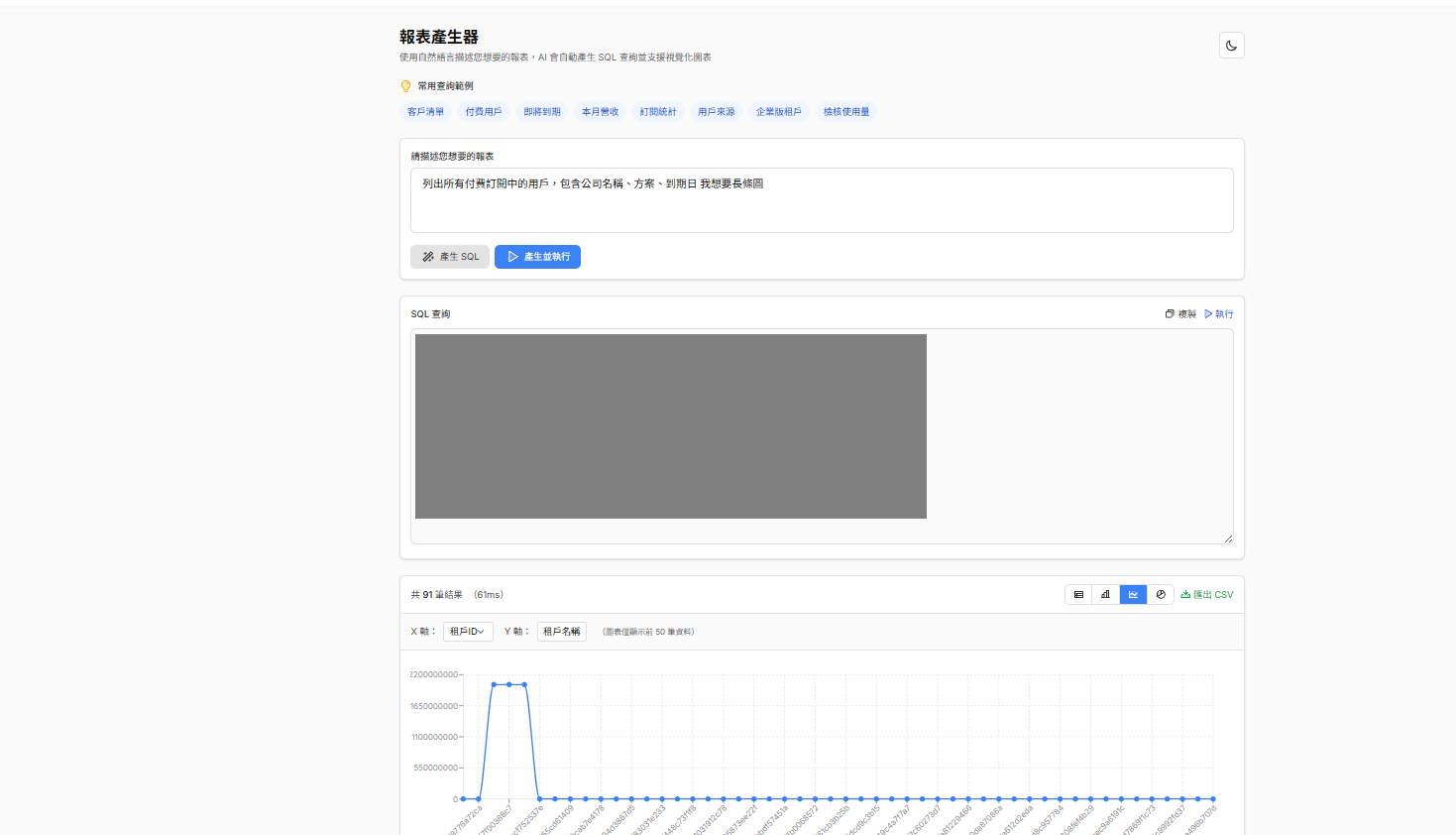
Example 2: Visualizing as a chart
Beyond tables, results can be displayed as charts for more intuitive insights:
Example 3: Safety guard test
User input: Delete all test users
AI response:
Sorry, I can't perform delete operations. This is a read-only report query tool. To delete data, please contact the database administrator.
✅ The system successfully blocked the dangerous operation!
How much does this system cost?
AI models are billed by usage, measured in Tokens (think of them as "word-units").
What's a Token?
In simple terms, a Token is the smallest text unit the AI processes:
- English: roughly 1 word = 1 Token
- Chinese: roughly 1 character = 2-3 Tokens (UTF-8 encoding makes Chinese heavier)
Gemini 2.0 Flash pricing
| Item | Price (USD) | Approx NT$ (1 USD ≈ 32 TWD) |
|---|---|---|
| 1M input Tokens | $0.10 | About NT$3.2 |
| 1M output Tokens | $0.40 | About NT$12.8 |
Per 1,000 Tokens
| Item | USD | NT$ |
|---|---|---|
| 1,000 input Tokens | $0.0001 | About NT$0.0032 |
| 1,000 output Tokens | $0.0004 | About NT$0.0128 |
💡 Plain English: 1,000 input Tokens cost just NT$0.003 — extremely cheap!
Examples
| Text | Length | Approx Tokens |
|---|---|---|
List all paying customers | 4 English words | ~5 Tokens |
SELECT * FROM customers | 4 English words | ~5 Tokens |
| A SQL query | ~50 chars | ~30-50 Tokens |
| System prompt (rule book) | ~800 Chinese chars | ~2,000 Tokens |
Each AI conversation has two cost categories:
- Input Tokens: your question + the database schema info
- Output Tokens: the AI's response (SQL query + explanation)
Real-world usage estimate
┌─────────────────────────────────────────────────────────────────┐
│  Token consumption per report query                              │
├─────────────────────────────────────────────────────────────────┤
│                                                                 │
│  📥 Input Tokens (info you give the AI)                          │
│  ├── System prompt (rule book)    ~2,000 Tokens                  │
│  ├── DB schema (cached, no repeat) ~3,000 Tokens (first time)    │
│  └── User question                ~100 Tokens                    │
│                                                                 │
│  📤 Output Tokens (AI's response)                                │
│  ├── SQL query                    ~200 Tokens                    │
│  └── Result explanation           ~300 Tokens                    │
│                                                                 │
└─────────────────────────────────────────────────────────────────┘
Cost breakdown
| Operation | Tokens | Estimated cost | Note |
|---|---|---|---|
| Read DB schema (first time) | ~5,000 input + 500 output | About NT$0.03 | One-time, then cached |
| Each query (after caching) | ~2,100 input + 500 output | About NT$0.003 | Saves repeat schema-read cost |
| 50 queries per day | ~130k Tokens | About NT$0.15 | Typical SMB daily usage |
| Per month (22 working days) | ~2.86M Tokens | About NT$5 | Cheaper than a bubble tea! |
Example: single-query cost
Suppose a user asks: "List all paying customers, including company name and expiration date"
┌─────────────────────────────────────────────────────────────────┐
│  💰 Single-query cost calculation                                │
├─────────────────────────────────────────────────────────────────┤
│                                                                 │
│  📥 Input cost                                                   │
│  ├── System prompt   2,000 Tokens × $0.0001/1K = $0.0002        │
│  ├── User question     100 Tokens × $0.0001/1K = $0.00001       │
│  └── Subtotal: $0.00021 (NT$0.007)                            │
│                                                                 │
│  📤 Output cost                                                  │
│  ├── SQL query         200 Tokens × $0.0004/1K = $0.00008       │
│  ├── Explanation       300 Tokens × $0.0004/1K = $0.00012       │
│  └── Subtotal: $0.0002 (NT$0.006)                             │
│                                                                 │
│  ────────────────────────────────────────────────────────────   │
│  📊 Total: $0.0004 (NT$0.013)                                 │
│                                                                 │
│  👉 One query costs NT$0.01 — 100 queries cost NT$1!             │
│                                                                 │
└─────────────────────────────────────────────────────────────────┘
Why so cheap?
┌─────────────────────────────────────────────────────────────────┐
│  The savings key: caching                                        │
├─────────────────────────────────────────────────────────────────┤
│                                                                 │
│  ❌ Without caching                                              │
│     Re-read DB schema on every query                            │
│     → 5,000+ Tokens per query                                   │
│     → Could be NT$50+ per month                                 │
│                                                                 │
│  ✅ With caching                                                 │
│     Schema cached for 60 minutes                                │
│     → Only 2,100 Tokens per query                               │
│     → About NT$5 per month                                      │
│                                                                 │
│  💡 90% cost savings!                                            │
│                                                                 │
└─────────────────────────────────────────────────────────────────┘
Compared to other AI models
| Model | Same-usage monthly cost | Note |
|---|---|---|
| Gemini 2.0 Flash ✅ | About NT$5 | This project |
| GPT-4o | About NT$50 | 10x more expensive |
| GPT-4o mini | About NT$8 | Also a cheap option |
| Claude 3.5 Sonnet | About NT$40 | Good for complex analysis |
Super cheap! A month of AI costs less than a single drink 🥤
Safety rules for the dev team
Beyond the system's own protection, I also wrote dev guidelines so the team doesn't accidentally trigger dangerous operations when using AI tools (like Cursor):
# Dev guidelines: database safety

## Things AI must never do

### 1. Delete data
- No row deletes
- No truncating tables

### 2. Delete schema
- No drop table
- No drop database

### 3. Risky modifications
- No ad-hoc schema changes
Conclusion
Why does this approach work?
- Tools are mature enough — LangChain has handled the hard parts already
- AI is cheap enough — Gemini 2.0 Flash cost is essentially negligible
- Safety is solid — Three layers of defense, low-risk by design
What features could be added?
- Save common queries — Click to re-run later
- Auto-recommend chart type — Suggest a chart based on data shape
- Follow-up questions — After a query, say "show only the top 10"
What's it good for?
- Internal company report needs
- Letting non-engineers query data
- Data analysts validating ideas quickly
If you want to build something similar, feel free to use this architecture as a reference! With vibe coding, you can have a prototype in a single morning, then refine and ship — quickly.


Comments