
前言
在軟體專案規模不斷擴大的今天,程式碼品質往往比功能本身更影響專案的可維護性與團隊效率,不一致的命名、雜亂的格式、缺乏規範的程式碼,很容易在日後維護或交接時成為隱形成本。
本篇文章+將以 Visual Studio 為核心,整理出一套常見且實用的程式碼品質管理方法,從內建工具 Roslyn Analyzer 與 .editorconfig 的規範設定,到 Code Cleanup 的自動化格式化,再到 GitHub Copilot 的 AI 輔助開發與程式碼審查。
透過這些工具與流程的搭配,讓開發團隊能,
在撰寫程式碼的同時就及早發現問題,
以自動化方式維持一致的程式碼風格,
善用 AI 減少重複性工作,專注在真正的設計與邏輯。
預先安裝
- Visual studio 2022 以上
- Github copilot
1️⃣ 使用Visual studio 內建規則引擎 Roslyn Analyzers 跟及規則設定.editorconfig,來約束程式碼風格。
Roslyn Analyzer 就是 .NET 世界裡的程式碼檢查工具,功能有點像 JavaScript 的 ESLint,它本身是一個「規則引擎」,會在你寫程式、編譯的時候自動幫你檢查程式碼品質,而 .editorconfig 則是「規則設定檔」,你可以在裡面決定規則要怎麼跑,比如命名要不要用駝峰、縮排要幾格。
簡單說:
Roslyn Analyzer = 負責檢查
.editorconfig = 規則怎麼檢查
結合 .editorconfig 設定
在專案根目錄建立 .editorconfig:
root = true

[*]
charset = utf-8
end_of_line = crlf
insert_final_newline = true
trim_trailing_whitespace = true
indent_style = space
indent_size = 4
max_line_length = 120

dotnet_style_qualification_for_field = false:error
dotnet_style_qualification_for_property = false:error
dotnet_style_qualification_for_method = false:error
dotnet_style_qualification_for_event = false:error

[*.cs]
csharp_style_var_for_built_in_types = false
dotnet_diagnostic.IDE0008.severity = error
csharp_style_namespace_declarations = file_scoped:error
也可以透 Visual Studio UI 調整 .editorconfig 設定
- 開啟
工具 > 選項 > 文字編輯器 > C# > 程式碼樣式 - Visual Studio 2022 版本內建支援 EditorConfig,重新載入專案即可生效
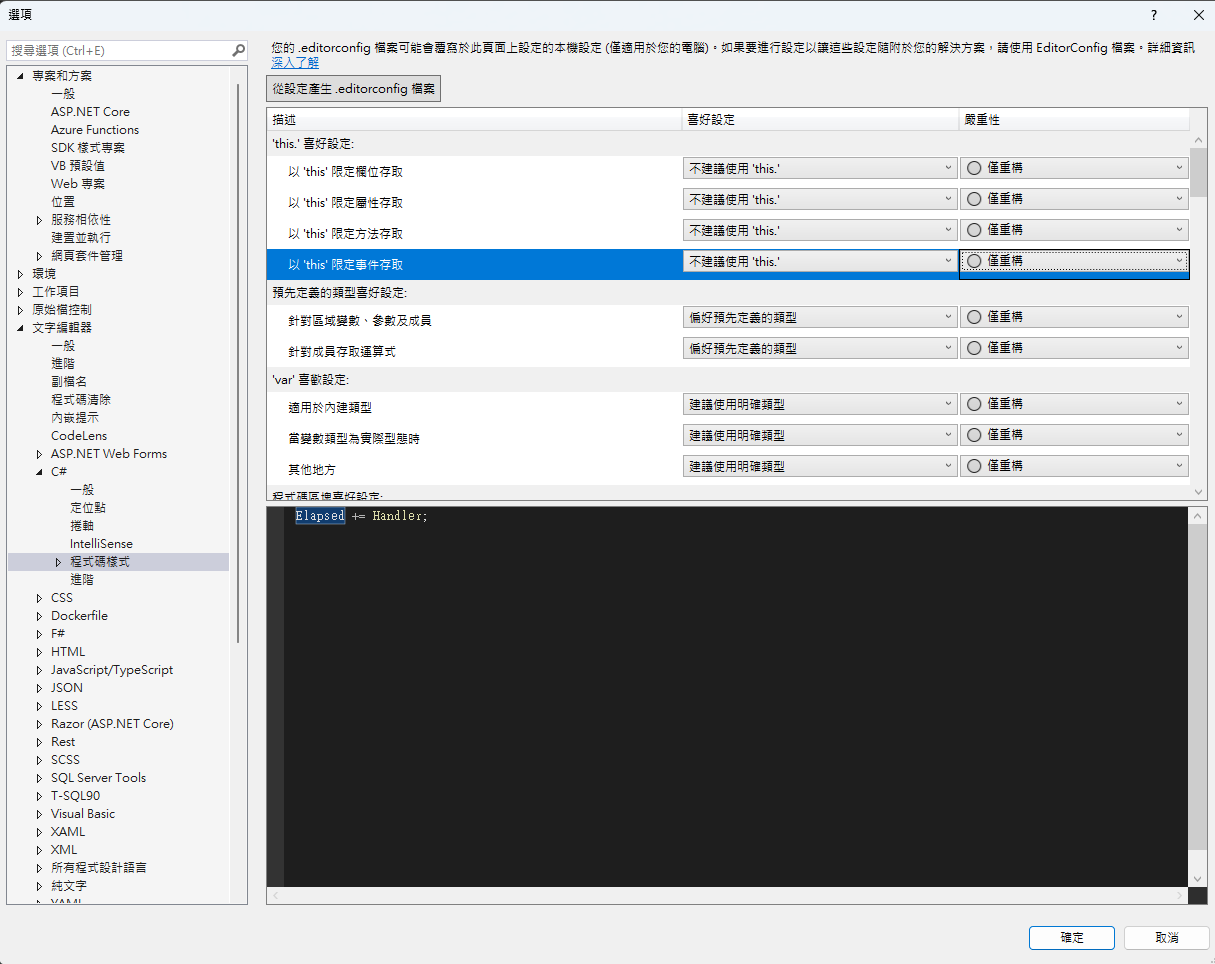
修改專案檔 WebApplication1/WebApplication1.csproj:
<Project Sdk="Microsoft.NET.Sdk.Web">
  <PropertyGroup>
    <TargetFramework>net8.0</TargetFramework>
    <Nullable>enable</Nullable>
    <ImplicitUsings>enable</ImplicitUsings>

    <!-- 啟用 .NET 分析器 -->
    <EnableNETAnalyzers>true</EnableNETAnalyzers>
    <EnforceCodeStyleInBuild>true</EnforceCodeStyleInBuild>
    <TreatWarningsAsErrors>true</TreatWarningsAsErrors>
  </PropertyGroup>
</Project>
參數說明
EnableNETAnalyzers:啟用 .NET 程式碼分析器,在建置時檢查程式碼品質問題EnforceCodeStyleInBuild:將程式碼風格違規視為建置錯誤,確保團隊程式碼風格一致 此時建置專案,會就出現規則錯誤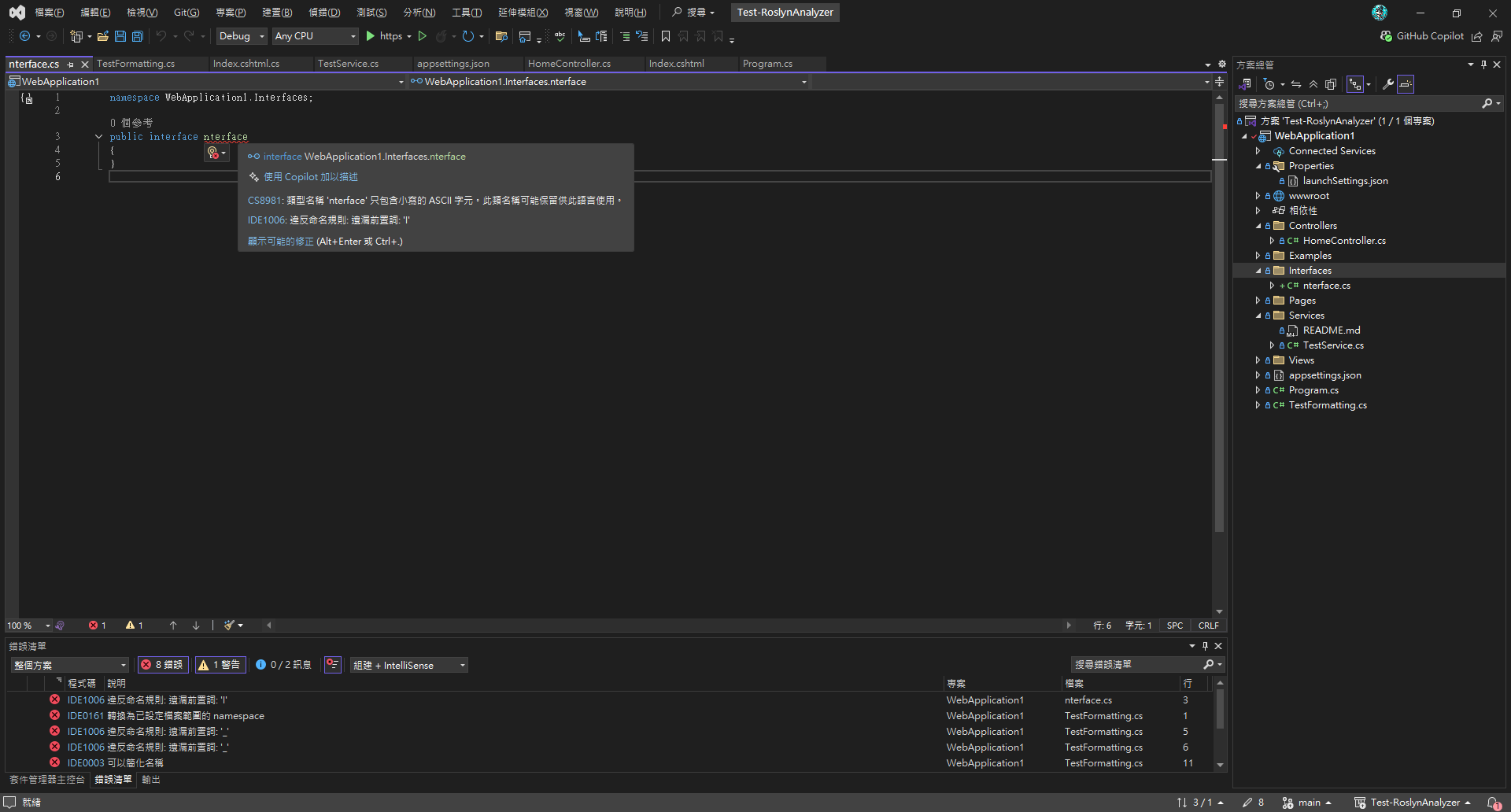
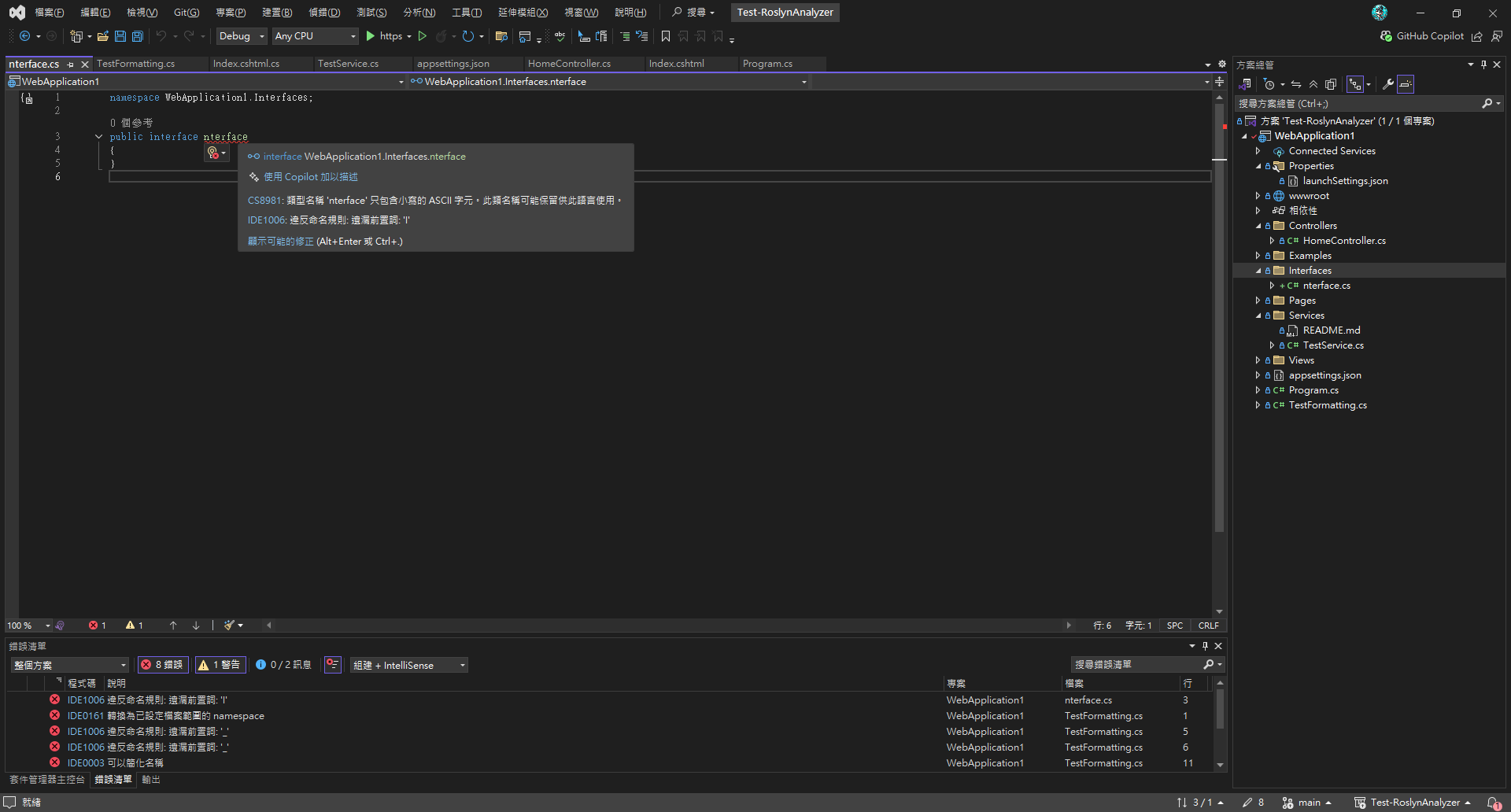
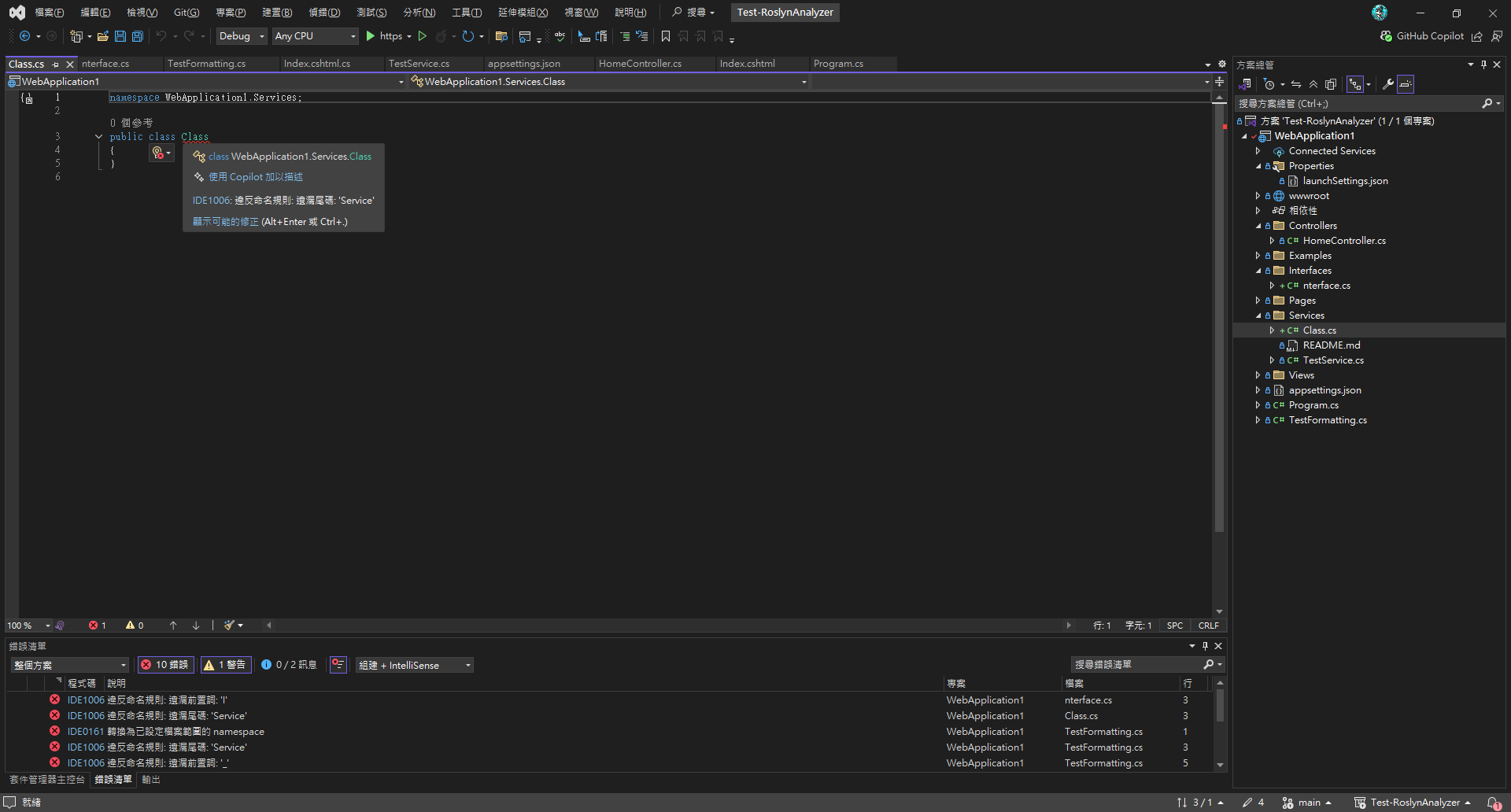
修正錯誤
- 錯誤清單視窗 (
檢視 > 錯誤清單) - 編輯器波浪線提示錯誤
- 快速修正:
Ctrl+.→ 選擇建議方案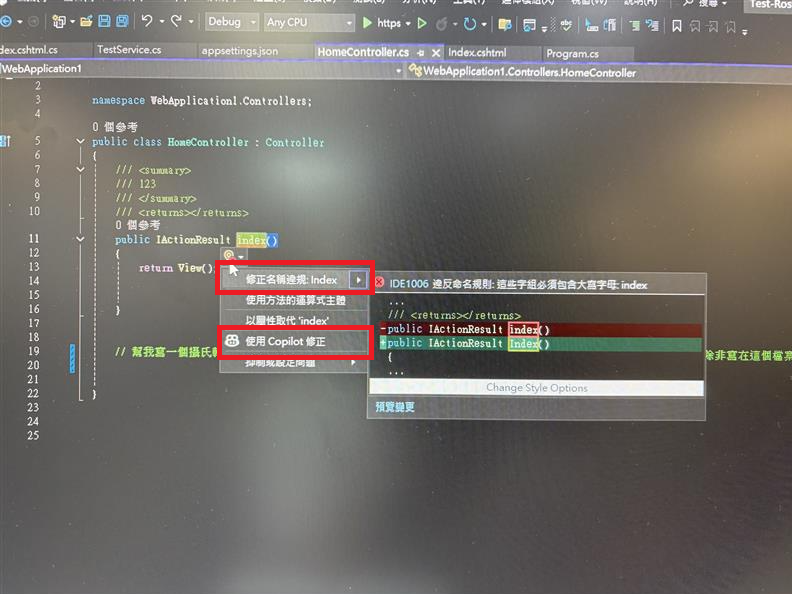
補充說明,也可以透過命令列 (CLI 去執行驗證規則,方便整合在CICD上)
# 建置並顯示警告
dotnet build --verbosity normal

# 僅執行程式碼分析
dotnet build --no-restore --verbosity normal

# 將警告視為錯誤
dotnet build /p:TreatWarningsAsErrors=true
P.S. 如果要更複雜的邏輯,可以自己客製 NamingConventionAnalyzer,這就得自己寫程式
2️⃣ 程式碼清除功能 (Code Cleanup)- 存檔時自動格式化程式碼樣式
Visual Studio 設定
-
開啟
工具 > 選項 > 文字編輯器 > C# -
勾選:
在儲存時自動格式化文件在儲存時移除並排序 using
程式碼清除設定
-
開啟
工具 > 選項 > 文字編輯器 > 程式碼清除 > 設定程式碼清除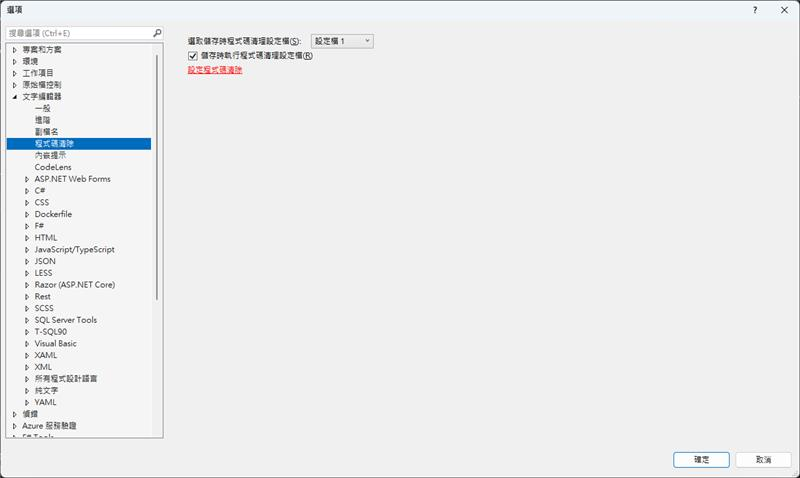
-
選擇要執行的規則,設定快捷鍵
Ctrl+K, Ctrl+E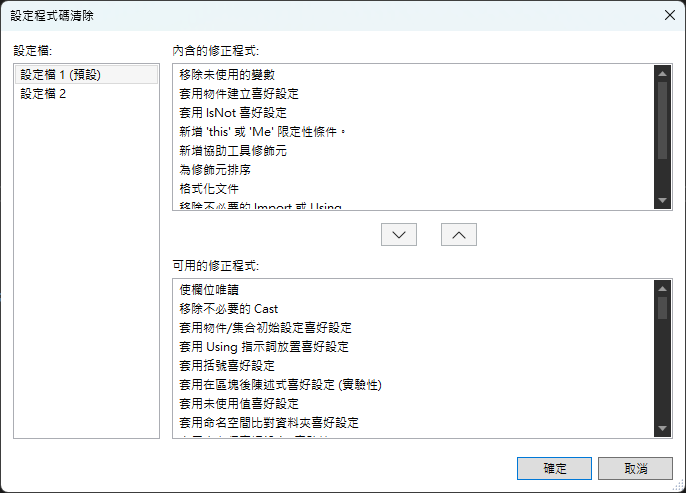
比較麻煩的事,團隊得人工同步設定:
- Windows:
%USERPROFILE%\AppData\Local\Microsoft\VisualStudio\<version>\CodeCleanupProfiles.json - Mac:
~/Library/Preferences/VisualStudio/<version>/CodeCleanupProfiles.json
範例:自動格式化效果
格式化前:
namespace WebApplication1
{
    public class TestFormatting
    {
        private string fieldName;
        private int fieldValue;

        public TestFormatting()
        {
            this.fieldName = "test";
            this.fieldValue = 42;
        }
    }
}
存檔後,自動格式化後的結果:
namespace WebApplication1;

public class TestFormatting
{
    private string fieldName;
    private int fieldValue;

    public TestFormatting()
    {
        fieldName = "test";
        fieldValue = 42;
    }
}
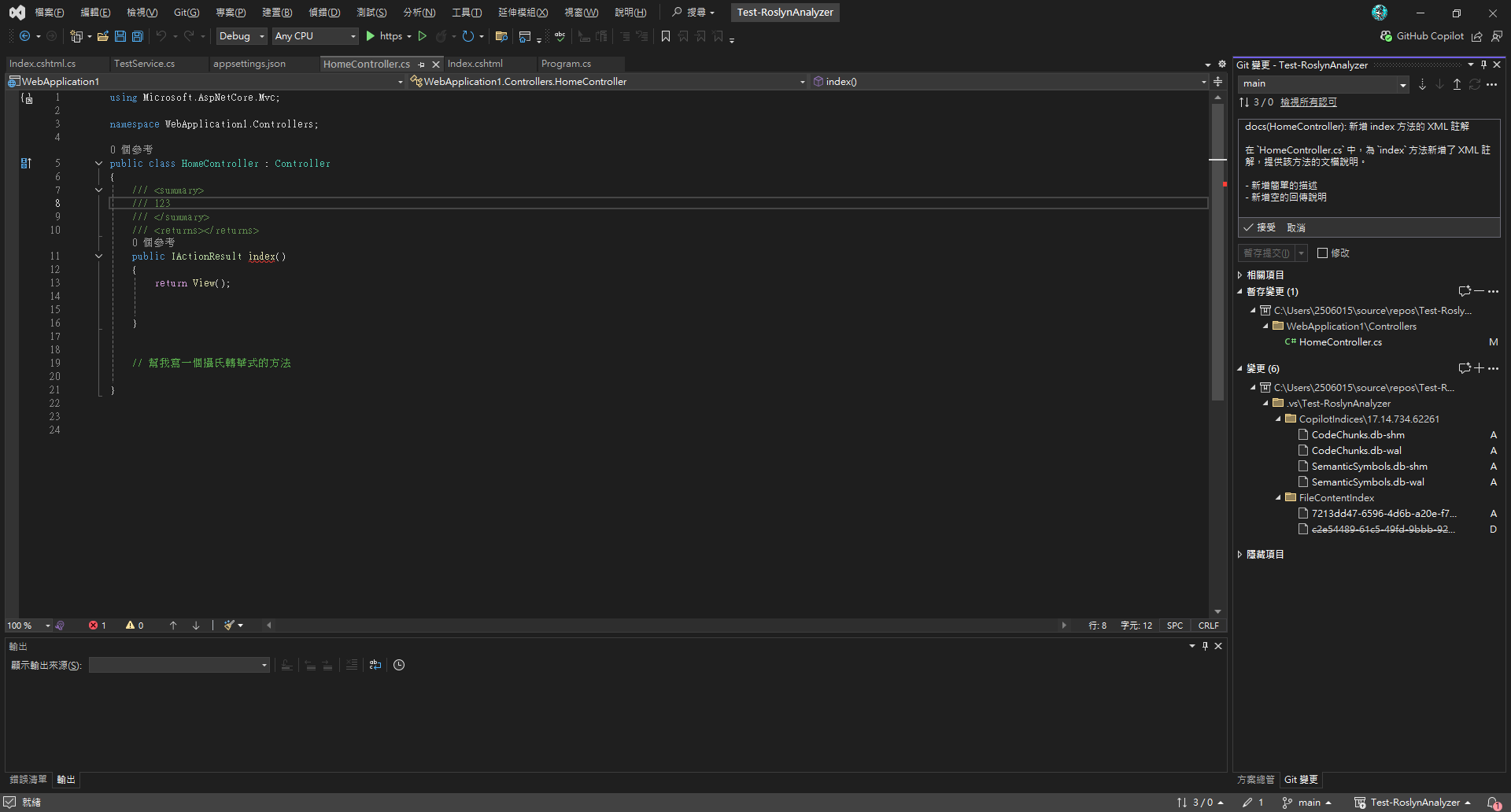
3️⃣ GitHub Copilot 自動生成 Commit Message
如果你希望 Copilot 幫依據commit 內容撰寫commit message ,可以參考下面文章。
[文章連結](可參考延伸閱讀中的「定義 Git 提交訊息產生的自訂指令」,在 Copilot 的自訂指令中加入 Commit 規範(如 Conventional Commits),或在工作流程中加入範例結構,協助自動產生更一致的訊息。
4️⃣ 依據 Coding Rules 生成程式碼(Copilot 自訂規則)
使用 GitHub Copilot 與自訂規則
GitHub Copilot 是強大的 AI 程式碼助手,可透過設定指令生成符合團隊規範的程式碼。
設定 Copilot 指令
在新的visual studio 在工具>選項 > Github Copilot 預設會啟用參考 github/copilot-instructions 指引及規則做生成相關的程式
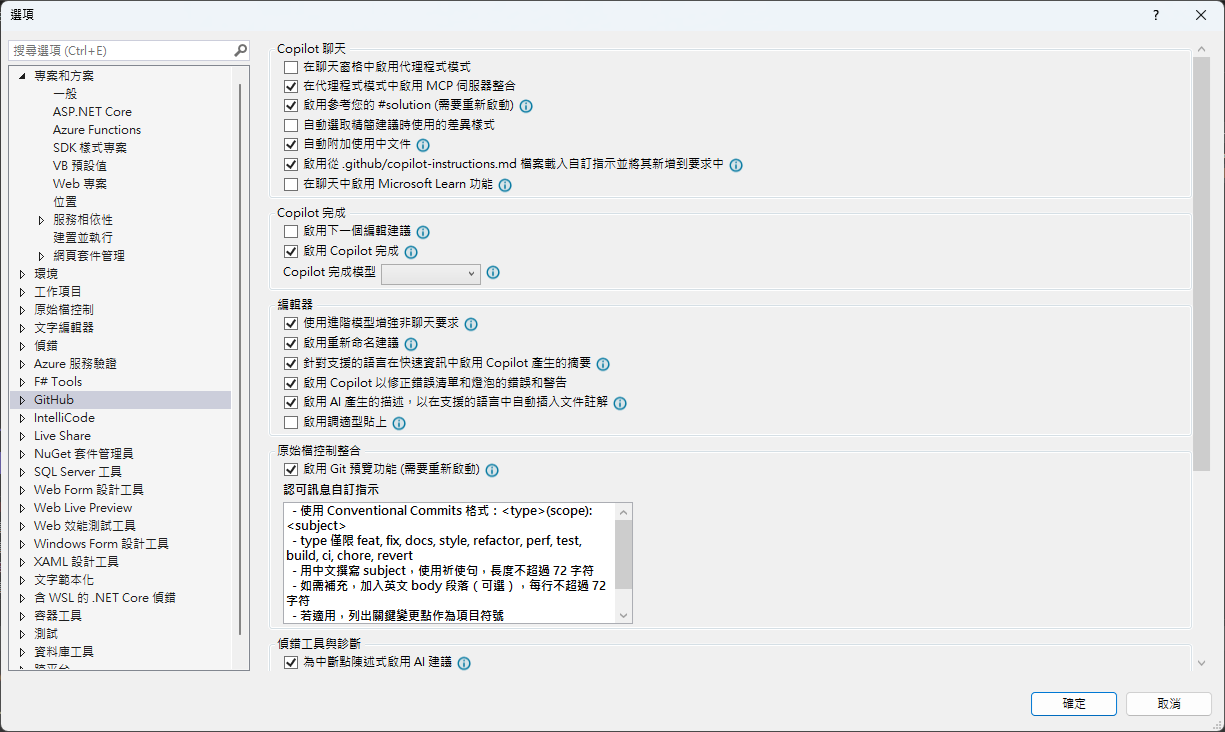
所以我們只要,在專案根目錄建立 .github/copilot-instructions.md:
程式註解一律使用繁體中文
變數、函數、類別名稱使用英文
函數名稱尾巴加上 123
程式碼最上方加註:由 GitHub Copilot 產生
變數名稱全部大寫並使用底線分隔
現在只要打開Copliot Chat,就會依據開發指引來生成程式碼,但 Copilot的自動完成(IntelliSense)不會遵循這些規則。
但可以在註解裡明確引用:例如
// 根據 Instructions.md 的規範
5️⃣ GitHub Copilot Code Review
GitHub Copilot 不僅協助生成程式碼,也能進行程式碼審查。透過 AI 協助,可以快速檢查程式碼品質、發現潛在問題並提供改進建議。
⚠️ 注意:此功能需 GitHub Copilot Enterprise 訂閱,預設關閉,開啟後才能使用。
延伸閱讀
- EditorConfig 官方文件
- Roslyn Analyzers 文件
- GitHub Copilot 最佳實踐
- Visual Studio 程式碼清除功能
- 讓程式碼更一致:使用 GitHub Copilot 自訂提示的技巧與設定
- Git 提交訊息產生的自訂指令
附錄:完整 .editorconfig 範例
以下提供完整可複製的 .editorconfig 範例:
# Editor configuration, see https://editorconfig.org
# 編輯器配置文件,詳見 https://editorconfig.org
root = true

# =============================================================================
# 通用排版規則 - 適用於所有文件類型
# =============================================================================
[*]
# 適用於所有文件的通用設置
charset = utf-8
# 字符編碼設置為 UTF-8
end_of_line = crlf
# 行尾符號使用 CRLF (Windows 風格)
insert_final_newline = true
# 文件結尾自動插入換行符
trim_trailing_whitespace = true
# 自動移除行尾空白字符
indent_style = space
# 縮進樣式使用空格而不是 Tab

### Indentation and spacing
### 縮進和間距設置
indent_size = 4
# 縮進大小為 4 個空格
tab_width = 4
# Tab 寬度為 4 個空格
max_line_length = 120
# 最大行長度為 120 字符

# =============================================================================
# 存檔時自動排版設置
# =============================================================================
# 啟用存檔時自動格式化
dotnet_style_qualification_for_field = false:error
# 字段不需要 this 限定符
dotnet_style_qualification_for_property = false:error
# 屬性不需要 this 限定符
dotnet_style_qualification_for_method = false:error
# 方法不需要 this 限定符
dotnet_style_qualification_for_event = false:error
# 事件不需要 this 限定符

# 強制執行一致的代碼格式
dotnet_diagnostic.IDE0055.severity = error # Remove unnecessary import
# 移除不必要的 import,違反時顯示錯誤
dotnet_diagnostic.IDE0100.severity = error # Remove unnecessary equality operator
# 移除不必要的相等運算子,違反時顯示錯誤
dotnet_diagnostic.IDE0055.severity = error # Fix formatting
# 修復格式化問題,顯示為錯誤

# =============================================================================
# 命名規則 - 根據命名規範精簡版
# =============================================================================
# 強制執行命名規則 (IDE1006) 作為建置錯誤
dotnet_diagnostic.IDE1006.severity = error
# 命名規則違反時顯示錯誤

# =============================================================================
# GitHub Copilot 設置
# =============================================================================
# GitHub Copilot Chat commit message generation instructions
# GitHub Copilot Chat 提交訊息生成指令
github.copilot.chat.commitMessageGeneration.instructions = |
  - 使用 Conventional Commits 格式:<type>(scope): <subject>
  - type 僅限 feat, fix, docs, style, refactor, perf, test, build, ci, chore, revert
  - 用中文撰寫 subject,使用祈使句,長度不超過 72 字符
  - 如需補充,加入英文 body 段落(可選),每行不超過 72 字符
  - 若適用,列出關鍵變更點作為項目符號
  - 若有重大變更,加入 BREAKING CHANGE: 說明
  - 僅根據實際 diff 與變更檔案撰寫,不要捏造內容

# =============================================================================
# C# 特定規則
# =============================================================================
[*.cs]
# 適用於所有 C# 文件的設置

# 縮進和括號設置
csharp_use_continuous_indent_inside_parens = true
# C# 在括號內使用連續縮進

# var 關鍵字使用規則
csharp_style_var_for_built_in_types = false
# 對於內建類型不使用 var 關鍵字
dotnet_diagnostic.IDE0008.severity = error # var preferences
# var 偏好設置,違反時顯示錯誤

# 命名空間規則
dotnet_style_namespace_match_folder = true
# 命名空間結構應與資料夾結構匹配
dotnet_diagnostic.IDE0130.severity = suggestion # namespace structure not match folder
# 命名空間結構不匹配資料夾時顯示建議
csharp_style_namespace_declarations = file_scoped:error
# 偏好使用檔案範圍的命名空間宣告
dotnet_diagnostic.IDE0161.severity = error # prefer file_scoped, otherwise show error
# 偏好檔案範圍命名空間,否則顯示錯誤

# using 語句規則
csharp_prefer_simple_using_statement = true
# 偏好使用簡單的 using 語句
dotnet_diagnostic.IDE0063.severity = error # prefer to use simple using statment
# 偏好使用簡單的 using 語句,違反時顯示錯誤

# 文檔註解設置
dotnet_diagnostic.CS1591.severity = none # ignore documentation missing before rosly fix #41640
# 忽略缺少文檔註解的警告(在 Roslyn 修復 #41640 之前)

# =============================================================================
# 命名規則 - 根據命名規範精簡版
# =============================================================================

# 強制執行命名規則 (IDE1006) 作為建置錯誤
dotnet_diagnostic.IDE1006.severity = error
# 命名規則違反時顯示錯誤

# 命名空間規則 - 使用 PascalCase
dotnet_style_namespace_match_folder = true
# 命名空間結構應與資料夾結構匹配

# 類型命名規則 - 使用 PascalCase
dotnet_naming_rule.types_should_be_pascal_case.severity = error
dotnet_naming_rule.types_should_be_pascal_case.symbols = types
dotnet_naming_rule.types_should_be_pascal_case.style = pascal_case_style

dotnet_naming_symbols.types.applicable_kinds = class, struct, interface, enum, delegate
dotnet_naming_symbols.types.applicable_accessibilities = public, internal, private, protected, protected_internal, private_protected
dotnet_naming_symbols.types.required_file_paths = **/*.cs
dotnet_naming_symbols.types.excluded_file_paths = **/Service/**, **/Services/**, **/Controller/**, **/Controllers/**, **/Dto/**, **/DTO/**, **/Dtos/**, **/DTOS/**, **/Query/**, **/Queries/**

dotnet_naming_style.pascal_case_style.required_prefix =
dotnet_naming_style.pascal_case_style.required_suffix =
dotnet_naming_style.pascal_case_style.word_separator =
dotnet_naming_style.pascal_case_style.capitalization = pascal_case

# 介面命名規則 - 以 I 開頭
dotnet_naming_rule.interface_types_should_be_prefixed_with_i.severity = error
dotnet_naming_rule.interface_types_should_be_prefixed_with_i.symbols = interface_types
dotnet_naming_rule.interface_types_should_be_prefixed_with_i.style = interface_naming_style

dotnet_naming_symbols.interface_types.applicable_kinds = interface
dotnet_naming_symbols.interface_types.applicable_accessibilities = public, internal, private, protected, protected_internal, private_protected

dotnet_naming_style.interface_naming_style.required_prefix = I
dotnet_naming_style.interface_naming_style.required_suffix =
dotnet_naming_style.interface_naming_style.word_separator =
dotnet_naming_style.interface_naming_style.capitalization = pascal_case

# 私有欄位命名規則 - 以 _ 開頭
dotnet_naming_rule.private_fields_should_be_prefixed_with_underscore.severity = error
dotnet_naming_rule.private_fields_should_be_prefixed_with_underscore.symbols = private_fields
dotnet_naming_rule.private_fields_should_be_prefixed_with_underscore.style = private_field_naming_style

dotnet_naming_symbols.private_fields.applicable_kinds = field
dotnet_naming_symbols.private_fields.applicable_accessibilities = private

dotnet_naming_style.private_field_naming_style.required_prefix = _
dotnet_naming_style.private_field_naming_style.required_suffix =
dotnet_naming_style.private_field_naming_style.word_separator =
dotnet_naming_style.private_field_naming_style.capitalization = camel_case

# 常數命名規則 - 使用 PascalCase
dotnet_naming_rule.constants_should_be_pascal_case.severity = error
dotnet_naming_rule.constants_should_be_pascal_case.symbols = constants
dotnet_naming_rule.constants_should_be_pascal_case.style = pascal_case_style

dotnet_naming_symbols.constants.applicable_kinds = field
dotnet_naming_symbols.constants.required_modifiers = const

# 枚舉命名規則 - 以 Enum 結尾
dotnet_naming_rule.enum_types_should_end_with_enum.severity = error
dotnet_naming_rule.enum_types_should_end_with_enum.symbols = enum_types
dotnet_naming_rule.enum_types_should_end_with_enum.style = enum_naming_style

dotnet_naming_symbols.enum_types.applicable_kinds = enum
dotnet_naming_symbols.enum_types.applicable_accessibilities = public, internal, private, protected, protected_internal, private_protected

dotnet_naming_style.enum_naming_style.required_prefix =
dotnet_naming_style.enum_naming_style.required_suffix = Enum
dotnet_naming_style.enum_naming_style.word_separator =
dotnet_naming_style.enum_naming_style.capitalization = pascal_case

# 方法參數和區域變數命名規則 - 使用 camelCase
dotnet_naming_rule.parameters_and_locals_should_be_camel_case.severity = error
dotnet_naming_rule.parameters_and_locals_should_be_camel_case.symbols = parameters_and_locals
dotnet_naming_rule.parameters_and_locals_should_be_camel_case.style = camel_case_style

dotnet_naming_symbols.parameters_and_locals.applicable_kinds = parameter, local
dotnet_naming_symbols.parameters_and_locals.applicable_accessibilities = public, internal, private, protected, protected_internal, private_protected

dotnet_naming_style.camel_case_style.required_prefix =
dotnet_naming_style.camel_case_style.required_suffix =
dotnet_naming_style.camel_case_style.word_separator =
dotnet_naming_style.camel_case_style.capitalization = camel_case

# =============================================================================
# 特定資料夾的命名規則
# =============================================================================

# Service 資料夾下的類型命名規則 - 以 Service 結尾
dotnet_naming_rule.service_folder_types_should_end_with_service.severity = error
dotnet_naming_rule.service_folder_types_should_end_with_service.symbols = service_folder_types
dotnet_naming_rule.service_folder_types_should_end_with_service.style = service_naming_style

dotnet_naming_symbols.service_folder_types.applicable_kinds = class, struct, interface
dotnet_naming_symbols.service_folder_types.applicable_accessibilities = public, internal, private, protected, protected_internal, private_protected
dotnet_naming_symbols.service_folder_types.required_file_extensions = cs
dotnet_naming_symbols.service_folder_types.required_file_paths = **/Service/**, **/Services/**

dotnet_naming_style.service_naming_style.required_prefix =
dotnet_naming_style.service_naming_style.required_suffix = Service
dotnet_naming_style.service_naming_style.word_separator =
dotnet_naming_style.service_naming_style.capitalization = pascal_case

# Controller 資料夾下的類型命名規則 - 以 Controller 結尾
dotnet_naming_rule.controller_folder_types_should_end_with_controller.severity = error
dotnet_naming_rule.controller_folder_types_should_end_with_controller.symbols = controller_folder_types
dotnet_naming_rule.controller_folder_types_should_end_with_controller.style = controller_naming_style

dotnet_naming_symbols.controller_folder_types.applicable_kinds = class, struct, interface
dotnet_naming_symbols.controller_folder_types.applicable_accessibilities = public, internal, private, protected, protected_internal, private_protected
dotnet_naming_symbols.controller_folder_types.required_file_extensions = cs
dotnet_naming_symbols.controller_folder_types.required_file_paths = **/Controller/**, **/Controllers/**

dotnet_naming_style.controller_naming_style.required_prefix =
dotnet_naming_style.controller_naming_style.required_suffix = Controller
dotnet_naming_style.controller_naming_style.word_separator =
dotnet_naming_style.controller_naming_style.capitalization = pascal_case

# DTO 資料夾下的類型命名規則 - 以 Dto 結尾
dotnet_naming_rule.dto_folder_types_should_end_with_dto.severity = error
dotnet_naming_rule.dto_folder_types_should_end_with_dto.symbols = dto_folder_types
dotnet_naming_rule.dto_folder_types_should_end_with_dto.style = dto_naming_style

dotnet_naming_symbols.dto_folder_types.applicable_kinds = class, struct, interface
dotnet_naming_symbols.dto_folder_types.applicable_accessibilities = public, internal, private, protected, protected_internal, private_protected
dotnet_naming_symbols.dto_folder_types.required_file_extensions = cs
dotnet_naming_symbols.dto_folder_types.required_file_paths = **/Dto/**, **/DTO/**, **/Dtos/**, **/DTOS/**

dotnet_naming_style.dto_naming_style.required_prefix =
dotnet_naming_style.dto_naming_style.required_suffix = Dto
dotnet_naming_style.dto_naming_style.word_separator =
dotnet_naming_style.dto_naming_style.capitalization = pascal_case

# Query 資料夾下的類型命名規則 - 以 Query 結尾
dotnet_naming_rule.query_folder_types_should_end_with_query.severity = error
dotnet_naming_rule.query_folder_types_should_end_with_query.symbols = query_folder_types
dotnet_naming_rule.query_folder_types_should_end_with_query.style = query_naming_style

dotnet_naming_symbols.query_folder_types.applicable_kinds = class, struct, interface
dotnet_naming_symbols.query_folder_types.applicable_accessibilities = public, internal, private, protected, protected_internal, private_protected
dotnet_naming_symbols.query_folder_types.required_file_extensions = cs
dotnet_naming_symbols.query_folder_types.required_file_paths = **/Query/**, **/Queries/**

dotnet_naming_style.query_naming_style.required_prefix =
dotnet_naming_style.query_naming_style.required_suffix = Query
dotnet_naming_style.query_naming_style.word_separator =
dotnet_naming_style.query_naming_style.capitalization = pascal_case

# =============================================================================
# 通用命名規則 (適用於不在特定資料夾中的檔案)
# =============================================================================

# 類型命名規則 - 使用 PascalCase (不包含特定後綴)
dotnet_naming_rule.general_types_should_be_pascal_case.severity = error
dotnet_naming_rule.general_types_should_be_pascal_case.symbols = general_types
dotnet_naming_rule.general_types_should_be_pascal_case.style = general_pascal_case_style

dotnet_naming_symbols.general_types.applicable_kinds = class, struct, interface
dotnet_naming_symbols.general_types.applicable_accessibilities = public, internal, private, protected, protected_internal, private_protected
dotnet_naming_symbols.general_types.required_file_extensions = cs
dotnet_naming_symbols.general_types.required_file_paths = **/*.cs
dotnet_naming_symbols.general_types.excluded_file_paths = **/Service/**, **/Services/**, **/Controller/**, **/Controllers/**, **/Dto/**, **/DTO/**, **/Dtos/**, **/DTOS/**, **/Query/**, **/Queries/**

dotnet_naming_style.general_pascal_case_style.required_prefix =
dotnet_naming_style.general_pascal_case_style.required_suffix =
dotnet_naming_style.general_pascal_case_style.word_separator =
dotnet_naming_style.general_pascal_case_style.capitalization = pascal_case

# =============================================================================
# 其他文件類型規則
# =============================================================================
[*.{json,js,ts,jsx,tsx}]
# JavaScript/TypeScript 文件規則
indent_size = 2
# JavaScript/TypeScript 使用 2 空格縮進

[*.{xml,html,cshtml}]
# XML/HTML 文件規則
indent_size = 2
# XML/HTML 使用 2 空格縮進

[*.{css,scss,less}]
# CSS 文件規則
indent_size = 2
# CSS 使用 2 空格縮進

[*.md]
# Markdown 文件規則
trim_trailing_whitespace = false
# Markdown 文件保留行尾空白(用於換行)
max_line_length = off
# Markdown 不限制行長度


留言