
解決問題
在我們的電商前台收完訂單後,會寫入 SAP,常常會因四捨五入和SAP 進位方式不同,而導致小數進位的差異。
而然而大部份程式語言及銀行,都使用的是這種方式進位。(IEEE 754)
銀行家演算法進位的存在目的
銀行家演算法的主要目的是確保在貨幣計算中的精度和正確性。它是一種進位方式,使用較為嚴格的規則來處理小數的進位,以減少誤差。這種演算法通常在財務系統和銀行業務中使用,因為在這些領域中,計算精度和正確性非常重要,任何微小的誤差都可能導致業務的失敗。在採用銀行家演算法的進位方式下,可以確保計算結果的精度,並且能夠在不同計算環境下保持一致。
口絕
四舍六入五考慮,五後非零就進一,五後為零看奇偶,五前為偶應舍去,五前為奇要進一
前端程式
export const numberFormat = (
    num: number,
    decimal: number = 2, // 小數幾位
    isZeroPadding: boolean = false, // 缺項補零
    isNeedThousandComma: boolean = false, // 千分位
    roundType = RoundType.EvenRound
) => {
    try {
        let result;

        if (num === undefined) {
            return num;
        }

        if (isNaN(num)) {
            return num.toString();
        }

        let newNumber;
        const sign = Math.sign(num);

        // 進位
        switch (roundType) {
            // 四捨五入
            case RoundType.Round:
                newNumber = (Math.round(Math.abs(num) * Math.pow(10, decimal)) / Math.pow(10, decimal)) * sign;
                break;
            // 無條件進位
            case RoundType.Celi:
                newNumber = Math.ceil(num * Math.pow(10, decimal)) / Math.pow(10, decimal);
                break;
            // 無條件捨去
            case RoundType.Floor:
                newNumber = parseFloat(num.toFixed(decimal));
                break;
            case RoundType.EvenRound:
                newNumber = evenRound(num, decimal);
                break;
            default:
                newNumber = num;
        }

        // add Comma
        let newNumberStr = newNumber.toString();

        if (isZeroPadding) {
            if (newNumberStr.indexOf('.') === -1) {
                newNumberStr += '.';
            }
            const numberArray = newNumberStr.split('.');
            let x1 = numberArray[0];

            if (isNeedThousandComma) {
                const rgx = /(\d+)(\d{3})/;

                while (rgx.test(x1)) {
                    x1 = x1.replace(rgx, '$1' + ',' + '$2');
                }
            }

            let x2 = numberArray.length > 1 ? numberArray[1] : '';
            // 缺項補零

            while (x2.length < decimal) {
                x2 += '0';
            }

            if (decimal > 0) {
                x2 = '.' + x2;
            }

            result = x1 + x2;
            return result;
        }
        return newNumberStr;
    } catch (e) {
        return num.toString();
    }
};

function evenRound(num: number, decimalPlaces: number) {
    const d = decimalPlaces || 0;
    const m = Math.pow(10, d);
    const n = +(d ? num * m : num).toFixed(8); // Avoid rounding errors
    const i = Math.floor(n),
        f = n - i;
    const e = 1e-8; // Allow for rounding errors in f
    const r = f > 0.5 - e && f < 0.5 + e ? (i % 2 === 0 ? i : i + 1) : Math.round(n);

    return d ? r / m : r;
}

export const moneyFormat = (price: number) => {
    return `$${numberFormat(price, 2, true, true)}`;
};
前端 Unit-test ( Jest )
import { numberFormat, RoundType } from '@/lib/format';
test('event-round-1', () => {
    const result = parseFloat(numberFormat(1.964, 2, false, false, RoundType.EvenRound));
    const answer = 1.96;

    expect(result).toBe(answer);
});

test('event-round-2', () => {
    const result = parseFloat(numberFormat(1.9651, 2, false, false, RoundType.EvenRound));
    const answer = 1.97;

    expect(result).toBe(answer);
});

test('event-round-3', () => {
    const result = parseFloat(numberFormat(1.965, 2, false, false, RoundType.EvenRound));
    const answer = 1.96;

    expect(result).toBe(answer);
});

test('event-round-4', () => {
    const result = parseFloat(numberFormat(1.935, 2, false, false, RoundType.EvenRound));
    const answer = 1.94;

    expect(result).toBe(answer);
});

test('event-round-5', () => {
    const result = parseFloat(numberFormat(1.966, 2, false, false, RoundType.EvenRound));
    const answer = 1.97;

    expect(result).toBe(answer);
});
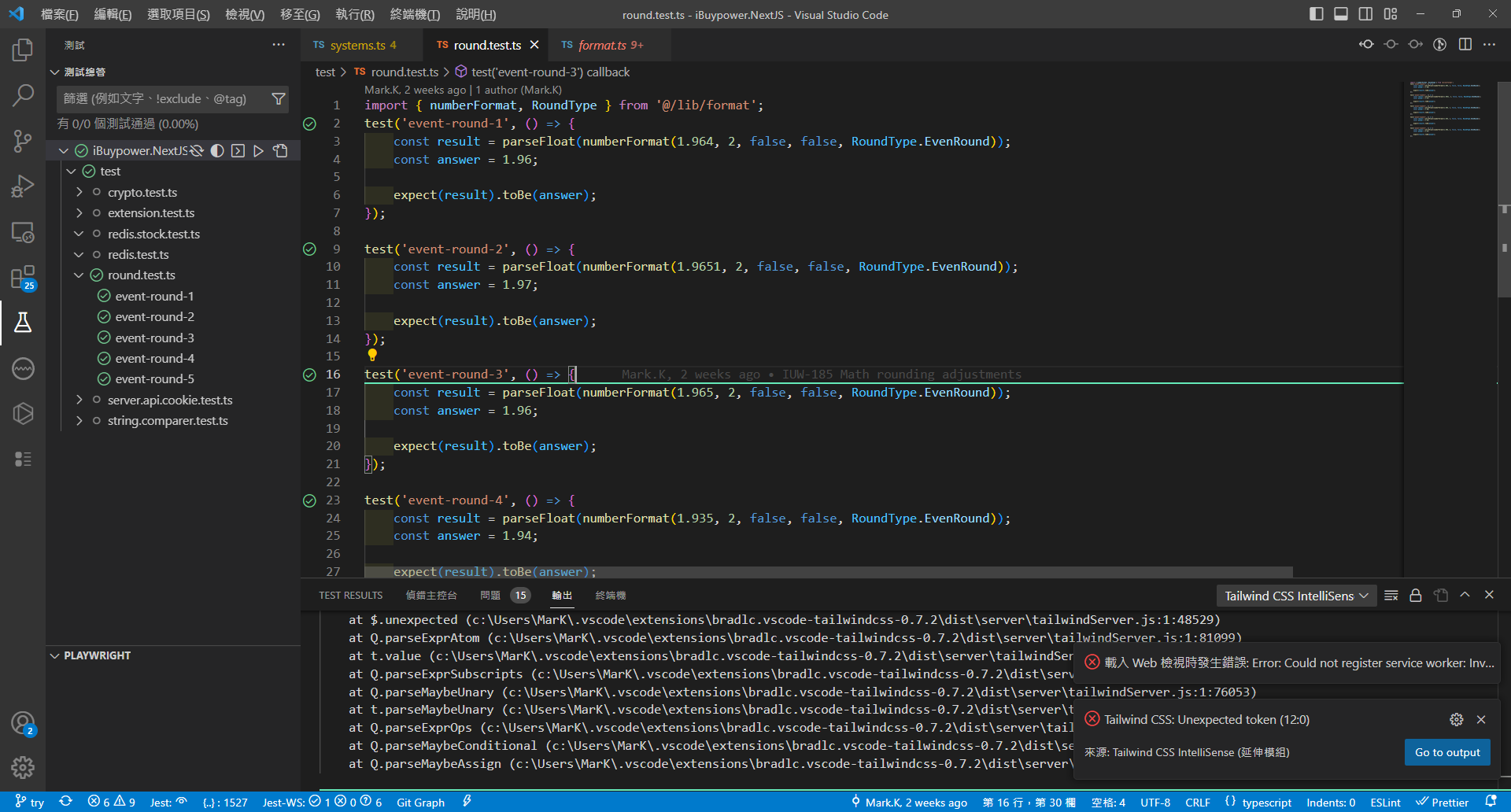
自動化測試 - (需在 vs code 安裝 Jest plugin )
相當方便,核心商業程式,點兩下就能知道有沒有把方法改壞
額外補充 - c# 後端銀行演算法做法
// 銀行家演算法進位
Math.Round(1.965,2); // 1.96

// 四捨五入
Math.Round(1.965,2, MidpointRounding.AwayFromZero,); // 1.97


留言