


一、橡皮筋行為造成的問題
在開發 Mobile Web 時,經常碰到的 iOS 系統上的橡皮筋效果,這個效果搭配上拉刷新,下拉取得資料時,使用者體驗還是挺不錯的,但是實際上,每一個捲軸都擁有這效果,可能會額外造成滑動卡死及不流暢。
- 捲軸捲最上方,會有彈簧的行為

- 捲動到最下方,會有彈簧的行為

- 在多個侷部捲動,捲動溢出時會捲動不流暢,甚置造成捲動行為卡死。
二、常見的解決方案
對於 ios 原生來說只要一行程式碼,就能關閉彈簧行為,但對 web 來說,則是很麻煩的事。
解決方法 1.使用 css 的 fixed
基於架構現有的手機版架構,所用到 px 都會被postcss工具轉換成 rem ,所以很難算到精準,所以不適合使用 fixed。
解決方法 2. 自己寫 js 控制
全域阻止,還要一個個排外,太麻煩,改動的範圍太大了,且太花時間。
解決方法 3. 使用 inobounce js 套件
解決方法 4. 採用虛擬捲軸 (僅有特定情境能用)
參、inobounce js 的使用方式
步驟 1.針對 ios 裝置啟用 inobounce
if (this.isiOS) {
  inobounce.enable()
}
步驟 2. 針對捲動的容器下 css
- overflow-x 或 overflow-y 值為 auto 或 scroll
- -webkit-overflow-scrolling 值為 touch
肆、採用 inobounce後,雖然解決了大部份的彈簧行為,但也衍伸了其他的問題,因此打算基於inobounce的邏輯,直接修改的原始碼。
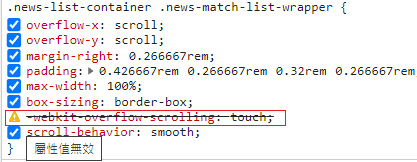
問題 1. chrome 模擬 ios 時無法使用 touch ,調查了原始碼css 屬性在 chrome 中 -webkit-overflow-scrolling 沒有作用
var isDesktopDebugMode = window.navigator.vendor === 'Google Inc.'
      var scrolling = style.getPropertyValue('-webkit-overflow-scrolling') === 'touch' || isDesktopDebugMode
問題 2. inobounce js 不支援橫向捲動,因此可以參考垂直捲軸的邏輯,來擴充橫向捲軸
伍、最後修改完的 inobounce js 如下
/*! iNoBounce - v0.2.1
 * https://github.com/lazd/iNoBounce/
 * Copyright (c) 2013 Larry Davis <[email protected]>; Licensed BSD */
(function(global) {
  // Stores the Y position where the touch started
  var startY = 0
  var startX = 0

  // Store enabled status
  var enabled = false

  var supportsPassiveOption = false
  try {
    var opts = Object.defineProperty({}, 'passive', {
      get: function() {
        supportsPassiveOption = true
      }
    })
    window.addEventListener('test', null, opts)
  } catch (e) {}

  var handleTouchmove = function(evt) {
    // Get the element that was scrolled upon
    var el = evt.target

    // Allow zooming
    var zoom = window.innerWidth / window.document.documentElement.clientWidth
    if (evt.touches.length > 1 || zoom !== 1) {
      return
    }

    // Check all parent elements for scrollability
    while (el ! document.body && el ! document) {
      // Get some style properties
      var style = window.getComputedStyle(el)

      if (!style) {
        // If we've encountered an element we can't compute the style for, get out
        break
      }

      // Ignore range input element
      if (el.nodeName = 'INPUT' && el.getAttribute('type') = 'range') {
        return
      }

      // chrome 在桌面版模擬 ios webkit-overflow-scrolling 屬性沒有作用
      var isDesktopDebugMode = window.navigator.vendor === 'Google Inc.'
      var scrolling = style.getPropertyValue('-webkit-overflow-scrolling') === 'touch' || isDesktopDebugMode

      var overflowY = style.getPropertyValue('overflow-y')
      var scrollableY = overflowY = 'auto' || overflowY = 'scroll'
      var height = parseInt(style.getPropertyValue('height'), 10)
      var width = parseInt(style.getPropertyValue('width'), 10)

      // Determine if the element should scroll

      var isScrollableY = scrolling && scrollableY

      var canScrollY = el.scrollHeight > el.offsetHeight // 能不能滑

      var curY = evt.touches ? evt.touches[0].screenY : evt.screenY

      if (isScrollableY && canScrollY) {
        // Get the current Y position of the touch

        // Determine if the user is trying to scroll past the top or bottom
        // In this case, the window will bounce, so we have to prevent scrolling completely
        var isAtTop = startY <= curY && el.scrollTop === 0
        var isAtBottom =
          startY >= curY && el.scrollHeight - el.scrollTop === height

        // Stop a bounce bug when at the bottom or top of the scrollable element
        if (isAtTop || isAtBottom) {
          console.log('prevent')
          evt.preventDefault()
        }

        // No need to continue up the DOM, we've done our job
        return
      }

      // 橫向捲動

      var overflowX = style.getPropertyValue('overflow-x')
      var scrollableX = overflowX = 'auto' || overflowX = 'scroll'
      var isScrollableX = scrolling && scrollableX
      var canScrollX = el.scrollWidth > el.offsetWidth

      if (isScrollableX && canScrollX) {
        // debugger
        // Get the current X position of the touch
        var curX = evt.touches ? evt.touches[0].screenX : evt.screenX

        // Determine if the user is trying to scroll past the top or bottom
        // In this case, the window will bounce, so we have to prevent scrolling completely
        var isAtLeft = startX <= curX && el.scrollLeft === 0
        var isAtRight =
          startX >= curX && el.scrollWidth - el.scrollLeft === width

        // Stop a bounce bug when at the bottom or top of the scrollable element
        if (isAtLeft || isAtRight) {
          evt.preventDefault()
        }

        // No need to continue up the DOM, we've done our job
        return
      }

      // Test the next parent
      el = el.parentNode
    }

    // Stop the bouncing -- no parents are scrollable
    evt.preventDefault()
  }

  var handleTouchstart = function(evt) {
    // Store the first Y position of the touch
    startY = evt.touches ? evt.touches[0].screenY : evt.screenY
    startX = evt.touches ? evt.touches[0].screenX : evt.screenX
  }

  var enable = function() {
    // Listen to a couple key touch events
    window.addEventListener(
      'touchstart',
      handleTouchstart,
      supportsPassiveOption ? { passive: false } : false
    )
    window.addEventListener(
      'touchmove',
      handleTouchmove,
      supportsPassiveOption ? { passive: false } : false
    )
    enabled = true
  }

  var disable = function() {
    // Stop listening
    window.removeEventListener('touchstart', handleTouchstart, false)
    window.removeEventListener('touchmove', handleTouchmove, false)
    enabled = false
  }

  var isEnabled = function() {
    return enabled
  }

  // Enable by default if the browser supports -webkit-overflow-scrolling
  // Test this by setting the property with JavaScript on an element that exists in the DOM
  // Then, see if the property is reflected in the computed style
  var testDiv = document.createElement('div')
  document.documentElement.appendChild(testDiv)
  testDiv.style.WebkitOverflowScrolling = 'touch'
  var scrollSupport =
    'getComputedStyle' in window &&
    window.getComputedStyle(testDiv)['-webkit-overflow-scrolling'] === 'touch'
  document.documentElement.removeChild(testDiv)

  if (scrollSupport) {
    enable()
  }

  // A module to support enabling/disabling iNoBounce
  var iNoBounce = {
    enable: enable,
    disable: disable,
    isEnabled: isEnabled
  }

  if (typeof module !== 'undefined' && module.exports) {
    // Node.js Support
    module.exports = iNoBounce
  }
  if (typeof global.define === 'function') {
    // AMD Support
    (function(define) {
      define('iNoBounce', [], function() {
        return iNoBounce
      })
    })(global.define)
  } else {
    // Browser support
    global.iNoBounce = iNoBounce
  }
})(this)
陸、結論
在 Web 看起來是無法完美避免橡皮筋行為,比較好的做法是改 Layout,捲到最上時用 CSS Fixed 住,回彈時,上面有東西擋住 滾動就沒這麼怪。
inobounce js只能解決
- 第一次載入,上拉橡皮筋問題
- 多個侷部滑動時,捲動溢出卡死問題
暫時無法解決的問題
- 當在滾動狀態時,滾動到最上方時或最下方,會出現一次橡皮筋行為,JS因為無法阻止滾動到負值,回彈後在 scrollTop 0 後,才會禁止橡皮筋行為。


留言