---
title: "解決前端渲染大量資料渲染效能問題 Part's 2- 虛擬捲軸 && 分段渲染"
description: "深入比較虛擬捲軸與分段渲染兩種實作方式，並提供完整的 Vue 元件原始碼，適用於需要同時顯示 1000 筆以上資料的前端場景。"
canonical_url: "https://blog.markkulab.net/post/frontend-rendering-performance-issue-part-2"
author: "Mark Ku"
author_url: "https://blog.markkulab.net/author/mark-ku"
site: "Mark Ku's Blog"
date_published: "2020-04-16"
category: "Frontend"
tags: ["frontend", "virtual scroll", "virtual list", "vue", "rendering", "performance", "large data", "dom"]
language: "zh-TW"
license: "CC BY 4.0"
license_url: "https://creativecommons.org/licenses/by/4.0/"
attribution: "轉載或引用請註明作者並附上原文連結"
---

# 解決前端渲染大量資料渲染效能問題 Part's 2- 虛擬捲軸 && 分段渲染

## 定義問題
[先前](https://blog.markkulab.net/2021/09/26/frontend-rendering-performance-issue/)有對大資料渲染進行調察研究，得知瞬間大資料的渲染，會造成瀏覽器卡頓不回應，並得出可以透過分時渲染、捲動式渲染、虛擬列表，解決高併發渲染的問題。  
  
而籃足球比賽比分列表，一遇假日就會有1000~2000 筆的比賽需要同時顯示，且依據使用者期待，不要使用分頁顯示。　　

[像是雷速網站](https://live.leisu.com/)

## 虛擬捲軸 VS 分段渲染
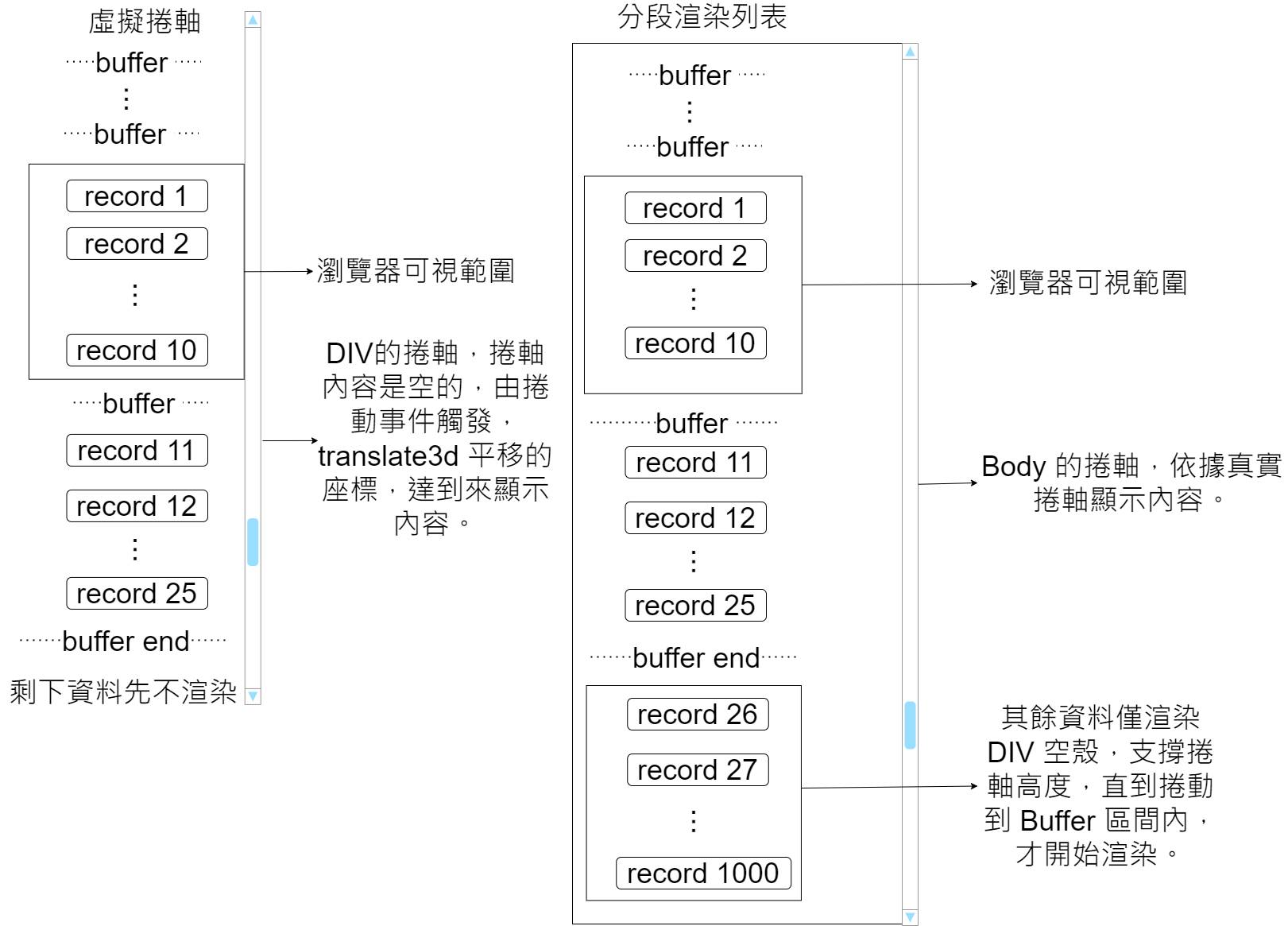
![虛擬捲軸與分段渲染列表的比較圖](https://blog.markkulab.net/content/markku/posts/frontend-rendering-performance-issue-part-2/images/ciO0Rjn.png)

### 虛擬捲軸概念
設計概念，一開始先傳入高度，並將每一筆 item 的 邊界 getBoundingClientRect 結果快取起來，直到渲染出來會重新計算快取高度，透過容器的卷軸事件，css translate3d，操作 y 軸，達到到平移捲動的效果，只有利用實體捲軸的高度及捲動事件，但不是透過實體捲軸顯示，因此這就是為什麼稱之虛擬捲軸的原因。

### 分段渲染概念
跟虛擬捲軸最大的差異，分段捲軸一開始採用的用的真實的實體捲軸，除buffer item 其餘都僅渲染空 div 支撐捲軸高度，直到捲到 buffer item 時，才開始渲染該區間的元件。

## 和傳統渲染效能比較
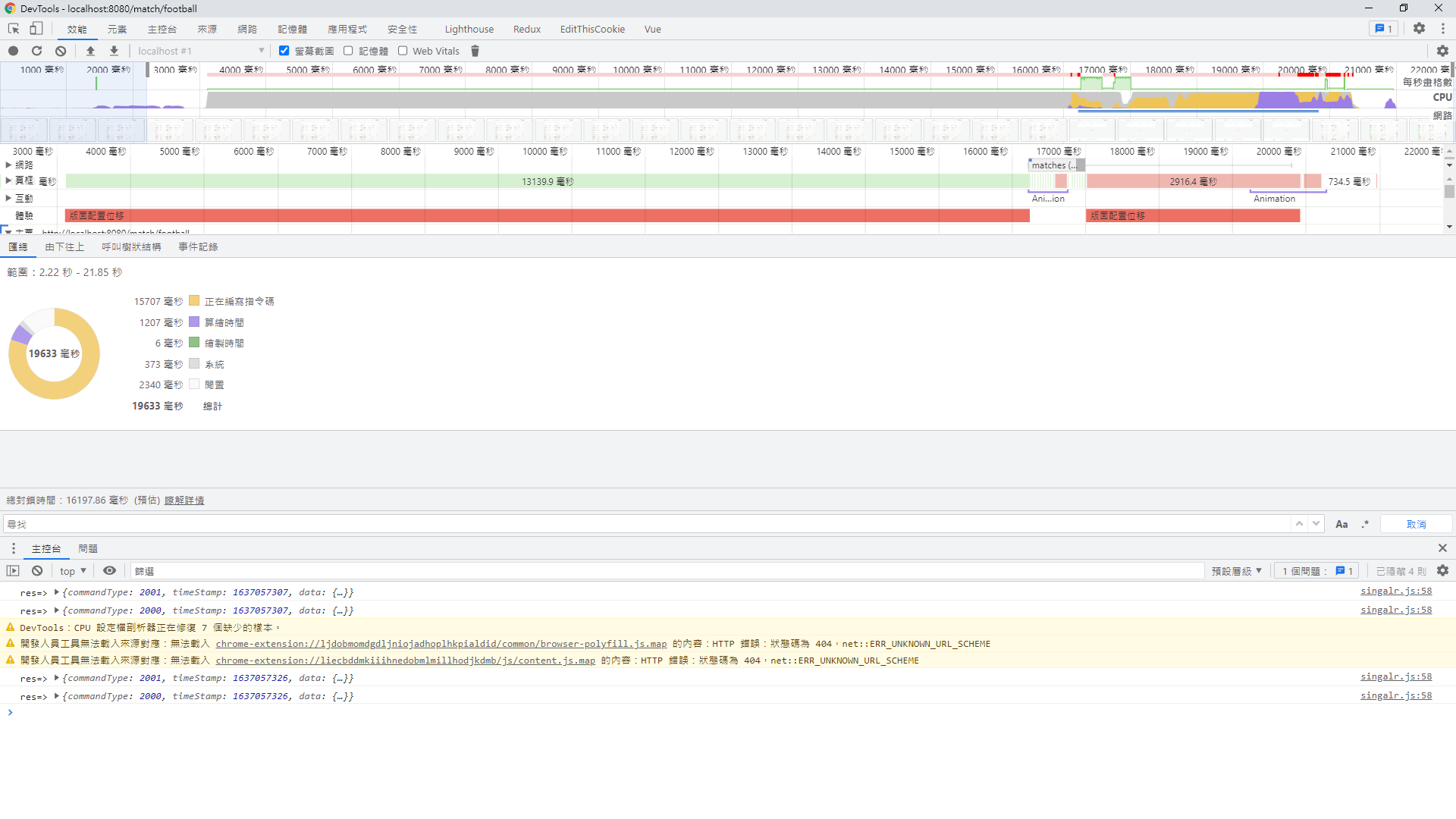
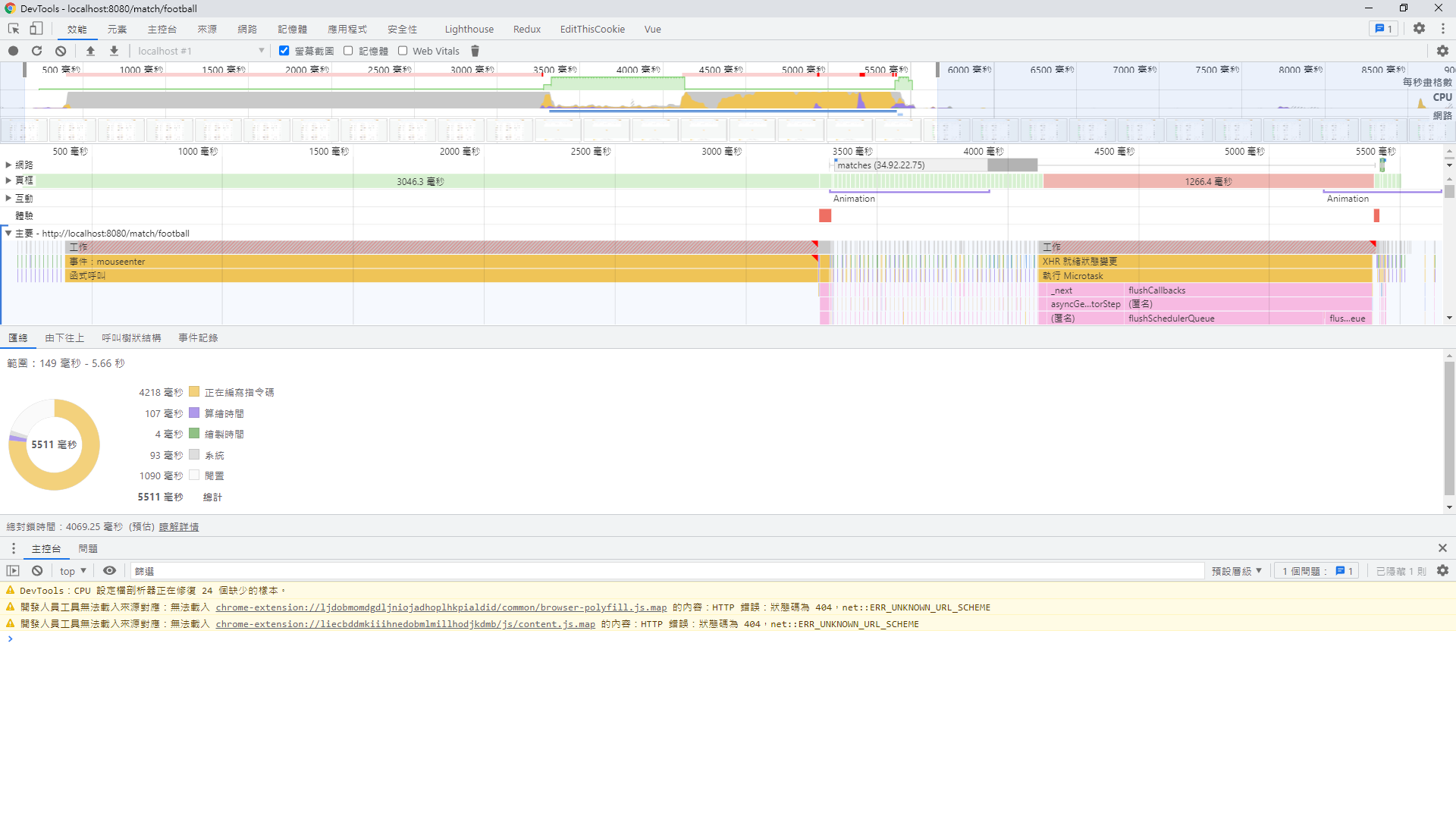
拿 1000 筆左右的數據，資料採用分段渲染和一般炫染效能做比較，因為要渲染的筆數少了，其實可以預期效能差了快1x倍之多。
### 一般渲染
![DevTools 效能面板時間軸與活動圓餅圖](https://blog.markkulab.net/content/markku/posts/frontend-rendering-performance-issue-part-2/images/C4kDCOm.png)
### 分段渲染
![Chrome DevTools 效能分析介面顯示總計 5511 毫秒](https://blog.markkulab.net/content/markku/posts/frontend-rendering-performance-issue-part-2/images/IYudcTq.png)

## 使用方式

### 虛擬捲軸  
```
<template>
  <div
    id="virtual-list"
    ref="scroller"
    class="virtual-scroll-list-container"
    @scroll="scrollEvent($event)"
    @touchstart="touchstartHandle"
    @touchmove="touchmoveHandle"
    @touchend="touchendHandle"
  >
    <div
      class="virtual-scroll-list-phantom"
      :style="{ 'min-height': minListHeight + (enableScrollUp ? 40 : 0)+ 'px' }"
    />
    <div
      ref="actualContentRef"
      class="virtual-scroll-list"
      :style="{ transform: getTransform }"
    >
      <div v-show="isShow.isRefresh" ref="refresh" class="refresh">
        <div class="flex justify-center align-center">
          <span class="circle-rotate " />
          <span>
            重新整理
          </span>
        </div>
      </div>
      <slot
        v-for="item in visibleData"
        :start="start"
        :index="getCache(item[uniKey]).index"
        :end="end"
        :uniKey="uniKey"
        :item="item"
        :height="getCache(item[uniKey]).height"
      />
      <div v-show="isShow.isLoading" class="load m-t-4">
        <div class="flex justify-center align-center">
          <span class="circle-rotate " />
          <span>
            加載中
          </span>
        </div>
      </div>
      <span v-if="!isChatMode" class="finished-text">
        <slot name="finishedText">沒有更多內容</slot>
      </span>
    </div>
  </div>
</template>

<script>
import { scrollElementToBottom, debounce } from '@/utils'

export default {
  name: 'VirtualList',
  props: {
    // 所有列表數據
    list: {
      type: Array,
      default: () => []
    },
    // 每項預設的高度
    itemDefaultHeight: {
      type: Number,
      default: 200
    },
    // 唯一值
    uniKey: {
      type: String,
      default: function() {
        return 'seq'
      },
      required: false
    },
    // 可視範圍外多渲染幾筆
    bufferSize: {
      type: Number,
      default: 0
    },
    isChatMode: {
      type: Boolean,
      required: false,
      default: function() {
        return false
      }
    },
    enableScrollDown: {
      // 開啟上拉功能  refresh
      type: Boolean,
      required: false,
      default: function() {
        return false
      }
    },
    enableScrollUp: {
      // 開啟下拉功能 loading
      type: Boolean,
      required: false,
      default: function() {
        return false
      }
    },
    autoLoadMore: {
      // 自動捲到最底就刷新 / 捲到定點，在上拉才刷新
      type: Boolean,
      required: false,
      default: function() {
        return true
      }
    }
  },
  data() {
    return {
      // scrollTop: 0, // 卷軸位址
      lastScrollTop: 0, // 紀錄最後卷軸位址
      isScrolling: false,
      isLoadMoreEnd: false,

      // 列表預估總高度
      minListHeight: 0,
      // 可視區域高度
      screenHeight: 0,
      // 起始索引
      start: 0,
      // 結束索引
      end: null,
      // 快取高度
      cachedPositions: [],
      // 每一項只記算一次動態高度
      calculateOnce: true,
      // 是不是己捲動到最下面
      autoScrollLoaded: false,

      firstRender: false,

      refreshLoginStatus: 'normal', // 組件當前狀態：正常瀏覽模式normal，下拉刷新模式refresh，上拉加載模式loading
      isShow: {
        // 加載動劃控制開關
        isRefresh: false,
        isLoading: false
      },
      startPos: {
        // 手指初始按壓位置
        pageY: 0,
        pageX: 0
      },
      dis: {
        // 手移動距離
        pageY: 0,
        pageX: 0
      },
      last: {
        pageY: 0,
        pageX: 0
      }

    }
  },
  computed: {
    // 預期可視範圍可顯示的列表數
    visibleCount() {
      return Math.ceil(this.screenHeight / this.itemDefaultHeight)
    },
    // 偏移量對應的style
    getTransform() {
      const currentCachedPositions = this.cachedPositions[this.start - 1]

      return `translate3d(0,${
        this.start >= 0 && currentCachedPositions
          ? currentCachedPositions.bottom
          : 0
      }px,0)`
    },
    // 獲取可視範圍的資料筆數
    visibleData() {
      if (this.cachedPositions.length === 0) {
        return []
      }

      return this.list.slice(this.start, this.end + 1)
    }
  },
  watch: {
    list: {
      handler(val) {
        if (val) {
          this.init()
        }

        this.isLoadMoreEnd = false
      },
      immediate: false,
      deep: true
    }
  },
  mounted() {
    this.init()
  },
  // activated生命鉤子在keep-alive被激活時調用
  activated() {
  // 如果曾滾動過,則還原位置
    if (this.lastScrollTop) {
      const page = this.$refs.scroller
      page.scrollTop = this.lastScrollTop
    }
  },

  updated() {
    // 當每一次 component 更新時重新計算一下，目前渲染出來的項目高度，放進 cache 計算
    const that = this

    if (that.$refs.actualContentRef.childElementCount > 0) {
      const childNodes = that.$refs.actualContentRef.childNodes

      that.hasLastNode = false

      childNodes.forEach((node, index) => {
        if (!node || !node.id || node.id.indexOf('-') === -1) {
          return
        }

        const elementIdArray = node.id.split('-')

        if (elementIdArray.length === 2) {
          const elementId = Number(elementIdArray[1])

          if (elementId) {
            const currentCachedPositions = that.cachedPositions.find(
              (x) => x.id === elementId
            )

            if (currentCachedPositions) {
              if (currentCachedPositions.isLast === true) {
                that.hasLastNode = true
              }
            }
            // 每個 item的高度只會重算一次
            if (
              that.calculateOnce &&
              currentCachedPositions.updated &&
              currentCachedPositions.updated === true
            ) {
              return
            }

            const rect = node.getBoundingClientRect()
            const { height } = rect

            const oldHeight = currentCachedPositions.height
            const dValue = oldHeight - height

            if (dValue) {
              currentCachedPositions.bottom -= dValue
              currentCachedPositions.top -= dValue
              currentCachedPositions.height = height
              currentCachedPositions.dValue = dValue
              currentCachedPositions.updated = true
              that.minListHeight -= dValue

              for (
                let i = currentCachedPositions.index;
                i < that.cachedPositions.length;
                i++
              ) {
                const cacheItem = that.cachedPositions[i]

                if (cacheItem) {
                  cacheItem.top -= dValue
                  cacheItem.bottom -= dValue
                }
              }
            }
          }
        }
      })

      if (that.isChatMode) {
        that.$nextTick(function() {
          if (that.firstRender === false) {
            that.firstRender = true
            that.$refs.scroller.scrollTop = that.$refs.scroller.scrollHeight
          } else if (that.autoScrollLoaded === false) {
            scrollElementToBottom('virtual-list')
            if (that.hasLastNode) {
              that.autoScrollLoaded = true
            }
          }
        })
      }
    }
  },

  methods: {
    init() {
      this.autoScrollLoaded = false
      this.initCachedPositions()
      this.initPosition()
      this.screenHeight = this.$el.clientHeight || this.$el.parentElement.clientHeight
      this.scrollEvent()

      // 給 list 預設的高度
      this.minListHeight = this.list.length * this.itemDefaultHeight
    },
    touchstartHandle(e) {
      // 記錄起始位置 和 組件距離window頂部的高度
      this.startPos.pageY = e.touches[0].pageY
      this.startPos.pageX = e.touches[0].pageX
      // 內容頁在可視視窗最頂端或者在指定的位置（父級元素的頂部）
    },
    touchmoveHandle(e) {
      const disY = e.touches[0].pageY - this.startPos.pageY
      const disX = e.touches[0].pageX - this.startPos.pageX
      // for android 預設下拉刷新的問題
      if (this.isAndroid) {
        this.preventAndriodRefreshEevnt(e)
      }

      this.last.pageY = e.changedTouches[0].pageY
      this.last.pageX = e.changedTouches[0].pageX

      if (disX > 100 && !this.isScrolling) {
        this.dis.pageX = disX
        this.$emit('scrollRight')
        this.refreshLoginStatus = 'right'
      } else if (disX < -100 && !this.isScrolling) {
        this.$emit('scrollLeft')
        this.refreshLoginStatus = 'left'
      } else {
        if (this.$refs.scroller.scrollTop <= 0 && disY > 100) {
          this.dis.pageY = disY
          this.refreshLoginStatus = 'refresh'
          this.refreshMove(disY, e)
        } else if (disY < 100) {
          /* //觸發上拉加載 */
          if (this.isShow.isLoading) return
          this.refreshLoginStatus = 'loading'
          this.loadingMove(disY)
        }
      }
    },

    preventAndriodRefreshEevnt(e) {
      // 阻止 android 原生事件
      var direction = e.changedTouches[0].pageY > this.last.pageY ? 1 : -1

      const scrollTop = this.$refs.scroller.scrollTop

      if (direction > 0 && scrollTop <= 0) {
        e.preventDefault()
      }
    },
    loadingMove(dis) {
      // 計算內容頁底部距離可視視窗頂部的距離
      if (this.enableScrollUp && !this.autoLoadMore) {
        const disToTop = this.$refs.actualContentRef.getBoundingClientRect()
          .bottom

        // 計算可視視窗的高度
        const clientHeight = document.documentElement.clientHeight
        if (disToTop <= clientHeight) {
          if (this.refreshLoginStatus === 'loading' && this.dis.pageY < 0) {
            this.isShow.isLoading = true
          }
        }
      }
    },
    refreshMove(dis, e) {
      if (this.enableScrollDown) {
        if (this.isShow.isRefresh) return
        if (this.refreshLoginStatus === 'refresh' && this.dis.pageY > 0) {
          // 下拉刷新成立條件

          this.isShow.isRefresh = true
          // 下拉到一定距離後，內容頁不隨touchmove移動
          this.$refs.actualContentRef.style.transform = `translateY(${
            dis < 8 ? dis : 8
          }px)`

          // for android 預設下拉刷新的問題
          if (this.isAndroid) {
            e.preventDefault()
          }
        }
      }
    },

    touchendHandle(e) {
      if (this.refreshLoginStatus === 'left' || this.refreshLoginStatus === 'right') {
        this.isShow.isRefresh = false
        this.isShow.isLoading = false
      }

      this.refreshLoginStatus === 'refresh' && this.refreshToucnend(e)
      this.refreshLoginStatus === 'loading' && this.loadingTouchend(e)
    },
    refreshToucnend(e) {
      // 加上限定條件，防止不在刷新狀態，後面的代碼執行
      if (!this.isShow.isRefresh) return
      // 必須下拉一定距離，才進行異步加載數據
      this.dis.pageY > 10 && (this.$emit('scrollDown'))

      // 松手後加載動劃消失，並且內容頁回到原位置
      this.isShow.isRefresh = false
      this.$refs.actualContentRef.style.transform = `translateY(0px)`
      this.refreshLoginStatus = 'normal'
    },
    loadingTouchend(e) {
      // 加上限定條件，防止不在刷新狀態，後面的代碼執行
      if (!this.isShow.isLoading) return

      if (this.isLoadMoreEnd === false) {
        this.$emit('scrollUp')

        this.isLoadMoreEnd = true
      }
      this.isShow.isLoading = false
      this.refreshLoginStatus = 'normal'
    },

    getCache(uniId) {
      const cache = this.cachedPositions.find(x => x.id === uniId)
      return cache
    },

    initPosition() {
      if (this.isChatMode) {
        this.end = this.list.length

        var range = this.visibleCount + this.bufferSize

        if (this.end - range < 0) {
          this.start = 0
        } else {
          this.start = this.end - range
        }
      } else {
        this.start = 0
        this.end = this.start + this.visibleCount + this.bufferSize
      }
    },
    // 依照預設每一筆資料都給計算 bottom 及給預設高度
    initCachedPositions() {
      const { itemDefaultHeight } = this
      this.cachedPositions = []
      for (let i = 0; i < this.list.length; ++i) {
        this.cachedPositions[i] = {
          id: this.list[i][this.uniKey],
          index: i,
          height: itemDefaultHeight,
          top: i * itemDefaultHeight,
          bottom: (i + 1) * itemDefaultHeight,
          dValue: 0,
          isLast: i + 1 === this.list.length

        }
      }
    },
    scrollEvent(e) {
      // 當前滾動位置
      const scrollTop = this.$refs.scroller.scrollTop

      // 綁定事件,滾動時,儲存位置到this.scrollTop
      this.lastScrollTop = scrollTop

      // 處理滑動不可以切換tab
      this.isScrolling = true
      var scroll
      clearTimeout(scroll)
      scroll = setTimeout(() => {
        this.isScrolling = false
      }, 100)

      let index = 0
      // 此時的開始索引
      const currentCachePostion = this.cachedPositions.filter(
        (x) => scrollTop < x.bottom
      )[0]

      if (currentCachePostion) {
        index = currentCachePostion.index
      }

      if (index === 0) {
        this.start = 0
        this.end = index + this.visibleCount + this.bufferSize
      }
      // debugger
      // 此時的結束索引
      this.start = index - this.bufferSize
      this.end = index + this.visibleCount + this.bufferSize

      if (this.list.length > 0 && this.end >= this.list.length) {
        // 自動加載
        if (this.enableScrollUp && this.autoLoadMore) {
          this.isShow.isLoading = true
          this.loadingTouchend(e)
        }

        this.end = Math.max(this.list.length, this.visibleCount)
        this.start = Math.min(this.end - this.visibleCount - this.bufferSize, 0)
      }

      if (this.start < 0) this.start = 0 // 起始筆
    },
    debounceScroll(e) {
      debounce(() => { this.scrollEvent(e) }, 16.6) // 60Hz
    }
  }
}
</script>

<style scoped lang="scss">
.virtual-scroll-list-container {
  position: relative;
  overflow: auto;
  height: 100%;
  -webkit-overflow-scrolling: touch;
  // scroll-behavior: smooth;
}

// .virtual-scroll-list-container::-webkit-scrollbar {
//   display: none;
// }

.virtual-scroll-list-phantom {
  position: absolute;
  top: 0;
  right: 0;
  left: 0;
  z-index: -1;
}

.virtual-scroll-list {
  position: absolute;
  top: 0;
  right: 0;
  left: 0;
  z-index: 998;
}

/*
::-webkit-scrollbar {
    width: 10px;
}

::-webkit-scrollbar-track {
    background-color: darkgrey;
}

::-webkit-scrollbar-thumb {
    box-shadow: inset 0 0 6px rgba(0, 0, 0, 0.2);
} */

.circle-rotate {
  position: relative;
  border: 10px solid #CCC;
  border-right-color: transparent;
  border-radius: 50%;
  width: 20px;
  height: 20px;
  animation: loadingAnimation 0.75s infinite;
}

@keyframes loadingAnimation {
  0% {
    transform: translateX(-50%) rotate(0deg);
  }

  100% {
    transform: translateX(-50%) rotate(360deg);
  }
}

.finished-text {
  display: block;
  padding: 24px 0 32px 0;
  font-size: 22px;
  text-align: center;
  color: $text-grey-darken;
}

.disable-hover {
  pointer-events: none;
}

</style>
```
使用方式
```
<VirtualScroller
      :list="news"
      class="news-list-wrapper"
      :item-default-height="100"
      :uni-key="'id'"
      :enable-scroll-up="!isLastPage"
      :auto-load-more="true"
      :enable-scroll-down="true"
      :buffer-size="4"
      @scrollDown="scrollDown"
      @scrollUp="scrollUp"
    >
      <template #default="slotScope">
        <NewsCard
          :id="'news-' + slotScope.item[slotScope.uniKey]"
          :key="'news-' + slotScope.item[slotScope.uniKey]"
          :start="slotScope.start"
          :end="slotScope.end"
          :index="slotScope.index"
          :h="slotScope.height"
          :news="slotScope.item"
          :sport-id="slotScope.item.sportId"
        />
      </template>
</VirtualScroller>
```

### 分段捲軸
```
<template>
  <div
    ref="part-render-container"
    class="part-render-scroll-list-container"
    :style="{ height: minListHeight +'px' }"
  >

    <div
      v-for="(item, index) in list"
      :key="item[uniKey]"
      :[uniKey]="item[uniKey]"
      :index="index"
      class="part-render-item"
      :class="[{ visiable: checkVisible(index) }, itemClass]"
      :style="{ 'min-height': cachedPositions[index].height + 'px' }"
    >
      <transition-group name="fade">
        <slot
          v-if="checkVisible(index)"
          :index="index"
          :uniKey="uniKey"
          :item="item"
          :height="cachedPositions[index].height"
        />
      </transition-group>
    </div>
  </div>
</template>

<script>
export default {
  name: 'VirtualList',
  props: {
    scrollElementId: { // 沒傳預設抓 body
      type: String,
      required: false,
      default: function() {
        return ''
      }
    },
    // 所有列表數據
    list: {
      type: Array,
      default: () => []
    },
    // 每項預設的高度
    itemDefaultHeight: {
      type: Number,
      default: 200
    },
    // 唯一值
    uniKey: {
      type: String,
      default: function() {
        return 'id'
      },
      required: false
    },
    // 可視範圍外多渲染幾筆
    bufferSize: {
      type: Number,
      default: 20
    },
    itemClass: {
      type: String,
      required: false,
      default: function() {
        return ''
      }
    }
  },
  data() {
    return {
      // 列表預估總高度
      minListHeight: 0,
      // 起始索引
      start: 0,
      // 結束索引
      end: null,
      // 快取高度
      cachedPositions: [],
      // 每一項只記算一次動態高度

      defaultTopOffset: 0,
      maxListHeight: 0,
      currentScrollTop: 0,
      currentEleTop: 0,
      currentEleBottom: 0,
      screenHeight: 0,
      scrollElement: null,
      isBodyScroller: false // 是不是 body 的捲軸

    }
  },
  computed: {
    // 一頁預估可以顯示幾筆
    visibleCount() {
      return Math.ceil(this.screenHeight / this.itemDefaultHeight)
    },

    // 己進入預渲染的範圍
    isEnterPreload() {
      const isEnterPreload = this.currentScrollTop + this.screenHeight > this.currentEleTop && this.currentScrollTop - this.screenHeight < this.currentEleBottom

      return isEnterPreload
    }

  },
  watch: {
    list: {
      handler(val) {
        if (
          val &&
          val.length > 0
        ) {
          // 給 list 預設的高度
          this.minListHeight = this.list.length * this.itemDefaultHeight

          this.initCachedPositions()
          var that = this
          that.$nextTick(function() {
            const rect = this.$el.getBoundingClientRect()
            that.defaultTopOffset = rect.top
          })
        }
      },
      immediate: true,
      deep: true
    }
  },
  mounted() {
    this.screenHeight =
        window.innerHeight ||
        document.documentElement.clientHeight ||
        document.body.clientHeight

    this.recalculateCurrentEleBoundary()

    // 給初始值
    this.start = 0

    this.end = this.start + this.visibleCount + this.bufferSize

    this.isBodyScroller = this.scrollElementId.length === 0

    if (this.isBodyScroller) {
      window.addEventListener('scroll', this.handleScroll)
    } else {
      this.getScrollElement().addEventListener('scroll', this.handleScroll, false)
    }
  },

  updated() {
    // 當每一次 component 更新時重新計算一下，目前渲染出來的項目高度，放進 cache 計算

    const that = this
    const el = this.$el

    if (el) {
      const childNodes = el.querySelectorAll('.visiable')

      childNodes.forEach((node, index) => {
        if (!node) {
          return
        }

        const elementIndex = Number(node.getAttribute('index'))

        // 重算高度
        const currentCachedPositions = that.cachedPositions[elementIndex]

        if (currentCachedPositions.updated === true) {
          return
        }

        currentCachedPositions.updated = true

        if (currentCachedPositions) {
          // slot 只能放一筆
          const rect = node.children[0].getBoundingClientRect()
          const { height } = rect

          const oldHeight = currentCachedPositions.height
          const dValue = oldHeight - height

          if (dValue) {
            currentCachedPositions.bottom -= dValue
            currentCachedPositions.top -= dValue
            currentCachedPositions.height = height
            currentCachedPositions.dValue = dValue
            that.minListHeight -= dValue

            // 重算快取 Cache 的 上邊界 & 下邊界
            this.recalculateCache(currentCachedPositions.index, dValue)
          }
        }
      })

      this.recalculateCurrentEleBoundary()
    }
  },
  beforeDestroy() {
    if (this.isBodyScroller) {
      window.removeEventListener('scroll', this.handleScroll)
    } else {
      this.getScrollElement().removeEventListener('scroll', this.handleScroll, false)
    }
  },
  methods: {
    getScrollElement() {
      const scrollElement = document.getElementById(this.scrollElementId)
      if (this.isBodyScroller) {
        return document.documentElement || document.body
      } else {
        if (!scrollElement) {
          console.log('找不到捲軸物件')
        }
        return document.getElementById(this.scrollElementId)
      }
    },
    // 重算快取 Cache 的 上邊界 & 下邊界
    recalculateCache(index, dValue) {
      for (let i = index; i < this.cachedPositions.length; i++) {
        const cacheItem = this.cachedPositions[i]

        if (cacheItem) {
          cacheItem.top -= dValue
          cacheItem.bottom -= dValue
        }
      }
    },
    // 重新計算上邊界和下邊界的距離
    recalculateCurrentEleBoundary() {
      var rect = this.$el.getBoundingClientRect()

      this.currentEleTop = rect.top + this.currentScrollTop
      this.currentEleBottom = rect.top + this.currentScrollTop + rect.height
    },

    checkVisible(nowIndex) {
      if (this.isEnterPreload) {
        return (
          nowIndex >= this.start &&
        nowIndex <= Math.min(this.end, this.list.length)
        )
      } else {
        return false
      }
    },
    handleScroll() {
      this.currentScrollTop = this.getScrollElement().scrollTop

      let index = 0

      // 此時的開始索引
      const currentCachePostion = this.cachedPositions.filter(
        (x) => this.currentScrollTop - this.currentEleTop < x.top
      )[0]

      if (currentCachePostion) {
        index = currentCachePostion.index
      }

      if (index === 0) {
        this.start = 0
        this.end = index + this.visibleCount + this.bufferSize
      }

      this.start = index - this.bufferSize
      this.end = index + this.visibleCount + this.bufferSize

      if (this.start < 0) {
        this.start = 0
      }

      if (this.end > this.list.length) {
        this.end = this.list.length - 1
        this.start = this.end - this.visibleCount - this.bufferSize
      }
    },

    // 依照預設每一筆資料都給計算 bottom 及給預設高度
    initCachedPositions() {
      const { itemDefaultHeight } = this
      this.cachedPositions = []
      for (let i = 0; i < this.list.length; ++i) {
        this.cachedPositions[i] = {
          index: i,
          height: itemDefaultHeight,
          top: i * itemDefaultHeight,
          bottom: (i + 1) * itemDefaultHeight,
          dValue: 0,
          isLast: i === this.list.length - 1,
          updated: false // 曾經渲染過
        }
      }
    }
  }
}
</script>

<style scoped>
.part-render-scroll-list-container {
  box-sizing: border-box;
}

.part-render-item {
  box-sizing: border-box;
}
</style>

```
使用方式
```
<PartRenderingScroller :scroll-element-id="'schedule-container'" :list="early.early" :item-default-height="100" uni-key="matchId" class="schedule-list p-l-20 p-r-20" :buffer-size="50">
            <template #default="slotScope">
              <ScheduleCard
                :id="'live-' + slotScope.item[slotScope.uniKey]"
                :key="'live-' + slotScope.item[slotScope.uniKey]"
                :class="{'p-t-20':slotScope.index===0}"
                :start="slotScope.start"
                :end="slotScope.end"
                :index="slotScope.index"
                :h="slotScope.height"
                :sport-id="sportId"
                :schedule="slotScope.item"
                :lottery-type="lotteryType"
              />
            </template>
</PartRenderingScroller>
```

## 如果要設計的東西，未來要套虛擬捲軸或分段捲軸時，可能要留意一下  
1. 分段捲軸 Desktop 網站架構是是 body 捲動，而 mobile 架構是 div 在捲動，可以透過傳入 scrollElementId 決定，沒傳則是 body 捲動  
2. list 外容器，不能撐padding ，要由 item 去支撐撐高，item 最外層不能用 margin，因為用程式抓寬高抓不到 margin => 之後或許可以擴充用 window.getComputedStyle 來擴充支援 margin   
3. list-item 的 css 要加 box-sizing: border-box; 不然不會把 padding 算進去   
4. 分段或虛擬捲軸， 結構要用 div ，不能用 ul li 或table 等等，因為虛擬捲軸組件會額外渲染出額外的 div  
5. 為了重算高度，list item  一定要給 id ，並用減號分隔 => "{{type}}-{{id}}"
6. 儘量避免和其他有用到捲軸的套件整合 better scroller、vant dialog、 swiper，因為每個套件有自己的生命週期，如果一定整合進來，可能自己擴充組件功能會比較不會衝突  

## 實作過程遇到的問題
### 1. 評估過 vue-virtual-scroller and vue-virtual-scroll-list 簡單功能可以套用，但遇到複雜的情境就不好套用。
原始碼也不易理解及改動，最後決定自己刻了。
 
### 2. 而在實作過程中發現，桌面版非滿版網頁，或是需要多個虛擬捲軸同時存在，則使用者體驗不是這麼好，會變成雙出現內外卷軸的情境，對於使用者捲動上來說並不是很好的體驗，  
此時情境可能不適合用虛擬捲軸，而是要分段渲染卷軸。

### 3. 每一筆資料都不同高度，分段元件及虛擬捲軸得支援動態高度。  
元件初始化時，先給預設高，並快取起來，直到渲染出來，在去更新高度，postion 的快取。
### 4. 虛擬捲軸在套聊天室時發現筆數一多，從最舊的資料渲染到最新時，透過自動捲動渲染，顯示時就會變得非常卡頓。  
聊天室最後將渲染索引反過來渲染，最先渲染使用者看得到的，直到使用者往上捲動。

### ５.整合 vue better scroll( 上拉整理、下拉取得資料) 、 swiper 
上述都是類似虛擬捲軸機制的套件，如果要整合捲軸類型的套件，最好還是自己擴充虛擬捲軸，不然要解決兩個虛擬捲軸機制在裡面衝突。

## 同一系列文章
* [解決前端渲染大量資料渲染效能問題 - 1](https://blog.markkulab.net/2021/09/26/frontend-rendering-performance-issue/)
* [解決前端渲染大量資料渲染效能問題 Part's 2- 虛擬捲軸 && 分段渲染](https://blog.markkulab.net/2021/12/06/frontend-rendering-performance-issue-part-2/)

---

## 關於本文與作者

本文出自 [Mark Ku's Blog](https://blog.markkulab.net/post/frontend-rendering-performance-issue-part-2)

授權條款： [CC BY 4.0](https://creativecommons.org/licenses/by/4.0/) — 轉載或引用請註明作者並附上原文連結

### 關於作者

**[Mark Ku](https://blog.markkulab.net/author/mark-ku)** — Software Solution Provider

- 10+ 年資深軟體工程師，現為 AI 應用 Builder
- 專注大型平台架構設計，從北美電商到AI SaaS訂閱收費系統
- 結合 AI Agent 與自動化，打造高效可演進的產品技術基礎

### 作者開發的免費工具

以下工具皆可免費使用：

- [免費 PDF 簽名工具](https://blog.markkulab.net/tools/pdf-sign): 線上 PDF 簽名工具，瀏覽器內完成手繪、打字、上傳簽名，可拖曳放置、縮放、下載。所有處理都在你的裝置完成，檔案不會上傳。
- [VS Code Refactory](https://blog.markkulab.net/tools/refactory): Refactory 是一款 VS Code 重構擴充套件：34 個重構動作、37 條 code smell 檢查、Code Health 儀表板、18 種語言、534 支測試。懂你的專案慣例：介面放哪、DI 註冊寫在哪、'use client' 該不該加；還會用 git 修改頻率 × 複雜度排出「該先修哪個檔案」，並一鍵把壞味道交給你自己電腦上的 Claude Code 修。免費使用，原始碼不離開你的機器。
- [DB-Kit 資料庫管理工具](https://blog.markkulab.net/tools/db-kit): DB-Kit 是一個用 Tauri + Rust + React 打造的輕量跨平台資料庫管理工具，用單一一致的介面同時管理 MySQL、MariaDB、PostgreSQL、SQL Server、Oracle、SQLite、MongoDB、Redis、Kafka、Elasticsearch 與 RabbitMQ 十一種資料來源：連線密碼以 OS keychain 加密、SSH Tunnel、完整 CRUD、視覺化查詢建構器、多結果集同時顯示、跨連線資料傳輸與比對同步、Excel / CSV 匯入匯出、執行計畫視覺化、ER 圖、排程備份、SQL 壓力測試（p50～p99 延遲百分位）、15 條規則的 SQL 審查、Kafka 訊息瀏覽與監控告警；繁中 / 英文雙語介面，內建 AI 助手（自然語言生成 SQL、AI 審查與調校建議）與命令列工具 dbk。免費開源（MIT），提供 Windows / macOS / Linux 安裝檔。
- [VS Code Super Mermaid](https://blog.markkulab.net/tools/super-mermaid): Super Mermaid 是一款 VS Code 擴充套件：開箱即用的漂亮 Mermaid 圖表，自動上色、即時預覽、滑鼠平移縮放、PNG / SVG 高解析匯出，內建 21 種範本與多種主題。免費開源（MIT）。
- [React Super Mermaid](https://blog.markkulab.net/tools/react-super-mermaid): react-super-mermaid 是一個開源 React 元件庫：一行 <MermaidViewer> 即可渲染漂亮的 Mermaid 圖表，內建 colorful / sketch 主題、平移縮放、圖內搜尋、SVG / PNG 高解析匯出。輕量、SSR 安全、完整 TypeScript 型別。免費開源（MIT）。
- [Jira / Confluence Super Mermaid](https://blog.markkulab.net/tools/jira-super-mermaid): Atlassian Forge app：在 Jira issue 與 Confluence 內文直接寫 Mermaid 語法，畫流程圖、時序圖、狀態機與甘特圖。11 種圖表、SVG / PNG 匯出、明暗主題、完整中日韓文字支援。取得 Runs on Atlassian 資格：圖表存在你自己的站台，app 不呼叫任何第三方服務。免費，即將上架 Atlassian Marketplace。
- [Mermaid 線上預覽](https://blog.markkulab.net/tools/mermaid-preview): 在瀏覽器裡寫 Mermaid、即時看圖，整張圖表壓進網址就能分享。免註冊、不上傳伺服器，相容 mermaid.live 的分享連結。
- [React Intl Phone Number](https://blog.markkulab.net/tools/react-intl-phone-number): react-intl-phone-number 是一個開源 React 元件：framework-agnostic、不依賴 antd，提供 E.164 進出、可搜尋國旗 / 國碼下拉、可配置驗證等級（strict / mobile-strict / loose）、可主題化 CSS 與 i18n，電話邏輯由 google-libphonenumber 驅動。輕量、完整 TypeScript 型別。免費開源（MIT）。
- [Uptime Kuma Cluster](https://blog.markkulab.net/tools/uptime-kuma-cluster): 把單機版 Uptime Kuma 改造成高可用叢集：OpenResty + Lua 智慧負載平衡、MariaDB 共享狀態、健康檢查與自動 Failover，附叢集管理 REST API，一行 Docker Compose 啟動。免費開源（MIT）。
- [特教專案](https://blog.markkulab.net/education): 為特殊教育學生製作的學習教材

### 每日 Podcast

- [科技新鮮事](https://blog.markkulab.net/category/tech-news): 每日精選 AI 與科技趨勢，透過語音摘要快速掌握最新技術動態，涵蓋 AI 應用、軟體架構、DevOps 與工程實戰。 — RSS: https://blog.markkulab.net/feed.xml
- [AI股市蝦聊](https://blog.markkulab.net/category/ai-stock-chat): 每個交易日用 AI 分析台股盤勢，以雙人對話聊當天的盤中觀察與隔日預測。 — RSS: https://blog.markkulab.net/ai-stock-chat/feed.xml

### 電子報

[訂閱電子報](https://blog.markkulab.net/subscribe) — 第一時間收到新文章通知，無垃圾信、隨時可取消訂閱。