---
title: "Token Monitor 實測:把一堆 AI 工具的 token 用量,收進同一個畫面"
description: "同時開 Claude Code、Codex、Copilot、Cursor,額度到底燒到哪?Token Monitor 把這些工具的用量收在同一個畫面,還能跨裝置同步。這篇是 Windows 實測:怎麼裝、Hub URL 設定藏在哪、為什麼要自己做 Dashboard、覺得卡的時候調哪裡,還有我做過的資安檢查。"
canonical_url: "https://blog.markkulab.net/en/post/token-monitor-ai-token-dashboard"
author: "Mark Ku"
author_url: "https://blog.markkulab.net/en/author/mark-ku"
site: "Mark Ku's Tech Notes"
date_published: "2026-09-19 10:00:00 +0800"
category: "AI"
tags: ["Token Monitor", "Claude Code", "Codex", "AI 工具", "Token 用量", "成本控管", "Electron"]
language: "en"
license: "CC BY 4.0"
license_url: "https://creativecommons.org/licenses/by/4.0/"
attribution: "when reusing or quoting, credit the author and link back to the original"
---
# Token Monitor 實測:把一堆 AI 工具的 token 用量,收進同一個畫面
## 前言:工具開一排,額度到底燒到哪去了
現在寫程式,同時開著 Claude Code、Codex、GitHub Copilot、Cursor 已經很正常。但工具一多,幾個問題就來了:
- 快撞上限了嗎?通常都是跳警告才知道。
- 錢花在哪個工具上?每家都有自己的後台,要比就得一個一個開。
- 哪一台機器燒的?公司筆電、家裡桌機、伺服器上跑的 agent,各燒各的。
[Token Monitor](https://github.com/Javis603/token-monitor) 就是在解這件事:一個桌面小視窗,讀你電腦上各家工具留下的紀錄,把用量、花費、剩餘額度全部收在同一個畫面,而且可以多台機器一起看。
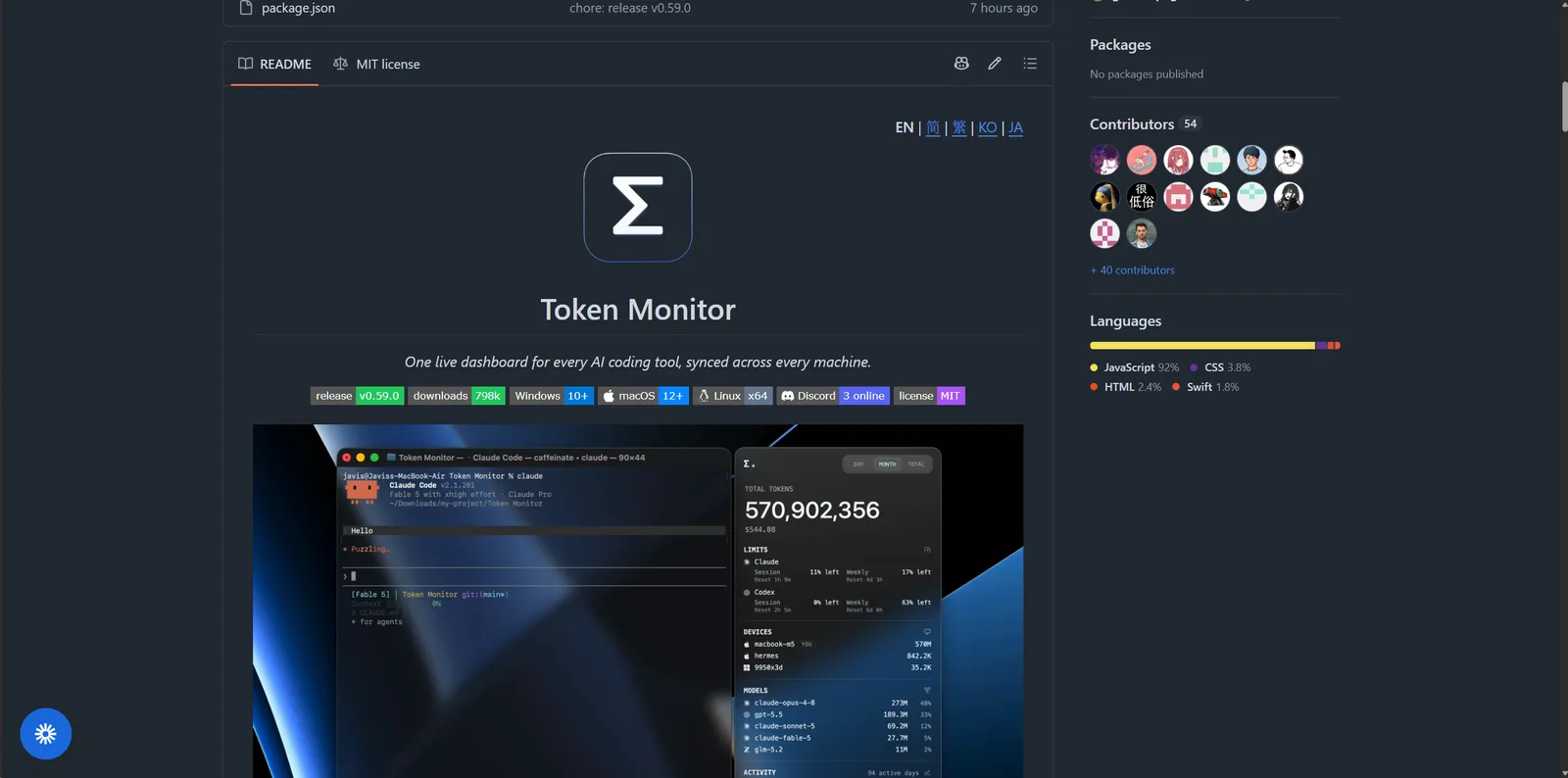
這篇不是翻譯官方文件,是我自己在 Windows 上裝 v0.59.0 實際跑過一輪的紀錄。
## 先講結論
沒時間讀完的話,看這段就夠了。
**✅ 值得裝。** 本機用的話裝完就能用,不用設定,不用帳號。
**✅ 它是開源的(MIT)。** 原始碼完整放在 GitHub 上,程式分成四塊:桌面程式、背景收集器、Hub、Cloudflare Worker,各自獨立。想改哪一塊就只碰那一塊,不用讀懂整包。打包指令也現成(`npm run dist:win`),改完就能產出自己的安裝檔。所以**非常適合自己拿來二次開發**。
**❌ 它沒有網頁版的 Dashboard。** 這是目前最大的缺口。所有畫面都在桌面程式裡,想用瀏覽器開、想掛在大螢幕上、想做一個團隊共用的看板,都得自己做。
好消息是它把資料開得很大方:Hub 有一組完整的 API,資料撈出來自己畫就好,**完全不用改到它的原始碼**。我們就是這樣接的,後面會講。
適不適合你,大概是這樣:
| 你的情況 | 建議 |
| --- | --- |
| 同時用 3 個以上 AI 工具 | 裝,馬上有感 |
| 有好幾台機器 | 裝,這是它最強的地方 |
| 團隊想要共用看板 | 可以做,但要自己接 API |
| 想要「裝完就有網頁報表」 | 會失望,它不做這件事 |
另外先說清楚我**驗證到哪裡**,免得你把我的結論放太大:安裝、簽章、預設設定、它讀哪些資料夾、對外連了哪裡,這些我都實際跑過。至於逐行看原始碼、對 Hub 做攻擊測試,我沒做。
## 它到底在讀什麼
一句話:**它不看你的 prompt,也不看你的程式碼,只讀各家工具留在你電腦上的用量紀錄。**
像 Claude Code 會把每次對話記在 `~/.claude/projects/`,Codex 記在 `~/.codex/`,Token Monitor 就是去讀這些檔案,把 token 數加一加、成本算一算。
它抓三種東西:
- **用量**:花了多少 token、多少錢、快取命中率
- **額度**:各家方案還剩多少、什麼時候重置
- **單次對話明細**:某一次對話裡,每則訊息各用了多少
目前支援 37 種以上的工具,常見的 Claude Code、Codex、Copilot、Cursor、Antigravity、OpenCode、Cline 都有。底層解析是用 [tokscale](https://github.com/junhoyeo/tokscale) 這個 Rust 專案(也是 MIT),Token Monitor 負責畫面跟同步。
## 兩種用法:一台機器,或多台一起
這兩種模式先搞懂,後面設定才不會亂:
```mermaid
flowchart LR
subgraph Local["一台機器(預設,零設定)"]
W1["桌面程式"] --> F1["讀本機的
~/.claude、~/.codex…"]
end
subgraph Sync["多台一起(選用)"]
D1["機器 A"] --> HUB["Hub"]
D2["機器 B"] --> HUB
HUB --> V1["任一台的畫面"]
HUB --> V2["你自己做的 Dashboard"]
end
```
重點只有兩個:
- **預設就是一台機器的模式**,裝完就會動,什麼都不用設。
- **多台要同步的話,得先挑一個 Hub**,所有機器連同一個。
## 安裝
到 [GitHub Releases](https://github.com/Javis603/token-monitor/releases) 抓 `Token-Monitor-Setup-x.x.x.exe`(約 113 MB),雙擊一路下一步就好。macOS 用 `brew install --cask token-monitor`,Linux 抓 `.AppImage`。
我有順手驗一下數位簽章(`Get-AuthenticodeSignature`),結果是 Valid,簽署者 SignPath Foundation,跟官方文件寫的一致,代表檔案沒被動過手腳。
裝完之後,設定跟資料會放在 `%APPDATA%\Token Monitor\`,之後想移除乾淨的話這個資料夾記得一起刪。
## 裝完之後長怎樣
一開起來,它馬上就開始讀了。從日誌看得出它在盯哪些資料夾:
```text
[collector] Watching C:\Users\\.claude\projects
[collector] Watching C:\Users\\.copilot
[collector] Watching C:\Users\\.gemini\antigravity
```
幾個觀察:
- **只看你電腦上真的有的工具**,沒裝的就不碰。
- 用系統的檔案異動通知,不是傻傻掃整顆硬碟。
- 開機時會自己去 GitHub 看有沒有新版。
預設會追 28 個工具,設定檔在 `%APPDATA%\Token Monitor\settings.json`。
## 多台機器同步:Hub URL 藏在哪
這是最多人卡住的地方,先講位置。
> **桌面程式右下角的 ⚙ 齒輪 → Multi-device Sync(多裝置同步) → 點「Connect to a hub(連接到 Hub)」那顆圓點**
**要先點那顆圓點,網址跟密碼的欄位才會跑出來。** 沒點就只看到幾個選項,很多人以為「怎麼沒有地方填」,就是卡在這。
Hub 有三種選法,挑一個就好,所有機器連同一個:
| 方式 | 適合誰 | 缺點 |
| --- | --- | --- |
| **用其中一台當 Hub** | 家裡或公司有一台常開機的電腦 | 那台程式關掉,大家就都不同步了 |
| **裝在 NAS 或伺服器上** | 有常開的機器 | 要下指令,稍微麻煩一點 |
| **Cloudflare Worker** | 想從手機看、或跨不同網路 | 要有 Cloudflare 帳號 |
最簡單的是第一種:在常開的那台選「Host hub on this device」,它會自己產生一組密碼,然後列出其他機器可以連的網址。其他機器就填那個網址加密碼。
跨網路的話,走 Tailscale 或 ZeroTier 會比開防火牆簡單,也安全得多。
## 它沒有網頁 Dashboard,所以我們自己做了一個
前面提過,這是它最大的缺口。所有畫面都鎖在桌面程式裡。
但 Hub 本身其實開了一組滿完整的 API,資料要多少有多少:
| 網址 | 拿到什麼 |
| --- | --- |
| `/api/health` | 確認 Hub 活著(這支不用密碼) |
| `/api/stats` | 全部統計:今日、本月、全部,含工具、模型、專案、額度 |
| `/api/stats/stream` | 即時推播,有變動就推給你 |
| `/api/devices` | 每台機器的狀況 |
用密碼的方式很單純,加一個 header 就好:
```bash
curl -H "Authorization: Bearer 你的密碼" http://127.0.0.1:17321/api/stats
```
所以我們就用這組 API,做了一個單一檔案的 `dashboard.html`,瀏覽器直接打開,填網址跟密碼就會動:
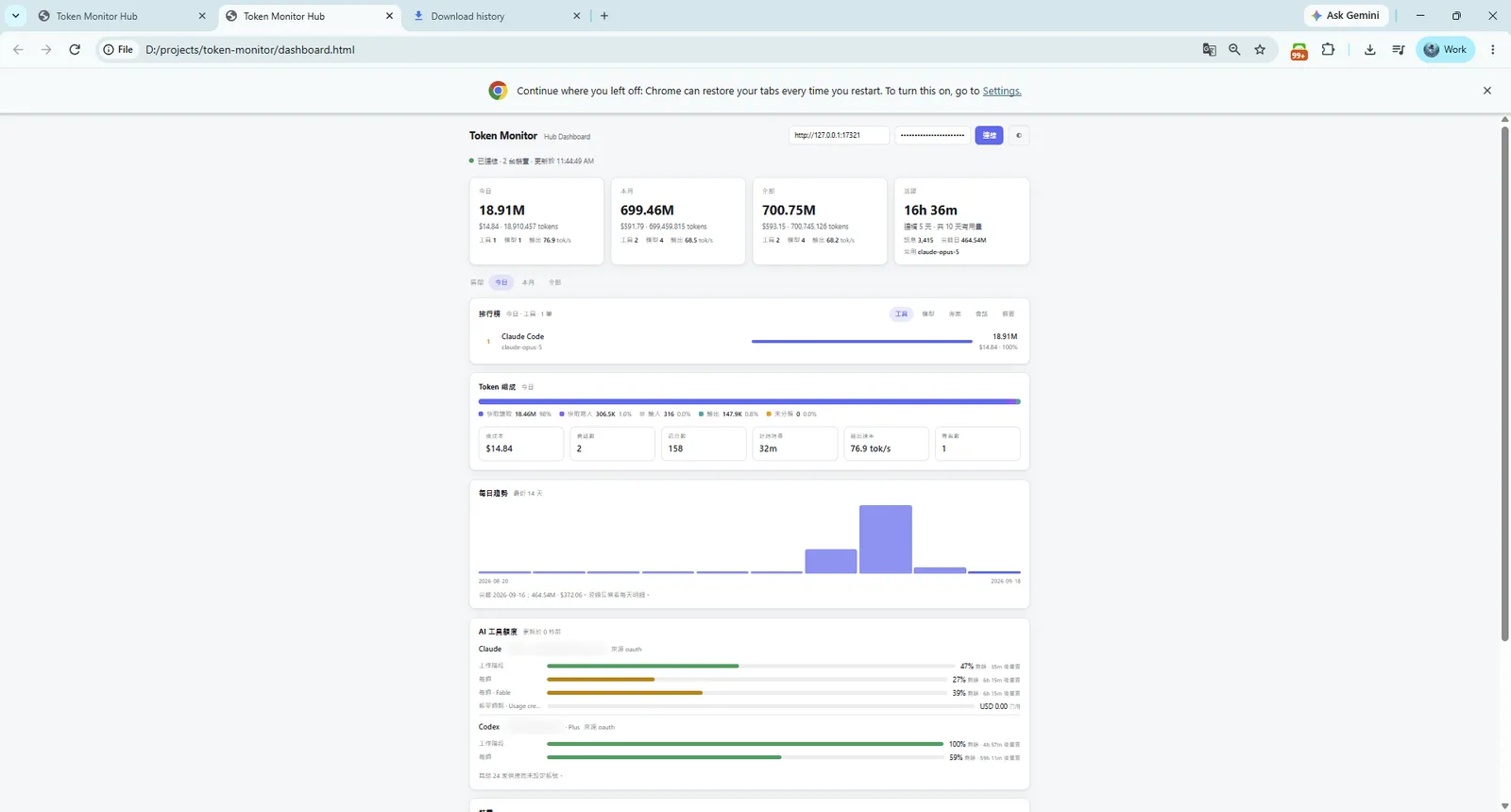
往下捲是每台機器的狀況:
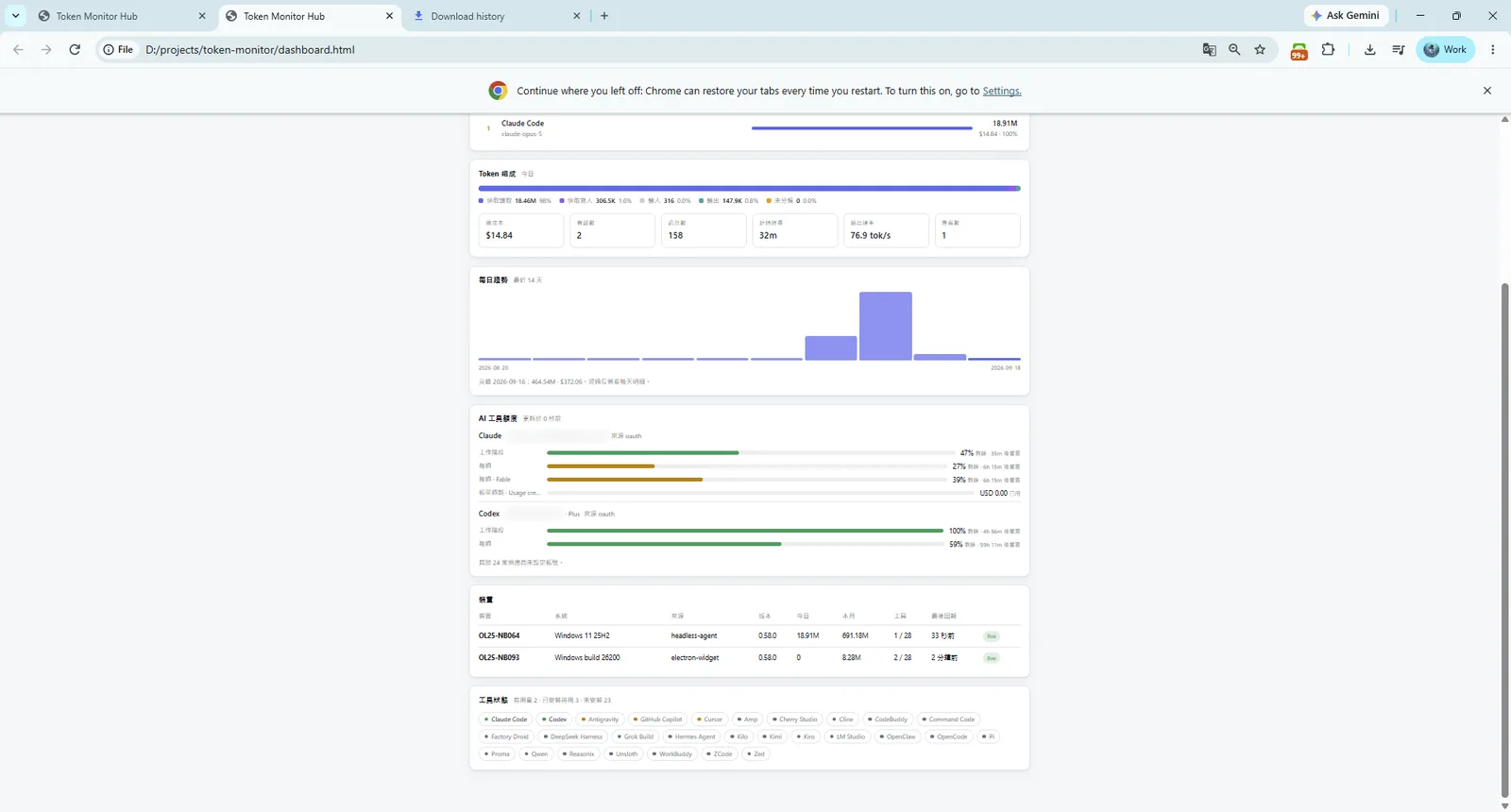
這塊其實很實用,一眼就看得出哪台是背景跑的、哪台是有開視窗的、各自最後回報是什麼時候。**如果某一台的「最後回報」停在幾小時前,通常就是同步出問題了。**
要自己做的話,其實只要三件事:
1. 做一個填網址跟密碼的表單
2. 接 `/api/stats/stream`,有資料就重畫
3. 把回來的 JSON 攤平成表格
不難,而且完全不用碰它的原始碼。
## 覺得卡卡的?先關掉沒在用的工具
有人反應更新頻率調高之後會卡。設定都在 ⚙ 裡面,幾個可以動的:
| 設定 | 預設 | 怎麼調 |
| --- | --- | --- |
| 追蹤的工具 | 全開(28 個) | **先調這個,最有感**。沒在用的通通關掉 |
| 畫面更新間隔 | 15 秒 | 這只是重畫畫面,調小效果有限 |
| 歷史資料寫入 | 15 分鐘 | 機器慢的話往上調,不要往下 |
| 專案分類 | 開 | 專案資料夾很多的話,關掉會輕鬆很多 |
| WSL 掃描 | 開 | 沒在用 WSL 就關掉 |
順序很重要:**先關掉沒在用的工具,再考慮動時間。** 預設 28 個全開,但大部分人真正在用的可能只有三四個。把其他的關掉,比調更新頻率有效多了。
另外一個跟效能無關、但很重要的設定:
**Claude Code 預設只留 30 天的對話紀錄**,超過就自己清掉了。Token Monitor 有一個「保留已刪除的用量」選項,建議開著,它會把看過的每日用量另外存一份,來源被刪也不影響你看趨勢圖。
但要注意,它只能救**裝了之後**的資料。裝之前被刪掉的就回不來了。所以如果你想長期看趨勢,越早裝越好。
## 資安:我檢查了什麼
既然要導入,順手掃一下是合理的。完整稽核我沒做,但基本的幾項跑過了。
**看它連去哪裡。** 程式跑起來之後我看了它建立的連線,只有兩個地方:GitHub(檢查更新)跟 `api.anthropic.com`(查 Claude 還剩多少額度)。
**沒有開任何對外的埠。** 這點滿重要的,只要你沒把它設成 Hub,它就不會在你電腦上開任何服務。
**讀的範圍很乾淨。** 從日誌看,它盯的都是各家 AI 工具自己的資料夾,沒有掃你的專案原始碼或整個使用者目錄。
**官方聲明不送任何統計回去給作者。** 加上原始碼公開,這點可以自己查證。
至於我**沒做**的:沒有逐行看原始碼,沒有驗證下載的程式真的是那份原始碼編出來的,也沒有對 Hub 做攻擊測試。
幾個自己用的時候要注意的:
- **填進去的憑證是存在你電腦上的。** 查額度那塊要填 API key 或 cookie,這些會存在 `%APPDATA%\Token Monitor\` 裡面。那台電腦多安全,這些憑證就多安全。
- **Hub 密碼是大家共用的。** 用「其中一台當 Hub」的方式是純 HTTP,**不要直接對外網開埠**,走區網或 Tailscale。
- **用 Cloudflare Worker 等於把統計放到網路上。** 密碼要夠長。雖然不含對話內容,但你的工作節奏會被看見。
- **專案資料夾名稱會同步出去。** 完整路徑跟對話標題不會,但資料夾名稱會。公司專案的命名如果本身就敏感,這點要先想過。
## 幾個要注意的地方
- **更新很快。** 5 天內發了三個版本。修得快是好事,但 Windows 每次都要重下 113 MB。在意流量的話可以關掉自動更新。
- **Cursor 偶爾會同步失敗。** 我這邊出現過 `Cursor API returned status 404`,不影響其他工具。Cursor 走的是帳號層級的匯出,本來就會慢幾分鐘。
- **只有一台機器的話,同步那塊完全可以不用碰。**
- **這篇是 Windows 11 + v0.59.0 的紀錄**,版本一直在動,你看到的畫面可能跟我不一樣。
## 結論
Token Monitor 解的問題很具體:AI 工具變多之後,用量跟額度散得到處都是。它的做法是讀本機紀錄、不碰內容、要的話可以跨機器同步,這個界線劃得很合理。
三句話收尾:
1. **自己一台用,裝完就結束了**,不用設定。
2. **多台要同步,記得先點「Connect to a hub」那顆圓點**,欄位才會出現。
3. **想在瀏覽器看,就得自己接 API。** 這是它目前最明顯的缺口,但也因為它是開源的、API 開得夠大方,補起來不難。真的想大改,原始碼跟打包指令都在,MIT 授權,隨你改。
---
## About this article and its author
Originally published on [Mark Ku's Tech Notes](https://blog.markkulab.net/en/post/token-monitor-ai-token-dashboard)
License: [CC BY 4.0](https://creativecommons.org/licenses/by/4.0/) — when reusing or quoting, credit the author and link back to the original
### About the author
**[Mark Ku](https://blog.markkulab.net/en/author/mark-ku)** — 226 Network Co. · Software engineer
- 10+ years as a software engineer, now running 226 Network
- Built North-American e-commerce and AI SaaS subscription billing
- Systems, websites, LINE bots and AI automation for small companies
### Free tools built by the author
All of these are free to use:
- [Free PDF Sign Tool](https://blog.markkulab.net/en/tools/pdf-sign): Online PDF sign tool — draw, type, or upload a signature, then drag, resize, and download. Everything runs in your browser; nothing is uploaded.
- [VS Code Refactory](https://blog.markkulab.net/en/tools/refactory): Refactory is a VS Code refactoring extension: 34 actions plus a 37-rule code-smell inspection layer with a Code Health dashboard, across 18 languages, backed by 534 tests. It learns your repo's conventions: where interfaces live, where DI is registered, whether 'use client' belongs. It ranks files by git churn × complexity so you know what to fix first, and hands any smell to the Claude Code already on your machine. Free to use, and your source never leaves your computer.
- [DB-Kit Database Manager](https://blog.markkulab.net/en/tools/db-kit): DB-Kit is a lightweight, cross-platform database manager built with Tauri + Rust + React. Manage MySQL, MariaDB, PostgreSQL, SQL Server, Oracle, SQLite, MongoDB, Redis, Kafka, Elasticsearch and RabbitMQ from one consistent interface: passwords encrypted in the OS keychain, SSH tunnels, full CRUD, a visual query builder, stacked multi-statement result sets, cross-connection data transfer, schema & data compare with sync SQL and schema snapshots, Excel / CSV import & export, visualized execution plans, ER diagrams, scheduled backups, SQL stress testing with p50–p99 latency percentiles, a 15-rule SQL review engine, Review & Run (AI review plus per-statement backups and an auto-generated rollback script), Kafka message browsing with monitoring & alerts, a bilingual UI (Traditional Chinese / English), a built-in AI assistant (a local CLI or any Anthropic / OpenAI-compatible API; natural-language SQL, AI review and tuning advice) and the dbk CLI. Free and open source (MIT), with installers for Windows, macOS and Linux.
- [VS Code Super Mermaid](https://blog.markkulab.net/en/tools/super-mermaid): Super Mermaid is a VS Code extension for beautiful Mermaid diagrams out of the box: auto-colored live preview, mouse pan & zoom, high-res PNG / SVG export, 21 templates and multiple themes. Free and open source (MIT).
- [React Super Mermaid](https://blog.markkulab.net/en/tools/react-super-mermaid): react-super-mermaid is an open-source React component library: render beautiful Mermaid diagrams with a single , with built-in colorful / sketch themes, pan & zoom, in-diagram search, and high-res SVG / PNG export. Lightweight, SSR-safe, fully typed. Free and open source (MIT).
- [Jira / Confluence Super Mermaid](https://blog.markkulab.net/en/tools/jira-super-mermaid): An Atlassian Forge app: write Mermaid syntax directly inside a Jira issue or a Confluence page and get flowcharts, sequence diagrams, state machines and Gantt charts. 11 diagram types, SVG / PNG export, light and dark themes, full CJK support. Runs on Atlassian: your diagrams live in your own site and the app calls no third-party service. Free, coming soon to the Atlassian Marketplace.
- [Mermaid Live Preview](https://blog.markkulab.net/en/tools/mermaid-preview): Write Mermaid in your browser, see it render instantly, and share the whole diagram as a single link. No sign-up, nothing uploaded to a server, and mermaid.live share links work as-is.
- [React Intl Phone Number](https://blog.markkulab.net/en/tools/react-intl-phone-number): react-intl-phone-number is an open-source React component: framework-agnostic and antd-free, with E.164 in/out, a searchable flag / country-code dropdown, configurable validation levels (strict / mobile-strict / loose), themeable CSS, and i18n — phone logic powered by google-libphonenumber. Lightweight and fully typed. Free and open source (MIT).
- [Uptime Kuma Cluster](https://blog.markkulab.net/en/tools/uptime-kuma-cluster): Turn single-node Uptime Kuma into a highly available cluster: OpenResty + Lua smart load balancing, shared MariaDB state, health checks and automatic failover, plus cluster-management REST APIs. One Docker Compose command to start. Free and open source (MIT).
- [AI Podcast Cut](https://blog.markkulab.net/en/tools/ai-podcast-cut): Drop in a recording and it removes fillers and stutters, levels loudness segment by segment, and sends a second agent to review every cut. Cut points snap to word boundaries and zero crossings, every splice gets a fade, and sentence-end breaths are preserved. Desktop app for Windows, macOS and Linux. MIT licensed; the Windows installer bundles ffmpeg.
- [open-pos restaurant POS](https://blog.markkulab.net/en/tools/open-pos): One computer and one receipt printer is enough to open the shop. Your data lives on your own disk, no subscription, no lock-in, MIT licensed. Money is integer New Taiwan dollars with tax split by the statutory formula, so sales + tax always equals the total. Printing goes straight over ESC/POS on TCP 9100, with no vendor driver. Tauri + Rust + SQLite desktop app, v1.0 in development.
- [Special Education](https://blog.markkulab.net/en/education): Learning materials crafted for special education students
### Daily podcasts
- [Mark's Tech Insights — Daily AI News](https://blog.markkulab.net/en/category/tech-news): Daily curated AI and tech trends. Catch the latest developments via audio summaries — covering AI applications, software architecture, DevOps, and engineering practice. — RSS: https://blog.markkulab.net/feed.xml
- [AI股市蝦聊](https://blog.markkulab.net/en/category/ai-stock-chat): Every trading day, an AI-analyzed take on the Taiwan stock market, delivered as a two-host conversation covering the session and the next-day outlook. — RSS: https://blog.markkulab.net/ai-stock-chat/feed.xml
- [開源好物週報](https://blog.markkulab.net/en/category/open-source-weekly): A weekly two-host pick of free open-source tools surfaced from real Hacker News, GitHub, and Reddit buzz — what pain they solve and the fastest way to get started. — RSS: https://blog.markkulab.net/open-source-weekly/feed.xml
- [AI 運動週報](https://blog.markkulab.net/en/category/sports-weekly): Two hosts talk NBA, MLB and world sport three times a week — scores, records and the stories behind them, from a Taiwanese fan perspective. — RSS: https://blog.markkulab.net/sports-weekly/feed.xml
- [AI 國際新聞快報](https://blog.markkulab.net/en/category/world-news): A daily two-host briefing that makes sense of the past 24 hours in world news — geopolitics, the global economy, conflict and security, disasters and climate — from a Taiwanese perspective, neutral and fully sourced. — RSS: https://blog.markkulab.net/world-news/feed.xml
- [地端 AI 實驗室](https://blog.markkulab.net/en/category/local-ai-lab): Twice a week, a two-host look at open-weight models and LoRAs you can actually run on your own machine: what they are for, whether your GPU can handle them, and how they compare — sourced from official model cards. — RSS: https://blog.markkulab.net/local-ai-lab/feed.xml
### Deals
- [Saily eSIM](https://blog.markkulab.net/en/saily): Travel eSIM by the NordVPN team,Promo code:KUKU
- [NordVPN](https://blog.markkulab.net/en/nordvpn): The world's leading VPN, independently audited
- [PremLogin](https://blog.markkulab.net/en/premlogin): Subscription sharing for streaming and AI seats,Promo code:markku666
### Newsletter
[Subscribe to the newsletter](https://blog.markkulab.net/en/subscribe) — Be the first to know about new posts. No spam, unsubscribe anytime.