---
title: "Protect Your Website from Bots with Cloudflare Turnstile"
description: "An introduction to integrating Cloudflare Turnstile to replace Google reCAPTCHA, using frontend JavaScript and backend C# validation to effectively block automated bot attacks."
canonical_url: "https://blog.markkulab.net/en/post/protect-your-website-with-cloudflare-turnstile"
author: "Mark Ku"
author_url: "https://blog.markkulab.net/en/author/mark-ku"
site: "Mark Ku's Tech Notes"
date_published: "2024-02-26T17:01:35.000Z"
category: "Security"
tags: ["cloudflare", "turnstile", "security", "bot", "captcha", "anti-bot"]
language: "en"
license: "CC BY 4.0"
license_url: "https://creativecommons.org/licenses/by/4.0/"
attribution: "when reusing or quoting, credit the author and link back to the original"
---
# Protect Your Website from Bots with Cloudflare Turnstile
> **TL;DR** — Cloudflare Turnstile effectively blocks 20-30% of bot requests by analyzing user behavior and using machine learning.
## Context
* One day, we discovered that bots had registered over 10,000 member accounts on our site.
* Visa notified us that too many bots were attempting to use non-existent card numbers. The failure rate was so high that they threatened to suspend our credit card payment processing.
* We also found bots attempting to reset passwords and check order statuses.
We evaluated Google reCAPTCHA v2/v3 and found the user experience wasn't great. Google reCAPTCHA often takes a long time to solve, wasting a lot of the user's time. So, I asked my colleague to research and integrate Cloudflare Turnstile.
## How It Works
* Behavioral Analysis: Analyzes user behavior patterns (such as mouse movements, keyboard inputs, scrolling behavior, etc.) to determine if the user is a real human.
* Machine Learning: Uses machine learning models trained on real-world data to identify and adapt to new automated threats.
* Privacy Protection: Protects user privacy by not relying on personally identifiable information for verification. Instead, it uses non-personally identifiable behavioral characteristics and patterns.
* Accessibility: Provides accessible access for all users, including those with visual impairments, without relying on visual challenges.
* Flexibility and Customization: Allows website owners to customize protection levels and user experience based on their needs, from automatic background checks to triggering a manual challenge when high risk is detected.
## Why We Chose Cloudflare Turnstile
While searching for a solution, we discovered Cloudflare Turnstile. It's free, easy to integrate, offers a great user experience, has fewer false positives, and provides relevant reporting services.
## Integration Method
### 1. Read the integration [documentation](https://developers.cloudflare.com/turnstile/get-started/client-side-rendering/#reset-a-widget)
### 2. Register and obtain your Turnstile Site Key and Secret Key
First, you need to register your site in the Cloudflare Turnstile dashboard to get a Site Key and a Secret Key. The Site Key will be used for front-end integration, and the Secret Key will be used for server-side verification.
### 3. Front-end Integration
In your web page, you need to add the Turnstile JavaScript library and initialize it with your Site Key. This typically involves adding a specific element to your HTML form. The Cloudflare script will automatically handle this element, presenting a challenge to the user if necessary.
```
const widgetId = turnstile.render(`#${containerId}`, {
sitekey,
language: 'en',
action,
execution,
callback: function (token: string) {
// console.log(`${widgetId}: Challenge Success ${token}`);
setTurnstileToken(token);
},
'expired-callback': function () {
// console.log('Expired Callback');
// refresh token
setTurnstileToken('');
turnstile.reset(`#${containerId}`); // 當過期時,透過這方法重新刷新這個 token
turnstile.execute(`#${containerId}`);
},
});
```
### 4. Server-side Verification
When the form is submitted, Turnstile generates a token. This token needs to be sent to your server to verify if the user's request is legitimate. In C#, you can use the HttpClient class to send a request to Cloudflare's verification API, passing in the token and your Secret Key.
```
using System.Net.Http;
using System.Threading.Tasks;
using Newtonsoft.Json;
public class TurnstileVerification
{
private const string VerifyUrl = "https://challenges.cloudflare.com/turnstile/v0/siteverify";
private readonly string _secretKey;
public TurnstileVerification(string secretKey)
{
_secretKey = secretKey;
}
public async Task VerifyTokenAsync(string token)
{
using (var httpClient = new HttpClient())
{
var response = await httpClient.PostAsync(VerifyUrl, new FormUrlEncodedContent(new[]
{
new KeyValuePair("secret", _secretKey),
new KeyValuePair("response", token),
}));
if (response.IsSuccessStatusCode)
{
var responseContent = await response.Content.ReadAsStringAsync();
var verificationResponse = JsonConvert.DeserializeObject(responseContent);
return verificationResponse.Success;
}
}
return false;
}
}
public class TurnstileVerificationResponse
{
[JsonProperty("success")]
public bool Success { get; set; }
// 根據需要添加更多屬性
}
```
### 4. Handling the Verification Result
Based on the return value of the `VerifyTokenAsync` method, you can decide whether to process the user's request. If verification is successful (returns `true`), you can proceed with the request. If it fails, you may need to reject the request or ask the user to try again.
## Results
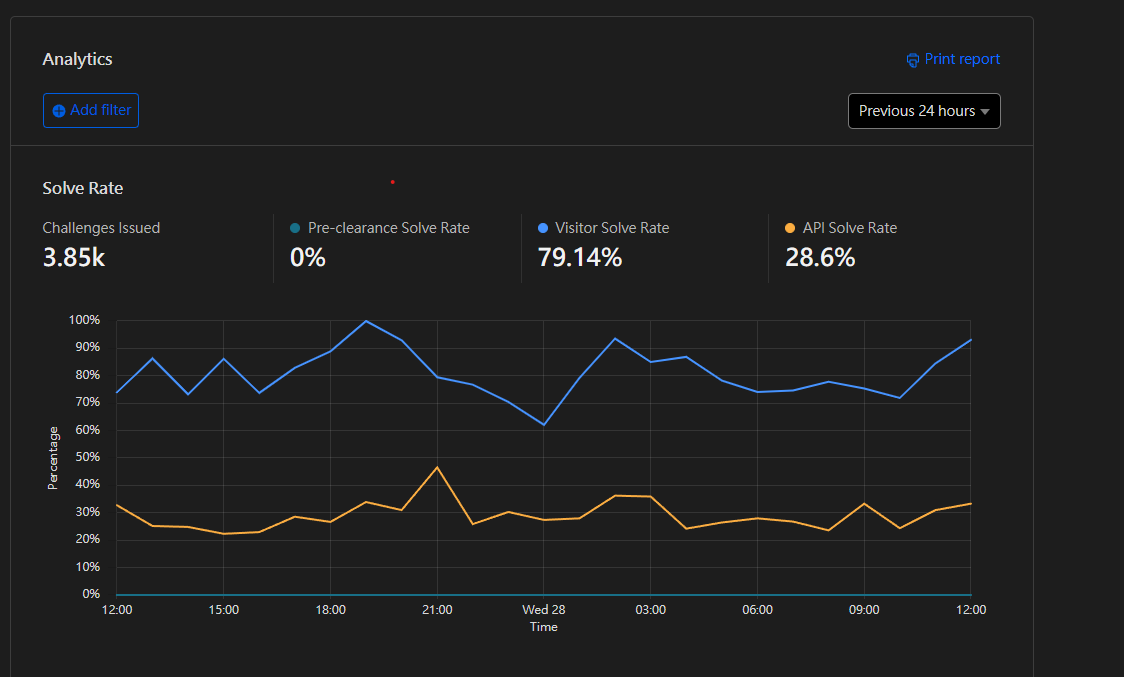
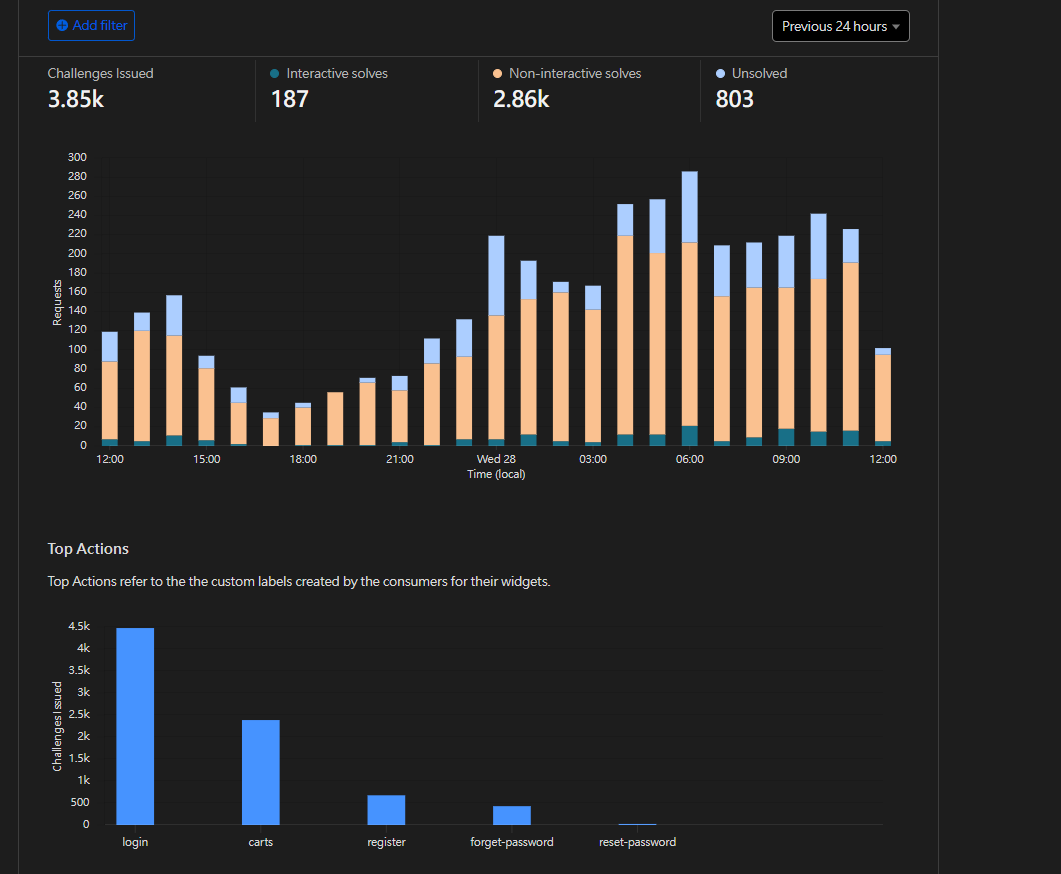
After deploying Cloudflare Turnstile, we blocked over 20-30% of bot requests for password resets, logins, account creation, and malicious credit card testing.
---
## About this article and its author
Originally published on [Mark Ku's Tech Notes](https://blog.markkulab.net/en/post/protect-your-website-with-cloudflare-turnstile)
License: [CC BY 4.0](https://creativecommons.org/licenses/by/4.0/) — when reusing or quoting, credit the author and link back to the original
### About the author
**[Mark Ku](https://blog.markkulab.net/en/author/mark-ku)** — Software engineer
- 10+ years as a software engineer
- Built North-American e-commerce and AI SaaS subscription billing
### Free tools built by the author
All of these are free to use:
- [Free PDF Sign Tool](https://blog.markkulab.net/en/tools/pdf-sign): Online PDF sign tool — draw, type, or upload a signature, then drag, resize, and download. Everything runs in your browser; nothing is uploaded.
- [VS Code Refactory](https://blog.markkulab.net/en/tools/refactory): Refactory is a VS Code refactoring extension: 34 actions plus a 37-rule code-smell inspection layer with a Code Health dashboard, across 18 languages, backed by 534 tests. It learns your repo's conventions: where interfaces live, where DI is registered, whether 'use client' belongs. It ranks files by git churn × complexity so you know what to fix first, and hands any smell to the Claude Code already on your machine. Free to use, and your source never leaves your computer.
- [DB-Kit Database Manager](https://blog.markkulab.net/en/tools/db-kit): DB-Kit is a lightweight, cross-platform database manager built with Tauri + Rust + React. Manage MySQL, MariaDB, PostgreSQL, SQL Server, Oracle, SQLite, MongoDB, Redis, Kafka, Elasticsearch and RabbitMQ from one consistent interface: passwords encrypted in the OS keychain, SSH tunnels, full CRUD, a visual query builder, stacked multi-statement result sets, cross-connection data transfer, schema & data compare with sync SQL and schema snapshots, Excel / CSV import & export, visualized execution plans, ER diagrams, scheduled backups, SQL stress testing with p50–p99 latency percentiles, a 15-rule SQL review engine, Review & Run (AI review plus per-statement backups and an auto-generated rollback script), Kafka message browsing with monitoring & alerts, an SSH terminal with SFTP / FTP, Docker / Kubernetes, remote desktop (RDP / VNC / RustDesk), file / folder compare, stored procedure integration tests, six UI languages, a built-in AI assistant (a local CLI or any Anthropic / OpenAI-compatible API; natural-language SQL, AI review and tuning advice) and the dbk CLI. Free and open source (MIT), with installers for Windows, macOS and Linux.
- [VS Code Super Mermaid](https://blog.markkulab.net/en/tools/super-mermaid): Super Mermaid is a VS Code extension for beautiful Mermaid diagrams out of the box: auto-colored live preview, mouse pan & zoom, high-res PNG / SVG export, 21 templates and multiple themes. Free and open source (MIT).
- [React Super Mermaid](https://blog.markkulab.net/en/tools/react-super-mermaid): react-super-mermaid is an open-source React component library: render beautiful Mermaid diagrams with a single , with built-in colorful / sketch themes, pan & zoom, in-diagram search, and high-res SVG / PNG export. Lightweight, SSR-safe, fully typed. Free and open source (MIT).
- [Jira / Confluence Super Mermaid](https://blog.markkulab.net/en/tools/jira-super-mermaid): An Atlassian Forge app: write Mermaid syntax directly inside a Jira issue or a Confluence page and get flowcharts, sequence diagrams, state machines and Gantt charts. 11 diagram types, SVG / PNG export, light and dark themes, full CJK support. Runs on Atlassian: your diagrams live in your own site and the app calls no third-party service. Free, coming soon to the Atlassian Marketplace.
- [Mermaid Live Preview](https://blog.markkulab.net/en/tools/mermaid-preview): Write Mermaid in your browser, see it render instantly, and share the whole diagram as a single link. No sign-up, nothing uploaded to a server, and mermaid.live share links work as-is.
- [React Intl Phone Number](https://blog.markkulab.net/en/tools/react-intl-phone-number): react-intl-phone-number is an open-source React component: framework-agnostic and antd-free, with E.164 in/out, a searchable flag / country-code dropdown, configurable validation levels (strict / mobile-strict / loose), themeable CSS, and i18n — phone logic powered by google-libphonenumber. Lightweight and fully typed. Free and open source (MIT).
- [Uptime Kuma Cluster](https://blog.markkulab.net/en/tools/uptime-kuma-cluster): Turn single-node Uptime Kuma into a highly available cluster: OpenResty + Lua smart load balancing, shared MariaDB state, health checks and automatic failover, plus cluster-management REST APIs. One Docker Compose command to start. Free and open source (MIT).
- [AI Podcast Cut](https://blog.markkulab.net/en/tools/ai-podcast-cut): Drop in a recording and it removes fillers and stutters, levels loudness segment by segment, and sends a second agent to review every cut. Cut points snap to word boundaries and zero crossings, every splice gets a fade, and sentence-end breaths are preserved. Desktop app for Windows, macOS and Linux. MIT licensed; the Windows installer bundles ffmpeg.
- [AI Video Cut](https://blog.markkulab.net/en/tools/ai-video-cut): Pick something in your video: type it (face, license plate, phone screen, logo), click points or drag a box, or let Claude Code / Codex pick it. AI Video Cut tracks it frame by frame, then mosaics or blurs it, recolors it, pins stickers and text to it, swaps a screen or poster for your own image or video, or removes it using background that other frames actually captured. Plus sequence editing, local captions and an AI assistant. Free, open-source (MIT) Windows desktop app (macOS / Linux experimental) that runs locally, nothing uploaded.
- [open-pos restaurant POS](https://blog.markkulab.net/en/tools/open-pos): One computer and one receipt printer is enough to open the shop. Your data lives on your own disk, no subscription, no lock-in, MIT licensed. Money is integer New Taiwan dollars with tax split by the statutory formula, so sales + tax always equals the total. Printing goes straight over ESC/POS on TCP 9100, with no vendor driver. Tauri + Rust + SQLite desktop app, v1.0 in development.
- [.NET e-commerce API template](https://blog.markkulab.net/en/tools/dotnet-ecommerce-api): An e-commerce backend API template built on .NET 10: Controller → Service → Repository layering, Autofac convention-based registration, SqlSugar for MySQL / MariaDB and SQL Server, Redis cache and message queue, Hangfire jobs, JWT auth, and an extensible payment provider module (ECPay, Newebpay). Apache 2.0.
- [Open Token Monitor team AI usage](https://blog.markkulab.net/en/tools/open-token-monitor): Collect token usage and equivalent cost from every employee's AI coding tools into a hub you host yourself: PostgreSQL, org roster, dashboards compared by company and department, and a reports API. Electron and Rust/Tauri clients upload every 30 minutes. MIT licensed, one Docker command.
- [ai-security-monitor defensive security](https://blog.markkulab.net/en/tools/ai-security-monitor): Your website is live. Who checks its certificates, security settings and known vulnerabilities? A self-hosted Security Hub brings website scans and host monitoring together, deduplicates findings and compares scans after fixes.
### Daily podcasts
- [Mark's Tech Insights — Daily AI News](https://blog.markkulab.net/en/category/tech-news): Daily curated AI and tech trends. Catch the latest developments via audio summaries — covering AI applications, software architecture, DevOps, and engineering practice. — RSS: https://blog.markkulab.net/feed.xml
- [AI股市蝦聊](https://blog.markkulab.net/en/category/ai-stock-chat): Every trading day, an AI-analyzed take on the Taiwan stock market, delivered as a two-host conversation covering the session and the next-day outlook. — RSS: https://blog.markkulab.net/ai-stock-chat/feed.xml
- [開源好物日報](https://blog.markkulab.net/en/category/open-source-weekly): A daily two-host pick of free open-source tools surfaced from real Hacker News, GitHub, and Reddit buzz — what pain they solve and the fastest way to get started. — RSS: https://blog.markkulab.net/open-source-weekly/feed.xml
- [AI 運動日報](https://blog.markkulab.net/en/category/sports-weekly): Two hosts talk NBA, MLB and world sport every day — scores, records and the stories behind them, from a Taiwanese fan perspective. — RSS: https://blog.markkulab.net/sports-weekly/feed.xml
- [AI 國際新聞快報](https://blog.markkulab.net/en/category/world-news): A daily two-host briefing that makes sense of the past 24 hours in world news — geopolitics, the global economy, conflict and security, disasters and climate — from a Taiwanese perspective, neutral and fully sourced. — RSS: https://blog.markkulab.net/world-news/feed.xml
- [地端 AI 實驗室](https://blog.markkulab.net/en/category/local-ai-lab): Every day, a two-host look at open-weight models and LoRAs you can actually run on your own machine: what they are for, whether your GPU can handle them, and how they compare — sourced from official model cards. — RSS: https://blog.markkulab.net/local-ai-lab/feed.xml
- [AI 行銷日報](https://blog.markkulab.net/en/category/ai-marketing): Every day, two hosts break down the latest in AI for marketing, advertising, SEO/GEO and content marketing: practical, never sponsored, every story sourced. — RSS: https://blog.markkulab.net/ai-marketing/feed.xml
- [AI 資安日報](https://blog.markkulab.net/en/category/ai-security): Every day, two hosts cover the latest where AI meets cybersecurity: LLM and AI agent vulnerabilities, prompt injection, model supply-chain risks and AI-powered attacks, from a defense-first angle with every story sourced. — RSS: https://blog.markkulab.net/ai-security/feed.xml
### Newsletter
[Subscribe to the newsletter](https://blog.markkulab.net/en/subscribe) — Be the first to know about new posts. No spam, unsubscribe anytime.