---
title: "Easily Build an End-to-End Automated Testing Environment with Microsoft Playwright, Protect Your Core Business Website, and Integrate Teams Notifications & External Triggers"
description: "How to quickly build E2E automated tests with Microsoft Playwright and GitHub Actions, integrating Teams notifications and a Jenkins Pipeline to safeguard the e-commerce checkout flow."
canonical_url: "https://blog.markkulab.net/en/post/playwright-end-to-end-test"
author: "Mark Ku"
author_url: "https://blog.markkulab.net/en/author/mark-ku"
site: "Mark Ku's Tech Notes"
date_published: "2023-01-09 01:01:01 +0800"
category: "Frontend"
tags: ["playwright", "vscode", "github actions", "e2e test", "jenkins", "testing", "frontend"]
language: "en"
license: "CC BY 4.0"
license_url: "https://creativecommons.org/licenses/by/4.0/"
attribution: "when reusing or quoting, credit the author and link back to the original"
---
# Easily Build an End-to-End Automated Testing Environment with Microsoft Playwright, Protect Your Core Business Website, and Integrate Teams Notifications & External Triggers
## Solving the Problem
I currently work at a B2C e-commerce company with significant traffic. To avoid accidentally breaking the checkout screen without it being noticed, I started researching UI testing to protect our checkout flow. We had previously used Playwright for SEO pre-rendering, and after evaluating several UI testing frameworks, I found that Playwright's ecosystem has become very complete and simple in recent years, making it a perfect fit for us. Its advantages are as follows:
* An open-source UI-Test framework from Microsoft
* Integrates with Jest
* Supports development and debugging in VS Code
* Integrates with GitHub by default
* Provides comprehensive reports
* Supports Node.js
## My Expected Workflow

## Steps
### First, let's create a Playwright test project [Official Docs](https://playwright.dev/docs/release-notes)
```
npm init playwright@latest
```
### Choose TypeScript and GitHub Actions flow integration
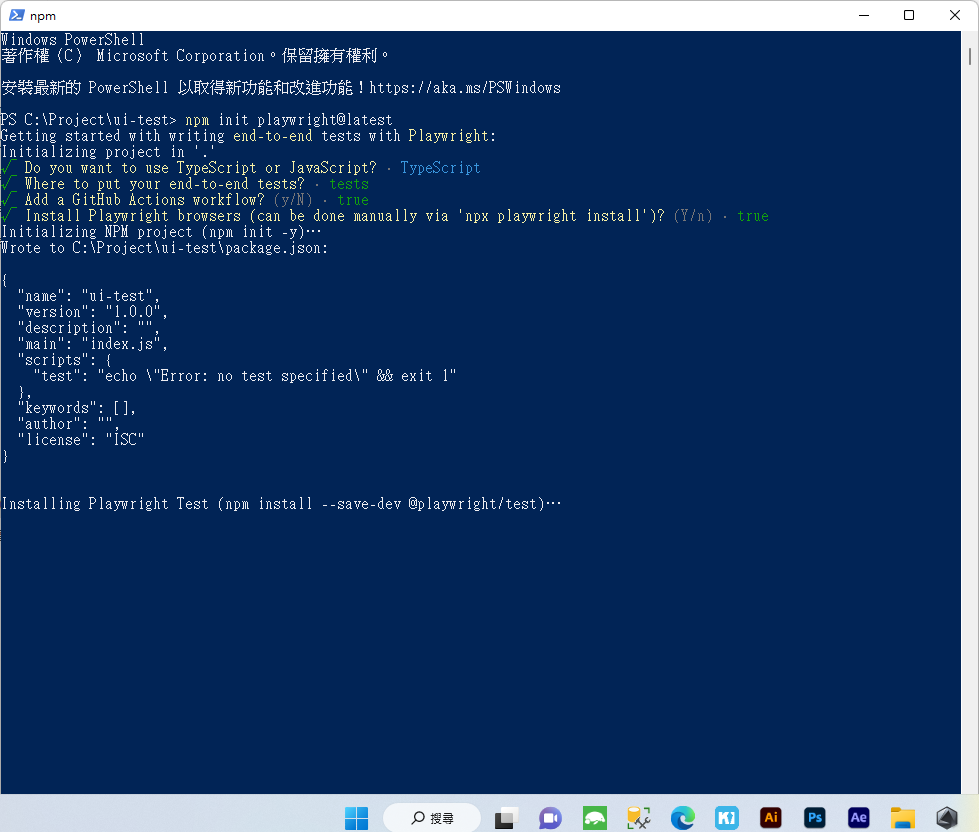
### Open the test project you just created. You'll find that basic test examples are already included in the folder.
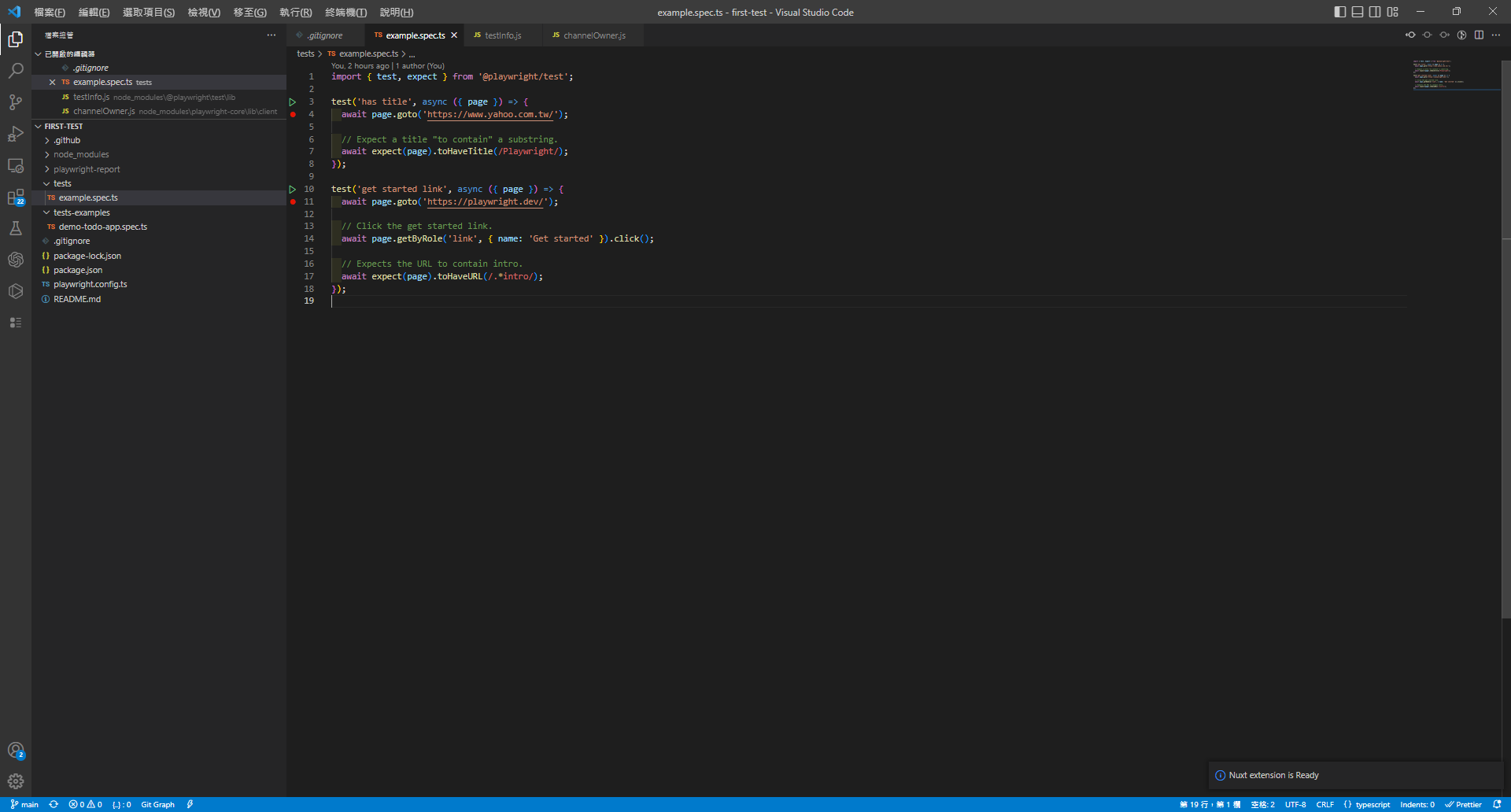
### First, install the [Jest extension](https://marketplace.visualstudio.com/items?itemName=Orta.vscode-jest) and the [Playwright Test for VSCode extension](https://marketplace.visualstudio.com/items?itemName=ms-playwright.playwright) in VS Code.
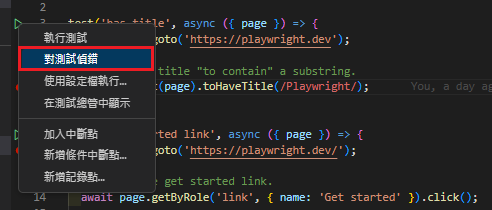
### Add a breakpoint, then right-click the green play arrow > Debug Test.
### A browser window will pop up, allowing you to debug line by line.
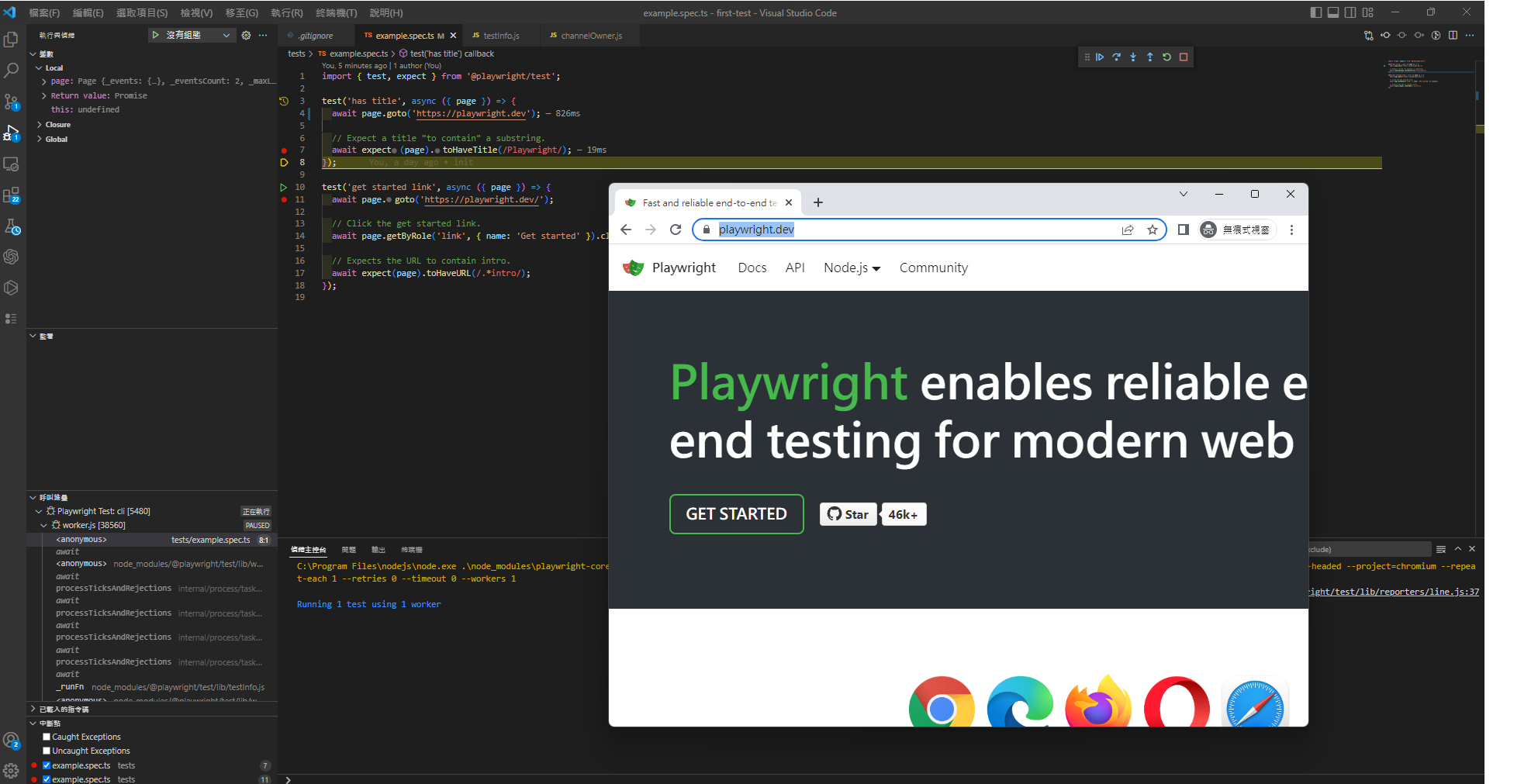
### The developer experience here is fantastic. In the past, when I wrote Python with Selenium, I had to spend a lot of time configuring the system environment.
### Next, push your project to GitHub. This will automatically trigger a build (test). Click on the job history.
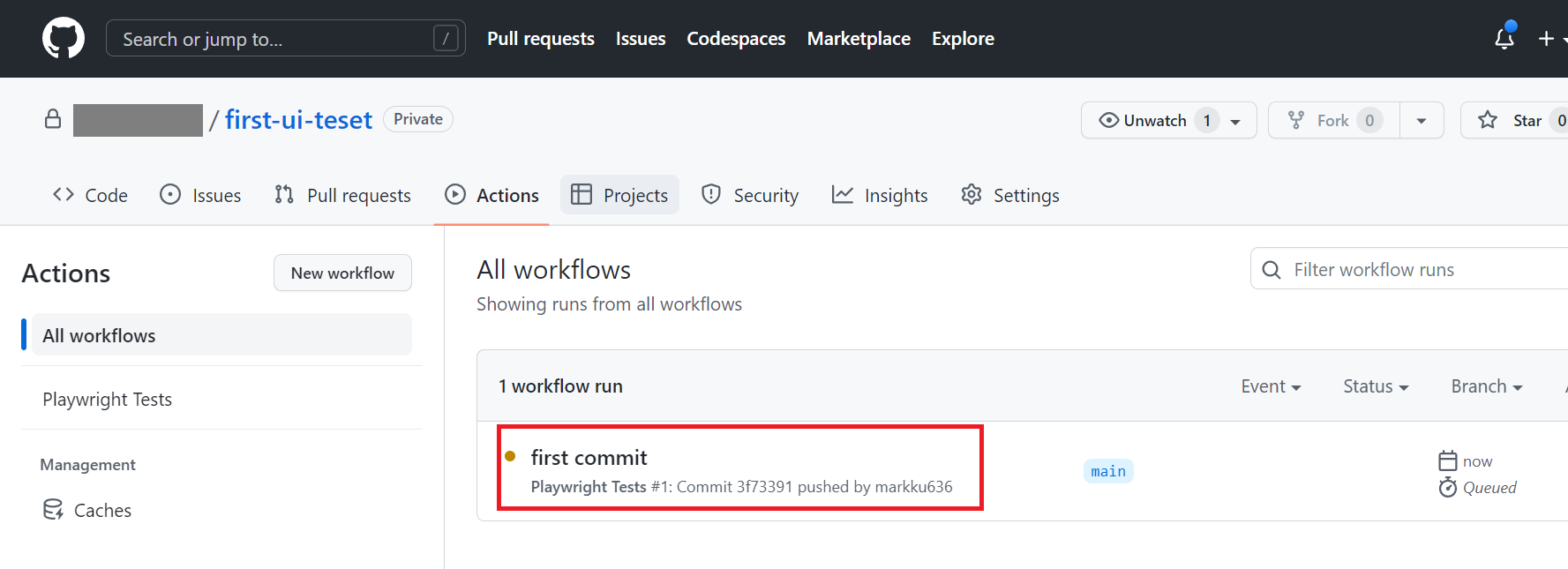
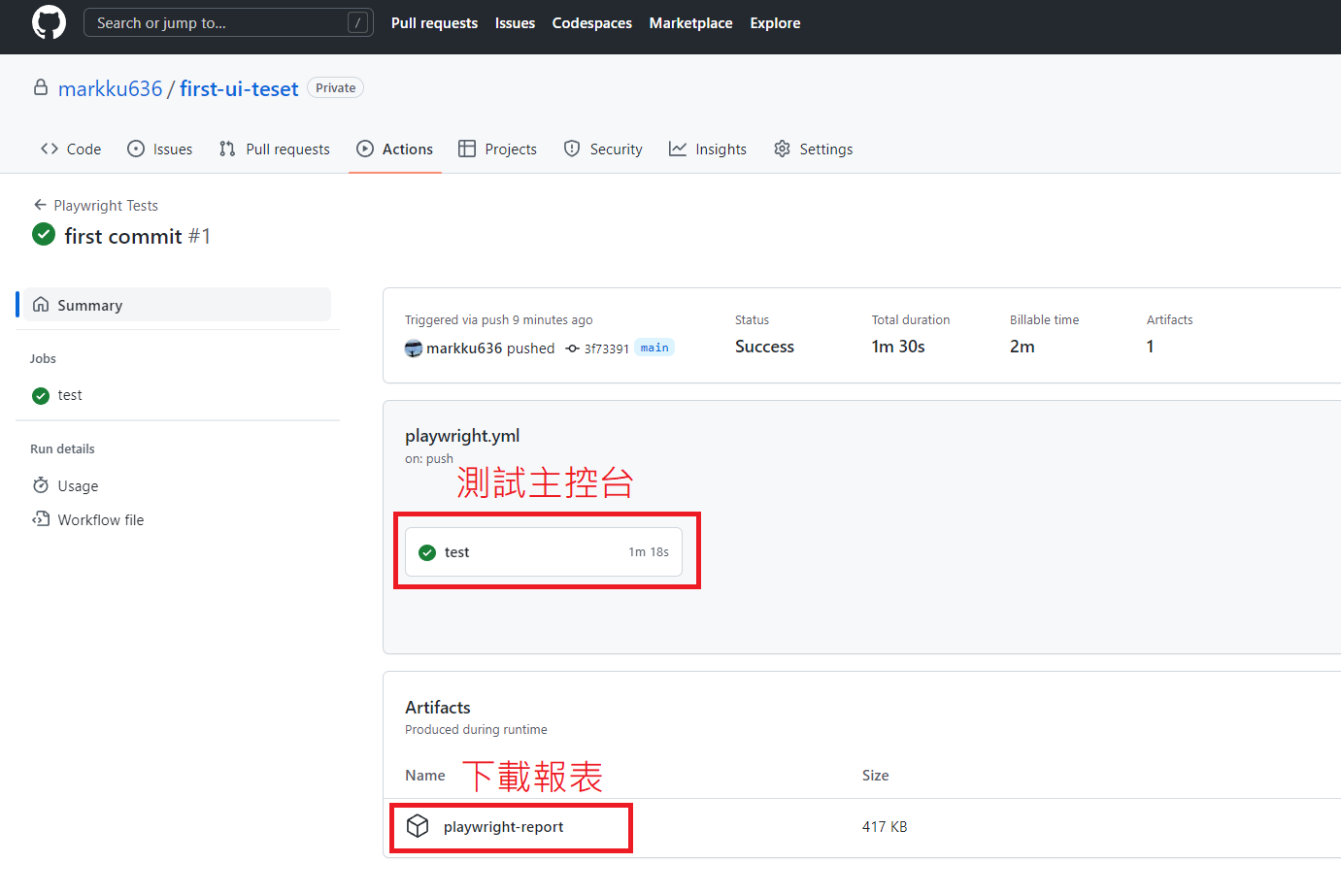
### You'll see that the test build has completed successfully, and you'll find links to the console and the report.
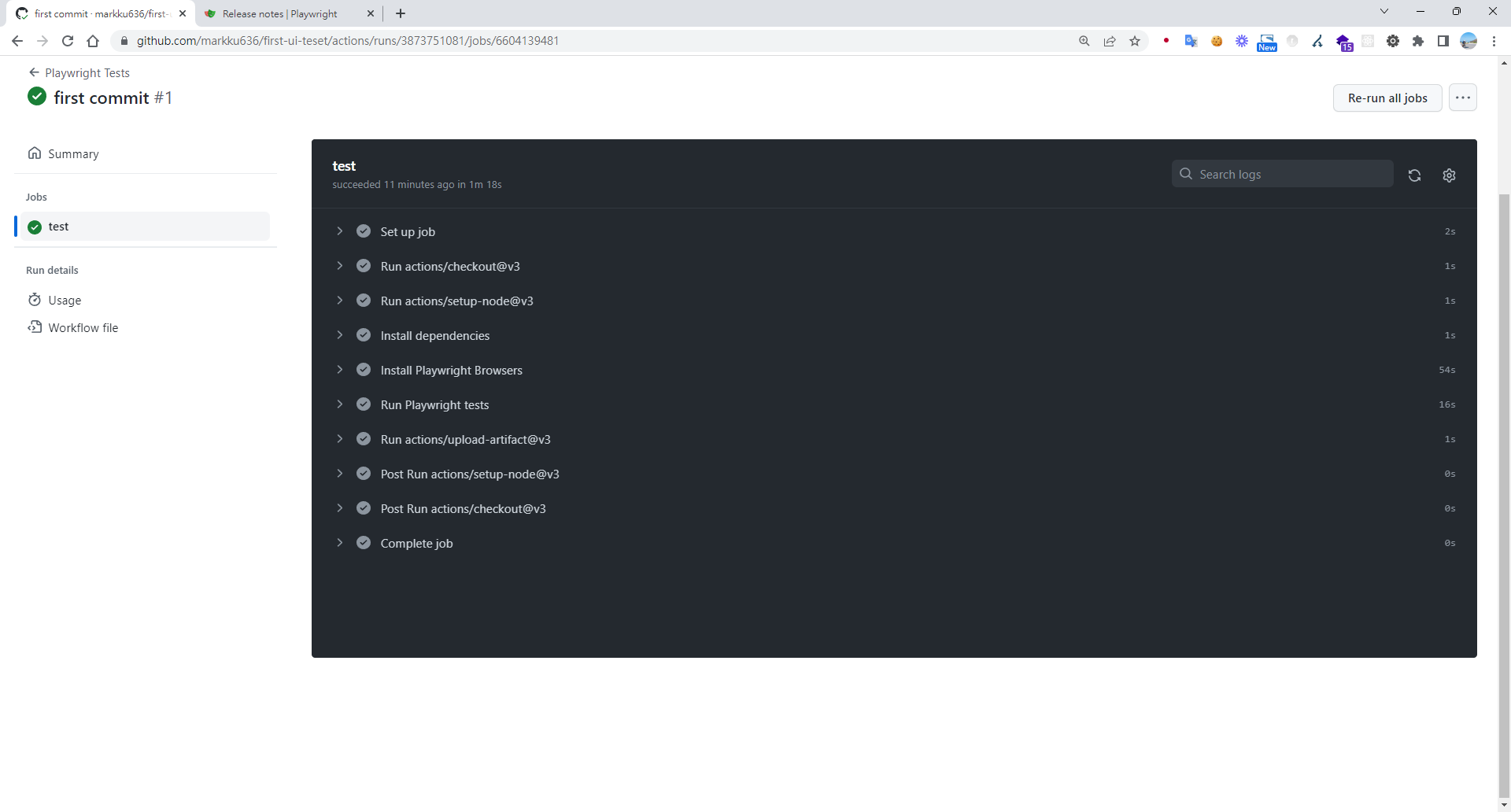
### Click to enter the test console to see what the job executed.
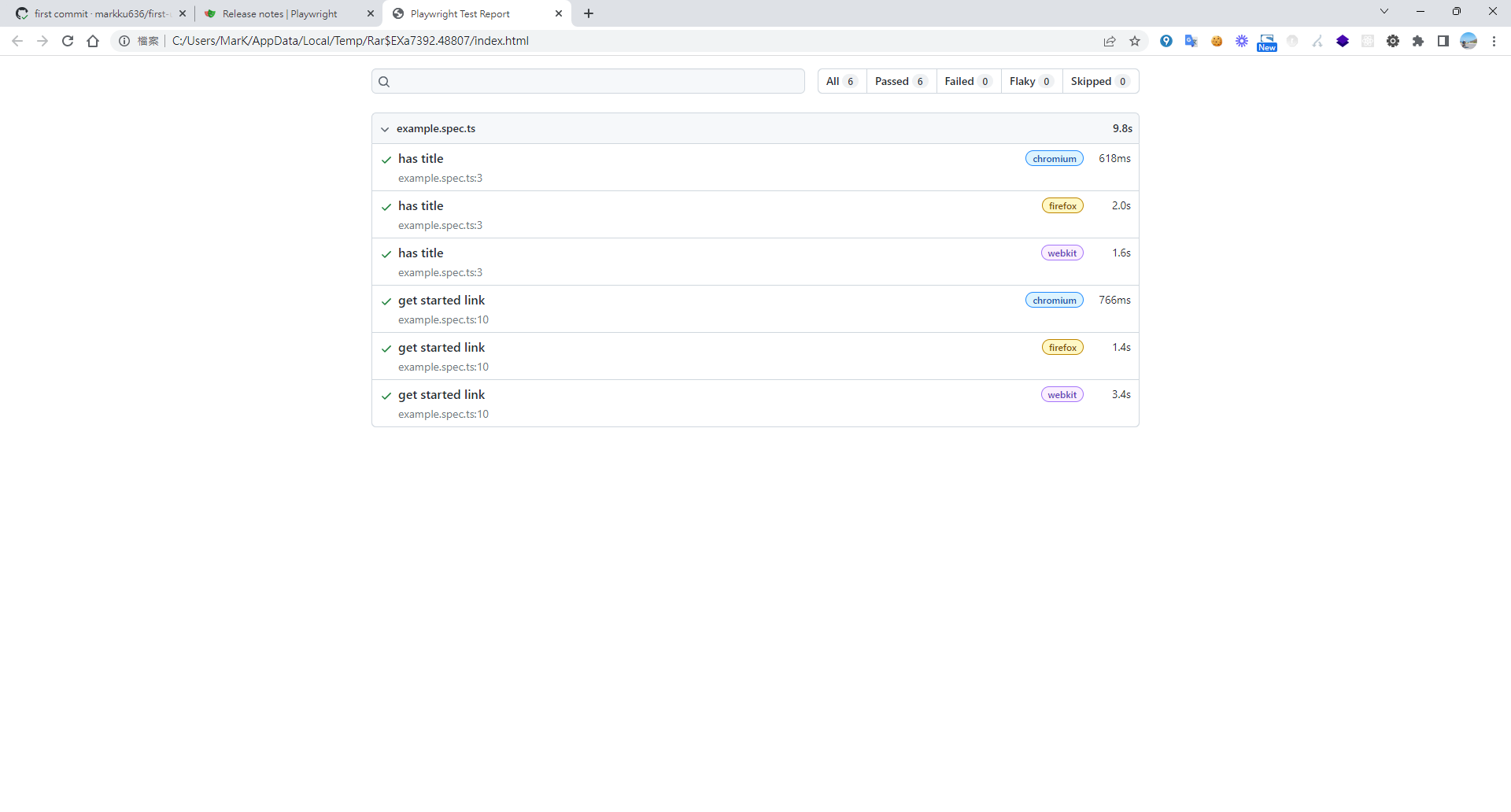
### Open the downloaded report.
### Next, since we want to push the test results and report to Teams:
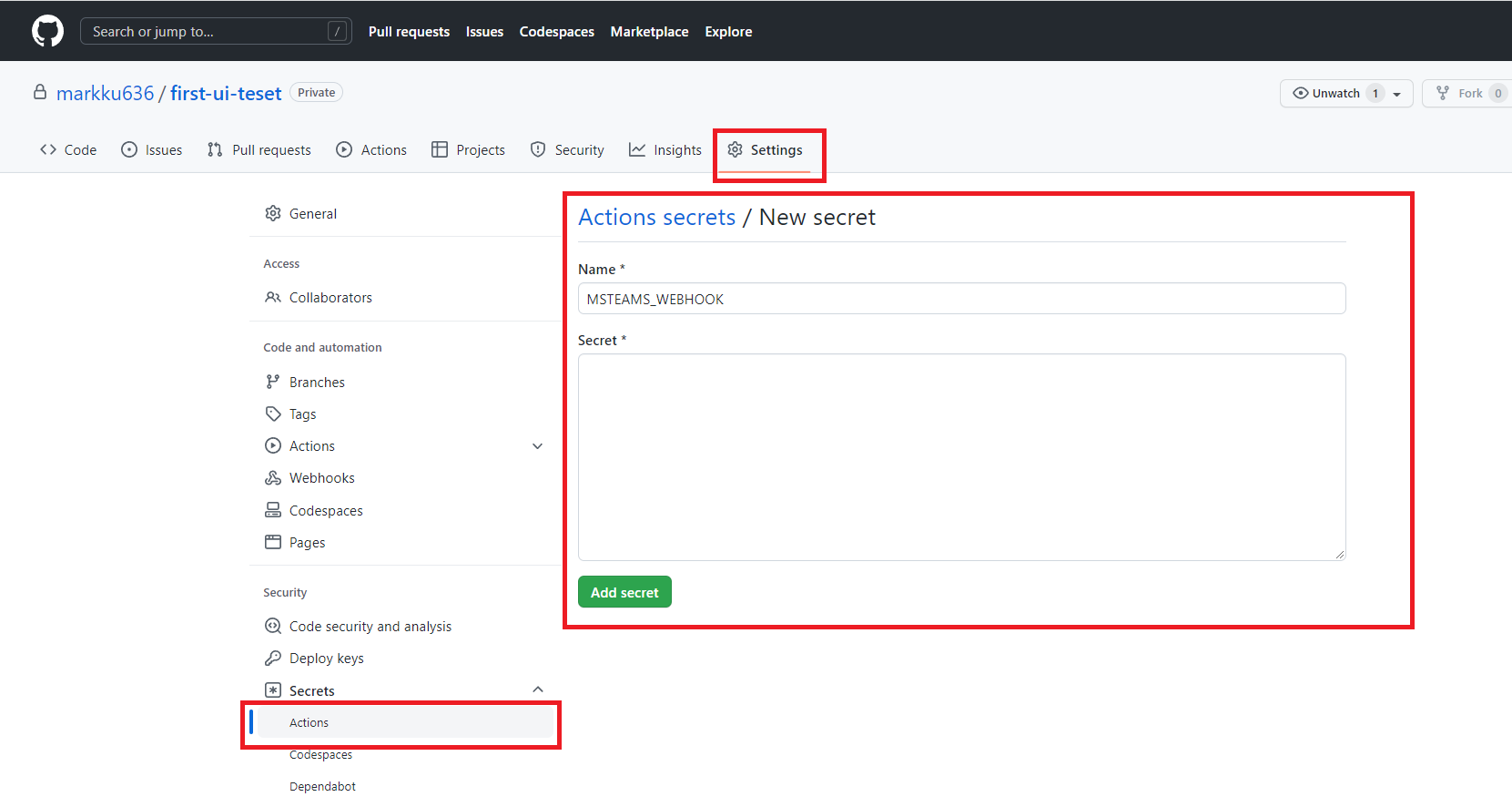
### First, go to your GitHub repo's Settings > Secrets > and create Actions secrets.
### Modify `.github/workflows/playwright.yml` by referencing the code below to add notifications.
```
name: Playwright Tests
on:
repository_dispatch:
types: remote-trigger-ui-test
push:
branches: [ main, master ]
pull_request:
branches: [ main, master ]
jobs:
test:
timeout-minutes: 60
runs-on: ubuntu-latest
steps:
- uses: actions/checkout@v3
- uses: actions/setup-node@v3
with:
node-version: 16
- name: Install dependencies
run: npm ci
- name: Install Playwright Browsers
run: npx playwright install --with-deps
- name: Run Playwright tests
run: npx playwright test
- uses: actions/upload-artifact@v3
if: always()
with:
name: playwright-report
path: playwright-report/
retention-days: 30
success_notify:
needs: test
name: notify
runs-on: ubuntu-18.04
steps:
- name: 📣 Send teams notification
uses: simbo/msteams-message-card-action@v1
with:
webhook: ${{ secrets.MSTEAMS_WEBHOOK }}
title: 😊 UI - Test Success
message: UI - Test Success\ ^ ^ /
color: 007FFF
buttons: |
See Test Report! ${{ github.server_url }}/${{ github.repository }}/actions/runs/${{ github.run_id }}
error_notify:
needs: test
name: error_notify
if: ${{ always() && needs.test.result == 'failure' }}
runs-on: ubuntu-18.04
steps:
- name: Send fail notification
uses: simbo/msteams-message-card-action@v1
with:
webhook: ${{ secrets.MSTEAMS_WEBHOOK }}
title: 💩UI - Test Fail
message: Ba Be Q ...= =...
color: FF0000
buttons: |
See Test Report! ${{ github.server_url }}/${{ github.repository }}/actions/runs/${{ github.run_id }}
```
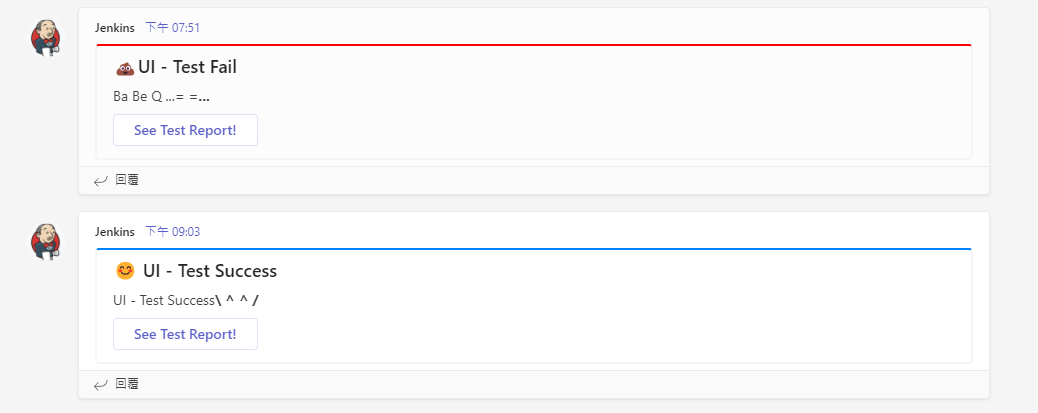
### The resulting card after the test run completes.
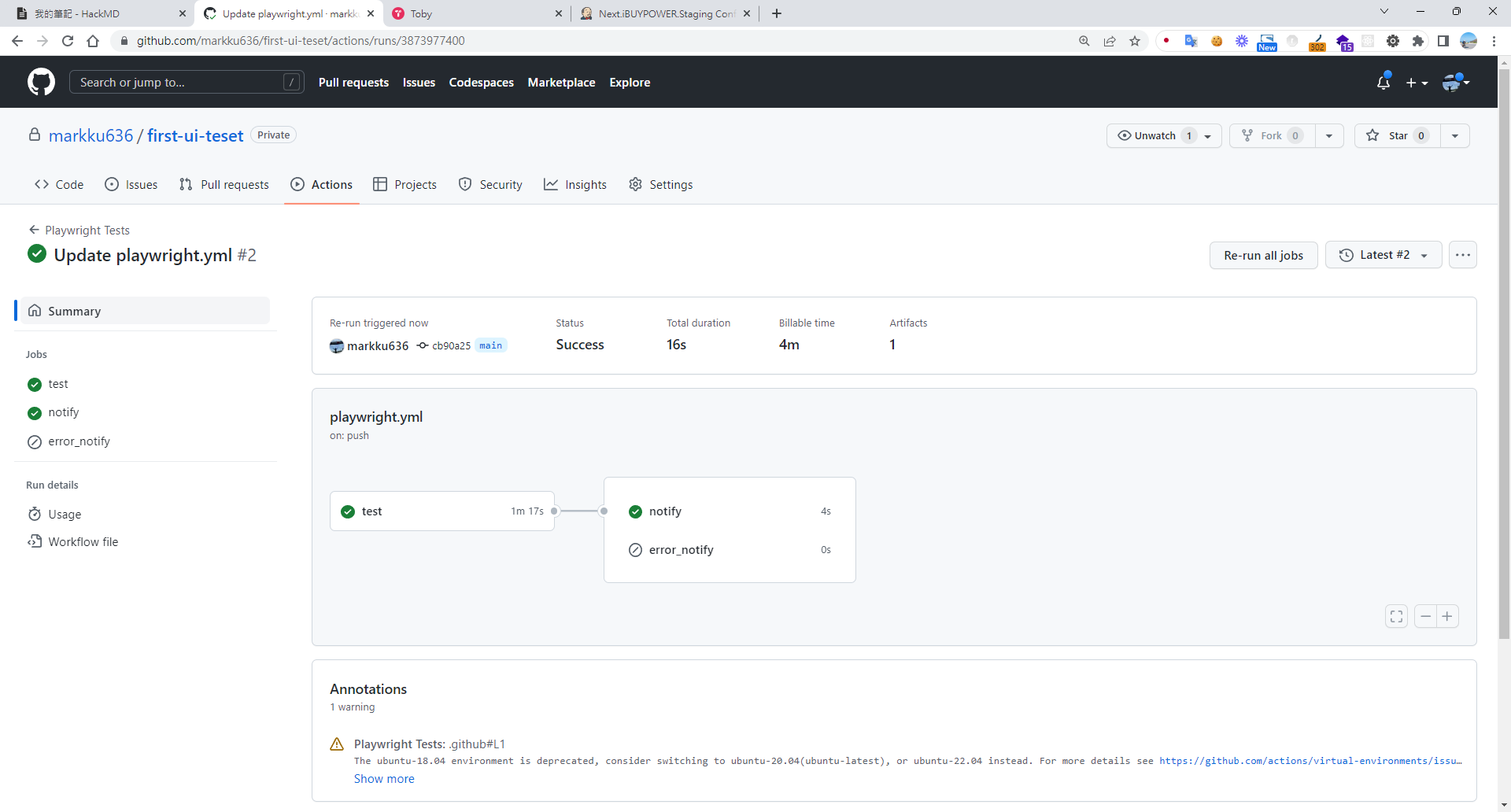
### In your application, add an external trigger for the workflow. [You can refer to this article on how to trigger a GitHub Action remotely](https://www.chenshaowen.com/blog/how-to-trigger-github-action-remotely.html), and replace the parameters in the code below.
:owner/:repo => markku636/first-ui-teset
:token => [GitHub token, click here to apply](https://github.com/settings/tokens/new)
```
on: push
jobs:
test-curl-action:
name: "Call Test CICD"
runs-on: ubuntu-latest
steps:
- name: "Call Github API"
uses: indiesdev/curl@v1.1
id: api2
with:
url: https://api.github.com/repos/:owner/:repo/dispatches
method: "POST"
accept: 200,201,204
headers: '{ "authorization": "token :token", "accept": "application/vnd.github.everest-preview+json","content-type":"application/x-www-form-urlencoded" }'
# you can use multiline format to construct json data object, the content should be yml format.
# this format apply to inputs: body, headers and params
"body": '{ "event_type": "remote-trigger-ui-test" }'
log-response: true
- name: "Use response"
run: echo ${{ steps.api.outputs.response }}
```
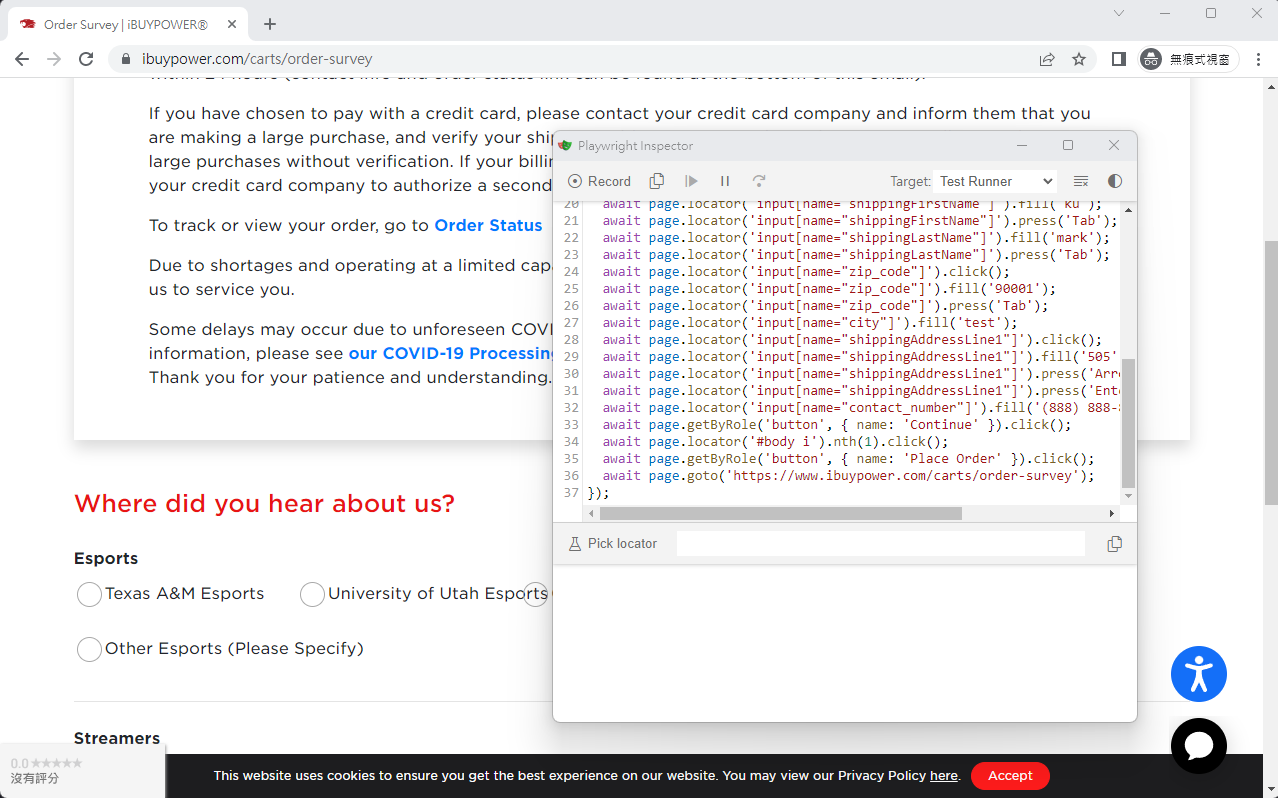
### Recording a Script
This is super cool. Without any special environment configuration, it can pop up a browser and start recording. It's incredibly useful.
```
npx playwright codegen www.ibuypower.com --output ./tests/ibuypower.spec.ts
```
## Conclusion
The biggest advantage of using Playwright is that Microsoft leverages its complete ecosystem to integrate the entire workflow. I was able to integrate VS Code + GitHub + Teams in a very short amount of time, and the experience was fantastic.
## Additional Notes
If you can't debug Jest test files in VS Code, please run the following command:
```
npm i -D @playwright/test
npx playwright install
npm install -D jest jest-playwright-preset playwright
code --install-extension Orta.vscode-jest
code --install-extension ms-playwright.playwright
```
## References
* [How to trigger GitHub Action remotely](https://www.chenshaowen.com/blog/how-to-trigger-github-action-remotely.html)
* [MS Teams Message Card](https://github.com/marketplace/actions/ms-teams-message-card)
## GitHub Actions felt too slow after going live, so I later moved it to run in our own Jenkins pipeline.
```
pipeline {
agent any
tools {nodejs "Node Core"}
options {
buildDiscarder logRotator(artifactDaysToKeepStr: '', artifactNumToKeepStr: '20', daysToKeepStr: '', numToKeepStr: '20')
timeout(time: 10, unit: 'MINUTES')
}
stages {
stage("GitHub Pull") {
steps {
git branch: "main", url: "https://ghp_xxx@github.com/iBuypowerUS/iBuypower.UI.Test.git"
}
}
stage("Test and Report") {
steps {
script {
def errorEncountered = false
try {
bat "npm install"
bat "npm run testCase"
} catch(Exception e) {
errorEncountered = true
echo "Error during testing: ${e.getMessage()}"
} finally {
publishHTML([
alwaysLinkToLastBuild: true,
allowMissing: false,
keepAll: true,
reportDir: 'playwright-html-report',
reportFiles: 'index.html',
reportName: 'HTML Report',
reportTitles: 'HTML Report'
])
if (errorEncountered) {
error "npm run testCase encountered an error."
}
}
}
}
}
}
}
```
P.S. To display reports in Jenkins, you need to install the 'HTML Publisher plugin'. If the HTML report content doesn't display, you'll need to run the following in the Jenkins Script Console:
```
System.setProperty("hudson.model.DirectoryBrowserSupport.CSP", "")
```
---
## About this article and its author
Originally published on [Mark Ku's Tech Notes](https://blog.markkulab.net/en/post/playwright-end-to-end-test)
License: [CC BY 4.0](https://creativecommons.org/licenses/by/4.0/) — when reusing or quoting, credit the author and link back to the original
### About the author
**[Mark Ku](https://blog.markkulab.net/en/author/mark-ku)** — Software Solution Provider
- 10+ years senior software engineer, now an AI Builder
- Focused on large-platform architecture — North-American e-commerce, AI SaaS subscription billing
- Combining AI Agents and automation to build evolvable product foundations
### Free tools built by the author
All of these are free to use:
- [Free PDF Sign Tool](https://blog.markkulab.net/en/tools/pdf-sign): Online PDF sign tool — draw, type, or upload a signature, then drag, resize, and download. Everything runs in your browser; nothing is uploaded.
- [VS Code Refactory](https://blog.markkulab.net/en/tools/refactory): Refactory is a VS Code refactoring extension: 34 actions plus a 37-rule code-smell inspection layer with a Code Health dashboard, across 18 languages, backed by 534 tests. It learns your repo's conventions: where interfaces live, where DI is registered, whether 'use client' belongs. It ranks files by git churn × complexity so you know what to fix first, and hands any smell to the Claude Code already on your machine. Free to use, and your source never leaves your computer.
- [DB-Kit Database Manager](https://blog.markkulab.net/en/tools/db-kit): DB-Kit is a lightweight, cross-platform database manager built with Tauri + Rust + React. Manage MySQL, MariaDB, PostgreSQL, SQL Server, Oracle, SQLite, MongoDB, Redis, Kafka, Elasticsearch and RabbitMQ from one consistent interface: passwords encrypted in the OS keychain, SSH tunnels, full CRUD, a visual query builder, stacked multi-statement result sets, cross-connection data transfer and compare/sync, Excel / CSV import & export, visualized execution plans, ER diagrams, scheduled backups, SQL stress testing with p50–p99 latency percentiles, a 15-rule SQL review engine, Kafka message browsing with monitoring & alerts, a bilingual UI (Traditional Chinese / English), a built-in AI assistant (natural-language SQL, AI review and tuning advice) and the dbk CLI. Free and open source (MIT), with installers for Windows, macOS and Linux.
- [VS Code Super Mermaid](https://blog.markkulab.net/en/tools/super-mermaid): Super Mermaid is a VS Code extension for beautiful Mermaid diagrams out of the box: auto-colored live preview, mouse pan & zoom, high-res PNG / SVG export, 21 templates and multiple themes. Free and open source (MIT).
- [React Super Mermaid](https://blog.markkulab.net/en/tools/react-super-mermaid): react-super-mermaid is an open-source React component library: render beautiful Mermaid diagrams with a single , with built-in colorful / sketch themes, pan & zoom, in-diagram search, and high-res SVG / PNG export. Lightweight, SSR-safe, fully typed. Free and open source (MIT).
- [Jira / Confluence Super Mermaid](https://blog.markkulab.net/en/tools/jira-super-mermaid): An Atlassian Forge app: write Mermaid syntax directly inside a Jira issue or a Confluence page and get flowcharts, sequence diagrams, state machines and Gantt charts. 11 diagram types, SVG / PNG export, light and dark themes, full CJK support. Runs on Atlassian: your diagrams live in your own site and the app calls no third-party service. Free, coming soon to the Atlassian Marketplace.
- [Mermaid Live Preview](https://blog.markkulab.net/en/tools/mermaid-preview): Write Mermaid in your browser, see it render instantly, and share the whole diagram as a single link. No sign-up, nothing uploaded to a server, and mermaid.live share links work as-is.
- [React Intl Phone Number](https://blog.markkulab.net/en/tools/react-intl-phone-number): react-intl-phone-number is an open-source React component: framework-agnostic and antd-free, with E.164 in/out, a searchable flag / country-code dropdown, configurable validation levels (strict / mobile-strict / loose), themeable CSS, and i18n — phone logic powered by google-libphonenumber. Lightweight and fully typed. Free and open source (MIT).
- [Uptime Kuma Cluster](https://blog.markkulab.net/en/tools/uptime-kuma-cluster): Turn single-node Uptime Kuma into a highly available cluster: OpenResty + Lua smart load balancing, shared MariaDB state, health checks and automatic failover, plus cluster-management REST APIs. One Docker Compose command to start. Free and open source (MIT).
- [Special Education](https://blog.markkulab.net/en/education): Learning materials crafted for special education students
### Daily podcasts
- [Mark's Tech Insights — Daily AI News](https://blog.markkulab.net/en/category/tech-news): Daily curated AI and tech trends. Catch the latest developments via audio summaries — covering AI applications, software architecture, DevOps, and engineering practice. — RSS: https://blog.markkulab.net/feed.xml
- [AI股市蝦聊](https://blog.markkulab.net/en/category/ai-stock-chat): Every trading day, an AI-analyzed take on the Taiwan stock market, delivered as a two-host conversation covering the session and the next-day outlook. — RSS: https://blog.markkulab.net/ai-stock-chat/feed.xml
- [開源好物週報](https://blog.markkulab.net/en/category/open-source-weekly): A weekly two-host pick of free open-source tools surfaced from real Hacker News, GitHub, and Reddit buzz — what pain they solve and the fastest way to get started. — RSS: https://blog.markkulab.net/open-source-weekly/feed.xml
### Newsletter
[Subscribe to the newsletter](https://blog.markkulab.net/en/subscribe) — Be the first to know about new posts. No spam, unsubscribe anytime.