---
title: "React Learning Notes - Framework Advantages, XSS, and CSS-in-JS Usage - Part 2"
description: "React Learning: Part Two, covering the advantages of React compared to other frameworks, its XSS protection mechanisms, and how to use CSS-in-JS with practical examples."
canonical_url: "https://blog.markkulab.net/en/post/learn-react-part-2"
author: "Mark Ku"
author_url: "https://blog.markkulab.net/en/author/mark-ku"
site: "Mark Ku's Tech Notes"
date_published: "2022-07-23 01:01:01 +0800"
category: "Frontend"
tags: ["react", "xss", "css in js", "frontend", "javascript", "framework", "學習筆記"]
language: "en"
license: "CC BY 4.0"
license_url: "https://creativecommons.org/licenses/by/4.0/"
attribution: "when reusing or quoting, credit the author and link back to the original"
---

# React Learning Notes - Framework Advantages, XSS, and CSS-in-JS Usage - Part 2

## React Learning Notes

## Key to the Success of the React Framework
### The Problem with Two-Way Binding
Two-way binding primarily changes the UI dynamically by changing the data. As applications grow larger, two-way binding is often unnecessary and instead causes performance overhead, making data increasingly difficult to manage.
Angular - AngularJS's approach led to too many derivative problems, which is why Angular 2 and later also adopted a one-way data flow.
Vue - A one-way data flow framework. `v-model` is just syntactic sugar to reduce the code needed to control data flow. It allows user actions to update the bound value through a one-way data flow, and this bound value is then updated on the page through a render update.

### One-Way Rendering
Data and the interface are bound together, much like a function: the same input parameters will always produce the same component output.

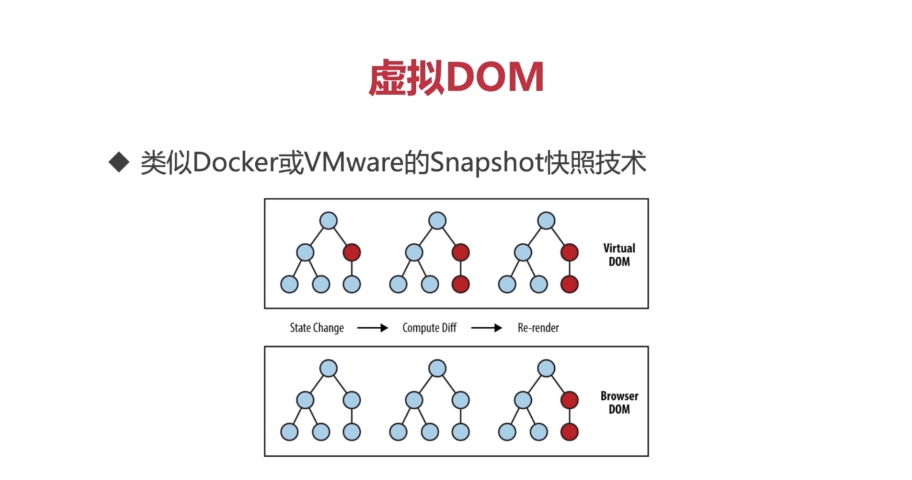
### Virtual DOM
Manipulating the browser's DOM is expensive. JavaScript simulates a DOM abstraction layer to achieve partial render updates with minimal cost.

![Diagram illustrating Virtual DOM state change, diff, and re-render](https://blog.markkulab.net/content/markku/posts/learn-react-part-2/images/WUh2W3r.png)

### Componentization
An application is built from countless components. Components themselves are independent, complete, and freely composable, which enables:
* Consistency
* A unified visual style
* Better collaboration in software development

## React and XSS
`{html}` => When rendered in a JSX template, XSS-related characters are converted into encoded strings. If you need to render raw HTML, you must use `dangerouslySetInnerHTML`, but be careful when doing so.
```
import React from "react";
import logo from "./logo.svg";

import Robot from "Robot";
import "App.css";

function App() {
  let html = "<img alt='rebot' src='./images/GDZ.png'} />";
  let jsHack = "javascript: alert('123')";  

  let user = { name: "hannah </script><script>alert(1);//" };

  return (
    <div className="App">      

      <span dangerouslySetInnerHTML={{ __html: user.name }} />
      <a
        className="App-link"
        href="https://reactjs.org"
        target="_blank"
        rel="noopener noreferrer"
      >
        Learn Reactaa
      </a>
      {/* <Robot id="GDZ.png?set=set3" email="edaad" name="mark" /> */}
      <a href={jsHack}>JShACK</a>
      {html}
    </div>
  );
}

export default App;
```   
    
##  Methods for Using CSS in React
### 1. Directly import the entire CSS file
```
import './index.css'
<div className="app" />
```
P.S. Importing this way can cause global CSS pollution.

### 2. Write CSS within the component
```
import React from "react";

class Header extends React.Component {
	style1 = {
		background: 'red',
		height: '25px'
	};	
	 	
  render() {
    return (
		<div  style={this.style1}>		
			123
		</div>
    );
  }
}

export default Header;
```

### 3. CSS-in-JS (Modular import with JSS)
A characteristic of CSS-in-JS is that the resulting `CssName` in the final render is dynamically generated. The benefit is that you can import and use CSS only when it's needed.
Declare the CSS module.

```
global.d.ts
declare module "*.module.css" {
    const classes: { [key: string]: string}
    export default classes
}

declare module "*.module.scss" {
    const classes: { [key: string]: string}
    export default classes
}
  
```

```
import style from './index'
<div className={styles.app}>
```

#### VS Code IntelliSense for CSS-in-JS (Install the TypeScript CSS Modules plugin)

```
npm install typescript-plugin-css-modules --save --dev
```
#### Modify the tsconfig.json config file and add plugins
```
{
  "compilerOptions": {
    "target": "es5",
    "lib": [
      "dom",
      "dom.iterable",
      "esnext"
    ],
    ...
  
    "plugins": [
      {
        "name": "typescript-plugin-css-modules"
      }
    ]
    ...
	...
   "include": [
	"global.d.ts"
   ]
   ...
  },
}
```
#### Add VS Code configuration (.vscode/settings.json)
```
{
	"typescript.tsdk": "node_modules/typescript/lib",
	"typescript.enablePromptUseWorkspaceTsdk": true,
	"typescript.tsserver.pluginPaths": ["typescript-plugin-css-modules"]
}
```
#### At this point, VS Code will show a prompt. Click "Allow," restart VS Code, and you will have autocompletion for CSS modules.
![VS Code prompt in Chinese asking to allow workspace TypeScript version](https://blog.markkulab.net/content/markku/posts/learn-react-part-2/images/rDoTdb4.png)
### Autocompletion Feature
![VS Code autocompleting CSS module cartContainer property](https://blog.markkulab.net/content/markku/posts/learn-react-part-2/images/S6loSZi.png)
P.S. Looking at React's internals, you'll find that image formats and other types of React modules are already declared by default, so you can just import them directly.
![VS Code autocompletion for React SVG module declaration](https://blog.markkulab.net/content/markku/posts/learn-react-part-2/images/xwbguAU.png)

---

## About this article and its author

Originally published on [Mark Ku's Tech Notes](https://blog.markkulab.net/en/post/learn-react-part-2)

License: [CC BY 4.0](https://creativecommons.org/licenses/by/4.0/) — when reusing or quoting, credit the author and link back to the original

### About the author

**[Mark Ku](https://blog.markkulab.net/en/author/mark-ku)** — Software Solution Provider

- 10+ years senior software engineer, now an AI Builder
- Focused on large-platform architecture — North-American e-commerce, AI SaaS subscription billing
- Combining AI Agents and automation to build evolvable product foundations

### Free tools built by the author

All of these are free to use:

- [Free PDF Sign Tool](https://blog.markkulab.net/en/tools/pdf-sign): Online PDF sign tool — draw, type, or upload a signature, then drag, resize, and download. Everything runs in your browser; nothing is uploaded.
- [VS Code Refactory](https://blog.markkulab.net/en/tools/refactory): Refactory is a VS Code refactoring extension: 34 actions plus a 37-rule code-smell inspection layer with a Code Health dashboard, across 18 languages, backed by 534 tests. It learns your repo's conventions: where interfaces live, where DI is registered, whether 'use client' belongs. It ranks files by git churn × complexity so you know what to fix first, and hands any smell to the Claude Code already on your machine. Free to use, and your source never leaves your computer.
- [DB-Kit Database Manager](https://blog.markkulab.net/en/tools/db-kit): DB-Kit is a lightweight, cross-platform database manager built with Tauri + Rust + React. Manage MySQL, MariaDB, PostgreSQL, SQL Server, Oracle, SQLite, MongoDB, Redis, Kafka, Elasticsearch and RabbitMQ from one consistent interface: passwords encrypted in the OS keychain, SSH tunnels, full CRUD, a visual query builder, stacked multi-statement result sets, cross-connection data transfer and compare/sync, Excel / CSV import & export, visualized execution plans, ER diagrams, scheduled backups, SQL stress testing with p50–p99 latency percentiles, a 15-rule SQL review engine, Kafka message browsing with monitoring & alerts, a bilingual UI (Traditional Chinese / English), a built-in AI assistant (natural-language SQL, AI review and tuning advice) and the dbk CLI. Free and open source (MIT), with installers for Windows, macOS and Linux.
- [VS Code Super Mermaid](https://blog.markkulab.net/en/tools/super-mermaid): Super Mermaid is a VS Code extension for beautiful Mermaid diagrams out of the box: auto-colored live preview, mouse pan & zoom, high-res PNG / SVG export, 21 templates and multiple themes. Free and open source (MIT).
- [React Super Mermaid](https://blog.markkulab.net/en/tools/react-super-mermaid): react-super-mermaid is an open-source React component library: render beautiful Mermaid diagrams with a single <MermaidViewer>, with built-in colorful / sketch themes, pan & zoom, in-diagram search, and high-res SVG / PNG export. Lightweight, SSR-safe, fully typed. Free and open source (MIT).
- [Jira / Confluence Super Mermaid](https://blog.markkulab.net/en/tools/jira-super-mermaid): An Atlassian Forge app: write Mermaid syntax directly inside a Jira issue or a Confluence page and get flowcharts, sequence diagrams, state machines and Gantt charts. 11 diagram types, SVG / PNG export, light and dark themes, full CJK support. Runs on Atlassian: your diagrams live in your own site and the app calls no third-party service. Free, coming soon to the Atlassian Marketplace.
- [Mermaid Live Preview](https://blog.markkulab.net/en/tools/mermaid-preview): Write Mermaid in your browser, see it render instantly, and share the whole diagram as a single link. No sign-up, nothing uploaded to a server, and mermaid.live share links work as-is.
- [React Intl Phone Number](https://blog.markkulab.net/en/tools/react-intl-phone-number): react-intl-phone-number is an open-source React component: framework-agnostic and antd-free, with E.164 in/out, a searchable flag / country-code dropdown, configurable validation levels (strict / mobile-strict / loose), themeable CSS, and i18n — phone logic powered by google-libphonenumber. Lightweight and fully typed. Free and open source (MIT).
- [Uptime Kuma Cluster](https://blog.markkulab.net/en/tools/uptime-kuma-cluster): Turn single-node Uptime Kuma into a highly available cluster: OpenResty + Lua smart load balancing, shared MariaDB state, health checks and automatic failover, plus cluster-management REST APIs. One Docker Compose command to start. Free and open source (MIT).
- [Special Education](https://blog.markkulab.net/en/education): Learning materials crafted for special education students

### Daily podcasts

- [Mark's Tech Insights — Daily AI News](https://blog.markkulab.net/en/category/tech-news): Daily curated AI and tech trends. Catch the latest developments via audio summaries — covering AI applications, software architecture, DevOps, and engineering practice. — RSS: https://blog.markkulab.net/feed.xml
- [AI股市蝦聊](https://blog.markkulab.net/en/category/ai-stock-chat): Every trading day, an AI-analyzed take on the Taiwan stock market, delivered as a two-host conversation covering the session and the next-day outlook. — RSS: https://blog.markkulab.net/ai-stock-chat/feed.xml
- [開源好物週報](https://blog.markkulab.net/en/category/open-source-weekly): A weekly two-host pick of free open-source tools surfaced from real Hacker News, GitHub, and Reddit buzz — what pain they solve and the fastest way to get started. — RSS: https://blog.markkulab.net/open-source-weekly/feed.xml

### Newsletter

[Subscribe to the newsletter](https://blog.markkulab.net/en/subscribe) — Be the first to know about new posts. No spam, unsubscribe anytime.
