---
title: "Building an Efficient API Management Platform: Deploying Kong Gateway from Scratch - Part 1"
description: "This post will guide you through installing and deploying Kong API Gateway from scratch, covering its core features, common configurations, Docker deployment examples, and advanced practical use cases like rate limiting, reverse proxy, and high-availability architecture."
canonical_url: "https://blog.markkulab.net/en/post/kong-api-gateway-part1-setup"
author: "Mark Ku"
author_url: "https://blog.markkulab.net/en/author/mark-ku"
site: "Mark Ku's Tech Notes"
date_published: "2025-06-19 01:01:35 +0800"
category: "DevOps"
tags: ["kong", "api gateway", "reverse proxy", "rate limiting", "docker"]
language: "en"
license: "CC BY 4.0"
license_url: "https://creativecommons.org/licenses/by/4.0/"
attribution: "when reusing or quoting, credit the author and link back to the original"
---
# Building an Efficient API Management Platform: Deploying Kong Gateway from Scratch - Part 1
## What is Kong?
Kong is a high-performance API Gateway built on Nginx and OpenResty. Its core is written in Lua and it provides features like reverse proxying, API management, and plugin management/extension. It also inherits the advantages and characteristics of Nginx. Kong primarily uses PostgreSQL to store its configuration but also supports a database-less (DB-less) mode. It offers a native RESTful API for management, making it very suitable for scenarios requiring a single entry point for APIs and API subscriptions.
---
## What can Kong do?
* Load balancing (reverse proxy)
* Unified API entry point (API Gateway)
* Supports multi-environment and version deployments
* API usage statistics and billing
* Security authentication (API Key, JWT, OAuth2, etc.)
---
## Core Features
* Makes managing and deploying RESTful APIs simple and efficient
* Supports API version control and authorization
* Allows setting request limits (Rate Limiting) based on user levels
* Based on its Nginx architecture, no service restart is needed when changing configurations
* A powerful plugin mechanism for extending functionality or custom development
---
## Official Documentation
---
## Similar Tools
* **Apache APISIX**
* **Tyk**
* **NGINX Plus (Commercial)**
---
## Deploying Kong API Gateway (Docker with DB version)
```yaml
version: '3.8'
services:
kong-database:
image: postgres:13
container_name: kong-database
environment:
POSTGRES_USER: kong
POSTGRES_DB: kong
POSTGRES_PASSWORD: kong
ports:
- "5432:5432"
kong-migrations:
image: kong:3.6.0
command: kong migrations bootstrap
environment:
KONG_DATABASE: postgres
KONG_PG_HOST: kong-database
KONG_PG_PASSWORD: kong
depends_on:
- kong-database
kong:
image: kong:3.6.0
container_name: kong
environment:
KONG_DATABASE: postgres
KONG_PG_HOST: kong-database
KONG_PG_PASSWORD: kong
KONG_ADMIN_LISTEN: 0.0.0.0:8001
KONG_ADMIN_GUI_URL: http://localhost:8002
KONG_ADMIN_GUI_API_URL: http://localhost:8001
ports:
- "8000:8000" # Proxy
- "8443:8443" # Proxy SSL
- "8001:8001" # Admin API
- "8002:8002" # Kong Dashboard
depends_on:
- kong-database
- kong-migrations
```
Startup command:
```bash
docker-compose up -d
```
Open Dashboard:
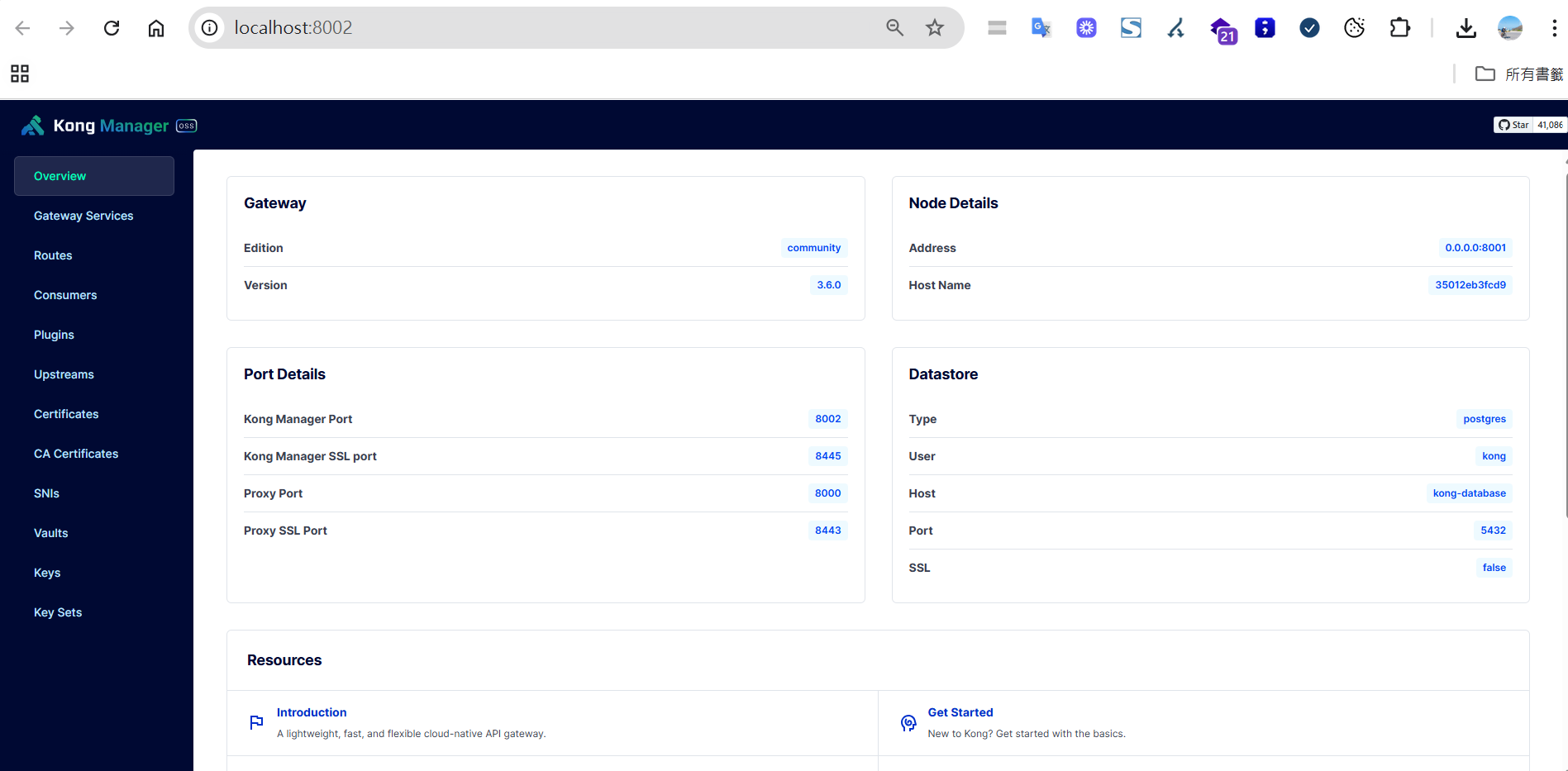
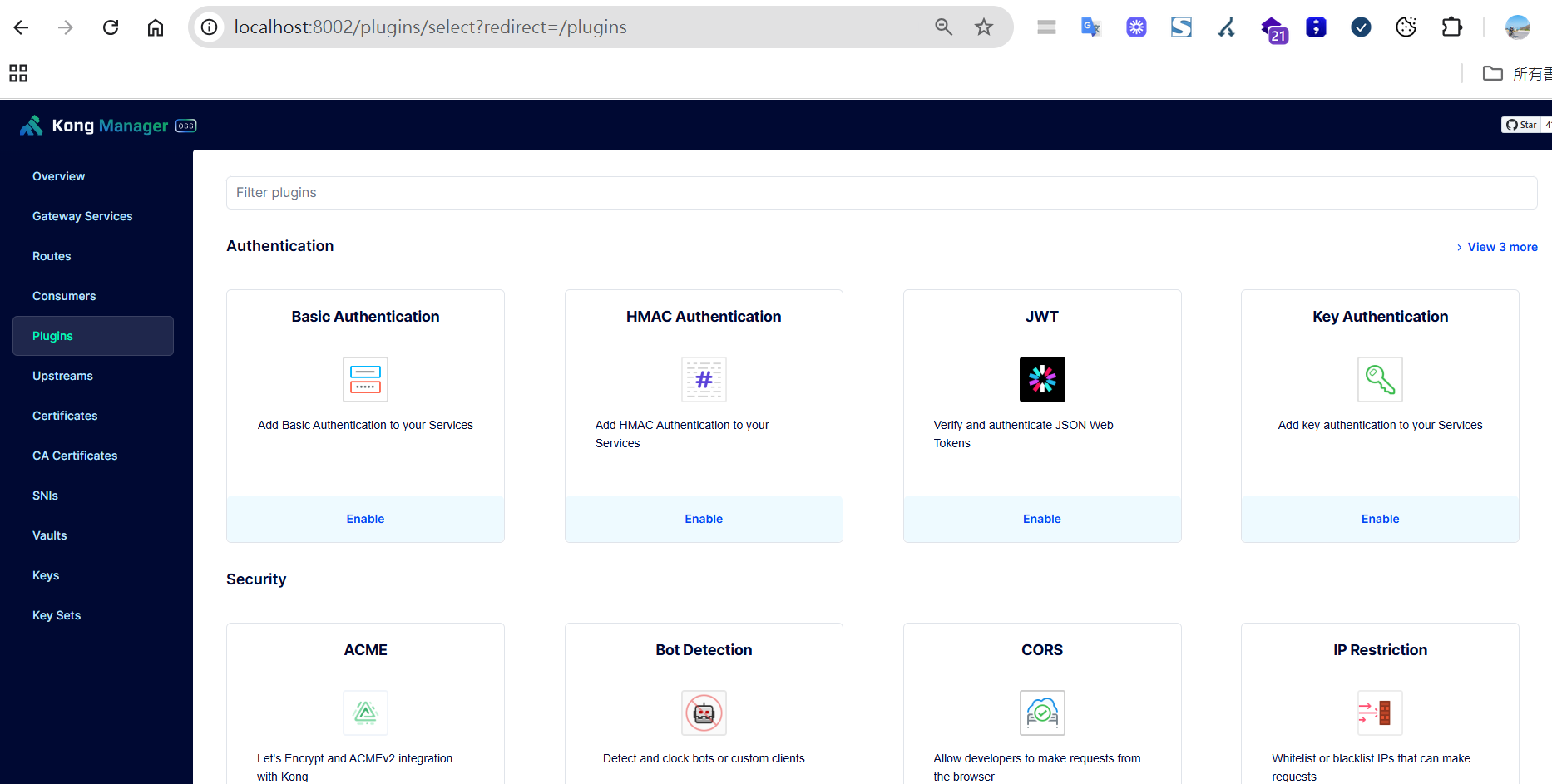
Many convenient plugins are installed by default, and you can add your own extensions if needed.
---
## Common Port Descriptions
| Port | Purpose | Protocol | Description |
|----|----|----|----|
| `8000` | Proxy (HTTP) | HTTP | External API request entry point |
| `8443` | Proxy (HTTPS) | HTTPS | Encrypted request entry point |
| `8001` | Admin API | HTTP | Manages routes, services, plugins, etc. |
| `8002` | Kong Dashboard | HTTP | Graphical management interface |
---
## Quick Test - Creating a Reverse Proxy
Create a service:
```bash
POST http://localhost:8001/services
Content-Type: application/json
{
"name": "my-service",
"url": "https://blog.markkulab.net/"
}
```
Create a route:
```bash
POST http://localhost:8001/services/my-service/routes
Content-Type: application/json
{
"paths": ["/blog"]
}
```
Test result:
```
http://localhost:8000/blog -> https://blog.markkulab.net/
```
---
## Load Balancing Strategies
| Strategy Name | Description | Open Source Support |
|----|----|----|
| Round-robin | Distributes requests sequentially | ✅ |
| Weighted round-robin | Distributes requests based on weight | ✅ |
| Least-connections | Prioritizes the server with the fewest connections | ❌ (Requires Enterprise Edition) |
**Notes**:
* Supports health checks to automatically remove faulty nodes.
* Supports dynamic target discovery via DNS.
> **Advanced Notes:**
> - **Health Checks**: Kong has a built-in health check mechanism that automatically detects the status of backend services. It removes unhealthy nodes and adds them back once they recover.
> - **Dynamic Target Discovery**: Supports dynamic DNS resolution, so Kong doesn't need to be restarted when backend service IPs change.
> - **Multi-Target Management**: You can configure multiple targets for the same service and dynamically adjust their weights.
---
## Rate Limiting
By using Consumers and Key Auth in conjunction with the Rate Limiting plugin, you can set different request frequencies based on user levels.
| Level | Limit |
|----|----|
| Basic Member | 5 requests per minute |
| Bronze | 5 requests per second |
| Silver | 10 requests per second |
| Gold | 30 requests per second |
| Platinum/Project | 50 requests per second |
Basic workflow:
1. Create a Consumer
2. Create a key-auth credential
3. Apply the rate-limiting plugin
Example:
```bash
curl -i -X POST http://localhost:8001/consumers \
--data "username=gold"
curl -i -X POST http://localhost:8001/consumers/gold/key-auth
POST /consumers/gold/plugins
{
"name": "rate-limiting",
"config": {
"second": 30,
"policy": "local"
}
}
...
```
Include the key in the API request:
```bash
GET /your-api
apikey:
```
> **Advanced Notes:**
> - **Multiple Policies**: Supports various storage policies like `local`, `cluster`, and `redis` (external Redis), suitable for different scales.
> - **Custom Responses**: You can customize the response message and HTTP status code for when the limit is exceeded.
> - **Integration with Authentication**: It's recommended to use it with plugins like key-auth or JWT to set different limits for different user groups.
---
## Performance and Stress Testing
**Official Benchmarks**: On a single 8 vCPU machine, QPS can reach 100,000-200,000 with latency under 10ms.
**Detailed Report**: [Kong Gateway Performance Benchmark](https://docs.konghq.com/gateway/latest/production/performance/performance-testing/)
**For higher traffic scenarios, consider hardware appliances (like F5).**
---
## High Availability (HA) Architecture
```
┌──────────────┐
│ LoadBalancer │
└─────┬────────┘
┌────┴───────┐
┌────▼────┐ ┌────▼────┐
│ Kong #1 │...│ Kong #N │
└────┬────┘ └────┬────┘
└────┬────┬───┘
│ │
┌─────────────┐
│ PostgreSQL │
└─────────────┘
```
> **Advanced Notes:**
> - **Database High Availability**: For PostgreSQL, it's recommended to use a master-slave replication or a cluster solution to avoid a single point of failure.
> - **Multiple Kong Nodes**: You can horizontally scale Kong nodes and use a load balancer to achieve high availability and elastic scaling.
> - **Configuration Synchronization**: Configuration is automatically synchronized between Kong nodes to ensure consistent API management.
---
## Stress Testing Tool: K6
Installation:
```bash
npm install -g k6
```
Test script:
```js
import http from 'k6/http';
import { sleep } from 'k6';
export default function () {
http.get('http://localhost:8000/v1/users');
sleep(1);
}
```
Execution:
```bash
k6 run script.js
```
---
## Issues Encountered During Implementation
1. A route can only have one configuration, but this can be worked around using route prefixes.
2. When calculating combined traffic, if some subsystems use different domains, you have to set up separate traffic calculations for them.
---
## Further Reading and Resources
* [Kong Kubernetes Ingress Controller](https://docs.konghq.com/kubernetes-ingress-controller/latest/)
* [CSDN: Kong Hands-on Tutorial](https://blog.csdn.net/zhangshenglu1/article/details/145325419)
---
## About this article and its author
Originally published on [Mark Ku's Tech Notes](https://blog.markkulab.net/en/post/kong-api-gateway-part1-setup)
License: [CC BY 4.0](https://creativecommons.org/licenses/by/4.0/) — when reusing or quoting, credit the author and link back to the original
### About the author
**[Mark Ku](https://blog.markkulab.net/en/author/mark-ku)** — Software Solution Provider
- 10+ years senior software engineer, now an AI Builder
- Focused on large-platform architecture — North-American e-commerce, AI SaaS subscription billing
- Combining AI Agents and automation to build evolvable product foundations
### Free tools built by the author
All of these are free to use:
- [Free PDF Sign Tool](https://blog.markkulab.net/en/tools/pdf-sign): Online PDF sign tool — draw, type, or upload a signature, then drag, resize, and download. Everything runs in your browser; nothing is uploaded.
- [VS Code Refactory](https://blog.markkulab.net/en/tools/refactory): Refactory is a VS Code refactoring extension: 34 actions plus a 37-rule code-smell inspection layer with a Code Health dashboard, across 18 languages, backed by 534 tests. It learns your repo's conventions: where interfaces live, where DI is registered, whether 'use client' belongs. It ranks files by git churn × complexity so you know what to fix first, and hands any smell to the Claude Code already on your machine. Free to use, and your source never leaves your computer.
- [DB-Kit Database Manager](https://blog.markkulab.net/en/tools/db-kit): DB-Kit is a lightweight, cross-platform database manager built with Tauri + Rust + React. Manage MySQL, MariaDB, PostgreSQL, SQL Server, Oracle, SQLite, MongoDB, Redis, Kafka, Elasticsearch and RabbitMQ from one consistent interface: passwords encrypted in the OS keychain, SSH tunnels, full CRUD, a visual query builder, stacked multi-statement result sets, cross-connection data transfer and compare/sync, Excel / CSV import & export, visualized execution plans, ER diagrams, scheduled backups, SQL stress testing with p50–p99 latency percentiles, a 15-rule SQL review engine, Kafka message browsing with monitoring & alerts, a bilingual UI (Traditional Chinese / English), a built-in AI assistant (natural-language SQL, AI review and tuning advice) and the dbk CLI. Free and open source (MIT), with installers for Windows, macOS and Linux.
- [VS Code Super Mermaid](https://blog.markkulab.net/en/tools/super-mermaid): Super Mermaid is a VS Code extension for beautiful Mermaid diagrams out of the box: auto-colored live preview, mouse pan & zoom, high-res PNG / SVG export, 21 templates and multiple themes. Free and open source (MIT).
- [React Super Mermaid](https://blog.markkulab.net/en/tools/react-super-mermaid): react-super-mermaid is an open-source React component library: render beautiful Mermaid diagrams with a single , with built-in colorful / sketch themes, pan & zoom, in-diagram search, and high-res SVG / PNG export. Lightweight, SSR-safe, fully typed. Free and open source (MIT).
- [Jira / Confluence Super Mermaid](https://blog.markkulab.net/en/tools/jira-super-mermaid): An Atlassian Forge app: write Mermaid syntax directly inside a Jira issue or a Confluence page and get flowcharts, sequence diagrams, state machines and Gantt charts. 11 diagram types, SVG / PNG export, light and dark themes, full CJK support. Runs on Atlassian: your diagrams live in your own site and the app calls no third-party service. Free, coming soon to the Atlassian Marketplace.
- [Mermaid Live Preview](https://blog.markkulab.net/en/tools/mermaid-preview): Write Mermaid in your browser, see it render instantly, and share the whole diagram as a single link. No sign-up, nothing uploaded to a server, and mermaid.live share links work as-is.
- [React Intl Phone Number](https://blog.markkulab.net/en/tools/react-intl-phone-number): react-intl-phone-number is an open-source React component: framework-agnostic and antd-free, with E.164 in/out, a searchable flag / country-code dropdown, configurable validation levels (strict / mobile-strict / loose), themeable CSS, and i18n — phone logic powered by google-libphonenumber. Lightweight and fully typed. Free and open source (MIT).
- [Uptime Kuma Cluster](https://blog.markkulab.net/en/tools/uptime-kuma-cluster): Turn single-node Uptime Kuma into a highly available cluster: OpenResty + Lua smart load balancing, shared MariaDB state, health checks and automatic failover, plus cluster-management REST APIs. One Docker Compose command to start. Free and open source (MIT).
- [Special Education](https://blog.markkulab.net/en/education): Learning materials crafted for special education students
### Daily podcasts
- [Mark's Tech Insights — Daily AI News](https://blog.markkulab.net/en/category/tech-news): Daily curated AI and tech trends. Catch the latest developments via audio summaries — covering AI applications, software architecture, DevOps, and engineering practice. — RSS: https://blog.markkulab.net/feed.xml
- [AI股市蝦聊](https://blog.markkulab.net/en/category/ai-stock-chat): Every trading day, an AI-analyzed take on the Taiwan stock market, delivered as a two-host conversation covering the session and the next-day outlook. — RSS: https://blog.markkulab.net/ai-stock-chat/feed.xml
- [開源好物週報](https://blog.markkulab.net/en/category/open-source-weekly): A weekly two-host pick of free open-source tools surfaced from real Hacker News, GitHub, and Reddit buzz — what pain they solve and the fastest way to get started. — RSS: https://blog.markkulab.net/open-source-weekly/feed.xml
### Newsletter
[Subscribe to the newsletter](https://blog.markkulab.net/en/subscribe) — Be the first to know about new posts. No spam, unsubscribe anytime.