---
title: "Visual Studio Code Quality Management Notes: Enhancing and Enforcing Code Quality with Roslyn Analyzer + EditorConfig + Code Cleanup + Copilot"
description: "A guide to code quality management in Visual Studio, covering Roslyn Analyzer rule configuration, EditorConfig style enforcement, automatic formatting with Code Cleanup, and using GitHub Copilot for assisted development and review."
canonical_url: "https://blog.markkulab.net/en/post/improving-visual-studio-code-quality"
author: "Mark Ku"
author_url: "https://blog.markkulab.net/en/author/mark-ku"
site: "Mark Ku's Tech Notes"
date_published: "2025-09-04 05:00:00 +0800"
category: ".NET Core"
tags: [".net", "roslyn", "analyzer", "editorconfig", "copilot", "code quality", "visual studio"]
language: "en"
license: "CC BY 4.0"
license_url: "https://creativecommons.org/licenses/by/4.0/"
attribution: "when reusing or quoting, credit the author and link back to the original"
---
# Visual Studio Code Quality Management Notes: Enhancing and Enforcing Code Quality with Roslyn Analyzer + EditorConfig + Code Cleanup + Copilot
## Introduction
As software projects continue to grow in scale, code quality often has a greater impact on project maintainability and team efficiency than the features themselves. Inconsistent naming, messy formatting, and a lack of coding standards can easily become hidden costs during future maintenance or handovers.
This article will focus on Visual Studio to outline a set of common and practical methods for managing code quality. We'll cover everything from setting up rules with the built-in Roslyn Analyzer and .editorconfig, to automated formatting with Code Cleanup, and finally, AI-assisted development and code review with GitHub Copilot.
By combining these tools and processes, development teams can:
Identify issues early on while writing code,
Maintain a consistent code style through automation,
And leverage AI to reduce repetitive work, allowing them to focus on core design and logic.
## Prerequisites
* Visual Studio 2022 or later
* GitHub Copilot
## 1️⃣ Use Visual Studio's built-in rule engine, Roslyn Analyzers, and the .editorconfig rule set to enforce code style.
Roslyn Analyzer is the code analysis tool for the .NET world, similar in function to ESLint for JavaScript. It acts as a "rule engine" that automatically checks your code quality as you write and compile. .editorconfig, on the other hand, is the "rule configuration file" where you define how those rules should run—for example, whether to use camel case for naming or how many spaces to use for indentation.
In short:
Roslyn Analyzer = Does the checking
.editorconfig = Defines how to check
### Integrating with .editorconfig settings
Create `.editorconfig` in the project's root directory:
```ini
root = true
[*]
charset = utf-8
end_of_line = crlf
insert_final_newline = true
trim_trailing_whitespace = true
indent_style = space
indent_size = 4
max_line_length = 120
dotnet_style_qualification_for_field = false:error
dotnet_style_qualification_for_property = false:error
dotnet_style_qualification_for_method = false:error
dotnet_style_qualification_for_event = false:error
[*.cs]
csharp_style_var_for_built_in_types = false
dotnet_diagnostic.IDE0008.severity = error
csharp_style_namespace_declarations = file_scoped:error
```
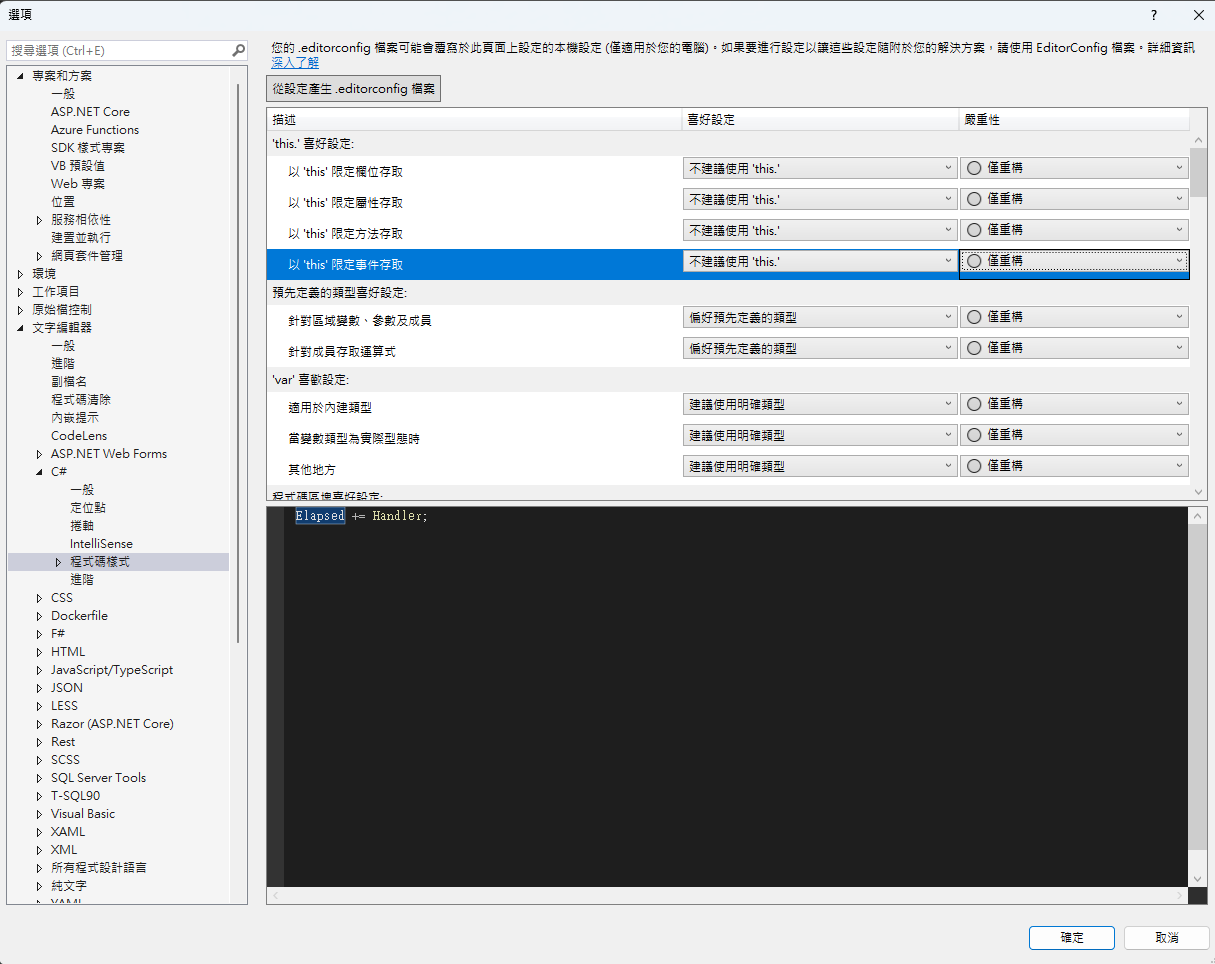
### You can also adjust .editorconfig settings through the Visual Studio UI
* Open `工具 > 選項 > 文字編輯器 > C# > 程式碼樣式`
* Visual Studio 2022 has built-in support for EditorConfig, so you just need to reload the project for the changes to take effect.
---
### Modify the project file `WebApplication1/WebApplication1.csproj`:
```xml
net8.0
enable
enable
true
true
true
```
### Parameter Descriptions
- **`EnableNETAnalyzers`**: Enables .NET code analyzers to check for code quality issues during the build.
- **`EnforceCodeStyleInBuild`**: Treats code style violations as build errors, ensuring a consistent code style across the team.
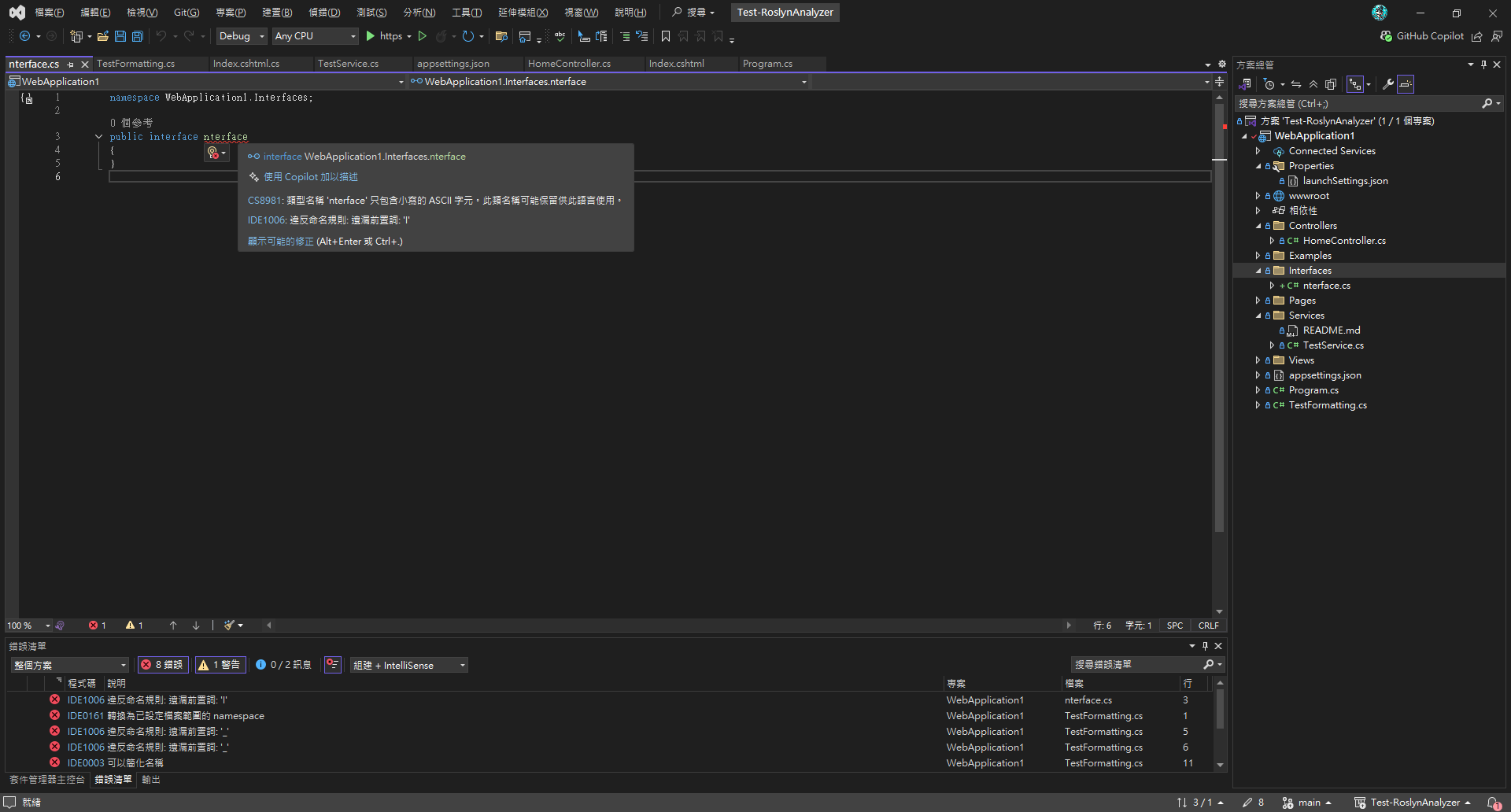
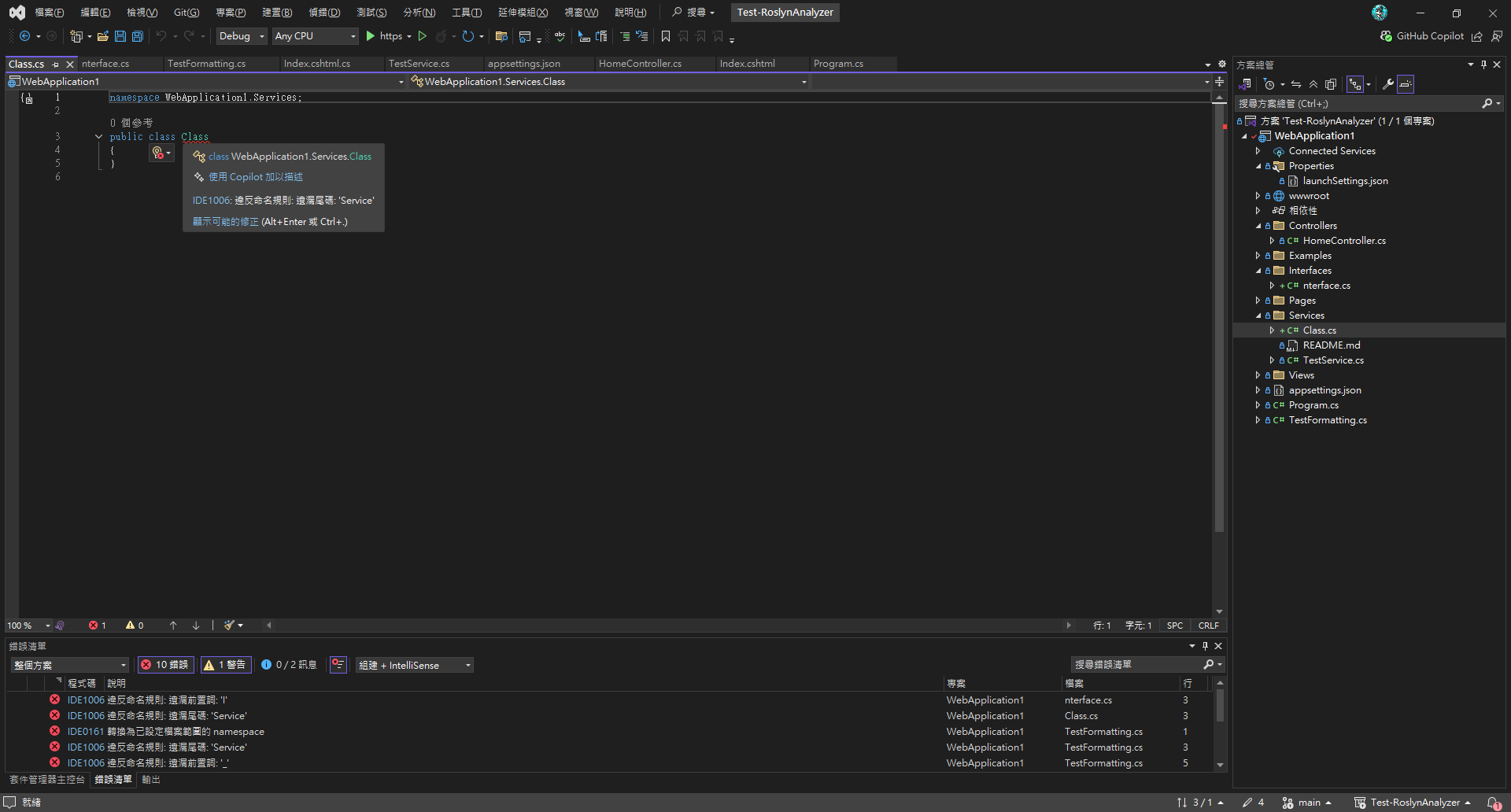
Now, when you build the project, rule violations will appear as errors.
---
### Fixing Errors
* Error List window (`檢視 > 錯誤清單`)
* Error squiggles in the editor
* Quick Actions: `Ctrl+.` → Select a suggested fix
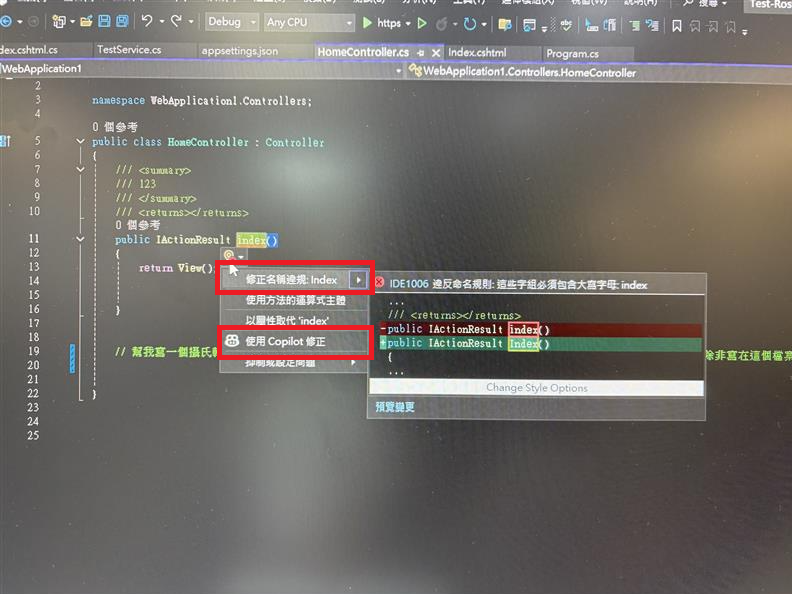
### Additional Note: You can also run rule validation via the command line (CLI) for easy CI/CD integration
```bash
# 建置並顯示警告
dotnet build --verbosity normal
# 僅執行程式碼分析
dotnet build --no-restore --verbosity normal
# 將警告視為錯誤
dotnet build /p:TreatWarningsAsErrors=true
```
P.S. For more complex logic, you can create a custom NamingConventionAnalyzer, which requires writing your own code.
---
## 2️⃣ Code Cleanup - Automatically format code style on save
### Visual Studio Settings
* Open `工具 > 選項 > 文字編輯器 > C#`
* Check the following:
* `在儲存時自動格式化文件`
* `在儲存時移除並排序 using`
### Code Cleanup Settings
* Open `工具 > 選項 > 文字編輯器 > 程式碼清除 > 設定程式碼清除`
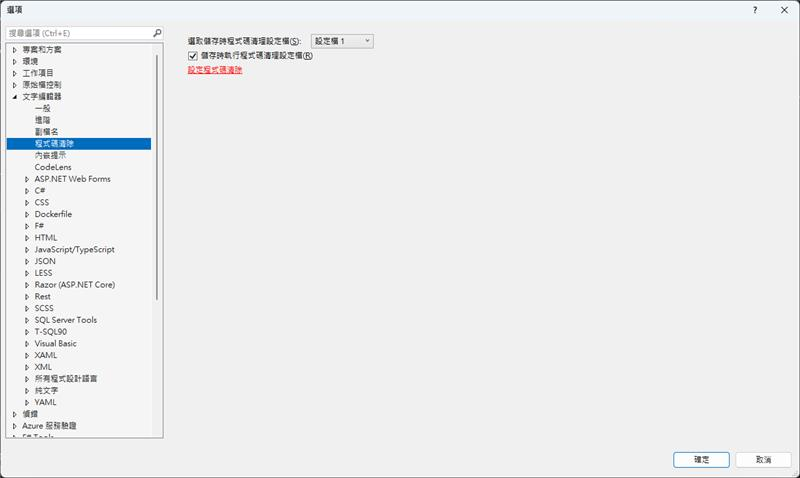
* Select the rules to run and set a shortcut key `Ctrl+K, Ctrl+E`
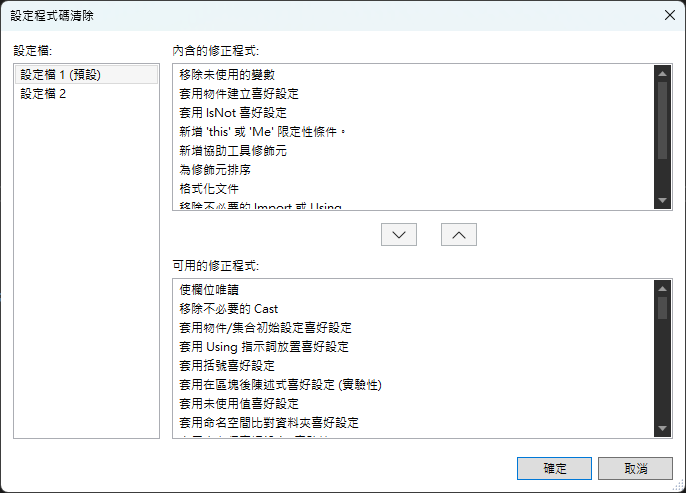
**The tricky part is that the team needs to sync these settings manually**:
* Windows: `%USERPROFILE%\AppData\Local\Microsoft\VisualStudio\\CodeCleanupProfiles.json`
* Mac: `~/Library/Preferences/VisualStudio//CodeCleanupProfiles.json`
---
### Example: Auto-formatting in action
**Before formatting**:
```csharp
namespace WebApplication1
{
public class TestFormatting
{
private string fieldName;
private int fieldValue;
public TestFormatting()
{
this.fieldName = "test";
this.fieldValue = 42;
}
}
}
```
**After saving, the auto-formatted result**:
```csharp
namespace WebApplication1;
public class TestFormatting
{
private string fieldName;
private int fieldValue;
public TestFormatting()
{
fieldName = "test";
fieldValue = 42;
}
}
```
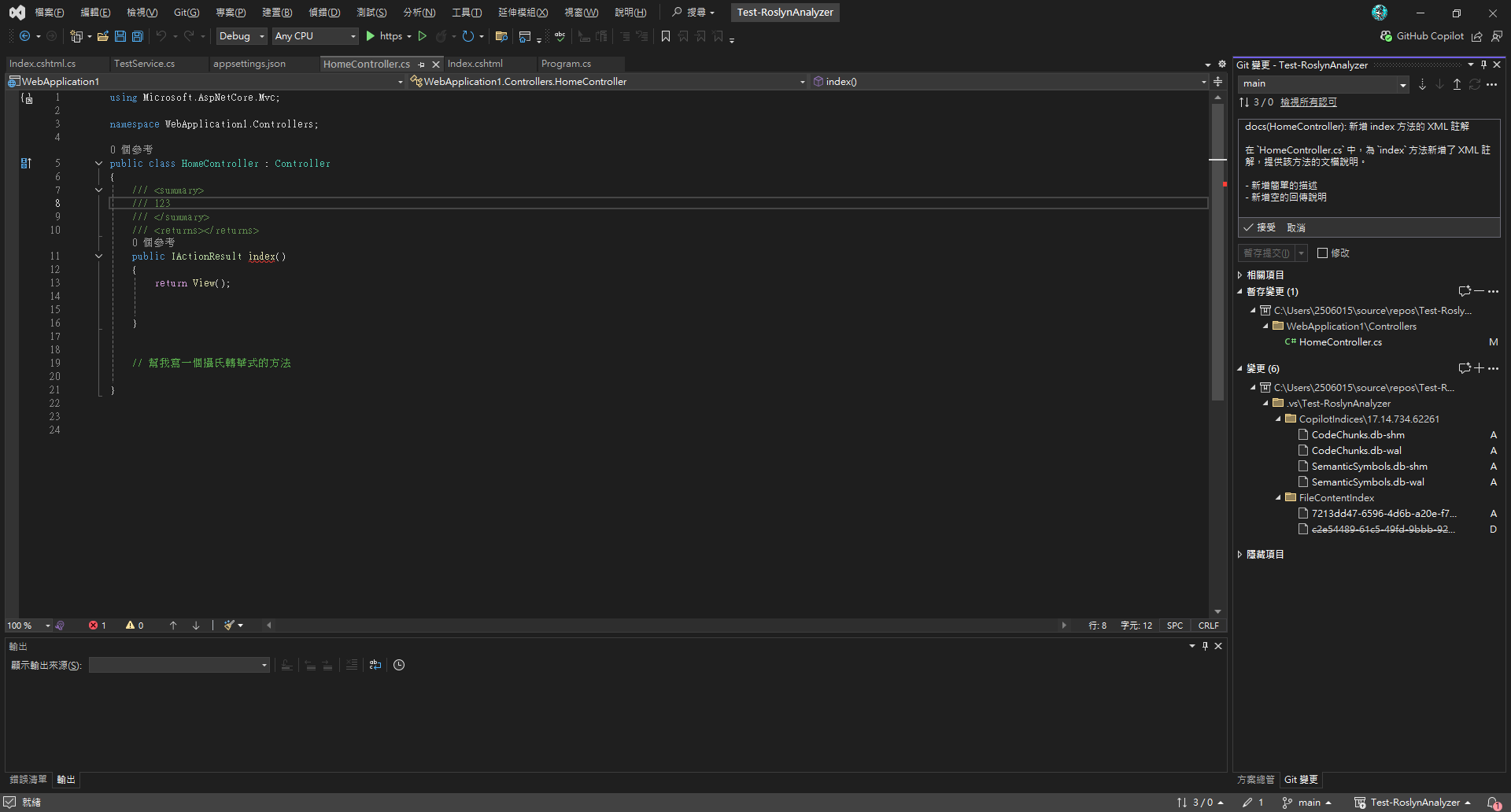
## 3️⃣ Automatically Generate Commit Messages with GitHub Copilot
If you want Copilot to help you write commit messages based on the content of your commits, you can refer to the article below.
[This article explains how to define custom instructions for generating Git commit messages](https://blog.miniasp.com/post/2024/12/27/GitHub-Copilot-Cookbook-Define-Custom-Instructions-for-Generating-Git-Commit-Messages), allowing you to add commit conventions (like Conventional Commits) or example structures to your workflow to help automatically generate more consistent messages.
---
## 4️⃣ Generate Code According to Coding Rules (Copilot Custom Rules)
### Using GitHub Copilot with Custom Rules
GitHub Copilot is a powerful AI coding assistant that can be configured with instructions to generate code that conforms to your team's standards.
#### Setting Copilot Instructions
In recent versions of Visual Studio, under Tools > Options > GitHub Copilot, the option to reference `github/copilot-instructions` for guidance and rules when generating code is enabled by default.
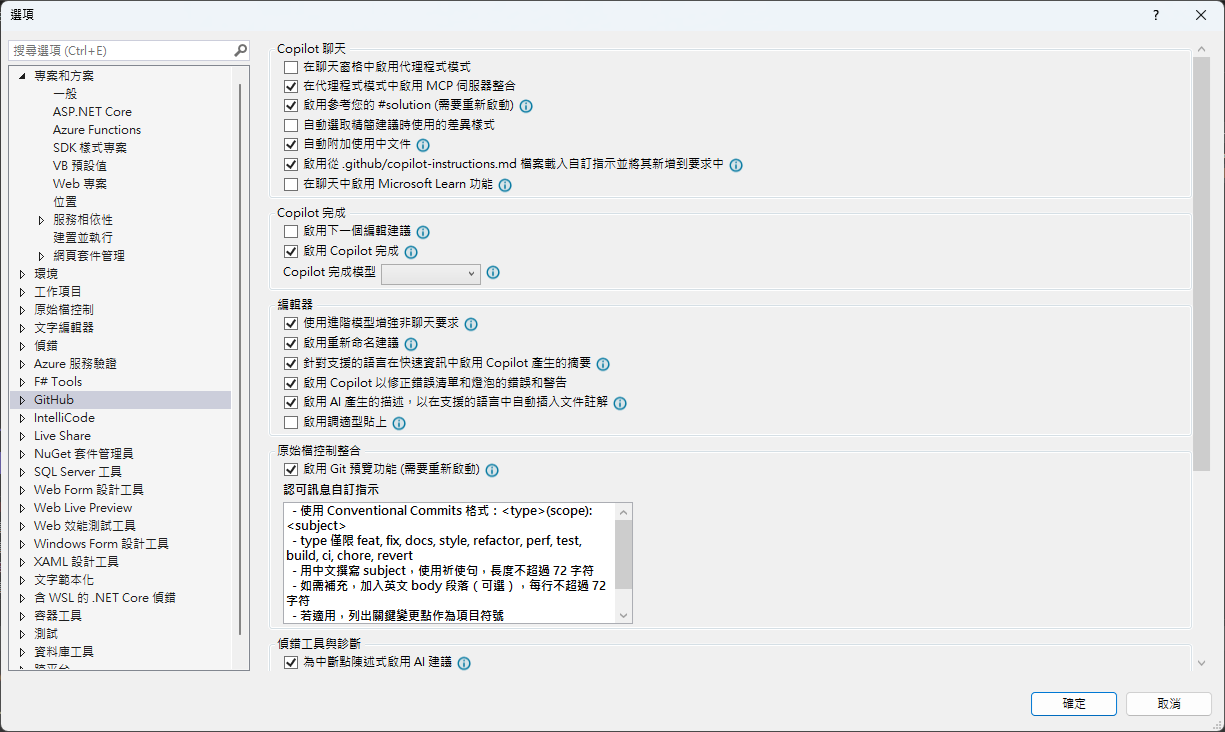
So, all we need to do is create a `.github/copilot-instructions.md` file in the project's root directory:
```markdown
程式註解一律使用繁體中文
變數、函數、類別名稱使用英文
函數名稱尾巴加上 123
程式碼最上方加註:由 GitHub Copilot 產生
變數名稱全部大寫並使用底線分隔
```
Now, whenever you open Copilot Chat, it will generate code based on these development guidelines. However, Copilot's autocompletion (IntelliSense) will not follow these rules.
But you can explicitly reference them in a comment, for example:
```
// 根據 Instructions.md 的規範
```
---
## 5️⃣ GitHub Copilot Code Review
GitHub Copilot not only helps generate code but can also perform code reviews. With AI assistance, you can quickly check code quality, identify potential issues, and receive suggestions for improvement.
> ⚠️ Note: This feature requires a GitHub Copilot Enterprise subscription. It is disabled by default and must be enabled to be used.
---
## Further Reading
- [EditorConfig Official Documentation](https://editorconfig.org/)
- [Roslyn Analyzers Documentation](https://docs.microsoft.com/en-us/dotnet/fundamentals/code-analysis/)
- [GitHub Copilot Best Practices](https://github.com/features/copilot)
- [Visual Studio Code Cleanup Feature](https://docs.microsoft.com/en-us/visualstudio/ide/code-styles-and-code-cleanup)
- [Making Code More Consistent: Techniques and Settings for Custom GitHub Copilot Prompts](https://dotblogs.com.tw/anyun/2024/11/23/160548)
- [Custom Instructions for Generating Git Commit Messages](https://blog.miniasp.com/post/2024/12/27/GitHub-Copilot-Cookbook-Define-Custom-Instructions-for-Generating-Git-Commit-Messages)
## Appendix: Complete .editorconfig Example
Below is a complete, copy-pasteable example of an `.editorconfig` file:
```ini
# Editor configuration, see https://editorconfig.org
# 編輯器配置文件,詳見 https://editorconfig.org
root = true
# =============================================================================
# 通用排版規則 - 適用於所有文件類型
# =============================================================================
[*]
# 適用於所有文件的通用設置
charset = utf-8
# 字符編碼設置為 UTF-8
end_of_line = crlf
# 行尾符號使用 CRLF (Windows 風格)
insert_final_newline = true
# 文件結尾自動插入換行符
trim_trailing_whitespace = true
# 自動移除行尾空白字符
indent_style = space
# 縮進樣式使用空格而不是 Tab
### Indentation and spacing
### 縮進和間距設置
indent_size = 4
# 縮進大小為 4 個空格
tab_width = 4
# Tab 寬度為 4 個空格
max_line_length = 120
# 最大行長度為 120 字符
# =============================================================================
# 存檔時自動排版設置
# =============================================================================
# 啟用存檔時自動格式化
dotnet_style_qualification_for_field = false:error
# 字段不需要 this 限定符
dotnet_style_qualification_for_property = false:error
# 屬性不需要 this 限定符
dotnet_style_qualification_for_method = false:error
# 方法不需要 this 限定符
dotnet_style_qualification_for_event = false:error
# 事件不需要 this 限定符
# 強制執行一致的代碼格式
dotnet_diagnostic.IDE0055.severity = error # Remove unnecessary import
# 移除不必要的 import,違反時顯示錯誤
dotnet_diagnostic.IDE0100.severity = error # Remove unnecessary equality operator
# 移除不必要的相等運算子,違反時顯示錯誤
dotnet_diagnostic.IDE0055.severity = error # Fix formatting
# 修復格式化問題,顯示為錯誤
# =============================================================================
# 命名規則 - 根據命名規範精簡版
# =============================================================================
# 強制執行命名規則 (IDE1006) 作為建置錯誤
dotnet_diagnostic.IDE1006.severity = error
# 命名規則違反時顯示錯誤
# =============================================================================
# GitHub Copilot 設置
# =============================================================================
# GitHub Copilot Chat commit message generation instructions
# GitHub Copilot Chat 提交訊息生成指令
github.copilot.chat.commitMessageGeneration.instructions = |
- 使用 Conventional Commits 格式:(scope):
- type 僅限 feat, fix, docs, style, refactor, perf, test, build, ci, chore, revert
- 用中文撰寫 subject,使用祈使句,長度不超過 72 字符
- 如需補充,加入英文 body 段落(可選),每行不超過 72 字符
- 若適用,列出關鍵變更點作為項目符號
- 若有重大變更,加入 BREAKING CHANGE: 說明
- 僅根據實際 diff 與變更檔案撰寫,不要捏造內容
# =============================================================================
# C# 特定規則
# =============================================================================
[*.cs]
# 適用於所有 C# 文件的設置
# 縮進和括號設置
csharp_use_continuous_indent_inside_parens = true
# C# 在括號內使用連續縮進
# var 關鍵字使用規則
csharp_style_var_for_built_in_types = false
# 對於內建類型不使用 var 關鍵字
dotnet_diagnostic.IDE0008.severity = error # var preferences
# var 偏好設置,違反時顯示錯誤
# 命名空間規則
dotnet_style_namespace_match_folder = true
# 命名空間結構應與資料夾結構匹配
dotnet_diagnostic.IDE0130.severity = suggestion # namespace structure not match folder
# 命名空間結構不匹配資料夾時顯示建議
csharp_style_namespace_declarations = file_scoped:error
# 偏好使用檔案範圍的命名空間宣告
dotnet_diagnostic.IDE0161.severity = error # prefer file_scoped, otherwise show error
# 偏好檔案範圍命名空間,否則顯示錯誤
# using 語句規則
csharp_prefer_simple_using_statement = true
# 偏好使用簡單的 using 語句
dotnet_diagnostic.IDE0063.severity = error # prefer to use simple using statment
# 偏好使用簡單的 using 語句,違反時顯示錯誤
# 文檔註解設置
dotnet_diagnostic.CS1591.severity = none # ignore documentation missing before rosly fix #41640
# 忽略缺少文檔註解的警告(在 Roslyn 修復 #41640 之前)
# =============================================================================
# 命名規則 - 根據命名規範精簡版
# =============================================================================
# 強制執行命名規則 (IDE1006) 作為建置錯誤
dotnet_diagnostic.IDE1006.severity = error
# 命名規則違反時顯示錯誤
# 命名空間規則 - 使用 PascalCase
dotnet_style_namespace_match_folder = true
# 命名空間結構應與資料夾結構匹配
# 類型命名規則 - 使用 PascalCase
dotnet_naming_rule.types_should_be_pascal_case.severity = error
dotnet_naming_rule.types_should_be_pascal_case.symbols = types
dotnet_naming_rule.types_should_be_pascal_case.style = pascal_case_style
dotnet_naming_symbols.types.applicable_kinds = class, struct, interface, enum, delegate
dotnet_naming_symbols.types.applicable_accessibilities = public, internal, private, protected, protected_internal, private_protected
dotnet_naming_symbols.types.required_file_paths = **/*.cs
dotnet_naming_symbols.types.excluded_file_paths = **/Service/**, **/Services/**, **/Controller/**, **/Controllers/**, **/Dto/**, **/DTO/**, **/Dtos/**, **/DTOS/**, **/Query/**, **/Queries/**
dotnet_naming_style.pascal_case_style.required_prefix =
dotnet_naming_style.pascal_case_style.required_suffix =
dotnet_naming_style.pascal_case_style.word_separator =
dotnet_naming_style.pascal_case_style.capitalization = pascal_case
# 介面命名規則 - 以 I 開頭
dotnet_naming_rule.interface_types_should_be_prefixed_with_i.severity = error
dotnet_naming_rule.interface_types_should_be_prefixed_with_i.symbols = interface_types
dotnet_naming_rule.interface_types_should_be_prefixed_with_i.style = interface_naming_style
dotnet_naming_symbols.interface_types.applicable_kinds = interface
dotnet_naming_symbols.interface_types.applicable_accessibilities = public, internal, private, protected, protected_internal, private_protected
dotnet_naming_style.interface_naming_style.required_prefix = I
dotnet_naming_style.interface_naming_style.required_suffix =
dotnet_naming_style.interface_naming_style.word_separator =
dotnet_naming_style.interface_naming_style.capitalization = pascal_case
# 私有欄位命名規則 - 以 _ 開頭
dotnet_naming_rule.private_fields_should_be_prefixed_with_underscore.severity = error
dotnet_naming_rule.private_fields_should_be_prefixed_with_underscore.symbols = private_fields
dotnet_naming_rule.private_fields_should_be_prefixed_with_underscore.style = private_field_naming_style
dotnet_naming_symbols.private_fields.applicable_kinds = field
dotnet_naming_symbols.private_fields.applicable_accessibilities = private
dotnet_naming_style.private_field_naming_style.required_prefix = _
dotnet_naming_style.private_field_naming_style.required_suffix =
dotnet_naming_style.private_field_naming_style.word_separator =
dotnet_naming_style.private_field_naming_style.capitalization = camel_case
# 常數命名規則 - 使用 PascalCase
dotnet_naming_rule.constants_should_be_pascal_case.severity = error
dotnet_naming_rule.constants_should_be_pascal_case.symbols = constants
dotnet_naming_rule.constants_should_be_pascal_case.style = pascal_case_style
dotnet_naming_symbols.constants.applicable_kinds = field
dotnet_naming_symbols.constants.required_modifiers = const
# 枚舉命名規則 - 以 Enum 結尾
dotnet_naming_rule.enum_types_should_end_with_enum.severity = error
dotnet_naming_rule.enum_types_should_end_with_enum.symbols = enum_types
dotnet_naming_rule.enum_types_should_end_with_enum.style = enum_naming_style
dotnet_naming_symbols.enum_types.applicable_kinds = enum
dotnet_naming_symbols.enum_types.applicable_accessibilities = public, internal, private, protected, protected_internal, private_protected
dotnet_naming_style.enum_naming_style.required_prefix =
dotnet_naming_style.enum_naming_style.required_suffix = Enum
dotnet_naming_style.enum_naming_style.word_separator =
dotnet_naming_style.enum_naming_style.capitalization = pascal_case
# 方法參數和區域變數命名規則 - 使用 camelCase
dotnet_naming_rule.parameters_and_locals_should_be_camel_case.severity = error
dotnet_naming_rule.parameters_and_locals_should_be_camel_case.symbols = parameters_and_locals
dotnet_naming_rule.parameters_and_locals_should_be_camel_case.style = camel_case_style
dotnet_naming_symbols.parameters_and_locals.applicable_kinds = parameter, local
dotnet_naming_symbols.parameters_and_locals.applicable_accessibilities = public, internal, private, protected, protected_internal, private_protected
dotnet_naming_style.camel_case_style.required_prefix =
dotnet_naming_style.camel_case_style.required_suffix =
dotnet_naming_style.camel_case_style.word_separator =
dotnet_naming_style.camel_case_style.capitalization = camel_case
# =============================================================================
# 特定資料夾的命名規則
# =============================================================================
# Service 資料夾下的類型命名規則 - 以 Service 結尾
dotnet_naming_rule.service_folder_types_should_end_with_service.severity = error
dotnet_naming_rule.service_folder_types_should_end_with_service.symbols = service_folder_types
dotnet_naming_rule.service_folder_types_should_end_with_service.style = service_naming_style
dotnet_naming_symbols.service_folder_types.applicable_kinds = class, struct, interface
dotnet_naming_symbols.service_folder_types.applicable_accessibilities = public, internal, private, protected, protected_internal, private_protected
dotnet_naming_symbols.service_folder_types.required_file_extensions = cs
dotnet_naming_symbols.service_folder_types.required_file_paths = **/Service/**, **/Services/**
dotnet_naming_style.service_naming_style.required_prefix =
dotnet_naming_style.service_naming_style.required_suffix = Service
dotnet_naming_style.service_naming_style.word_separator =
dotnet_naming_style.service_naming_style.capitalization = pascal_case
# Controller 資料夾下的類型命名規則 - 以 Controller 結尾
dotnet_naming_rule.controller_folder_types_should_end_with_controller.severity = error
dotnet_naming_rule.controller_folder_types_should_end_with_controller.symbols = controller_folder_types
dotnet_naming_rule.controller_folder_types_should_end_with_controller.style = controller_naming_style
dotnet_naming_symbols.controller_folder_types.applicable_kinds = class, struct, interface
dotnet_naming_symbols.controller_folder_types.applicable_accessibilities = public, internal, private, protected, protected_internal, private_protected
dotnet_naming_symbols.controller_folder_types.required_file_extensions = cs
dotnet_naming_symbols.controller_folder_types.required_file_paths = **/Controller/**, **/Controllers/**
dotnet_naming_style.controller_naming_style.required_prefix =
dotnet_naming_style.controller_naming_style.required_suffix = Controller
dotnet_naming_style.controller_naming_style.word_separator =
dotnet_naming_style.controller_naming_style.capitalization = pascal_case
# DTO 資料夾下的類型命名規則 - 以 Dto 結尾
dotnet_naming_rule.dto_folder_types_should_end_with_dto.severity = error
dotnet_naming_rule.dto_folder_types_should_end_with_dto.symbols = dto_folder_types
dotnet_naming_rule.dto_folder_types_should_end_with_dto.style = dto_naming_style
dotnet_naming_symbols.dto_folder_types.applicable_kinds = class, struct, interface
dotnet_naming_symbols.dto_folder_types.applicable_accessibilities = public, internal, private, protected, protected_internal, private_protected
dotnet_naming_symbols.dto_folder_types.required_file_extensions = cs
dotnet_naming_symbols.dto_folder_types.required_file_paths = **/Dto/**, **/DTO/**, **/Dtos/**, **/DTOS/**
dotnet_naming_style.dto_naming_style.required_prefix =
dotnet_naming_style.dto_naming_style.required_suffix = Dto
dotnet_naming_style.dto_naming_style.word_separator =
dotnet_naming_style.dto_naming_style.capitalization = pascal_case
# Query 資料夾下的類型命名規則 - 以 Query 結尾
dotnet_naming_rule.query_folder_types_should_end_with_query.severity = error
dotnet_naming_rule.query_folder_types_should_end_with_query.symbols = query_folder_types
dotnet_naming_rule.query_folder_types_should_end_with_query.style = query_naming_style
dotnet_naming_symbols.query_folder_types.applicable_kinds = class, struct, interface
dotnet_naming_symbols.query_folder_types.applicable_accessibilities = public, internal, private, protected, protected_internal, private_protected
dotnet_naming_symbols.query_folder_types.required_file_extensions = cs
dotnet_naming_symbols.query_folder_types.required_file_paths = **/Query/**, **/Queries/**
dotnet_naming_style.query_naming_style.required_prefix =
dotnet_naming_style.query_naming_style.required_suffix = Query
dotnet_naming_style.query_naming_style.word_separator =
dotnet_naming_style.query_naming_style.capitalization = pascal_case
# =============================================================================
# 通用命名規則 (適用於不在特定資料夾中的檔案)
# =============================================================================
# 類型命名規則 - 使用 PascalCase (不包含特定後綴)
dotnet_naming_rule.general_types_should_be_pascal_case.severity = error
dotnet_naming_rule.general_types_should_be_pascal_case.symbols = general_types
dotnet_naming_rule.general_types_should_be_pascal_case.style = general_pascal_case_style
dotnet_naming_symbols.general_types.applicable_kinds = class, struct, interface
dotnet_naming_symbols.general_types.applicable_accessibilities = public, internal, private, protected, protected_internal, private_protected
dotnet_naming_symbols.general_types.required_file_extensions = cs
dotnet_naming_symbols.general_types.required_file_paths = **/*.cs
dotnet_naming_symbols.general_types.excluded_file_paths = **/Service/**, **/Services/**, **/Controller/**, **/Controllers/**, **/Dto/**, **/DTO/**, **/Dtos/**, **/DTOS/**, **/Query/**, **/Queries/**
dotnet_naming_style.general_pascal_case_style.required_prefix =
dotnet_naming_style.general_pascal_case_style.required_suffix =
dotnet_naming_style.general_pascal_case_style.word_separator =
dotnet_naming_style.general_pascal_case_style.capitalization = pascal_case
# =============================================================================
# 其他文件類型規則
# =============================================================================
[*.{json,js,ts,jsx,tsx}]
# JavaScript/TypeScript 文件規則
indent_size = 2
# JavaScript/TypeScript 使用 2 空格縮進
[*.{xml,html,cshtml}]
# XML/HTML 文件規則
indent_size = 2
# XML/HTML 使用 2 空格縮進
[*.{css,scss,less}]
# CSS 文件規則
indent_size = 2
# CSS 使用 2 空格縮進
[*.md]
# Markdown 文件規則
trim_trailing_whitespace = false
# Markdown 文件保留行尾空白(用於換行)
max_line_length = off
# Markdown 不限制行長度
```
---
## About this article and its author
Originally published on [Mark Ku's Tech Notes](https://blog.markkulab.net/en/post/improving-visual-studio-code-quality)
License: [CC BY 4.0](https://creativecommons.org/licenses/by/4.0/) — when reusing or quoting, credit the author and link back to the original
### About the author
**[Mark Ku](https://blog.markkulab.net/en/author/mark-ku)** — Software Solution Provider
- 10+ years senior software engineer, now an AI Builder
- Focused on large-platform architecture — North-American e-commerce, AI SaaS subscription billing
- Combining AI Agents and automation to build evolvable product foundations
### Free tools built by the author
All of these are free to use:
- [Free PDF Sign Tool](https://blog.markkulab.net/en/tools/pdf-sign): Online PDF sign tool — draw, type, or upload a signature, then drag, resize, and download. Everything runs in your browser; nothing is uploaded.
- [VS Code Refactory](https://blog.markkulab.net/en/tools/refactory): Refactory is a VS Code refactoring extension: 34 actions plus a 37-rule code-smell inspection layer with a Code Health dashboard, across 18 languages, backed by 534 tests. It learns your repo's conventions: where interfaces live, where DI is registered, whether 'use client' belongs. It ranks files by git churn × complexity so you know what to fix first, and hands any smell to the Claude Code already on your machine. Free to use, and your source never leaves your computer.
- [DB-Kit Database Manager](https://blog.markkulab.net/en/tools/db-kit): DB-Kit is a lightweight, cross-platform database manager built with Tauri + Rust + React. Manage MySQL, MariaDB, PostgreSQL, SQL Server, Oracle, SQLite, MongoDB, Redis, Kafka, Elasticsearch and RabbitMQ from one consistent interface: passwords encrypted in the OS keychain, SSH tunnels, full CRUD, a visual query builder, stacked multi-statement result sets, cross-connection data transfer and compare/sync, Excel / CSV import & export, visualized execution plans, ER diagrams, scheduled backups, SQL stress testing with p50–p99 latency percentiles, a 15-rule SQL review engine, Kafka message browsing with monitoring & alerts, a bilingual UI (Traditional Chinese / English), a built-in AI assistant (natural-language SQL, AI review and tuning advice) and the dbk CLI. Free and open source (MIT), with installers for Windows, macOS and Linux.
- [VS Code Super Mermaid](https://blog.markkulab.net/en/tools/super-mermaid): Super Mermaid is a VS Code extension for beautiful Mermaid diagrams out of the box: auto-colored live preview, mouse pan & zoom, high-res PNG / SVG export, 21 templates and multiple themes. Free and open source (MIT).
- [React Super Mermaid](https://blog.markkulab.net/en/tools/react-super-mermaid): react-super-mermaid is an open-source React component library: render beautiful Mermaid diagrams with a single , with built-in colorful / sketch themes, pan & zoom, in-diagram search, and high-res SVG / PNG export. Lightweight, SSR-safe, fully typed. Free and open source (MIT).
- [Jira / Confluence Super Mermaid](https://blog.markkulab.net/en/tools/jira-super-mermaid): An Atlassian Forge app: write Mermaid syntax directly inside a Jira issue or a Confluence page and get flowcharts, sequence diagrams, state machines and Gantt charts. 11 diagram types, SVG / PNG export, light and dark themes, full CJK support. Runs on Atlassian: your diagrams live in your own site and the app calls no third-party service. Free, coming soon to the Atlassian Marketplace.
- [Mermaid Live Preview](https://blog.markkulab.net/en/tools/mermaid-preview): Write Mermaid in your browser, see it render instantly, and share the whole diagram as a single link. No sign-up, nothing uploaded to a server, and mermaid.live share links work as-is.
- [React Intl Phone Number](https://blog.markkulab.net/en/tools/react-intl-phone-number): react-intl-phone-number is an open-source React component: framework-agnostic and antd-free, with E.164 in/out, a searchable flag / country-code dropdown, configurable validation levels (strict / mobile-strict / loose), themeable CSS, and i18n — phone logic powered by google-libphonenumber. Lightweight and fully typed. Free and open source (MIT).
- [Uptime Kuma Cluster](https://blog.markkulab.net/en/tools/uptime-kuma-cluster): Turn single-node Uptime Kuma into a highly available cluster: OpenResty + Lua smart load balancing, shared MariaDB state, health checks and automatic failover, plus cluster-management REST APIs. One Docker Compose command to start. Free and open source (MIT).
- [Special Education](https://blog.markkulab.net/en/education): Learning materials crafted for special education students
### Daily podcasts
- [Mark's Tech Insights — Daily AI News](https://blog.markkulab.net/en/category/tech-news): Daily curated AI and tech trends. Catch the latest developments via audio summaries — covering AI applications, software architecture, DevOps, and engineering practice. — RSS: https://blog.markkulab.net/feed.xml
- [AI股市蝦聊](https://blog.markkulab.net/en/category/ai-stock-chat): Every trading day, an AI-analyzed take on the Taiwan stock market, delivered as a two-host conversation covering the session and the next-day outlook. — RSS: https://blog.markkulab.net/ai-stock-chat/feed.xml
- [開源好物週報](https://blog.markkulab.net/en/category/open-source-weekly): A weekly two-host pick of free open-source tools surfaced from real Hacker News, GitHub, and Reddit buzz — what pain they solve and the fastest way to get started. — RSS: https://blog.markkulab.net/open-source-weekly/feed.xml
### Newsletter
[Subscribe to the newsletter](https://blog.markkulab.net/en/subscribe) — Be the first to know about new posts. No spam, unsubscribe anytime.