---
title: "QNAP frp-c Container: Free Reverse Proxy for High-Performance NAT Traversal"
description: "How to set up an frpc container on a QNAP NAS using Docker, expose internal websites through the free freefrp reverse proxy service, and configure HTTPS tunneling."
canonical_url: "https://blog.markkulab.net/en/post/frpc"
author: "Mark Ku"
author_url: "https://blog.markkulab.net/en/author/mark-ku"
site: "Mark Ku's Tech Notes"
date_published: "2021/05/31 01:01:01 +0800"
category: "Infra"
tags: ["frp", "frpc", "reverse proxy", "nat traversal", "docker", "qnap", "self-hosted", "infra"]
language: "en"
license: "CC BY 4.0"
license_url: "https://creativecommons.org/licenses/by/4.0/"
attribution: "when reusing or quoting, credit the author and link back to the original"
---
# QNAP frp-c Container: Free Reverse Proxy for High-Performance NAT Traversal
## Problem to Solve
Since I live in a rented apartment, I wanted to host a website but couldn't get access to the router. I tried third-party hosting providers, but they were all slow and expensive. ngrok also has bandwidth limits, and ngrok itself is essentially a reverse proxy application.
## What is a Reverse Proxy
A reverse proxy is a "proxy server" that acts on behalf of the "target server" to exchange data with the "client". Its purposes include:
hiding the server's real IP, load balancing, improving access speed, providing security (preventing DoS/DDoS), and allowing you to swap out the underlying application server.
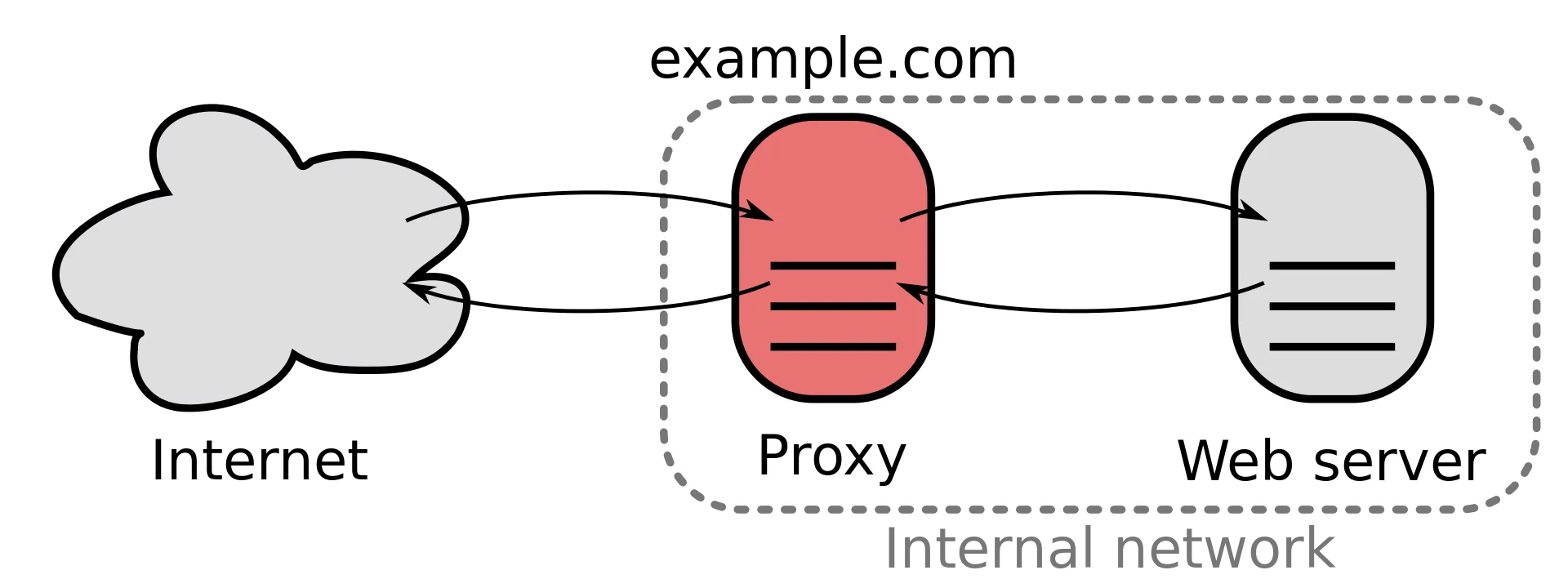
## Frp Service
Frp is a popular reverse proxy service that can map internal services through a free reverse proxy service (Freefrp).
[freefrp](https://freefrp.net/) is a well-known free frp service.
## Environment
This article uses a QNAP NAS TS-253D to set up the container service.
## First, log in to the NAS backend and create the frpc container service
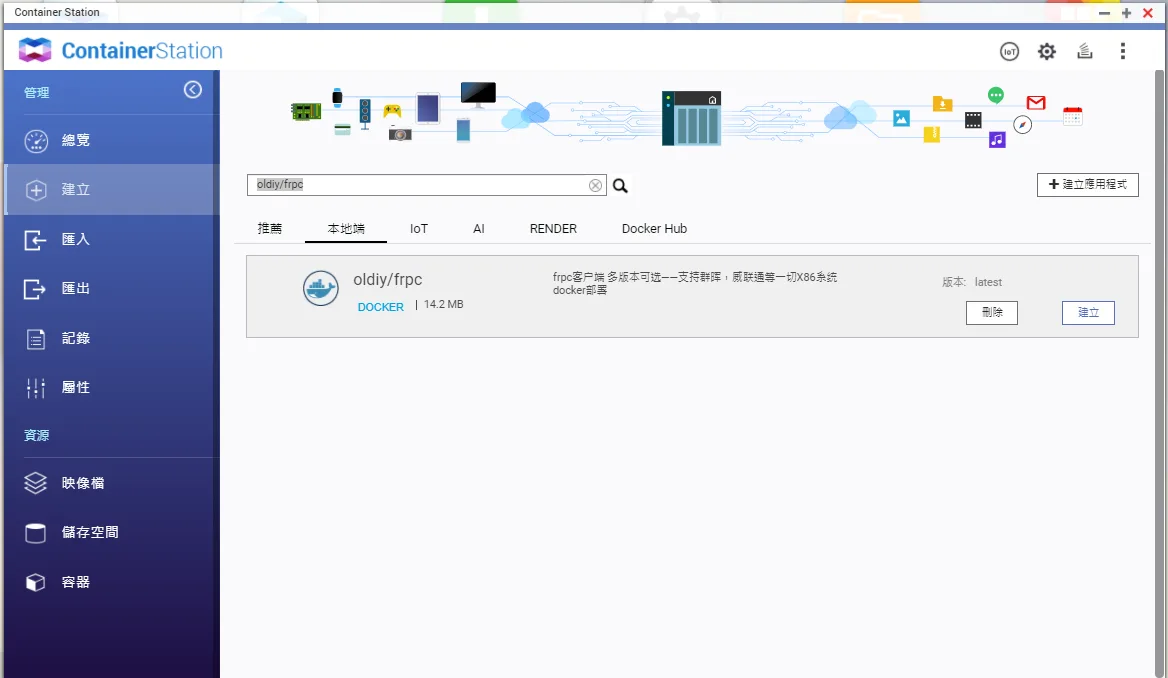
1. Search for oldiy/frpc on Docker Hub
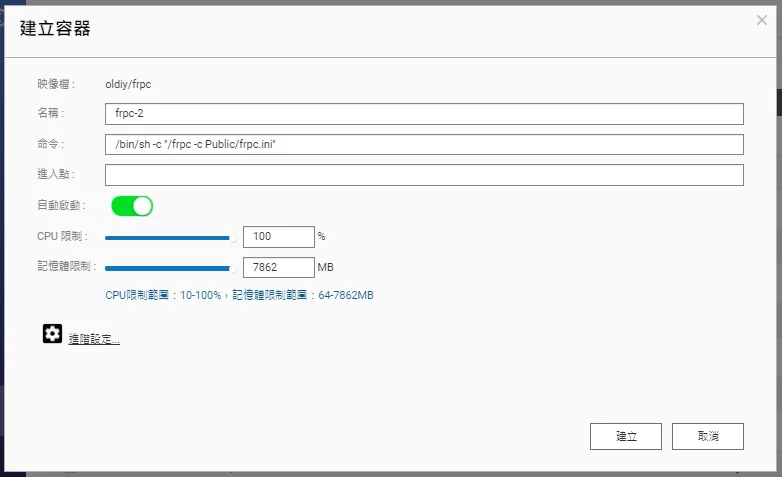
2. Create the container
/bin/sh -c "/frpc -c Public/frpc.ini"
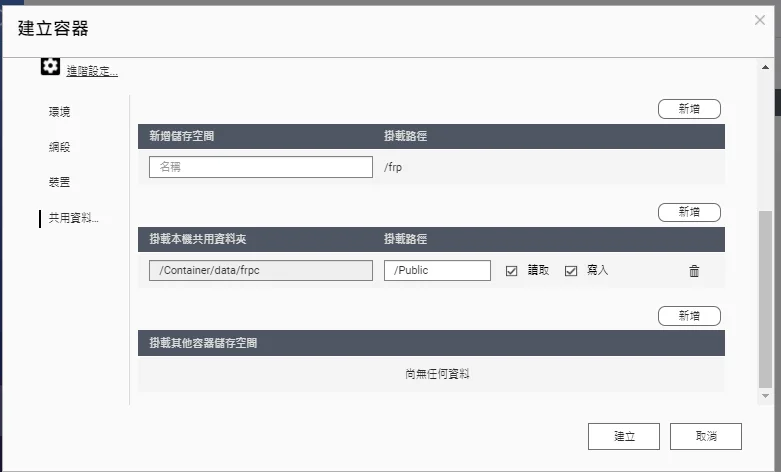
3. Mount a local folder for easier configuration management
4. Set the container network mode to Host
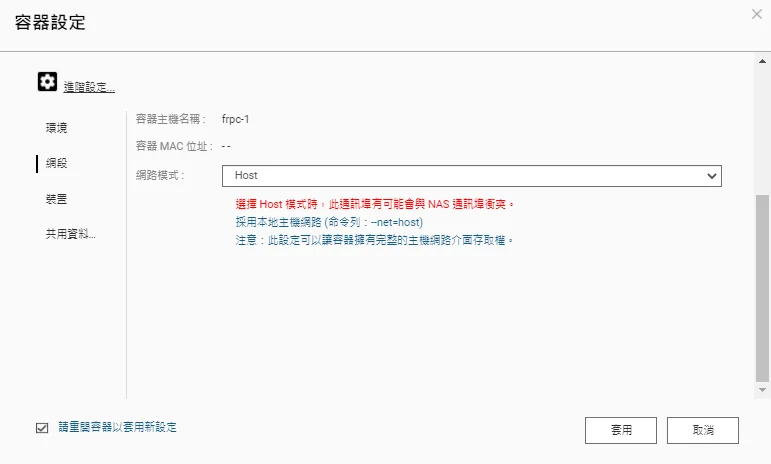
5. Configure the frpc config file (create frpc.toml under \\qnapnas\Container\data\frpc\)
```
serverAddr = "your server"
serverPort = 7000
auth.token = "your token"
transport.poolCount = 10000
[[proxies]]
name = "jks"
type = "https"
customDomains = ["jks.letgo.com.tw"]
[proxies.plugin]
type = "https2http"
localAddr = "127.0.0.1:8080"
crtPath = "/var/frpc/letgo/fullchain.crt"
keyPath = "/var/frpc/letgo/cert.key"
hostHeaderRewrite = "jks.letgo.com.tw"
requestHeaders.set.x-from-where = "frp"
```
6. Now you can use this frpc to map services on your NAS
http://markku646.b.freefrp.net:49183/
---
## About this article and its author
Originally published on [Mark Ku's Tech Notes](https://blog.markkulab.net/en/post/frpc)
License: [CC BY 4.0](https://creativecommons.org/licenses/by/4.0/) — when reusing or quoting, credit the author and link back to the original
### About the author
**[Mark Ku](https://blog.markkulab.net/en/author/mark-ku)** — Software Solution Provider
- 10+ years senior software engineer, now an AI Builder
- Focused on large-platform architecture — North-American e-commerce, AI SaaS subscription billing
- Combining AI Agents and automation to build evolvable product foundations
### Free tools built by the author
All of these are free to use:
- [Free PDF Sign Tool](https://blog.markkulab.net/en/tools/pdf-sign): Online PDF sign tool — draw, type, or upload a signature, then drag, resize, and download. Everything runs in your browser; nothing is uploaded.
- [VS Code Refactory](https://blog.markkulab.net/en/tools/refactory): Refactory is a VS Code refactoring extension: 34 actions plus a 37-rule code-smell inspection layer with a Code Health dashboard, across 18 languages, backed by 534 tests. It learns your repo's conventions: where interfaces live, where DI is registered, whether 'use client' belongs. It ranks files by git churn × complexity so you know what to fix first, and hands any smell to the Claude Code already on your machine. Free to use, and your source never leaves your computer.
- [DB-Kit Database Manager](https://blog.markkulab.net/en/tools/db-kit): DB-Kit is a lightweight, cross-platform database manager built with Tauri + Rust + React. Manage MySQL, MariaDB, PostgreSQL, SQL Server, Oracle, SQLite, MongoDB, Redis, Kafka, Elasticsearch and RabbitMQ from one consistent interface: passwords encrypted in the OS keychain, SSH tunnels, full CRUD, a visual query builder, stacked multi-statement result sets, cross-connection data transfer and compare/sync, Excel / CSV import & export, visualized execution plans, ER diagrams, scheduled backups, SQL stress testing with p50–p99 latency percentiles, a 15-rule SQL review engine, Kafka message browsing with monitoring & alerts, a bilingual UI (Traditional Chinese / English), a built-in AI assistant (natural-language SQL, AI review and tuning advice) and the dbk CLI. Free and open source (MIT), with installers for Windows, macOS and Linux.
- [VS Code Super Mermaid](https://blog.markkulab.net/en/tools/super-mermaid): Super Mermaid is a VS Code extension for beautiful Mermaid diagrams out of the box: auto-colored live preview, mouse pan & zoom, high-res PNG / SVG export, 21 templates and multiple themes. Free and open source (MIT).
- [React Super Mermaid](https://blog.markkulab.net/en/tools/react-super-mermaid): react-super-mermaid is an open-source React component library: render beautiful Mermaid diagrams with a single , with built-in colorful / sketch themes, pan & zoom, in-diagram search, and high-res SVG / PNG export. Lightweight, SSR-safe, fully typed. Free and open source (MIT).
- [Jira / Confluence Super Mermaid](https://blog.markkulab.net/en/tools/jira-super-mermaid): An Atlassian Forge app: write Mermaid syntax directly inside a Jira issue or a Confluence page and get flowcharts, sequence diagrams, state machines and Gantt charts. 11 diagram types, SVG / PNG export, light and dark themes, full CJK support. Runs on Atlassian: your diagrams live in your own site and the app calls no third-party service. Free, coming soon to the Atlassian Marketplace.
- [Mermaid Live Preview](https://blog.markkulab.net/en/tools/mermaid-preview): Write Mermaid in your browser, see it render instantly, and share the whole diagram as a single link. No sign-up, nothing uploaded to a server, and mermaid.live share links work as-is.
- [React Intl Phone Number](https://blog.markkulab.net/en/tools/react-intl-phone-number): react-intl-phone-number is an open-source React component: framework-agnostic and antd-free, with E.164 in/out, a searchable flag / country-code dropdown, configurable validation levels (strict / mobile-strict / loose), themeable CSS, and i18n — phone logic powered by google-libphonenumber. Lightweight and fully typed. Free and open source (MIT).
- [Uptime Kuma Cluster](https://blog.markkulab.net/en/tools/uptime-kuma-cluster): Turn single-node Uptime Kuma into a highly available cluster: OpenResty + Lua smart load balancing, shared MariaDB state, health checks and automatic failover, plus cluster-management REST APIs. One Docker Compose command to start. Free and open source (MIT).
- [Special Education](https://blog.markkulab.net/en/education): Learning materials crafted for special education students
### Daily podcasts
- [Mark's Tech Insights — Daily AI News](https://blog.markkulab.net/en/category/tech-news): Daily curated AI and tech trends. Catch the latest developments via audio summaries — covering AI applications, software architecture, DevOps, and engineering practice. — RSS: https://blog.markkulab.net/feed.xml
- [AI股市蝦聊](https://blog.markkulab.net/en/category/ai-stock-chat): Every trading day, an AI-analyzed take on the Taiwan stock market, delivered as a two-host conversation covering the session and the next-day outlook. — RSS: https://blog.markkulab.net/ai-stock-chat/feed.xml
- [開源好物週報](https://blog.markkulab.net/en/category/open-source-weekly): A weekly two-host pick of free open-source tools surfaced from real Hacker News, GitHub, and Reddit buzz — what pain they solve and the fastest way to get started. — RSS: https://blog.markkulab.net/open-source-weekly/feed.xml
### Newsletter
[Subscribe to the newsletter](https://blog.markkulab.net/en/subscribe) — Be the first to know about new posts. No spam, unsubscribe anytime.