---
title: "Solving frontend rendering performance for large datasets - Part 2: virtual scroll && segmented rendering"
description: "A deeper comparison of virtual scrolling and segmented rendering, with full Vue component source code. Suitable for frontend scenarios that need to display 1000+ rows at the same time."
canonical_url: "https://blog.markkulab.net/en/post/frontend-rendering-performance-issue-part-2"
author: "Mark Ku"
author_url: "https://blog.markkulab.net/en/author/mark-ku"
site: "Mark Ku's Tech Notes"
date_published: "2020-04-16"
category: "Frontend"
tags: ["frontend", "virtual scroll", "virtual list", "vue", "rendering", "performance", "large data", "dom"]
language: "en"
license: "CC BY 4.0"
license_url: "https://creativecommons.org/licenses/by/4.0/"
attribution: "when reusing or quoting, credit the author and link back to the original"
---

# Solving frontend rendering performance for large datasets - Part 2: virtual scroll && segmented rendering

## Defining the problem
[Previously](https://blog.markkulab.net/2021/09/26/frontend-rendering-performance-issue/) I investigated rendering large datasets and confirmed that rendering a huge volume of data all at once causes the browser to freeze. The takeaway was that time-sliced rendering, scroll-based rendering, and virtual lists can all solve highly concurrent rendering problems.

For our basketball/football live-score lists, weekends bring 1000-2000 matches that need to show at the same time, and users expect to see them without pagination.

[For example, the Leisu live site](https://live.leisu.com/)

## Virtual scroll vs. segmented rendering
![Diagram comparing virtual scroll and segmented rendering list techniques](https://blog.markkulab.net/content/markku/posts/frontend-rendering-performance-issue-part-2/images/ciO0Rjn.png)

### How virtual scroll works
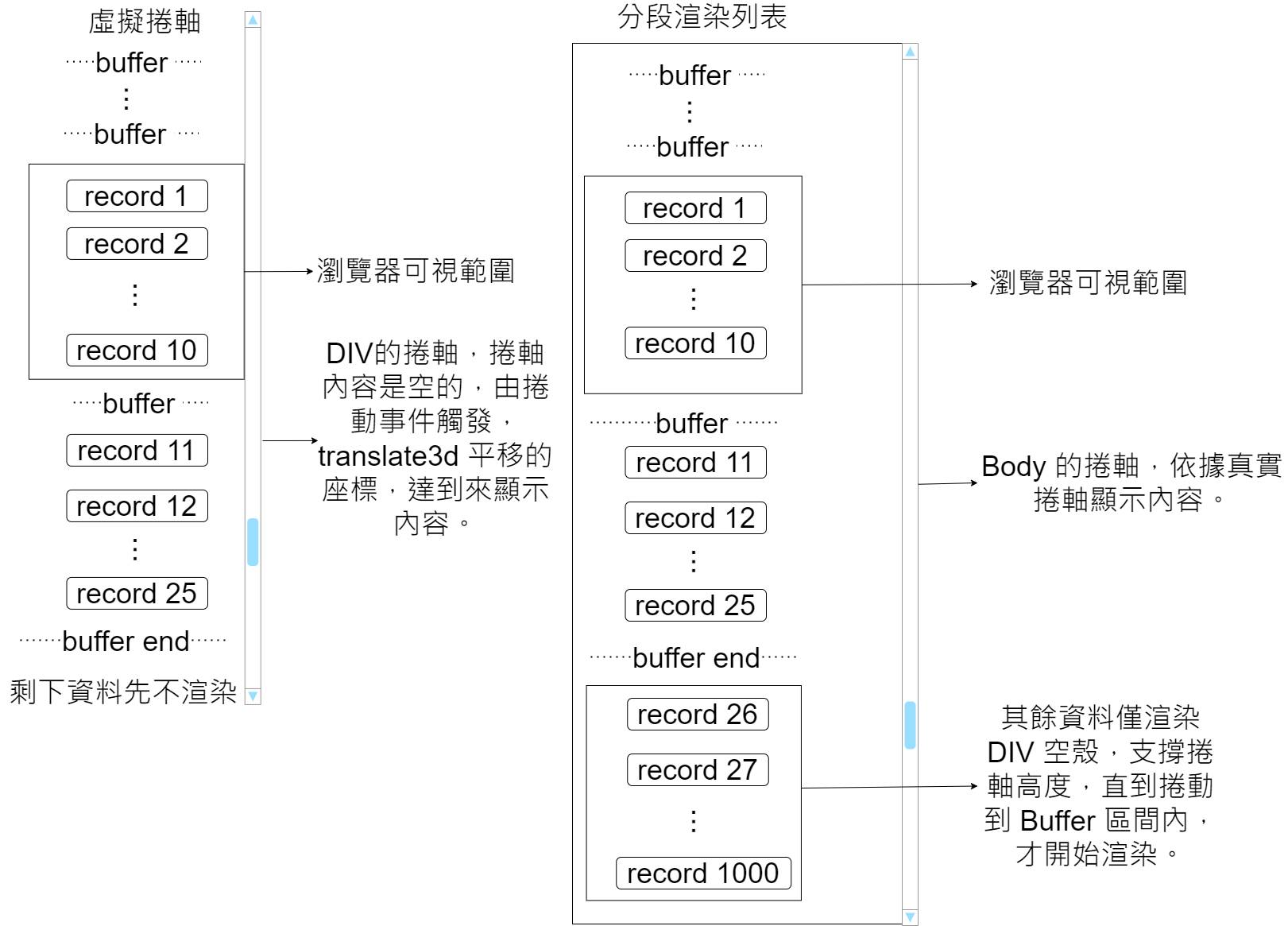
The idea: pass in a height up front, cache each item's getBoundingClientRect bounds, and recalculate the cached height once items render. Use the container's scroll event together with css translate3d on the y-axis to deliver a panning scroll effect. It only borrows the physical scrollbar's height and scroll events but does not actually display through the physical scrollbar - which is why it is called a "virtual" scroll.

### How segmented rendering works
The biggest difference from virtual scroll: segmented scrolling uses the real physical scrollbar from the start. Apart from the buffered items, every row only renders an empty div to prop up the scrollbar height. Components for that range are only rendered when the scroll position reaches its buffer.

## Comparison with traditional rendering performance
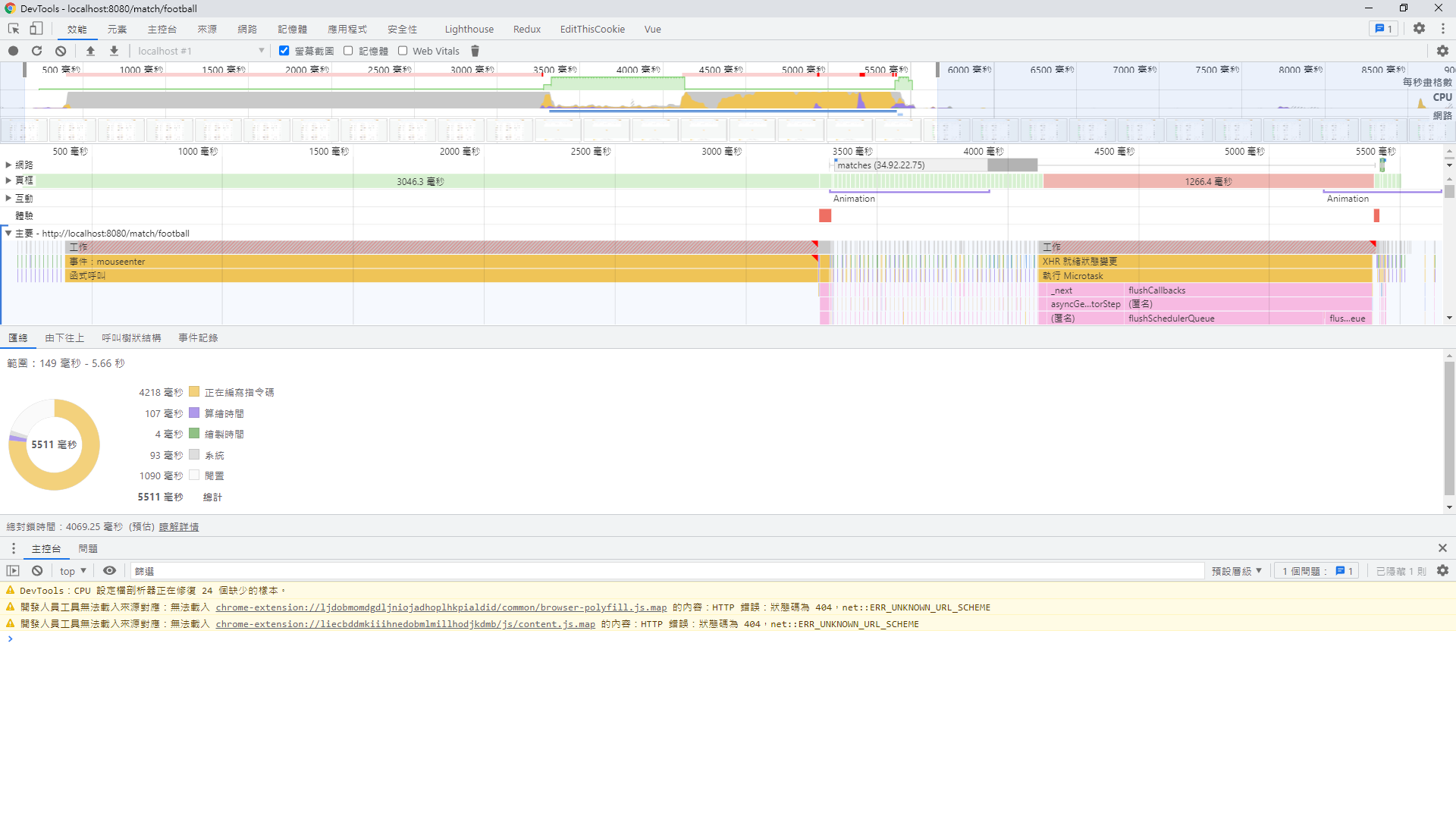
With around 1000 rows, comparing segmented rendering against ordinary rendering: because the number of rendered rows drops sharply, you can expect a near 10x performance improvement.
### Plain rendering
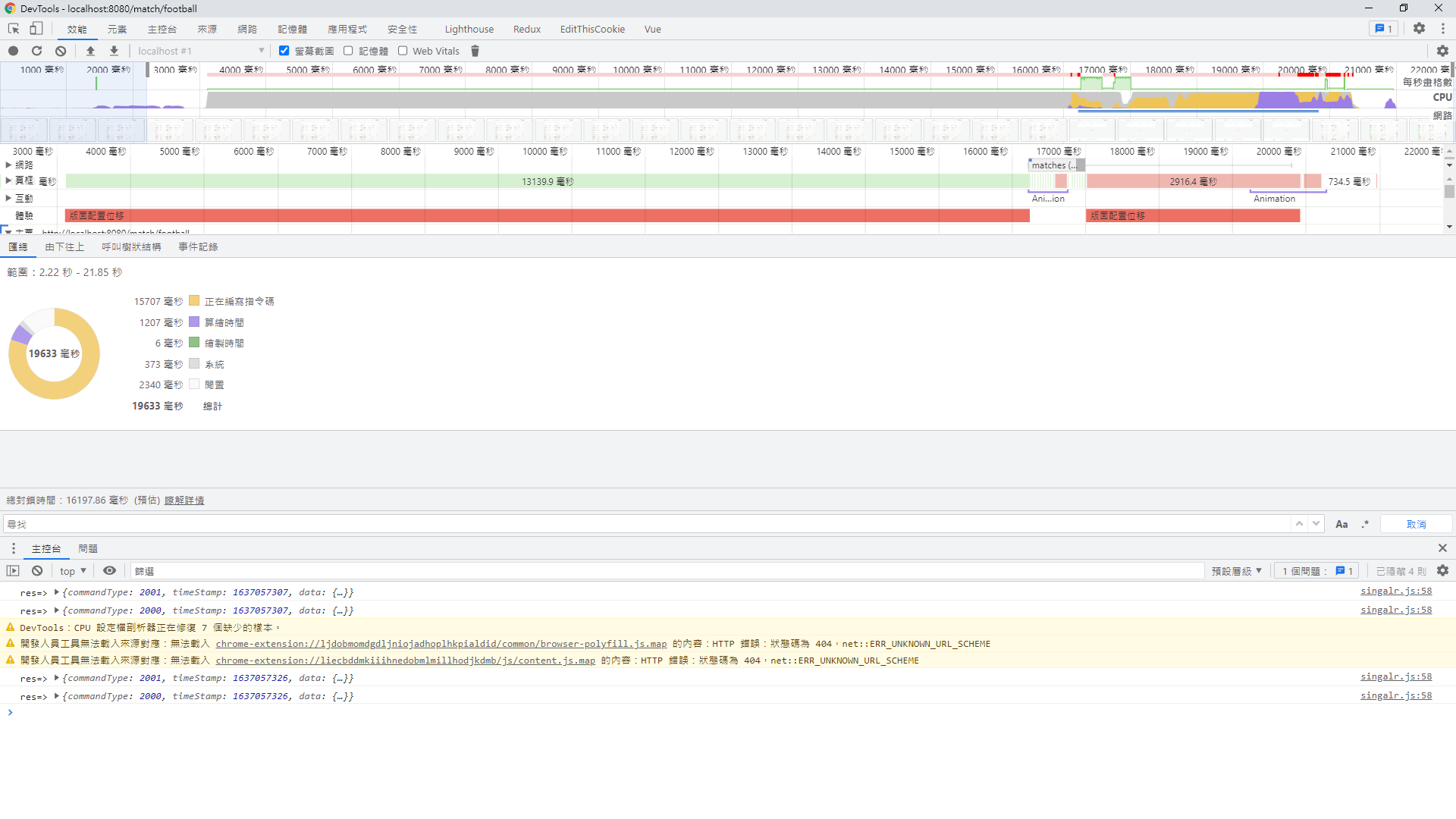
![Frontend performance profile in DevTools showing rendering and scripting](https://blog.markkulab.net/content/markku/posts/frontend-rendering-performance-issue-part-2/images/C4kDCOm.png)
### Segmented rendering
![Chrome DevTools performance profile showing rendering and scripting times](https://blog.markkulab.net/content/markku/posts/frontend-rendering-performance-issue-part-2/images/IYudcTq.png)

## Usage

### Virtual scroll
```
<template>
  <div
    id="virtual-list"
    ref="scroller"
    class="virtual-scroll-list-container"
    @scroll="scrollEvent($event)"
    @touchstart="touchstartHandle"
    @touchmove="touchmoveHandle"
    @touchend="touchendHandle"
  >
    <div
      class="virtual-scroll-list-phantom"
      :style="{ 'min-height': minListHeight + (enableScrollUp ? 40 : 0)+ 'px' }"
    />
    <div
      ref="actualContentRef"
      class="virtual-scroll-list"
      :style="{ transform: getTransform }"
    >
      <div v-show="isShow.isRefresh" ref="refresh" class="refresh">
        <div class="flex justify-center align-center">
          <span class="circle-rotate " />
          <span>
            重新整理
          </span>
        </div>
      </div>
      <slot
        v-for="item in visibleData"
        :start="start"
        :index="getCache(item[uniKey]).index"
        :end="end"
        :uniKey="uniKey"
        :item="item"
        :height="getCache(item[uniKey]).height"
      />
      <div v-show="isShow.isLoading" class="load m-t-4">
        <div class="flex justify-center align-center">
          <span class="circle-rotate " />
          <span>
            加載中
          </span>
        </div>
      </div>
      <span v-if="!isChatMode" class="finished-text">
        <slot name="finishedText">沒有更多內容</slot>
      </span>
    </div>
  </div>
</template>

<script>
import { scrollElementToBottom, debounce } from '@/utils'

export default {
  name: 'VirtualList',
  props: {
    // 所有列表數據
    list: {
      type: Array,
      default: () => []
    },
    // 每項預設的高度
    itemDefaultHeight: {
      type: Number,
      default: 200
    },
    // 唯一值
    uniKey: {
      type: String,
      default: function() {
        return 'seq'
      },
      required: false
    },
    // 可視範圍外多渲染幾筆
    bufferSize: {
      type: Number,
      default: 0
    },
    isChatMode: {
      type: Boolean,
      required: false,
      default: function() {
        return false
      }
    },
    enableScrollDown: {
      // 開啟上拉功能  refresh
      type: Boolean,
      required: false,
      default: function() {
        return false
      }
    },
    enableScrollUp: {
      // 開啟下拉功能 loading
      type: Boolean,
      required: false,
      default: function() {
        return false
      }
    },
    autoLoadMore: {
      // 自動捲到最底就刷新 / 捲到定點，在上拉才刷新
      type: Boolean,
      required: false,
      default: function() {
        return true
      }
    }
  },
  data() {
    return {
      // scrollTop: 0, // 卷軸位址
      lastScrollTop: 0, // 紀錄最後卷軸位址
      isScrolling: false,
      isLoadMoreEnd: false,

      // 列表預估總高度
      minListHeight: 0,
      // 可視區域高度
      screenHeight: 0,
      // 起始索引
      start: 0,
      // 結束索引
      end: null,
      // 快取高度
      cachedPositions: [],
      // 每一項只記算一次動態高度
      calculateOnce: true,
      // 是不是己捲動到最下面
      autoScrollLoaded: false,

      firstRender: false,

      refreshLoginStatus: 'normal', // 組件當前狀態：正常瀏覽模式normal，下拉刷新模式refresh，上拉加載模式loading
      isShow: {
        // 加載動劃控制開關
        isRefresh: false,
        isLoading: false
      },
      startPos: {
        // 手指初始按壓位置
        pageY: 0,
        pageX: 0
      },
      dis: {
        // 手移動距離
        pageY: 0,
        pageX: 0
      },
      last: {
        pageY: 0,
        pageX: 0
      }

    }
  },
  computed: {
    // 預期可視範圍可顯示的列表數
    visibleCount() {
      return Math.ceil(this.screenHeight / this.itemDefaultHeight)
    },
    // 偏移量對應的style
    getTransform() {
      const currentCachedPositions = this.cachedPositions[this.start - 1]

      return `translate3d(0,${
        this.start >= 0 && currentCachedPositions
          ? currentCachedPositions.bottom
          : 0
      }px,0)`
    },
    // 獲取可視範圍的資料筆數
    visibleData() {
      if (this.cachedPositions.length === 0) {
        return []
      }

      return this.list.slice(this.start, this.end + 1)
    }
  },
  watch: {
    list: {
      handler(val) {
        if (val) {
          this.init()
        }

        this.isLoadMoreEnd = false
      },
      immediate: false,
      deep: true
    }
  },
  mounted() {
    this.init()
  },
  // activated生命鉤子在keep-alive被激活時調用
  activated() {
  // 如果曾滾動過,則還原位置
    if (this.lastScrollTop) {
      const page = this.$refs.scroller
      page.scrollTop = this.lastScrollTop
    }
  },

  updated() {
    // 當每一次 component 更新時重新計算一下，目前渲染出來的項目高度，放進 cache 計算
    const that = this

    if (that.$refs.actualContentRef.childElementCount > 0) {
      const childNodes = that.$refs.actualContentRef.childNodes

      that.hasLastNode = false

      childNodes.forEach((node, index) => {
        if (!node || !node.id || node.id.indexOf('-') === -1) {
          return
        }

        const elementIdArray = node.id.split('-')

        if (elementIdArray.length === 2) {
          const elementId = Number(elementIdArray[1])

          if (elementId) {
            const currentCachedPositions = that.cachedPositions.find(
              (x) => x.id === elementId
            )

            if (currentCachedPositions) {
              if (currentCachedPositions.isLast === true) {
                that.hasLastNode = true
              }
            }
            // 每個 item的高度只會重算一次
            if (
              that.calculateOnce &&
              currentCachedPositions.updated &&
              currentCachedPositions.updated === true
            ) {
              return
            }

            const rect = node.getBoundingClientRect()
            const { height } = rect

            const oldHeight = currentCachedPositions.height
            const dValue = oldHeight - height

            if (dValue) {
              currentCachedPositions.bottom -= dValue
              currentCachedPositions.top -= dValue
              currentCachedPositions.height = height
              currentCachedPositions.dValue = dValue
              currentCachedPositions.updated = true
              that.minListHeight -= dValue

              for (
                let i = currentCachedPositions.index;
                i < that.cachedPositions.length;
                i++
              ) {
                const cacheItem = that.cachedPositions[i]

                if (cacheItem) {
                  cacheItem.top -= dValue
                  cacheItem.bottom -= dValue
                }
              }
            }
          }
        }
      })

      if (that.isChatMode) {
        that.$nextTick(function() {
          if (that.firstRender === false) {
            that.firstRender = true
            that.$refs.scroller.scrollTop = that.$refs.scroller.scrollHeight
          } else if (that.autoScrollLoaded === false) {
            scrollElementToBottom('virtual-list')
            if (that.hasLastNode) {
              that.autoScrollLoaded = true
            }
          }
        })
      }
    }
  },

  methods: {
    init() {
      this.autoScrollLoaded = false
      this.initCachedPositions()
      this.initPosition()
      this.screenHeight = this.$el.clientHeight || this.$el.parentElement.clientHeight
      this.scrollEvent()

      // 給 list 預設的高度
      this.minListHeight = this.list.length * this.itemDefaultHeight
    },
    touchstartHandle(e) {
      // 記錄起始位置 和 組件距離window頂部的高度
      this.startPos.pageY = e.touches[0].pageY
      this.startPos.pageX = e.touches[0].pageX
      // 內容頁在可視視窗最頂端或者在指定的位置（父級元素的頂部）
    },
    touchmoveHandle(e) {
      const disY = e.touches[0].pageY - this.startPos.pageY
      const disX = e.touches[0].pageX - this.startPos.pageX
      // for android 預設下拉刷新的問題
      if (this.isAndroid) {
        this.preventAndriodRefreshEevnt(e)
      }

      this.last.pageY = e.changedTouches[0].pageY
      this.last.pageX = e.changedTouches[0].pageX

      if (disX > 100 && !this.isScrolling) {
        this.dis.pageX = disX
        this.$emit('scrollRight')
        this.refreshLoginStatus = 'right'
      } else if (disX < -100 && !this.isScrolling) {
        this.$emit('scrollLeft')
        this.refreshLoginStatus = 'left'
      } else {
        if (this.$refs.scroller.scrollTop <= 0 && disY > 100) {
          this.dis.pageY = disY
          this.refreshLoginStatus = 'refresh'
          this.refreshMove(disY, e)
        } else if (disY < 100) {
          /* //觸發上拉加載 */
          if (this.isShow.isLoading) return
          this.refreshLoginStatus = 'loading'
          this.loadingMove(disY)
        }
      }
    },

    preventAndriodRefreshEevnt(e) {
      // 阻止 android 原生事件
      var direction = e.changedTouches[0].pageY > this.last.pageY ? 1 : -1

      const scrollTop = this.$refs.scroller.scrollTop

      if (direction > 0 && scrollTop <= 0) {
        e.preventDefault()
      }
    },
    loadingMove(dis) {
      // 計算內容頁底部距離可視視窗頂部的距離
      if (this.enableScrollUp && !this.autoLoadMore) {
        const disToTop = this.$refs.actualContentRef.getBoundingClientRect()
          .bottom

        // 計算可視視窗的高度
        const clientHeight = document.documentElement.clientHeight
        if (disToTop <= clientHeight) {
          if (this.refreshLoginStatus === 'loading' && this.dis.pageY < 0) {
            this.isShow.isLoading = true
          }
        }
      }
    },
    refreshMove(dis, e) {
      if (this.enableScrollDown) {
        if (this.isShow.isRefresh) return
        if (this.refreshLoginStatus === 'refresh' && this.dis.pageY > 0) {
          // 下拉刷新成立條件

          this.isShow.isRefresh = true
          // 下拉到一定距離後，內容頁不隨touchmove移動
          this.$refs.actualContentRef.style.transform = `translateY(${
            dis < 8 ? dis : 8
          }px)`

          // for android 預設下拉刷新的問題
          if (this.isAndroid) {
            e.preventDefault()
          }
        }
      }
    },

    touchendHandle(e) {
      if (this.refreshLoginStatus === 'left' || this.refreshLoginStatus === 'right') {
        this.isShow.isRefresh = false
        this.isShow.isLoading = false
      }

      this.refreshLoginStatus === 'refresh' && this.refreshToucnend(e)
      this.refreshLoginStatus === 'loading' && this.loadingTouchend(e)
    },
    refreshToucnend(e) {
      // 加上限定條件，防止不在刷新狀態，後面的代碼執行
      if (!this.isShow.isRefresh) return
      // 必須下拉一定距離，才進行異步加載數據
      this.dis.pageY > 10 && (this.$emit('scrollDown'))

      // 松手後加載動劃消失，並且內容頁回到原位置
      this.isShow.isRefresh = false
      this.$refs.actualContentRef.style.transform = `translateY(0px)`
      this.refreshLoginStatus = 'normal'
    },
    loadingTouchend(e) {
      // 加上限定條件，防止不在刷新狀態，後面的代碼執行
      if (!this.isShow.isLoading) return

      if (this.isLoadMoreEnd === false) {
        this.$emit('scrollUp')

        this.isLoadMoreEnd = true
      }
      this.isShow.isLoading = false
      this.refreshLoginStatus = 'normal'
    },

    getCache(uniId) {
      const cache = this.cachedPositions.find(x => x.id === uniId)
      return cache
    },

    initPosition() {
      if (this.isChatMode) {
        this.end = this.list.length

        var range = this.visibleCount + this.bufferSize

        if (this.end - range < 0) {
          this.start = 0
        } else {
          this.start = this.end - range
        }
      } else {
        this.start = 0
        this.end = this.start + this.visibleCount + this.bufferSize
      }
    },
    // 依照預設每一筆資料都給計算 bottom 及給預設高度
    initCachedPositions() {
      const { itemDefaultHeight } = this
      this.cachedPositions = []
      for (let i = 0; i < this.list.length; ++i) {
        this.cachedPositions[i] = {
          id: this.list[i][this.uniKey],
          index: i,
          height: itemDefaultHeight,
          top: i * itemDefaultHeight,
          bottom: (i + 1) * itemDefaultHeight,
          dValue: 0,
          isLast: i + 1 === this.list.length

        }
      }
    },
    scrollEvent(e) {
      // 當前滾動位置
      const scrollTop = this.$refs.scroller.scrollTop

      // 綁定事件,滾動時,儲存位置到this.scrollTop
      this.lastScrollTop = scrollTop

      // 處理滑動不可以切換tab
      this.isScrolling = true
      var scroll
      clearTimeout(scroll)
      scroll = setTimeout(() => {
        this.isScrolling = false
      }, 100)

      let index = 0
      // 此時的開始索引
      const currentCachePostion = this.cachedPositions.filter(
        (x) => scrollTop < x.bottom
      )[0]

      if (currentCachePostion) {
        index = currentCachePostion.index
      }

      if (index === 0) {
        this.start = 0
        this.end = index + this.visibleCount + this.bufferSize
      }
      // debugger
      // 此時的結束索引
      this.start = index - this.bufferSize
      this.end = index + this.visibleCount + this.bufferSize

      if (this.list.length > 0 && this.end >= this.list.length) {
        // 自動加載
        if (this.enableScrollUp && this.autoLoadMore) {
          this.isShow.isLoading = true
          this.loadingTouchend(e)
        }

        this.end = Math.max(this.list.length, this.visibleCount)
        this.start = Math.min(this.end - this.visibleCount - this.bufferSize, 0)
      }

      if (this.start < 0) this.start = 0 // 起始筆
    },
    debounceScroll(e) {
      debounce(() => { this.scrollEvent(e) }, 16.6) // 60Hz
    }
  }
}
</script>

<style scoped lang="scss">
.virtual-scroll-list-container {
  position: relative;
  overflow: auto;
  height: 100%;
  -webkit-overflow-scrolling: touch;
  // scroll-behavior: smooth;
}

// .virtual-scroll-list-container::-webkit-scrollbar {
//   display: none;
// }

.virtual-scroll-list-phantom {
  position: absolute;
  top: 0;
  right: 0;
  left: 0;
  z-index: -1;
}

.virtual-scroll-list {
  position: absolute;
  top: 0;
  right: 0;
  left: 0;
  z-index: 998;
}

/*
::-webkit-scrollbar {
    width: 10px;
}

::-webkit-scrollbar-track {
    background-color: darkgrey;
}

::-webkit-scrollbar-thumb {
    box-shadow: inset 0 0 6px rgba(0, 0, 0, 0.2);
} */

.circle-rotate {
  position: relative;
  border: 10px solid #CCC;
  border-right-color: transparent;
  border-radius: 50%;
  width: 20px;
  height: 20px;
  animation: loadingAnimation 0.75s infinite;
}

@keyframes loadingAnimation {
  0% {
    transform: translateX(-50%) rotate(0deg);
  }

  100% {
    transform: translateX(-50%) rotate(360deg);
  }
}

.finished-text {
  display: block;
  padding: 24px 0 32px 0;
  font-size: 22px;
  text-align: center;
  color: $text-grey-darken;
}

.disable-hover {
  pointer-events: none;
}

</style>
```
Usage
```
<VirtualScroller
      :list="news"
      class="news-list-wrapper"
      :item-default-height="100"
      :uni-key="'id'"
      :enable-scroll-up="!isLastPage"
      :auto-load-more="true"
      :enable-scroll-down="true"
      :buffer-size="4"
      @scrollDown="scrollDown"
      @scrollUp="scrollUp"
    >
      <template #default="slotScope">
        <NewsCard
          :id="'news-' + slotScope.item[slotScope.uniKey]"
          :key="'news-' + slotScope.item[slotScope.uniKey]"
          :start="slotScope.start"
          :end="slotScope.end"
          :index="slotScope.index"
          :h="slotScope.height"
          :news="slotScope.item"
          :sport-id="slotScope.item.sportId"
        />
      </template>
</VirtualScroller>
```

### Segmented scroll
```
<template>
  <div
    ref="part-render-container"
    class="part-render-scroll-list-container"
    :style="{ height: minListHeight +'px' }"
  >

    <div
      v-for="(item, index) in list"
      :key="item[uniKey]"
      :[uniKey]="item[uniKey]"
      :index="index"
      class="part-render-item"
      :class="[{ visiable: checkVisible(index) }, itemClass]"
      :style="{ 'min-height': cachedPositions[index].height + 'px' }"
    >
      <transition-group name="fade">
        <slot
          v-if="checkVisible(index)"
          :index="index"
          :uniKey="uniKey"
          :item="item"
          :height="cachedPositions[index].height"
        />
      </transition-group>
    </div>
  </div>
</template>

<script>
export default {
  name: 'VirtualList',
  props: {
    scrollElementId: { // 沒傳預設抓 body
      type: String,
      required: false,
      default: function() {
        return ''
      }
    },
    // 所有列表數據
    list: {
      type: Array,
      default: () => []
    },
    // 每項預設的高度
    itemDefaultHeight: {
      type: Number,
      default: 200
    },
    // 唯一值
    uniKey: {
      type: String,
      default: function() {
        return 'id'
      },
      required: false
    },
    // 可視範圍外多渲染幾筆
    bufferSize: {
      type: Number,
      default: 20
    },
    itemClass: {
      type: String,
      required: false,
      default: function() {
        return ''
      }
    }
  },
  data() {
    return {
      // 列表預估總高度
      minListHeight: 0,
      // 起始索引
      start: 0,
      // 結束索引
      end: null,
      // 快取高度
      cachedPositions: [],
      // 每一項只記算一次動態高度

      defaultTopOffset: 0,
      maxListHeight: 0,
      currentScrollTop: 0,
      currentEleTop: 0,
      currentEleBottom: 0,
      screenHeight: 0,
      scrollElement: null,
      isBodyScroller: false // 是不是 body 的捲軸

    }
  },
  computed: {
    // 一頁預估可以顯示幾筆
    visibleCount() {
      return Math.ceil(this.screenHeight / this.itemDefaultHeight)
    },

    // 己進入預渲染的範圍
    isEnterPreload() {
      const isEnterPreload = this.currentScrollTop + this.screenHeight > this.currentEleTop && this.currentScrollTop - this.screenHeight < this.currentEleBottom

      return isEnterPreload
    }

  },
  watch: {
    list: {
      handler(val) {
        if (
          val &&
          val.length > 0
        ) {
          // 給 list 預設的高度
          this.minListHeight = this.list.length * this.itemDefaultHeight

          this.initCachedPositions()
          var that = this
          that.$nextTick(function() {
            const rect = this.$el.getBoundingClientRect()
            that.defaultTopOffset = rect.top
          })
        }
      },
      immediate: true,
      deep: true
    }
  },
  mounted() {
    this.screenHeight =
        window.innerHeight ||
        document.documentElement.clientHeight ||
        document.body.clientHeight

    this.recalculateCurrentEleBoundary()

    // 給初始值
    this.start = 0

    this.end = this.start + this.visibleCount + this.bufferSize

    this.isBodyScroller = this.scrollElementId.length === 0

    if (this.isBodyScroller) {
      window.addEventListener('scroll', this.handleScroll)
    } else {
      this.getScrollElement().addEventListener('scroll', this.handleScroll, false)
    }
  },

  updated() {
    // 當每一次 component 更新時重新計算一下，目前渲染出來的項目高度，放進 cache 計算

    const that = this
    const el = this.$el

    if (el) {
      const childNodes = el.querySelectorAll('.visiable')

      childNodes.forEach((node, index) => {
        if (!node) {
          return
        }

        const elementIndex = Number(node.getAttribute('index'))

        // 重算高度
        const currentCachedPositions = that.cachedPositions[elementIndex]

        if (currentCachedPositions.updated === true) {
          return
        }

        currentCachedPositions.updated = true

        if (currentCachedPositions) {
          // slot 只能放一筆
          const rect = node.children[0].getBoundingClientRect()
          const { height } = rect

          const oldHeight = currentCachedPositions.height
          const dValue = oldHeight - height

          if (dValue) {
            currentCachedPositions.bottom -= dValue
            currentCachedPositions.top -= dValue
            currentCachedPositions.height = height
            currentCachedPositions.dValue = dValue
            that.minListHeight -= dValue

            // 重算快取 Cache 的 上邊界 & 下邊界
            this.recalculateCache(currentCachedPositions.index, dValue)
          }
        }
      })

      this.recalculateCurrentEleBoundary()
    }
  },
  beforeDestroy() {
    if (this.isBodyScroller) {
      window.removeEventListener('scroll', this.handleScroll)
    } else {
      this.getScrollElement().removeEventListener('scroll', this.handleScroll, false)
    }
  },
  methods: {
    getScrollElement() {
      const scrollElement = document.getElementById(this.scrollElementId)
      if (this.isBodyScroller) {
        return document.documentElement || document.body
      } else {
        if (!scrollElement) {
          console.log('找不到捲軸物件')
        }
        return document.getElementById(this.scrollElementId)
      }
    },
    // 重算快取 Cache 的 上邊界 & 下邊界
    recalculateCache(index, dValue) {
      for (let i = index; i < this.cachedPositions.length; i++) {
        const cacheItem = this.cachedPositions[i]

        if (cacheItem) {
          cacheItem.top -= dValue
          cacheItem.bottom -= dValue
        }
      }
    },
    // 重新計算上邊界和下邊界的距離
    recalculateCurrentEleBoundary() {
      var rect = this.$el.getBoundingClientRect()

      this.currentEleTop = rect.top + this.currentScrollTop
      this.currentEleBottom = rect.top + this.currentScrollTop + rect.height
    },

    checkVisible(nowIndex) {
      if (this.isEnterPreload) {
        return (
          nowIndex >= this.start &&
        nowIndex <= Math.min(this.end, this.list.length)
        )
      } else {
        return false
      }
    },
    handleScroll() {
      this.currentScrollTop = this.getScrollElement().scrollTop

      let index = 0

      // 此時的開始索引
      const currentCachePostion = this.cachedPositions.filter(
        (x) => this.currentScrollTop - this.currentEleTop < x.top
      )[0]

      if (currentCachePostion) {
        index = currentCachePostion.index
      }

      if (index === 0) {
        this.start = 0
        this.end = index + this.visibleCount + this.bufferSize
      }

      this.start = index - this.bufferSize
      this.end = index + this.visibleCount + this.bufferSize

      if (this.start < 0) {
        this.start = 0
      }

      if (this.end > this.list.length) {
        this.end = this.list.length - 1
        this.start = this.end - this.visibleCount - this.bufferSize
      }
    },

    // 依照預設每一筆資料都給計算 bottom 及給預設高度
    initCachedPositions() {
      const { itemDefaultHeight } = this
      this.cachedPositions = []
      for (let i = 0; i < this.list.length; ++i) {
        this.cachedPositions[i] = {
          index: i,
          height: itemDefaultHeight,
          top: i * itemDefaultHeight,
          bottom: (i + 1) * itemDefaultHeight,
          dValue: 0,
          isLast: i === this.list.length - 1,
          updated: false // 曾經渲染過
        }
      }
    }
  }
}
</script>

<style scoped>
.part-render-scroll-list-container {
  box-sizing: border-box;
}

.part-render-item {
  box-sizing: border-box;
}
</style>

```
Usage
```
<PartRenderingScroller :scroll-element-id="'schedule-container'" :list="early.early" :item-default-height="100" uni-key="matchId" class="schedule-list p-l-20 p-r-20" :buffer-size="50">
            <template #default="slotScope">
              <ScheduleCard
                :id="'live-' + slotScope.item[slotScope.uniKey]"
                :key="'live-' + slotScope.item[slotScope.uniKey]"
                :class="{'p-t-20':slotScope.index===0}"
                :start="slotScope.start"
                :end="slotScope.end"
                :index="slotScope.index"
                :h="slotScope.height"
                :sport-id="sportId"
                :schedule="slotScope.item"
                :lottery-type="lotteryType"
              />
            </template>
</PartRenderingScroller>
```

## Things to keep in mind if you plan to apply virtual scroll or segmented scroll later
1. For segmented scroll, the desktop layout uses the body scroll, while mobile uses a div for scrolling. Pass scrollElementId to control it; if nothing is passed, body scroll is used by default.
2. Do not use padding to expand the outer list container - let the items themselves prop up the height. The outermost layer of an item cannot use margin either, because programmatic width/height measurements do not include margin. (Maybe later we can extend this to use window.getComputedStyle to support margin.)
3. List item CSS needs box-sizing: border-box; otherwise padding is not counted.
4. For segmented or virtual scrolling, the structure must use div - not ul/li or table - because the virtual scroll component renders extra divs.
5. To recalculate height, list items must have an id separated by a hyphen, like "{{type}}-{{id}}".
6. Try to avoid integrating with other libraries that own the scroll behavior (better-scroll, vant dialog, swiper). Each library has its own lifecycle. If you really must integrate, extending the component yourself usually conflicts less.

## Issues encountered along the way
### 1. After evaluating vue-virtual-scroller and vue-virtual-scroll-list, I found they handle simple cases but break down on complex scenarios.
The source code is also hard to read and modify, so I ended up writing my own.

### 2. During implementation I noticed that on a non-fullscreen desktop layout, or when several virtual scrolls need to coexist, the user experience suffers. You end up with nested inner and outer scrollbars, which is awkward to scroll through.
For these cases, virtual scroll is probably the wrong tool - go with segmented rendering instead.

### 3. Every row may have a different height, so the segmented and virtual-scroll components must support dynamic heights.
On initialization, give a default height and cache it. Once the row actually renders, update the cached height and position.
### 4. When using virtual scroll for chat, with a lot of messages, rendering from the oldest to the newest via auto-scroll becomes very laggy.
For chat we ended up reversing the render index, drawing what the user can see first, and only working backwards as the user scrolls up.

### 5. Integrating with vue-better-scroll (pull-up to load, pull-down to refresh) and swiper.
These all have virtual-scroll-like mechanics built in. If you have to integrate scroll-related libraries, it is usually safer to extend your own virtual scroll - otherwise you will be untangling two competing virtual-scroll mechanisms.

## Articles in this series
* [Solving frontend rendering performance for large datasets - Part 1](https://blog.markkulab.net/2021/09/26/frontend-rendering-performance-issue/)
* [Solving frontend rendering performance for large datasets - Part 2: virtual scroll && segmented rendering](https://blog.markkulab.net/2021/12/06/frontend-rendering-performance-issue-part-2/)

---

## About this article and its author

Originally published on [Mark Ku's Tech Notes](https://blog.markkulab.net/en/post/frontend-rendering-performance-issue-part-2)

License: [CC BY 4.0](https://creativecommons.org/licenses/by/4.0/) — when reusing or quoting, credit the author and link back to the original

### About the author

**[Mark Ku](https://blog.markkulab.net/en/author/mark-ku)** — Software Solution Provider

- 10+ years senior software engineer, now an AI Builder
- Focused on large-platform architecture — North-American e-commerce, AI SaaS subscription billing
- Combining AI Agents and automation to build evolvable product foundations

### Free tools built by the author

All of these are free to use:

- [Free PDF Sign Tool](https://blog.markkulab.net/en/tools/pdf-sign): Online PDF sign tool — draw, type, or upload a signature, then drag, resize, and download. Everything runs in your browser; nothing is uploaded.
- [VS Code Refactory](https://blog.markkulab.net/en/tools/refactory): Refactory is a VS Code refactoring extension: 34 actions plus a 37-rule code-smell inspection layer with a Code Health dashboard, across 18 languages, backed by 534 tests. It learns your repo's conventions: where interfaces live, where DI is registered, whether 'use client' belongs. It ranks files by git churn × complexity so you know what to fix first, and hands any smell to the Claude Code already on your machine. Free to use, and your source never leaves your computer.
- [DB-Kit Database Manager](https://blog.markkulab.net/en/tools/db-kit): DB-Kit is a lightweight, cross-platform database manager built with Tauri + Rust + React. Manage MySQL, MariaDB, PostgreSQL, SQL Server, Oracle, SQLite, MongoDB, Redis, Kafka, Elasticsearch and RabbitMQ from one consistent interface: passwords encrypted in the OS keychain, SSH tunnels, full CRUD, a visual query builder, stacked multi-statement result sets, cross-connection data transfer and compare/sync, Excel / CSV import & export, visualized execution plans, ER diagrams, scheduled backups, SQL stress testing with p50–p99 latency percentiles, a 15-rule SQL review engine, Kafka message browsing with monitoring & alerts, a bilingual UI (Traditional Chinese / English), a built-in AI assistant (natural-language SQL, AI review and tuning advice) and the dbk CLI. Free and open source (MIT), with installers for Windows, macOS and Linux.
- [VS Code Super Mermaid](https://blog.markkulab.net/en/tools/super-mermaid): Super Mermaid is a VS Code extension for beautiful Mermaid diagrams out of the box: auto-colored live preview, mouse pan & zoom, high-res PNG / SVG export, 21 templates and multiple themes. Free and open source (MIT).
- [React Super Mermaid](https://blog.markkulab.net/en/tools/react-super-mermaid): react-super-mermaid is an open-source React component library: render beautiful Mermaid diagrams with a single <MermaidViewer>, with built-in colorful / sketch themes, pan & zoom, in-diagram search, and high-res SVG / PNG export. Lightweight, SSR-safe, fully typed. Free and open source (MIT).
- [Jira / Confluence Super Mermaid](https://blog.markkulab.net/en/tools/jira-super-mermaid): An Atlassian Forge app: write Mermaid syntax directly inside a Jira issue or a Confluence page and get flowcharts, sequence diagrams, state machines and Gantt charts. 11 diagram types, SVG / PNG export, light and dark themes, full CJK support. Runs on Atlassian: your diagrams live in your own site and the app calls no third-party service. Free, coming soon to the Atlassian Marketplace.
- [Mermaid Live Preview](https://blog.markkulab.net/en/tools/mermaid-preview): Write Mermaid in your browser, see it render instantly, and share the whole diagram as a single link. No sign-up, nothing uploaded to a server, and mermaid.live share links work as-is.
- [React Intl Phone Number](https://blog.markkulab.net/en/tools/react-intl-phone-number): react-intl-phone-number is an open-source React component: framework-agnostic and antd-free, with E.164 in/out, a searchable flag / country-code dropdown, configurable validation levels (strict / mobile-strict / loose), themeable CSS, and i18n — phone logic powered by google-libphonenumber. Lightweight and fully typed. Free and open source (MIT).
- [Uptime Kuma Cluster](https://blog.markkulab.net/en/tools/uptime-kuma-cluster): Turn single-node Uptime Kuma into a highly available cluster: OpenResty + Lua smart load balancing, shared MariaDB state, health checks and automatic failover, plus cluster-management REST APIs. One Docker Compose command to start. Free and open source (MIT).
- [Special Education](https://blog.markkulab.net/en/education): Learning materials crafted for special education students

### Daily podcasts

- [Mark's Tech Insights — Daily AI News](https://blog.markkulab.net/en/category/tech-news): Daily curated AI and tech trends. Catch the latest developments via audio summaries — covering AI applications, software architecture, DevOps, and engineering practice. — RSS: https://blog.markkulab.net/feed.xml
- [AI股市蝦聊](https://blog.markkulab.net/en/category/ai-stock-chat): Every trading day, an AI-analyzed take on the Taiwan stock market, delivered as a two-host conversation covering the session and the next-day outlook. — RSS: https://blog.markkulab.net/ai-stock-chat/feed.xml
- [開源好物週報](https://blog.markkulab.net/en/category/open-source-weekly): A weekly two-host pick of free open-source tools surfaced from real Hacker News, GitHub, and Reddit buzz — what pain they solve and the fastest way to get started. — RSS: https://blog.markkulab.net/open-source-weekly/feed.xml

### Newsletter

[Subscribe to the newsletter](https://blog.markkulab.net/en/subscribe) — Be the first to know about new posts. No spam, unsubscribe anytime.