---
title: "Chrome Extension Development in Practice: Building a Content Compliance Tool from Scratch — Keycloak SSO and Store Submission, End to End"
description: "A complete walkthrough of Chrome Extension development — Manifest V3 architecture, Keycloak SSO integration, lead-generation funnel design, and how to submit to the Chrome Web Store."
canonical_url: "https://blog.markkulab.net/en/post/chrome-extension-content-compliance-marketing"
author: "Mark Ku"
author_url: "https://blog.markkulab.net/en/author/mark-ku"
site: "Mark Ku's Tech Notes"
date_published: "2026-01-31 10:00:00 +0800"
category: "Tech Insights"
tags: ["chrome-extension", "marketing", "lead-generation", "manifest-v3", "keycloak", "oauth2"]
language: "en"
license: "CC BY 4.0"
license_url: "https://creativecommons.org/licenses/by/4.0/"
attribution: "when reusing or quoting, credit the author and link back to the original"
---
# Chrome Extension Development in Practice: Building a Content Compliance Tool from Scratch — Keycloak SSO and Store Submission, End to End
> **TL;DR** — 歡迎來到 Mark 的 Tech Insights,我是主持人璦廷。你是否想過,瀏覽器擴充功能不只是實用工具,還能成為絕佳的產品導流神器?今天,我們將帶您從零開始,探索如何開發一款內容合規檢查的 Chrome 擴充功能。 讓我們來看看實際的應用場景。想像一下,行銷人員在發布貼文前,只要選取網頁文字按右鍵,就能快速檢查文案是否觸犯法規,甚至支援圖片識別與截圖檢查,能大幅降低違規風險。 在技術層面,這個重點值得注意。專案全面採用最新的 Manifest V3 架構,以 Service Worker 提升執行效率與安全性。此外,為了實現單一登入,系統整合了開源的 Keycloak,並搭配專屬的安全機制,確保登入過程滴水不漏。 開發工具的同時,我們也融入了產品導流策略。透過解鎖完整建議的行動呼籲設計,使用者能獲得有價值的分析報告,團隊也能藉此收集潛在客戶名單,創造雙贏的價值交換。 總結來說,擴充功能不僅能建立品牌認知,更能有效降低獲客成本。如果您正在思考如何為產品開創新的曝光管道,不妨評估看看,您的核心服務是否也能化身為使用者瀏覽器上的得力助手呢?
## Preface
This year our team plans to launch a "web content compliance check" extension on Chrome. The main goals: increase product exposure and offer users a genuinely useful tool.
This article covers the full picture:
1. **Chrome Extension dev essentials** — Architecture and must-know concepts
2. **Keycloak SSO integration** — How to do single sign-on inside an extension
3. **Lead-generation strategy** — Turning free-tool users into paying customers
4. **Chrome Web Store submission** — Packaging through review
## Product positioning and target users
The main target users are **marketing managers and community operators**. Before posting, they often need to confirm whether content complies with regulations — to avoid ad copy that violates rules and triggers fines.
### Use case
Picture this scenario:
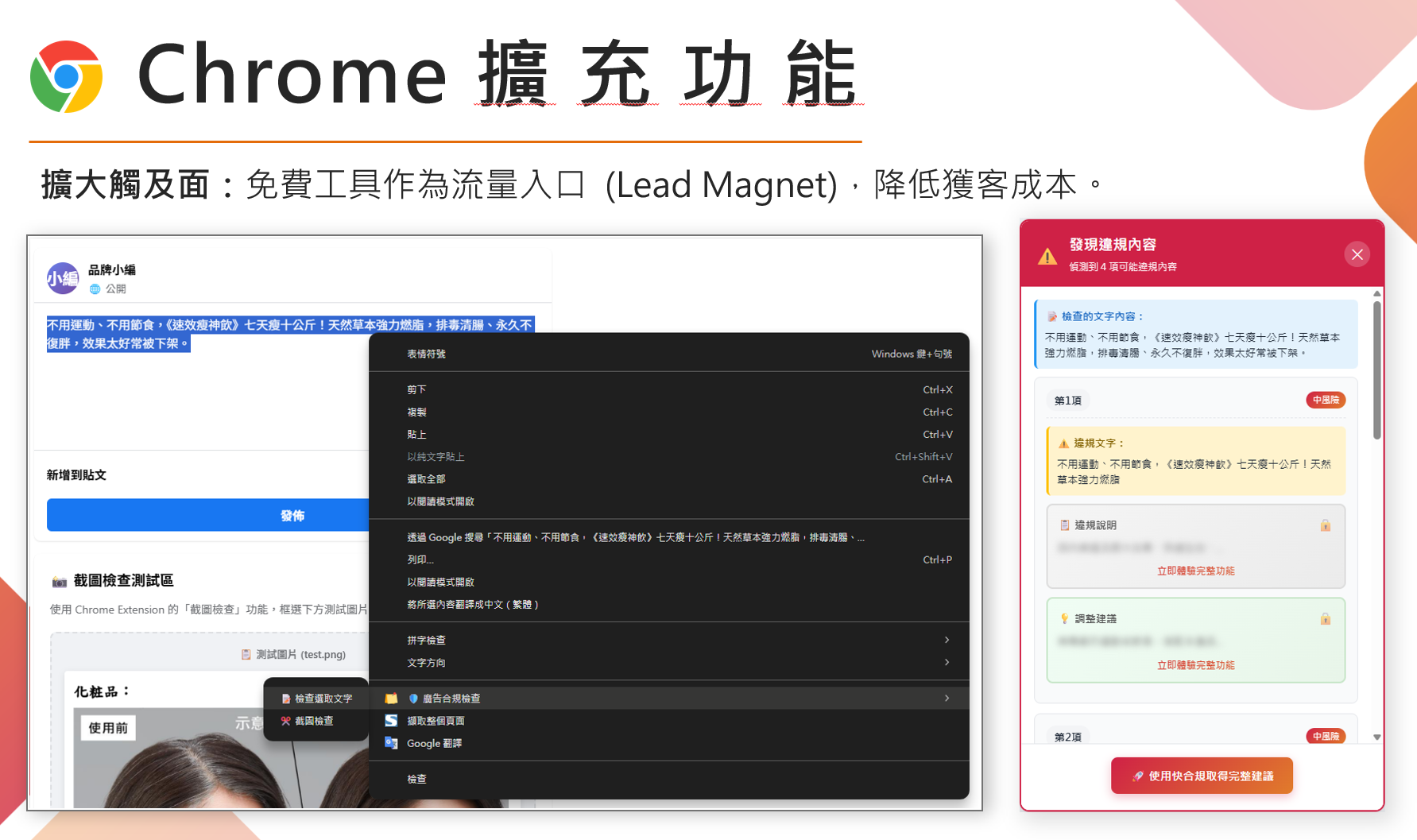
> A marketer is preparing to publish a Facebook post about a health supplement promotion. Before going live, she wants to check the copy for forbidden wording. She just selects the text, right-clicks, and quickly verifies whether the content is compliant.
## Core feature design
### Right-click menu
After users select text on a webpage, they can quickly run a check via the right-click menu:
```mermaid
---
title: Four check entry points in the right-click menu
---
flowchart LR
M["🖱️ Right-click menu"] --> C["📋 Copy"]
M --> S["🔍 Search"]
M --> G["🛡️ Ad compliance check
added by this extension"]
G --> T["📝 Check selected text"]
G --> L["🔗 Check link content"]
G --> I["🖼️ Check image text"]
G --> P["✂️ Screenshot check"]
```
### Four check modes
1. **📝 Check selected text** — Directly check the selected text
2. **🔗 Check link content** — Fetch and analyze webpage content
3. **🖼️ Check image text** — OCR text from images
4. **✂️ Screenshot check** — Capture a screen region and run OCR + check
## Architecture
The project is built on **Manifest V3**, with the following stack:
```
chrome-extension/
├── manifest.json # Extension config (Manifest V3)
├── background.js # Service Worker
├── content.js # Content script
├── config.js # Centralized config
│
├── auth/ # Auth module (Keycloak integration)
│ ├── auth-config.js # Auth config
│ ├── auth-service.js # Login logic
│ ├── auth.html # Login page
│ └── auth.js # Login UI control
│
├── core/ # Core modules
│ ├── utils.js # Shared utilities
│ ├── risk-levels.js # Risk-level definitions
│ └── api-client.js # API call wrapper
│
├── handlers/ # Feature handlers
│ ├── text-handler.js # Text check
│ ├── link-handler.js # Link check
│ ├── image-handler.js # Image OCR
│ └── screenshot-handler.js # Screenshot check
│
├── ui/ # UI components
│ ├── loading.js # Loading animation
│ ├── dialog.js # Dialog
│ ├── result-panel.js # Result panel
│ └── styles.css # Styles
│
├── popup/ # Popup page
│ ├── popup.html
│ ├── popup.css
│ └── popup.js
│
└── options/ # Settings page
├── options.html
├── options.css
└── options.js
```
---
## Chrome Extension dev essentials
If you're building a Chrome Extension for the first time, here are the core concepts to know:
### What is a Chrome Extension?
In simple terms, a Chrome Extension is a **small program that runs inside the browser**, capable of:
- Adding new features to web pages (right-click menus, floating buttons)
- Reading or modifying webpage content
- Communicating with external APIs
- Storing user settings
### Manifest V3 vs V2: must use the new version!
Chrome now requires new extensions to use **Manifest V3**, and V2 is being phased out starting in 2024.
| Difference | Manifest V2 (old) | Manifest V3 (new) |
|------|-------------------|-------------------|
| Background execution | Background Page (always on) | Service Worker (on-demand) |
| Permissions | Looser | Stricter, must declare explicitly |
| Security | Standard | Higher — restricts remote code |
| Submission | No longer accepted | Required |
### The five core files
You'll always need these files when building a Chrome Extension:
```mermaid
---
title: The five core files of Manifest V3
---
flowchart TB
MF["manifest.json (required)
The extension's ID card
name, permissions, file locations"]
MF --> BG["background.js
Service Worker"]
MF --> CT["content.js
Content Script"]
MF --> PP["popup.html
Small window shown on icon click"]
MF --> OP["options.html
Where users tune settings"]
BG --> BGD["Runs in background: event listeners, API calls
Cannot manipulate page DOM directly"]
CT --> CTD["Injected into the page: can manipulate DOM
read page content, insert UI elements"]
```
### Sample manifest.json
This is the most important file in an extension — it tells Chrome what permissions the extension needs:
```json
{
"manifest_version": 3,
"name": "Quick Compliance Check",
"version": "1.1.0",
"description": "Select any text and quickly check whether it complies with ad regulations",
"permissions": [
"contextMenus", // Right-click menu
"activeTab", // Access the current tab
"storage", // Store data
"notifications", // Show notifications
"scripting", // Inject scripts dynamically
"identity" // OAuth login
],
"host_permissions": [
"https://api.textcomply.com/*", // API URL
"https://sso.example.com/*" // SSO URL
],
"background": {
"service_worker": "background.js"
},
"action": {
"default_popup": "popup/popup.html",
"default_icon": "logo/icon128.png"
}
}
```
### How do components communicate?
Different parts of a Chrome Extension are "isolated" and need to talk via **Message Passing**:
```mermaid
---
title: How Content Script and Background split the work
---
flowchart LR
CS["Content Script
runs inside the page"]
BG["Background
Service Worker"]
CS <-->|"chrome.runtime.sendMessage()
chrome.runtime.onMessage"| BG
CS --> CSD["Manipulate page DOM
Inject UI elements"]
BG --> BGD["Call external APIs
Handle login auth"]
```
Code example:
```javascript
// content.js — send a message to background
chrome.runtime.sendMessage(
{ action: 'checkText', text: 'Selected text content' },
(response) => {
console.log('Check result:', response);
}
);
// background.js — receive and handle the message
chrome.runtime.onMessage.addListener((message, sender, sendResponse) => {
if (message.action === 'checkText') {
// Call API to check the text
checkTextApi(message.text).then(result => {
sendResponse(result);
});
return true; // Indicates an async response
}
});
```
---
## Integrating Keycloak SSO
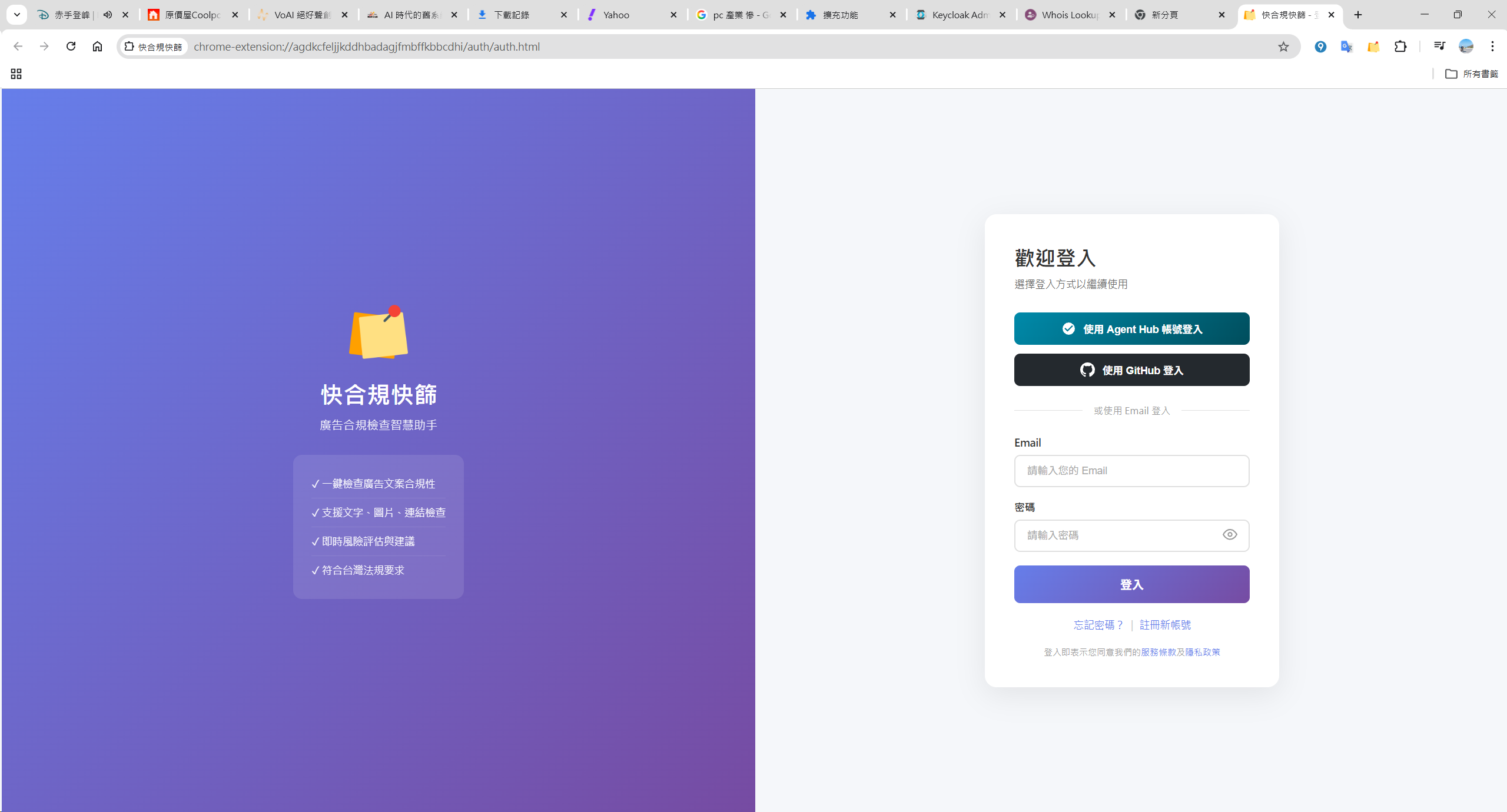
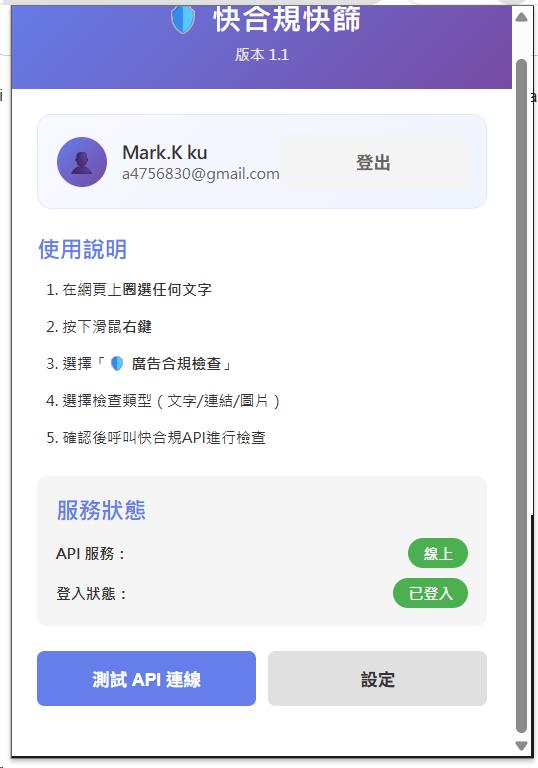
If your product needs user login, you can integrate **Keycloak** (or any other OAuth2 / OIDC provider) for single sign-on.
### Why Keycloak?
- ✅ **Open-source and free** — No license fees
- ✅ **Multiple login methods** — Email/password, Google, GitHub, Facebook...
- ✅ **Standard protocols** — OAuth2 / OpenID Connect
- ✅ **Enterprise features** — Role management, multi-tenancy, MFA, etc.
### Integration flow overview
```mermaid
---
title: Chrome Extension + Keycloak login flow
---
sequenceDiagram
actor U as User
participant E as Extension
participant K as Keycloak
participant A as Backend API
U->>E: Clicks "Login"
E->>K: Opens the Keycloak login page
U->>K: Enters credentials, or picks a third-party login
K-->>E: Validates, returns Authorization Code
E->>K: Exchanges Code for Access Token
K-->>E: Returns Access Token
Note over E: Stores the token
E->>A: Subsequent API calls carry the token
```
### Keycloak Client config
Create a Client in the Keycloak admin console:
```
Client ID: chrome-extension
Client Protocol: openid-connect
Access Type: public (extensions can't keep client_secret confidential)
Valid Redirect URIs: https://.chromiumapp.org/*
Web Origins: *
```
### PKCE security (important!)
Because a Chrome Extension is a "public client" (it can't safely store `client_secret`), you must use **PKCE** for additional security:
```javascript
// 1. Generate a random code_verifier
function generateRandomString(length = 64) {
const charset = 'ABCDEFGHIJKLMNOPQRSTUVWXYZabcdefghijklmnopqrstuvwxyz0123456789-._~';
const array = new Uint8Array(length);
crypto.getRandomValues(array);
return Array.from(array, (byte) => charset[byte % charset.length]).join('');
}
// 2. Derive code_challenge from code_verifier
async function generateCodeChallenge(codeVerifier) {
const encoder = new TextEncoder();
const data = encoder.encode(codeVerifier);
const hash = await crypto.subtle.digest('SHA-256', data);
// Base64 URL encoding
const bytes = new Uint8Array(hash);
let binary = '';
bytes.forEach(byte => binary += String.fromCharCode(byte));
return btoa(binary)
.replace(/\+/g, '-')
.replace(/\//g, '_')
.replace(/=+$/, '');
}
```
### Initiating the login request
```javascript
async function loginWithKeycloak() {
// 1. Generate PKCE parameters
const codeVerifier = generateRandomString(64);
const codeChallenge = await generateCodeChallenge(codeVerifier);
const state = generateRandomString(32);
// 2. Store the verifier (needed later when exchanging for token)
await chrome.storage.local.set({ codeVerifier, state });
// 3. Build the login URL
const authUrl = new URL('https://sso.example.com/realms/myrealm/protocol/openid-connect/auth');
authUrl.searchParams.set('client_id', 'chrome-extension');
authUrl.searchParams.set('redirect_uri', chrome.identity.getRedirectURL());
authUrl.searchParams.set('response_type', 'code');
authUrl.searchParams.set('scope', 'openid profile email');
authUrl.searchParams.set('code_challenge', codeChallenge);
authUrl.searchParams.set('code_challenge_method', 'S256');
authUrl.searchParams.set('state', state);
// 4. Open the login window
chrome.identity.launchWebAuthFlow(
{ url: authUrl.toString(), interactive: true },
handleAuthCallback
);
}
```
### Exchanging code for access token
```javascript
async function exchangeCodeForToken(code) {
const { codeVerifier } = await chrome.storage.local.get('codeVerifier');
const response = await fetch(
'https://sso.example.com/realms/myrealm/protocol/openid-connect/token',
{
method: 'POST',
headers: { 'Content-Type': 'application/x-www-form-urlencoded' },
body: new URLSearchParams({
grant_type: 'authorization_code',
client_id: 'chrome-extension',
code: code,
redirect_uri: chrome.identity.getRedirectURL(),
code_verifier: codeVerifier // PKCE verification
})
}
);
const tokens = await response.json();
// Store tokens
await chrome.storage.local.set({
accessToken: tokens.access_token,
refreshToken: tokens.refresh_token,
expiresAt: Date.now() + (tokens.expires_in * 1000)
});
return tokens;
}
```
### Auto-refreshing tokens
Access tokens usually expire within minutes — you'll need to refresh them automatically:
```javascript
async function getValidToken() {
const { accessToken, refreshToken, expiresAt } =
await chrome.storage.local.get(['accessToken', 'refreshToken', 'expiresAt']);
// Token still valid — use it
if (expiresAt && Date.now() < expiresAt - 60000) {
return accessToken;
}
// Token about to expire — refresh
if (refreshToken) {
const newTokens = await refreshAccessToken(refreshToken);
return newTokens.access_token;
}
// No token — must log in again
return null;
}
```
---
## Lead-generation strategy
This is the most interesting part of the project — **converting free-tool users into qualified leads**.
### Funnel design
```mermaid
---
title: From free tool to sales conversation
---
flowchart TD
subgraph EXT["Inside the extension"]
S1["1️⃣ Installs the extension (free)"] --> S2["2️⃣ Selects text or screenshot, runs a check"]
S2 --> S3["3️⃣ Waits for the AI response
carousel ads play meanwhile"]
S3 --> S4["4️⃣ Sees basic results
some info hidden"]
end
subgraph WEB["On the website"]
S5["5️⃣ Clicks Get full recommendations"] --> S6["6️⃣ Submits email to unlock the full report"]
S6 --> S7["7️⃣ Sales team follows up and converts"]
end
S4 --> S5
```
### The value of waiting time
When a user submits a check request, they need to wait for the AI to respond (usually 3-5 seconds). This is a perfect window for ad exposure!
```javascript
// config.js — carousel settings
CAROUSEL_IMAGES: [
'images/banner_square-1.png',
'images/banner_square-2.png'
],
CAROUSEL_INTERVAL_MS: 3000,
```
We embed an image carousel in the loading screen to show product ads or promo messages.
### Result-page funnel design
The check result shows:
- ✅ Whether it's compliant
- ⚠️ Number of violations
- 🔒 **Some details shown blurred**
Key design: **Violation explanations and suggested edits show only the first 15 characters; the rest is masked with "..."** — guiding users to click and unlock.
```javascript
// Explanation (violation reason) — locked state
if (violation.explanations && violation.explanations.length > 0) {
const expPreview = escapeHtml(violation.explanations[0]).substring(0, 15) + '...';
html += `
${expPreview}
Try the full feature now
`;
}
```
### CTA button design
At the bottom of the result panel, we place a prominent CTA button:
```javascript
// CTA button
html += `
`;
```
## Lead generation mechanism
When users click the "Get full recommendations" button, they're taken to an unlock page:
### Unlock flow
1. User submits an email
2. Email validity is checked
3. Full report is unlocked
4. **Each email can only unlock one report**
The clever part of this design:
- ✅ Users get a valuable, complete analysis report
- ✅ We get a qualified lead
- ✅ Sales can follow up and convert
## Installation and usage
### Install from the Chrome Web Store
Users can search and install this extension directly from the Chrome Web Store.
### Developer-mode install
If you want to deploy a similar project yourself:
1. Open Chrome → `chrome://extensions/`
2. Enable "Developer mode"
3. Click "Load unpacked"
4. Select the `chrome-extension` folder
### How to use
1. **Select text** on any webpage
2. **Right-click**
3. Choose "🛡️ Ad compliance check"
4. Pick a check type
5. Wait for results
## Lessons learned and recommendations
### Manifest V3 challenges
Chrome now requires new extensions to use Manifest V3, which brings some development changes:
- Service Worker replaces Background Page
- Permissions need to be declared more explicitly
- Content Script injection works differently
### Modular design
Recommend splitting features into independent modules:
- `core/` — Core logic
- `handlers/` — Various check handlers
- `ui/` — UI components
This makes the code easier to maintain and extend.
### API design considerations
```javascript
// Centralized config
const CONFIG = {
DEFAULT_API_ENDPOINT: 'https://your-api-endpoint.com',
IMAGE_OCR_PATH: '/api/image/ocr',
CREATE_AND_CHECK_PATH: '/api/TextContent/CreateAndCheck',
MAX_RETRIES: 3,
RETRY_DELAY: 1000,
};
```
Recommend designing API endpoints to be configurable, so it's easy to switch environments or update services later.
## Expected results
The extension hasn't officially launched yet. The targets below are early-stage planning numbers that we'll adjust based on real data after launch:
| Metric | Initial target |
|------|------|
| Extension installs | 500+ (track post-launch) |
| Monthly active users | 200+ |
| Lead conversion rate | 5–10% |
| Qualified leads | 10–50 per month |
## Summary
A Chrome Extension is more than a tool — it's an excellent **product distribution channel**. By offering a free, useful feature, we can:
1. **Build brand awareness** — Daily use means users naturally remember the product
2. **Capture qualified leads** — The unlock mechanism collects valid prospects
3. **Lower customer acquisition cost** — Compared to ad spend, an extension's CAC is lower
4. **Provide value exchange** — Users get a tool, we get leads
If you're also thinking about how to create new exposure channels for your product, a Chrome Extension is well worth a try!
---
## References
- [Chrome Extension Manifest V3 official docs](https://developer.chrome.com/docs/extensions/mv3/)
- [Chrome Web Store developer policies](https://developer.chrome.com/docs/webstore/program_policies/)
---
## About this article and its author
Originally published on [Mark Ku's Tech Notes](https://blog.markkulab.net/en/post/chrome-extension-content-compliance-marketing)
License: [CC BY 4.0](https://creativecommons.org/licenses/by/4.0/) — when reusing or quoting, credit the author and link back to the original
### About the author
**[Mark Ku](https://blog.markkulab.net/en/author/mark-ku)** — Software Solution Provider
- 10+ years senior software engineer, now an AI Builder
- Focused on large-platform architecture — North-American e-commerce, AI SaaS subscription billing
- Combining AI Agents and automation to build evolvable product foundations
### Free tools built by the author
All of these are free to use:
- [Free PDF Sign Tool](https://blog.markkulab.net/en/tools/pdf-sign): Online PDF sign tool — draw, type, or upload a signature, then drag, resize, and download. Everything runs in your browser; nothing is uploaded.
- [VS Code Refactory](https://blog.markkulab.net/en/tools/refactory): Refactory is a VS Code refactoring extension: 34 actions plus a 37-rule code-smell inspection layer with a Code Health dashboard, across 18 languages, backed by 534 tests. It learns your repo's conventions: where interfaces live, where DI is registered, whether 'use client' belongs. It ranks files by git churn × complexity so you know what to fix first, and hands any smell to the Claude Code already on your machine. Free to use, and your source never leaves your computer.
- [DB-Kit Database Manager](https://blog.markkulab.net/en/tools/db-kit): DB-Kit is a lightweight, cross-platform database manager built with Tauri + Rust + React. Manage MySQL, MariaDB, PostgreSQL, SQL Server, Oracle, SQLite, MongoDB, Redis, Kafka, Elasticsearch and RabbitMQ from one consistent interface: passwords encrypted in the OS keychain, SSH tunnels, full CRUD, a visual query builder, stacked multi-statement result sets, cross-connection data transfer and compare/sync, Excel / CSV import & export, visualized execution plans, ER diagrams, scheduled backups, SQL stress testing with p50–p99 latency percentiles, a 15-rule SQL review engine, Kafka message browsing with monitoring & alerts, a bilingual UI (Traditional Chinese / English), a built-in AI assistant (natural-language SQL, AI review and tuning advice) and the dbk CLI. Free and open source (MIT), with installers for Windows, macOS and Linux.
- [VS Code Super Mermaid](https://blog.markkulab.net/en/tools/super-mermaid): Super Mermaid is a VS Code extension for beautiful Mermaid diagrams out of the box: auto-colored live preview, mouse pan & zoom, high-res PNG / SVG export, 21 templates and multiple themes. Free and open source (MIT).
- [React Super Mermaid](https://blog.markkulab.net/en/tools/react-super-mermaid): react-super-mermaid is an open-source React component library: render beautiful Mermaid diagrams with a single , with built-in colorful / sketch themes, pan & zoom, in-diagram search, and high-res SVG / PNG export. Lightweight, SSR-safe, fully typed. Free and open source (MIT).
- [Jira / Confluence Super Mermaid](https://blog.markkulab.net/en/tools/jira-super-mermaid): An Atlassian Forge app: write Mermaid syntax directly inside a Jira issue or a Confluence page and get flowcharts, sequence diagrams, state machines and Gantt charts. 11 diagram types, SVG / PNG export, light and dark themes, full CJK support. Runs on Atlassian: your diagrams live in your own site and the app calls no third-party service. Free, coming soon to the Atlassian Marketplace.
- [Mermaid Live Preview](https://blog.markkulab.net/en/tools/mermaid-preview): Write Mermaid in your browser, see it render instantly, and share the whole diagram as a single link. No sign-up, nothing uploaded to a server, and mermaid.live share links work as-is.
- [React Intl Phone Number](https://blog.markkulab.net/en/tools/react-intl-phone-number): react-intl-phone-number is an open-source React component: framework-agnostic and antd-free, with E.164 in/out, a searchable flag / country-code dropdown, configurable validation levels (strict / mobile-strict / loose), themeable CSS, and i18n — phone logic powered by google-libphonenumber. Lightweight and fully typed. Free and open source (MIT).
- [Uptime Kuma Cluster](https://blog.markkulab.net/en/tools/uptime-kuma-cluster): Turn single-node Uptime Kuma into a highly available cluster: OpenResty + Lua smart load balancing, shared MariaDB state, health checks and automatic failover, plus cluster-management REST APIs. One Docker Compose command to start. Free and open source (MIT).
- [Special Education](https://blog.markkulab.net/en/education): Learning materials crafted for special education students
### Daily podcasts
- [Mark's Tech Insights — Daily AI News](https://blog.markkulab.net/en/category/tech-news): Daily curated AI and tech trends. Catch the latest developments via audio summaries — covering AI applications, software architecture, DevOps, and engineering practice. — RSS: https://blog.markkulab.net/feed.xml
- [AI股市蝦聊](https://blog.markkulab.net/en/category/ai-stock-chat): Every trading day, an AI-analyzed take on the Taiwan stock market, delivered as a two-host conversation covering the session and the next-day outlook. — RSS: https://blog.markkulab.net/ai-stock-chat/feed.xml
- [開源好物週報](https://blog.markkulab.net/en/category/open-source-weekly): A weekly two-host pick of free open-source tools surfaced from real Hacker News, GitHub, and Reddit buzz — what pain they solve and the fastest way to get started. — RSS: https://blog.markkulab.net/open-source-weekly/feed.xml
### Newsletter
[Subscribe to the newsletter](https://blog.markkulab.net/en/subscribe) — Be the first to know about new posts. No spam, unsubscribe anytime.