---
title: "Vibe Coding Tips: AI Is an Amplifier — Don't Let It Magnify Your Tech Debt"
description: "Vibe Coding looks productive, but with AI assistance it can amplify flaws and leave systems hard to maintain. This article explores why solid software engineering thinking still matters, and shares concrete engineering tips for avoiding isolated information silos and building genuinely robust applications."
canonical_url: "https://blog.markkulab.net/en/post/beyond-vibe-coding-ai-amplifier"
author: "Mark Ku"
author_url: "https://blog.markkulab.net/en/author/mark-ku"
site: "Mark Ku's Tech Notes"
date_published: "2026-04-11T03:44:07.737Z"
category: "AI"
language: "en"
license: "CC BY 4.0"
license_url: "https://creativecommons.org/licenses/by/4.0/"
attribution: "when reusing or quoting, credit the author and link back to the original"
---
# Vibe Coding Tips: AI Is an Amplifier — Don't Let It Magnify Your Tech Debt
## Introduction: The Other Side of Vibe Coding
Lately more and more people are talking about Vibe Coding — writing prompts by feel, letting AI generate code, and quickly assembling something that "runs". On the surface the productivity is striking, but in my experience this style tends to overlook a core concern of software engineering: maintainability.
Software development has a reality that often gets ignored: the real cost is not in development, but in maintenance. IEEE research shows that 60–80% of a software project's lifetime cost happens after launch. "Getting it running" is just the starting point. Bug fixes, requirement iterations, and system integration afterwards are where the real time and effort goes.
There are plenty of industry observations on this. Google Chrome engineering lead Addy Osmani put it bluntly: Vibe Coding and AI-assisted engineering are "fundamentally different methods". After analysing a large body of real-world code, GitClear also found that copy-paste went up noticeably and refactoring went down after AI adoption, eventually producing isolated silos of code. The quality looks fine, but because nobody actually wrote or fully understood it, the long-term maintenance burden gets heavier and heavier. Without a solid engineering foundation, AI can quietly amplify tech debt.
This article collects six engineering tips I think are worth investing in, for anyone else feeling their way through the Vibe Coding wave.
## Tip 1: Think Through Your Tech Stack Before You Start
Vibe Coding moves fast, and it's easy to dive in with a "let's just get it running" mindset, only to discover later that the framework you picked doesn't fit the scenario. Having a basic understanding of each tool's characteristics really does help you avoid unnecessary detours.
### How I Approach Stack Selection
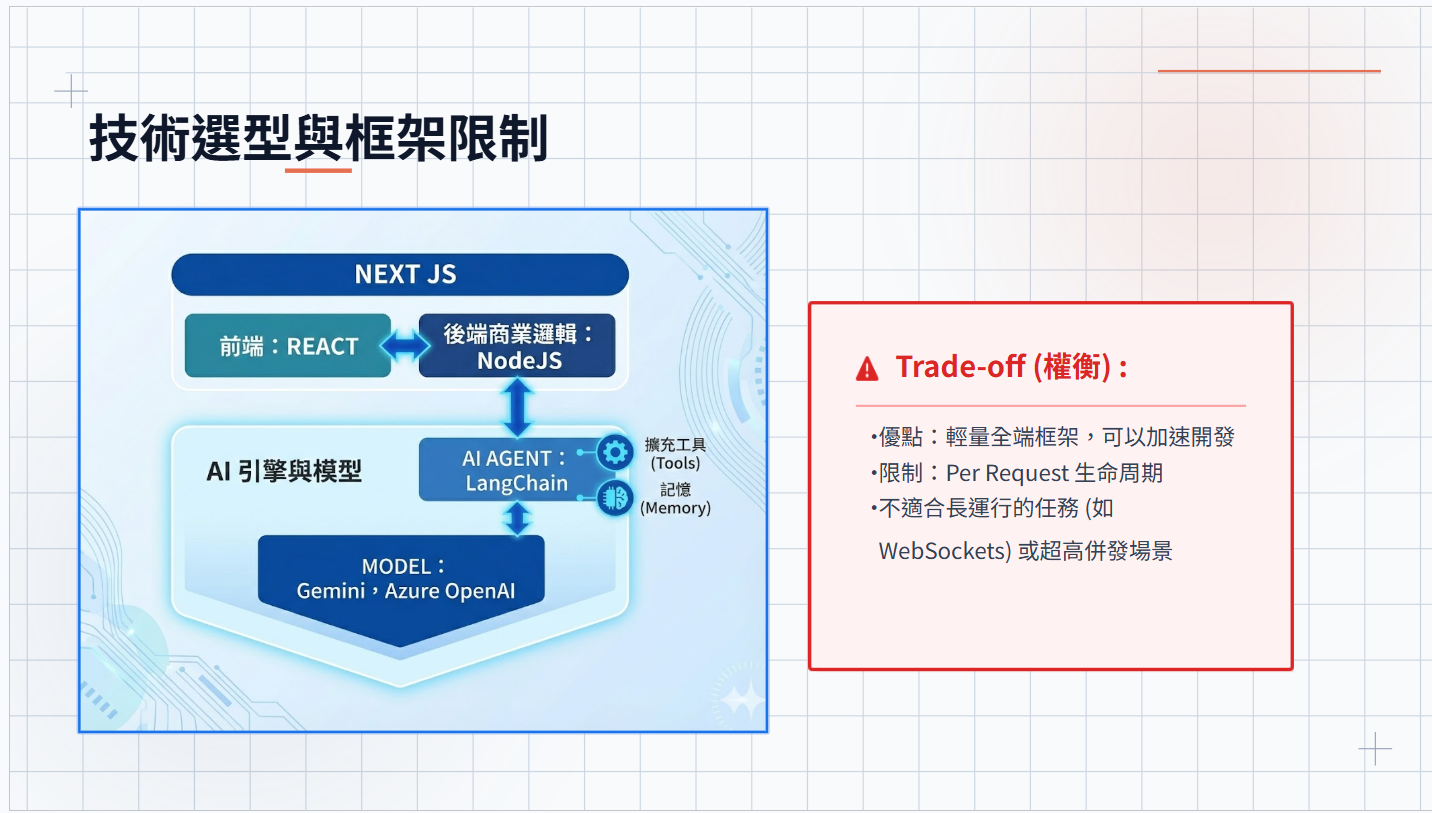
**Taking my current go-to full-stack framework, Next.js, as an example**
Next.js is essentially React + Node.js. Because the scripting language is simple and front and back end live in the same project, AI can keep its context window small when assisting development, and stay focused on a single feature's implementation. LangChain also supports Node.js, which makes building AI Agent applications quite convenient.
That said, there are a few traits to be aware of:
#### Single-Threaded Behaviour
Node.js is mainly single-threaded and uses one CPU by default. As traffic grows, blocking can occur. `worker_threads` is the way out.
**Common scenarios:**
* API responses suddenly slow under high traffic
* CPU-heavy work (image processing, data aggregation, ranking calculations) blocks the event loop and stalls other requests
The core idea behind `worker_threads` is to hand CPU-bound work to a separate thread, while the main thread keeps serving other requests. When the computation finishes, results are returned via `parentPort.postMessage`.
```
Main Thread (Event Loop) Worker Thread
│ │
│ new Worker('./heavy-worker.mjs') │
│ ─────────────────────────────────▶│
│ │
│ Keep handling other requests │ CPU-heavy work (separate thread)
│ (non-blocking) │
│ │
│◀─────────────────────────────────│
│ postMessage({ result }) │
│ │
```
#### Not a Fit for Very High Concurrency or Persistent Connections
Next.js has a per-request lifecycle, so it's a poor fit for long-lived services, queues, or scheduled jobs — think WebSocket, Queue, or Cron Job.
#### Parallel Computation and Backend Choice
On the Next.js server side you can use Node.js `worker_threads` for parallel computation. For complex computation, in small projects I usually pick **NestJS** for shareability, while for large projects I lean toward **C#** for high-performance, stable APIs.
#### Numeric Precision in Node.js
When dealing with money, statistics, or cryptography, you have to watch out for JavaScript's numeric precision quirks. Precision math libraries solve this — `decimal.js`, `big.js`, `bignumber.js`.
#### Use `http-proxy-middleware` to Simplify Architecture
In practice, people often re-implement an API forwarding layer inside Next.js to deal with CORS or to hide the real backend address, which adds development and maintenance cost. A cleaner approach is to use `http-proxy-middleware` and let Next.js API Routes act purely as a proxy that transparently forwards requests to the backend.
**Overall request flow:**
```
┌──────────────┐ /api/proxy/* ┌──────────────────────┐
│ │ ─────────────────────────▶│ Next.js API Route │
│ Frontend │ │ (proxyServer) │
│ │ ◀─────────────────────────│ │
└──────────────┘ Backend response └──────────┬───────────┘
│
pathRewrite: │ Strip /api/proxy prefix
/api/proxy/users → /users │
▼
┌──────────────────────┐
│ Backend API │
│ (NEXT_PUBLIC_API) │
└──────────────────────┘
```
**Things the proxy handles automatically:**
1. **relayRequestHeaders** — forward cookies (including Turnstile bypass token)
2. **relayResponseHeaders** — intercept `Set-Cookie` for additional handling
3. **onError** — log proxy failures
#### `useEffect` Side Effects
If React's `useEffect` isn't managed carefully it tends to fire duplicate API requests, which is especially easy to fall into during rapid prototyping.
#### Prefetch Is On by Default
`` prefetches every link on a list page by default. With long lists this can produce a lot of background requests, so evaluate whether to disable it based on your actual scenario.
#### Easy i18n Support
Next.js App Router with `next-intl` makes i18n setup low-friction. Locale files are JSON, middleware auto-detects locale and redirects, and components consume strings via `useTranslations()`. The whole architecture is clean and supports multilingual sites without any extra complexity.
#### Frontend State Management Choices
* **Small projects**: `useState` plus props is enough.
* **Medium projects**: when component depth grows and prop drilling shows up, **Zustand** is my pick — minimal API, almost no boilerplate, gentle learning curve.
* **Large projects**: if you need strict `action/reducer` separation and middleware, go with **Redux Toolkit**. Boilerplate is much reduced, but overall complexity is still higher than Zustand.
#### Manage Server State With TanStack Query
Client state is something you control fully, but server state is just a snapshot of backend data — the source of truth lives on the server. In practice every API call has to deal with loading, error, retry, timeout, plus caching and cross-component sync, raising questions like:
* Should the API data be cached?
* Should it refetch when the user navigates away and back?
* Do we need background polling to keep data fresh?
* When page A mutates data, how does page B stay in sync?
In the past this logic was scattered across `useEffect` and `useState`, leading to lots of repeat work. **TanStack Query** turns the entire request lifecycle (send, cache, retry, invalidate, sync) into a declarative configuration — just define `staleTime` and refetch conditions and let the framework handle the rest.
Pair this with a unified API response shape (`success` + `error.code`) and you can implement global error interception at the `QueryClient` layer, e.g.:
* `AUTH-001`: redirect to the login page automatically
* `RATE-001`: show a rate-limit message
That way you don't write `try-catch` in every API call, and consistency and developer productivity both go up.
**AI Agent Framework: LangChain / LangGraph**
You can think of LangChain as a headless n8n: it lets engineers wire up AI models and external tools through code, and switch freely between OpenAI, Gemini, and Claude through a single interface — no vendor lock-in. Built-in modules for Memory, Tool Calling, RAG, and so on mean common AI scenarios don't have to be built from scratch.
LangGraph is the part of the LangChain ecosystem that handles multi-state agents with conditional branches. When an AI task isn't a straight line and needs to decide the next step based on intermediate results — for example "judge article quality first; regenerate if it's not good enough; only generate audio after it passes" — modelling that branching, fallback-capable workflow with LangGraph is much clearer.
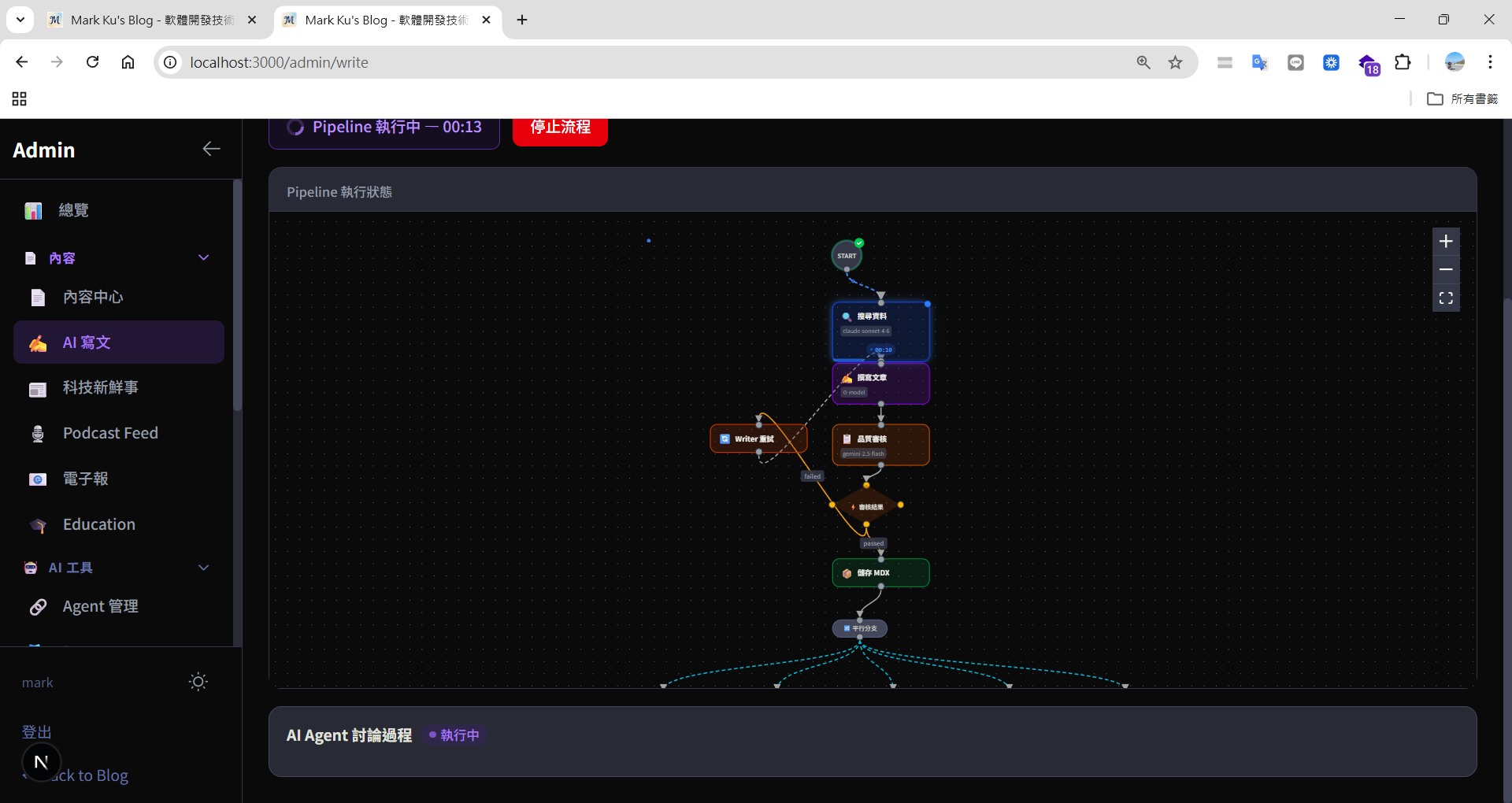
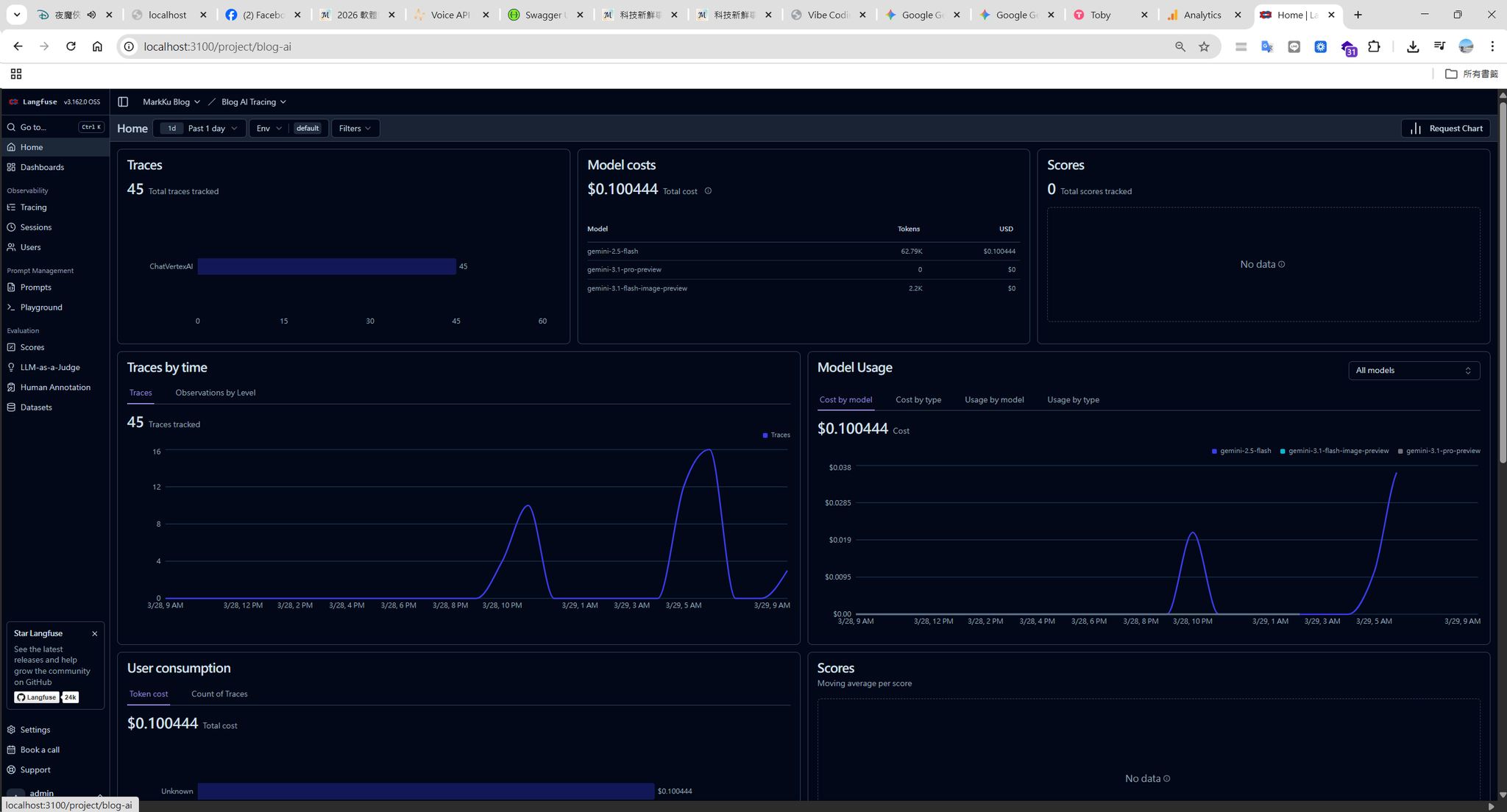
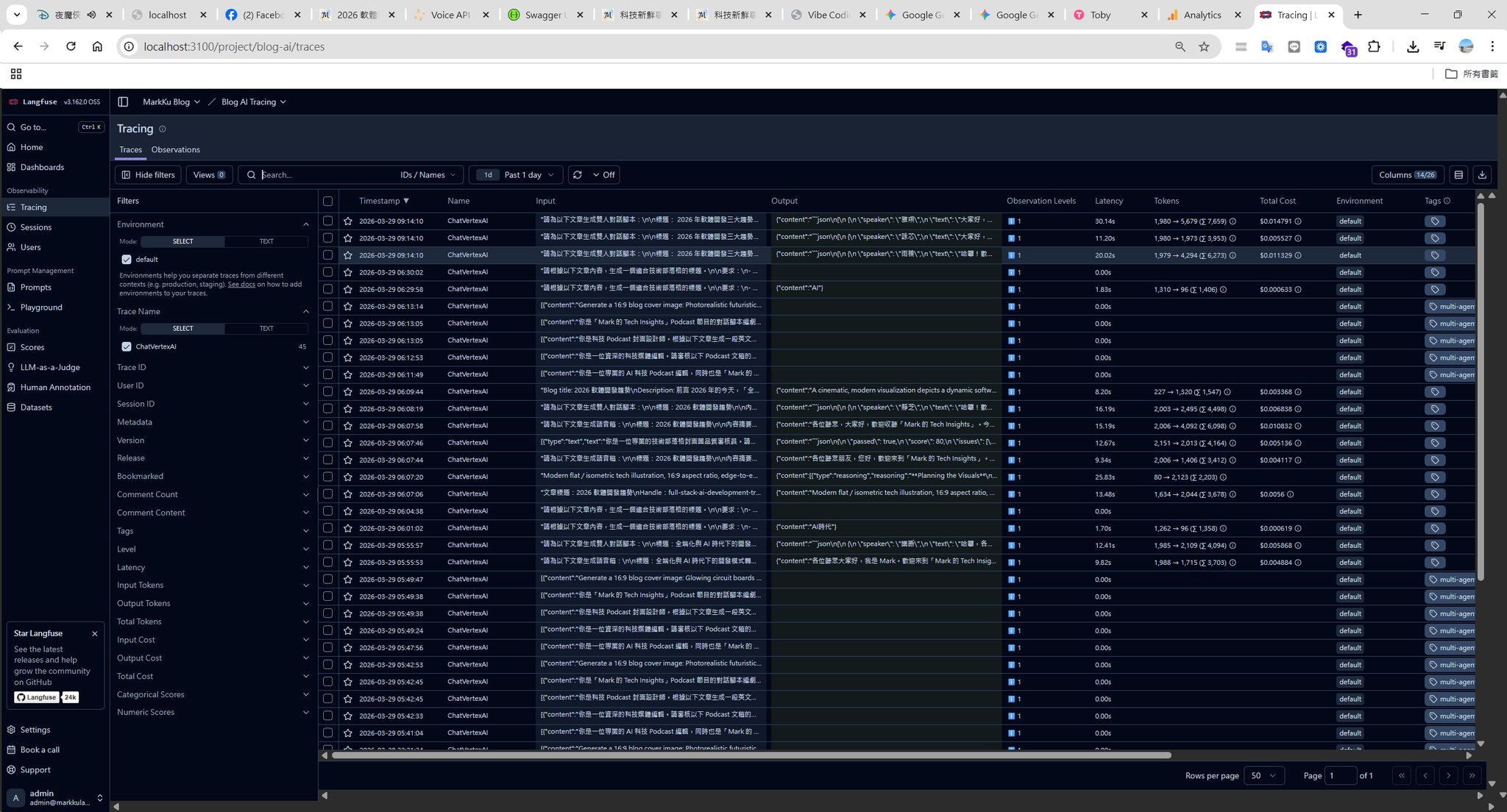
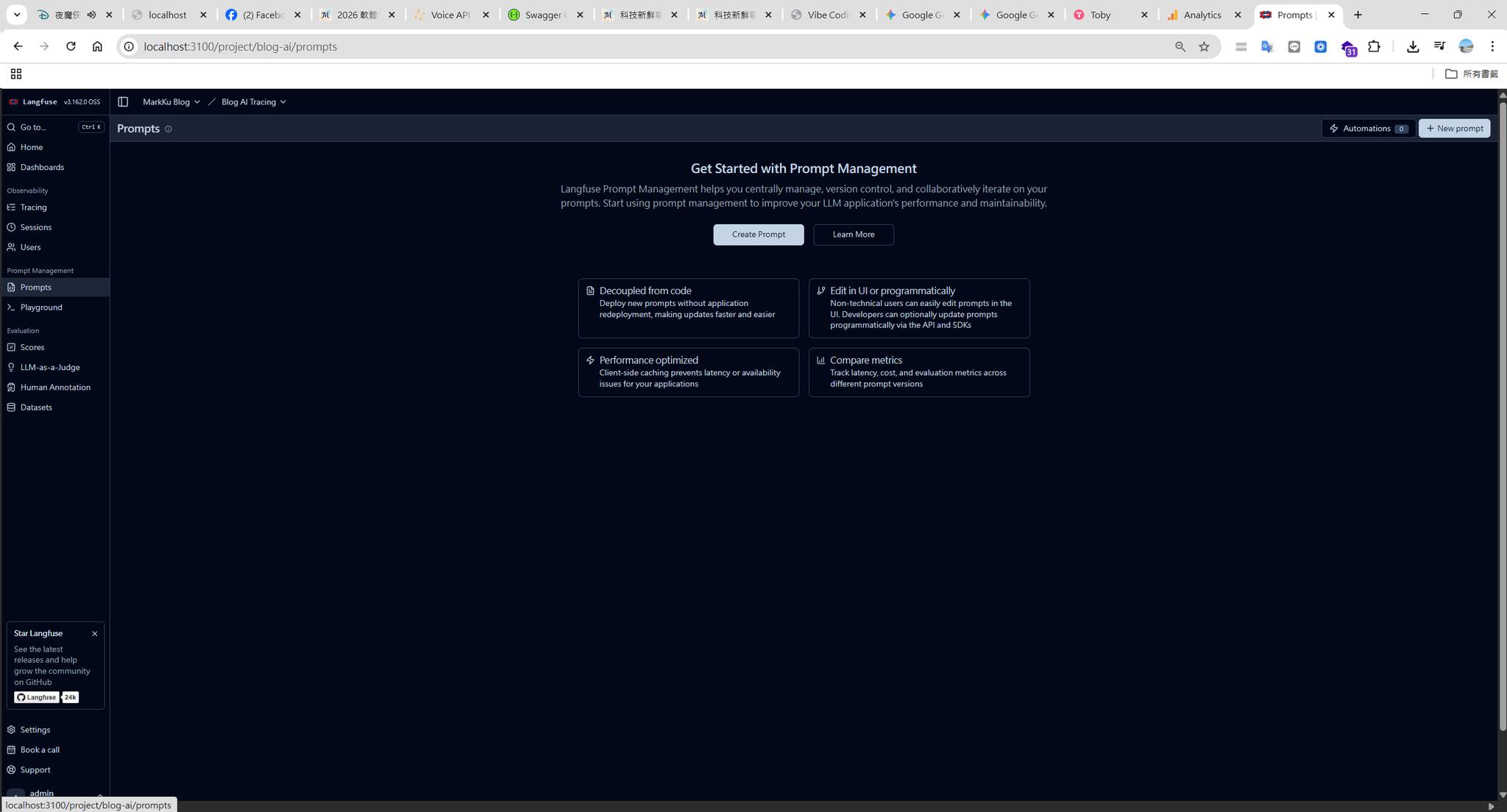
**Pair it with Langfuse** for AI observability — recording each call's prompt, response, token usage, and latency, making it easy to track which step costs the most or which prompt has unstable quality. Very practical for products that need to keep iterating on AI behaviour.
**Styling Framework: Tailwind CSS**
Tailwind CSS takes a Mobile First design philosophy: selectors start at phone size by default, and prefixes like `md:` and `lg:` layer on desktop styles. This is the opposite of the traditional "desktop-first then override downwards" mindset, but for responsive development it's actually more intuitive.
Combined with its rich utility helpers, layout, spacing, and shadows that previously needed hand-written SCSS can be done with just classes, saving real design time.
I usually buy a Next.js + Tailwind UI theme from an overseas marketplace as a starting point and shape it into the look I want. That way I have ready-made components, development is faster, and if I later want to switch frameworks or refactor styles, the low coupling of utility classes also makes migration relatively painless.
**Database: I lean toward PostgreSQL**
MongoDB's flexibility is genuinely attractive — no migrations, schema can change anytime, early development is fast — but in my own experience the lack of schema constraints turns into a long-term headache. Data quality is hard to guarantee and `$lookup` is nowhere near as good as a SQL JOIN. Without proper indexes you also easily trigger collection scans (COLLSCAN). On a cloud service like MongoDB Atlas that means burning read-unit costs and blowing up memory, forcing the system to auto-upgrade to a pricier tier — and the bill can climb fast.
So for most cases I still pick PostgreSQL: full ACID, native JOINs, mature tooling (Prisma / Drizzle), and `jsonb` for the times when you really do need flexible structure. For me, adding flexibility on top of PostgreSQL is much easier than retrofitting relational queries onto MongoDB.
I think MongoDB fits better when: data is naturally JSON with little relational structure (logs, CMS settings), or when you need very large-scale horizontal scaling. For products you'll maintain long term, I still lean PostgreSQL.
**Language: TypeScript Is the Foundation of Maintainability**
This one I don't think needs much selling — anyone who has used it knows. The value of TypeScript's type system is even more obvious when AI generates code at scale: type errors get a red squiggle in the IDE immediately instead of blowing up at runtime, and AI is less likely to produce silent bugs like "passed the wrong argument but JavaScript doesn't complain".
The biggest impact on long-term maintenance is during refactoring. Change an interface and TypeScript instantly tells you everywhere that needs to follow, instead of relying on human memory or running tests to find what you missed. Combined with Prisma / Drizzle's type inference, even database query types are guaranteed — type safety end to end.
### Folder Layout and Helper / Service Layering
AI tends to put logic right next to whatever file it just edited, so over time components end up carrying API logic and utility functions get scattered around, making single-feature changes touch multiple places. Update this convention into Claude.md (the project playbook) to keep AI output consistent and maintainable.
The split I usually use in Next.js projects:
- `data/`: pure data access (read files, hit APIs, query DB)
- `services/`: business logic (combining data sources and applying rules)
- `lib/`: substantial utility modules (independently testable)
- `utils/`: pure, side-effect-free helpers (date, number formatting)
- `hooks/`: React-specific custom hooks
- `components/`: pure UI, no business logic
- `app/api/`: just request reception and response formatting
With this layering, when collaborating with AI it's also easier to say which layer to touch, reducing the chance the AI edits unrelated places.
## Tip 2: A Unified API Response Format So Errors Are Traceable
Inconsistent API formats are one of the most common maintenance pain points I've run into. The typical pattern is wrapping every response in HTTP 200 and returning errors as a vague `message: "Something went wrong"` — when something breaks you have no idea where to look. As the number of services grows the chaos only gets worse.
### My Approach
I designed a unified API response structure based on RFC 9457 (an industry standard describing HTTP API error formats), with fixed fields for both success and failure:
```json
// Success response
{
"success": true,
"data": {
"userId": "u-20260410",
"name": "Mark Ku"
}
}
// Error response
{
"success": false,
"error": {
"type": "https://api.example.com/errors/auth",
"code": "AUTH-001",
"message": "Token has expired, please log in again",
"traceId": "req-7f3a-4b2c-9d1e"
}
}
```
A few design choices I find useful:
- Domain-prefixed error codes: `AUTH-001` (auth), `IDM-4001` (identity management), `ORD-2003` (orders) — one glance tells you which service the problem is in.
- A traceId that runs through the whole chain: from API Gateway to backend services using the same traceId, so cross-service debugging stops being a needle-in-a-haystack situation.
- Honest HTTP status codes: 401 means 401, no more wrapping errors in 200.
### Benefits
API behaviour becomes predictable, and the frontend can use one unified error-handling path. When something breaks, `AUTH-001` plus `traceId` gets you to the root cause quickly.
## Tip 3: Build a Solid Identity Foundation With Keycloak
Vibe Coding is all about generating and validating quickly, but a side effect is that you tend to produce a lot of small standalone systems — every side project or microservice is a fresh start. Once you have many of them, integration becomes the biggest pain point: every service has its own login, the user experience is fragmented, and maintenance costs rise sharply.
Authentication is the first line of defence for system security. From experience, building a login module yourself is complex, time-consuming, and easy to leave security holes in under a "good enough" mindset. The common pattern: each service implements its own auth logic, token validation isn't unified, session management is scattered, and tracking issues becomes hard.
### How to Roll It Out
Keycloak is Red Hat's open-source Identity and Access Management (IAM) platform. It supports OAuth2 and OpenID Connect and can act as the auth centre for your entire system, so individual services don't have to reinvent login. My approach is to use it for centralised auth and authorisation across all services:
- Social login: Identity Brokering integrates Google, GitHub, Facebook, LINE, and other third-party logins quickly. I recommend enabling matching email auto account linking.
- Multi-tenant isolation: Keycloak 26+ supports the Organization feature for setting up isolated login environments for SaaS products.
- Security hardening: enable MFA, strictly validate redirect URLs, and turn on login event monitoring.
The overall interaction looks like this:
```
┌──────────┐ 1. Login request ┌──────────────┐
│ │ ──────────────────▶ │ │
│ Frontend │ │ Keycloak │
│ │ ◀────────────────── │ (IdP Hub) │
└──────────┘ 5. JWT Token └──────┬───────┘
│
2. Identity│ Brokering
│
▼
┌──────────────┐
│ Third-party │
│ IdP │
│ Google / │
│ GitHub / │
│ Facebook │
└──────┬───────┘
│
3. OAuth2 │ authorisation
4. Return │ user info
▼
(back to Keycloak,
which issues JWT)
```
### Benefits
Once auth is centralised on Keycloak, services only need to validate JWT tokens — no more wheel reinvention. When something goes wrong there's also a login event monitor to consult, much easier to track than the every-service-for-itself situation.
## Tip 4: Make AI a Refactoring and Testing Partner, Not a Debt Generator
Just dumping code at AI and saying "refactor this" doesn't always go well. GitClear's data shows refactoring activity drops noticeably after AI adoption. A Qodo survey also reports that many developers feel AI lacks enough context during refactors, producing changes that look reasonable but actually break existing behaviour.
The problem isn't that AI isn't smart enough — it's that we don't give it precise enough guidance.
### How I Actually Collaborate With AI
The core idea: write tests first, then hand it to AI to refactor, then run the tests to confirm there's no regression. Let AI work inside a safety net rather than freelancing.
Step one, add tests for existing code first (so the behaviour is covered):
```typescript
// Suppose we have a discount function — logic is messy but "it works"
// Before refactoring, make sure tests cover its behaviour
describe('calculateDiscount', () => {
it('VIP members get 20% off', () => {
expect(calculateDiscount(1000, 'vip')).toBe(800)
})
it('regular members get no discount', () => {
expect(calculateDiscount(1000, 'regular')).toBe(1000)
})
it('returns 0 when amount is 0', () => {
expect(calculateDiscount(0, 'vip')).toBe(0)
})
})
```
Step two, ask AI to refactor in a small scope, then human review:
```typescript
// Before refactoring
function calculateDiscount(amount: number, type: string): number {
if (type === 'vip') {
return amount * 0.8
} else if (type === 'svip') {
return amount * 0.7
}
return amount
}
// After AI refactor — human review confirms behaviour is unchanged, readability improved
const DISCOUNT_RATE: Record = {
vip: 0.8,
svip: 0.7,
}
function calculateDiscount(amount: number, type: string): number {
const rate = DISCOUNT_RATE[type] ?? 1
return amount * rate
}
```
### Benefits
This avoids the "behaviour quietly drifted" surprise after refactoring. The point isn't to stop using AI — it's to use tests as a safety net and let AI play within that boundary.
## Tip 5: Don't Forget Security Scans for AI-Generated Code
AI generates code in volume, and reviewing security issues line by line by hand simply doesn't keep up. From my experience, AI sometimes produces code that looks fine but carries subtle risks — string-concatenated SQL, hardcoded secrets, overly permissive CORS settings — and without scanning, these are easy to miss in code review.
### How I Scan
Currently I cover the gap two ways:
**1. Security-focused code review with a Claude Skill**
Ask Claude to review generated code from a security angle and surface potential SQL Injection, XSS, hardcoded secrets, permission issues, and so on. Much less effort than staring at it yourself.
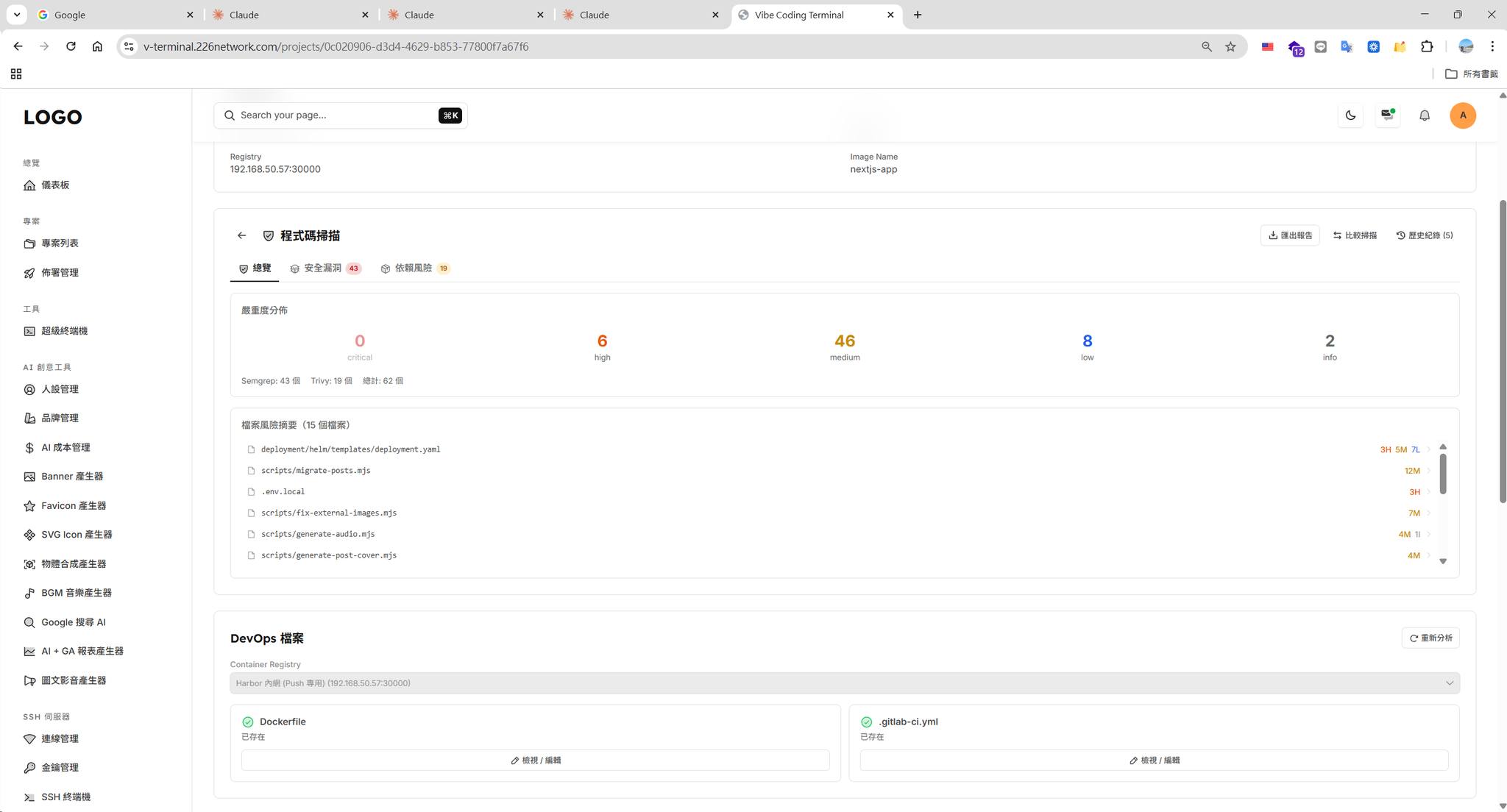
**2. Wire open-source CLIs into the CI/CD Pipeline**
Hook security scanners into the pipeline so every PR or push runs them automatically. Common picks:
| Tool | Purpose |
|------|------|
| `Semgrep` | Static analysis, multi-language, customisable rules |
| `Trivy` | Scans container images and dependency vulnerabilities |
| `Gitleaks` | Detects secrets / tokens accidentally committed to the repo |
| `npm audit` / `pnpm audit` | Checks for known vulnerabilities in npm packages |
Once scanning is wired into the pipeline, every PR runs a sweep automatically — no relying on humans to remember.
### Benefits
The more AI generates, the higher the odds of overlooked security holes. Once scanning is automated, this stops depending on individual diligence and issues get caught before they ship.
## Tip 6: Lay the Groundwork for API Subscriptions With an API Gateway (Kong) for Separation of Concerns
In the AI era, building your own SaaS has become easy, but in my experience, without an engineering foundation, Vibe Coding alone struggles to push past the complexity threshold. Features pile up, fixing A breaks B, auth/throttling/logging are each doing their own thing, duplicate logic is scattered everywhere, and when something breaks nobody knows where to look.
That's exactly the pain point I ran into with [Kong API Gateway architecture validation](https://blog.markkulab.net/post/kong-api-gateway-architecture-verification) — every service implementing its own version, all of them seemingly working, but maintenance was draining.
### How to Adopt It
An API Gateway is a unified entry point in front of all backend services that centralises shared concerns like auth, rate limiting, and logging, letting each backend service focus on its own business logic. Kong is one of the most mature open-source options today.
Overall architecture:
```
┌─────────────────────────────────┐
│ Kong API Gateway │
│ │
┌──────────┐ │ ┌───────────┐ ┌────────────┐ │ ┌──────────────┐
│ │ Request │ │ JWT │ │ Rate │ │ │ User Service │
│ Client │ ────────▶ │ │ Auth │─▶│ Limiting │──│──▶ │ │
│ │ │ └───────────┘ └────────────┘ │ └──────────────┘
└──────────┘ │ │ │ │
│ ▼ ▼ │ ┌──────────────┐
│ ┌───────────┐ ┌────────────┐ │ │ Order Service │
│ │ Logging │ │ Request │──│──▶ │ │
│ │ unified │ │ Transform │ │ └──────────────┘
│ └───────────┘ └────────────┘ │
│ │ ┌──────────────┐
│ ─│──▶ │ Payment Svc │
│ │ └──────────────┘
└─────────────────────────────────┘
```
### Benefits
Backend services can focus on core business logic instead of reinventing wheels, all traffic policies are managed in one place, and bringing up a new service only takes a route and a Plugin in Kong — saving a lot of repeated work.
## Conclusion
The problem with Vibe Coding isn't using AI — it's that it sometimes skips engineering thinking. What software is really solving is complexity: understanding requirements, designing boundaries, weighing trade-offs. AI can't replace that yet.
None of these six directions are new inventions. They existed before AI showed up. But in the current Vibe Coding moment, they're worth thinking through again. Pick your stack thoughtfully, unify your response format, centralise auth, refactor with test coverage, automate security scans, unify traffic at one entry point — none is hard on its own, but stacked together they're the difference between AI amplifying your capability and AI amplifying your burden.
## References
- [Addy Osmani - Vibe Coding Is Not AI-Assisted Engineering](https://medium.com/@addyosmani/vibe-coding-is-not-the-same-as-ai-assisted-engineering-3f81088d5b98)
- [InfoQ - AI Amplifying Engineering (2025 DORA Report)](https://www.infoq.com/news/2026/03/ai-dora-report/)
- [GitClear - AI Copilot Code Quality 2025](https://www.gitclear.com/ai_assistant_code_quality_2025_research)
- [IEEE - Software Maintenance Implications on Cost and Schedule](https://ieeexplore.ieee.org/document/4526688/)
- [Qodo - State of AI Code Quality 2025](https://www.qodo.ai/reports/state-of-ai-code-quality/)
- [RFC 9457 - Problem Details for HTTP APIs](https://www.rfc-editor.org/rfc/rfc9457)
- [Keycloak - Server Administration Guide](https://www.keycloak.org/docs/latest/server_admin/index.html)
- [Keycloak Notes - HackMD](https://hackmd.io/@ming1230/S1FXl3WjY)
- [Kong Official Documentation](https://developer.konghq.com/gateway/)
- [Mark Ku - Kong API Gateway Architecture Validation](https://blog.markkulab.net/post/kong-api-gateway-architecture-verification)
---
## About this article and its author
Originally published on [Mark Ku's Tech Notes](https://blog.markkulab.net/en/post/beyond-vibe-coding-ai-amplifier)
License: [CC BY 4.0](https://creativecommons.org/licenses/by/4.0/) — when reusing or quoting, credit the author and link back to the original
### About the author
**[Mark Ku](https://blog.markkulab.net/en/author/mark-ku)** — Software Solution Provider
- 10+ years senior software engineer, now an AI Builder
- Focused on large-platform architecture — North-American e-commerce, AI SaaS subscription billing
- Combining AI Agents and automation to build evolvable product foundations
### Free tools built by the author
All of these are free to use:
- [Free PDF Sign Tool](https://blog.markkulab.net/en/tools/pdf-sign): Online PDF sign tool — draw, type, or upload a signature, then drag, resize, and download. Everything runs in your browser; nothing is uploaded.
- [VS Code Refactory](https://blog.markkulab.net/en/tools/refactory): Refactory is a VS Code refactoring extension: 34 actions plus a 37-rule code-smell inspection layer with a Code Health dashboard, across 18 languages, backed by 534 tests. It learns your repo's conventions: where interfaces live, where DI is registered, whether 'use client' belongs. It ranks files by git churn × complexity so you know what to fix first, and hands any smell to the Claude Code already on your machine. Free to use, and your source never leaves your computer.
- [DB-Kit Database Manager](https://blog.markkulab.net/en/tools/db-kit): DB-Kit is a lightweight, cross-platform database manager built with Tauri + Rust + React. Manage MySQL, MariaDB, PostgreSQL, SQL Server, Oracle, SQLite, MongoDB, Redis, Kafka, Elasticsearch and RabbitMQ from one consistent interface: passwords encrypted in the OS keychain, SSH tunnels, full CRUD, a visual query builder, stacked multi-statement result sets, cross-connection data transfer and compare/sync, Excel / CSV import & export, visualized execution plans, ER diagrams, scheduled backups, SQL stress testing with p50–p99 latency percentiles, a 15-rule SQL review engine, Kafka message browsing with monitoring & alerts, a bilingual UI (Traditional Chinese / English), a built-in AI assistant (natural-language SQL, AI review and tuning advice) and the dbk CLI. Free and open source (MIT), with installers for Windows, macOS and Linux.
- [VS Code Super Mermaid](https://blog.markkulab.net/en/tools/super-mermaid): Super Mermaid is a VS Code extension for beautiful Mermaid diagrams out of the box: auto-colored live preview, mouse pan & zoom, high-res PNG / SVG export, 21 templates and multiple themes. Free and open source (MIT).
- [React Super Mermaid](https://blog.markkulab.net/en/tools/react-super-mermaid): react-super-mermaid is an open-source React component library: render beautiful Mermaid diagrams with a single , with built-in colorful / sketch themes, pan & zoom, in-diagram search, and high-res SVG / PNG export. Lightweight, SSR-safe, fully typed. Free and open source (MIT).
- [Jira / Confluence Super Mermaid](https://blog.markkulab.net/en/tools/jira-super-mermaid): An Atlassian Forge app: write Mermaid syntax directly inside a Jira issue or a Confluence page and get flowcharts, sequence diagrams, state machines and Gantt charts. 11 diagram types, SVG / PNG export, light and dark themes, full CJK support. Runs on Atlassian: your diagrams live in your own site and the app calls no third-party service. Free, coming soon to the Atlassian Marketplace.
- [Mermaid Live Preview](https://blog.markkulab.net/en/tools/mermaid-preview): Write Mermaid in your browser, see it render instantly, and share the whole diagram as a single link. No sign-up, nothing uploaded to a server, and mermaid.live share links work as-is.
- [React Intl Phone Number](https://blog.markkulab.net/en/tools/react-intl-phone-number): react-intl-phone-number is an open-source React component: framework-agnostic and antd-free, with E.164 in/out, a searchable flag / country-code dropdown, configurable validation levels (strict / mobile-strict / loose), themeable CSS, and i18n — phone logic powered by google-libphonenumber. Lightweight and fully typed. Free and open source (MIT).
- [Uptime Kuma Cluster](https://blog.markkulab.net/en/tools/uptime-kuma-cluster): Turn single-node Uptime Kuma into a highly available cluster: OpenResty + Lua smart load balancing, shared MariaDB state, health checks and automatic failover, plus cluster-management REST APIs. One Docker Compose command to start. Free and open source (MIT).
- [Special Education](https://blog.markkulab.net/en/education): Learning materials crafted for special education students
### Daily podcasts
- [Mark's Tech Insights — Daily AI News](https://blog.markkulab.net/en/category/tech-news): Daily curated AI and tech trends. Catch the latest developments via audio summaries — covering AI applications, software architecture, DevOps, and engineering practice. — RSS: https://blog.markkulab.net/feed.xml
- [AI股市蝦聊](https://blog.markkulab.net/en/category/ai-stock-chat): Every trading day, an AI-analyzed take on the Taiwan stock market, delivered as a two-host conversation covering the session and the next-day outlook. — RSS: https://blog.markkulab.net/ai-stock-chat/feed.xml
- [開源好物週報](https://blog.markkulab.net/en/category/open-source-weekly): A weekly two-host pick of free open-source tools surfaced from real Hacker News, GitHub, and Reddit buzz — what pain they solve and the fastest way to get started. — RSS: https://blog.markkulab.net/open-source-weekly/feed.xml
### Newsletter
[Subscribe to the newsletter](https://blog.markkulab.net/en/subscribe) — Be the first to know about new posts. No spam, unsubscribe anytime.