---
title: "Amazon pay V2 integration note with csharp - one-time payments"
description: "A complete walkthrough of integrating Amazon Pay V2 one-time payments with the C# SDK, covering both frontend and backend examples from creating a Checkout Session through CompleteCheckoutSession."
canonical_url: "https://blog.markkulab.net/en/post/amazon-pay-integration"
author: "Mark Ku"
author_url: "https://blog.markkulab.net/en/author/mark-ku"
site: "Mark Ku's Tech Notes"
date_published: "2023-04-28 01:01:01 +0800"
category: "Payment"
tags: ["amazon-pay", "payment", "csharp", "ecommerce", "integration"]
language: "en"
license: "CC BY 4.0"
license_url: "https://creativecommons.org/licenses/by/4.0/"
attribution: "when reusing or quoting, credit the author and link back to the original"
---
# Amazon pay V2 integration note with csharp - one-time payments
## Amazon pay integration note with csharp - one-time payments
## Purpose
Our company's Amazon Pay integration often breaks down, so we need to reconnect/reintegrate it
## Prepare
* Amazon pay api key
* Setting white list of domains in the Amazon pay backend sytem.
* Embedding Amaon pay checkout js in Frontend Web site
* Install Amazon SDK in your backend ( Nuget:Amazon.Pay.API.SDK )
## Doc
* [Get set up for integration](https://developer.amazon.com/docs/amazon-pay-checkout/get-set-up-for-integration.html)
* [Frontend Doc](https://developer.amazon.com/docs/amazon-pay-checkout/v1-amazon-pay-script.html)
* [Backend Doc](https://developer.amazon.com/docs/amazon-pay-api-v2/checkout-session.html)
## Amazon pay demo dite
[Demo Site](https://pay.amazon.com/demo)
### Amazmon pay check out process
* Create Checkout Session - POST
```
https://pay-api.amazon.com/:version/checkoutSessions
```
* Get Checkout Session - GET
```
https://pay-api.amazon.com/:version/checkoutSessions/:checkoutSessionId
```
* Update Checkout Session - PATCH
```
https://pay-api.amazon.com/:version/checkoutSessions/:checkoutSessionId
```
* Complete Checkout Session - POST
```
https://pay-api.amazon.com/:version/checkoutSessions/:checkoutSessionId/complete
```
## Step1 Embedding Amaon pay checkout js
```
```
## Step2 Call our backend api to Create Amazon Session get signature and payload (backend)
```
private static WebStoreClient InitiateAmazonPayClient() {
var environment = Projects.InTestingServer ? Environment.Sandbox : Environment.Live;
var payConfiguration = new ApiConfiguration
(
region: Region.UnitedStates,
environment: environment,
publicKeyId: AmazonV2.Public_key_id,
privateKey: AmazonV2.PrivateKey
);
var client = new WebStoreClient(payConfiguration);
return client;
}
public static AmazonCreateCheckoutSession AmazonPayButton(string ChangePaymentReferID) {
var isChangePayment = !string.IsNullOrEmpty(ChangePaymentReferID);
var client = InitiateAmazonPayClient();
var request = new CreateCheckoutSessionRequest(
checkoutReviewReturnUrl: "http://{your-domain}/carts",
storeId: Projects.AmazonV2.Store_Id
);
request.PaymentDetails.CanHandlePendingAuthorization = false;
request.DeliverySpecifications.AddressRestrictions.Type = RestrictionType.Allowed;
request.DeliverySpecifications.AddressRestrictions.AddCountryRestriction("US");
request.DeliverySpecifications.AddressRestrictions.AddCountryRestriction("CA");
//generate the button signature
var signature = client.GenerateButtonSignature(request);
var payload = request.ToJson();
return new AmazonCreateCheckoutSession {
Signature = signature,
PayloadJSON = payload,
PublicKeyId = Projects.AmazonV2.Public_key_id,
MerchantId = Projects.AmazonV2.Merchant_Id,
IsSandbox = Projects.InTestingServer
};
}
```
## Step3 Render Amazon pay button (frontend)
```
async function amazonPaySetting() {
const resp = await createAmazonCheckoutSession('');
if (reviewItems) {
updateCartReviewItems(reviewItems);
}
if (resp.Success) {
const data = resp.Data;
const request = {
merchantId: data.MerchantId,
ledgerCurrency: 'USD',
checkoutLanguage: 'en_US',
productType: 'PayAndShip',
placement: 'Cart',
buttonColor: 'Gold',
createCheckoutSessionConfig: {
payloadJSON: data.PayloadJSON,
signature: data.Signature,
publicKeyId: data.PublicKeyId,
},
sandbox: process.env.NODE_ENV === 'development' ? true : false,
};
(window as any).amazon.Pay.renderButton('#AmazonPayButton', request);
setTimeout(() => {
if (amazonBtn.current) {
amazonBtn.current.click();
}
}, 1000);
}
}
```

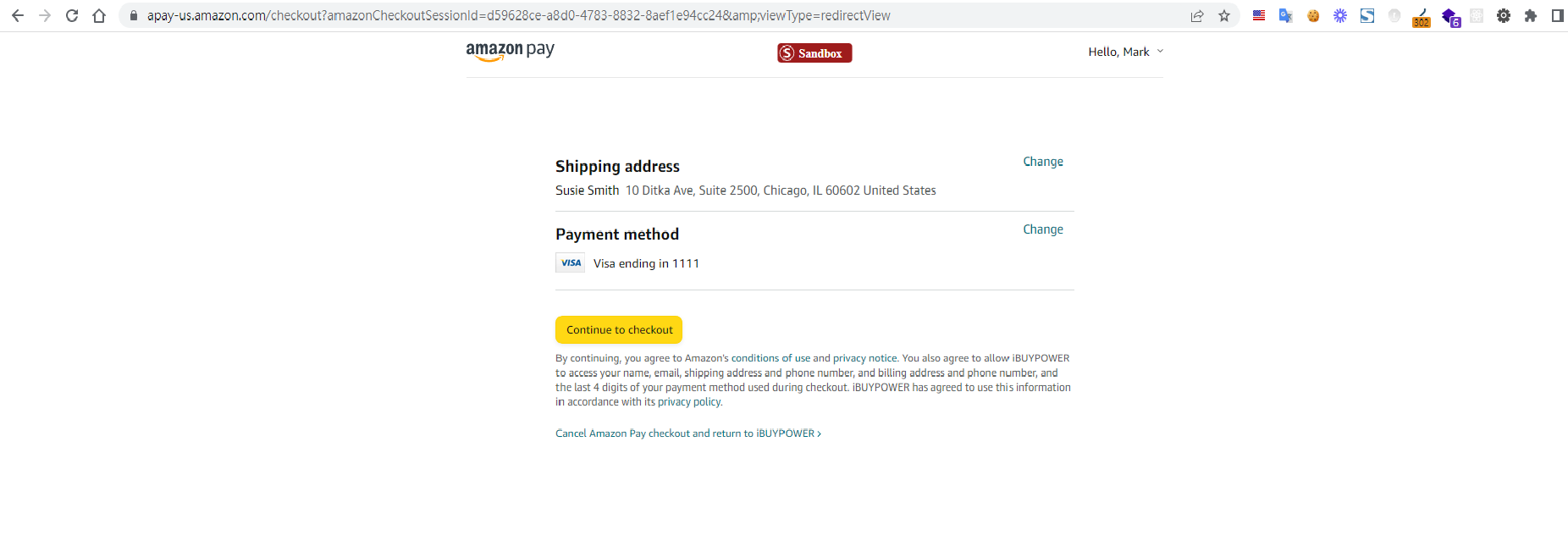
## Step 4 When the user clicks 'Express Checkout', they will be redirected to the payment selection page and can continue with the checkout process (frontend)
## Step5 Amazon will redirect to payload's checkoutReviewReturnUrl with checkout session Id (frontend)

## Step6 Call our backend API to retrieve the checkout session and obtain Amazon shipping information.(backend)
```
public static AmazonV2Result GetPaymentInfo(string AmazonCheckoutSessionId) {
var client = InitiateAmazonPayClient();
var getInfo = client.GetCheckoutSession(AmazonCheckoutSessionId);
var result = new AmazonV2Result {
Success = false
};
if (!getInfo.Success) {
return GetAmazonIssue(getInfo.RawResponse);
}
result.Success = true;
result.CustomerInfo = FilloutCustomerInfo(getInfo.ShippingAddress, getInfo.Buyer.Email);
return result;
}
```
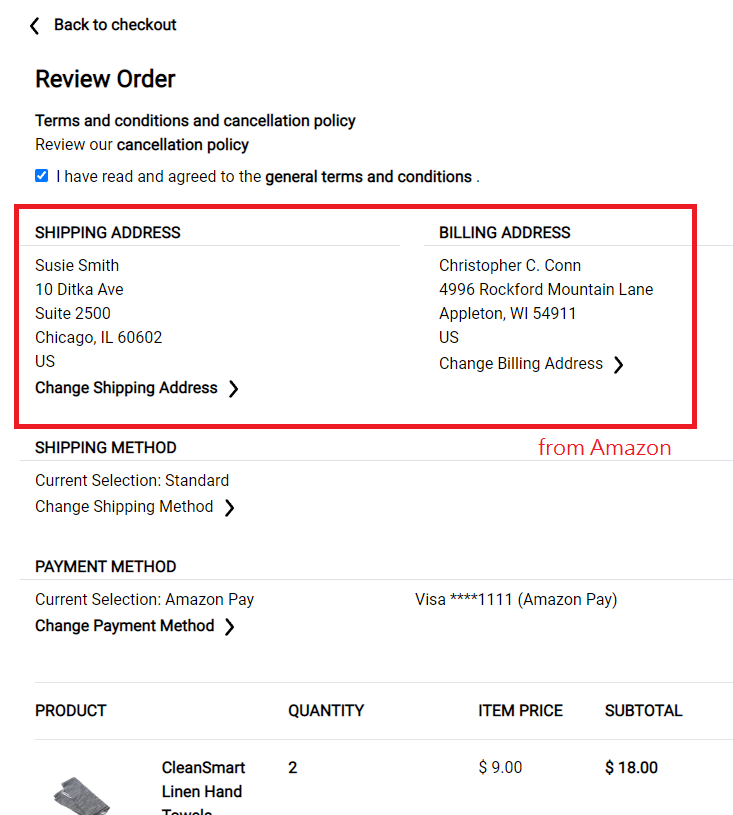
## Step7 Call our backend API to update the checkout session and retrieve the Amazon purchase URL(backend)
Backend will UpdateCheckoutSession then get Checkout Url with Amazon pay SDK.
```
private static AmazonV2Result UpdateCheckoutSession(string AmazonCheckoutSessionId, AmazonV2Request Data, bool Authorize, string ChangPaymentsReferID) {
NLog.Logger logger = NLog.LogManager.GetCurrentClassLogger();
var result = new AmazonV2Result {
Success = false,
AmazonPayRedirectUrl = string.Empty,
ResponseJson = string.Empty
};
try {
var client = InitiateAmazonPayClient();
var request = new UpdateCheckoutSessionRequest();
var isChangPaymentsStep = !string.IsNullOrEmpty(ChangPaymentsReferID);
request.WebCheckoutDetails.CheckoutResultReturnUrl = isChangPaymentsStep ? ChangePaymentsSuccessLink + ChangPaymentsReferID + "&complete=1" : successLink;
request.PaymentDetails.ChargeAmount.Amount = Data.OrderAmount;
request.PaymentDetails.ChargeAmount.CurrencyCode = Currency.USD;
request.PaymentDetails.CanHandlePendingAuthorization = false;
request.PaymentDetails.PaymentIntent = Authorize ? PaymentIntent.Authorize : PaymentIntent.AuthorizeWithCapture;
request.MerchantMetadata.MerchantReferenceId = Data.OrderId;
request.MerchantMetadata.MerchantStoreName = "ibuypower.com";
request.MerchantMetadata.NoteToBuyer = Data.ModelName;
// send the request
var updateResult = client.UpdateCheckoutSession(AmazonCheckoutSessionId, request);
// check if API call was successful
if (updateResult.Success) {
var josn = DataPackager.Json(updateResult);
result.Success = true;
result.AmazonPayRedirectUrl = updateResult.WebCheckoutDetails.AmazonPayRedirectUrl;
result.ResponseJson = JsonConvert.SerializeObject(updateResult.RawResponse, Formatting.Indented);
}
else {
logger.Error($"[AmazonPay][AmazonV2Helper][PurchaseGetAmazonPayRedirectUrl][UpdateCheckoutSession][Error]Request:{DataPackager.Json(request)},Response:{DataPackager.Json(updateResult)}");
result.Message = "Please select another credit card or change payment method and try again.";
}
}
catch (Exception ex) {
logger.Error($"[AmazonPay][AmazonV2Helper][PurchaseGetAmazonPayRedirectUrl][UpdateCheckoutSession][Error]{ex.Message},{ex.StackTrace}");
}
return result;
}
```
## Step8 When a member checks out on Amazon's website, they are redirected to our website with an 'amazonCheckoutSessionId.' This allows us to initiate the 'CompleteCheckoutSession' process.
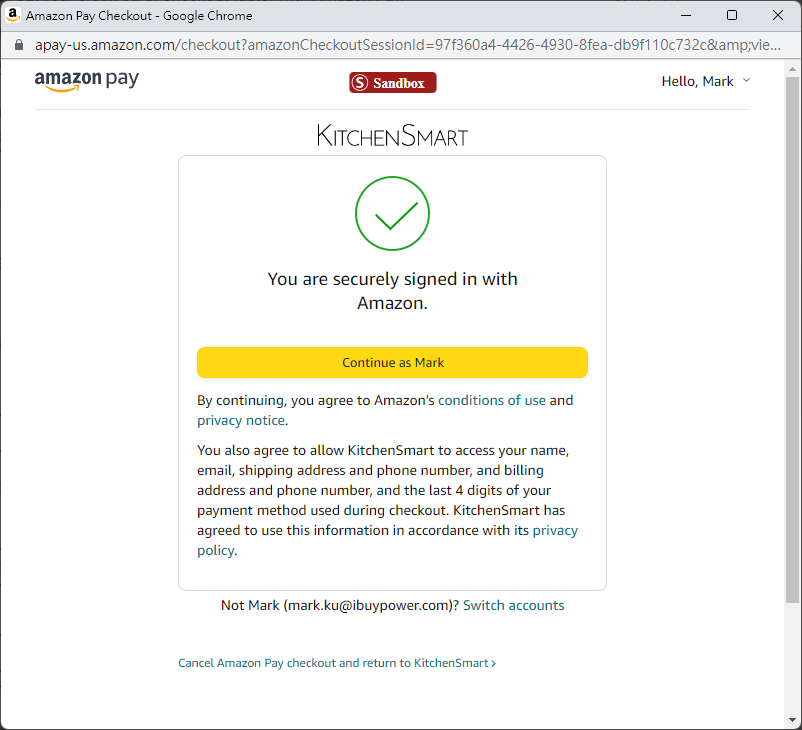
( return to CheckoutResultReturnUrl)
## Step9 CompleteCheckoutSession (backend)
```
private static AmazonV2Result CompleteCheckoutSession(string AmazonCheckoutSessionId, decimal Amount) {
NLog.Logger logger = NLog.LogManager.GetCurrentClassLogger();
AmazonV2Result result = new AmazonV2Result();
try {
var client = InitiateAmazonPayClient();
var request = new CompleteCheckoutSessionRequest(Amount, Currency.USD);
CheckoutSessionResponse checkoutSessionResponse = client.CompleteCheckoutSession(AmazonCheckoutSessionId, request);
logger.Info($"[AmazonPay][Success][CompleteCheckoutSession]AmazonCheckoutSessionId:{AmazonCheckoutSessionId},Amount{Amount},Data:{DataPackager.Json(checkoutSessionResponse)}");
if (checkoutSessionResponse.Success) {
result.Success = true;
result.ChargeId = checkoutSessionResponse.ChargeId;
result.ChargePermissionId = checkoutSessionResponse.ChargePermissionId;
result.ResponseJson = JsonConvert.SerializeObject(checkoutSessionResponse.RawResponse, Formatting.Indented);
}
else {
result = GetAmazonIssue(checkoutSessionResponse.RawResponse);
logger.Error($"[AmazonPay][Error][CompleteCheckoutSession][GetAmazonIssue][Step 3]AmazonCheckoutSessionId:{AmazonCheckoutSessionId},Amount{Amount},Data:{DataPackager.Json(checkoutSessionResponse)}");
}
}
catch (System.Exception ex) {
logger.Error($"[AmazonPay][Error][CompleteCheckoutSession][Step 3]AmazonCheckoutSessionId:{AmazonCheckoutSessionId},Amount{Amount},Ex:{ex.Message},StackTrace:{ex.StackTrace}");
}
return result;
}
```
## Step 10 Finsih
Amazon pay is a bit complicated, with a lot of page redirections, so it's really difficult to integrate.
## Reference
### (Error Code)[https://developer.amazon.com/docs/amazon-pay-api-v2/charge.html]
---
## About this article and its author
Originally published on [Mark Ku's Tech Notes](https://blog.markkulab.net/en/post/amazon-pay-integration)
License: [CC BY 4.0](https://creativecommons.org/licenses/by/4.0/) — when reusing or quoting, credit the author and link back to the original
### About the author
**[Mark Ku](https://blog.markkulab.net/en/author/mark-ku)** — Software Solution Provider
- 10+ years senior software engineer, now an AI Builder
- Focused on large-platform architecture — North-American e-commerce, AI SaaS subscription billing
- Combining AI Agents and automation to build evolvable product foundations
### Free tools built by the author
All of these are free to use:
- [Free PDF Sign Tool](https://blog.markkulab.net/en/tools/pdf-sign): Online PDF sign tool — draw, type, or upload a signature, then drag, resize, and download. Everything runs in your browser; nothing is uploaded.
- [VS Code Refactory](https://blog.markkulab.net/en/tools/refactory): Refactory is a VS Code refactoring extension: 34 actions plus a 37-rule code-smell inspection layer with a Code Health dashboard, across 18 languages, backed by 534 tests. It learns your repo's conventions: where interfaces live, where DI is registered, whether 'use client' belongs. It ranks files by git churn × complexity so you know what to fix first, and hands any smell to the Claude Code already on your machine. Free to use, and your source never leaves your computer.
- [DB-Kit Database Manager](https://blog.markkulab.net/en/tools/db-kit): DB-Kit is a lightweight, cross-platform database manager built with Tauri + Rust + React. Manage MySQL, MariaDB, PostgreSQL, SQL Server, Oracle, SQLite, MongoDB, Redis, Kafka, Elasticsearch and RabbitMQ from one consistent interface: passwords encrypted in the OS keychain, SSH tunnels, full CRUD, a visual query builder, stacked multi-statement result sets, cross-connection data transfer and compare/sync, Excel / CSV import & export, visualized execution plans, ER diagrams, scheduled backups, SQL stress testing with p50–p99 latency percentiles, a 15-rule SQL review engine, Kafka message browsing with monitoring & alerts, a bilingual UI (Traditional Chinese / English), a built-in AI assistant (natural-language SQL, AI review and tuning advice) and the dbk CLI. Free and open source (MIT), with installers for Windows, macOS and Linux.
- [VS Code Super Mermaid](https://blog.markkulab.net/en/tools/super-mermaid): Super Mermaid is a VS Code extension for beautiful Mermaid diagrams out of the box: auto-colored live preview, mouse pan & zoom, high-res PNG / SVG export, 21 templates and multiple themes. Free and open source (MIT).
- [React Super Mermaid](https://blog.markkulab.net/en/tools/react-super-mermaid): react-super-mermaid is an open-source React component library: render beautiful Mermaid diagrams with a single , with built-in colorful / sketch themes, pan & zoom, in-diagram search, and high-res SVG / PNG export. Lightweight, SSR-safe, fully typed. Free and open source (MIT).
- [Jira / Confluence Super Mermaid](https://blog.markkulab.net/en/tools/jira-super-mermaid): An Atlassian Forge app: write Mermaid syntax directly inside a Jira issue or a Confluence page and get flowcharts, sequence diagrams, state machines and Gantt charts. 11 diagram types, SVG / PNG export, light and dark themes, full CJK support. Runs on Atlassian: your diagrams live in your own site and the app calls no third-party service. Free, coming soon to the Atlassian Marketplace.
- [Mermaid Live Preview](https://blog.markkulab.net/en/tools/mermaid-preview): Write Mermaid in your browser, see it render instantly, and share the whole diagram as a single link. No sign-up, nothing uploaded to a server, and mermaid.live share links work as-is.
- [React Intl Phone Number](https://blog.markkulab.net/en/tools/react-intl-phone-number): react-intl-phone-number is an open-source React component: framework-agnostic and antd-free, with E.164 in/out, a searchable flag / country-code dropdown, configurable validation levels (strict / mobile-strict / loose), themeable CSS, and i18n — phone logic powered by google-libphonenumber. Lightweight and fully typed. Free and open source (MIT).
- [Uptime Kuma Cluster](https://blog.markkulab.net/en/tools/uptime-kuma-cluster): Turn single-node Uptime Kuma into a highly available cluster: OpenResty + Lua smart load balancing, shared MariaDB state, health checks and automatic failover, plus cluster-management REST APIs. One Docker Compose command to start. Free and open source (MIT).
- [Special Education](https://blog.markkulab.net/en/education): Learning materials crafted for special education students
### Daily podcasts
- [Mark's Tech Insights — Daily AI News](https://blog.markkulab.net/en/category/tech-news): Daily curated AI and tech trends. Catch the latest developments via audio summaries — covering AI applications, software architecture, DevOps, and engineering practice. — RSS: https://blog.markkulab.net/feed.xml
- [AI股市蝦聊](https://blog.markkulab.net/en/category/ai-stock-chat): Every trading day, an AI-analyzed take on the Taiwan stock market, delivered as a two-host conversation covering the session and the next-day outlook. — RSS: https://blog.markkulab.net/ai-stock-chat/feed.xml
- [開源好物週報](https://blog.markkulab.net/en/category/open-source-weekly): A weekly two-host pick of free open-source tools surfaced from real Hacker News, GitHub, and Reddit buzz — what pain they solve and the fastest way to get started. — RSS: https://blog.markkulab.net/open-source-weekly/feed.xml
### Newsletter
[Subscribe to the newsletter](https://blog.markkulab.net/en/subscribe) — Be the first to know about new posts. No spam, unsubscribe anytime.